

During high-demand sales periods like Black Friday or the holidays, PPC (Pay-Per-Click) advertising is one of the most effective tools to drive immediate traffic and conversions. However, rising costs – average CPCs are up 13% year-over-year and projected to climb another 15–30% in 2026 – make budget planning more critical than ever. Here’s how to allocate and adjust your PPC budget to maximize results during peak sales periods:
- Analyze Past Campaign Data: Review 12–36 months of historical performance to identify trends in costs, conversions, and revenue. Use this data to set ROI-driven goals.
- Set a Clear Budget: Calculate your PPC budget using a formula tied to your revenue targets. For example:
(Target Leads / Lead-to-Customer Rate) / Conversion Rate × Average CPC. - Distribute Funds Wisely: Allocate budgets based on campaign types (e.g., 60–70% for Sponsored Products on Amazon or 45% for Shopping campaigns on Google Ads). Focus on bottom-of-funnel campaigns for high-intent shoppers.
- Adjust in Real-Time: Monitor key metrics like ROAS, CPC, and CPA daily. Reallocate budgets to high-performing campaigns and scale gradually (10–20% increases) to avoid disrupting performance.
- Experiment and Protect Key Terms: Reserve 10–20% of your budget for testing new platforms or keywords. Allocate 10–15% of your search budget to branded campaigns to prevent competitors from capturing your traffic.
A well-planned PPC strategy ensures your ads stay competitive and profitable during peak sales seasons. Keep tracking, optimizing, and reallocating to make the most of your ad spend.
Step 1: Review Historical Data and Set Goals
Analyze Past Performance to Predict Trends
Your previous campaign data holds valuable insights for planning ahead. Gather 12 to 36 months of historical performance data to identify trends in metrics like CPC, conversion rates, and revenue during peak seasons. For many businesses, Q4 accounts for 40–60% of annual revenue, so pinpoint the high-performing weeks and prepare to allocate surge budgets that are 150–200% higher during these critical periods.
Take a close look at last year’s impression share. A low impression share could indicate that your bids or budget were too conservative, potentially costing you sales. Dig deeper into keywords and audience segments – consider factors like age, location, and device type to see what drove conversions. Searches including "Near Me" and "Where to buy" have doubled in the past two years, so if local intent played a role in past success, it’s likely to be effective again.
Don’t forget to calculate your break-even ROAS (Return on Ad Spend) using this formula: 1 / profit margin. Be sure to include additional costs like shipping, the 15% average return rate, and 3% payment processing fees. This ensures you’re not mistakenly celebrating campaigns that appear profitable but actually lose money once all expenses are factored in.
Set Clear, ROI-Driven Goals for Peak Periods
Once you’ve analyzed past trends, establish specific, ROI-focused objectives. Use SMART goals – Specific, Measurable, Achievable, Relevant, and Time-bound. For instance, instead of a general goal like "boost sales", aim for something precise, such as "Achieve a 5:1 ROAS on Google Shopping campaigns during Black Friday week".
To plan your budget effectively, use a goal-oriented formula to reverse-engineer your revenue targets: (Target Number of Leads / Lead-to-Customer Rate) / Website Conversion Rate × Average CPC. For example, if your goal is 500 sales, with a 20% lead-to-customer rate, a 4% website conversion rate, and an average CPC of $2.00, you’d need a budget of $62,500. Setting these detailed goals and budget plans ensures you’re ready to dive into the next steps with precision.
sbb-itb-e2944f4
Step 2: Calculate and Distribute Your PPC Budget
Apply Goal-Based Budget Formulas
To determine your PPC budget, work backward from your revenue targets. Use this formula: PPC Budget = (Target # of Leads / Lead-to-Customer Rate) / Website Conversion Rate × Average CPC. This approach ensures your spending is tied to clear, measurable goals instead of relying on guesswork.
Here’s an example: Let’s say you’re aiming for 800 sales during Cyber Week. If your lead-to-customer rate is 25%, your website conversion rate is 5%, and your average CPC is $1.80, your budget would come out to $115,200. To calculate your break-even ROAS (Return on Ad Spend), use the formula: 1 / profit margin. For instance, with a 40% profit margin, your break-even ROAS is 2.5×. To ensure profitability, aim for 20–30% above this figure, targeting a ROAS of around 3.0–3.25×.
For Amazon sellers, break-even ACOS (Advertising Cost of Sales) can be calculated using: (Profit Margin / Product Price) × 100.
Once you’ve established a clear budget goal, the next step is to allocate funds effectively across your campaigns.
Split Budget Across Campaign Types
With your total budget set, distribute it across different campaign types based on their role in the customer journey. For Amazon sellers, here’s a strategic breakdown:
- 60–70% to Sponsored Products: These are your main drivers of conversions.
- 15–25% to Sponsored Brands: Ideal for boosting visibility at the top of search results.
- 10–20% to Sponsored Display: Focused on retargeting and defending against competitors.
For retail brands using Google Ads, the allocation looks a bit different:
- 45% to Shopping campaigns: These perform exceptionally well during peak periods.
- 40% to Performance Max: This campaign type automates optimization across Google’s entire ecosystem.
- 15% to Search campaigns: These help capture intent-driven traffic.
Here’s a real-world example: A fashion accessories brand with a $25,000 monthly budget was stuck at a 2.5× ROAS. They had allocated 60% of their budget to Search campaigns and only 10% to Display. By shifting their allocation to 45% Shopping and 40% Performance Max, they achieved a 3.2× ROAS and increased revenue by 42% within 90 days. The key takeaway? Focus your budget on the channels that drive the most conversions, even if it means stepping out of your comfort zone.
Assign Budget by Funnel Stage and Product Priority
Your budget should align with the different stages of the customer journey:
- 10–20% for top-of-funnel (TOFU) campaigns: These include display ads and video content aimed at building awareness.
- 30–40% for middle-of-funnel (MOFU) campaigns: Think remarketing efforts and non-branded search.
- 40–60% for bottom-of-funnel (BOFU) campaigns: Target high-intent keywords and branded terms.
During peak sales periods, it’s wise to allocate more to BOFU campaigns to capture shoppers who are ready to make a purchase.
Apply the 80/20 rule to your product catalog as well. Focus 70–80% of your budget on your "Hero SKUs" – the top 20% of products that generate the majority of your revenue. For high-margin products (50%+ margin), set aggressive ROAS targets around 2.0×. For lower-margin products (20–30% margin), aim for more conservative targets closer to 4.0× to maintain profitability.
Don’t forget to protect your branded terms. Allocate 10–15% of your search budget to branded campaigns to defend against competitors bidding on your name. Additionally, set aside 10–20% of your total budget for experimenting with new platforms, keywords, or creative formats.
Finally, consider using portfolio bidding strategies, which automatically redistribute funds across campaigns based on real-time performance. Brands that used this approach saw a 22% lower CPA compared to those with fixed budgets for individual campaigns.
Step 3: Adjust Budgets in Real-Time During Peak Periods
Track Metrics and Make Real-Time Changes
Once you’ve nailed down historical trends and planned allocations, it’s time to fine-tune your budget in real-time during peak periods. These are the moments when daily monitoring becomes critical. Why? Because platforms like Google Ads can spend up to double your daily budget to ride traffic surges. Checking in weekly won’t cut it anymore. Keep a close eye on five key metrics: ROAS (your go-to for profitability), Impression Share (to spot budget-limited campaigns), CPA (to ensure you’re staying within profit margins), CTR (sudden drops may signal ad fatigue), and CPC (rising costs often mean more competition). This kind of active tracking lets you make quick decisions to boost ROI.
Automated alerts can be a lifesaver here. Set them up to flag rapid spending spikes or when ROAS dips below your target. For instance, one agency streamlined its reporting by consolidating over 600 reports into a single system. The result? They achieved 99.9% data accuracy and slashed daily budget-tracking time from hours to just 10–30 minutes. This efficiency allowed them to reallocate funds quickly across more than 100 client accounts.
Here’s a surprising stat: 72% of companies haven’t reviewed their ad campaigns in over a month. During critical sales periods, this kind of neglect can lead to wasted ad spend. To avoid this, use rules-based automation for routine tasks. For example, set a rule to cut the budget by 20% if ROAS drops below your target for three straight days. Also, make it a habit to review search term reports daily to block irrelevant, high-volume queries that could drain your budget unnecessarily.
Increase Budgets for High-Performing Campaigns
Once your automated alerts are up and running, shift your focus to scaling budgets wisely for your top-performing campaigns. The key here is to increase budgets gradually. Instead of making large jumps, aim for daily increases of 10–20% or weekly increases of about 15%. Pushing beyond 20% can disrupt the algorithm and trigger a "learning phase", which may hurt performance temporarily.
Use metrics like "Impression Share Lost to Budget" to pinpoint high-performing campaigns that are being held back by limited funding. When you find these opportunities, reallocate funds from underperforming campaigns. A practical approach is to do this weekly – every Monday, for instance, shift 5–10% of your total budget from campaigns with weak 7-day ROAS to your top performers.
For even better results, consider dayparting. This tactic focuses your budget during peak buying hours, such as 7–10 PM for retail, rather than spreading it thinly across the entire day.
"Perfect budget planning doesn’t exist… getting 80% right with consistent optimization beats chasing 100% perfect once a quarter."
- Jennifer Park, Google Ads Certified Expert
5 Effective Strategies to Scale Amazon PPC
Budget Allocation Examples by Business Size
PPC Budget Allocation Guide by Business Size for Peak Sales Periods
Budget Allocation Comparison Table
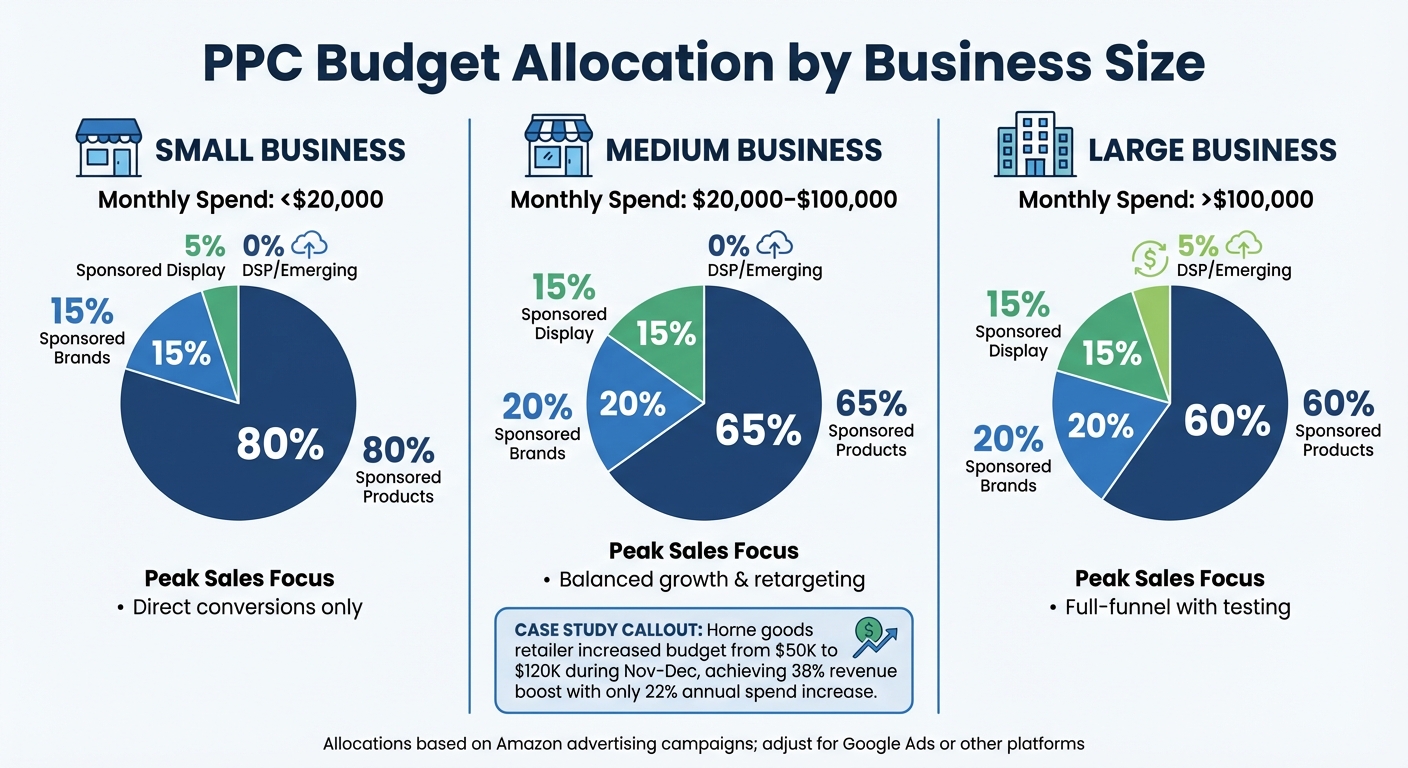
When planning your PPC budget, it’s crucial to adapt your strategy based on the size of your business. Your monthly budget significantly influences how you should allocate funds, especially during peak sales periods. Here’s a breakdown:
For small businesses (spending less than $20,000 per month), it’s recommended to allocate 80% to Sponsored Products, 15% to Sponsored Brands, and 5% to Sponsored Display. This strategy prioritizes Sponsored Products, which are great for targeting shoppers who are ready to make a purchase.
Medium-sized businesses (with a budget of $20,000 to $100,000 per month) benefit from a more balanced approach. A typical allocation is 65% to Sponsored Products, 20% to Sponsored Brands, and 15% to Sponsored Display. This mix helps capture bottom-of-funnel conversions while also building brand awareness and retargeting potential customers. For example, a home goods retailer with a $75,000 monthly budget successfully used seasonal adjustments – spending $50,000 from January to August but increasing to $120,000 in November and December. This approach resulted in a 38% boost in annual revenue with just a 22% increase in total annual spend.
For large businesses (spending over $100,000 per month), diversification is key. A suggested split is 60% to Sponsored Products, 20% to Sponsored Brands, 15% to Sponsored Display, and 5% to DSP or emerging formats. Larger businesses can leverage this broader approach to cover the entire customer journey, but should avoid excessive testing that might compromise performance.
Here’s a quick summary of these strategies:
| Business Size | Monthly Spend | Sponsored Products | Sponsored Brands | Sponsored Display | DSP/Emerging | Peak Sales Focus |
|---|---|---|---|---|---|---|
| Small | <$20,000 | 80% | 15% | 5% | 0% | Direct conversions only |
| Medium | $20,000–$100,000 | 65% | 20% | 15% | 0% | Balanced growth & retargeting |
| Large | >$100,000 | 60% | 20% | 15% | 5% | Full-funnel with testing |
Each allocation type comes with its own strengths and trade-offs, especially during high-demand periods. By tailoring your budget to your business size, you can maximize your ad performance and meet your sales goals effectively.
Conclusion
Key Takeaways for PPC Budgeting
A well-planned, data-focused PPC strategy is crucial for maximizing sales during peak periods. With PPC costs projected to climb by 15–30% in 2026 and average CPC increasing 13% annually, it’s more important than ever to make every dollar count.
Start by calculating your budget based on target revenue, CPA, and ROAS. Allocate your funds strategically: set aside 10–20% for awareness campaigns, 30–40% for consideration efforts, and 40–60% for bottom-of-funnel conversions. Additionally, reserve 10–20% of your total budget for experimenting with new keywords, creatives, or platforms. This experimentation can help identify fresh opportunities for growth.
Active monitoring is non-negotiable, especially during high-demand periods. Track your spending daily to avoid running out of budget prematurely, and make weekly adjustments based on performance data. When campaigns meet ROI benchmarks, scale them gradually – around 15–20% – to maintain efficiency without overextending. This careful approach is essential for staying competitive as costs rise.
It’s worth noting that PPC visitors are 50% more likely to convert than those from organic channels. By integrating data across platforms, using real-time pacing alerts, and reallocating budgets from weaker campaigns to stronger ones, you can seize peak demand while keeping profitability intact throughout the sales cycle. These strategies ensure your advertising dollars work harder when it matters most.
FAQs
How far ahead should I increase my PPC budget for Black Friday?
To handle the spike in demand and rising CPCs during Black Friday, plan to increase your PPC budget 2–3 weeks ahead of time. This proactive approach helps keep your campaigns competitive during the busiest shopping days. Making adjustments early also gives you time to fine-tune performance and ensure your ads remain visible, especially during peak hours, which often hit around midday on Black Friday.
What should I do if CPC spikes but ROAS drops during peak sales?
If you notice CPC increasing and ROAS decreasing during peak sales periods, it’s time to take action. Start by adjusting your bids and budgets ahead of time to ensure your campaigns stay visible while staying in control of costs.
Keep a close eye on CPC trends, especially during high-demand events like Black Friday, when competition heats up. Implement pacing strategies to avoid burning through your budget too quickly. By tweaking bids and budgets both before and during these surges, you can better handle demand shifts, keep performance steady, and safeguard your profitability.
How do I decide which products deserve most of my PPC budget?
When planning your PPC budget, concentrate on products that offer the best chance for a strong return on ad spend (ROAS) and align closely with your business objectives. Focus on items that consistently show high conversion rates, solid profit margins, and strong sales numbers. Regularly review performance data to identify trends and opportunities. Allocate more budget to high-performing or in-demand products, and reduce spending on those that are underperforming. This strategy helps you get the most out of your investment, especially during peak sales periods.