
When launching a pet product on Amazon, your first 48 hours are critical. Amazon’s algorithm evaluates your product’s performance – tracking metrics like sales, click-through rates, and conversions – to decide your visibility. A strong start during this window can set the tone for long-term success.
Here’s what you need to know:
- Pre-Launch Prep: Optimize your product listing with clear titles, benefit-focused bullet points, and high-quality images. Use backend keywords and A+ Content to improve discoverability.
- Inventory & Pricing: Stock at least 90 days of inventory. Start with prices 10–15% below competitors and use coupons to attract buyers.
- Launch Day (Hours 0–24): Run Amazon PPC campaigns immediately, targeting both broad and specific keywords. Allocate $50–$100 daily to drive traffic and gather data.
- Next 24 Hours (Hours 24–48): Boost sales velocity with external traffic (social media ads, influencers, email campaigns). Secure early reviews via Amazon Vine and automated review requests.
Key Metrics to Track:
- Sales Velocity: Aim for 20–30 daily sales.
- Conversion Rate (CVR): A strong rate is 20% or higher.
- Click-Through Rate (CTR): Above 0.5% indicates ad success.
- Organic Ranking: Monitor keyword placement in search results.
The first 48 hours can determine whether your product thrives or fades into obscurity. Meticulous preparation, aggressive PPC strategies, and external traffic are your best tools for success.
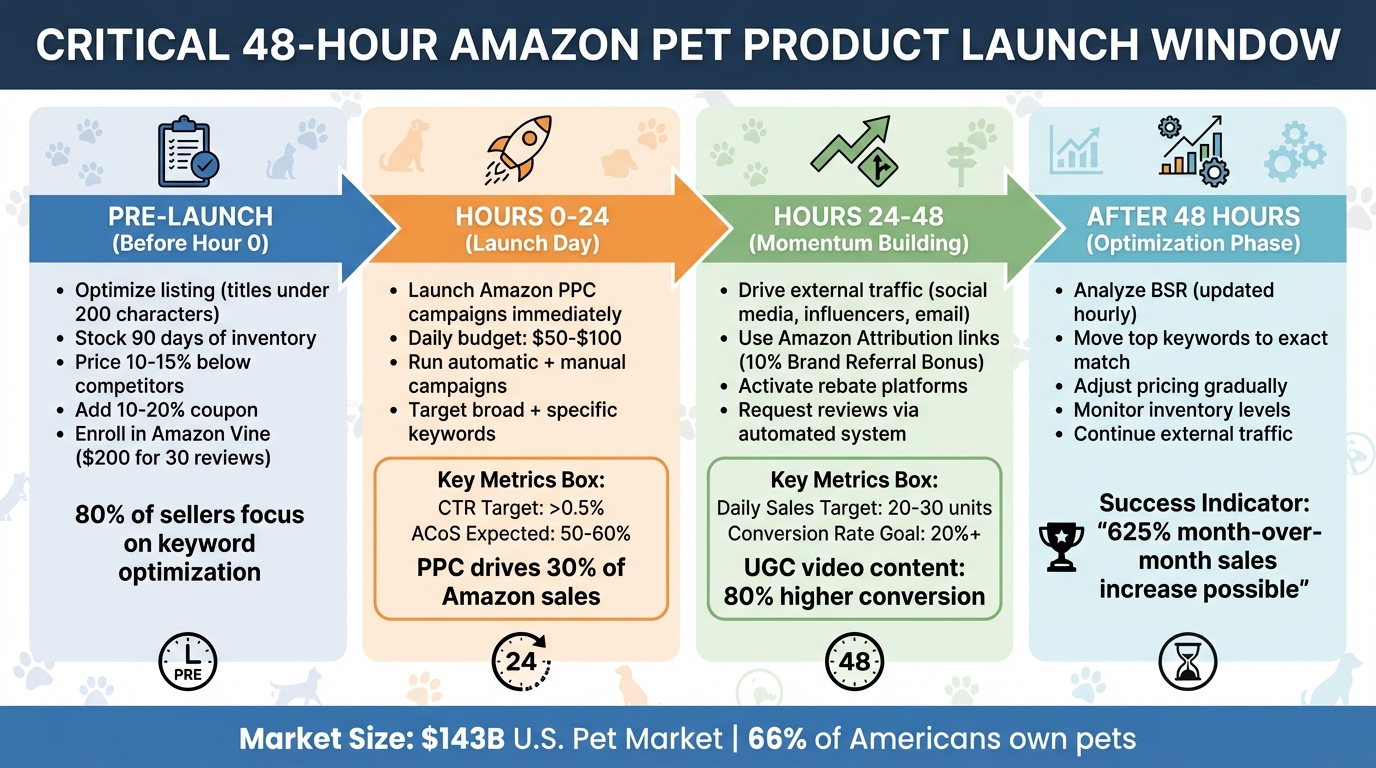
48-Hour Amazon Pet Product Launch Timeline with Key Metrics
Real Amazon PPC Product Launch Walkthrough – Proven Strategy
sbb-itb-e2944f4
Pre-Launch Preparation: What to Complete Before Going Live
Amazon’s A10 algorithm starts analyzing your product the moment it hits the marketplace, but your success largely hinges on how well you prepare before launch. The first 2–4 weeks – often called the "honeymoon period" – give new listings a temporary ranking boost. During this time, Amazon evaluates your product based on keywords and visual appeal rather than sales history. This short window is your best chance to make an impact.
Interestingly, nearly 80% of Amazon sellers focus on keyword optimization before launching their products. However, over 58% of sellers begin with less than $5,000 in starting capital. With such tight budgets, there’s little room for error. That’s why nailing your pre-launch preparation is crucial – especially when it comes to crafting a listing that resonates with pet owners.
How to Optimize Your Product Listing for Pet Owners
Your product title is the first thing both Amazon’s algorithm and potential buyers notice. Starting in 2025, titles must stay under 200 characters and can’t repeat the same word more than twice (excluding common prepositions like "for" or "with"). Special characters like !, $, or ? are also off-limits. For instance, a well-optimized title for a dog leash might read: "Reflective Dog Leash for Large Dogs, 6-Foot Heavy Duty Nylon with Padded Handle, No-Pull Training Lead for Walking."
Next, focus on bullet points that solve specific customer problems. Instead of generic phrases like "made with stainless steel", use benefit-driven language such as "rust-proof bowl won’t harbor bacteria or odors." Pet owners are drawn to features that highlight convenience and practicality, like "leak-proof", "odor-neutralizing", or "machine-washable".
Don’t overlook backend keywords – they’re essential for capturing synonyms (e.g., using "puppy" if your title says "dog"), common misspellings, and long-tail phrases. If you’re a brand-registered seller, take advantage of A+ Content. This feature allows you to add comparison tables and interactive modules, which can boost cross-sells and increase the average order value. Additionally, Amazon’s AI assistant, Rufus, now summarizes reviews and bullet points for buyers. Clear, structured data makes your product more likely to be recommended.
Product Images and Videos That Convert
Your main image is a critical factor – it often determines whether a shopper clicks on your listing. Hero shots on a plain white background can increase click-through rates by 30%. But don’t stop there. Add a variety of images, including lifestyle shots, sizing infographics, and comparison charts.
Video content is another key driver of conversions. Listings with videos can see conversion rates jump by up to 80%. User-generated content (UGC) like TikTok-style demos often performs even better, converting up to 80% higher than polished studio footage. Amazon’s Creator Connections program can help you collaborate with influencers who create authentic video demos for your product.
If you’re brand-registered, consider enrolling in the Amazon Vine Program before launch. For a $200 fee, this program provides up to 30 early reviews that can appear as soon as your listing goes live.
"This program [Amazon Vine] is really important. It drives on average a 30% sales lift. So, it’s a great asset that can really accelerate your early sales of your product." – Jeff Nickerson, Director of Brand Experience and Excellence, Amazon
Once your visuals are polished, turn your attention to inventory and pricing strategies to ensure a smooth launch.
Inventory Planning and Pricing for Launch Day
After perfecting your listing and visuals, it’s time to prepare for launch day. Running out of stock during your launch can seriously hurt your organic ranking. Amazon rewards sellers who maintain consistent availability, so aim to send at least 90 days of inventory to FBA before your launch. If you’re sourcing products overseas, factor in a 30–40 day buffer to account for shipping delays. Make sure all shipments are correctly labeled to avoid holdups at fulfillment centers.
Pricing also plays a huge role in your launch success. Set your initial price 10–15% below the market average to encourage early sales. Adding a 10–20% green coupon badge can further boost click-through rates in search results. Avoid making large price changes after launch, as the algorithm doesn’t respond well to sudden jumps. Instead, use limited-time coupons or discount codes (up to 25% off) to maintain flexibility.
"Price matters more than ever during launch. You want to incentivize clicks and purchases to build up your order velocity." – Amzigo
Sellers who use Amazon’s New Seller Guide services during their first 90 days typically generate 6x more first-year sales on average. To avoid running out of stock, set reorder triggers by multiplying your average daily sales by your total lead time. Once you’ve built up reviews and improved your organic ranking, you can gradually raise your price to meet your target margins. With a solid inventory plan and competitive pricing, you’ll be well-positioned for the next phase of your product’s growth.
Hours 0-24: Driving Traffic with Amazon PPC Campaigns
The moment your pet product hits the market, Amazon’s algorithm starts paying attention. Those first 24 hours are critical for creating a buzz and setting the stage for your product’s visibility. This is where Amazon PPC campaigns come in – they can ignite initial traffic and sales, which helps your product climb the rankings. Without paid traffic during this crucial window, your listing might struggle to gain traction.
Kick things off with a strong daily budget of $50–$100 per product to quickly gather valuable data. Why? PPC ads are responsible for about 30% of all Amazon sales, and shoppers who click on these ads are 50% more likely to make a purchase compared to organic traffic. Plus, Amazon’s advertising costs are reported to be 68% lower than Google’s and 44% lower than Facebook’s.
Setting Up Sponsored Product Campaigns for Pet Keywords
Get your campaigns rolling within the first hour by launching both automatic and manual campaigns. Automatic campaigns let Amazon’s algorithm figure out how shoppers are searching for your product, while manual campaigns give you control over targeting specific, high-intent keywords. Automatic campaigns also help identify converting search terms, which you can later use in exact match campaigns for long-term profitability.
Before launching, brainstorm potential keywords for your product. Think about every possible name, use, and even unconventional applications that pet owners might consider. Check out competitor listings to see how similar products are described, then divide your keywords into two categories: high-volume competitive terms (e.g., "dog leash") to boost visibility and long-tail niche keywords (e.g., "reflective leash for large dogs nighttime walking") to attract ready-to-buy customers. Use Amazon Brand Analytics to find low-competition, high-conversion keywords instead of relying on guesswork.
For manual campaigns, organize your keywords by match type and bidding strategy:
| Match Type | Purpose | Bidding Strategy |
|---|---|---|
| Exact | Targets specific, high-intent keywords | Highest bids for top-of-search placement |
| Phrase | Covers specific keyword sequences | Moderate bids for balanced reach |
| Broad | Casts a wide net for keyword discovery | Lower bids for cost-effective data collection |
Start with Amazon’s "Suggested Bid" as your baseline, but adjust bids if impressions are low during the first 6–12 hours. Use competitive bids for popular keywords to secure prime placements, while keeping bids lower for long-tail keywords to maximize affordable conversions. Don’t forget to add non-converting, high-cost keywords to your negative match list to avoid wasting your budget.
"PPC can help to act as the spark to kickstart the organic growth of a product on Amazon."
- Carly M., Founder, PPC Farm
Using Sponsored Brands and Display Ads During Launch
Once you’ve gathered some keyword data, expand your reach with Sponsored Brands and display ads. Sponsored Product ads drive immediate traffic to your listing, but Sponsored Brands help establish your brand identity and showcase your full product line. Brands that focus on upper-funnel advertising strategies during the first month of a launch often see a 36% higher conversion rate. Ads highlighting that a product is "new" or "noteworthy" can boost click-through rates by 22% on average.
Take Merrick Pet Care, for example. This pet food and supplies brand used a full-funnel strategy with Amazon Ads to launch new products, leading to a massive 475% increase in new-to-brand purchases. Pair your PPC efforts with Amazon Coupons during the launch phase – the bright green discount tags catch shoppers’ eyes and can significantly boost clicks and conversions. Considering that 57% of U.S. consumers begin their shopping journey on Amazon, early visibility is essential.
Tracking and Adjusting Campaign Performance
Keep an eye on your click-through rate (CTR) hourly. A low CTR might mean your ad creative or title isn’t resonating with shoppers, while a high CTR but low conversions could point to issues with your product images or pricing.
Track metrics like CTR, cost per click (CPC), and advertising cost of sales (ACoS) continuously. Adjust your bids, keywords, and creatives as needed. On average, about 14% of PPC-driven sessions convert into sales. During the first two weeks, be ready to allocate up to 75% of your total advertising cost of sales (TACoS) to build momentum.
Download the Sponsored Products Search Terms report regularly to identify top-performing terms from broad campaigns, and shift those into exact match campaigns for better results. Use automation tools to flag non-converting keywords in real time, so your budget isn’t wasted on irrelevant traffic. Aligning your PPC keywords with those in your product listing helps Amazon’s algorithm recognize your product’s relevance.
"Don’t tell your shoppers what you think they need to know; build your listing and your Amazon product advertising campaigns around why your product is the best product for them."
- Jeff Cohen, VP of Marketing, Seller Labs
These PPC strategies lay the groundwork for building sales momentum in the next 24–48 hours.
Hours 24-48: Building Sales Momentum and Getting Early Reviews
Your PPC campaigns are live, and you’ve gathered some initial data. Now it’s time to build on that momentum, reach a broader audience, and secure those all-important early reviews. The next 24 hours are critical for ensuring your launch gains traction. By extending your reach beyond Amazon, you can amplify your results and keep the sales rolling in.
Bringing External Traffic to Your Amazon Listing
Amazon’s algorithm, particularly the A10, rewards products that attract traffic from outside its platform. This external traffic not only boosts your product’s ranking but also signals its appeal to a wider audience. Plus, Amazon’s Brand Referral Bonus gives sellers an average of 10% back on the purchase price of sales driven from external sources.
Here’s how to bring in that external traffic:
- Social Media Ads: Run targeted Facebook and Instagram ads aimed at pet owners. Offer steep discounts (70–100% off) to drive order volume. Use ManyChat bots to collect customer emails before directing them to Amazon, building your email list while driving immediate sales. Make sure to use Amazon Attribution links to track conversions and qualify for the Brand Referral Bonus.
- Micro-Influencers: Collaborate with TikTok or Instagram creators who have 1,000–5,000 followers. These influencers often produce authentic product demos that resonate with their audiences, and their content can convert up to 80% better than polished studio ads. Amazon Creator Connections is another great tool to connect with creators who can promote your pet products.
- Email Campaigns: If you already have an email list, send out "launch special" offers over several days to maintain steady sales.
- Google Ads: Target niche, branded keywords like "organic lavender dog shampoo" to capture high-intent shoppers. Tools like Pixelfy.me can help you create links that open directly in the Amazon Mobile App, increasing conversion rates by up to 44%.
- Rebate Platforms: Platforms like Rebaid allow you to offer rebates for full-price purchases, which carry more weight in Amazon’s ranking algorithm. These services typically charge about $3 per giveaway.
"The algorithm loves outside traffic." – Riley Bennett, Amazon Marketer
How to Get Early Reviews Within Amazon’s Guidelines
Reviews are a key factor in convincing shoppers to make a purchase. They build trust and provide the social proof buyers need to click "Add to Cart." Here’s how to secure those early reviews while staying within Amazon’s rules:
- Amazon Vine Program: This program allows trusted reviewers to test your product for free in exchange for honest feedback. To qualify, you’ll need a Professional Selling Partner account, enrollment in Amazon Brand Registry, and FBA for products with fewer than 30 reviews. The cost is $200 for up to 30 units, plus the cost of the products and FBA fees. Despite the investment, sellers often see a 30% sales lift.
- Request a Review Button: Use the "Request a Review" feature in Seller Central to send automated review requests 4–30 days after delivery.
- Product Inserts: Include neutral inserts in your packaging that politely ask for honest feedback. Avoid asking for specific ratings or offering incentives, as Amazon’s AI actively monitors for unnatural review patterns.
Research shows that consumers are 48% more likely to purchase a product with positive reviews from named users. Early reviews not only enhance your credibility but also help sustain sales momentum.
Using Promotions and Discounts to Increase Sales Velocity
Strategic discounts during this 24–48 hour window can maintain the sales velocity Amazon’s algorithm loves. This is a crucial time to solidify your product’s ranking and build on your initial traction.
- Launch Pricing: Set your price 10–30% lower than your long-term target or $1.00 below your lowest competitor.
- Coupons: Offer 10–20% "green tag" coupons to make your listing stand out and boost click-through rates. Avoid discounts over 50% if you want those sales to qualify as "Verified" reviews.
- Tiered Promotions: Use deals like "Buy 2, Save 5%" to increase your average order value. Enable the "list price" feature to show a crossed-out retail price, creating a sense of urgency.
- Rebates: High-percentage rebates (70–100% off) are particularly effective, as they count as full-price organic sales in Amazon’s algorithm.
For example, in September 2021, Riley Bennett launched a "Cooler Bag" product with a 12-day campaign. By combining Facebook ads with 60 rebate units, he spent $240 on ads and offered rebates on units priced at $32.99. The result? The product’s Best Seller Rank jumped from 60,000 to 3,000 in just 30 days, generating $25,000 in monthly revenue and securing Page 1 rankings for high-volume keywords.
This early phase, often referred to as the "honeymoon period", typically lasts 1–3 months. Amazon’s algorithm is especially sensitive to sales velocity during this time, making it a golden opportunity to establish your product.
"The algorithm loves early sales. This early period is known amongst sellers as the honeymoon period." – Riley Bennett, Amazon Marketer
After 48 Hours: Analyzing Results and Planning Next Steps
The first 48 hours have passed, but the journey is far from over. Now, it’s time to shift gears from launching to analyzing. The data you’ve gathered during this critical window holds the key to understanding what’s working and where there’s room for improvement. For instance, Amazon updates your Best Sellers Rank (BSR) hourly, reflecting both recent and historical sales data. This real-time feedback helps you gauge your product’s momentum and sets the stage for the next steps.
Metrics to Measure Your Launch Performance
To keep your momentum going, you’ll need to monitor key metrics that reflect the health of your launch. One of the most important is sales velocity, which directly impacts your BSR. A daily sales rate of 20–30 units and a conversion rate (CVR) of around 20% are strong indicators that your listing is performing well. On the other hand, a CVR below 10% might suggest issues with your images, pricing, or A+ Content. Be sure to keep an eye on your product detail page in Seller Central to track hourly changes in your BSR.
Your PPC performance metrics – like click-through rate (CTR), impressions, and Advertising Cost of Sales (ACoS) – also offer valuable insights. A CTR above 0.5% generally indicates that your ad is resonating, while anything below 0.3% could mean it’s time to revisit your ad creative or targeting. For new launches, an ACoS of 50% to 60% is common, but this should decrease to 20% to 30% as your organic ranking improves. Use the Search Catalog Performance dashboard to monitor metrics like "Cart Adds" and "Click Rates" to identify where potential customers might be dropping off during their buying journey.
Another critical metric is your organic ranking. Check where your product appears in search results for key terms like "organic dog shampoo" or "cat scratching post." If you’re not hitting Page 1 for your primary keywords, it may be time to tweak your PPC campaigns or focus on driving external traffic.
"Quarterly sales jumped over 40% after optimizing for best search terms using the Amazon Brand Analytics Search Terms and Search Query Performance dashboard."
- Guy Arad, Co-Founder, thefitguy
| Metric | What It Measures | Where to Find It |
|---|---|---|
| BSR | Sales velocity relative to category competitors | Product Detail Page / Seller Central |
| Organic Rank | SEO effectiveness and keyword relevance | Amazon Search Results |
| ACoS | Efficiency of PPC spend during launch | Advertising Reports |
| Cart Adds | Indicator of shopper interest before purchase | Search Catalog Performance Dashboard |
| CVR | Percentage of visitors who convert to a purchase | Business Reports in Seller Central |
Adjustments to Make for Continued Growth
Once you’ve analyzed these metrics, you’ll uncover actionable insights to refine your strategy and keep your product’s momentum strong. Start by reviewing your broad "farming" campaigns to identify high-performing search terms that have driven sales. Move these terms into exact match campaigns to improve efficiency and minimize wasted ad spend.
If your product launched at a break-even price – typically 10% to 30% below your target – consider gradually raising the price once your sales velocity stabilizes. This will help improve your profit margins without disrupting your momentum.
Keep a close watch on your FBA inventory levels. If sales are picking up, reorder stock promptly to avoid running out. Stockouts can hurt your ranking, and recovering from them can take a week or more.
If your product has fewer than 10 reviews by week six, now is the time to enroll in Amazon Vine. For $60 per SKU, this program can help you gain valuable reviews and increase sales by an average of 30%.
"This program [Vine] is really important. It drives on average a 30% sales lift. So, it’s a great asset that can really accelerate your early sales of your product."
- Jeff Nickerson, Director of Brand Experience and Excellence, Amazon
Don’t forget to experiment with your listing elements using Amazon’s "Manage Your Experiments" tool. Test new main images, adjust your title, or tweak bullet points to see what resonates most with your audience. Even small changes can lead to noticeable improvements in your CVR.
Lastly, continue driving external traffic to your listing. Amazon rewards products that attract visitors from outside the platform, and you can earn an average 10% bonus through the Brand Referral Bonus program. Keep running targeted ads on Facebook and Instagram, collaborate with micro-influencers, and leverage your email list. This external traffic not only boosts your organic ranking but also creates a positive feedback loop that keeps sales flowing.
Conclusion
The first 48 hours are critical in shaping the success of your Amazon pet product launch. During this time, all the groundwork you’ve laid – like crafting compelling product images and launching targeted PPC campaigns – comes into play. This initial push not only boosts visibility but also sparks what experts often refer to as the "PPC flywheel", where paid ads drive organic growth over time. It’s an investment that pays off as your product climbs the rankings and gains traction.
"PPC can help to act as the spark to kickstart the organic growth of a product on Amazon. It’s what we like to call the PPC flywheel."
- Carly M., Founder, PPC Farm
The early results from a well-executed launch speak for themselves. For instance, the pet brand we discussed earlier achieved a staggering 625% month-over-month sales increase and earned the coveted #1 New Release badge – all within a short span. These outcomes underscore the importance of taking full advantage of that initial launch window.
Once the first 48 hours pass, the focus shifts to optimization. Use the data you’ve collected to refine your strategy. Move top-performing keywords into exact match campaigns, leverage Amazon Vine to gather reviews, and keep external traffic flowing to maintain your ranking. Programs like the Brand Referral Bonus can even add an extra 10% to your revenue. Fine-tune your listing, experiment with pricing, and monitor inventory carefully to avoid stockouts that could stall your momentum. Consistent adjustments ensure your product stays competitive long after the launch.
The Amazon pet category is enormous, with 66% of Americans owning pets and the U.S. pet market surpassing $143 billion in 2023. Your 48-hour launch window is your opportunity to carve out a piece of this thriving market. By executing your strategy with precision, analyzing your results, and continuously optimizing, you can turn a strong start into lasting success in this highly competitive space.
FAQs
What are the best strategies to prepare your Amazon pet product listing for a successful launch?
To give your Amazon pet product the best chance at success right from the start, focus on three major areas: keywords, listing quality, and traffic preparation.
Begin with detailed keyword research to uncover popular search terms that match your product, such as "durable dog toy" or "natural cat treats." Incorporate these keywords naturally into your product title, bullet points, description, and backend search terms. Combine this with competitive pricing to attract buyers and encourage those crucial early sales.
Then, refine your listing with clear, benefit-focused copy that speaks directly to pet owners’ concerns – think safety, durability, or health benefits. Use high-quality images, lifestyle photos, and videos to showcase your product in action. If you’re brand-registered, Enhanced Brand Content can help build trust and make your listing stand out even more.
Finally, launch a small Amazon PPC campaign targeting your chosen keywords to boost visibility right away. Programs like Amazon Vine can also help you gather a few initial reviews, adding credibility to your product. These efforts are essential to gaining momentum during the first 48 hours of your launch.
What’s the best way to use Amazon PPC campaigns in the first 48 hours of launching a pet product?
During the first 48 hours of launching your pet product on Amazon, PPC campaigns can play a key role in driving visibility and building sales momentum. To get started, research high-traffic, relevant keywords and set up both automatic and manual campaigns. This dual approach helps you reach a broader audience while fine-tuning your targeting. For maximum impact, focus on broad match keywords and allocate a daily budget in the range of $50–$100 to secure strong impressions and initial sales.
When it comes to bidding, aim for 20–30% above the suggested bid to increase your chances of landing premium ad placements. To further extend your reach, consider running product-targeting ads. These ads allow your product to appear on competitor listings or related pet product pages, giving you an edge in visibility.
Keep a close eye on your campaign performance. Adjust bids as needed and pause keywords that aren’t delivering results. These early PPC-driven sales do more than just boost your bottom line – they enhance your product’s algorithmic ranking on Amazon and help you collect verified reviews, which are essential for sustained success.
How can I drive external traffic and get early reviews for my Amazon pet product launch?
Driving external traffic and gathering early reviews are key to launching a successful pet product on Amazon, especially during those critical first 48 hours.
To bring in external traffic, start with a targeted Amazon PPC campaign focused on pet-related keywords. This helps boost visibility and create sales momentum. Social media ads on platforms like Facebook and Instagram are also effective for reaching pet owners based on their interests and shopping habits. If you’re looking for free traffic, share SEO-optimized articles on pet-focused blogs or forums and promote them through social media using relevant hashtags. Don’t forget about your email list – offering discounts or special deals can drive immediate clicks and conversions.
When it comes to early reviews, Amazon-approved programs like the Early Reviewer Program or Amazon Vine can help you gather feedback from verified buyers. Another option is to run small giveaways, providing free units in exchange for honest reviews (while staying within Amazon’s guidelines). Collaborating with pet influencers or engaging with niche communities can also expand your reach. After a purchase, follow up with buyers politely, including a direct link to the review page to make the process simple and convenient.
By combining these approaches, you can quickly build momentum, generating both sales and reviews to position your product for long-term success on Amazon.
Related Blog Posts
- Why 73% of Pet Brands Fail on Amazon Before Year Two (And How to Be the Exception)
- The Humanization of Pet Care Is Changing Amazon. Is Your Brand Keeping Up?
- After Managing $50M in Pet Brand Sales, Here’s What Actually Moves the Needle on Amazon
- The Real Reason Your Amazon Pet Product Has 4.8 Stars and Still Isn’t Selling