
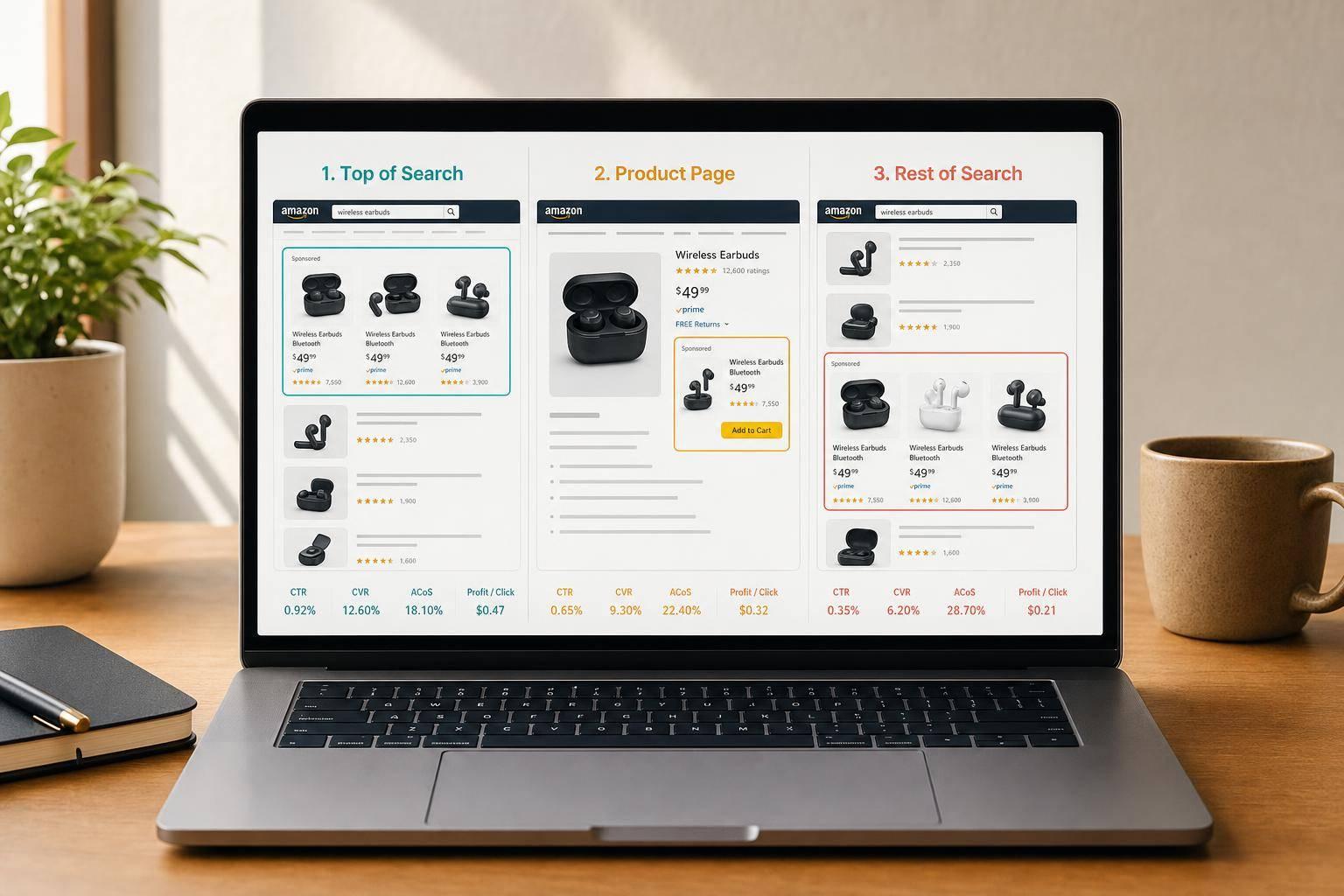
Where your ad shows can change both sales and profit. In most cases, Top of Search gets the most clicks and often the best conversion rate, but it also brings the highest CPC. Product Pages usually sit in the middle on cost and intent, while Rest of Search often gives you the lowest-cost traffic but with more mixed buying intent.
If I were reviewing placement data, I’d focus on just a few things first:
- Top of Search: best for launches, rank pushes, and branded terms
- Product Pages: best for competitor targeting and protecting my own listings
- Rest of Search: best for low-cost testing and finding new search terms
- CTR: use 0.5% as a rough starting floor
- CVR: many paid campaigns land around 10%–13%
- Bid multipliers: Amazon allows up to 900% for Top of Search and Product Pages
- Margin check: compare each placement’s ACoS to my break-even ACoS
- Inventory check: push harder when Days of Cover > 35; pull back when it drops below 21
Here’s the short version: I wouldn’t judge placements by visibility alone. I’d judge them by profit per click, using CTR, CVR, CPC, ACoS, and ROAS together. That tells me when to spend more at the top of results and when to cut bids on traffic that looks cheap but does not convert well.
Amazon Sponsored Products Placement Comparison: Cost, Intent & Best Use
Get Seen First on Amazon Ads – PPC Placement Made Simple
sbb-itb-e2944f4
Quick Comparison
| Placement | What it usually does | Cost trend | Best use |
|---|---|---|---|
| Top of Search | Strong click volume and buyer intent | Highest | Launches, rank movement, branded coverage |
| Product Pages | Reaches shoppers comparing items | Mid-range | Cross-sell, ASIN targeting, own-listing protection |
| Rest of Search | Brings broader traffic at lower cost | Lowest | Testing, term discovery, efficiency-focused spend |
Put simply, start with your goal, check which placement supports that goal, and then set bids around margin, not guesswork.
How the three Sponsored Products placements work
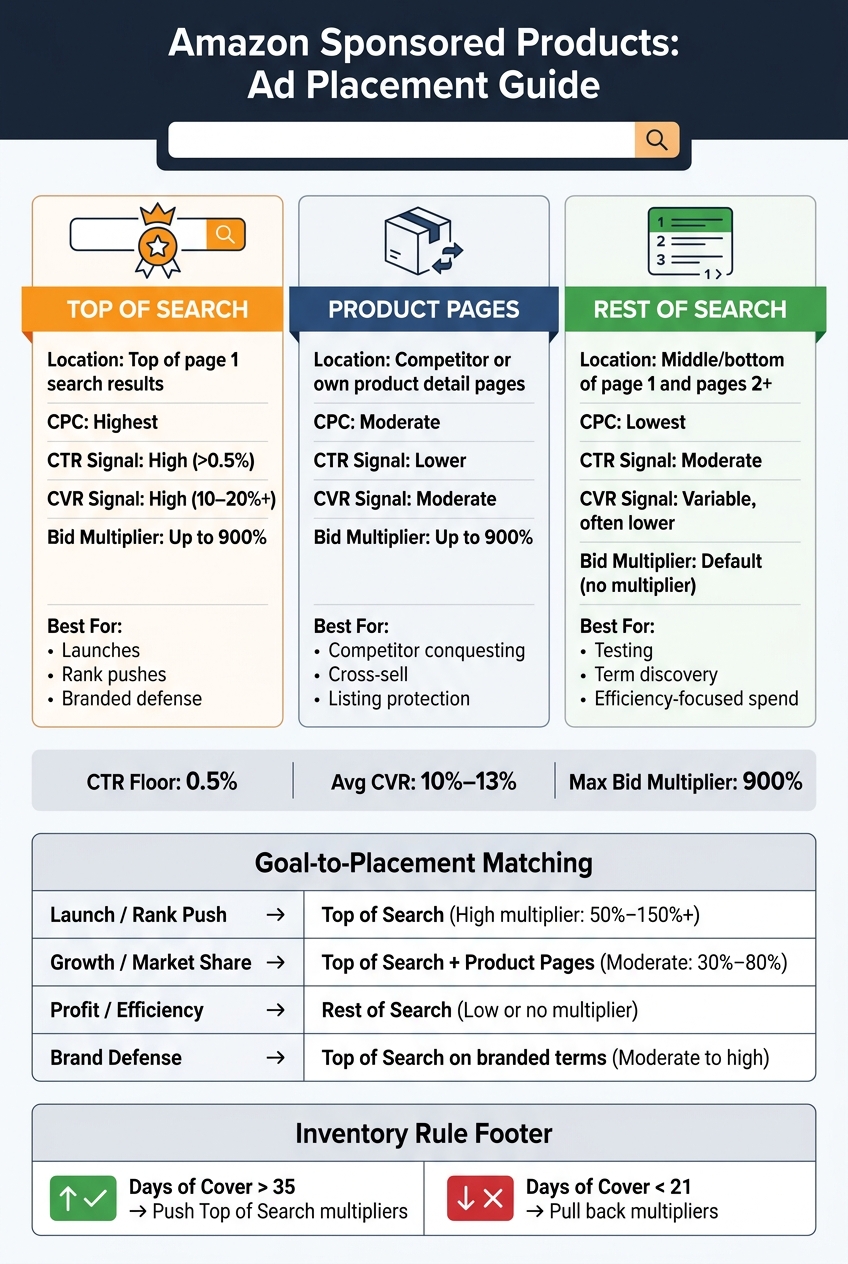
Amazon Sponsored Products show up in three placements. Each one brings a different mix of buyer intent, visibility, and cost. Top of Search tends to drive growth. Product Pages and Rest of Search usually help with efficiency and testing. That split matters because it helps you decide where to spend for reach and where to keep spend under control.
| Placement | Location | CPC Tendency | Best-Fit Use Case |
|---|---|---|---|
| Top of Search | Top of page 1 search results | Highest | Launches, rank pushes, and branded defense |
| Product Pages | Competitor or own product detail pages | Moderate | Competitor conquesting, defending own listings |
| Rest of Search | Middle/bottom of page 1 and pages 2 and beyond | Lowest | Broad reach, low-cost traffic, new term discovery |
Amazon allows bid multipliers of up to 900% for Top of Search and Product Pages. Rest of Search is the default search placement.
Top of search: premium visibility and strong purchase intent
Top of Search puts your ad at the very top of page 1 search results. In plain English, it’s the first thing a shopper sees after they search. That kind of placement often leads to the strongest CTR, but it also comes with the highest CPC.
For new listings with only a few reviews, pushing hard here can backfire. Why? Because the ad still has to compete with established brands sitting in those prime spots. If the listing doesn’t look convincing once the shopper clicks, the extra spend can disappear fast.
Product pages and rest of search: broader reach at lower cost
Product Page placements appear on product detail pages, often under headings like "Products related to this item." Shoppers here aren’t starting from scratch. They’re already comparing options. So performance often comes down to fit: does your product make sense on that page, or does it feel out of place?
Rest of Search includes the middle and bottom of page 1, plus page 2 and beyond. These shoppers are still in research mode. They’re clicking around, comparing, and narrowing things down. CPCs here are usually the lowest of the three placements, and intent is more mixed. That’s why this placement works well for gathering lower-cost data before moving budget into placements that perform better.
Next, use CTR, CVR, CPC, ACoS, and ROAS to judge which placement traffic is worth scaling.
How to judge traffic quality by placement
A low CPC can look good on paper and still burn money if CVR is soft. That’s why placement reports matter. They show whether the clicks you’re paying for are helping profit or just adding more traffic.
Read placement reports using CTR, CVR, CPC, ACoS, and ROAS
Once you know which placements stay within margin, change bids by placement instead of changing the entire campaign.
A simple starting point is 0.5% CTR as a rough floor. From there, compare CVR and ACoS against your account average. If Top of Search beats Product Pages in the same campaign and date range, that usually signals stronger shopper intent. Average paid conversion rates often land between 10% and 13%, so any placement sitting far below that range needs a closer review before you put more budget behind it.
The table below helps you read whether a placement is helping profit or mostly adding volume.
| Placement | CTR Signal | CVR Signal | Cost Level | Action |
|---|---|---|---|---|
| Top of Search | High (>0.5%) | High (10–20%+) | Highest | Scale if ACoS is within target |
| Product Pages | Lower | Moderate | Moderate | Optimize for margin; use for defense |
| Rest of Search | Moderate | Variable, often lower | Lowest | Test before scaling; watch CVR closely |
Match placement performance to your margin targets
Start with break-even ACoS. Then measure each placement against that number. Break-even ACoS is your gross margin before ad spend, shown as a percentage. If a placement runs above that line, it’s cutting into profit.
It also helps to set targets based on where the product is in its life cycle. Use a higher TACoS during launches and a lower TACoS on mature products. In plain English, don’t judge every placement by the same campaign average. Judge it by what the product is supposed to do right now.
That gives you a cleaner way to decide which placements should get higher bid multipliers next.
How to set bids by placement for growth or profit goals
Set base bids first, then adjust top of search and product pages
Start with your margin targets from the previous section. Use them to set your base bid first. After that, add placement multipliers.
Here’s the key idea: Amazon uses your base bid as-is for Rest of Search. Then it adds multipliers for Top of Search and Product Pages – up to 900%.
That’s why base bid comes first. It gives you the floor. Placement multipliers decide where you push harder.
If you increase a placement multiplier, it often makes sense to lower the base bid. That shifts more of your spend toward traffic that tends to convert better, instead of spreading budget too evenly.
Also, watch Dynamic Bidding – Up and Down. Before you increase any multiplier, calculate your highest possible click cost. If you skip that step, costs can jump faster than expected, especially when Amazon raises bids in auctions it thinks are more likely to convert.
When each placement fits launch, growth, and profit-focused campaigns
Placement goals change with the job you need the campaign to do. A launch campaign and a profit campaign shouldn’t bid the same way. Not even close.
| Business Goal | Placement Priority | Base Bid Approach | Suggested Multiplier | Signal to Adjust |
|---|---|---|---|---|
| Launch / Rank Push | Top of Search | Aggressive | High (50%–150%+) | Raise if organic rank is climbing |
| Growth / Market Share | Top of Search & Product Pages | Moderate | Moderate (30%–80%) | Raise if New-to-Brand sales exceed 20% |
| Profit / Efficiency | Rest of Search | Conservative | Low or none | Raise if ROAS exceeds 4.0 |
| Brand Defense | Top of Search (branded terms) | High enough to defend branded queries | Moderate to high | Raise if competitors appear on branded queries |
A simple way to think about it:
- Top of Search works well when you want visibility, rank movement, or stronger branded coverage.
- Product Pages make sense for cross-selling or ASIN conquesting.
- Rest of Search is usually the most efficient place to keep volume moving.
Inventory matters too. If your Days of Cover is above 35 days, you can lean harder into Top of Search multipliers. If stock falls below 21 days, pull them back so you don’t push demand you can’t fulfill.
How expert PPC management can improve placement decisions
Placement decisions don’t work in a vacuum. They depend on whether the account is ready to turn traffic into sales.
Emplicit connects PPC decisions to Buy Box rate, ratings, listing quality, inventory, and account health.
Conclusion: Choose placements based on traffic quality, not just visibility
Top of Search usually brings the strongest buying intent, and it also comes with the highest CPC. Product Pages can help you reach shoppers who are in comparison mode. Rest of Search gives you the broadest reach at the lowest cost. What matters most isn’t where the ad shows up. It’s whether that traffic pays for itself.
Your placement mix should follow the goal of the campaign: launch, growth, profit, or defense. If the goal is growth, lean into high-intent traffic. If the goal is margin protection, keep a tighter grip on spend.
Once the goal is set, placement reports tell you if the traffic lines up with that goal. Look at CTR, CVR, CPC, ACoS, and ROAS to judge whether a placement has earned more budget or needs to be trimmed.
Set bids based on placement data and margin, not gut feel. If the numbers and your margin say a multiplier isn’t working, don’t keep it out of habit. Cut the bid when placement performance can’t support margin. Pick placements based on profit per click, not visibility alone.
FAQs
How do I pick the right placement for my campaign goal?
Match each placement to the goal you care about most, then use performance data to fine-tune bids. Top of Search usually works best for immediate sales and high-intent, long-tail keywords. Product Pages often reach shoppers who are close to making a choice, while Rest of Search can help with broader brand discovery.
When a placement is doing well, increase its bid adjustment by 50% to 100%. If it’s falling short, cut bids by 30% to 60%. The right move should come from your placement reports, not guesswork.
What’s a good starting bid strategy by placement?
For new Amazon Sponsored Products campaigns, start with 0% placement adjustments. That gives you clean baseline data for Top of Search, Product Pages, and Rest of Search.
Then give the campaign some time to breathe. In most cases, that means two to four weeks of data on ACoS, ROAS, and conversion rate before you change anything.
Once the numbers start to settle, look for patterns. If Top of Search keeps outperforming the other placements, increase bids there by 50% to 100%. And if Product Pages keeps lagging, it often makes sense to cut that placement by 30% to 50%.
When should I increase or reduce Top of Search multipliers?
Increase Top of Search multipliers when your data shows strong conversion rates. These placements often perform 3 to 5 times better than other placements, so a higher multiplier can make sense.
If they start to lag or keep pushing past your target ACoS, reduce the multiplier or pause it. Big modifiers can also push up your cost-per-click, so it often helps to lower your base bid at the same time.
Then give it some room to breathe. Monitor results for 2 to 4 weeks before making another change.