

If your Amazon Ads are draining your profits, the problem might not be your ad strategy – it’s likely your product listing. Weak listings with poor images, unclear bullet points, or missing keywords hurt your organic visibility. This forces you to rely on ads just to stay visible, which feels like paying a “tax” to compensate for underperforming content.
Here’s the solution: optimize your listing. A well-crafted listing improves conversion rates, lowers ad costs (ACoS), and boosts organic rankings. Here’s how to fix common issues:
- Analyze metrics like click-through rates (CTR) and conversion rates (CVR) to spot weak points.
- Improve listing elements like titles, bullet points, and backend keywords to attract organic traffic.
- Upgrade visuals with better images, videos, and infographics to increase buyer confidence.
- Set competitive prices to win the Buy Box and improve sales velocity.
- Test and refine your listing regularly using tools like Amazon’s Manage Your Experiments.
Fixing your listing is the key to reducing your reliance on ads and building a stronger Amazon business.
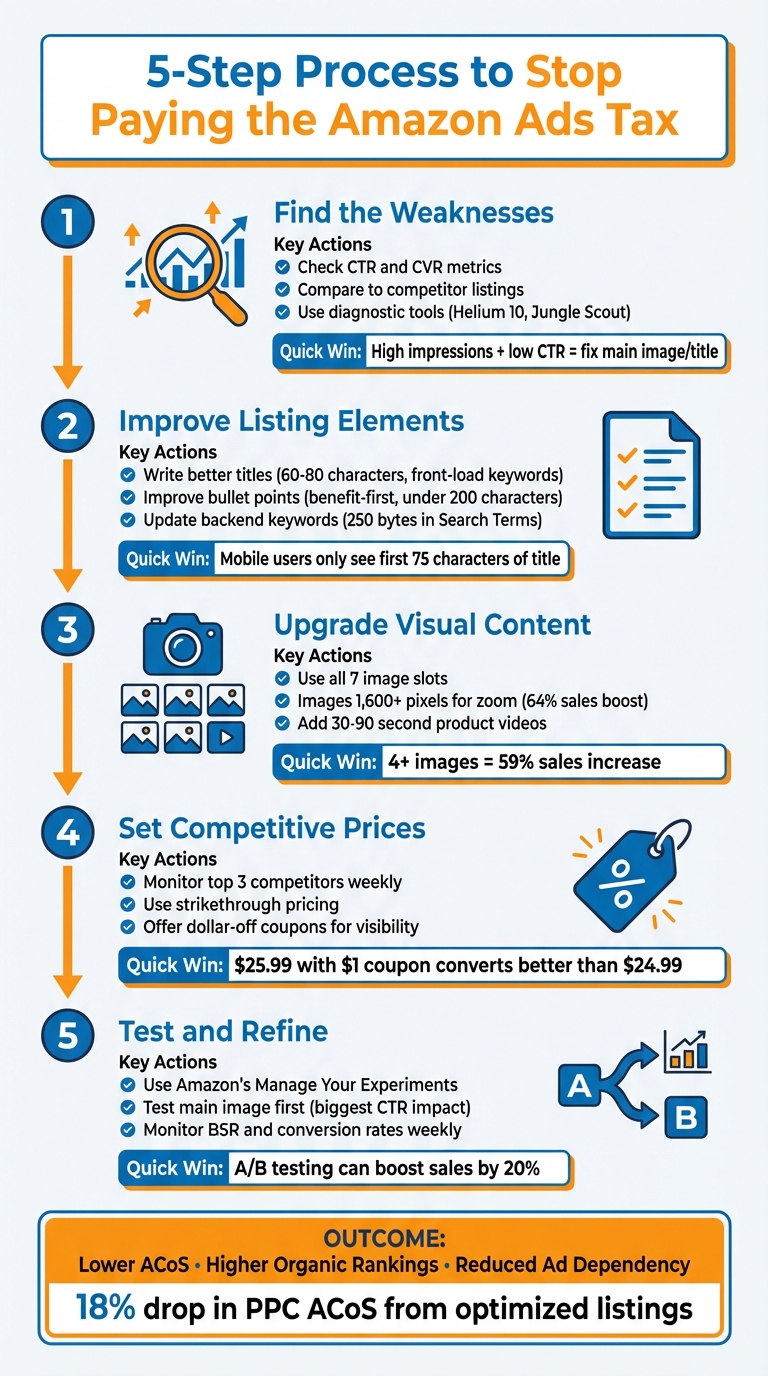
5-Step Process to Optimize Amazon Listings and Reduce Ad Costs
Watch Us Optimize Our Amazon Product Listing in Real Time!
sbb-itb-e2944f4
Step 1: Find the Weaknesses in Your Amazon Listings
Improving your Amazon listings starts with identifying their weak spots. Amazon provides valuable data that can help you figure out where potential customers are losing interest. By analyzing key metrics, comparing your listing to competitors, and using diagnostic tools, you can uncover hidden issues and reduce your reliance on expensive Amazon Ads.
Check Key Metrics to Spot Problem Areas
Amazon’s performance metrics can reveal where your listings fall short. For example:
- Click-Through Rate (CTR): This metric shows whether your main image and title are grabbing attention. If impressions are high but clicks are low, it’s a sign that your storefront isn’t engaging enough.
- Conversion Rate (CVR): This tells you if your gallery images, bullet points, and A+ Content are convincing shoppers to make a purchase. High clicks with low sales suggest that while you’re attracting attention, your listing isn’t closing the deal.
Another key area to monitor is your organic search ranking. If your ranking drops, it may indicate that Amazon’s A10 algorithm finds your listing less relevant, potentially due to poor customer engagement or misaligned keywords. High return rates or repeated negative reviews can also point to overpromising or missing product details. Additionally, reviewing Sponsored Products reports can help you identify whether keyword underperformance stems from your listing content. For instance, if a keyword gets clicks but no sales, the issue likely lies in your listing, not your ad targeting.
| Metric Scenario | Likely Problem Area | Recommended Action |
|---|---|---|
| High Impressions / Low CTR | Main Image, Title, or Price | Test a new main image; check price competitiveness |
| High CTR / Low CVR | Gallery Images, Bullets, or A+ Content | Add lifestyle videos; address objections in bullet points |
| Low Impressions | Keyword Indexing / SEO | Conduct new keyword research; update backend search terms |
Study Competitor Listings for Comparison
Competitor listings can offer valuable insights. A Reverse-ASIN lookup helps you discover which keywords top sellers are using that your listing might be missing. You can also compare image quality and title length to see how your listing stacks up.
Here’s an example: In January 2025, Jungle Scout analyzed the "Pet Housebreaking Pad" category and compared a low-performing listing from KCHEX, which had a Listing Quality Score of 3/10, to Jungle Creations’ Washable Pee Pads. KCHEX had only one image and an 80-character repetitive title, while Jungle Creations optimized all seven image slots and used a more detailed 186-character title. The result? Jungle Creations earned over 400 positive reviews in less than a year and improved its Best Seller Rank significantly.
Competitor reviews are another goldmine for insights. If customers frequently mention sizing issues, for example, you could add a size comparison infographic to your gallery. Similarly, check the Q&A sections on competitor pages to find out what information shoppers are searching for, then include those details in your listing.
Use Diagnostic Tools for Detailed Analysis
Tools like Helium 10 and Jungle Scout can help you assess your listing’s performance. They offer a Listing Quality Score (LQS), which rates your listing on factors like title length, image count, and keyword usage. These scores make it easy to see where your listing needs improvement.
Running a Reverse ASIN search with tools like Helium 10’s Cerebro or Jungle Scout’s Keyword Scout can uncover keyword gaps – terms your competitors rank for that you’re missing. These tools also let you audit backend fields, like "Search Terms" and "Subject Matter", to ensure they’re populated with relevant, high-volume keywords that Amazon’s algorithm uses for indexing.
Don’t forget to check how your listing appears on mobile devices. Over 80% of Amazon shoppers browse on mobile, and only the first 75 characters of your title show up in search results. If your most important information isn’t front-loaded, mobile users might scroll right past your listing.
Once you’ve identified the weaknesses in your listing, you’ll be ready to optimize its elements to boost organic rankings.
Step 2: Improve Your Listing Elements for Better Organic Rankings
Once you’ve pinpointed the weak spots in your Amazon listing, it’s time to address them. The goal? Make your listing more effective at driving organic traffic. Amazon’s A9 algorithm relies on your title, bullet points, and backend keywords to determine if your product matches what shoppers are searching for. If these elements aren’t optimized, you’ll keep paying for clicks that could have been free. By fixing these issues, you strengthen your listing and improve its performance.
Write Better Product Titles
A strong product title is the backbone of your listing. It not only grabs the attention of potential buyers but also signals relevance to Amazon’s algorithm. To maximize impact, focus on the most important details first – your brand and high-volume keywords. Keep in mind that mobile users only see the first 75 characters in search results, so make those characters count.
Amazon has clear rules for titles. Starting January 21, 2025, you can’t repeat the same word more than twice (excluding prepositions, articles, and conjunctions). The maximum character limit is 200, but aiming for 60 to 80 characters helps avoid truncation in ads and search results. Avoid stuffing your title with keywords – it can confuse both buyers and the algorithm.
Here’s a proven formula to craft effective titles: Brand + Core Keyword + Top Attribute + Size/Model + Quantity/Pack + USP. For instance, Jungle Scout analyzed the title "JUNGLE CREATIONS Washable Pee Pads for Dogs", which used 186 characters to include the brand, core keywords (waterproof potty training mats), specific use cases, and benefits (washable, reusable). This approach helped the product earn over 400 reviews in less than a year and improved its Best Seller Rank.
If a keyword is important but clutters the title, shift it to the backend "Generic Keywords" field. These terms remain invisible to shoppers but are still indexed for search.
Improve Bullet Points and Features
Bullet points are your chance to quickly grab attention and answer customer questions before they leave your page. Use a benefit-first approach: start with the benefit, follow with the feature, and end with a specific result or proof. Keep each bullet point under 200 characters and aim for a total of five. Sprinkle in secondary keywords naturally to make the text flow while improving search visibility.
"Your bullet points are where you should be upselling how your product features benefit the customer using emotionally compelling language in bite-sized highlights."
- Lailama Hasan, Helium 10
If you’re part of Amazon Brand Registry, take advantage of A+ Content. This enhanced content lets you replace the standard text description with visually rich elements like comparison tables, lifestyle images, and storytelling modules. These features can reduce return rates and encourage repeat purchases.
After refining your bullet points, move on to polishing your product descriptions and backend keywords for a complete listing overhaul.
Update Product Descriptions and Backend Keywords
To finish optimizing your listing, focus on crafting engaging product descriptions and fine-tuning your backend keywords. A concise, well-written description highlights your product’s value while addressing common customer concerns, such as setup instructions or product care tips.
For backend keywords, you have 250 bytes available in the "Search Terms" field. Use this space for synonyms, abbreviations, and common misspellings – terms that might look unprofessional in visible text but are crucial for search indexing. Avoid repeating keywords from your title or bullet points, as redundancy won’t improve your ranking.
"The way to make the Amazon algorithm recognize a product as being relevant to a keyword is to either have relevant keywords on your product detail page, or to secure a sale after a buyer has searched for your product through that particular keyword."
- Helium 10
Refresh your backend keywords every quarter using Brand Analytics to capture seasonal trends and new search behaviors. Also, fill the "Subject Matter" backend fields (five fields of 50 characters each) with your best-performing keywords to help Amazon index your product more effectively.
Step 3: Upgrade Visual Content to Increase Conversions
Even the most well-crafted text can fall flat if your visuals aren’t pulling their weight. High-quality visuals don’t just improve conversion rates – they can also reduce your dependence on ads by driving more organic traffic. For instance, Amazon sellers who optimized at least 25% of their product images for zoom functionality saw an average sales boost of 64%. Similarly, listings featuring four or more images increased sales by 59% in just one week.
Improve Product Images
Your primary product image is your first impression, so it needs to meet Amazon’s strict guidelines: a pure white background (RGB 255, 255, 255), the product occupying at least 85% of the frame, and no overlays like text, logos, or watermarks. But simply following the rules isn’t enough. To enable zoom functionality, your images should be at least 1,000 pixels on the longest side, though 1,600 pixels is even better.
Take advantage of all seven available slots (six images and one video) to showcase your product from every angle and in various contexts. Use a mix of white-background shots, lifestyle imagery, infographics, and size comparisons to clearly highlight your product’s features and benefits. This is especially critical since 80% of Amazon shoppers browse on mobile devices, where visuals need to instantly convey value.
Keep in mind that if your images are low-quality, Amazon might replace them with visuals from other sellers. To avoid this, ensure you include at least three key image types: white-background shots, lifestyle images, and size or fit demonstrations. Once your images are polished and attention-grabbing, take it a step further by incorporating engaging video content.
Add Video Content for Better Engagement
Videos are a powerful way to build trust and showcase your product’s value. Use video to demonstrate the product in motion, highlight its true size, and show how it solves common problems. Aim for videos that are between 30 and 90 seconds long, and consider including a 360-degree view alongside a product demonstration.
User-generated videos – authentic clips created by real customers – can increase conversions by up to 18%. These unpolished, relatable videos often outperform slick, professionally produced ones because they feel more genuine. Address common customer concerns directly in your video. For example, if reviews mention confusing assembly, include a quick setup tutorial. If size is a frequent question, show the product next to familiar objects for scale.
Amazon displays videos in multiple places, such as the main gallery, search results, and below the fold, keeping shoppers engaged while signaling relevance to Amazon’s algorithm.
Step 4: Set Competitive Prices for Organic Success
Pricing plays a huge role in driving sales and improving your organic ranking on Amazon. A competitive price not only attracts buyers but also boosts your sales velocity, signaling Amazon to rank your product higher organically. Winning the Featured Offer (or Buy Box) with smart pricing can lead to a noticeable increase in sales, which further strengthens your organic positioning.
Keep an Eye on Competitor Pricing
Start by analyzing the prices of your top three organic competitors. This helps you identify the market’s price floor and ceiling, giving you a realistic range to work within while protecting your profit margins. To stay on top of changes, manually check competitors’ prices at least once a week. For real-time updates, take advantage of Amazon’s "Automate Pricing" tool, which allows you to set minimum and maximum price limits. This ensures your prices remain competitive without cutting too deeply into your profits.
Use Pricing Tactics That Balance Value and Profit
Pair your pricing strategy with your overall listing approach to create a cohesive buyer experience. For example, strikethrough pricing – showing a "List Price" above your actual selling price – creates the impression of a deal and enhances perceived value. Another effective tactic is offering dollar-off coupons (e.g., "$1 off"). A product priced at $25.99 with a $1 coupon often converts better than one priced at $24.99 because the green coupon badge in search results grabs attention and increases click-through rates.
"Your price should reinforce your listing strategy, not fight against it. When your visuals, copy, and price align, shoppers buy with confidence." – Levi Adler, E-commerce Expert
If you’re marketing your product as premium, make sure your pricing reflects the quality of your branding. High-quality images, A+ Content, and detailed descriptions are essential to justify a higher price point. Shoppers are willing to pay more if the perceived value aligns with the cost. To ensure your pricing is sustainable, use the Amazon Revenue Calculator to account for all expenses, including shipping, Amazon fees, and fulfillment costs.
Continuously test and tweak your pricing and listings to maintain and grow your success.
Step 5: Test and Refine Your Listings Over Time
Treating your Amazon listing as a "set it and forget it" project is a recipe for missed opportunities. Optimizing your listing requires ongoing effort. Customer preferences evolve, Amazon introduces new features, and competitors adjust their strategies. If you don’t keep up, you risk losing organic visibility and becoming overly reliant on ads – exactly the opposite of what you want. Regular testing and fine-tuning are key to staying ahead.
A/B Test Different Listing Elements
Amazon’s Manage Your Experiments (MYE) tool is a game-changer for sellers in the Brand Registry program. It allows you to run A/B tests on various elements of your product page, such as titles, main images, bullet points, descriptions, and A+ Content. Here’s how it works: shoppers are split into two groups. One group sees your original content (Version A), while the other sees your updated content (Version B). This setup can help you identify changes that drive better performance – sometimes boosting sales by as much as 20%.
For the best results, test bold, clear differences between Version A and Version B. Subtle changes might not yield meaningful insights. For example, Ben Huge from Onkata Hardware Sales, Inc. used MYE to tweak a single word on a product detail page and saw an 8% sales lift.
"With Manage Your Experiments, we can explain what’s going on in a customer’s marketplace. We justify the changes or recommendations we want to make thanks to the data Manage Your Experiments produces, and more importantly, we can give our customers positive results".
Focus your initial tests on the main image – it’s the first thing shoppers notice and a major factor in click-through rates. Adjustments like changing the angle, lighting, or cropping can make a noticeable difference. Run each experiment until it reaches statistical significance, which typically takes about four weeks.
Monitor Performance and Make Adjustments
Once you’ve implemented changes, it’s crucial to track their impact. Start by monitoring your conversion rate weekly to see how shoppers are responding. Keep an eye on your Best Sellers Rank (BSR), which updates hourly and reflects your sales performance compared to competitors. Even a 1% improvement in BSR can translate to a 4.2% boost in daily sales.
Customer feedback is another goldmine of insights. Check reviews weekly to catch recurring complaints or questions. If buyers mention issues like confusing assembly instructions or unclear sizing, consider adding an infographic or video to address these concerns.
Don’t forget to review your Search Term Reports in Amazon Advertising. These reports reveal new keywords that shoppers are using, which you can incorporate into your backend keywords or titles.
Finally, stay up to date with Amazon’s new features. For instance, if they roll out enhanced A+ Content modules or new video options, make sure to use them to keep your listings competitive. And don’t overlook seasonal updates – no one wants to see winter-themed images in the middle of summer. Refreshing content quarterly shows attention to detail and keeps your listings relevant.
Conclusion: Stop Paying the ‘Amazon Ads Tax’ with Better Listings
Amazon Ads can feel like a heavy expense when your listing doesn’t perform well. But by following the five steps outlined in this guide – spotting weaknesses, improving listing elements, upgrading visuals, setting competitive prices, and testing consistently – you can break that cycle and make your ads work smarter, not harder.
When you fix listing issues, you stop wasting money on ads. Optimized titles and keywords help attract more organic traffic from Amazon searches, while high-quality images and competitive pricing convert that traffic into sales. A well-tuned listing not only improves your organic ranking but also reduces the need for excessive ad spending.
Addressing these areas doesn’t just save money – it boosts your overall performance. Better-converting listings lead to more efficient ad campaigns. Some sellers have even seen an 18% drop in their PPC ACoS by simply improving their product pages to turn more clicks into purchases.
"Listings will make us or break us as Amazon sellers, which means investing the time to make it the best it can be is extremely important." – Brian Connolly, Ecommerce Expert, Jungle Scout
Optimized listings create a positive cycle. Higher conversion rates signal to Amazon that your product is in demand, leading to more sales, more reviews, and better organic rankings. This momentum reduces your reliance on ads over time, cutting your long-term Total Advertising Cost of Sales (TACoS) and building a stronger, more sustainable business. Ads don’t have to be a constant drain – treat your listing as the foundation for lasting growth on Amazon.
FAQs
How can I spot and fix weaknesses in my Amazon product listings?
If your Amazon product listings aren’t performing as expected, it’s time to take a closer look at the key elements that might be holding you back. Start with the basics: product titles, descriptions, images, and keywords.
Your titles and descriptions should be more than just informative – they need to grab attention. Make sure they’re clear, engaging, and packed with relevant keywords that match what potential buyers are typing into the search bar. For images, focus on quality. Use sharp, high-resolution photos that showcase your product’s features and benefits in the best possible light.
Next, dive into your keyword strategy. Are you targeting the right search terms? Tools like Helium 10 can help you uncover gaps in your keyword usage and suggest terms that could boost your visibility. While you’re at it, double-check your product’s categorization. Being in the right category isn’t just a technical detail – it’s crucial for helping shoppers find your product quickly and easily.
When you fine-tune these elements, you’ll not only improve your organic visibility but also draw in more buyers – without having to lean so heavily on paid ads.
How can I optimize product titles and bullet points for better performance on Amazon?
When crafting product titles for Amazon, prioritize clarity, relevance, and smart keyword usage. A great title should include important details like the brand name, key benefits, and essential specifications, all of which help shoppers quickly grasp what your product offers. Aim to keep titles concise – ideally under 80 characters – so they display well on mobile screens. Incorporate keywords naturally to enhance search visibility, but avoid making the title feel overloaded or spammy.
For bullet points, focus on creating a clear and easy-to-read format that highlights the most important features and benefits. Address customer needs directly, emphasize what sets your product apart, and explain how it solves specific problems. Use this section to define who the product is for and why it’s the right choice for them. Well-thought-out bullet points can make a big difference in helping shoppers make confident, informed buying decisions.
How can better product images help reduce ad costs and boost sales?
High-quality product images are essential for driving sales and cutting advertising expenses. Clear, professional photos – ideally with a white background, at least 1600 pixels in resolution, and filling most of the frame – immediately catch the eye of potential buyers. This visual appeal not only grabs attention but also encourages higher engagement and conversions, meaning you can rely less on costly paid ads.
Great visuals also make your product listings shine in search results, attracting more organic traffic. When your product stands out visually, shoppers are more inclined to click on it and make a purchase. This combination of increased clicks and conversions helps reduce ad spend while improving your listing’s overall performance. Investing in strong, professional images can elevate both your organic sales and advertising results.