
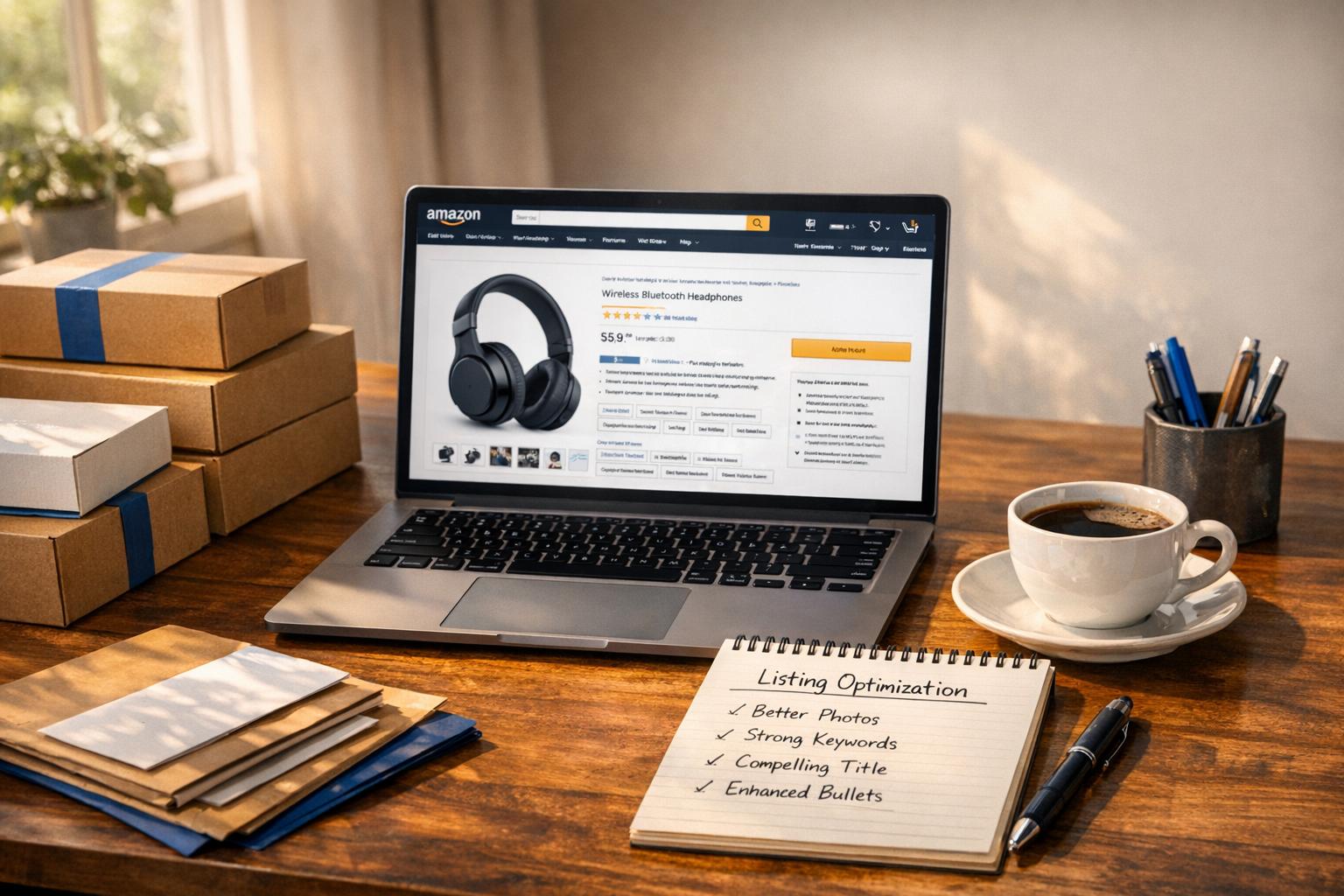
If you’re spending too much on Amazon ads, the real problem might be your product listing. Weak listings – poor images, unclear titles, or unconvincing bullet points – hurt your conversion rates. This signals to Amazon that your product is less relevant, driving up your ad costs and lowering your organic ranking.
Here’s the fix: focus on optimizing your listing. Start with clear, keyword-rich titles, benefit-driven bullet points, and high-quality images. Use tools like Amazon Brand Analytics and reverse ASIN lookups to refine your keywords. Regularly update backend search terms and test changes using Amazon’s "Manage Your Experiments" tool.
ADVANCED Amazon SEO & Listing Optimization (2024)
sbb-itb-e2944f4
The Real Cost of Weak Listings
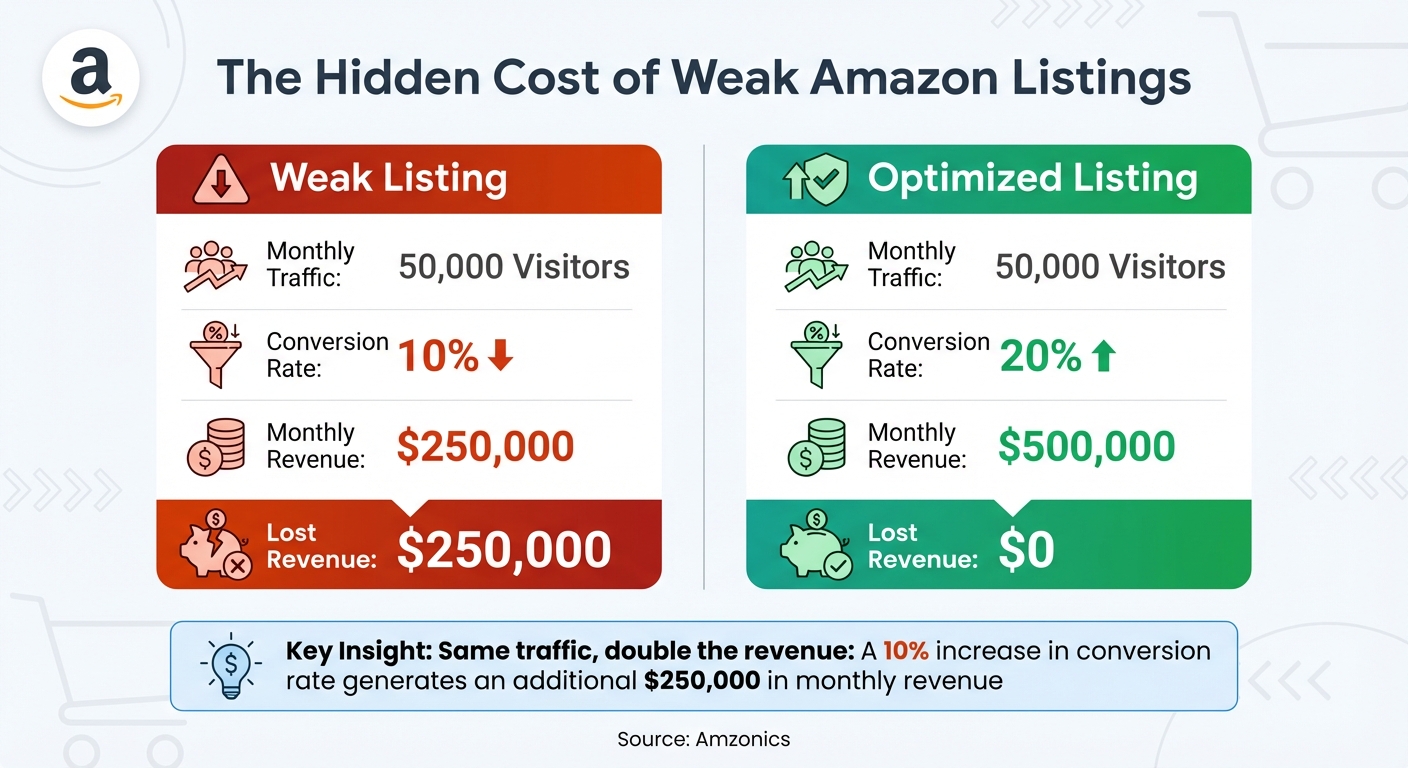
Impact of Weak vs Optimized Amazon Listings on Revenue and Conversion
A poorly crafted Amazon listing doesn’t just hurt your sales – it can drain your ad budget and crush your organic visibility.
How the Amazon Algorithm Works
Amazon’s A10 algorithm is designed to connect shoppers with products they’re most likely to buy. It evaluates key factors like Click-Through Rate (CTR), Conversion Rate (CVR), and sales velocity. When your listing performs well and converts visitors into buyers, Amazon interprets this as a sign of relevance. The reward? Better organic placement. This creates a momentum loop: more visibility leads to more sales, which in turn boosts visibility even further.
But here’s the flip side: low conversion rates send the opposite message. Amazon sees your product as irrelevant, which pushes your organic ranking down and forces you to rely more heavily on paid ads. Amazon also assigns a Quality Score based on engagement metrics. If your score is low, you’ll face higher cost-per-clicks (CPCs) and less effective ad placements.
Consider this: roughly 70% of Amazon shoppers never bother clicking past the first page of search results. If your listing doesn’t make it to that coveted first page, you’re stuck paying for every click. This penalty, driven by the algorithm, adds hidden costs to your ad strategy.
The Hidden Costs of Ad Dependency
Running pay-per-click (PPC) campaigns for a poorly optimized listing is like throwing money into the wind. If those clicks don’t convert, you’re not just wasting ad dollars – you’re also damaging your Quality Score. This tells Amazon your product isn’t worth prioritizing, further lowering your visibility.
The financial consequences can snowball. For example, a conversion rate of 10% instead of 20% means earning half the revenue while still incurring the same ad expenses.
| Metric | Weak Listing | Optimized Listing |
|---|---|---|
| Monthly Traffic | 50,000 Visitors | 50,000 Visitors |
| Conversion Rate | 10% | 20% |
| Monthly Revenue | $250,000 | $500,000 |
| Lost Revenue | $250,000 | $0 |
Source: Amzonics
For small and medium-sized businesses, this creates a vicious cycle. As your organic rank declines, you’re forced to spend more on ads, driving up your Advertising Cost of Sales (ACoS) and shrinking your profit margins. Meanwhile, competitors with optimized listings rake in organic traffic and increase their profits.
"A poor listing doesn’t just cost you a single sale – it has ripple effects across your entire Amazon business." – Amzonics
Breaking free from this cycle starts with optimizing your listing. It’s the foundation for reducing ad costs and boosting your long-term profitability.
Listing Optimization Strategies to Cut Ad Spend
Weak product listings can silently drain your ad budget. Strengthening them with targeted strategies not only trims ad costs but also boosts organic traffic. Let’s dive into how you can make it happen.
Conducting Effective Keyword Research
Your keyword strategy determines whether Amazon puts your product in front of the right shoppers. Start by leveraging Amazon Brand Analytics, a free tool for those enrolled in Brand Registry. Weekly downloads of the Search Terms report will help you identify phrases with high click-share and purchase-share – these are the golden keywords customers use when they’re ready to buy.
Take it a step further with a reverse ASIN lookup using tools like Helium 10 Cerebro or Jungle Scout Keyword Scout. This lets you see which keywords your competitors rank for, helping you find gaps where you can stand out. Don’t forget to audit your PPC Search Term Reports and integrate high-performing keywords into your organic listing.
Focus on long-tail keywords – specific phrases with three or more words, like "comfortable running shoes for kids" instead of just "shoes." These terms often convert better because they align with high-intent searches.
"A keyword map should never be a ‘set it and forget it’ document. Think of it as a living, breathing guide that you constantly update with your PPC data." – Headline Marketing Agency
Strategically map your keywords: place high-volume terms in your title, secondary and long-tail phrases in bullet points, and synonyms or common misspellings in backend search terms. Nearly 80% of Amazon sellers use this approach, with many seeing a 25% to 40% boost in conversion rates after a full listing update.
Writing Optimized Product Titles
Your product title is the most impactful part of your listing. Amazon’s algorithm gives it significant SEO weight, and it’s often the first thing shoppers notice.
Use this simple formula: Brand + Core Keyword + Top Attribute + Size/Model + USP. For example: "Nike Air Zoom Pegasus 40 Men’s Running Shoes, Breathable Mesh, Size 10.5, Lightweight Cushioning." Always front-load your most important keyword right after the brand name to maximize visibility.
While Amazon allows titles up to 200 characters, aim for 60 to 150 characters. Shorter titles display better on mobile devices, which over 80% of shoppers use. Also, avoid repeated words, special characters, and write numbers as numerals.
Writing Benefit-Focused Bullet Points and Descriptions
Use all five bullet points with a benefit-first approach. Start with what the customer gains, then explain the feature that delivers it.
For example, instead of saying "40mm steel burr grinder", write:
CONSISTENT GRIND FOR FULLER FLAVOR – The 40mm steel burr mechanism ensures a uniform particle size for professional-quality coffee at home.
Make bullet points scannable with clear headers and keep them under 200–250 characters to ensure they display well on mobile. Address common concerns directly, like including product dimensions for sizing or warranty details for durability.
In your product description or A+ Content, tell a story about why your product exists and how it solves a problem. Use A+ modules to add comparison tables, lifestyle images, and brand stories that keep shoppers engaged.
Improving Images to Increase Conversions
Your images are essentially your product on Amazon, so they need to sell it effectively.
Start with a strong main image: use a pure white background (RGB 255, 255, 255), and ensure the product fills 85% of the frame. Upload high-resolution images (at least 1,600 pixels on the longest side) to enable the zoom function. Sellers who make at least 25% of their images zoomable report an average sales increase of 64%.
Utilize all seven image slots to create a visual sales pitch. Include lifestyle photos showing real people using the product, infographics highlighting key benefits, and size comparisons with familiar objects. For example, a visual catalog overhaul led to a 37% conversion boost in just one month.
Consider adding exploded views to showcase internal components, before-and-after demonstrations to prove effectiveness, and instructional images to address usability concerns. Ensure any text overlays are large enough to be legible on mobile screens.
"On Amazon, your images are the product. Your main image needs to be scroll-stopping and earn that click." – Chilat Doina
Using Backend Search Terms Effectively
Backend search terms are invisible to shoppers but indexed by Amazon’s algorithm, making them a powerful tool for increasing discoverability while reducing ad spend.
You have 250 bytes (not characters) to work with, so use this space wisely. Include synonyms (like "trainers" for "sneakers"), abbreviations, and common misspellings that don’t fit in your visible listing. For instance, if your title uses "gray", add "grey" in the backend.
Avoid repeating keywords from your title or bullet points. Use single spaces only, and skip commas, semicolons, or stop words like "and" or "by" to maximize the byte limit. Exceeding 250 bytes means none of the keywords in that field will be indexed, so use a byte counter to ensure you’re within the limit.
Measuring Results and Making Improvements
Optimizing your listing is just the beginning. To truly succeed, you need to track performance and make adjustments. This phase is essential for reducing reliance on ads and ensuring your efforts pay off.
Metrics to Track
Keep an eye on these key metrics to understand your listing’s performance:
- Click-Through Rate (CTR): This shows how effective your listing is at attracting clicks. A low CTR might signal issues with your product’s image, title, price, or rating.
- Unit Session Percentage (Conversion Rate): This measures how many visitors actually make a purchase. If your conversion rate is low, it could mean your bullet points, A+ Content, or additional images aren’t convincing enough.
- Organic Keyword Ranking: This indicates where your product appears in search results for your target keywords. A stable or improving ranking shows better relevance.
- Total Advertising Cost of Sale (TACOS): This metric compares your ad spend to total sales (both organic and paid). A declining TACOS means your organic sales are growing and you’re becoming less dependent on ads.
Additionally, use Search Query Performance in Brand Analytics to see how your brand stacks up against competitors for specific search terms. Don’t forget to monitor your Featured Offer Percentage to ensure you’re consistently winning the Buy Box. Together, these metrics provide the insights needed to fine-tune your strategy and reduce unnecessary ad spend.
How to A/B Test Your Listings
Once you’ve identified areas for improvement through your metrics, A/B testing can help you refine your listing elements. Amazon’s Manage Your Experiments tool is a powerful resource for professional sellers enrolled in Brand Registry. It allows you to test different versions of your listing by splitting customers into two groups – one sees your current version (Version A), and the other sees your updated version (Version B).
To get accurate results, test only one element at a time. For example, if you change both the title and the main image simultaneously, it’ll be unclear which change impacted performance. Run experiments for at least four to six weeks to gather reliable data. The tool can even automatically apply the better-performing version, saving you time.
Focus your tests on high-impact elements. For example, try comparing lifestyle images with product-only photos to improve CTR, or test long, detailed titles against shorter, snappier ones. Use customer reviews and Q&A sections to identify common concerns, then create bullet points that directly address those issues. Sellers using Manage Your Experiments have seen sales increase by as much as 25%.
Conclusion: Stop Overpaying for Ads by Strengthening Your Listings
Your Amazon listing holds the key to reducing reliance on ads. Think of ads as a short-term boost, not a long-term strategy. When your listing is optimized to attract organic traffic, you’re setting up a system that works for you. Weak listings, on the other hand, burn through ad budgets without creating lasting results. But strong listings? They create a ripple effect: better conversions show Amazon’s algorithm your relevance, leading to higher organic rankings and lower ad costs.
To achieve this, focus on the essentials: clear messaging, content that highlights benefits, and top-notch visuals. These elements directly impact conversions and, in turn, reduce your ad spend. The numbers back this up – fully optimized listings can boost conversion rates by 25–40%. And nearly 80% of top-performing sellers make ongoing tweaks to their keywords, titles, and images to sustain these improvements. It’s clear that consistent listing updates are the foundation for lasting growth.
Think of your listings as dynamic assets. Regularly review and refine them – quarterly audits are a great starting point. Use your ad performance data to fine-tune your copy and experiment with one change at a time using Amazon’s Manage Your Experiments tool. The ultimate goal isn’t just to rank well; it’s to rank profitably while building a business that doesn’t rely on escalating ad budgets. Stop wasting money on underperforming listings and start investing in content that drives real results.
FAQs
How can I identify if my Amazon listing needs improvement?
A weak Amazon listing often reveals itself through high traffic but disappointing sales. If your product page is getting views but suffers from a low click-through rate (CTR) or conversion rate (CVR), it’s a clear signal that shoppers aren’t convinced to make a purchase. This doesn’t just hurt your sales – it also drags down your organic ranking and increases your ad costs.
Here are some common signs of a weak listing:
- Unoptimized titles: Titles that are overly long, missing primary keywords, or fail to emphasize the product’s key benefit can turn off potential buyers.
- Poor images: Low-quality photos, missing lifestyle shots, or pictures that don’t meet Amazon’s guidelines (like hero images without a white background) can make your product less appealing.
- Weak bullet points or descriptions: Product copy that focuses too much on technical details, instead of highlighting benefits or addressing customer pain points, can fail to connect with shoppers.
- Lack of social proof: Few reviews, low ratings, no Enhanced Brand Content, or missing incentives like coupons can deter buyers.
- Keyword gaps: Missing critical search terms in the backend reduces your product’s visibility and relevance in search results.
If your listing shows any of these red flags, it’s time to make improvements before pouring more money into ads. Refining your titles, images, copy, and keywords can help attract more organic traffic and, most importantly, convert that traffic into sales.
What’s the best way to optimize Amazon product titles for better visibility?
To make your Amazon product title stand out, stick to Amazon’s content guidelines. These typically cap titles at 200 characters and forbid special characters, repetitive words, or misleading claims. A well-structured title should include your brand name, a primary keyword, and important details like size, model, or standout features. Aim for a length between 60 and 150 characters – this helps boost click-through rates.
A simple formula to follow: Brand + Primary Keyword + Key Feature + Size/Model + Unique Selling Point. For example: "Acme Wireless Earbuds – Noise Canceling, Bluetooth 5.0, 20-Hour Battery Life." Avoid cramming in too many keywords; Amazon ignores duplicates and may even suppress your listing. By focusing on clear, relevant details, you can draw in more organic traffic and rely less on paid ads.
What are backend search terms, and how do they improve my Amazon listing’s performance?
Backend search terms, often called hidden keywords, are a powerful tool for improving your product’s visibility on Amazon. These keywords are tucked away in the backend of your listing, meaning shoppers never see them. Their main job? Helping Amazon’s algorithm connect your product with relevant search queries. By maximizing the 250-character limit with high-intent, non-repetitive keywords, you can rank for searches that aren’t covered in your title or bullet points. This can bring in more organic traffic and cut down on your dependence on paid ads.
Because these terms are invisible to customers, they’re the perfect spot for including variations, synonyms, or long-tail keywords that might otherwise clutter your visible listing. When these hidden keywords match what shoppers are typing into the search bar, Amazon is more likely to feature your product in organic search results. This can lead to higher click-through rates, improved conversions, and ultimately, increased sales – all while keeping your ad costs in check.