
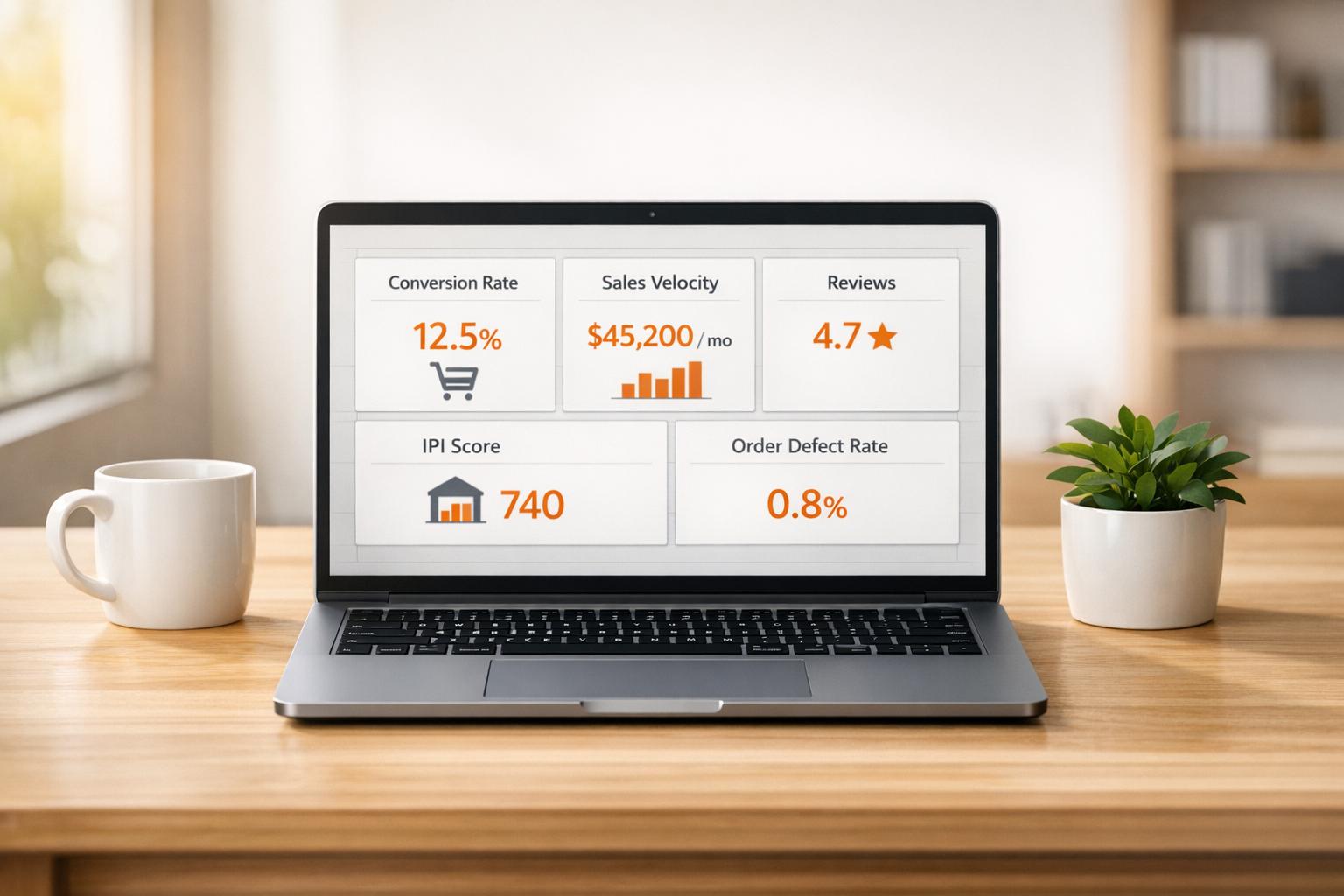
Running a successful Amazon business means tracking the right metrics. Here are the five most important KPIs that determine your performance on Amazon:
- Conversion Rate (CVR): Measures how many visitors turn into buyers. A higher CVR boosts rankings and sales. Aim for at least 10–15%.
- Sales Velocity: Tracks how quickly products sell. Consistent sales improve rankings and Buy Box eligibility.
- Review Velocity and Ratings: Regular positive reviews (4.5 stars or higher) improve rankings and conversions.
- Inventory Performance Index (IPI) Score: Keep your score above 550 to avoid restocking limits and fees.
- Order Defect Rate (ODR): Stay below 1% to protect your account and maintain Buy Box eligibility.
Each KPI directly impacts your visibility, sales, and account health. By monitoring and improving these metrics, you can increase profitability and stay competitive on Amazon.
Top 7 Amazon Seller Central KPIs You Must Track for Success in 2024
sbb-itb-e2944f4
1. Conversion Rate (CVR)
Conversion Rate (CVR) measures the percentage of orders compared to unique daily visits. While most e-commerce sites see conversion rates of just 2–3%, Amazon listings average an impressive 10–15%. This is largely due to the high purchase intent of Amazon shoppers and the platform’s trusted reputation.
Impact on Category Performance
CVR plays a massive role in revenue generation by turning traffic into actual sales. For instance, Prime members convert at a striking 74%, compared to only 13% for non-Prime shoppers. Performance also depends on product categories: Grocery & Gourmet Food listings typically convert at 15–25%, with top-performing listings exceeding 35%, while Electronics fall between 3–8%. Other factors like reviews and enhanced content also matter – listings with over 50 reviews can see up to a 20% boost in conversions, and Premium A+ Content has been shown to increase sales by as much as 20%.
Relevance to Amazon’s Ranking Algorithm
Amazon’s A9/A10 algorithm heavily weighs CVR as a sign of product relevance. Tanveer Abbas, an Amazon Growth Strategist, explains:
Amazon’s primary business goal is selling products efficiently. The algorithm rewards listings that convert visitors into buyers because this increases Amazon’s revenue per click.
Higher CVR creates a snowball effect: better conversions improve rankings, which lead to greater visibility and even more sales. This makes CVR a core focus for sellers aiming to succeed on Amazon.
Actionable Insights for Sellers
If you want to improve your CVR, here are some practical steps:
- Track your Unit Session Percentage: Use Seller Central’s Business Reports to spot underperforming listings.
- Optimize your main image: Ensure the image fills 85% of the frame and has a resolution of at least 1600px to enable zoom functionality.
- Craft better titles: Highlight key product features within the first 80 characters to avoid truncation on mobile devices.
- Run A/B tests: Use Amazon’s "Manage Your Experiments" tool to test different titles and images over a 6–8 week period.
- Leverage psychological pricing: Prices ending in .99 or .95 can encourage impulse purchases.
Focusing on these strategies can help you boost your CVR and, in turn, drive more sales and better rankings on Amazon.
2. Sales Velocity
Sales velocity plays a key role in determining product rankings and Buy Box eligibility on Amazon. It measures how quickly your inventory sells within a specific timeframe, calculated as total units sold divided by average inventory. Amazon’s algorithm rewards fast-selling products with better organic search rankings and improved chances of securing the Buy Box. Why? Because rapid sales indicate strong demand, which Amazon prioritizes for promotion.
Impact on Category Performance
Sales velocity has a direct effect on your Best Sellers Rank (BSR), which updates every hour and determines your position within a category. Products with strong momentum can even earn the coveted "Best Seller" badge, regardless of how many reviews they have. Interestingly, Amazon prioritizes unit movement over total revenue. For example, a product selling 100 units daily will generally outrank one selling 500 units monthly.
Consistent sales velocity is vital for winning – and keeping – the Buy Box. Amazon’s algorithm considers how quickly your product sells when choosing the featured offer. Stockouts, on the other hand, can severely hurt your performance. Running out of inventory signals low popularity, which can lead to a drop in organic rankings and potentially trigger a downward spiral in sales. To avoid this, aim to keep your stockout rate below 2% for key products.
Relevance to Amazon’s Ranking Algorithm
Vernon Elliot from Signalytics highlights the connection between sales velocity and Amazon’s ranking algorithm:
A9 algorithm ranks products based on keyword relevance and purchase likelihood. Listings with higher conversion rates, strong sales velocity, competitive pricing, and Buy Box eligibility tend to rank higher.
The algorithm places more weight on recent sales than historical data. This means a sudden spike in sales velocity can quickly improve your ranking. However, relying on unsustainable promotional spikes that drain your inventory can harm your performance. Strategic inventory planning is essential to maintain steady sales momentum.
Actionable Insights for Sellers
To build sustainable growth, focus on strategies that maintain consistent momentum rather than relying on short-term boosts. Using Fulfillment by Amazon (FBA) can help you qualify for Prime eligibility, while driving external traffic through social media and influencer partnerships can further support steady sales.
Another effective tactic is targeting long-tail keywords with reverse ASIN tools. These specific terms often lead to higher conversion rates, even if they have lower search volumes.
For example, in 2025, the beauty brand Birchbox launched a three-month influencer campaign called "Love, you", featuring micro-influencers from various backgrounds. This initiative significantly improved both their conversion rates and sales velocity.
Lastly, set automated reorder points for a 30-day window to avoid stockouts, and monitor weekly sales velocity to track trends and identify potential issues, such as competitor promotions or Buy Box losses.
3. Review Velocity and Ratings
Review velocity reflects how quickly new reviews are coming in, offering a snapshot of current product demand. This is important because Amazon’s algorithm now prioritizes "predicted satisfaction", which makes up 35% of ranking weight in the A11 era. Fresh reviews are essential to offset the diminishing influence of older ones.
Impact on Category Performance
The numbers speak for themselves: a one-star increase in average rating can drive a 26% increase in sales. Shifting your rating from 3.5 to 4.8 stars can improve conversion rates by 12-18%. Products with ratings above 4.7 stars often see organic ranking boosts of 15-25%, while those below 4.3 stars may suffer ranking suppression of 20-40%. With 96% of Amazon shoppers reading reviews before making a purchase, these stats directly tie reviews to performance.
Consistently gaining 3-5 new reviews each week can improve rankings by 15-25%. This creates a positive feedback loop: higher review velocity enhances click-through and conversion rates, which in turn boosts organic rankings and sales. This cycle underscores how critical review metrics are to Amazon’s ranking system.
Relevance to Amazon’s Ranking Algorithm
Amazon’s ranking algorithm heavily factors in these metrics. According to SellerMetrics:
Velocity signals current relevance, and fresh reviews indicate ongoing buyer activity, both of which support conversion predictability, a core input to Amazon’s ranking model.
The algorithm now tailors search results based on satisfaction signals, meaning your product’s rank can vary for different users depending on your review performance.
Actionable Insights for Sellers
To optimize review velocity and ratings, focus on these strategies:
- Aim for a 2-5% review rate – this equates to 2-5 reviews per 100 orders or 5-10 reviews per $10,000 in monthly revenue.
- Maintain ratings at or above 4.5 stars. Products rated below 4.0 can see their conversion rates drop by half compared to those above 4.5.
- Leverage tools like Amazon Vine or the "Request a Review" button during your first 30 days, as this period accounts for 40-50% of your 90-day ranking trajectory.
Keep your rating distribution authentic. A healthy breakdown might include 70-75% five-star ratings, 15-20% four-star ratings, and 8-10% three-star or lower ratings. Amazon’s machine learning systems catch review manipulation with 85-90% accuracy, so stick to genuine, verified-purchase reviews obtained through compliant methods.
4. Inventory Performance Index (IPI) Score
Your IPI score is a key indicator of your growth potential on Amazon. Falling below 400 can limit your ability to restock during crucial periods like Q4 or Prime Day. Scores of 550 or higher are considered strong, while hitting 800 or above unlocks unlimited storage capacity.
Impact on Category Performance
The IPI score plays a critical role in your overall operations. If your score drops below 400, Amazon imposes storage restrictions, forcing you to prioritize which products to restock. This can lead to stockouts, which hurt sales momentum, lower your search rankings, and drive up advertising costs. Managing your inventory effectively, as reflected in your IPI score, is just as important as boosting conversion rates and sales velocity for success in your category.
The financial implications of a low IPI score go beyond lost sales. Amazon imposes Storage Utilization Surcharges ranging from $0.23 to $0.94+ per cubic foot after 22 weeks of storage. Additionally, Aged Inventory Surcharges start at $0.50 per cubic foot at 181 days and climb to $6.90 per cubic foot after 365 days. These fees can quickly surpass the wholesale value of your goods, turning your inventory into a costly liability.
Alignment with Amazon’s Operational and Customer Satisfaction Standards
Amazon enforces penalties on both ends of the inventory spectrum. Low-inventory fees (between $0.32 and $1.11 per unit) apply when you have less than 28 days of supply. On the other hand, storage surcharges kick in after inventory sits for more than 22 weeks, leaving sellers with a narrow 30-60 day supply window. Dillon Carter, Co-Founder of Aura, summarizes it well:
FBA is no longer cheap long-term storage. It’s a high-speed fulfillment network that punishes slow inventory.
This dual-penalty system reflects Amazon’s commitment to maintaining a fast-moving fulfillment network while ensuring that in-demand products are readily available for customers.
Actionable Insights for Sellers
To maintain a healthy IPI score and avoid penalties, consider these strategies:
- The IPI score heavily factors in Excess Inventory (40-45%) and Sell-Through Rate (30-35%). Aim for a sell-through rate between 3.0 and 7.0 (good) or 7.0+ (excellent), which means at least 6 inventory turns per year.
- Review your "Fix Stranded Inventory" page every Monday and resolve issues within 24-48 hours to see a quick improvement in your score.
- For items with 85+ days of supply, apply 30%+ discounts or initiate removal orders before hitting aged inventory fees at 181 days.
- Mark seasonal or discontinued items as "non-replenishable" in the Manage Inventory Health dashboard. This prevents stockouts on these SKUs from negatively affecting your In-Stock Rate metric.
- Shift to small-batch replenishments, sending inventory every 3-4 weeks instead of larger shipments every 2-3 months. This approach helps maintain the critical 30-60 day supply window.
5. Order Defect Rate (ODR)
Keeping your ODR below 1% is a must for succeeding on Amazon. This metric plays a huge role in maintaining your Buy Box eligibility – which drives 82% of all Amazon sales – and avoiding potential account suspensions within 24–72 hours.
As Levi Adler, Founder of Levi’s Toolbox, explains:
ODR is a mirror into how well your business is being run.
How ODR Aligns with Amazon’s Standards
The ODR is calculated over a rolling 60-day period, factoring in negative feedback (1 or 2-star ratings), A-to-z Guarantee claims, and credit card chargebacks. There’s typically a two-week delay in data reporting. Even if an order has multiple issues – like both negative feedback and an A-to-z claim – it’s counted as a single defective order.
Amazon enforces this metric automatically. If your ODR goes over 1% during an evaluation period, your account is flagged immediately. Sellers usually have 17 days to submit a Plan of Action to address the issue. Brianna Kipnis, Director of Marketing and Partnerships at Riverbend Consulting, emphasizes:
Your ODR is significant… it directly reflects your ability to meet Amazon’s stringent standards for customer satisfaction and service excellence.
Why ODR Impacts Your Performance
A low ODR doesn’t just protect your account – it also enhances your overall performance. Amazon’s ranking algorithms reward sellers with strong ODRs by improving their search visibility, which can lead to more sales. On the flip side, a high ODR can limit your chances of getting approval for restricted categories or brands. Additionally, chargebacks tied to a high ODR can result in fees ranging from $20 to $100 per incident. These outcomes reflect Amazon’s focus on customer satisfaction and operational excellence.
Tips to Improve and Maintain a Low ODR
- Monitor Daily: Check your Account Health Dashboard every day and aim for a 0.5% ODR as a safety buffer.
- Audit Listings: Regularly review your product titles, images, and descriptions to ensure they match the actual product. Many A-to-z claims stem from listing discrepancies.
- Quick Responses: Reply to customer messages within 24 hours, including weekends and holidays, to resolve issues before they escalate.
If you’re using Fulfillment by Merchant (FBM), consider switching to Fulfillment by Amazon (FBA) for high-volume products. FBA can shield your ODR by taking responsibility for shipping problems and negative feedback. For FBM orders, use durable packaging to prevent damage during transit, and keep detailed records, including delivery proofs, to defend against chargebacks.
KPI Benchmarks and Target Ranges
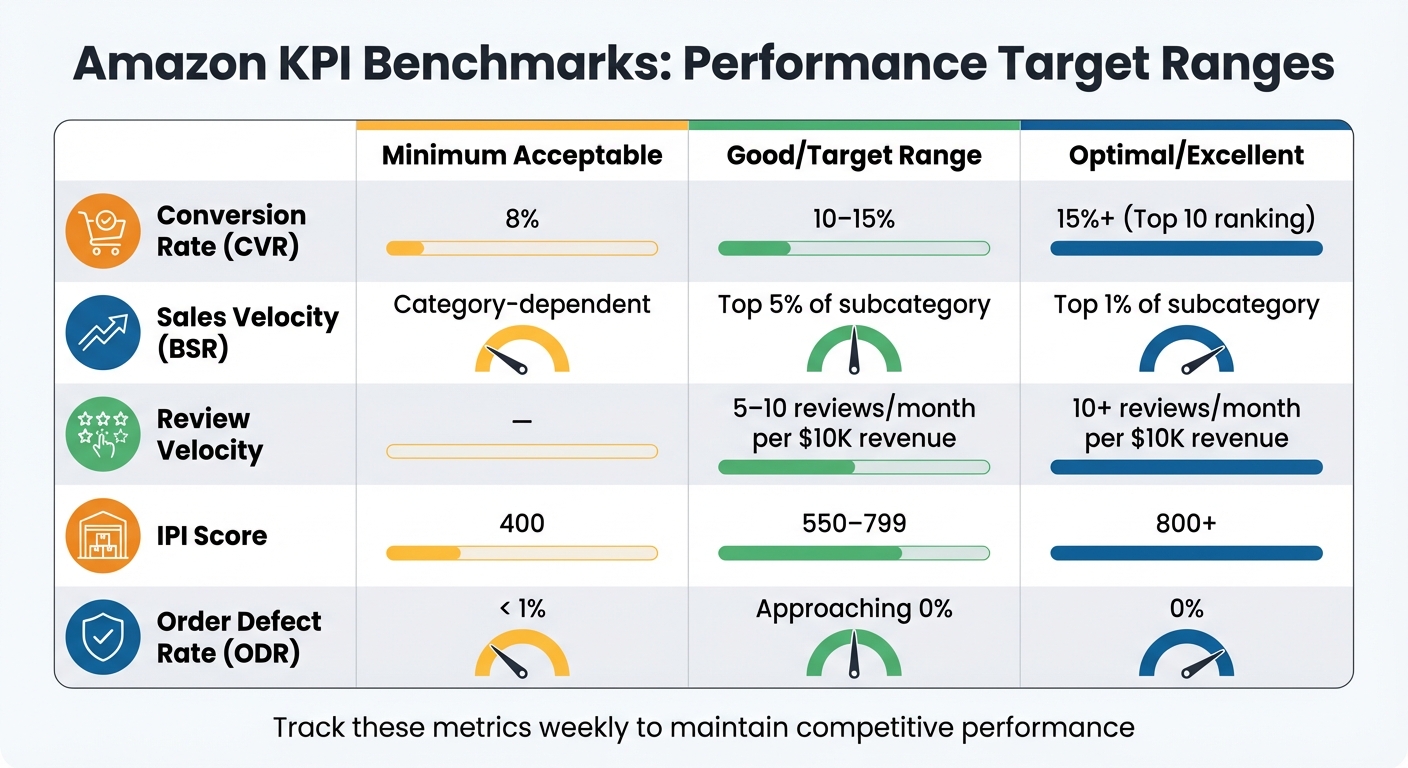
Amazon Seller KPI Benchmarks: Target Ranges for Success
After breaking down each KPI, let’s look at benchmark targets to help you refine your Amazon performance. These benchmarks act as guideposts, giving you clear targets to aim for while identifying areas that need attention. For instance, Amazon’s conversion rates can differ widely depending on the product category. A $12 kitchen gadget might boast a 22% conversion rate, while a $180 espresso machine in the same category may only reach 9%. Higher-priced items, like electronics, often lead to longer research phases, which means more sessions but lower visible conversion rates. These variations highlight why benchmarking is essential for setting realistic and actionable goals.
Here’s a table outlining target ranges for the five key KPIs, based on current Amazon standards:
| KPI Metric | Minimum Acceptable | Good/Target Range | Optimal/Excellent |
|---|---|---|---|
| Conversion Rate (CVR) | 8% | 10%–15% | 15%+ (Top 10 ranking) |
| Sales Velocity (BSR) | Category-dependent | Top 5% of subcategory | Top 1% of subcategory |
| Review Velocity (per $10,000 revenue) | – | 5–10 reviews/month | 10+ reviews/month |
| IPI Score | 400 | 550–799 | 800+ |
| Order Defect Rate (ODR) | < 1% | Approaching 0% | 0% |
These benchmarks help you evaluate your current standing and pinpoint areas for improvement across all five KPIs.
For Sales Velocity, it’s crucial to focus on your Best Sellers Rank (BSR) within your specific subcategory rather than the broader category. For example, in Beauty & Personal Care, a BSR of 144,903 places you in the Top 1%, while in Home & Kitchen, you’d need a BSR closer to 1,660,470 for the same distinction. Tracking 7- and 30-day moving averages can provide a clearer picture of your sales momentum.
Beyond conversion rates and sales momentum, inventory management benchmarks are another critical factor in operational success. Aim to keep your IPI score above 550 to ensure smooth inventory flow and avoid storage restrictions. Falling below 400 can lead to capacity limits and storage surcharges of up to $10 per cubic foot. To stay on top of inventory, maintain a 30–60 day supply window.
Conclusion
These five KPIs are deeply interconnected, creating a ripple effect on your overall performance. High conversion rates and positive reviews fuel sales velocity, while steady sales velocity relies on effective inventory management to avoid stockouts. At the same time, maintaining a low order defect rate is critical for competing for the Buy Box and staying visible on Amazon. As Tyler Lawson from Goamify puts it:
A strong conversion rate shows that your products are not only being discovered but are also compelling enough to drive purchases.
When these metrics are aligned, they amplify each other’s impact. However, ignoring one can disrupt the entire system. For instance, a low Inventory Performance Index (IPI) score can lead to stockouts, which hurt your sales velocity and organic rankings. Amazon’s algorithm rewards products with strong sales velocity and conversion rates, making these metrics essential for long-term success.
To stay ahead, monitor your KPIs weekly. If your conversion rate (CVR) dips below 8% or your IPI score drops below 500, take immediate action. For a low CVR, focus on improving your product’s main image, adjusting pricing, and increasing your review count before allocating more budget to ads. If your IPI score falls under 500, liquidate slow-moving inventory with lightning deals or removal orders to avoid storage restrictions. Canopy Management emphasizes the importance of staying proactive:
Amazon’s 1% limit isn’t a target – it’s a cliff edge. Stay well below 0.5% to be safe.
If managing these KPIs feels overwhelming, specialized ecommerce services can help. Emplicit offers tailored solutions for every critical metric. From PPC management to boost sales velocity and Best Seller Rank, to professional listing optimization that improves conversion rates with high-quality images and compelling content, their services address the key areas that drive success. They also provide inventory management strategies to maintain a healthy IPI score and account health services to minimize order defects by monitoring compliance and fulfillment quality.
Whether you’re introducing a new product or scaling an established brand, these five KPIs serve as a roadmap for sustained growth on Amazon. Keep a close eye on these metrics and consider expert support to fine-tune performance – turning solid results into market leadership.
FAQs
Which KPI should I fix first when sales drop?
When sales start to dip, the conversion rate is the first key metric to examine. If your rate is low, it means people are checking out your listing but not following through with a purchase. Generally, a solid conversion rate falls between 10-15%. If it drops below 8%, it’s a clear sign that something needs attention. To turn things around, work on improving the quality of your listing – this could mean upgrading your images, refining your descriptions, or adjusting your pricing to make it more appealing. These tweaks can help lift your conversions and get your sales back on track.
How can I raise conversion rate without increasing ad spend?
To boost your Amazon conversion rate without increasing ad spend, shift your attention to refining product listings and improving the overall customer experience. Start by enhancing SEO-friendly copy, incorporating high-quality images, and leveraging A+ Content to make your product pages more engaging and informative.
Take advantage of tools like Amazon’s Detail Page Sales and Traffic Report to uncover and address potential issues. For instance, review your listings for problems like low-quality images, vague product descriptions, or pricing that might not meet customer expectations. Aligning your listings with what shoppers are looking for can make a big difference in driving sales.
How often should I review these KPIs to catch issues early?
It’s a good idea to check these KPIs daily – preferably every morning. This habit helps you spot potential problems early and tackle them before they escalate. Keeping a close eye on performance ensures you can respond quickly to changes and maintain steady progress in your Amazon category.