

If I want Amazon Creator Connections to work, I need to treat it like a sales program, not just a creator campaign. The basics are simple: I need Brand Registry access, retail-ready ASINs, enough margin for at least a 10% commission, a budget of at least $5,000, and a campaign that runs at least 30 days.
Here’s the short version:
- I build the campaign and choose the ASINs, commission, budget, and dates
- Creators can opt in, but I still need to approve participation
- Amazon tracks campaign-level results like clicks, orders, sales, and commission spend
- Sales attribution uses a 24-hour window
- Results often come down to listing quality, inventory, offer rate, and product choice
A few numbers matter right away:
- Minimum budget: $5,000
- Minimum commission: 10%
- Campaign length: 30 to 365 days
- ASIN limit per campaign: up to 1,200
- Many brands start near 15%–20% commission if margins support it
- Amazon reports sales ÷ commission spend as the main return check
Before I launch anything, I need to confirm five things:
- I have account access and the right permissions
- My listings are ready to convert traffic
- My stock can support the push
- My margins can absorb commission and returns
- My brief gives creators clear rules, product points, and FTC disclosure steps
One example in the article shows $41,395 in attributed sales on $6,209 in commission spend, or 6.66x ROAS. But that kind of result usually depends on simple things done well: good products, pages that convert, and a clean offer.
So the main takeaway is this: pick products people already want, pay enough commission to get creator interest, approve participants fast, and measure results at the campaign level after the run ends.
The rest of the guide walks through that process from setup to reporting.
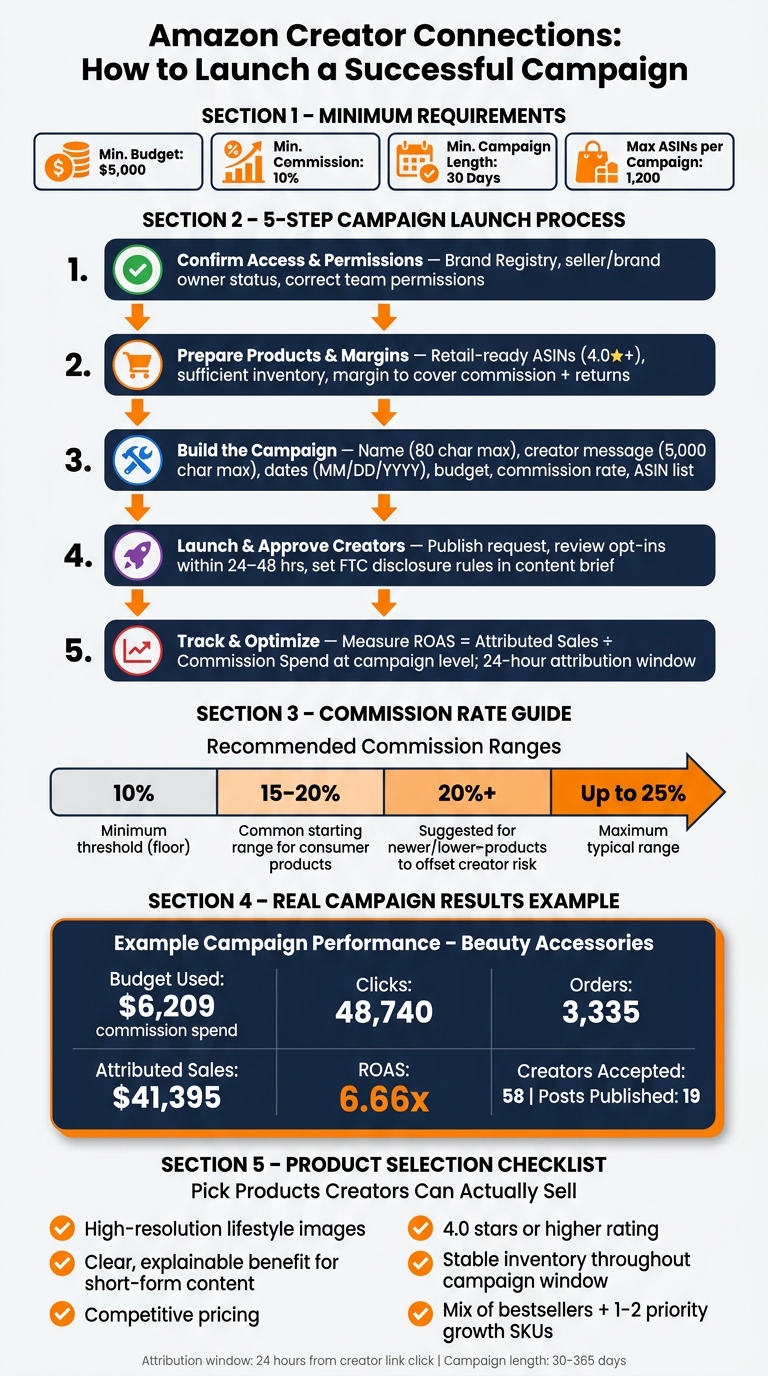
Amazon Creator Connections: Campaign Setup Process & Key Requirements
Check Access and Prepare the Account
Before you build a campaign, make sure the brand qualifies and the product is ready to support the effort. After that, the account can move into setup.
Confirm Account Eligibility and Permissions
Creator Connections is for brands that are set up as Amazon sellers or brand owners. The team working in the account also needs the right permissions to create and manage campaigns.
In plain terms, the people running this should be able to handle the parts that affect performance, including:
- Campaign strategy
- Listing optimization
- A+ Content creation
- PPC management
- Performance analytics
If those permissions are split across different people or teams, sort that out first. It saves a lot of back-and-forth once the campaign is live.
Prepare Product, Margin, and Inventory Inputs
Each ASIN should have enough margin to cover the commission, enough inventory to avoid stockouts, and retail-ready content with strong images, video, and A+ Content.
That last part matters more than some teams expect. If creators send traffic to a weak listing, the campaign can struggle even if the offer looks good. Once access and product readiness are confirmed, move into campaign setup.
sbb-itb-e2944f4
Create the Campaign and Plan the Offer
Once access is approved, build the campaign in Amazon Creator Connections. Go field by field and make each one work harder for creator interest.
Enter the Campaign Basics
You’ll need to fill in six fields: campaign name, creator message, start and end dates, budget, commission rate, and ASINs. Amazon allows up to 1,200 ASINs in one campaign, but a tighter product set is usually easier for creators to sort through.
Each field affects what creators see before they apply. The campaign name can be up to 80 characters, so write it like a title meant for creators, not an internal label. Creators often decide in seconds whether something looks worth their time. That means Fall Skincare Glow-Up: Clean, Derm-Tested Essentials is far more useful than Q4 Promo – Line A.
The creator-facing message can be up to 5,000 characters. Treat it like a short brief. Explain the brand, the target audience, the type of content you want, key talking points, and any required disclosures. Clear direction cuts down on back-and-forth.
Dates need to be entered in MM/DD/YYYY format. Campaigns must run for at least 30 days and no more than 365 days.
Choose Budget, Commission, Duration, and Product Mix
Amazon sets a floor for campaign setup: a minimum budget of $5,000, a minimum commission rate of 10%, and a minimum campaign length of 30 days. Many brand-side guides suggest starting closer to 15%–20% for consumer products, if your margins allow it.
Before you set commission, check contribution margin. A higher rate may bring in more creators, but it only works if the math still holds.
Here’s a simple planning view:
| Lever | Planning note |
|---|---|
| Budget | Higher budgets can signal scale and often draw more creators; strong listings help turn that interest into efficient sales |
| Commission Rate | 10%–25% of qualifying sales; 15%–20% is a common starting range for consumer products |
| Duration | 30–180+ days; longer runs give creators more time to make content and see what works |
| Product Mix | A focused group of proven and priority ASINs can help creators feel more confident and improve results overall |
After the offer is in place, publish the request and set the participation rules.
Pick Products Creators Can Actually Sell
More creators doesn’t automatically mean better performance. If the products in the campaign don’t convert, the traffic won’t do much. The ASINs you pick should have:
- High-resolution lifestyle images
- A clear benefit that’s easy to explain in short-form content
- Competitive pricing
- A rating of 4.0 stars or higher
A smart mix usually includes proven bestsellers plus one or two priority SKUs you want to grow. Bestsellers give creators a better shot at conversion. Priority SKUs can gain from creator-led awareness and may help future organic performance.
If you’re asking creators to feature a newer product with fewer reviews, it can help to offer a higher commission. For example, 20% instead of 15% may offset the extra risk and make that product more appealing to promote.
Once the product mix is locked in, move to launch and participation rules.
Launch the Campaign and Manage Participation
Publish the Request and Review Creator Participation
Once the campaign is built, publish it and watch creator opt-ins closely. When you click Send request, the campaign appears in the dashboards of eligible creators, and they can decide whether to join.
Before you publish, double-check the dates, budget, commission, and ASIN list.
After launch, check the portal often. Pay attention to how many creators have opted in, how many are waiting for review, and which ASINs are drawing the most interest. Try to approve creators within 24–48 hours so the campaign keeps moving.
One campaign shows how much activity this can drive: 58 creators accepted, 19 published, and the campaign produced strong sales on a $5,000 budget. That gap between accepted creators and live posts is normal. Not every creator who opts in will end up publishing, so it helps to start with a bigger group.
Set Clear Rules Before Content Goes Live
As approvals start coming in, set the content rules before any creator posts go live. The brief shapes what creators can say and show. It should spell out required FTC disclosures – such as a verbal and written disclosure that the content is part of a paid partnership – along with prohibited claims, tone, and the product details creators should highlight. If you’re promoting a newer or more complex product, lay out the main talking points so creators aren’t left guessing.
It also helps to get marketing, ecommerce, and supply chain on the same page before launch. Check inventory levels for every promoted ASIN during the live campaign window. If a creator sends traffic to an out-of-stock listing, that work is wasted and the shopper experience can take a hit.
Give customer support the product list and campaign dates so they’re ready for questions about shipping, returns, or product details. Agencies like Emplicit can help keep these teams aligned with marketplace operations, making sure listing health, inventory, and performance reporting stay in sync while the campaign runs.
With the campaign live, the next step is tracking sales and tuning the campaign after launch.
Track Results, Optimize, and Close Out
Measure Sales, Spend, and ROAS at the Campaign Level
Amazon Creator Connections reports performance at the campaign level, not the order level. You can see attributed sales, commission spend, orders, units, and clicks by campaign. But Amazon does not provide order-level or buyer-level data.
The main number to watch is ROAS on commission spend = attributed sales ÷ commission spend.
Here’s what that can look like in practice: one beauty accessories campaign spent $6,209, drove 48,740 clicks, 3,335 orders, and $41,395 in sales, which worked out to 6.66x ROAS. Its top products delivered 5x to 7x ROAS. That kind of result usually depends on two things: strong retail readiness and a solid offer structure.
Attribution uses a 24-hour window. That means a purchase counts only if it happens within 24 hours of a shopper clicking a creator’s link during the campaign dates.
So don’t get too hung up on daily ups and downs. Look at campaign-level patterns over time. And don’t stop at attributed revenue. You still need to subtract commission, fees, and returns. That’s what tells you if the campaign paid off or just looked good on the surface.
Those numbers also help shape the next move. Maybe the next campaign needs a higher commission. Maybe the ASIN mix was too broad. Maybe the listing just wasn’t ready for the traffic.
Use Platform Limits and Retail Readiness to Improve the Next Campaign
Once you’ve measured ROAS, turn that data into a better plan for the next campaign. Use Amazon’s fixed limits as guardrails, then adjust the budget, offer, and product mix around margin, product quality, and seasonality.
Start with the ASINs. Look for anything that could hurt conversion, such as:
- weak images
- weak pricing
- low stock
- poor review velocity
After the campaign ends, check whether conversion rates, review count, or Best Seller Rank changed for the featured products. That can help show whether creator traffic did more than drive short-term sales.
Emplicit can help align listing optimization, PPC, inventory, and account health so creator traffic lands on pages that are ready to convert.
Conclusion: The Core Steps Brands Need to Follow
A strong Creator Connections campaign usually comes down to getting the basics right, then learning from the result.
Confirm account access and permissions first. Check margins and inventory before you set a commission rate or budget. Build a clear offer with a realistic commission, a focused ASIN list, and a campaign length that fits your calendar. Pick products with strong conversion potential, like listings with good reviews, solid page quality, and stable stock.
From there, launch with a clear content brief, fast creator approvals, and alignment across teams. After the campaign, pull the campaign-level reports, calculate return on commission spend, and write down what worked and what didn’t. That gives you a cleaner starting point for the next offer, the next product mix, and the next approval flow.
FAQs
How do I know if my ASINs are ready?
Make sure your product listings are fully optimized, your items are confirmed in stock, and your hero SKUs are mapped the right way so tagging errors don’t creep in. It also helps to run test orders and check that purchase events fire as expected.
Emplicit can help by improving A+ content, tuning your listings, and helping manage inventory so your ASINs are ready to convert creator-driven traffic.
What commission rate should I start with?
Most sellers start with 10% to 15% when testing Amazon Creator Connections. That range is common because it helps bring in a broad mix of creators without going too far out of the gate.
Once you spot your top performers, you can send private invites and bump commissions up to 20% to 30% or more. Just keep your product category in mind, since rates can vary quite a bit by sector.
Why might a campaign get clicks but few sales?
Clicks with few sales usually point to friction between interest and purchase. If click-through rate is strong but conversion is low, the issue is often the landing experience or the offer, not the content.
Common causes include:
- Landing-page friction
- Pricing issues
- Traffic going to an out-of-stock listing
- Traffic going to the wrong SKU
Also check that tracking is clean and look for obstacles close to the final purchase steps.