

If I sell with Amazon FBA in 2026, Amazon may collect sales tax on many orders – but I may still need to register, file returns, and track nexus in multiple states.
Here’s the short version:
- FBA inventory can create physical nexus in any state where Amazon stores my products.
- Economic nexus can apply when I pass a state threshold, often $100,000 in sales or 200 transactions.
- Marketplace facilitator laws usually mean Amazon collects tax on Amazon orders, but that does not remove my duties for:
- my own website
- Shopify sales
- wholesale sales
- MCF and other non-Amazon channels
- In some states, I still have to file returns even if Amazon collected all tax due.
- Wrong product tax codes can lead to the wrong tax being charged.
- I need to review:
- inventory locations
- sales by state
- filing deadlines
- Amazon tax reports
- 1099-K vs. payout records
A few numbers matter most up front:
- Many states use $100,000 or 200 transactions for economic nexus
- Several states may require monthly, quarterly, semi-annual, or annual filing
- Zero-due returns can still trigger penalties if I skip them
What this guide covers: how I check nexus, when I register, what Amazon handles, what I still handle, which reports I pull, and the filing mistakes I try to avoid.
If I want to stay out of trouble in 2026, the play is simple: find every nexus state, register where needed, separate Amazon-collected sales from my own taxable sales, and file on time.
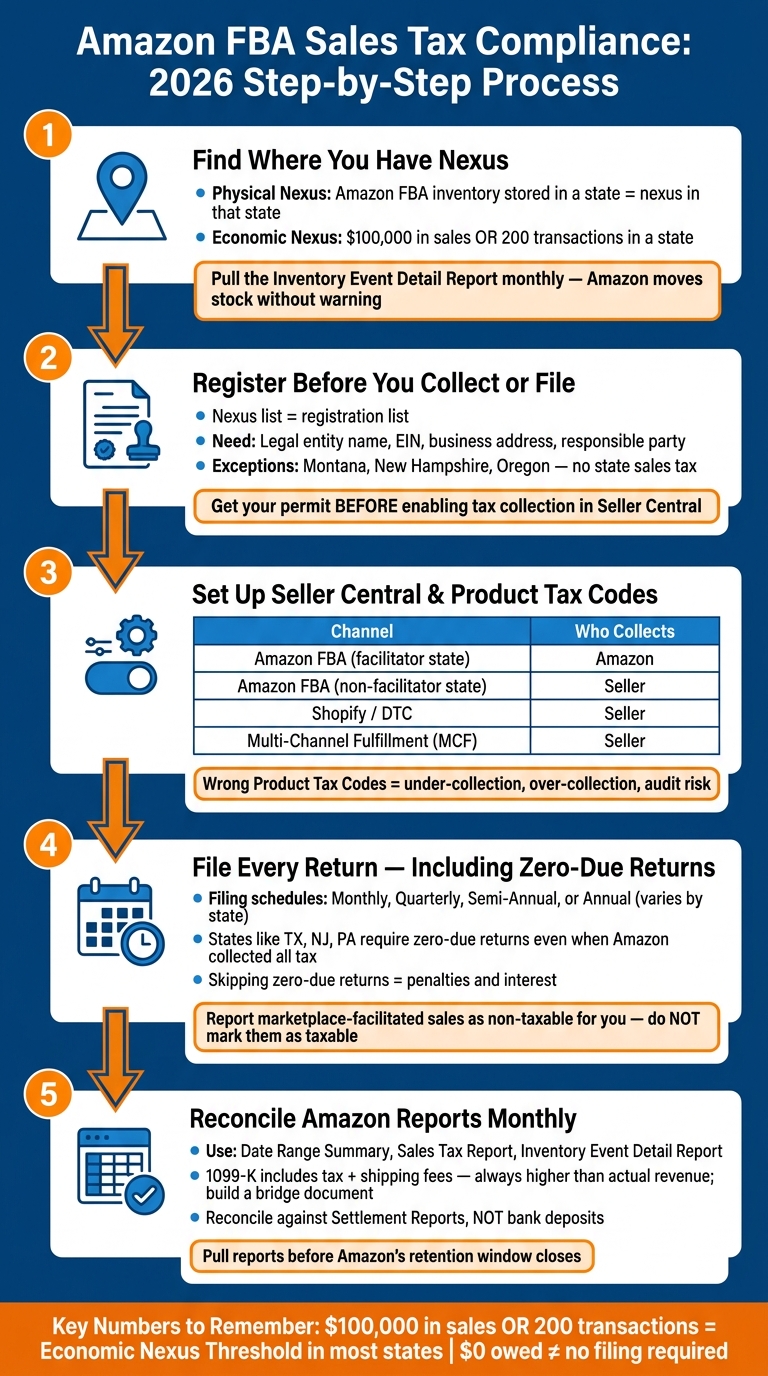
Amazon FBA Sales Tax Compliance Process for 2026
Amazon FBA SALES TAX Collection in 2026 for Beginners
sbb-itb-e2944f4
1. Determine Where You Have Sales Tax Nexus
For FBA sellers, nexus usually comes from where your inventory sits or how much you sell into a state. In plain English, two triggers show up most often:
- Physical nexus from Amazon’s fulfillment network
- Economic nexus from hitting a state’s sales threshold
Physical Nexus From Amazon Fulfillment Centers
If Amazon stores your inventory in a fulfillment center, that usually creates physical nexus in that state. No office there? No employees there? Doesn’t matter. The inventory by itself is enough.
That catches a lot of sellers off guard because Amazon moves FBA inventory around on its own. One day your stock is in one state, and the next day part of it may be somewhere else. That’s why you should pull the Inventory Event Detail report in Amazon Seller Central. It shows where your inventory moved and where it was stored, state by state.
Use that report to spot where physical nexus may already exist. Then line those states up with your sales by destination so you can also check for economic nexus.
Economic Nexus Thresholds by State
You can owe sales tax in a state even if you don’t store a single unit there. That’s economic nexus.
A lot of states use a threshold of $100,000 in annual sales or 200 transactions – whichever comes first. Once you go over either one, you generally need to register and collect tax on future sales into that state.
One point that trips people up: count sales from all channels, not just Amazon. If you also sell on your own site, through Shopify, or somewhere else, those sales still count toward the threshold in each destination state.
Every state has its own rules, and those rules can shift. So before you act, check the current threshold with the state itself.
A Nexus Review Process for 2026
This isn’t something to check once and forget. Amazon can move inventory without warning, so a monthly review makes sense.
Start with your FBA storage reports and the Inventory Event Detail report. That gives you a list of every state where Amazon stored your inventory. After that, export your revenue by destination state across every sales channel and compare those totals against each state’s current threshold.
Then look beyond Amazon. Nexus can also come from things like a home office, remote employees, third-party warehouses, or drop-shipping setups. Any one of those can create nexus on its own.
The table below sums up the nexus triggers FBA sellers run into most often:
| Nexus Trigger | Typical FBA Scenario | Compliance Impact |
|---|---|---|
| Physical Nexus | Inventory stored in an Amazon fulfillment center | Register and file even at low volume; zero-due returns may still be required. |
| Economic Nexus | Exceeding $100,000 in sales or 200 transactions in a state | Must register once the threshold is crossed, regardless of physical presence |
| Other Triggers | Home office, remote employees, or 3PL warehouses | Creates immediate nexus in the state where the activity occurs |
2. Register in the Right States and Understand Amazon’s Collection Role
Nexus shows you where you may owe sales tax. Registration is the next step. It tells you where you need to take action.
Once you’ve pinned down nexus, register in each state where registration is required before you collect sales tax yourself or file returns. In plain English: your nexus list usually becomes your registration list, unless Amazon is already taking care of collection in that state.
When You Need to Register Before Collecting or Filing
You need a sales tax permit before you collect tax yourself. In many states, you also need that permit before you file a return. So if you plan to collect tax outside Amazon, get the permit in place before you switch on direct collection in Seller Central.
State registration forms usually ask for the basics:
- Legal entity name
- EIN
- Responsible party
- Business address
- Business description
The exact questions and steps change from state to state.
What Marketplace Facilitator Laws Cover and What They Don’t
In most states with marketplace facilitator laws, Amazon collects and remits sales tax on marketplace sales. That’s helpful, but it doesn’t cover everything.
If you also sell through your own website, wholesale accounts, or any sales channel outside Amazon, you are still on the hook for collecting and remitting tax on those sales .
That split matters. Amazon may handle tax for Amazon orders, while you still need to deal with tax for the rest of your business.
State-by-State Rules for FBA Sellers
Use this table to connect each nexus state with your registration and filing duty.
| State | Marketplace Facilitator Collection | Likely Registration Need | Typical Filing Expectation |
|---|---|---|---|
| Pennsylvania | Amazon collects/remits | Required for economic nexus or in-state FBA inventory | Returns due even if $0 taxable |
| New York | Amazon collects/remits | Required for economic nexus; inventory can still create physical nexus | Zero-due returns |
| New Jersey | Amazon collects/remits | Required if you have physical or economic nexus | Monthly or quarterly, depending on state rules |
| Montana, New Hampshire, Oregon | No state sales tax | Not required | No sales tax filing |
| States where Amazon stores your inventory | Amazon collects/remits | Required (physical nexus) | Monthly or quarterly; often zero-due returns |
After you register, update your Seller Central tax settings and product tax codes so they match each state’s rules.
3. Set Up Tax Collection, Seller Central Settings, and Product Tax Codes
Once your registrations are in place, the next step is to line up Seller Central with each state’s rules without interfering with Amazon’s marketplace collection. This is where your registration list turns into live tax settings.
Review Seller Central Tax Settings Without Overriding Marketplace Collection
Enable manual tax collection only in states where you have nexus and Amazon does not collect as marketplace facilitator.
To add a state manually, go to Settings > Tax Settings > Add a State in Seller Central, enter your state-specific permit number, and use Amazon’s default tax codes so the right rate applies based on destination.
One more thing here: reconcile against Amazon Settlement Reports, not bank deposits. Bank deposits can look clean at a glance, but they don’t show the same tax detail. Settlement Reports do.
Assign Product Tax Codes Correctly
Product Tax Codes (PTCs) tell Amazon how to tax each SKU under state rules. Amazon’s default tax code usually works for standard general merchandise, but you should review any SKU that may get special treatment, like clothing, groceries, or medical supplies.
This part matters more than many sellers expect. A wrong code can lead to under-collection, over-collection, and audit risk. If you sell products with special tax treatment, assign category-specific codes instead of leaning on the general default.
Account for Shipping, Gift Wrap, and Multi-Channel Sales
Once collection is active, state tax rules also apply to shipping and gift wrap. Those rules vary by state, so a setup that works in one place may be wrong in another.
If FBA creates nexus in a state, collect there on every channel you control, including Shopify and MCF. In plain English: inventory stored by Amazon can affect more than just your Amazon orders.
| Channel | Who Collects Tax | Compliance Note |
|---|---|---|
| Amazon FBA (facilitator state) | Amazon | No seller action needed for marketplace orders |
| Amazon FBA (non-facilitator state) | Seller | Enable manual collection in Seller Central |
| Direct-to-consumer (Shopify/web) | Seller | Must collect in every nexus state you control |
| Multi-Channel Fulfillment (MCF) | Seller | Nexus from FBA inventory applies here too |
Align your tax settings across every channel where you sell. Those settings feed straight into the return process in the next step.
4. File Returns, Keep Records, and Reconcile Amazon Data
Once your tax settings are live, this turns into a routine job: pull the right reports, file on time, and keep records that line up with what you submit. After collection starts, the work is mostly about repeat filing and clean reconciliation.
Know Your Filing Frequency and Return Requirements
Your filing duty depends on the states where you already have nexus and registration. Each state assigns a filing schedule – monthly, quarterly, semi-annual, or annual – based on your projected or actual sales volume at registration. Pennsylvania, for example, uses four filing schedules in 2026, including a monthly prepayment option for higher-volume sellers. Check the registration confirmation from each state’s Department of Revenue so you know exactly which schedule applies.
Here’s where many FBA sellers get tripped up: you may still need to file a return even if Amazon remitted all of the tax. Texas, New Jersey, and Pennsylvania are among the states that require registered sellers to file zero-tax-due returns. In those cases, you report total sales, then back out marketplace-facilitated sales to arrive at zero due. If you skip those filings, you can still face penalties and interest.
Use Amazon Reports to Prepare Accurate Returns
A few Amazon reports do most of the heavy lifting here.
- The Date Range Summary shows taxes, shipping, gift-wrap charges, and offsetting withheld amounts.
- The Sales Tax Report in the Tax Document Library breaks down tax collected by state and transaction, which helps when filing at the jurisdiction level.
- The Inventory Event Detail Report shows which fulfillment centers held your stock, giving support for physical nexus duties.
Your Form 1099-K reports gross customer payments, including sales tax and shipping fees, so it will usually be higher than your actual revenue. That’s normal. The fix is to build a bridge document that starts with the 1099-K total, then subtracts Amazon fees, refunds, and sales tax so it ties back to actual cash received.
"Reporting marketplace-facilitated sales on your sales tax return as taxable when they should be reported as marketplace-facilitated (non-taxable for you) is a common mistake." – Nexus by State Research Team
Build a Repeatable Compliance Workflow
The table below maps each task to an owner, filing rhythm, and the exact source to use.
| Task | Owner | Frequency | Data Source |
|---|---|---|---|
| Download Settlement Reports | Finance/Ops | Monthly | Amazon Seller Central (Reports > Payments) |
| Reconcile Gross Sales vs. Payouts | Finance | Monthly | Settlement Report + 1099-K |
| Review Inventory Locations | Ecommerce Ops | Monthly | Inventory Event Detail Report |
| Download Sales Tax Reports | Finance/Ops | Monthly | Seller Central > Reports > Tax Document Library |
| Verify Filing Deadlines | Tax/Finance | Monthly | State DOR Calendar |
| File Sales Tax Returns (including zero-due returns) | Tax/CPA | Per state schedule | State Department of Revenue Portal |
| Save Filing Confirmations | Finance | Monthly | State Tax Portal / Software Exports |
| Update Nexus Tracker | Finance | Monthly | Sales by State Report |
A set workflow makes life easier. It also makes the next section’s common mistakes much easier to catch before they turn into notices or late fees.
5. Common Amazon FBA Sales Tax Errors to Avoid in 2026
Once your nexus setup and filing process are in place, a few mistakes can still lead to notices and penalties.
Errors That Cause the Most Problems Across States
One of the biggest mix-ups is assuming Amazon handles everything. Amazon may collect the tax, but many states still expect sellers to keep an active permit and file zero-due returns. If you skip those filings, you can still get hit with failure-to-file penalties, even when you owe $0.
Another trouble spot is inventory movement. When Amazon stores your inventory in a new state, that can create physical nexus even if your sales there are low. And because Amazon shifts inventory across its network, your nexus footprint can change without much notice.
It also helps to keep marketplace-facilitated sales separate from seller-collected sales. This matters even more if you sell on Amazon and through your own DTC store. If your tax settings don’t line up, you can end up collecting tax twice on the same order.
How to Lower Audit and Penalty Risk
The good news? These issues often show up during monthly reconciliation if you’re looking in the right places.
Pull your Inventory Event Detail reports and tax reports before Amazon’s retention window closes. Then reconcile those numbers against Settlement Reports, not bank deposits. Bank deposits can leave out details you need, which is where people get tripped up.
If you sell across more than one channel, check your storefront tax settings on a regular basis. A quick review can help confirm you’re not charging tax twice on the same SKU.
Conclusion: The 2026 Compliance Checklist for Growing FBA Brands
The checklist is pretty simple: identify nexus, register where needed, let Amazon collect tax where marketplace-facilitator laws apply, set up Seller Central and product tax codes the right way, and file on time, including zero-due returns.
FAQs
Do I need a sales tax permit in every FBA inventory state?
Usually, yes. When Amazon stores your inventory in one of its fulfillment centers, that often creates physical nexus in that state. And once that happens, you may need to register for a sales tax permit there.
Here’s where sellers get tripped up: even if Amazon collects and remits sales tax as a marketplace facilitator, that doesn’t always mean you’re off the hook. Some states still expect you to hold a valid permit. In some cases, you may also need to file informational returns or zero-tax returns.
To stay on top of it, check your inventory placement reports in Seller Central. That’s one of the main ways to see where your inventory is being stored and where filing duties may apply.
When do Amazon sales count toward economic nexus?
Economic nexus kicks in when your sales in a state go past that state’s threshold, which is often $100,000 in gross revenue.
A lot of states used to pair that with a 200-transaction rule. But by 2026, at least 15 states had shifted to a revenue-only standard.
Here’s the part that trips people up: in most states, marketplace sales still count toward those thresholds, including Amazon sales, even if Amazon collects and remits the tax for you.
That’s why it’s smart to track your total sales by state across all channels, not just your direct sales.
Why file if Amazon collected the tax?
Even when Amazon collects and remits sales tax for you as a marketplace facilitator, you may still have to file state sales tax returns.
That catches a lot of sellers off guard.
Why? Because many states still expect a return from you to keep your account in good standing, even if you owe $0 for that period. Those zero-dollar returns are often part of staying compliant.
You also need to report sales that happen outside Amazon. That includes channels like your own ecommerce website, where you collect the tax yourself.