

Amazon does not care whether you used AI first. It cares whether your final image or copy breaks listing rules. If your AI edit changes the product, adds banned claims, breaks main image rules, or creates a mismatch across the page, your listing can be flagged, suppressed, reverted, or tied to Item Not As Described returns.
Here’s the short version:
- AI-generated content carries more risk because it can change color, shape, texture, or details.
- AI-assisted edits are usually lower risk if the product still looks the same.
- Main images face the strictest checks: pure white background (RGB 255, 255, 255), product fills at least 85% of the frame, and no extra text or graphics.
- Secondary images allow more room, but the product still has to match what buyers receive.
- AI copy is checked like any other copy. Unsupported claims, restricted wording, and IP issues can still get flagged.
- Metadata, customer complaints, Brand Registry reports, and Amazon review systems can all push a live listing into review.
- A problem in one marketplace can affect the same ASIN in other marketplaces.
- Amazon may also revert a new image to an older version if the new asset looks risky.
If I had to boil it down to one rule, it’s this: use AI to polish the listing, not to change product reality.
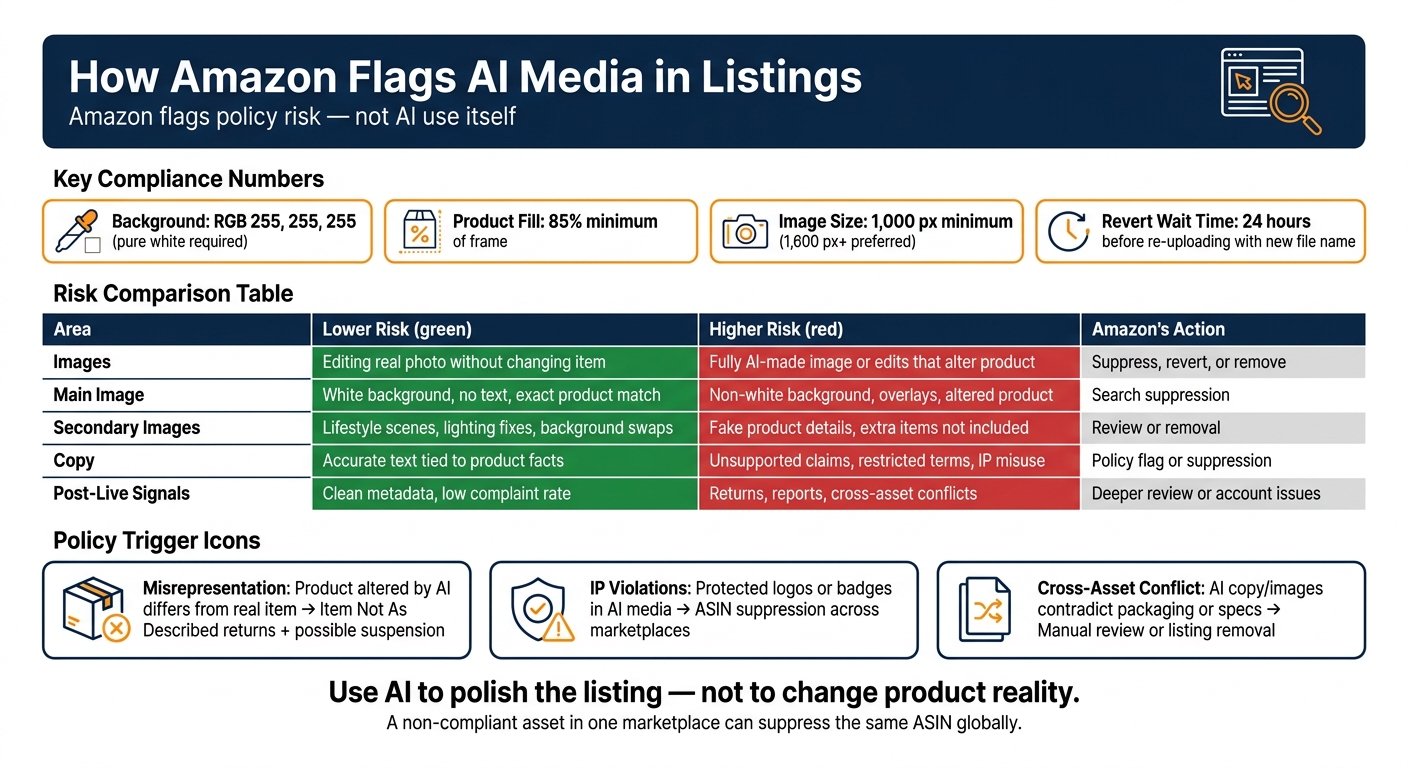
A few numbers stand out right away:
- Main image background must be 255, 255, 255
- Product fill must be at least 85%
- Image size should be at least 1,000 px on the longest side, with 1,600 px+ as the preferred target
- If Amazon reverts an image, sellers often wait 24 hours before re-uploading with a new file name
Amazon AI Listing Compliance: Risk Levels & Enforcement Outcomes
Amazon‘s 2026 Synthetic Media Rule: Tag AI Models or Lose Your Listings
sbb-itb-e2944f4
Quick Comparison
| Area | Lower Risk | Higher Risk | What Amazon May Do |
|---|---|---|---|
| Images | Editing a real product photo without changing the item | Fully AI-made product image or edits that change the product | Suppress, revert, or remove |
| Main image | White background, no text, exact product match | Non-white background, overlays, altered product look | Search suppression |
| Secondary images | Lifestyle scenes, lighting fixes, background swaps | Fake product details, extra items not included | Review or removal |
| Copy | Accurate text tied to product facts | Unsupported claims, restricted terms, IP misuse | Policy flag or suppression |
| Post-live signals | Clean metadata and low complaint rate | Returns, reports, cross-asset conflicts | Deeper review or account issues |
So the article’s main point is simple: Amazon flags AI media when it sees policy risk, not just AI use. That means your safest path is to keep images, copy, metadata, and packaging aligned before and after publishing.
How Amazon Flags AI Images and Copy
Automated Checks for Image Quality, Policy Violations, and Suspicious Edits
Amazon scans listings for background color, image quality, and banned text. What matters is the final image, not the tool used to make it.
That means an AI-generated image gets checked the same way as any other asset. If the image shows odd artifacts, bent edges, uneven lighting, or background details that don’t fit the product, it can get flagged. In some cases, Amazon may even swap out the new image and restore an older version it sees as less risky.
| AI-Specific Signal | Likely Outcome |
|---|---|
| Artifacts, warped edges, or inconsistent lighting | search suppression |
| Altered product shape, color, or texture | returns or suspension |
| Invented background elements or unnatural shadows | automatic reversion |
| Unsupported performance statements or IP misuse | policy flag or listing suppression |
This doesn’t always stay limited to one store, either. A non-compliant asset in one marketplace can affect the same ASIN in other marketplaces too.
Copy goes through much the same review process, but Amazon looks for different warning signs.
How Amazon Reviews AI-Generated Copy on Detail Pages
Amazon scans titles, bullets, descriptions, and A+ content for banned claims, restricted wording, and IP misuse, whether the copy was written by a person or generated with AI.
And it doesn’t stop once the page is live. Metadata and customer reports can push that same listing into a deeper review after publication.
Metadata, Customer Report Paths, and Listing Escalation
When Metadata Verification Matters
After Amazon’s automated checks, metadata can decide whether an image update goes through the right way. That’s why it helps to keep source files and versioned exports organized, with file names that stay consistent from one asset to the next. Clean file management sounds boring, sure, but it can save a lot of back-and-forth when Amazon reviews image updates.
If an image uses a synthetic human model, Amazon may ask for disclosure metadata that identifies the performer as AI-generated. And if Amazon suppresses or reverts an image, check the asset in Seller Central or Brand Registry first, then upload a clean version.
Once an asset is live, reports and internal review can push things much further.
How Customer, Brand, and Internal Reports Can Escalate a Listing
A listing can be escalated through three paths: customer complaints, Brand Registry reports, or Amazon’s internal review.
Repeated returns marked as “Item Not As Described” can hurt account health and may lead to suspension. Brand Registry reports can flag copy or images that misstate a product or infringe IP, and those reports move into a faster moderation queue than standard customer complaints. Amazon’s internal systems also scan the catalog all the time and may flag, revert, or suppress a listing. Because ASINs are linked across marketplaces, a non-compliant image in one marketplace can trigger suppression that also affects the U.S. listing. If another seller or Amazon Retail has locked the detail page, even brand owners may have to open a manual case with Seller Support to fix it.
These escalations usually connect back to the policy triggers covered next.
Policy Triggers That Put AI Media at Risk
Misrepresentation and Intellectual Property Issues
Once Amazon scans the asset, a few repeat problems tend to cause most enforcement. In plain terms: Amazon usually flags AI media when the final asset misstates the product, breaks image rules, or clashes with the rest of the listing.
The biggest risk is misrepresentation. AI tools can change a product’s shape, color, or texture. If the physical item doesn’t match what the listing shows, customers may file "Item Not As Described" returns. That can hurt account health and even lead to suspension. Even small color changes can create a gap between the listing and the actual product, which can drive up return risk.
There’s also the intellectual property side. AI-generated media that includes protected logos or promotional badges can trigger ASIN suppression across marketplaces or account health warnings.
| Trigger | What Causes It | Enforcement Outcome |
|---|---|---|
| Product differs from the real item | Altering shape, color, texture, or adding features the product lacks; showing accessories or environments not included in the purchase | "Item Not As Described" returns; listing or account suspension |
| Protected logos or badges | Including protected logos or promotional badges in AI-generated media | ASIN suppression across marketplaces; account health warning |
| Listing details conflict | AI copy or images that contradict packaging or physical product specs | Manual review; listing removal |
File size, format, or upload issues can stop a publish, but those are separate from AI-specific policy triggers.
Main Image Violations and Cross-Asset Inconsistency
Main images need extra care because Amazon reviews them more strictly than secondary images. If the main image breaks the rules, search visibility can be suppressed.
Amazon also checks the full listing as a set. That means the title, bullets, images, A+ content, and packaging all need to line up. If one part says one thing and another shows something else, that mismatch can trigger review or removal. The simplest way to avoid this is to make sure every image, claim, and product detail matches the real item.
How Sellers Can Lower Risk Before and After Publishing
Build a Pre-Publish Review Process for Images, Metadata, and Claims
A pre-publish checklist helps you catch problems before Amazon reviews the listing.
That matters because the same things Amazon flags during review are usually the same things you could have caught before upload. So instead of fixing issues after the fact, build a simple workflow that checks images, metadata, claims, and the common report triggers covered earlier.
Here’s a clean way to split ownership:
- The Creative or Photographer handles image specs: a pure white background (RGB 255, 255, 255), product fill of at least 85% of the frame, and image resolution of at least 1,000 px on the longest side, with 1,600 px or more as the preferred target.
- The Brand Manager checks that AI did not change the product’s physical appearance and that the main image has no banned text or watermarks.
- The Operations or Account Manager handles flat-file uploads, naming syntax, and checks across global marketplaces.
Before you publish, review these four checkpoints in order:
- Main image integrity: Make sure the product matches the physical item exactly. Use AI only for secondary images.
- Metadata and attribute audit: Pull the category template and confirm all required fields, like size, material, and color, instead of patching one-off errors inside Seller Central.
- Claim review: Remove unsupported or restricted claims before upload.
- Asset naming check: Use the standard naming syntax
[ASIN].[Variant Code].[Extension]for uploads, such asB08XYZ1234.MAIN.jpg.
Monitor Suppressed Content and Account Health After Updates Go Live
Once the listing is live, check for suppression, reversions, and account-health issues every day.
Each morning, review the suppressed, stranded, and Fix Your Products views. When a listing gets suppressed, speed matters. A delay can cut visibility and stall sales.
There are also two less obvious issues to watch.
First, Amazon’s automated review can swap a new image back to an older version. If that happens, delete the image, wait 24 hours for the cache to clear, and then re-upload it with a new file name.
Second, if you sell in other countries, don’t assume a fix in the U.S. account has already carried over to CA, UK, or EU marketplaces. Sync between marketplaces can lag.
These checks help lower the odds that AI-edited assets lead to suppression or customer complaints.
Conclusion: Use AI to Improve Listings Without Adding Compliance Risk
Use the checks above to avoid the flags covered in this guide.
Amazon reviews AI media through automated image scans, copy review, metadata checks, customer reports, and internal escalations. Keep the product representation accurate, keep metadata clean, and review every claim before it goes live.
Use AI for speed, not for changing product reality. Use it to improve listings, while keeping the main image accurate and the copy compliant.
FAQs
Can Amazon automatically detect AI-edited images?
Yes. In practice, Amazon can flag AI-edited images through automated catalog scans and image compliance checks.
If an image breaks Amazon’s rules, the listing can get suppressed until you swap in a new image. That often happens when the main image has a non-white background, text overlays, blur, or a product photo that looks altered or doesn’t match the item being sold.
Amazon can also flag image-to-listing mismatches. For example, if the photo doesn’t line up with the product title, variation, or other listing fields, it may trigger a review. In some cases, Amazon may even revert the image and use a version it sees as safer.
Will one flagged image affect my listing in other marketplaces?
Yes. Amazon links ASINs across marketplaces, so a non-compliant image uploaded in an international account – like the UK, Canada, or Mexico – can suppress your U.S. listing.
There’s another wrinkle too: cross-market sync can lag or fail. So even if you fix the image in one marketplace, that change may not clear the issue elsewhere.
Check your international accounts and make sure no non-compliant images are attached to that ASIN.
What should I do if Amazon reverts my updated image?
Amazon may have flagged the new image by mistake and switched the listing back to an older file. If that happens, delete the image in the backend, wait 24 hours so the cache can clear, and then upload it again using a new filename.
If the same issue comes back, check the file name and the image itself. The file should follow the ASIN.MAIN.jpg format. The main image also needs a pure white background, and the product should take up about 85% of the frame.
If the listing is still locked after that, contact Seller Support.