

Starting a business on Amazon can feel like a dream – until inventory mismanagement turns it into a nightmare. My pet brand collapsed because of overstocking, stockouts, and reliance on manual systems. A single warehouse error at Amazon’s ABE8 center in June 2024 spiraled into lost sales, excess fees, and deactivated listings.
Here’s what went wrong:
- Overstocking: Excess inventory led to storage fees and cash flow issues.
- Stockouts: Running out of top sellers tanked rankings and sales.
- Manual Tracking: Spreadsheet errors caused overselling and account health warnings.
- Overreliance on FBA: No backup plan left me vulnerable to Amazon’s limitations.
What I’d do differently:
- Use automated inventory tools for accurate demand forecasting.
- Set dynamic reorder points with safety stock to prevent stockouts.
- Adopt a hybrid fulfillment model (FBA + FBM) to stay flexible.
Inventory management isn’t just logistics – it’s the backbone of growth. Without the right systems, even a great product can fail.
Amazon Inventory Mismanagement: Key Statistics and Costly Mistakes
Amazon Accelerate 2025: Inventory Insights: Fine-Tuning Your FBA Stock Management
How Amazon Inventory Mismanagement Destroyed My Pet Brand
A series of inventory missteps led to the collapse of my pet brand.
Overstocking and Excess FBA Fees
I made a critical error by overstocking inventory. For a couple of my SKUs, the supply exceeded Amazon’s 90-day storage limit, which flagged them as excess inventory. The situation spiraled quickly – aged inventory surcharges started eating into my profits, especially for bulky items. One particular cat bed, which wasn’t selling, ended up costing me more in monthly storage fees than I could make in profit per unit.
This overstock didn’t just rack up fees; it tied up much-needed cash. That cash could’ve been used for marketing or to restock items that were actually selling. To make matters worse, my Inventory Performance Index (IPI) dropped below Amazon’s recommended threshold. This triggered strict storage limits on my account, stopping me from sending in new, more profitable stock. It became a vicious cycle: poor inventory management led to cash flow issues, which then stunted my ability to grow.
But while excess inventory drained my resources, other mistakes made the situation even worse.
Stockouts and Lost Sales
Despite having too much stock of some items, I managed to run out of my best-selling dog treat pouch. The stockout lasted several days, and the effects were immediate. My organic ranking for key search terms plummeted, and even after restocking, it took weeks to recover. Robyn Johnson from Marketplace Blueprint couldn’t have put it better:
"The 10 commandments of Amazon selling are that you never run out of inventory, you never run out of inventory, you never run out of inventory."
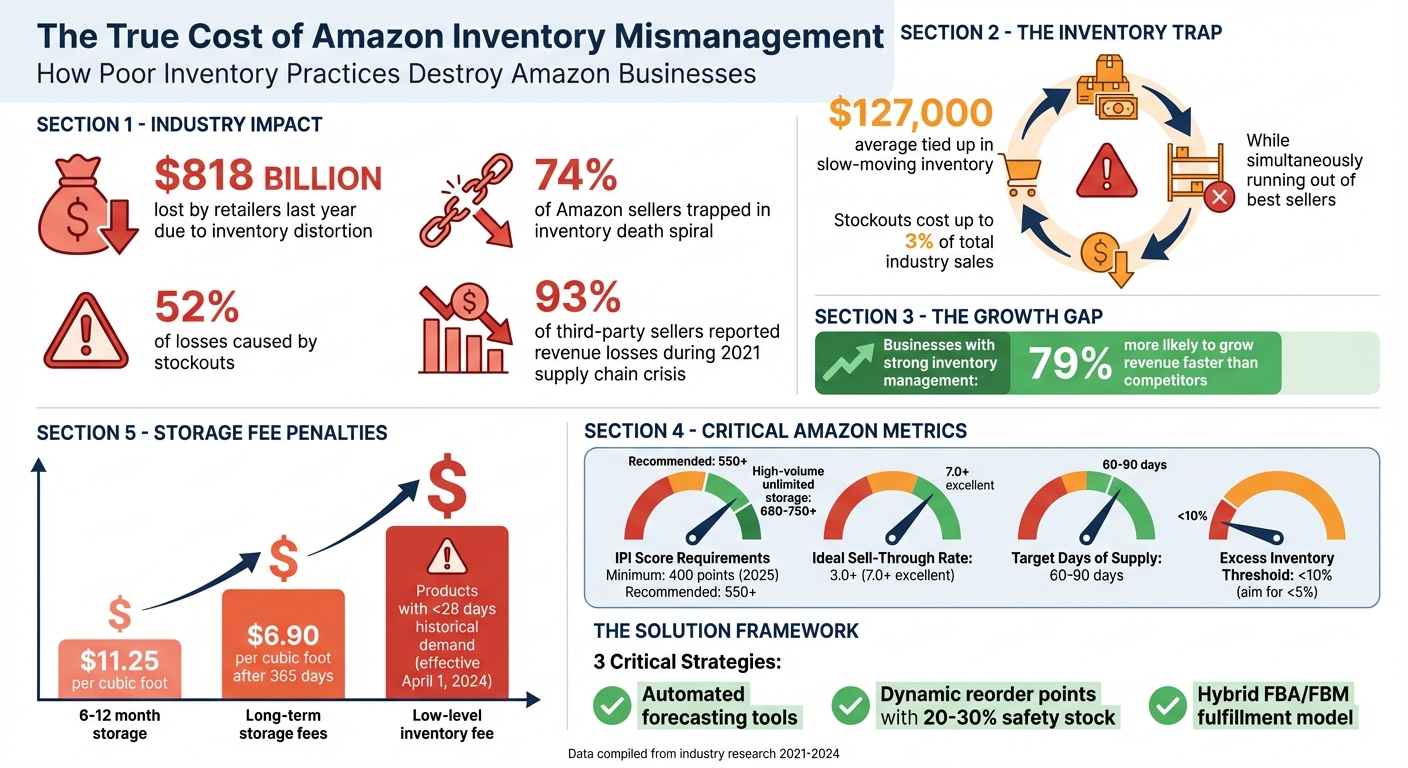
The financial hit was devastating. Not only did I lose direct sales during the stockout, but the drop in ranking slowed my sales velocity for weeks. And in retail, stockouts don’t just hurt in the short term – they can cost up to 3% of total industry sales as customers switch to competitors and may never return.
These losses were compounded by another major flaw in my system: relying on manual inventory tracking.
Manual Inventory Tracking Failures
I managed my SKUs manually across Amazon, Shopify, and wholesale accounts using Google Sheets. This system was a ticking time bomb. Inevitably, errors crept in. For instance, after a bulk wholesale order, I forgot to update my spreadsheet in time. This led to overselling a popular cat toy on Amazon. When I couldn’t fulfill those orders, I had to cancel them, which hurt my account health and resulted in a warning from Amazon.
Abby Jenkins, Product Marketing Manager at NetSuite, explains this all too well:
"Human error is usually the No. 1 reason for inaccurate item counts, which causes shrinkage, meaning loss of inventory. Miscounting or typing in the wrong number when manually managing inventory can eventually lead to stockouts."
Without automation, every misstep snowballed. My manual system left me constantly reacting instead of planning. I’d often realize I was low on stock too late to reorder, especially with the long lead times from suppliers and Amazon’s slow check-in process. This lack of foresight was a recipe for disaster.
The Key Mistakes I Made (And What I Learned)
Reflecting on the inventory challenges I mentioned earlier, my failures boiled down to three interconnected mistakes. Each one not only hurt my sales but also taught me some hard lessons.
Ignoring Demand Forecasting and ABC Analysis
One of my biggest errors was ignoring data when placing orders. Instead of relying on analytics, I let gut feelings guide me. For example, when a supplier offered a bulk discount on cat toys, I jumped at the deal without considering how fast those items would sell. Meanwhile, my best-selling dog treat pouch – responsible for 20% of my revenue – kept running out because I spread my inventory budget too thin.
This is a common pitfall. A staggering 74% of Amazon sellers fall into an "inventory death spiral", constantly juggling stockouts and cash flow issues. I was no exception. Without using ABC Analysis, I ended up with $127,000 tied up in slow-moving inventory while my top sellers were out of stock. Ayman Farooq, Founder of The Smart Sellers Edge, summed it up perfectly:
"The average seller has $127,000 tied up in slow-moving inventory while simultaneously running out of their best sellers."
What I should have done was allocate 60% of my inventory budget to A-Class products – the top 20% of items that generate the most revenue – and kept just 7 days of safety stock for them to maintain faster turnover. Instead, I diluted my resources across too many mediocre SKUs.
No Safety Stock or Reorder Points
Another costly mistake was not maintaining safety stock. When my dog treat pouch ran out, my Sponsored Product ads were disqualified, and my organic ranking took a nosedive. Ben Donovan, Co-founder of Brand Builder University, explains the risks:
"When you run out of stock for a significant period, you run the risk that the Amazon algorithm will see your product as declining in popularity and adjust its organic ranking accordingly."
The financial consequences were harsh. Retailers lost $818 billion last year due to inventory distortion, with 52% of that loss caused by stockouts. I became part of that statistic. Without dynamic reorder points (calculated as Average Daily Sales × Lead Time + Safety Stock), I was always reacting to problems instead of preventing them.
I learned the hard way that businesses with strong inventory management practices are 79% more likely to grow revenue faster than their competitors. Unfortunately, I wasn’t one of them.
Overreliance on Amazon FBA Without Backup Plans
My third mistake was putting all my faith in Amazon FBA. As eComEngine warns:
"The FBA program… can provide a false sense of security. The fact of the matter is that even though FBA does a great job, you must resist the urge to ‘set it and forget it.’"
During the 2021 supply chain crisis, 93% of Amazon third-party sellers reported revenue losses due to stockouts. I was completely unprepared. I had no 3PL backup, no FBM option, and no contingency plan. When FBA hit capacity, my business came to a standstill. If I had adopted a hybrid fulfillment model, I could have avoided this disaster and maintained sales velocity – but I realized this far too late.
These mistakes made it clear that a strong, data-driven inventory strategy is non-negotiable. I’ll dive into what that looks like in the next section.
sbb-itb-e2944f4
What I’d Do Differently: Strategies for Inventory Success
Looking back, my missteps could have been avoided. Here’s how I’d approach building a reliable inventory system from the ground up, based on lessons learned.
Invest in Automated Inventory Management
Relying on spreadsheets for inventory management was a costly mistake. If I were starting over, I’d prioritize automated inventory tools right away. These systems use historical data, seasonality, and trends to accurately forecast demand. Features like real-time syncing across sales channels and automated "Reorder Now" alerts help prevent overselling and stockouts.
These tools also monitor your Inventory Performance Index (IPI) and FBA capacity limits, ensuring you stay within Amazon’s storage guidelines. By keeping stock levels optimized, you can avoid excess inventory fees and storage restrictions. Starting April 1, 2024, Amazon introduced a low-level inventory fee for products with less than 28 days of historical demand. Automated systems help maintain an ideal balance – around 60 days of supply – minimizing risks of both stockouts and overstock penalties.
This kind of automation would have saved my pet brand from the inventory pitfalls I encountered.
Establish PAR Levels and Dynamic Reorder Points
Reorder points are the backbone of effective inventory management. Here’s the formula: (Average Daily Sales × Lead Time) + Safety Stock. For example, if a product sells 15 units daily, has a 45-day lead time, and includes a 20% safety stock (135 units), the reorder point is 810 units. Safety stock acts as a buffer against unexpected demand or supplier delays, and maintaining 20% to 30% of your base reorder point is crucial. If supplier lead times vary, adjust the buffer to cover the maximum delay.
Dan Ashburn, Co-Founder of Titan Network, highlights the stakes:
"Your Amazon inventory management strategy is the difference between scaling to $20M and plateauing at $5M."
Reorder points shouldn’t be static. For example, during November’s seasonal spike, applying a 3.2x multiplier ensures you’re prepared for increased demand.
Once reorder points are defined, diversifying fulfillment methods can keep your business running smoothly, even when one channel faces challenges.
Use a Hybrid FBA/FBM Fulfillment Model
Relying solely on FBA can be risky. A hybrid approach – combining Fulfillment by Amazon (FBA) with Fulfillment by Merchant (FBM) – adds a layer of protection. Listing the same ASIN under both methods ensures that if FBA inventory runs out or faces delays, FBM can step in to keep your listing active and maintain your organic rank.
For high-velocity SKUs, FBA is ideal to maximize Prime conversions. Meanwhile, FBM works better for slower-moving products, oversized items (over 20 lbs.), or when FBA storage constraints arise. For instance, while FBA is perfect for fast-selling dog treats, a bulky cat tree with slower turnover is more cost-effective through FBM – especially given FBA’s long-term storage fees, which can hit $6.90 per cubic foot after 365 days.
Marija Cvetkovic from Seller Candy explains the advantage:
"With FBM, sellers can still fulfill orders directly from their own inventory in case they run out of stock in Amazon’s fulfillment centers. This allows them to keep their listings active and continue making sales."
A hybrid model also helps you navigate Amazon’s strict IPI storage limits during peak seasons, allowing for uninterrupted growth. This approach would have been a game-changer for my pet brand.
Proven Strategies for Long-Term Success on Amazon
After addressing immediate challenges, it’s important to focus on strategies that ensure lasting success on Amazon. These insights, developed from hard-earned lessons, can help avoid the mistakes that once derailed my pet brand.
Monitor Key Metrics Continuously
Keeping a close eye on your Inventory Performance Index (IPI) is essential. Amazon rates sellers on a scale from 0 to 1,000, with a minimum score of 400 points required for 2025. Experts suggest maintaining a score of 550+ for solid standing, while high-volume sellers aiming for unlimited storage should target 680-750+.
Amazon updates IPI scores weekly, so make it a habit to check your Inventory Performance Dashboard every Tuesday. The IPI score is determined by four main factors: excess inventory (40–45%), sell-through rate (30–35%), stranded inventory (15–20%), and in-stock rate (10–15%). Ideally, your sell-through rate should be at least 3.0, with anything above 7.0 considered excellent. Keep excess inventory below 10%, and strive for less than 5% by monitoring items with over 90 days of supply.
Use automated alerts to address stranded inventory within 24–48 hours. Additionally, track your Days of Sales in Inventory (DSI) and aim for 60 to 90 days of supply. This helps avoid stockouts while steering clear of penalties for excess inventory.
Once your metrics are stable, you can fine-tune your PPC strategy to further improve inventory turnover.
Leverage PPC Campaigns to Boost Inventory Turnover
Your advertising strategy plays a key role in managing inventory effectively. When your stock levels hover around 60–75 days of supply, increasing your PPC spend can help accelerate sell-through. On the flip side, if stock levels drop critically low, it’s wise to pause ads to prevent stockouts.
Robyn Johnson, Founder and CEO of Marketplace Blueprint, emphasizes:
"Inventory stockouts not only lose the incremental sales, but also impact your organic rankings and diminish your advertising efforts."
For slow-moving or seasonal items, running aggressive PPC campaigns can often be more cost-effective than paying removal fees or long-term storage charges, which can climb to $11.25 per cubic foot for items stored between 6–12 months. A stockout can have a drastic impact on your sales rank, with some products dropping from a rank of 1,850 to over 16,000 in just one week.
A well-executed PPC strategy not only boosts sell-through but also improves your IPI, creating a positive cycle. Reviewing the "Restock Inventory" report in Seller Central on a weekly basis ensures your ad spend aligns with inventory levels.
Conduct Regular Cycle Counts and Audits
Regular cycle counting – where small portions of inventory are checked periodically – offers a practical alternative to full-scale warehouse audits. In the past, relying solely on manual tracking without regular audits led to costly overselling errors. To avoid such issues, perform weekly stranded inventory reviews and schedule full audits quarterly.
Inspect incoming shipments immediately to confirm quantities, serial codes, and product quality. For those managing high volumes, monthly reviews of reorder points and variance analysis can help identify problems like supplier delays or unexpected demand spikes.
Dan Ashburn from Titan Network highlights the importance of this approach:
"The difference isn’t just better forecasting – it’s treating every inventory dollar as working capital that must generate measurable returns."
Conclusion: Protecting Your Brand from Inventory Pitfalls
The strategies outlined above highlight just how essential a solid inventory system is for any business.
Take my experience with my pet brand as a cautionary tale. Its downfall wasn’t inevitable – it was the result of avoidable mistakes that nearly wiped out my business. And I wasn’t alone. Inventory issues like stockouts and overstocks cost retailers billions each year. If I’d realized earlier that inventory management goes beyond logistics and serves as the backbone of sustainable growth on platforms like Amazon, my story might have ended differently.
To move forward successfully, there are three key practices you need to implement: automated forecasting, dynamic reorder points with safety stock, and a hybrid FBA/FBM fulfillment strategy. These aren’t just buzzwords – they’re proven methods. In fact, businesses with effective inventory management systems see revenue growth climb by 79%. That kind of growth isn’t luck; it’s the result of smart, disciplined systems that make every dollar work harder.
On the flip side, relying on manual inventory management or failing to maintain an IPI score above 680 puts your brand at serious risk. The gap between scaling to eight-figure success and watching your business crumble often hinges on having the right systems and expertise in place. That’s where Emplicit comes in. They specialize in turning these strategies into tangible results, offering end-to-end support in inventory management, account health monitoring, and PPC optimization – areas where my own business struggled. Plus, their USA-based account managers bring a deep understanding of marketplace operations, making their approach both practical and effective.
Don’t let long-term storage fees or stockouts derail your organic rankings. Learn from my mistakes – protect your brand now so you don’t pay the price later.
FAQs
How do automated inventory tools help prevent overstocking and running out of stock on Amazon?
Automated inventory tools take the hassle out of managing stock by doing the heavy lifting for you. They track sales patterns, forecast demand, and even send alerts when it’s time to reorder, so you’re never caught off guard. This helps strike the perfect balance – avoiding the headaches of running out of stock while steering clear of overstocking, which can rack up unnecessary storage costs.
With these tools in place, you can fine-tune your supply chain, maintain steady cash flow, and ensure your Amazon account stays in good standing by reliably meeting customer demand.
What are the advantages of combining FBA and FBM for order fulfillment on Amazon?
Using a hybrid fulfillment model – combining Fulfillment by Amazon (FBA) and Fulfilled by Merchant (FBM) – lets you leverage the strengths of both approaches. FBA is perfect for fast-moving, lightweight products. It offers perks like Prime-eligible shipping, better chances of winning the Buy Box, and hassle-free returns processing. These advantages can help increase sales while easing the operational burden on your team. On the other hand, FBM is better suited for slower-moving, oversized, or high-margin items. It gives you more control over costs, avoids steep storage fees, and allows you to respond quickly to inventory changes or seasonal demand.
This hybrid strategy also helps mitigate risks. If there’s a disruption at an Amazon warehouse, your FBM inventory can still fulfill orders, ensuring steady cash flow. You can also fine-tune which products go through FBA or FBM based on real-time data, balancing costs while maintaining a reliable shopping experience for customers. This flexibility is especially valuable for pet brands that sell both small consumables and larger accessories, helping you manage profits effectively and stay competitive on Amazon.
Why is it important to maintain a high Inventory Performance Index (IPI) score on Amazon?
Maintaining a high Inventory Performance Index (IPI) score is crucial for Amazon sellers. Why? Because it directly affects your FBA storage limits and can save you from expensive overage fees. A good IPI score means your inventory is well-managed, ensuring your products stay in stock without overcrowding Amazon’s warehouses.
When you focus on improving your IPI score, you’re not just cutting down on unnecessary costs. You’re also improving cash flow, keeping your account in good standing, and positioning your brand to stand out in the competitive Amazon marketplace.