

When it comes to running Amazon PPC campaigns, keyword match types are the rules that determine when your ads appear based on how closely a shopper’s search query aligns with your targeted keywords. Amazon offers three match types: Broad Match, Phrase Match, and Exact Match, each with unique benefits and limitations.
- Broad Match: Provides the widest reach by targeting synonyms, variations, and related terms. It’s ideal for discovering new keywords but can lead to irrelevant clicks without proper negative keyword management.
- Phrase Match: Offers a balance between reach and precision by requiring the keyword phrase to appear in the correct order, while allowing additional words before or after. It’s great for scaling mid-funnel traffic.
- Exact Match: The most precise option, targeting only exact keywords or close variants. It delivers higher conversion rates and lower ACoS but limits reach.
Key takeaway: Use Broad Match for keyword discovery, Phrase Match to refine targeting, and Exact Match for high-conversion campaigns. Combining these types strategically, along with negative keywords, helps optimize ad spend and improve campaign performance.
Amazon PPC: Keyword Match Types Explained
sbb-itb-e2944f4
Broad Match Type
Broad Match is the most flexible keyword setting on Amazon, designed to cast a wide net. It allows your ads to appear when a shopper’s search includes your target keyword in any order, as well as synonyms, abbreviations, plurals, and related variations.
Since 2026, Amazon’s algorithm has become more advanced, thanks to AI-driven semantic matching. This technology focuses on shopper intent rather than just word-for-word matches. For instance, a keyword like "wireless earbuds" might also trigger ads for "Bluetooth earbuds waterproof." Additionally, the system automatically ignores common stop words like "the", "of", and "if".
Now, let’s break down how Broad Match works in real-world campaigns.
How Broad Match Works
When you use a Broad Match keyword, Amazon evaluates the relevance of your product, not just the exact terms in your keyword. For example, if your keyword is "running shoes", your ad could show up for searches like "best running shoes", "athletic footwear for jogging", "types of sneakers for runners", or "shoes suitable for marathon running."
Amazon’s system also adapts to various word forms, including:
- Plurals (e.g., "bulbs" vs. "bulb")
- Acronyms (e.g., "NY" for "New York")
- Stemming (e.g., "pink notepad" for "notepad")
- Accents (e.g., "café" vs. "cafe")
- Misspellings (e.g., "earbudz" for "earbuds")
Broad Match is the default setting for all keywords in Amazon Ads unless you specify a different match type.
For advertisers seeking more control, there’s the Broad Match Modifier. By placing a plus sign (+) before a word – like +men shoes – you ensure that the specific term must appear in the search query. This option offers a middle ground between Broad Match and Phrase Match.
With this wide-reaching setup explained, let’s dive into the advantages Broad Match can offer.
Benefits of Broad Match
The biggest benefit of Broad Match is keyword discovery. It acts as a powerful research tool, helping you uncover the exact search terms your customers use. It also tends to have lower Cost-Per-Click (CPC) bids than Exact Match, making it an affordable way to test market interest. For example, running a Broad Match campaign during a product launch can help you gather data to refine your targeting later.
"The core truth about broad match: it’s a discovery engine, not a conversion engine. Use it to find winners, not to scale them."
- Maria R. Donis, Amazon eCommerce Content Specialist
Broad Match also maximizes your reach. Around 62% of Amazon advertising costs are tied to Broad Match campaigns, highlighting its popularity for driving visibility.
Drawbacks of Broad Match
One downside of Broad Match is its lower relevance. Ads can show up for searches that are only loosely related to your product. For instance, an ad for "adult costumes" might appear when someone searches for "children’s costumes", leading to wasted ad spend on clicks that don’t convert.
Without proper negative keyword management, Broad Match campaigns often have an Advertising Cost of Sale (ACoS) between 45% and 70%. Conversion rates typically fall between 5% and 12%, with click-through rates ranging from 0.3% to 0.6%. However, by using negative keywords effectively, you can bring ACoS down to a more reasonable 25% to 40%. Careful management of negative keywords is critical for keeping costs under control.
Phrase Match Type
Phrase Match strikes a balance between reach and precision, offering a middle ground between Broad Match and Exact Match. It provides more control than Broad Match by requiring your keyword phrase to appear in a specific order, while still allowing flexibility for variations. This approach maintains the core intent of your keyword while accommodating query variations.
This match type is especially helpful when you’ve identified high-performing keywords from Broad Match campaigns and want to refine your targeting without losing valuable traffic. It reduces wasted ad spend often associated with Broad Match while still capturing long-tail variations that Exact Match might overlook. This makes Phrase Match a logical step when optimizing campaigns after using Broad Match.
How Phrase Match Works
Your ad will appear only when the search query includes your exact keyword phrase, though additional words can appear before or after. However, the sequence of words in the phrase must remain intact.
For instance, if your keyword is "dish brush", your ad will show for searches like "scrubbing dish brush" or "dish brush packs." It won’t, however, trigger for searches like "brush dish" or "brush for doing dishes", as the word order is disrupted.
Phrase Match also accounts for close variations, such as plurals, misspellings, abbreviations, and translations. For example, "curtain rod" can match "curtain rods." In Sponsored Brands campaigns, it even includes semantic matching, which means it can trigger for synonyms or related terms – like matching "curtain rod" with "poles of curtains."
"Phrase match sits between exact and broad Amazon match types in terms of restrictiveness. Here, if a user enters your keyword, additional words can be added if your original words remain in the same order."
- Blair Forrest, Founder, AMZ Prep
Understanding these mechanics highlights why this match type is so effective.
Benefits of Phrase Match
Phrase Match is great for improving targeting accuracy without sacrificing too much reach. It captures relevant variations while filtering out irrelevant searches, making it an excellent option for mid-funnel shoppers – those who know what they want but are refining their search with details like size, color, or material.
For example, if you’re selling "blue running shoes", Phrase Match ensures that the key terms appear in order. This filters out irrelevant searches while still covering variations like "women’s blue running shoes" or "blue running shoes size 10."
Although Phrase Match usually has a higher cost-per-click than Broad Match, it reduces wasted ad spend by avoiding irrelevant clicks. This makes it more cost-efficient in the long run, as it increases the likelihood of conversions.
Drawbacks of Phrase Match
The main downside of Phrase Match is its narrower reach compared to Broad Match. Since it only triggers ads for searches that include the keyword in the specified order, you may see fewer impressions and clicks overall.
For example, if your keyword is "fried meat", your ad won’t appear for searches like "fried chicken meat." To cover such variations, you’d need to add them as separate keywords, which can require additional effort.
Phrase Match also demands more active monitoring than Broad Match. Regularly reviewing search term reports is necessary to spot gaps where relevant searches aren’t triggering your ads. This can increase the time and effort required for campaign optimization and keyword updates.
Exact Match Type
Exact Match is the most precise targeting option in Amazon PPC, designed for reaching shoppers with a clear purchase intent. It’s often the go-to choice for sellers who have already explored Broad and Phrase Match and are ready to refine their strategy for maximum accuracy.
Unlike Broad or Phrase Match, Exact Match doesn’t aim for a wide audience. Instead, it focuses on shoppers who know exactly what they’re looking for. While this narrower approach limits reach, the payoff is higher conversion efficiency, making it a powerful tool for targeted campaigns.
How Exact Match Works
With Exact Match, your ad appears only when a shopper’s search query matches your keyword exactly. Minor close variants, like plurals or common misspellings, are allowed, but additional words or phrases will not trigger the ad.
For instance, if your Exact Match keyword is [running shoes], your ad will show for searches like "running shoes" or "running shoe" (a plural variation). However, it won’t appear for queries like "best running shoes", "blue running shoes", or "running shoes for men".
This laser-focused targeting ensures your ad is seen by shoppers who are most likely to convert.
Benefits of Exact Match
The biggest advantage of Exact Match is its ability to capture high-intent searches with unparalleled relevance, leading to better conversion rates. Industry data shows that Exact Match campaigns often achieve conversion rates between 15% and 25%.
"Exact match keywords are your profit engine – they capture high-intent shoppers with laser precision, deliver the lowest ACoS, and scale your most proven winners."
- Maria R. Donis, Amazon eCommerce Content Specialist
Additionally, Exact Match campaigns boast impressive click-through rates (CTR), typically ranging from 0.8% to 1.5%, nearly doubling the performance of Broad Match. This precision also allows for 100% attribution between your keyword and the shopper’s search term, giving you greater control over performance tracking and budget allocation. It’s an ideal strategy for protecting branded terms or scaling proven high-performing keywords.
Drawbacks of Exact Match
The primary downside of Exact Match is its limited reach. Since your ads only appear for exact keyword matches, you miss out on potential impressions and clicks from related or long-tail variations.
This targeting type also requires detailed keyword research to identify the exact terms your audience uses, which can be tricky for new product launches without historical data. Many experts suggest waiting 1–3 months after a launch to gather performance insights before committing heavily to Exact Match campaigns.
Another challenge is cost. Exact Match keywords often come with higher Cost Per Click (CPC) due to their competitiveness. In crowded categories, bidding wars can drive CPCs to unsustainable levels, so regular monitoring is essential to maintain profitability.
Match Type Comparison
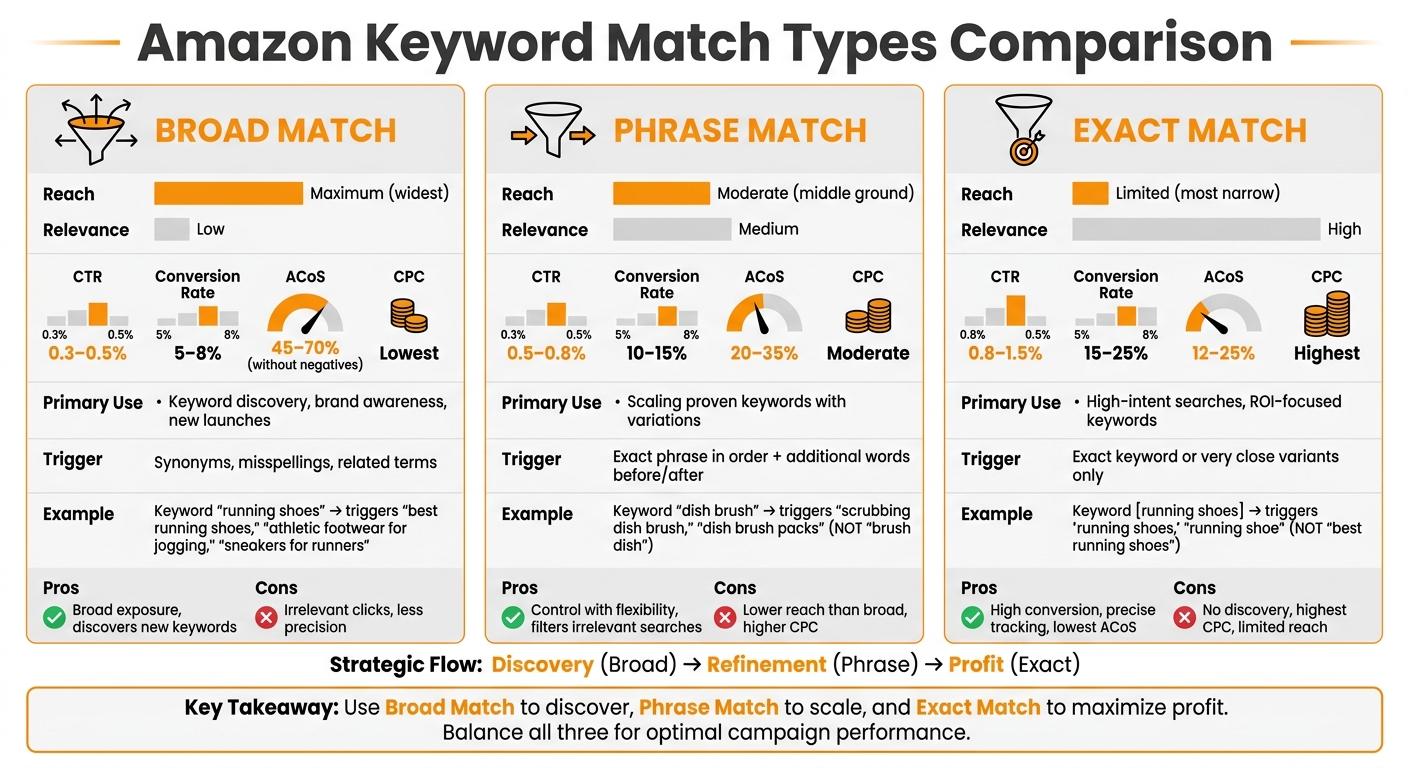
Amazon PPC Match Types Comparison: Broad vs Phrase vs Exact Match
Let’s break down the different match types and how they balance reach and precision.
Broad Match offers the widest reach, capturing searches that are loosely related to your keywords. While this can help discover new opportunities, it often sacrifices relevance. On the other hand, Exact Match is all about precision. It focuses on high-intent searches, ensuring relevance but limiting visibility. Phrase Match sits between these two – providing enough control to avoid wasted clicks while still catching variations of your target keywords.
Understanding these distinctions allows you to allocate your budget wisely. For example, Exact Match often delivers higher conversion rates, making it a strong choice for profitability.
Here’s a quick reference table summarizing the strengths and trade-offs of each match type:
Comparison Table
| Feature | Broad Match | Phrase Match | Exact Match |
|---|---|---|---|
| Definition | Targets related terms and synonyms broadly. | Matches the exact phrase with some flexibility. | Focuses on the exact keyword or close variants. |
| Trigger Conditions | Includes synonyms, misspellings, and related terms. | Matches exact phrases or similar meanings. | Matches exact keywords or very close variants. |
| Reach | Maximum | Moderate | Limited |
| Relevance | Low | Medium | High |
| Primary Use Case | Keyword discovery, brand awareness, new launches. | Scaling proven keywords with variations. | High-intent searches, ROI-focused keywords. |
| ACoS Risk | High (45–70% without negatives) | Medium (20–35%) | Low (12–25%) |
| CTR | 0.3–0.5% (without negatives) | 0.5–0.8% | 0.8–1.5% |
| Conversion Rate | 5–8% (without negatives) | 10–15% | 15–25% |
| CPC | Lowest | Moderate | Highest |
| Pros | Broad exposure, helps discover new keywords. | Offers control while allowing some flexibility. | High conversion rates and precise tracking. |
| Cons | Risk of irrelevant clicks, less precision. | Lower reach than broad, higher CPC. | No keyword discovery, highest CPC, competitive bidding. |
Key Takeaway
Every match type has its role in a campaign. Use Broad Match to uncover new search behaviors, Phrase Match to scale established keywords with flexibility, and Exact Match to focus on high-performing terms and drive conversions. Balancing these types strategically can help you achieve the right mix of reach, control, and profitability.
When to Use Each Match Type
Choosing the right match type at the right time can make or break your campaign. Each type has a specific role, and knowing when to use them can significantly boost performance while keeping your budget in check.
When to Use Broad Match
Broad match is your go-to during the discovery phase – perfect for launching a new product or stepping into a new market. Think of it as your exploration tool. It helps uncover the search terms people use to find products like yours. To make the most of broad match, set up a dedicated campaign with a wide range of relevant keywords. Then, dive into your search term reports regularly to spot high-performing terms.
This match type is also a solid choice for brand awareness campaigns, where reach takes priority over immediate ROI. However, broad match can quickly eat into your budget if left unchecked, so pairing it with a robust negative keyword strategy is a must to avoid wasting money on irrelevant clicks.
When to Use Phrase Match
Phrase match shines during the refinement stage, typically within the first few months of your campaign. By this point, you’ve gathered enough data to know which keywords are working, and you’re ready to scale without losing precision. This match type bridges the gap between broad and exact match, capturing variations of your keywords while staying true to their intent.
Phrase match is particularly useful when word order matters. For example, if you’re selling "men’s running shoes", phrase match ensures your ad doesn’t show up for unrelated searches. It’s a smart way to scale your campaigns while keeping profitability in sight.
"Phrase match keywords strike a balance between broad and exact matches. It’s suitable for sellers seeking a more targeted reach while maintaining flexibility." – Shivam Kumar, Author, Adbrew
A winning strategy? Take the top-performing terms from your broad match campaigns and promote them to phrase match with slightly higher bids. This approach helps you transition smoothly from discovery to targeted scaling. Just like with broad match, negative keywords are essential here to block irrelevant or low-converting searches.
When to Use Exact Match
Exact match is your profit driver – the final stage of your campaign strategy. It’s most effective once you’ve identified your "money keywords", the ones that consistently deliver high conversions and a strong ROI. This is where you focus on precision, targeting only the most qualified shoppers.
In competitive U.S. markets, where CPCs can soar above $3.00–$5.00 per click, exact match gives you complete control over your budget. By targeting high-intent keywords, you can ensure every dollar is spent wisely. As noted earlier, exact match campaigns tend to deliver the best metrics, including superior conversion rates and lower ACoS.
To keep things optimized, review your search term reports weekly. Look for new high-intent variations that deserve their own exact match campaigns. Once a keyword proves its worth in phrase match, upgrade it to exact match with a higher bid to secure lower ACoS. And don’t forget – your product listings should feature top-notch A+ Content to turn those clicks into conversions effectively.
Managing Match Types Effectively
Running successful Amazon PPC campaigns requires a thoughtful mix of match types. Let’s break it down.
Using Multiple Match Types Together
Top sellers know the value of running separate campaigns for each match type, each serving a distinct purpose. Broad match campaigns act as the "farming" phase, helping you uncover how potential customers search for your product.
"Create a broad campaign with a ton of relevant keywords. Think of this as your research phase. Or as we call it, ‘farming’" – Carly M., Founder of PPC Farm
Once you identify high-performing keywords in broad match, you can promote them to exact match campaigns, where you bid more aggressively to maximize ROI. Phrase match serves as the middle ground, scaling successful keywords while maintaining control over relevance. This layered strategy allows you to strike a balance between discovery, reach, and profitability. On average, Amazon sellers spend around $258 or more daily on ads, with about 62% of that budget going toward broad match campaigns. That’s why it’s crucial to monitor each campaign type separately to optimize results.
In addition to segmenting campaigns, managing irrelevant traffic is just as important.
Using Negative Keywords
Negative keywords are a powerful tool for stopping wasted ad spend, especially in broad and phrase match campaigns. By telling Amazon which searches shouldn’t trigger your ad, you can avoid reaching shoppers who are unlikely to convert. Without negative keywords, broad match campaigns can quickly drain your budget on irrelevant search terms. Implementing them can significantly improve performance – reducing average ACoS from 45–70% to 25–40% and increasing conversion rates from 5–8% to 8–12%.
Start building your negative keyword list from Day 1 and review your search term reports weekly. If you notice a term from your broad campaign that isn’t delivering results, add it as a negative exact match to block future impressions. With Amazon’s AI-powered semantic matching becoming more aggressive, staying vigilant is key to preventing your ads from showing up for loosely related but irrelevant terms.
Adjusting Bids Based on Performance
Once you’ve segmented match types and filtered out irrelevant traffic, it’s time to fine-tune your bids. Your bidding strategy should align with the role of each match type. Exact match keywords deserve the highest bids because they target high-intent shoppers who are ready to buy. Broad match keywords, while less expensive, require careful oversight to avoid overspending on low-quality traffic.
"Exact match is the most restrictive and tends to produce the highest conversion rates, which is why the scaling bucket should not live in the same campaign as the learning bucket" – Stack Influence
Analyze your performance data weekly, focusing on metrics like ACoS, conversion rate, and Total Advertising Cost of Sales (TACoS). For exact match keywords that perform well, raise bids to secure top-of-search placements. In broad match campaigns, aim for efficiency by maintaining a higher threshold for keyword discovery while using negative keywords to cut out non-performers. Before scaling any campaign, ensure your product listing is optimized with high-quality images and reviews – weak listings can lead to higher ad costs.
Conclusion
By effectively using Broad, Phrase, and Exact match types, your Amazon PPC campaigns can move through a Discovery → Refinement → Profit ladder, transforming keyword research into actual sales. Broad match helps uncover what shoppers are searching for, acting as a discovery tool. Phrase match takes those findings and scales relevant terms, serving as the bridge between discovery and profit. Exact match then zeroes in on high-intent buyers, offering precise targeting and delivering the lowest ACoS – typically ranging from 12% to 25%. This structured approach not only improves your ad spend efficiency but also separates high-intent traffic from casual clicks.
"The debate of Amazon exact match vs broad match isn’t a battle with a single winner… you need both, used correctly, at the right time." – CaptenAMZ
When campaigns are managed properly and include negative keywords, ACoS can drop from 45–70% to 25–40%. Exact match campaigns, in particular, boast conversion rates between 15% and 25%, which is nearly triple the rates seen in unmanaged broad match campaigns.
Achieving success requires ongoing adjustments – reviewing search term reports weekly, moving high-performing keywords to exact match, and continuously adding negative keywords to cut down on wasted spend.
Emplicit’s PPC management services specialize in these strategies, offering brands selling on platforms like Amazon, Walmart, Target, and TikTok Shops expert support in keyword research, bid adjustments, negative keyword management, and campaign segmentation. Their approach ensures your ad budget drives discovery, scales effectively, and maximizes profitability across all match types. Mastering these techniques is key to staying competitive in today’s crowded marketplace.
FAQs
How do I choose the best match type for a new product?
When deciding on the right match type for a new product, think about your goals and how specific you want your targeting to be.
- Broad match: This option casts the widest net, making it great for increasing awareness and reaching a large audience.
- Phrase match: A middle ground between reach and relevance, it targets searches that include your keyword phrase in the correct order.
- Exact match: The most precise option, ideal for honing in on specific, high-performing keywords once you’ve gathered enough data.
A good approach is to begin with broad and phrase match to collect insights. Then, shift your focus to exact match for terms that show strong results.
What negative keywords should I add first?
One of the simplest ways to cut down on wasted ad spend is by using broad negative keywords. These are terms that might trigger your ads but are irrelevant to your product or niche and don’t lead to conversions. By filtering out these searches, you can focus your budget on the audience that actually matters.
Here’s how to get started:
- Spot irrelevant search terms: Look at the search terms report in your ad platform to find keywords that are triggering your ads but aren’t converting or are completely unrelated to your business.
- Add them as broad match negative keywords: Once identified, block these terms by adding them to your negative keyword list. This ensures your ads won’t appear for those searches anymore.
- Keep refining your list: Regularly review your campaign performance and update your negative keywords list. This ongoing adjustment helps maintain ad relevance and improves overall campaign results.
By staying proactive with negative keywords, you can run more efficient campaigns and target the right audience.
When should I move a keyword from Broad to Phrase or Exact?
When you need more precise targeting and want to reduce irrelevant ad spend, shift a keyword from Broad match to Phrase or Exact match. Phrase match allows your ads to show for search queries that include the exact keyword phrase or close variations, giving you better control. For the highest level of precision, use Exact match, ensuring your ads only appear for searches that closely align with your keyword. This approach sharpens your targeting and helps make your ad spend more efficient.