

Want to boost your Amazon sales? It all starts with effective keyword research.
Keywords directly impact your product’s visibility on Amazon. If your listing doesn’t include the right keywords, your product won’t appear in search results. With over 70% of shoppers sticking to the first page and the top 3 search results capturing 60% of clicks, optimizing for the right keywords is critical.
This guide walks you through:
- Defining seed keywords (e.g., "yoga mat" or "BPA-free water bottle").
- Expanding your keyword list using Amazon autocomplete, competitor analysis, and backend fields.
- Validating keywords with tools like Helium 10 to check search volume and competition.
- Prioritizing terms by buyer intent and relevance to maximize conversions.
- Integrating keywords into listings (titles, bullets, backend) and PPC campaigns.
- Continuously tracking performance and updating your strategy as trends evolve.
Key takeaway: Focus on keywords that drive purchases, not just traffic. A targeted approach ensures your product ranks higher, attracts buyers, and grows sales.
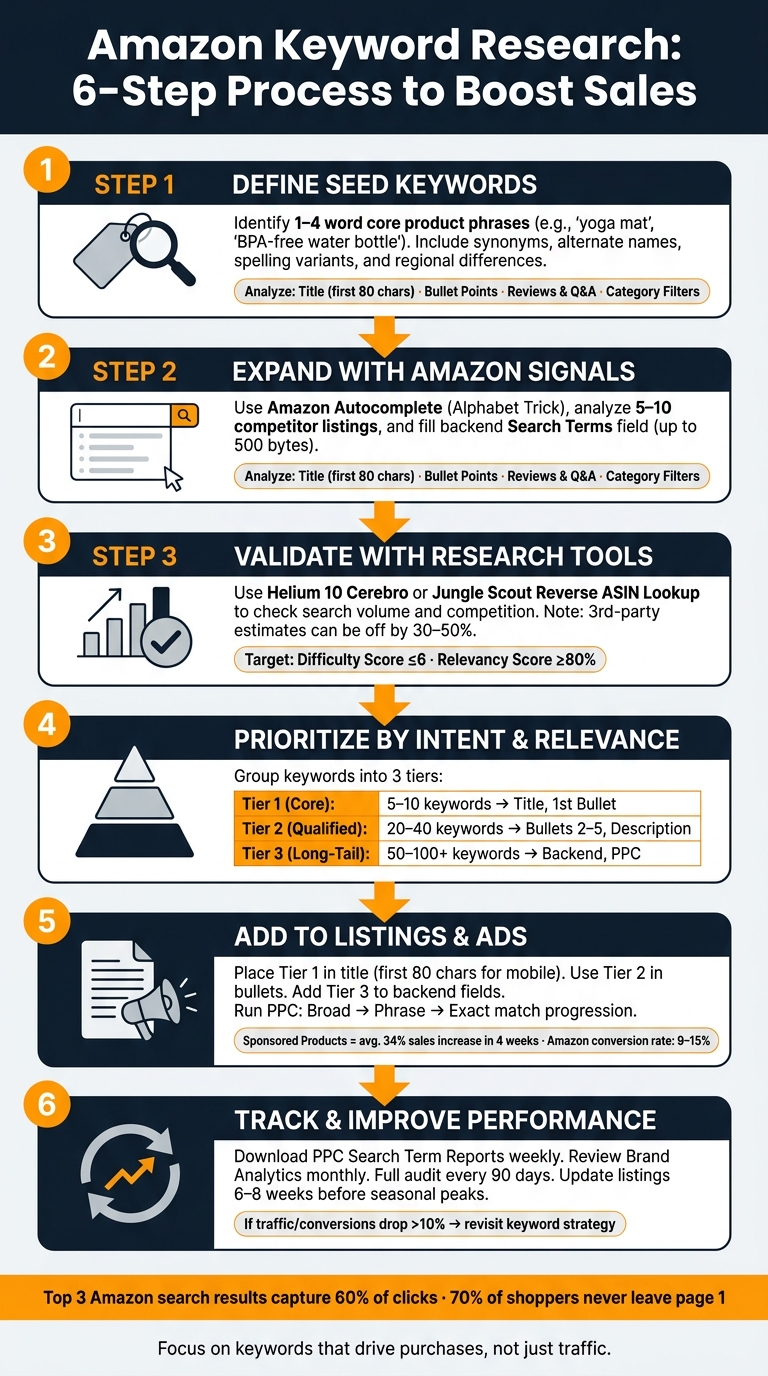
Amazon Keyword Research: 6-Step Process to Boost Sales
Step-by-Step Amazon SEO & Keyword Research | Full Course
Step 1: Define Your Seed Keywords
Seed keywords are short, focused phrases (1–4 words) that capture the essence of your product. Think of terms like "yoga mat", "water bottle", or "fitness tracker." These aren’t the final keywords you’ll use but serve as the foundation for generating a broader list of related keywords.
"Seed keywords act as magnets, attracting hundreds of related long-tail suggestions that real Amazon shoppers are using right now." – Keyword Tool Dominator
Identify Core Product Terms
Start by listing the key features, benefits, and target audience of your product. This helps ensure your research aligns with how potential buyers think and search, rather than relying on industry-specific terms.
For example, take a stainless steel water bottle. Your seed keywords might include terms like "water bottle", "stay hydrated", "stainless steel", "40oz", and "BPA-free." Each of these phrases reflects a specific buyer intent, whether it’s about material, size, or a health-related feature.
To refine your list, dive into customer reviews and Q&A sections for products in your category. These areas are goldmines for understanding how shoppers describe products in their own words. For instance, they might say "slip-resistant" instead of "non-slip", offering insights into the exact language buyers use when searching.
Once you’ve pinpointed these core terms, take it a step further by considering alternative phrasing.
Consider Alternate Names and Synonyms
Shoppers often use different terms for the same product, and identifying these variations can unlock entirely new search opportunities. For instance, some buyers might call a "bottle" a "flask", and Amazon treats these as separate search terms. Missing these alternatives could mean missing a whole group of potential customers.
"Getting this step right means every downstream decision, from tool-based expansion to final placement, stays grounded in real buyer intent." – Searchoneers
Don’t forget to account for spelling differences (like "gray" vs. "grey"), singular and plural forms, and abbreviations. For U.S. shoppers, regional differences also matter – someone might search for a "cell phone mount" while another types in "phone holder." Casting a wide net at this stage ensures you’re covering all potential search patterns before diving deeper into keyword expansion.
With a strong seed keyword list in hand, you’re ready to explore Amazon’s search signals to expand your keyword strategy.
Step 2: Expand Your Keyword List Using Amazon Signals
After identifying your seed keywords, it’s time to grow your list using Amazon signals. Amazon provides a treasure trove of insights into shopper behavior, giving you direct access to keyword opportunities based on real searches.
Use Amazon Autocomplete
Amazon’s autocomplete suggestions are an excellent resource because they reflect actual search frequency, buying patterns, and even seasonal trends. This feature offers a snapshot of the exact phrases customers are typing in.
"These suggestions reflect actual customer searches. It’s like getting a direct feed from shoppers." – Amazoniac Agency
To maximize autocomplete, try the Alphabet Trick. Type your seed keyword followed by each letter of the alphabet – for example, "water bottle a", "water bottle b", and so on. This approach helps uncover a wide range of popular search terms tied to specific buyer intents or product features. You can also experiment with intent-based phrases like "water bottle for…" or "water bottle with…" to identify even more targeted queries.
Once you’ve gathered ideas, cross-check them against competitor listings to refine your keyword list.
Review Competitor Listings
Analyzing competitor listings is another effective way to uncover relevant keywords. Focus on 5–10 top organic listings in your category. Pay close attention to the first 80 characters of their titles, as these often highlight the most important keywords. Bullet points, on the other hand, typically include secondary keywords that emphasize features and benefits. Don’t overlook customer reviews and Q&A sections – these provide natural language terms like "slip-resistant" or "non-slip" that can resonate with buyers but might not show up in your initial research.
| Competitor Element | What to Extract |
|---|---|
| Title (first 80 characters) | Primary keywords; core product terms |
| Bullet Points | Secondary keywords; feature-benefit phrases |
| Reviews & Q&A | Natural language; synonyms; problem-solving terms |
| Category Filters (sidebar) | Attribute terms like "BPA-free" or "dishwasher safe" |
Keywords that frequently appear across multiple top-ranking listings are especially valuable, as they signal relevance within your category.
Use Backend Keyword Fields
Backend keyword fields allow you to add terms that don’t fit naturally into your visible listing. The Search Terms field supports up to 500 bytes, providing room for alternate spellings, synonyms, abbreviations, and even common misspellings that might seem out of place in your title or bullet points.
To make the most of this space, follow these best practices:
- Skip punctuation and use single spaces between terms.
- Write everything in lowercase.
- Avoid stop words like "a", "the", or "with", as Amazon ignores them but they still take up space.
- Don’t repeat keywords from your visible listing. Amazon automatically deduplicates keywords across your content, so duplicates won’t add any ranking value.
"Backend fields are not where you dump every word you can think of; they’re where you extend your reach cleanly without cluttering the page." – Peter Sims, Brand Evangelist & Sales Specialist, Velocity Sellers
To confirm that a backend keyword is indexed, search for your ASIN combined with that keyword on Amazon. If your product shows up, the keyword is live and contributing to your visibility.
Step 3: Validate Keywords with Research Tools
Once you’ve built a keyword list using Amazon signals, the next step is to make sure those keywords will actually drive buyer behavior. That means validating and narrowing down your list with the help of specialized research tools.
Check Search Volume and Competition
Two key metrics to focus on are monthly search volume and competition level. Tools like Helium 10 Cerebro and Jungle Scout are excellent for this. They allow you to perform a Reverse ASIN Lookup – just input a competitor’s ASIN, and you’ll get a breakdown of every keyword they rank for, their organic position, and the estimated monthly search volume.
Another helpful metric is Title Density, which shows how many top listings use a specific keyword in their title. This can give you a sense of how competitive that keyword is. Helium 10’s Cerebro IQ Score simplifies things by combining search volume and the number of competing products into a single ratio, making it easier to spot keywords with high demand but less competition.
Keep in mind, though, that third-party search volume estimates can be off by as much as 30% to 50% compared to Amazon’s actual data. If you’re part of the Amazon Brand Registry, you can use the Search Query Performance Report in Brand Analytics to cross-check your findings. This report provides first-party data directly from Amazon, including real impressions, clicks, and conversion rates.
"Amazon keyword research is where most sellers think they have it figured out – and where most sellers are dead wrong. They run a competitor through Helium 10, grab the top 50 keywords by volume, dump them into a campaign, and wonder why their ACoS is 60%." – Hunter Harris, Founder, GigaBrands
Once you’ve reviewed search volume and competition, the next step is to filter your keywords based on relevance and buyer intent.
Filter by Relevance and Buyer Intent
Search volume alone doesn’t guarantee success. You also need to evaluate how relevant each keyword is to your product and whether it reflects buyer intent. Since Amazon shoppers are typically ready to buy, your keyword strategy should focus on attracting purchase-ready traffic instead of just generating clicks.
A great way to test this is the Page Fit Check: search the keyword on Amazon and examine the top results. If your product doesn’t fit naturally alongside those listings, your conversion rate will likely suffer no matter how much traffic the keyword generates. Long-tail keywords with specific details – like size, material, or use case – are often better choices. These terms indicate that shoppers know exactly what they’re looking for and tend to convert better than broad, high-volume keywords.
"The question to keep asking is not ‘how many people search this?’ The question is ‘how many of those people buy?’" – Chuck Kessler, SEO and GEO Strategist, Canopy Management
For newer sellers, it’s smart to start with keywords that have a difficulty score of 6 or below and a relevancy score of 80% or higher. To test whether a high-priority keyword is worth pursuing, consider running a short 14-day exact match PPC campaign. If the keyword doesn’t convert even with top-of-page placement, it’s probably not worth optimizing your listing for.
sbb-itb-e2944f4
Step 4: Prioritize Keywords by Intent and Relevance
Once you’ve validated your keyword list, the next step is to prioritize them based on buyer intent and relevance. Not every keyword carries the same weight, and using the wrong term in the wrong spot can hurt both your search rankings and your sales.
"Keyword research is more than a traffic decision. Ultimately, it’s a revenue decision." – Chuck Kessler, SEO and GEO Strategist, Canopy Management
Group Keywords into Tiers
Divide your keywords into three tiers, focusing on intent and specificity.
| Keyword Tier | Quantity | Intent Level | Listing Placement |
|---|---|---|---|
| Tier 1 (Core) | 5–10 | Highest (Purchase) | Title, 1st Bullet |
| Tier 2 (Qualified) | 20–40 | High (Consideration) | Bullets 2–5, Description |
| Tier 3 (Long-Tail) | 50–100+ | Specific (Niche) | Backend Search Terms, PPC |
- Tier 1: These are your most critical, high-intent keywords that directly define your product.
- Tier 2: These keywords focus on attributes like size, material, or use case.
- Tier 3: Long-tail keywords fall here. While they may not generate a lot of traffic, they attract buyers who already know exactly what they’re looking for.
To identify Tier 1 keywords, try scoring each term on a scale of 1 to 5 across three factors: relevance, search volume, and competition (with lower competition scoring higher). Keywords with the highest combined scores should be your top priorities.
Assign Keywords to the Right Listing Areas
Amazon’s algorithm doesn’t treat all parts of your listing equally. The title carries the most weight for indexing, followed by bullet points, backend search terms, and finally the product description.
- Title: Place Tier 1 keywords here, ideally within the first 80 characters to ensure they display fully on mobile devices.
- Bullet Points: Use Tier 2 keywords to highlight product benefits and features in bullets 2–5.
- Backend Search Terms: Tier 3 keywords, along with synonyms, alternate spellings, and translations, belong here. Note that Amazon limits this field to 250 bytes.
Avoid repeating keywords across listing fields. Once a term is in your title or bullet points, it doesn’t need to appear elsewhere. This approach maximizes indexing coverage, reinforcing the keyword strategies outlined earlier in Step 2.
"If your listings are live but traffic and sales feel totally random, the issue probably isn’t your product. It’s the keywords you’re feeding Amazon." – Peter Sims, Brand Evangelist, Velocity Sellers
Step 5: Add Keywords to Listings and Ads
Once you’ve prioritized your keywords, it’s time to integrate them into your listings and ads for maximum visibility. Placement matters – a lot.
Write Titles and Bullet Points with Primary Keywords
Your title should feature the most relevant, high-impact keyword – the Anchor Tenant – to clearly define your product category in Amazon’s algorithm.
For bullet points, use Tier 2 keywords to add depth. Start with your most important secondary terms in the first bullet point, then incorporate supporting details like size, material, or use case into the remaining bullets. This approach ensures your bullets not only resonate with customers but also help with indexing behind the scenes.
Optimize Backend Fields and Descriptions
Backend search terms are your chance to include synonyms, common misspellings (e.g., "garlic crusher" instead of "garlic press"), regional variations, and Spanish-language equivalents for the U.S. market. Remember, Amazon indexes each keyword only once, so don’t repeat terms already in your title or bullets – it’s a waste of valuable space that could be used for new keywords. Use single spaces to separate words and regularly review these fields as search trends evolve.
Target Keywords in Sponsored Ads
Amazon PPC is where your keyword strategy meets real-world advertising. Start with Broad or Automatic campaigns to discover customer search terms. Then, move converting keywords to Phrase match campaigns, and scale the top performers with Exact match targeting.
Here’s why this matters: Sellers using Sponsored Products experienced an average 34% increase in sales within four weeks. And with Amazon’s average conversion rate for sellers ranging between 9% and 15%, PPC can significantly boost your results. To protect your ROI, regularly add negative keywords. Use "Negative Exact" to block specific non-converting terms and "Negative Phrase" to eliminate irrelevant themes identified in your Search Term Reports.
Keep an eye on TACoS (Total Advertising Cost of Sales) alongside ACoS to measure how ad spend impacts organic sales growth. As you gather performance data, refine your keyword strategy to stay aligned with changing shopper behavior. This ongoing process ensures your ads remain effective and your keywords stay relevant.
Step 6: Track and Improve Keyword Performance
Once you’ve incorporated keywords into your listings and ads, the next step is keeping a close eye on their performance to maintain and boost your growth.
Read Your Search Term Reports
The Sponsored Products Search Term Report provides the exact phrases shoppers use before clicking on your ad. Comparing the terms you targeted with the actual search terms shoppers use can uncover valuable opportunities for improvement.
Focus on identifying terms that show strong conversion rates and solid attributed sales at a manageable ACoS – these are your "Money Keywords." If a keyword is driving sales but your product isn’t ranking on page one organically, it’s a sign that optimization is needed. On the flip side, keep an eye out for terms that burn through ad spend without resulting in sales. These "Unconverted Keywords" might indicate a disconnect between your listing and shopper intent, or that the wrong audience is being targeted.
For high-performing keywords, consider moving them from Broad or Auto campaigns into Exact Match campaigns for more precise bidding control. For underperforming keywords, add them as negative keywords to stop wasting ad spend. These insights can help you fine-tune both your ad campaigns and your product listings.
Track Campaign and Listing Performance
Building on your search term findings, regularly monitor your campaign and listing performance to detect any early signs of decline. Make it a habit to download PPC Search Term Reports weekly, review Brand Analytics monthly, and conduct a comprehensive audit every 90 days.
When analyzing Brand Analytics, focus on the search query purchase rate rather than raw search volume. For instance, a keyword with 5,000 monthly searches and an 8% conversion rate can lead to six times more purchases than a high-volume keyword with 50,000 searches but only a 1% conversion rate – all while spending the same amount on ads.
If you notice a drop in traffic or conversions exceeding 10%, it’s time to revisit your keyword strategy.
Update Keywords as Trends Change
Keywords aren’t static – they need regular updates as shopper behavior, competition, and seasonal trends shift. A strategy that worked well at launch might lose effectiveness over time.
Before committing to new keywords, run a 14–21 day Exact Match PPC test to ensure they convert at a cost that aligns with your margins. If a keyword fails to convert even with top-of-search placement, adding it to your title won’t solve the problem.
For seasonal products, plan ahead by updating your listings 6 to 8 weeks before peak demand. This gives Amazon enough time to index your changes, and it helps you avoid the increased CPCs that come with the peak season. As Enso Brands emphasizes:
"Keyword research is not a one-time task. Sellers who update their keyword strategy regularly consistently outperform those who optimized once at launch." – Enso Brands
Conclusion: Building a Stronger Amazon Keyword Strategy
Amazon keyword research plays a crucial role in driving product visibility and increasing sales. Chuck Kessler, SEO and GEO Strategist at Canopy Management, highlights its importance:
"This process shifts your focus from mere traffic to profitable sales, reinforcing our comprehensive guide."
The six steps outlined earlier provide a repeatable framework. Each step builds upon the previous one, and skipping any can lead to wasted ad spend, poor organic rankings, or both. Together, these steps give you the tools to outpace competitors and turn casual shoppers into loyal buyers.
The competition for top listings on Amazon is intense, and landing on the first page is non-negotiable. A precise, data-driven approach is what ensures your product not only gets there but stays there.
One key takeaway: shift your mindset from chasing traffic to focusing on purchases. For example, an 8% conversion rate from 5,000 monthly searches generates far more revenue than a high-traffic, low-conversion strategy – without increasing costs.
If you’re looking to refine your strategy and maximize results, consider partnering with experts. For professional Amazon services, check out Emplicit.
FAQs
How do I choose the best seed keywords for my product?
Kick things off by coming up with 30–50 phrases that highlight your product, its standout features (like material, size, or benefits), and the problem it addresses. Think from a shopper’s perspective – use simple, natural language instead of technical terms or industry jargon.
Here are a few tips to get started:
- Tap into Amazon’s autocomplete: Type in broad keywords related to your product and let the suggestions guide you.
- Check competitor titles: See how similar products are described and what phrases they use.
- Dive into customer reviews: Look for recurring words or phrases that shoppers use when praising or critiquing similar products.
For now, focus on broad seed keywords (1–4 words) and aim for quantity over quality. Later, you can refine and validate these phrases by analyzing their search volume, competition levels, and relevance to buyer intent.
What’s the difference between search volume and buyer intent?
Search volume measures how often a term is searched each month, giving insight into its potential to drive traffic. However, high-volume keywords often attract casual browsers rather than serious buyers, which can lead to lower conversion rates and increased ad costs.
On the other hand, buyer intent reveals how ready a shopper is to make a purchase. Keywords with high buyer intent, often long-tail phrases, are more specific and show that a user has a clear idea of what they’re looking for. While these terms usually have lower search volumes, they tend to deliver higher conversion rates, better ad performance, and greater profitability.
How often should I update my Amazon keywords?
Staying on top of your Amazon keywords is an ongoing process. For stable product niches, conduct a thorough keyword audit every 90 days. If you’re in a highly competitive category, consider doing this monthly to stay ahead.
Make updates to your keywords right away if there are major product changes, like introducing new sizes or colors. Also, keep an eye on Brand Analytics to spot emerging trends and adjust your strategy for seasonal shifts.
Don’t forget to use PPC data to refine your keywords. Remove terms that aren’t performing well to ensure your campaigns remain efficient and relevant.