
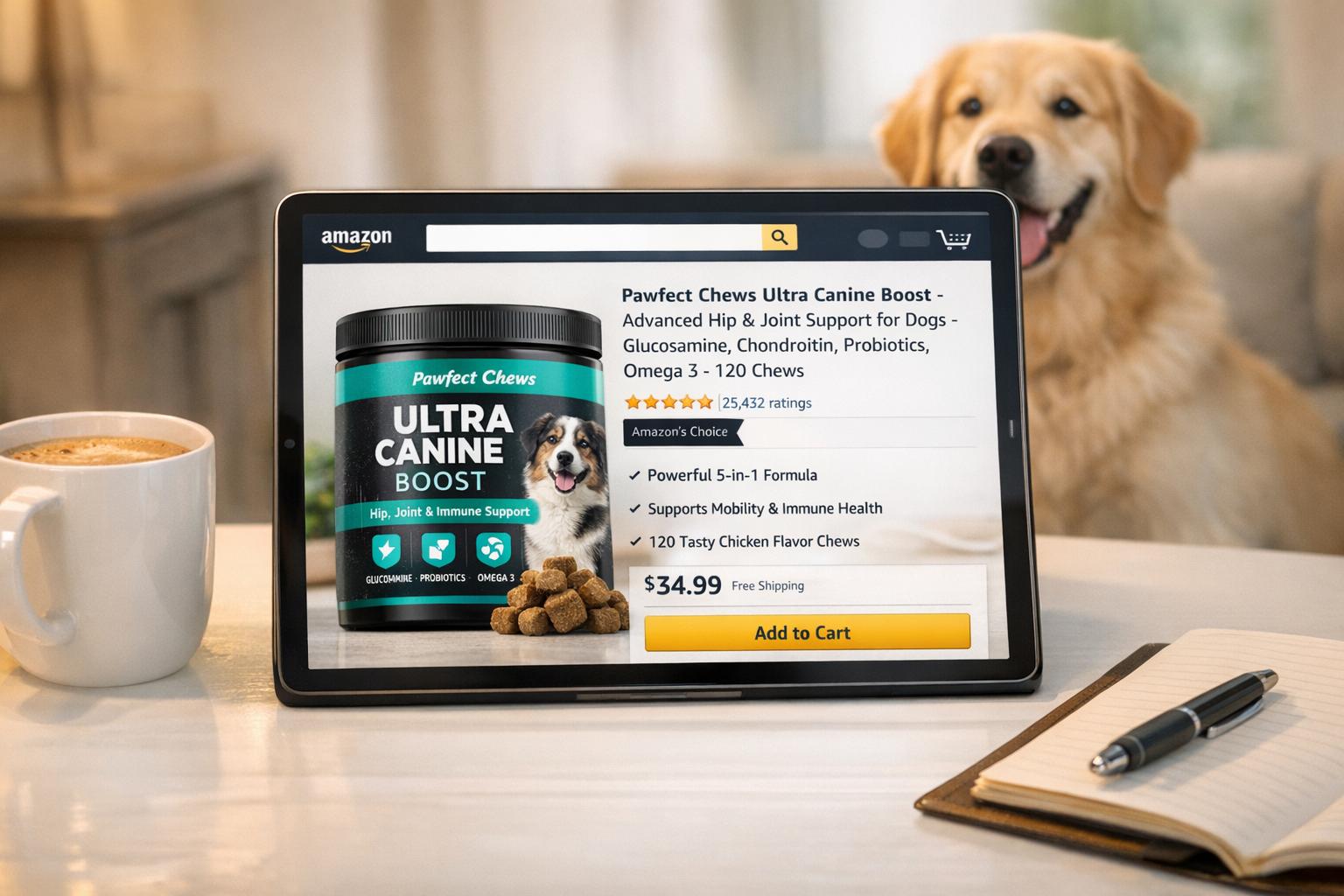
What made one Amazon dog supplement listing hit $1.2M in sales last year? It wasn’t the product – it was the listing. The secret? Amazon A+ Content. This feature transforms plain product pages into visually engaging, trust-building experiences with infographics, lifestyle images, and comparison charts.
Here’s why it works:
- Pet owners care about details. A+ Content highlights benefits, like ingredient quality or safety, in ways plain text can’t.
- Shoppers want visuals. Listings with videos and lifestyle images see up to 3.6x more conversions.
- It’s proven to boost sales. Basic A+ Content can increase sales by 8%, while Premium A+ Content pushes that to 20%.
With U.S. pet spending set to exceed $136 billion in 2025, optimizing your Amazon listing with A+ Content is no longer optional – it’s how you stand out and convert buyers.
The ULTIMATE Amazon A+ Content Tutorial – Tips, Templates, Do’s & Don’ts
Why Most Dog Supplement Listings on Amazon Fail
Most dog supplement listings on Amazon struggle to achieve decent sales. Why? Sellers often repeat the same three mistakes that hurt visibility and tank conversions before buyers even consider clicking "Add to Cart." Let’s break down these common pitfalls and how they sabotage your chances of success.
Vague Titles and Product Descriptions
Your product title has less than three seconds to grab attention. Yet many sellers waste this opportunity by either overloading titles with keywords or keeping them so vague that shoppers scroll right past.
Keyword stuffing is a major offender. Repeating the same word multiple times – like "Dog Supplements Dog Joint Support Dog Hip Joint Dog Vitamins for Dogs" – violates Amazon’s 2025 guidelines and makes your listing look spammy. Not only does this irritate buyers, but Amazon’s algorithm flags it as well.
On the other hand, vague titles are just as damaging. Titles under 80 characters that fail to specify details like quantity, size, or intended audience (e.g., "for Small, Medium, Large Dogs") leave buyers guessing. With over 80% of Amazon shoppers using mobile devices, the first 80 characters are all they see before the title gets cut off. If your title doesn’t clearly explain what you’re selling and who it’s for, you lose the click.
Another misstep? Listing features instead of benefits. Buyers don’t care about "500mg Glucosamine" – they care about how it helps their dog. Say something like "helps senior dogs climb stairs with ease" instead. Pet owners want results, not a chemistry lesson.
"When you write your heading, you spend 80 cents of your dollar." – David Ogilvy, Copywriter
Lastly, avoid using prohibited promotional language like "Best Seller", "Hot Item", or "Sale." Amazon will suppress your listing if you break these rules, costing you visibility when you need it most.
Poor Images and Missing Storytelling
Your main image is responsible for up to 63% of your click-through rate. If it looks cheap, blurry, or generic, shoppers will immediately lose trust.
Low-quality images are a dealbreaker. Buyers decide in seconds, and your main image is the first thing they notice. If it doesn’t look professional or fails to showcase a clear benefit, they’ll move on without hesitation.
"Low-quality creatives can look cheap or fake and turn shoppers away." – eComEngine
In the pet category, emotional connection is key. Buyers are drawn to images of real pets using the product, not sterile shots on a white background. They need to picture their own dog benefiting from your supplement. If your images don’t tell that story, your listing becomes invisible.
Another common mistake? Wasting image slots. Amazon allows up to seven images, yet many sellers use only three or four. Each unused slot is a missed chance to address buyer objections, show lifestyle context, or include comparison charts that build trust.
What works? In January 2024, a pet supply brand revamped its listing with My Amazon Guy. They added Premium A+ Content featuring real dogs and addressed customer concerns directly. The result? A 40% year-over-year sales increase, totaling $754,119 in revenue and attracting 684 new-to-brand customers.
Ignored Backend Keywords and SEO Features
If Amazon’s algorithm can’t find your listing, neither can shoppers. Skipping backend keywords is like opening a store without putting up a sign.
Amazon’s A9 and A10 algorithms rely on keywords to index listings. When you leave out relevant terms from both your visible content and backend search fields, your product won’t appear in search results for those queries. Every missed keyword equals lost revenue.
The backend "Search Terms" field gives you 250 bytes to include synonyms, abbreviations, and alternative names that don’t fit naturally into your title or bullet points. Unfortunately, many sellers either ignore this field or waste it by repeating keywords already visible on the page. This misstep widens the gap between average listings and those that dominate the market.
"Backend keywords help Amazon’s algorithm accurately rank your products, without having to keyword-stuff your product listing." – Fahim Sheikh, CEO, Trellis
Here’s proof: In January 2024, My Amazon Guy overhauled a pet brand’s SEO strategy. They increased indexed organic keywords from 898 to 1,487. For one product alone, they achieved 2,345 ranking keywords. This optimization led to a 915% surge in impressions (over 35 million total) and contributed to that 40% sales boost, reaching $754,119 in revenue.
With 52% of consumers starting their product searches directly on Amazon, failing to optimize for the exact phrases they’re typing hands sales to competitors who do their homework.
The $1.2M Secret: Amazon A+ Content
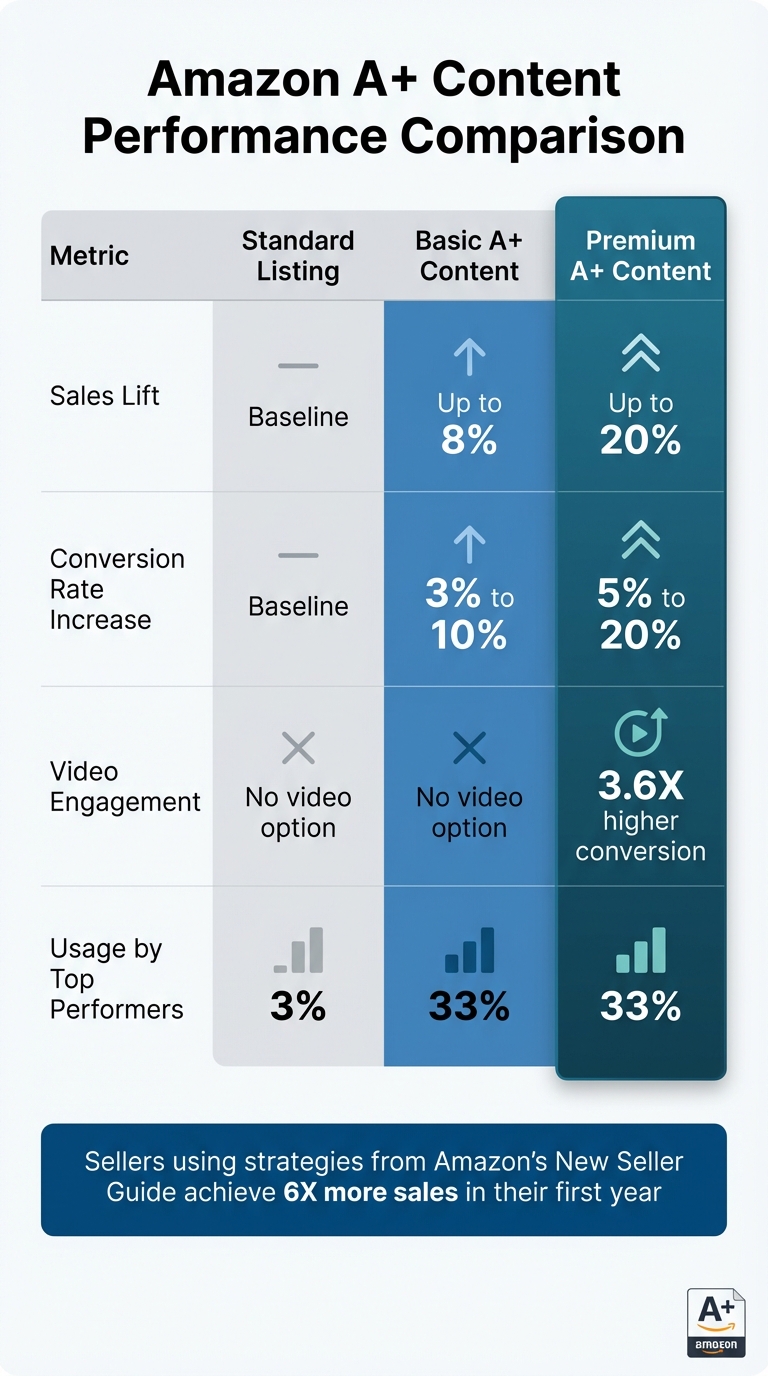
Amazon A+ Content Performance: Standard vs Basic vs Premium Listings Comparison
The secret to a $1.2M boost? Amazon A+ Content. While most sellers rely on basic text descriptions and bullet points, this approach turns a product page into a visually engaging story that addresses every potential buyer concern. Here’s how Amazon A+ Content works its magic.
What Amazon A+ Content Is
Amazon A+ Content (formerly Enhanced Brand Content) upgrades your product description by swapping plain text for rich visuals and multimedia. Think high-quality images, comparison charts, formatted text, and videos – all designed to make your product stand out.
This feature transforms the product page into a scrollable, visually appealing experience, especially effective for mobile shoppers. Modular layouts guide customers through your product’s story in a way that’s both functional and memorable.
There are three types of A+ Content:
- Basic A+ Content: Includes up to five modules such as enhanced images, feature highlights, and technical specs.
- Premium A+ Content: Offers up to seven modules, adding larger images, 720p videos, interactive elements, navigation carousels, and Q&A sections.
- Brand Story: A separate section under "From the brand" that highlights your company’s history, values, and product catalog.
Basic A+ Content and Brand Story are free for sellers in the Amazon Brand Registry. Premium A+ Content is currently free during a promotional period, provided sellers meet certain criteria, like publishing a Brand Story across all ASINs and completing at least five approved A+ projects in the past year.
For pet owners, this enhanced content answers critical questions about safety and benefits directly on the page.
Why A+ Content Works for Dog Supplements
Pet owners are meticulous, analyzing every ingredient as if they’re buying for a family member. According to research, 65% of pet owners consider ingredient quality the top factor when choosing pet products. A+ Content allows sellers to highlight ingredient sourcing, certifications, and lab testing in ways standard descriptions can’t.
Dog supplements often involve complex details – like glucosamine levels or probiotic strains – that overwhelm buyers when presented in dense text. A+ Content simplifies this with scannable infographics and icons, making technical information easy to digest.
"HexClad is a premium product, so A+ Content is where we convey the story of how our product adds value, showcase content that demonstrates how to use our product and point out unique features." – Jason Panzer, President, HexClad
Interactive features like Q&A modules address common safety concerns – dosage, side effects, age suitability – eliminating barriers to purchase. Comparison charts guide customers in selecting the right formula (e.g., "Calming" vs. "Multivitamin") and encourage multi-product purchases from the same brand instead of competitors.
Lifestyle images of happy, healthy dogs build emotional connections. Unlike generic product shots, these visuals help pet owners picture their own dog thriving, which can significantly boost conversions.
Measurable Results from A+ Content
The data speaks for itself. Amazon reports that Basic A+ Content can increase sales by 8%, while Premium A+ Content can push that lift to 20%. When optimized effectively, A+ Content can drive a 25% increase in conversion rates.
Videos are particularly impactful. Shoppers who watch product videos are 3.6 times more likely to buy. With 96.3% of customers saying video is crucial for product research, and 93% prioritizing visual appeal when making a purchase, the power of A+ Content becomes undeniable.
High-performing listings leverage enhanced content more often. In fact, 33% of top-performing listings use A+ Content, compared to just 3% of the lowest-performing ones. Listings with optimized content can see up to 21 times more conversions than those without.
| Metric | Standard Listing | Basic A+ Content | Premium A+ Content |
|---|---|---|---|
| Sales Lift | Baseline | Up to 8% | Up to 20% |
| Conversion Rate Increase | Baseline | 3% to 10% | 5% to 20% |
| Video Engagement | No video option | No video option | 3.6X higher conversion |
| Usage by Top Performers | 3% | 33% | 33% |
Sellers who adopt strategies from Amazon’s New Seller Guide – including A+ Content – achieve 6 times more sales in their first year. And in the fast-growing pet supplies market, expanding at 25.3% annually (outpacing Amazon’s overall growth of 19.9%), A+ Content is no longer optional. It’s the key to standing out in a crowded marketplace.
sbb-itb-e2944f4
How to Create A+ Content That Converts
Creating A+ Content for Amazon doesn’t have to be overwhelming, but it does require meeting some key requirements and following a few practical steps. Here’s how you can turn your product listing into a powerful sales tool.
Step 1: Gain Access Through Amazon Brand Registry

To start using A+ Content, you’ll need two things: a Professional selling plan (priced at $39.99 per month plus selling fees) and enrollment in Amazon Brand Registry. The Brand Registry program requires your brand to have a registered or pending trademark in the United States. Once enrolled, head to the "Advertising" tab in Seller Central and select "A+ Content Manager" to get started.
Basic A+ Content and Brand Story are available at no extra cost. Basic A+ Content allows up to five modules per listing, while Brand Story creates the carousel section under "From the brand". If you’ve already published a Brand Story across all your listings and completed at least five approved A+ projects in the last year, you could qualify for Premium A+ Content. This upgraded version supports up to seven modules, including video and interactive features, during Amazon’s current promotional period.
Once you’ve secured access, the next step is to focus on designing visuals that clearly showcase your product’s benefits.
Step 2: Create Infographics That Highlight Benefits
Shoppers, especially pet owners, often skim rather than read. Your infographics should immediately communicate the product’s benefits. For example, instead of saying "contains glucosamine", show the value with a phrase like "Supports joint flexibility in senior dogs", paired with an icon. Use clear annotations to highlight core benefits like a grain-free formula or digestive health support.
Address common concerns by including certifications such as GMP or NASC, explaining ingredient sourcing (like wild-caught Alaskan salmon oil), and breaking down how the product works in simple terms. Upload high-quality images – double Amazon’s minimum size requirements. For instance, if Amazon asks for 600×400 pixels, upload at 1200×800 to ensure sharp visuals on high-resolution screens.
Avoid placing critical text directly within images. On mobile devices, where about 60% of Amazon shoppers browse, embedded text can become unreadable. Instead, use Amazon’s text modules for written content and let your visuals do the heavy lifting.
Next, enhance your listing by adding lifestyle images and videos to create an emotional connection with shoppers.
Step 3: Include Lifestyle Images and Videos
While infographics focus on features, lifestyle images help buyers imagine how your product fits into their lives. For pet supplements, this means showing happy, active dogs. Think of a golden retriever running in the park after using joint support chews or a relaxed terrier enjoying a quiet evening at home. These images allow pet owners to picture their own dogs thriving with your product.
If possible, add a short video (under 60 seconds). Videos can make a big impact – shoppers who watch them are 3.6 times more likely to make a purchase, and 96.3% of customers say video is essential for product research. Use the video to demonstrate the product in action, showcase before-and-after results, or feature testimonials from real pet owners.
Finally, optimize your content for search engines with keywords and ALT text.
Step 4: Optimize with Keywords and ALT Text
Although the text in A+ Content modules isn’t indexed by Amazon’s internal search engine, it is indexed by Google and other external search engines. Additionally, every image requires "Image Keywords" (ALT text), which are indexed by both Amazon and Google.
Write precise ALT text for each image. Instead of generic phrases like "dog supplement", use detailed descriptions such as "grain-free joint support chew for senior dogs" or "probiotic powder for digestive health in puppies". You have up to 100 characters per image, so make them count by targeting long-tail keywords.
Avoid keyword stuffing, as Amazon prohibits excessive repetition and promotional language like "best-selling" or "guaranteed". Keep your ALT text clear and relevant.
Once your content is ready, apply it to specific ASINs and submit it for review. Amazon usually approves content within seven business days. To maximize performance, use the "Manage Your Experiments" tool to A/B test different layouts and keywords, helping you identify what drives the most conversions.
How Emplicit Helps Create High-Performing Amazon Listings
Emplicit takes a comprehensive approach to crafting Amazon listings that deliver results. By combining engaging A+ Content, smart PPC strategies, and efficient inventory management, they help boost sales and build stronger connections with customers.
For pet products, Emplicit leverages rich visuals and Brand Story modules to resonate with pet owners on an emotional level. For example, when promoting dog supplements, they focus on showcasing tangible benefits – like healthier, happier dogs – while using tools like comparison charts to highlight product strengths and encourage cross-selling within the catalog. These elements work together to create listings that stand out and convert.
On the PPC front, Emplicit fine-tunes ad campaigns by eliminating underperformers and deploying full-funnel Sponsored ad strategies. This includes Sponsored Products, Sponsored Brands, and Sponsored Display ads targeting long-tail keywords such as "grain-free joint support chew for senior dogs". These targeted efforts ensure ads reach buyers who are ready to purchase, maximizing the return on investment.
Inventory management is another key focus. Emplicit uses strategic safety stock planning to handle demand spikes and maintain seller performance. This approach helps keep cancellation rates below 2.5%. For pet-related items, they also account for seasonal trends, such as increased demand for flea prevention products in the spring and heated pet beds during colder months.
Conclusion
What sets a typical dog supplement listing apart from one pulling in $1.2 million in sales? The answer lies in Amazon A+ Content. This tool elevates your listing into a compelling, trustworthy narrative that addresses buyer concerns and builds confidence to purchase.
A+ Content has been shown to increase sales by 8%–20%, with 93% of customers placing high importance on visual appeal. These numbers highlight why creating professional, visually engaging A+ Content is a smart move for sellers in the pet supplement space.
To make the most of A+ Content, register your brand and design modules that spotlight product benefits with infographics, lifestyle images, and charts. Ensure your content is mobile-friendly by using large, high-contrast text and directly addressing potential buyer questions. And remember, steer clear of health claims to stay compliant with both FDA and Amazon regulations.
Emplicit takes it a step further, combining A+ Content optimization with targeted PPC strategies and streamlined inventory management. By weaving together visual storytelling and data-driven insights, you can unlock new levels of success on Amazon.
FAQs
What is Amazon A+ Content, and how can it help increase sales?
Amazon A+ Content is a feature designed for brand-registered sellers that allows you to upgrade your product listings with eye-catching visuals, videos, comparison charts, and a Brand Story section. Instead of relying solely on plain text, this feature helps transform your product pages into immersive, informative experiences. Think lifestyle images, detailed product highlights, and a chance to showcase what makes your brand stand out.
Why does this matter? A+ Content makes your listings not only more appealing but also easier for potential customers to understand. This builds trust, reduces hesitation, and ultimately leads to better conversion rates. Numbers back this up: basic A+ Content can boost sales by up to 8%. If you take it a step further with premium A+ Content – adding larger images, videos, and interactive features – you could see sales jump by as much as 20%. On top of that, it helps improve your product’s visibility on Amazon and can even encourage repeat purchases, paving the way for long-term growth.
How do unclear titles and low-quality images impact the success of an Amazon listing?
Clear and concise titles are essential for helping shoppers quickly understand what your product offers. If your title is vague or lacks important keywords, it can hurt your product’s visibility in search results. This means fewer people will find and click on your listing, which directly impacts your chances of making a sale.
Similarly, low-quality images can leave a bad first impression. They fail to grab attention and can lead to fewer clicks. Great visuals aren’t just about aesthetics – they play a big role in image-based search optimization. Poor-quality images can drag down your overall conversions.
To improve your listing’s performance, pair benefit-driven titles with high-quality, eye-catching images. This combination can make all the difference in attracting clicks and turning browsers into buyers.
How can I use keywords and ALT text to improve my Amazon listing’s visibility?
Using keywords and ALT text the right way can make a big difference in how visible and successful your Amazon listing is. Amazon’s algorithm looks at every part of your listing – titles, bullet points, descriptions, backend search terms, and even the ALT text for your images – to decide how well your product matches what shoppers are searching for.
To get the most out of your keywords, focus on terms that are both popular and relevant. Start by placing your main keyword at the beginning of your product title. Spread secondary keywords naturally throughout the bullet points and descriptions. Use backend search terms to include variations, common misspellings, or less obvious keywords. But don’t go overboard – stuffing your listing with keywords can make it hard to read and less appealing to potential buyers.
When it comes to ALT text, make sure every image – whether it’s a lifestyle photo or an infographic – has a short, keyword-rich description. You can use up to 100 characters per image, so include high-traffic keywords, common misspellings, and even Spanish translations to expand your reach. By combining these tactics, you can make your listing easier to find, attract more shoppers, and boost your sales.
Related Blog Posts
- We Analyzed 200 Pet Product Listings. Here’s What the Top 10% Do Differently.
- The Humanization of Pet Care Is Changing Amazon. Is Your Brand Keeping Up?
- The Real Reason Your Amazon Pet Product Has 4.8 Stars and Still Isn’t Selling
- Why the Fastest-Growing Pet Brands on Amazon Are Spending Less on Ads, Not More