

Amazon Placement Bid Adjustments let you control how much more (or less) you’re willing to pay for specific ad placements, such as the top of the search results, product pages, or other locations on Amazon. These adjustments help focus your budget on high-performing placements that are more likely to convert, while reducing spend on less effective ones.
Key points to know:
- What it is: A percentage multiplier applied to your base bid to adjust spending for specific ad placements.
- How it works: Adjustments range from 0% to 900% for Sponsored Products, impacting placements like Top of Search, Rest of Search, and Product Pages.
- Why it matters: Different placements have varying conversion rates. For example, Top of Search often performs 2-4x better than other placements.
- Dynamic bidding: Placement adjustments work alongside Amazon’s real-time dynamic bidding, which raises or lowers bids based on conversion likelihood.
To get started, analyze placement performance data (ACoS, ROAS, CTR) and make gradual adjustments. For new campaigns, start with 0% adjustments and gather data before making changes. Mismanagement can lead to high costs, so monitor bids closely.
How to Calculate Campaign Placement Bidding Adjustment Settings for Amazon PPC: Hit Your Target ACOS
sbb-itb-e2944f4
Understanding Amazon Ad Placements
Get a clear view of where your ads show up and why each placement plays a role in your campaign’s success.
What Are Amazon Ad Placements?
Amazon splits ad placements into three main categories, each tied to a different stage of the shopping journey:
| Placement Group | Where It Appears |
|---|---|
| Top of Search (First Page) | Ads in the top row of the very first page of search results |
| Rest of Search | Ads in the middle and bottom of page one, plus all positions on page two and beyond |
| Product Pages | Ads on product detail pages and other non-search pages, like the add-to-cart page |
Clicks at the Top of Search often signal early browsing behavior, while clicks on Product Pages suggest shoppers are in the final stages of decision-making. Recognizing these differences helps you decide where to tweak bids for better results.
As Radd Interactive explains:
"Different placement groups may have different performance metrics due to their locations on the site – including click-through-rate (CTR) and conversion rate (CR)."
If you treat all placements the same and bid uniformly, you might miss out on key opportunities or waste money on less effective placements.
Which Placements Support Bid Adjustments?
Each of the three placement categories allows bid adjustments of up to 900% of your base bid. Historically, Rest of Search defaulted to the base bid without any separate adjustment options. However, on January 9, 2024, Amazon introduced bid adjustment capabilities for Rest of Search.
These adjustment controls apply across all targeting types – whether you’re using automatic or manual campaigns – and work with every bidding strategy Amazon provides. This setup makes it easier to optimize bids based on the unique characteristics of each placement group.
How Placement Bid Adjustments Work
What Are Placement Bid Adjustments?
Placement bid adjustments let you apply a percentage multiplier to your base bid, giving you an edge on specific ad placements. For Sponsored Products, you can adjust bids anywhere between 0% and 900% – up to 10 times your base bid – for four placement types: Top of Search, Rest of Search, Product Pages, and Amazon Business.
The Amazon Business placement targets registered B2B buyers, such as wholesale purchasers and corporate accounts. This placement has its own adjustment field, highlighting its specialized purpose. Campaigns that aren’t eligible for this placement will show a greyed-out field instead.
How Are Adjustments Calculated?
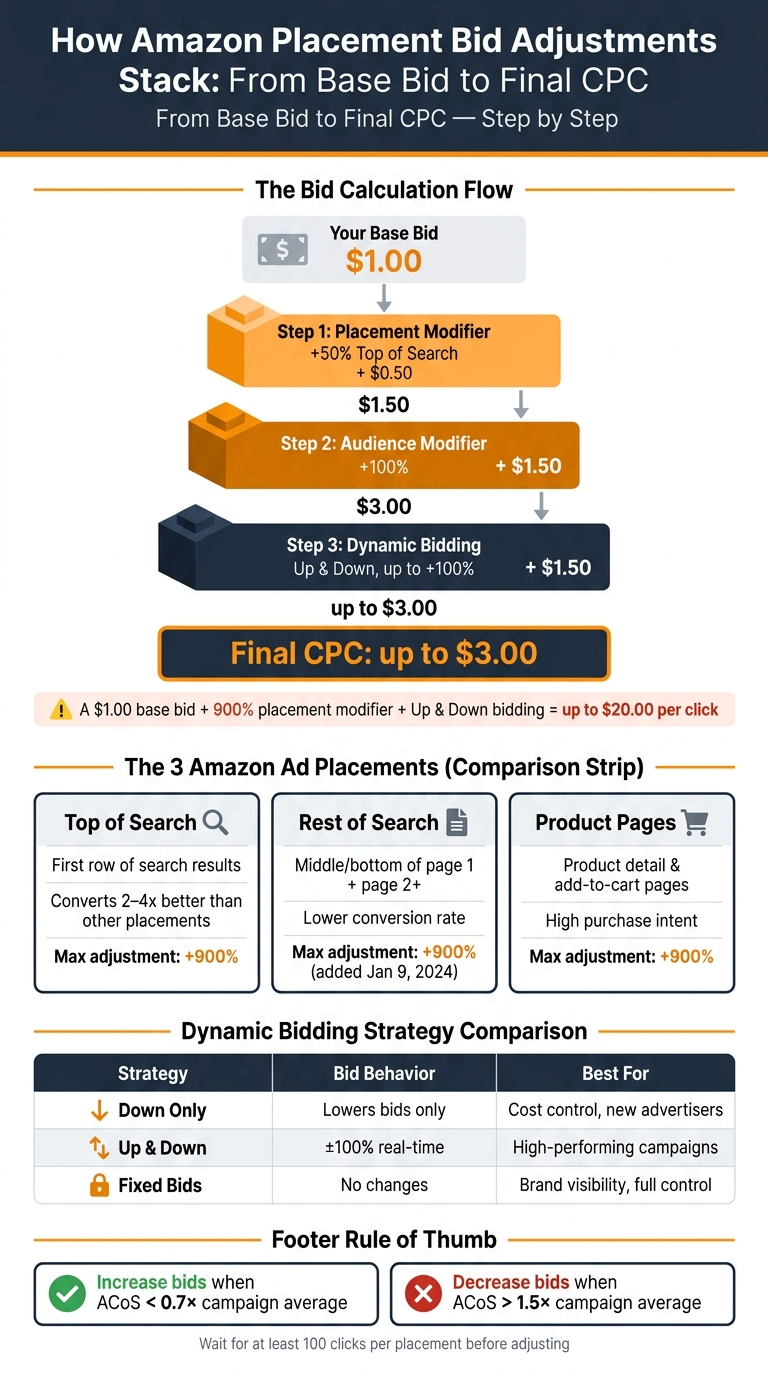
The calculation is simple: Amazon takes your base bid and multiplies it by the adjustment percentage for the targeted placement. For example, if your base bid is $1.00 and you apply a 50% Top of Search adjustment, your bid becomes $1.50 when competing for that placement.
When multiple modifiers are used, Amazon applies them sequentially. This means each adjustment builds on the previously adjusted bid, not the original base bid:
| Calculation Step | Adjustment Applied | Resulting Bid |
|---|---|---|
| Base Bid | – | $1.00 |
| Step 1: Placement (50%) | $1.00 + $0.50 | $1.50 |
| Step 2: Audience (100%) | $1.50 + $1.50 | $3.00 |
| Step 3: Video (50%) | $3.00 + $1.50 | $4.50 |
This table shows how multiple adjustments can compound, transforming a $1.00 base bid into $4.50 before dynamic bidding comes into play. Because of this, it’s crucial to calculate your potential maximum bid carefully, especially when combining high percentages across multiple adjustment types.
"Adjust Bids by Placement will work with your selected dynamic bidding strategy to determine the final bid that you actually pay." – Radd Interactive
Dynamic bidding is applied after placement adjustments. More details on this process are covered in the next section.
How Placement Adjustments and Dynamic Bidding Work Together
How Amazon Placement Bid Adjustments Stack: From Base Bid to Final CPC
Placement bid adjustments and dynamic bidding are like two sides of the same coin, each playing a unique role in your bidding strategy. Placement adjustments determine where you’re willing to spend more, while dynamic bidding decides how much to adjust based on the likelihood of a conversion.
"Placement modifier asks ‘how much more (or less) am I willing to pay for this category of inventory?’… Dynamic bidding asks ‘how likely is this specific impression to convert right now?’" – Daniks.AI
Let’s break down how dynamic bidding strategies complement these adjustments.
Dynamic Bidding Strategies at a Glance
Dynamic bidding fine-tunes your bids in real time by factoring in the likelihood of a conversion. Amazon provides three options, each tailored to different campaign objectives:
| Strategy | How It Works | Best For |
|---|---|---|
| Dynamic bids – down only | Automatically lowers bids when a conversion seems less likely | Controlling costs; new advertisers; strict ACoS goals |
| Dynamic bids – up and down | Adjusts bids up to 100% higher for strong conversion opportunities, or lowers them for weaker ones | Driving sales; high-performing campaigns; flexible budgets |
| Fixed bids | Sticks to your set base bid (plus any placement adjustments) without real-time changes | Brand visibility; impression-focused campaigns; full manual control |
The "up and down" strategy offers the most adaptability. It can double your bid when conversion chances are high and scale it back when they’re low. On the other hand, "down only" is more cautious – it reduces bids but never raises them. Fixed bids allow complete control, skipping any algorithmic adjustments.
The Order Amazon Applies Adjustments and Dynamic Bidding
Amazon applies placement bid adjustments first, followed by dynamic bidding. This order is crucial because dynamic bidding works off the placement-adjusted bid, not your base bid.
Here’s an example to make it clear: Imagine your base bid is $1.00, you’ve set a +50% Top of Search adjustment, and you’re using "Dynamic bids – up and down." Amazon first applies the placement adjustment, increasing your bid to $1.50. Then, if the impression has a high likelihood of converting, dynamic bidding can raise that $1.50 by up to 100%, pushing your final bid as high as $3.00 for that auction.
This sequence means large placement modifiers combined with "up and down" bidding can quickly drive up your cost-per-click (CPC). To manage this, consider pairing aggressive placement modifiers with "down only" bidding to limit potential overspending while still optimizing for conversions.
"Amazon will increase your bids for clicks that may be more likely to convert to a sale and reduce your bids for clicks that are less likely to convert to a sale." – Amazon Ads
When and Why to Use Placement Bid Adjustments
Placement bid adjustments should only be made after gathering enough performance data. These adjustments are based on identifying placements that perform better than others.
Placement Performance Metrics to Review
Start by examining Amazon’s Placement report in Campaign Manager. This report breaks down performance into three categories: Top of Search, Rest of Search, and Product Pages. Key metrics to focus on include ACoS (Advertising Cost of Sales), ROAS (Return on Ad Spend), CTR (Click-Through Rate), and conversion rate (CVR) for each placement.
The most practical way to evaluate performance is by comparing each placement’s ACoS to the campaign’s overall average. A good rule of thumb is:
- Increase bids for placements with an ACoS less than 0.7× the campaign average.
- Decrease bids for placements with an ACoS exceeding 1.5× the average.
Typically, Top of Search placements convert 2 to 4 times better than Rest of Search. However, ensure that each placement has gathered at least 100 clicks before making any decisions. Smaller data samples can lead to inaccurate conclusions.
"Treating them all with the same bid is like buying TV ads at 8 PM and 3 AM for the same price because they are technically the same channel." – Daniks.AI
These metrics provide a clear path for making effective placement adjustments.
Situations Where Placement Adjustments Help
Placement adjustments can be particularly effective in the following scenarios:
- Defensive brand campaigns: Using aggressive Top of Search modifiers helps secure your brand terms, preventing competitors from taking over this high-visibility spot.
- High-intent keywords: For keywords already showing strong conversion rates, a Top of Search modifier ensures your ad appears in the most prominent position for shoppers ready to buy.
- Cross-selling on Product Pages: Increasing the Product Pages modifier allows you to target competitor or complementary product detail pages, capturing shoppers who are still in the decision-making phase.
- Starving Rest of Search: While you can’t apply a negative modifier to Rest of Search, you can lower your base bid and apply positive modifiers to Top of Search and Product Pages. This strategy effectively shifts your budget away from lower-performing placements.
For new campaigns without sales history, it’s best to start with 0% adjustments across all placements and allow data to accumulate before making any changes.
Risks and Limits of Placement Adjustments
One major risk is bid compounding. Since placement adjustments are applied first and dynamic bidding adds on top, costs can escalate quickly. For instance, a $1.00 base bid with a 900% Top of Search modifier and "Dynamic Bids – Up and Down" enabled could lead to $20.00 per click. This highlights the importance of monitoring adjustments closely.
Another risk is performance instability caused by abrupt changes. To avoid this, make adjustments gradually – 25% to 50% increments every two weeks – instead of jumping from 0% to 200% in one go.
Lastly, remember that Amazon retains advertising data for only 60 to 90 days, depending on the report type. Regularly downloading placement reports ensures you can track trends over time and identify issues before they escalate.
Best Practices for Campaign Structure and Bid Adjustments
Organizing Campaigns by Placement Goals
One key improvement you can make to your campaign structure is to avoid grouping campaigns with different goals together. Instead, divide them into three categories: branded/defensive, exact match performance, and discovery. Each type behaves differently in terms of ad placements, so separating them allows for more precise bid adjustments.
"The seller who treats Top of Search, Product Pages, and Rest of Search as three separate auctions almost always outperforms the seller running one bid across all three." – Daniks.AI
Here’s a practical way to structure these campaigns:
- Branded/Defensive Campaigns: Use aggressive Top of Search bid modifiers, often +200% or higher, to dominate your brand terms.
- Exact Match Performance Campaigns: Focus on proven keywords that convert well, typically pulled from Auto or Broad campaigns. Apply Top of Search modifiers in the range of +50% to +100%.
- Discovery Campaigns: These rely on Auto and Broad match types to explore new keyword opportunities. Keep modifiers conservative – between 0% and +25% – as these campaigns are still identifying potential.
To avoid Amazon’s algorithm inflating costs due to high placement modifiers, pair these adjustments with "Fixed Bids" or "Dynamic Bids – Down Only" strategies. This campaign structure creates a solid base for ongoing bid performance monitoring.
Reviewing and Adjusting Bids Over Time
Regular bid reviews are essential. Check your campaigns every 14 days, using at least 30 days of data to ensure your decisions are backed by statistically relevant insights. For high-volume accounts, more frequent reviews may be beneficial.
When analyzing performance, look for patterns:
- Underperforming Placements: If the ACoS (Advertising Cost of Sales) exceeds 1.5× the campaign average, these placements may need reduced bids.
- Opportunities for Growth: Placements with an ACoS below 0.7× the campaign average could benefit from higher bids.
Make changes incrementally – adjusting modifiers by 25% to 50% – to maintain stability and better understand the impact of each tweak.
For instance, in 2026, Priya, a seller of coffee accessories, reviewed a campaign with a 41% ACoS. She found that Top of Search was converting at 18% with a 16% ACoS, while Rest of Search was converting poorly at 2.4% with a 78% ACoS. By applying a -75% modifier to Rest of Search and a +100% modifier to Top of Search, she reduced the overall ACoS to 22% and increased ad-attributed sales by 31% within two weeks.
If managing these adjustments feels overwhelming, external expertise can make a big difference.
How Emplicit Can Help With Placement Strategy

Building a clear campaign structure and regularly reviewing bids can significantly improve performance, but it requires consistent effort and expertise. For brands without the resources to handle this in-house, working with a professional team can simplify the process.
Emplicit specializes in Amazon PPC management, offering services like campaign architecture, placement-level optimization, and ongoing bid management. Their data-driven approach ensures that every decision is based on actual performance metrics, allowing brands to scale their ad performance while maintaining profitability.
Conclusion
Amazon placement bid adjustments let you take charge of where your ads appear and how much you’re willing to pay for those spots. By treating Top of Search, Rest of Search, and Product Pages as distinct auctions with their own bid modifiers, you can allocate your budget to the placements that are most likely to drive conversions.
The math behind these adjustments is critical. Placement modifiers stack with dynamic bidding and audience adjustments, which can quickly amplify your base bid. For example, a $1.00 base bid with a 50% placement adjustment becomes $1.50. Add a 100% audience adjustment, and that same bid jumps to $3.00. Monitoring how these adjustments interact is key to keeping your costs under control.
Regular analysis is what sets successful campaigns apart. Placement performance isn’t static – it evolves over time. What worked last quarter might not deliver the same results today. That’s why pulling data from the Placements tab every two weeks, using a minimum of 30 days of data, is essential. This approach grounds your decisions in actual performance data rather than assumptions.
Feeling overwhelmed by the complexity? You’re not alone. Emplicit specializes in managing Amazon PPC campaigns, from designing strategies to fine-tuning placement-level bids. This allows you to focus on scaling your business while leaving the metrics to the experts.
FAQs
What’s my true max CPC after placement and dynamic bidding?
Your actual maximum CPC (Cost-Per-Click) is determined by more than just the bid you set. It’s influenced by your base bid, adjusted by the placement modifier, and Amazon’s dynamic bidding rules. These adjustments ensure your bid adapts for each placement based on these factors, rather than staying static.
How many clicks do I need before changing placement modifiers?
When it comes to adjusting placement modifiers for Amazon ads, there’s no magic number of clicks to hit before making changes. Instead, focus on the performance data that actually matters – like your click-through rate (CTR), conversion rate, and how well the campaign aligns with your overall goals. Let the numbers guide your decisions, not an arbitrary click count.
How do I reduce Rest of Search spend without negative modifiers?
To reduce spending on Rest of Search without using negative modifiers, prioritize fine-tuning your placement bids. Allocate higher bids to placements that perform well, like Top of Search, and lower or limit bids for less effective ones, such as Rest of Search. Consider dynamic bidding strategies like Down Only or Up and Down with set bid caps. Additionally, make it a habit to review your search term reports frequently to adjust targeting and weed out irrelevant or expensive terms.