

Scaling your Amazon PPC budget isn’t about spending more – it’s about spending wisely to boost revenue while maintaining profitability. By focusing on key metrics like ACoS (Advertising Cost of Sales), ROAS (Return on Ad Spend), and impression share, you can identify high-performing campaigns and scale them effectively without wasting money.
Here’s the core strategy:
- Start small: Increase budgets gradually (10–20%) and monitor performance for at least a week before making further changes.
- Prioritize profitable campaigns: Focus on top-performing products and campaigns that align with your profit goals.
- Use automation: Set up budget rules to adjust spending based on performance or key events like Prime Day.
- Avoid common mistakes: Don’t overfund campaigns that are already saturated, and regularly audit for wasted spend on poor-performing keywords.
- Track profitability: Always ensure your ad spend aligns with your product margins and overall revenue goals.
The key is balancing growth with control – scaling what works while keeping an eye on costs to protect your margins.
Amazon PPC Ads – What to Budget & How to Adjust Budgets (Full Guide)
sbb-itb-e2944f4
Key Metrics for Budget Decisions
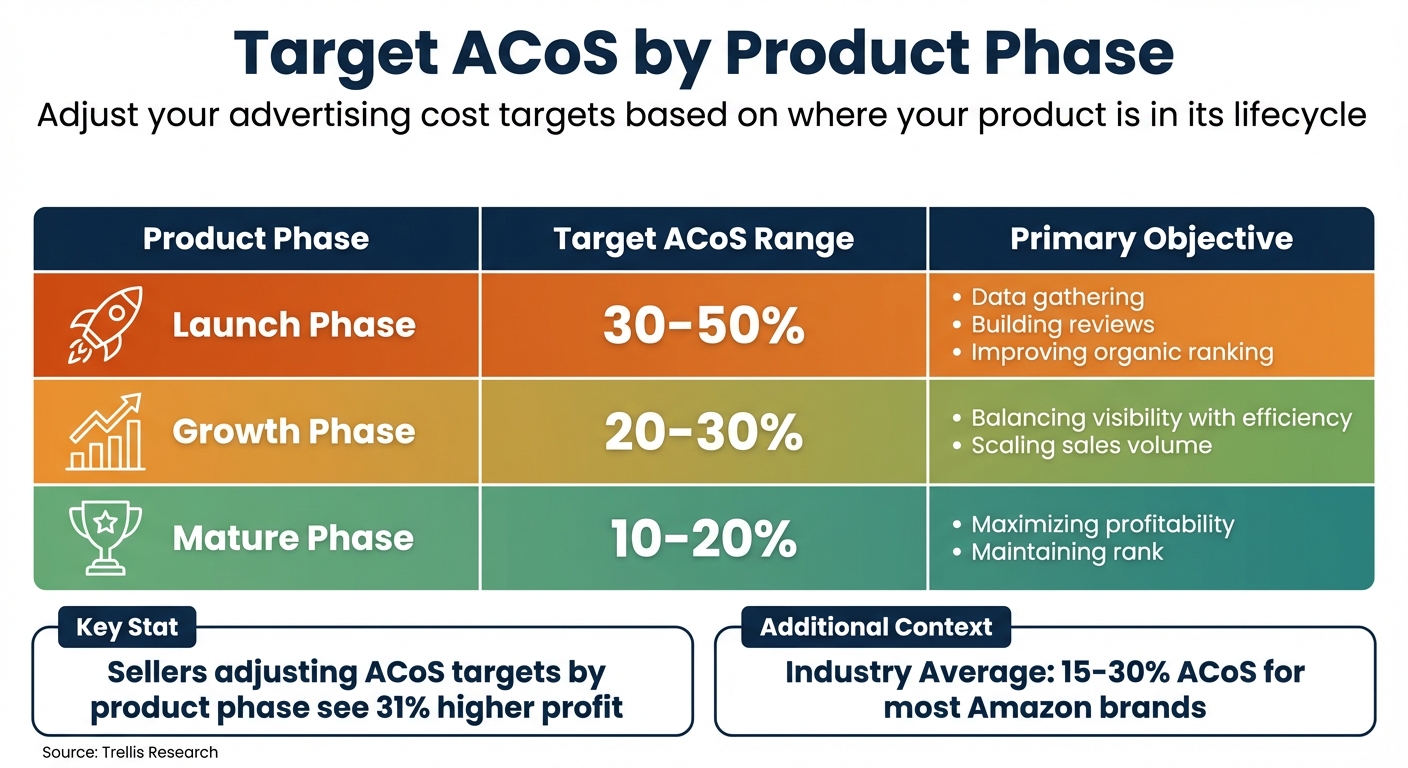
Amazon PPC Target ACoS by Product Lifecycle Phase
Three key metrics – ACoS, ROAS, and impression share – are essential for evaluating campaign scalability and profitability. Let’s break them down.
ACoS and ROAS: Measuring Budget Performance
ACoS (Advertising Cost of Sales) tells you what percentage of your ad-attributed sales is spent on advertising. The formula is straightforward: (Ad Spend ÷ Ad Revenue) × 100. For example, if you spend $200 on ads and generate $1,000 in sales, your ACoS is 20%. ROAS (Return on Ad Spend) flips this perspective, showing how much revenue you earn for every dollar spent. Using the same example, your ROAS would be 5:1 ($1,000 ÷ $200).
The breakeven ACoS is critical – it matches your profit margin. If your profit margin is 30%, your breakeven ACoS is also 30%. Falling below this threshold means profitability, while exceeding it results in losses. As Emplicit explains:
"If your advertising cost of sales is 20% and your profit margin is 25%, it means you’re losing money. Your ACoS should be lower than your profit margin to remain profitable."
Your ACoS target depends on where your product is in its lifecycle:
- Launch phase: ACoS of 30–50% is typical as you focus on visibility and gathering reviews.
- Growth phase: Aim for 20–30% to balance efficiency and volume.
- Mature phase: Target 10–20% to maximize profitability.
Trellis research shows that sellers adjusting their ACoS targets by product phase see 31% higher profit. Here’s a quick reference table:
| Product Phase | Target ACoS Range | Primary Objective |
|---|---|---|
| Launch | 30–50% | Data gathering, reviews, and organic ranking |
| Growth | 20–30% | Balancing visibility with efficiency |
| Mature | 10–20% | Maximizing profitability and maintaining rank |
While the average ACoS for Amazon brands falls between 15% and 30%, it varies by category and goals. For example, CPG brands chasing volume might run at 40%+ ACoS, while profit-focused brands aim for under 25%. The critical takeaway? Understand your unit economics first, then set ACoS targets that align with your margins – not industry norms.
Once you’ve nailed down cost metrics, the next step is to evaluate impression share to uncover budget constraints or market saturation.
Impression Share and Campaign Saturation
Impression share is another key metric that shows whether your campaigns are limited by budget or if they’ve hit a saturation point. If your campaign consistently runs out of budget early in the day but maintains a strong ACoS, it’s a clear signal to scale up. These campaigns have untapped potential and can capture more volume with additional investment.
On the flip side, campaign saturation happens when extra spending no longer delivers proportional results. As Amazoniac Agency puts it:
"A common mistake is to keep increasing the budget for a campaign that’s already performing well, hoping for even more sales."
When saturation sets in, you’ll notice rising costs per click, climbing ACoS, and shrinking profit margins – even if total sales remain flat. To spot saturation, watch for signs like unused budgets, higher CPCs, and stagnant conversion rates. If these indicators appear, stop increasing the budget. Instead, shift funds toward testing new keywords, experimenting with ad formats like Sponsored Brands or Display, or targeting new audience segments.
A practical method to balance growth and experimentation is the 80/20 rule: allocate 80–85% of your budget to proven, profitable campaigns while reserving 15–20% for testing and exploration. This ensures you’re not overfunding saturated campaigns while leaving room to discover new opportunities. Regular audits can also help you identify "budget vampires" – search terms with high spend but no sales – so you can add them as negative keywords and redirect those funds to better-performing areas.
Strategies for Scaling PPC Budgets
Scaling your Amazon PPC budget requires a strategic approach. The goal is to amplify successful campaigns while minimizing risks and maintaining profitability.
Prioritize Top-Performing Campaigns
Start by identifying your best-performing campaigns – those with strong conversion rates, steady traffic, and a return on ad spend (ROAS) that aligns with your profit goals. Focus on the top 20% of products that generate 80% of your revenue, following the 80/20 rule. Instead of spreading your budget evenly, concentrate on these high-performing campaigns to maximize impact.
For budget allocation, Sponsored Products should take priority. If your brand generates less than $1 million in revenue, allocate 95% of your budget to Sponsored Products and 5% to Sponsored Brands (mostly video). For brands exceeding $5 million in revenue, adjust to 80% for Sponsored Products, 10–15% for Sponsored Brands, and 5–10% for Sponsored Display.
Another key strategy is moving successful search terms from automatic campaigns into manual exact-match campaigns. This gives you tighter control over bids and budgets. Also, prioritize spending on Top of Search placements, as they consistently deliver higher conversion rates. Redirect funds from underperforming ads to campaigns meeting your target ACoS, ensuring your budget is spent efficiently to protect profitability.
Increase Budgets Gradually
Once you’ve pinpointed your strongest campaigns, scale their budgets cautiously. Avoid large, sudden increases – like jumping from $20/day to $100/day – which can lead to higher costs and lower-quality traffic. Instead, aim for budget increases of 10–20% at a time, monitoring performance for at least a week before making further adjustments. Only increase budgets for campaigns that are profitable and hitting their current budget limits (around 90% utilization).
Allow 2–4 weeks for data collection and bid optimization before making additional changes. Weekly reviews are better than daily monitoring, as they account for traffic fluctuations and help prevent premature decisions that could cap your budget too soon.
Set Up Campaign Budget Rules
Once gradual increases are in place, automated budget rules can help you manage adjustments more effectively. Amazon offers two types of automated rules: schedule-based and performance-based.
- Schedule-based rules adjust budgets for specific dates or events, such as Prime Day or Black Friday.
- Performance-based rules trigger changes based on metrics like ACoS, ROAS, CTR, or CVR. For example, you could set a rule to increase a campaign’s budget by 15% if ROAS exceeds 4.0 or if ACoS drops below 25%.
Performance-based rules require a minimum daily budget of $10 and use a 7-day lookback period to assess whether campaigns meet your criteria. Combining both rule types can maximize results. For instance, use schedule-based rules to prepare for high-traffic events, and layer performance-based rules to maintain efficiency during those periods.
Start with small adjustments – like 10–15% increases – and always set a maximum budget limit to avoid overspending. After major sales events, review your automated rules to ensure they align with current market conditions. These rules can help you scale budgets during strong performance periods and reduce spending when ACoS exceeds breakeven, safeguarding your profitability.
Dynamic Budget Adjustments
Dynamic budget adjustments let you adapt to real-time shifts in campaign performance. These strategies help you scale efficiently, avoiding wasted spend on underperforming ads while capitalizing on high-traffic opportunities. By combining these adjustments with gradual scaling, you can preserve profitability even as market conditions change.
Rule-Based Bidding
Rule-based bidding lets you adjust keyword bids automatically based on ROAS thresholds you set in Amazon’s campaign manager. This method ensures profitability by increasing bids for high-performing campaigns and lowering them when performance dips. For businesses managing large keyword portfolios, this approach can save up to 60% of manual optimization time.
To avoid overcorrection, set clear bid caps. For instance, you can establish rules to adjust bids by 5–15% when certain ROAS levels are reached, while capping maximum bids to protect your margins. Before applying automated changes, ensure keywords hit a minimum click threshold. A common formula: divide 100 by your organic conversion rate (e.g., with a 10% conversion rate, wait for at least 10 clicks). Rule-based bidding fine-tunes keyword adjustments, but broader automated tools can manage entire campaign budgets.
Using Tools for Automated Adjustments
Amazon’s Budget Rules feature automates daily budget changes for Sponsored Products, Sponsored Brands, and Sponsored Display campaigns. With performance-based rules, budgets increase automatically when campaigns hit specific metrics, using a 7-day lookback period for calculations. Schedule-based rules, on the other hand, allow you to pre-plan budget increases for major events like Prime Day. However, Amazon’s native tools only allow budget increases, which can be limiting.
Third-party tools like Adbrew offer more flexibility. These platforms support both budget increases and decreases, allow multiple performance criteria per rule, and provide adjustable lookback periods from 7 to 120 days.
| Feature | Amazon Native Budget Rules | Third-Party Tools |
|---|---|---|
| Budget Action | Only increases budgets | Can increase and decrease budgets |
| Lookback Period | Fixed 7-day window | Flexible (7–120 days) |
| Criteria Logic | Single criterion per rule | Multiple criteria simultaneously |
| Rule Application | Set individually per campaign | Apply one rule to multiple campaigns |
Focus on your most profitable campaigns when setting up automated rules. Also, check if campaigns are spending at least 90% of their current budget before increasing limits. Raising budgets for underutilized campaigns is unlikely to drive more sales.
Adjusting Budgets for Events
Planning ahead for high-traffic events like Prime Day or Black Friday is crucial. During these periods, competition intensifies, and Amazon’s suggested bids often rise by about 15%, with top search positions capturing up to 70% of clicks. Schedule-based rules can help you boost budgets by up to 50% to keep your ads visible during peak demand. Prioritize products with active deals, as these tend to perform better during events. For products in Lightning Deals or Deal of the Day, doubling the daily budget is often a smart move.
To maximize visibility, use placement modifiers to target Top of Search positions. Keep in mind that CPCs may increase, and ROAS may dip in the days before major events, as shoppers browse and build carts without immediately purchasing. Maintaining visibility during this phase keeps your brand in front of potential buyers. Set safety triggers or automated rules to pause campaigns if spending spikes without a corresponding boost in conversions.
It’s also worth noting that Amazon can exceed your set daily budgets by up to 25% during periods of high purchase intent. After major events, revisit your automated rules to ensure they align with current market conditions. Linking your PPC tools to inventory management can also prevent wasted ad spend by automatically pausing campaigns for low-stock items.
Monitoring and Troubleshooting Budget Scaling
Failing to monitor your campaigns properly can lead to wasted ad spend, with a $10,000/month account potentially losing between $650 and $1,600 per incident due to oversights. Effective monitoring builds on strategies like gradual budget increases and automated adjustments, helping to catch issues early and fix them before they spiral.
Identifying Budget Exhaustion
Budget exhaustion occurs when your campaigns run out of funds before the day ends, leaving you invisible during peak shopping hours. Amazon automatically pauses your ads when daily limits are reached, cutting off the "halo effect" that PPC ads provide to organic rankings. This can hurt your overall visibility and sales performance.
Another issue arises when budgets are too small to gather useful data. For example, a $5/day budget won’t generate enough clicks to make informed decisions. To address this, set your daily budget at least 10 times your average CPC. This ensures you collect enough clicks over a week to identify performance trends. You can also use dayparting to lower bids by 50–70% during low-activity hours, stretching your budget for high-conversion periods.
Avoid increasing budgets by more than 20% without reviewing at least seven days of performance data. Weekly evaluations are better than daily ones, as they account for natural traffic fluctuations. If your spend hits 60–70% by noon, consider lowering bids on high-CPC keywords to maintain ad visibility in the evening.
While preventing budget exhaustion is essential, keeping spending under control is just as important.
Preventing Overfunding
Overfunding can hurt profitability just as much as running out of budget. Signs of excessive spending include rising ACoS without proportional sales growth or CPCs increasing faster than revenue. These patterns indicate diminishing returns, where more spending yields little benefit.
To manage this, start with "Dynamic bids – down only" to prevent Amazon from overspending on low-performing placements. Gradually increase budgets by 15–20% every 5–7 days to maintain control. Use real-time alerts to flag when daily spend exceeds 70% of your budget or when ACoS climbs 20–30% above break-even levels. These tools can reduce budget waste caused by unexpected CPC spikes or drops in conversions by up to 80–90%.
Focus most of your budget – around 80% – on manual campaigns for better control, while limiting auto campaigns to 20% for keyword discovery. Conduct weekly reviews of search term reports, and add any keyword with 20+ clicks but no sales as a negative exact match to prevent waste. As Prime Team Agency notes:
"Amazon PPC doesn’t scale ads – it scales systems".
Managing spend effectively is important, but profitability at the product level should always guide your scaling decisions.
Checking Product-Level Profitability
Scaling budgets only works if your products remain profitable. To ensure this, calculate each SKU’s break-even ACoS using the formula: Profit Margin ÷ Price. This tells you the maximum ACoS you can handle before losing money. Additionally, track TACoS (Total Advertising Cost of Sale), which measures ad spend as a percentage of total revenue, including organic sales.
If TACoS rises consistently over 6–12 months, it’s a warning sign that you’re relying too much on paid traffic while organic rankings decline. Use the formula Sales = Clicks × Conversion Rate to pinpoint issues. For instance, if clicks are high but conversions are low, it may indicate problems with your product listing that need fixing before scaling. As Isaac from IG PPC explains:
"Your ads can only be as good as the product pages they send people to".
Organize campaigns by ASIN to track profitability and identify which products justify higher ad spend. Prioritize high-margin SKUs that can sustain a 60% ACoS over low-margin items that break even at 30%. Set up safety triggers to pause campaigns if spend increases without matching conversions. Additionally, link your PPC tools with inventory management systems to automatically reduce budgets when stock levels drop below a safe threshold. Keep in mind that Amazon’s data can lag by 48–72 hours, so base decisions on trends observed over 7–14 days rather than reacting to daily fluctuations.
Conclusion
Scaling Amazon PPC budgets effectively revolves around three main principles: making decisions based on data, adjusting budgets gradually, and keeping a close eye on performance. Before increasing your ad spend, make sure your listings are fully optimized. Set realistic goals for each SKU by calculating your break-even ACoS.
When increasing budgets, aim for incremental changes of 10–20% to prevent sudden spikes in ACoS. Use the 80/20 rule to allocate your budget wisely – dedicate 80% to high-performing campaigns and hero products, while reserving 20% for testing new keywords and ad types. This approach helps maintain profitability while allowing room for experimentation.
Shift your focus to TACoS (Total Advertising Cost of Sale) rather than just ACoS. TACoS gives a clearer picture of whether your ad spend is boosting overall revenue and improving organic rankings. As SellerMetrics explains:
"Scaling isn’t just about investing more; it’s about investing better. Sustainable growth is the result of consistent testing, focused optimization, and strategic decision-making driven by real data".
Instead of daily performance checks, conduct weekly reviews to account for Amazon’s 48–72 hour data lag. Use these reviews to analyze search term reports and add negative keywords for terms that generate clicks but no conversions. These small but consistent actions are key to building a scalable PPC strategy.
Keep in mind that profitability is more important than visibility. Every dollar spent should contribute to a clear and measurable return. By combining thoughtful budget allocation with disciplined monitoring, you can grow your Amazon PPC campaigns while protecting your margins and ensuring sustainable, long-term success.
FAQs
How do I calculate my break-even ACoS for each SKU?
To figure out your break-even ACoS (Advertising Cost of Sales), you need to identify the ACoS percentage where your ad spend matches your profit margin – leaving you with no profit or loss. The formula is simple: Break-even ACoS = Profit Margin Percentage.
Start by calculating your profit margin. Subtract all costs – like Amazon fees, product costs, and other expenses – from your sale price. Then, divide the result by the sale price. For instance, if your profit margin is 30%, your break-even ACoS would also be 30%.
How can I tell if a campaign is budget-limited or saturated?
To figure out if a campaign is budget-limited or saturated, take a closer look at its performance metrics.
- Budget-limited campaigns tend to have low impressions even when bids are high. This usually signals that the budget is capping the campaign’s reach.
- On the other hand, saturated campaigns might show high impressions and clicks, but sales remain flat, or ACoS (Advertising Cost of Sales) doesn’t improve.
By studying these patterns, you can decide whether to increase the budget or tweak your strategy to get better results.
When should I use budget rules instead of manual budget changes?
Budget rules are a great way to automate campaign adjustments, saving both time and effort. They’re especially useful for handling dynamic changes tied to performance metrics, specific schedules, or events like holidays or Prime Day. By using budget rules, you can skip the hassle of repetitive manual tweaks while ensuring your campaigns stay responsive to seasonal trends or shifts in performance. For example, you can reallocate spending from campaigns that aren’t performing well or boost budgets during busy shopping periods to make the most of increased demand.