
Amazon sellers face strict rules when listing products, especially those classified as restricted or prohibited. Violating these policies can lead to severe consequences, including listing removal, account suspension, inventory destruction, or payment holds. Amazon enforces these rules rigorously using AI and human reviews to protect customers and ensure compliance with laws and regulations.
Key Takeaways:
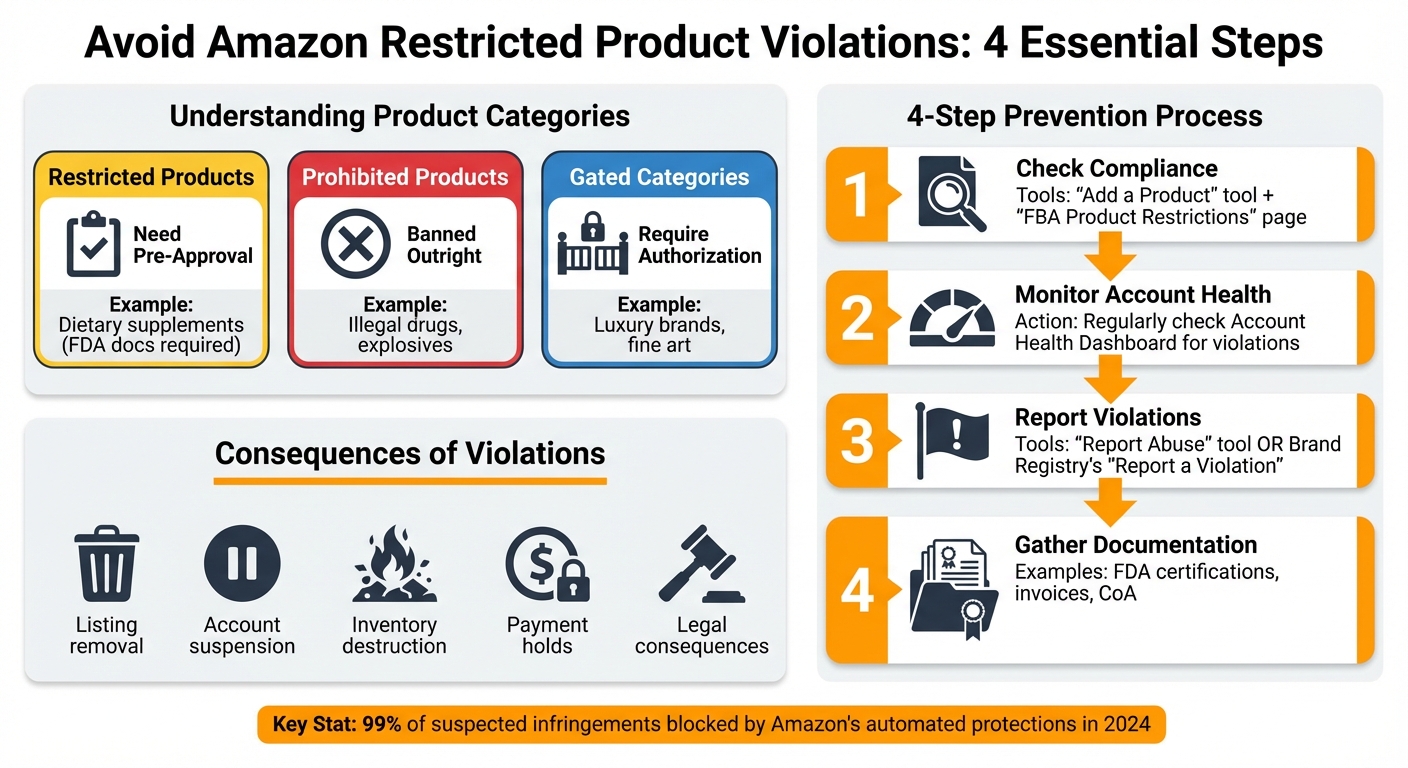
- Restricted Products: Items needing approval before sale (e.g., dietary supplements with FDA documentation).
- Prohibited Products: Items banned outright (e.g., illegal drugs, explosives).
- Gated Categories: Require seller or brand authorization (e.g., luxury brands, fine art).
To avoid penalties:
- Use Amazon’s tools like the "Add a Product" tool and "FBA Product Restrictions" page to check compliance.
- Regularly monitor your Account Health Dashboard for violations.
- Report violations accurately using the "Report Abuse" tool or Brand Registry’s "Report a Violation" feature.
- Gather necessary documentation (e.g., FDA certifications, invoices) before listing products.
Sellers must stay informed about Amazon’s policies, as non-compliance can harm their business and even lead to legal consequences. Following these guidelines can help you maintain account health and avoid costly mistakes.
4-Step Guide to Avoiding Amazon Restricted Product Violations
What Are Amazon Restricted Products?
Amazon restricted products are items that either need pre-approval (known as "ungating") or are completely banned from sale due to safety, legal, or regulatory concerns. These products fall into three main categories:
- Restricted Products: These require specific compliance or approval before being listed. For instance, dietary supplements might need FDA documentation.
- Prohibited Products: Items like illegal drugs or explosives fall under this category and cannot be sold on Amazon.
- Gated Categories: Selling in these categories requires extra authorization, either from Amazon or the brand owner. Examples include luxury brands like Nike or categories such as Fine Art.
As a seller, you’re responsible for ensuring your products meet Amazon’s compliance standards, even if they’re not explicitly mentioned in Amazon’s help pages. Tools in Seller Central can assist with this, but ultimately, it’s up to you to follow the rules. These restrictions are in place to protect consumers and ensure compliance with regulatory bodies like the FDA and FTC. Violating these rules can lead to severe consequences, such as listing removal or account suspension. Understanding these restrictions is essential, especially when dealing with specific product categories, which we’ll explore next.
Common Restricted Product Categories
Amazon has restrictions on dozens of product categories, each with its own requirements. Some of the most frequently flagged categories include:
- Alcohol
- Cosmetics
- Dietary Supplements
- Medical Devices
- Automotive & Powersports parts
- Electronics
- Food & Beverage
- Tobacco products
Cosmetics and dietary supplements require careful attention to ingredients. Even one prohibited ingredient can result in account suspension. For medical devices, FDA registration and certifications are mandatory. Claims like "FDA approved" without proper clearance can lead to immediate removal.
Electronics also come with strict guidelines, especially for items containing lithium batteries or those posing fire hazards. Some electronics may even be excluded from FBA due to safety concerns. Understanding these specific restrictions can help sellers avoid penalties and ensure compliance.
How to Check if a Product is Restricted
Once you understand what restricted products are, checking whether an item complies is straightforward with Seller Central tools. Before sourcing inventory, use the "Add a Product" tool in Seller Central. Search for the product using its ASIN, UPC, EAN, or JAN code. If the item is restricted for your account, a "Show limitations" or "Listing Limitations Apply" link will appear.
For FBA sellers, the "FBA Product Restrictions" page is a critical resource. It helps confirm whether Amazon will accept specific products at their fulfillment centers since some items allowed for merchant fulfillment may not be eligible for FBA.
The Restricted Products help pages in Seller Central also offer detailed examples of what is allowed and prohibited. While not exhaustive, these pages can guide you on what to look for, such as hazardous material warnings, medical claims, or age-restricted content on product labels.
If you receive a Performance Notification, you’ll need to remove the flagged listing to avoid further penalties. If one ASIN is flagged, it’s a good idea to audit your entire inventory for similar products or ingredients. For items with unclear regulatory status, consulting legal counsel can be a smart move.
sbb-itb-e2944f4
How to Identify Restricted Product Violations
Keeping your Amazon account in good standing means staying on top of compliance. Spotting violations early can help you avoid suspensions and other penalties. Here’s how to recognize the warning signs.
Warning Signs of a Violation
Start with the Account Health Dashboard. This tool highlights policy breaches, showing the "Reason" column for specific issues. Click "Review policy" for more details, and use the "View All" link to uncover additional warnings that could hurt your Account Health Rating if left unaddressed.
Pay close attention to email notifications from Amazon. These emails often contain details about specific violations or requests for compliance documentation. If you receive one, take action immediately. Other red flags to watch for include sudden listing removals, restrictions on adding new products, or even the suspension of your selling privileges. For FBA sellers, inventory destruction notices or permanent payment holds are serious indicators of compliance problems. Listings flagged by Amazon may include prohibited keywords, false medical claims (like "therapeutic" or "disease-treating"), or references to restricted ingredients such as CBD.
Once you’ve identified potential issues, use the following tools to keep your account on track.
Tools for Detecting Violations
Beyond the Account Health Dashboard, several tools can help you dig deeper into policy violations. The dashboard itself organizes issues into categories like Intellectual Property (both Suspected and Received), Authenticity, and Restricted Products. Additionally, the Performance Notifications section provides detailed emails about listing deactivations and policy warnings, which can be especially helpful if the Account Health page becomes overwhelming.
If you’re part of the Amazon Brand Registry, take advantage of the "Report a Violation" tool. This feature lets you search up to 50 ASINs or product URLs at a time, making it easier to pinpoint problems. For brands dealing with counterfeits, Project Zero offers the ability to remove counterfeit listings instantly. In fact, Amazon’s automated brand protections blocked 99% of suspected infringements in 2024.
For sellers managing complex inventories, tools like Emplicit‘s account health management can provide an extra layer of protection. This service is especially useful for high-risk categories such as dietary supplements, medical devices, or electronics, helping to spot violations before they escalate.
How to Report Restricted Product Violations
Once you’ve identified a potential violation, the next step is to report it accurately to prompt Amazon’s response. Proper reporting ensures that Amazon can investigate and address the issue effectively, reinforcing its safety and compliance standards. Here’s how to file a report that gets attention.
Using the Report Abuse Tool
Start by logging into Amazon Seller Central. Navigate to the Report Abuse section, which you can find under the Performance menu or on the Account Health page. From there, choose the type of violation – whether it’s a restricted product, listing abuse, or another policy breach.
Provide the necessary details, like the Order ID or ASIN/ISBN linked to the product. Clearly explain how the product violates Amazon’s policies in the issue description field. Be sure to include the seller’s store or business name, the product title, and the marketplaces where the violation is occurring. Once all fields are completed, click Submit.
"Sellers are responsible for complying with all laws, regulations and Amazon policies when listing products. Amazon encourages sellers to report listing abuse or seller violations of Amazon’s policies or applicable law."
– Simon_Amazon, Community Connections
If you’re part of the Brand Registry program, you can also use the Report a Violation (RAV) tool. This tool allows you to search Amazon’s catalog by ASIN, image, or URL to identify and report restricted or unauthorized content. It’s especially handy for handling intellectual property concerns alongside restricted product issues.
After submitting your report, don’t forget to provide relevant documentation to strengthen your case.
Providing Supporting Evidence
A strong report includes solid supporting evidence. Make sure to include the ASIN, product URL, and, if applicable, a test buy Order ID to back up your claim.
For issues involving brand restrictions or intellectual property, attach relevant documents like trademark certificates, copyright registration numbers, or patent details. If you have invoices, receipts, or contracts (dated within the last year) that confirm the product’s source, include those as well. Clear images of the product, its packaging, and screenshots of the listing can further assist Amazon’s investigation.
Stick to factual and specific descriptions. Identify the violating sellers using their Seller ID to avoid penalizing the entire ASIN. While Amazon won’t share the results of its investigations due to privacy policies, they will take appropriate action if a violation is confirmed. After submitting your report, you’ll receive a confirmation message, and you can track its status through the submission history feature.
How to Prevent Restricted Product Violations
Avoiding violations is crucial to protecting your Amazon account from suspensions, payment holds, or even inventory destruction. Here’s how to stay compliant and maintain a healthy seller account.
Monitor Your Account Health Regularly
Make it a habit to check your Account Health Dashboard at least once a week. Amazon frequently updates its restricted product policies, meaning items that were fine to sell in the past could suddenly be flagged due to policy changes or reclassification.
"Some sellers even manage to list their products on Amazon and make sales for years, only for the listing to be taken down, or worse, their account gets banned." – Emplicit
If you spot any issues, address them immediately. Use documents like certificates of analysis and authenticity records to resolve flagged problems. Amazon’s Seller Central tools can also help confirm your products meet Fulfillment by Amazon (FBA) eligibility requirements.
Once your account is in good standing, take the next step by verifying compliance for every new product you plan to list.
Verify Compliance Before Listing Products
Before adding a product, carefully review Amazon’s Restricted Products guidelines in Seller Central. Make sure your product aligns with the latest requirements. It’s important to understand the distinctions between:
- Restricted products: Require specific approvals to sell.
- Prohibited products: Completely banned from the platform.
- Gated categories: Require brand or category-level approval.
For example, beauty products containing banned ingredients like hydroquinone or laser products exceeding Class I specifications could trigger restrictions. If you’re applying for ungating, be prepared – it can take anywhere from one week to a month and cost between $500 and $2,000.
Here’s a quick overview of key documentation needed for some common categories:
| Category | Key Approval Documents Needed |
|---|---|
| Beauty & Personal Care | Ingredient lists, FDA registration, safety sheets, distributor invoices |
| Dietary Supplements | ISO/IEC 17025 lab CoA (within 6 months), third-party verification |
| Electronics | FCC ID, UL listing, compatibility tests, invoices |
| Grocery & Gourmet Food | FDA registration, nutritional labels, 50+ days shelf life |
| Medical Devices | FDA 510(k) clearance, quality certifications, distributor authorization |
For dietary supplements, ensure your Certificate of Analysis (CoA) is from an ISO/IEC 17025-accredited lab and issued within the last six months. Gather all required documents – like distributor invoices, FDA registrations, and Safety Data Sheets (SDS) – well in advance to avoid delays when listing.
Use Professional Account Management Services
If managing compliance feels overwhelming, professional account services can help reduce risks. These services audit your listings to catch potential violations, such as inaccurate descriptions or unapproved claims (e.g., suggesting an essential oil cures a medical condition).
Emplicit’s account management services, for instance, provide routine audits, compliance monitoring, and listing optimization. Their team identifies prohibited keywords or claims that may have been recently flagged and ensures all necessary certifications are in place before you list a product. By keeping your account in good standing and maintaining a strong seller reputation, you’ll improve your chances of getting approvals for restricted categories while avoiding penalties like payment holds, inventory destruction, or account bans.
Conclusion
Following Amazon’s restricted product policies isn’t just about avoiding trouble – it’s about safeguarding your business. Ignoring these guidelines can lead to severe consequences, like canceled listings, frozen payments, inventory destruction, or even losing your account entirely. Beyond Amazon’s rules, selling illegal or unsafe items could also expose you to civil or criminal penalties.
Staying compliant can also give you a competitive edge. Restricted categories often have fewer sellers, meaning less competition, better visibility, and the potential for higher profits. In fact, Amazon’s automated brand protections in 2024 demonstrated how strict compliance pays off, blocking 99% of suspected infringements before they could cause issues.
FAQs
What should I do first if Amazon flags my listing as restricted?
If Amazon marks your listing as restricted, the first step is to carefully review the alert or notification you received to pinpoint the exact reason. Familiarize yourself with Amazon’s policies on restricted products to ensure your listing aligns with their rules. If the issue allows for it, you can file an appeal or request reinstatement using Amazon’s tools. Be prepared to provide any necessary documentation or a detailed plan of action that demonstrates how your listing complies with their guidelines.
What evidence should I include when reporting a restricted product?
When reporting a restricted product on Amazon, make sure to provide clear and specific evidence of the violation or non-compliance. This could include documents such as invoices, compliance certificates, or other relevant proof. Adding detailed descriptions along with supporting images or records will make your report stronger. To help Amazon assess and address the issue efficiently, ensure all evidence is directly tied to the specific restriction in question.
How can I tell if a product is restricted for FBA vs. FBM?
When figuring out whether a product is allowed for FBA (Fulfillment by Amazon) or FBM (Fulfilled by Merchant), the first step is to consult Amazon’s restricted products list and the specific policies for FBA. Certain items, such as hazardous materials or oversized products, might only qualify for FBM. For instance, while vehicle tires can be sold on Amazon, they cannot be fulfilled through FBA. Always double-check the product’s category and Amazon’s guidelines to ensure it meets the requirements.