
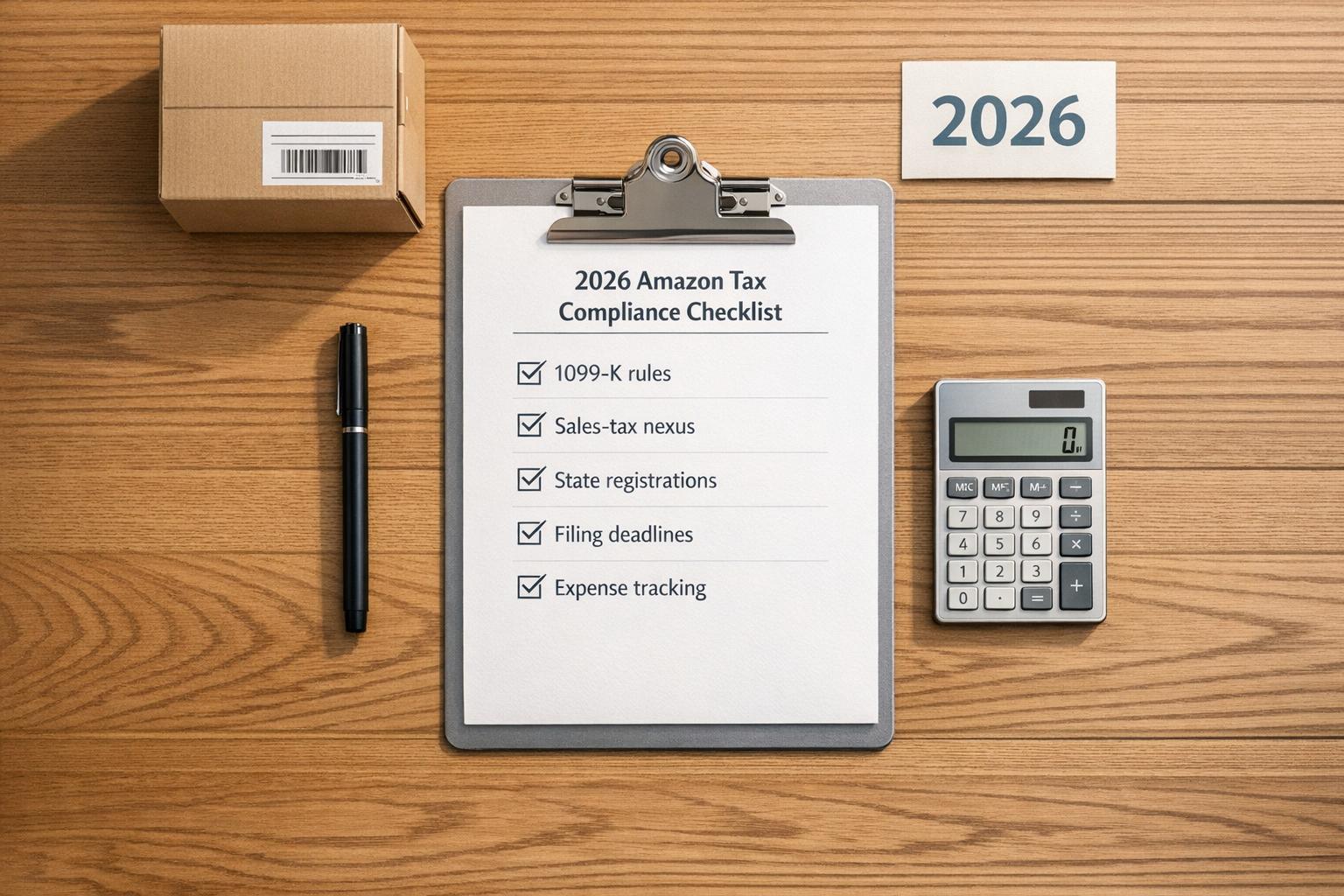
Tax compliance for Amazon sellers in 2026 is more stringent than ever. Whether you’re a solo seller or managing a larger operation, understanding your obligations is critical to avoid penalties or account issues. Here’s what you need to know:
- 1099-K Reporting Threshold: For the 2025 tax year, Amazon will issue a 1099-K if your gross sales exceed $20,000 and you have more than 200 transactions. This reports gross sales, not net profit, so you’ll need to reconcile expenses like fees and refunds yourself.
- Sales Tax Nexus: Amazon collects and remits sales tax as a marketplace facilitator in 45 states and D.C. However, you may still need to register for sales tax permits and file returns if you have physical or economic nexus (e.g., inventory stored in a state or $100,000 in revenue).
- State Nexus Updates: States like Illinois and Kentucky are shifting to a revenue-only threshold for economic nexus in 2026, removing the 200-transaction rule.
- Business Setup: Ensure your Amazon Tax Information Interview is up-to-date with accurate TINs, matching business documents, and verified identities. Proper classification (e.g., sole proprietor, LLC, S-Corp) determines your tax responsibilities.
- Filing and Deadlines: File quarterly estimated taxes if you owe $1,000 or more. Key 2026 deadlines include April 15, June 15, September 15, and January 15, 2027.
- Expense Tracking: Deduct Amazon fees, storage costs, advertising expenses, and COGS (Cost of Goods Sold) to lower taxable income. Keep detailed records for audits.
Pro Tip: Use tools like TaxJar or Avalara to automate sales tax tracking and filings, especially if you have nexus in multiple states.
Staying compliant involves regular reviews, accurate record-keeping, and understanding evolving tax laws. This guide breaks it all down, so you can focus on growing your business without compliance headaches.
Overview: U.S. Income Tax for Amazon Sellers

sbb-itb-e2944f4
Setting Up Your Business for Tax Compliance
Getting your business set up with the right IRS and Amazon information is a must to avoid account suspensions. Laying this groundwork early can save you from hassles and disruptions later. Once your business is verified and properly classified, you can focus on sales tax nexus and tracking income effectively.
Verifying Your Business and Tax Identity
By 2026, Amazon requires all sellers to complete a Tax Information Interview in Seller Central. This process generates either IRS Form W-9 (for U.S. sellers) or Form W-8 (for non-U.S. sellers). During the interview, you’ll need to provide a valid Taxpayer Identification Number (TIN), which could be your Social Security Number (SSN), Employer Identification Number (EIN), or Individual Taxpayer Identification Number (ITIN).
Make sure the name on your government ID, business documents, and bank account matches exactly to avoid delays or suspensions. Amazon Seller Central Help emphasizes:
"The address you provide must represent your primary place of business (head office or branch) where you receive services from Amazon."
For business accounts, Amazon also requires Articles of Incorporation or Organization. If those documents are older than 180 days, you’ll need a Certificate of Good Standing. Additionally, anyone owning more than 25% of the business must have their identity verified. Amazon’s verification team usually reviews submitted documents within 48 hours. Be sure to upload clear, high-quality color scans or original PDFs, as screenshots will be rejected.
Confirming Your Federal Tax Classification
Your business’s federal tax classification determines the forms you file and the deadlines you follow. Double-check your setup in Seller Central (Settings > Account Info > Legal Entity) against your IRS EIN confirmation (Form SS-4) or your latest federal tax return. Here’s a quick breakdown of common Amazon seller structures and their tax responsibilities:
| Business Structure | Federal Tax Form | Primary Tax Responsibility |
|---|---|---|
| Sole Proprietor / Single-member LLC | Schedule C (Form 1040) | Income tax + 15.3% self-employment tax |
| Partnership / Multi-member LLC | Form 1065 | Pass-through to partners’ individual returns |
| S Corporation | Form 1120-S | Owner W-2 salary + distributions |
| C Corporation | Form 1120 | Corporate-level tax + shareholder dividends |
If you’ve recently elected S-Corp status, update your tax interview in Seller Central to reflect this change. Otherwise, your 1099-K reporting might not align with your Form 1120-S filing. For many Amazon sellers, S-Corp election becomes advantageous when net profits reach around $80,000.
Building Your Financial Foundation
To keep your finances clean and organized, open a dedicated business bank account and use a separate business credit card. Mixing personal and business funds can complicate bookkeeping and draw attention during an audit. It’s also smart to set aside 25–30% of your net profits in a savings account for quarterly estimated tax payments. This is especially important if you expect to owe $1,000 or more in taxes for the year.
Finally, secure your financial data and tax identity by enabling two-factor authentication (2FA) in Seller Central. It’s a simple step that adds an extra layer of protection.
Managing Sales Tax Nexus and Collection
Dealing with sales tax requirements can feel overwhelming, but staying compliant is crucial.
Assessing Nexus and Registration Requirements
Nexus refers to the legal connection between your business and a state that obligates you to collect and remit sales tax there. For Amazon FBA sellers, two types of nexus are key: physical nexus and economic nexus.
Physical nexus occurs when Amazon stores your inventory in one of their fulfillment centers. Economic nexus, on the other hand, kicks in when your sales surpass a state’s threshold, typically $100,000 in gross revenue. As of July 1, 2025, at least 15 states will have transitioned to a revenue-only threshold, dropping the 200-transaction trigger. Saman Izadiyar, Founder of Ottit, highlights the importance of understanding this:
"Amazon FBA sales tax nexus creates immediate tax obligations in every state where Amazon stores your inventory."
To determine where you have physical nexus, download the "Inventory Event Detail" report from Seller Central (Reports > Tax Document Library). Cross-check this with your ship-to sales data across all sales channels – not just Amazon. If you have inventory in a state, you’re required to collect sales tax on all orders shipped to that state, regardless of the sales channel.
The scale of nexus can be surprising. Most FBA sellers establish nexus in 18 states within their first year, and nearly 89% have nexus in at least 10 states. If you’re behind on registering, consider a Voluntary Disclosure Agreement (VDA). This can limit the lookback period to 3–4 years and waive penalties, potentially saving over $50,000 compared to a state-initiated audit.
Once you’ve identified where you have nexus, the next step is setting up tax collection.
Configuring Tax Collection in Amazon Seller Central
Amazon serves as a marketplace facilitator in 45 states plus Washington, D.C., meaning they automatically collect and remit sales tax in those jurisdictions. While this simplifies things, it doesn’t absolve you of all responsibilities.
"The marketplace handles it is one of the most expensive misconceptions in e-commerce." – Beancount.io
You still need to register for a sales tax permit in every state where you have nexus, and you must do so before starting to collect sales tax. Collecting without a valid permit is illegal. After registering, go to Tax Settings in Seller Central to confirm that Amazon’s facilitator collection is active for the appropriate states. For any states Amazon doesn’t cover, you’ll need to configure tax codes manually.
Two reports will be your best friends here:
- The Sales Tax Calculation Report shows your liability in states where Amazon isn’t acting as a facilitator.
- The Marketplace Tax Collection Report confirms taxes Amazon has already remitted for you.
Review these reports monthly and reconcile them against your settlement reports. Relying solely on bank deposits can lead to inaccuracies.
Note that some states, like Arizona and Colorado, require additional local filings even when Amazon handles state-level tax collection. Always verify the specific rules for each state.
Once your tax settings are in order, focus on meeting filing deadlines.
Filing Sales Tax Returns
Even if Amazon collects sales tax, you’re still responsible for filing returns on time. Many states require zero-dollar returns for registered sellers, and missing these filings can result in penalties ranging from $25 to $100 per missed return, or late-filing penalties of 10%–30%.
A simple filing calendar can help keep you organized. Match each nexus state to its required filing frequency – monthly, quarterly, or annually. High-volume states like California and Texas often require monthly filings, while lower-volume states typically allow quarterly filings.
When your nexus footprint expands to multiple states, manual filing becomes impractical. Tools like TaxJar ($99/month) or Avalara ($200/month) can automate filings and flag zero-return requirements, ensuring nothing falls through the cracks.
If your inventory placement in a new state has recently created nexus, be aware that your registration and first filing deadlines may be closer than you think. Don’t wait for a notice to take action.
Tracking Income and Preparing for Federal Taxes
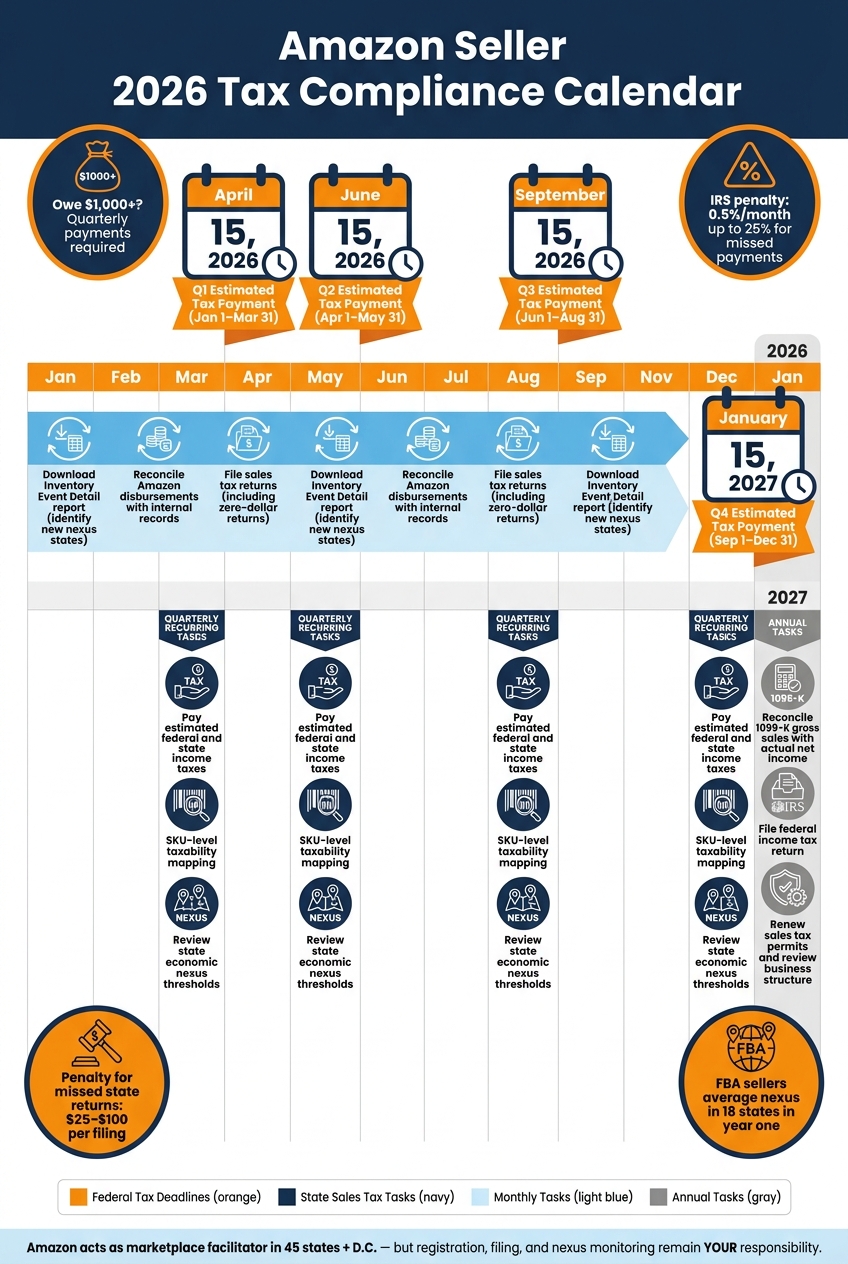
Amazon Seller 2026 Tax Deadlines & Compliance Calendar
Once your sales tax collection is set up, the next step is ensuring your income records are accurate for federal tax preparation. This involves reconciling income properly and understanding how to handle deductions and deadlines.
Reconciling Income with Amazon Reports
It’s important to remember that the deposits you receive from Amazon are not your total revenue. As Jon Hainstock from Taxomate explains:
"The deposit you receive is NOT your revenue. It’s revenue minus referral fees, FBA fees, storage fees, and refunds."
To reconcile your income, use the following formula:
Net Deposit = Gross Revenue − Fees − Refunds + Reimbursements + Adjustments
Amazon’s 1099-K reports show unadjusted gross sales, which include sales tax and shipping credits. To calculate your actual gross revenue, subtract those amounts. The table below outlines which Amazon reports to use for different purposes:
| Report Type | Best Use Case |
|---|---|
| Settlement Report | Bi-weekly bank reconciliation |
| Date Range Summary | Monthly/annual high-level review |
| Date Range Transaction | Detailed audit and SKU-level analysis |
| 1099-K | Federal tax filing baseline |
Keep in mind, Amazon updated its Date Range Transaction and Summary reports on February 28, 2026, to use accrual-based accounting. Transactions are now recorded when posted, not when funds are released. This change applies retroactively to January 1, 2025. To ensure your records match your 1099-K, re-download reports for 2025 if needed. Staying on top of these updates helps maintain accurate records, which is critical for both tax filings and potential audits.
Maximizing Your Deductions
Amazon sellers can deduct several expenses to reduce taxable income. These include:
- Amazon referral fees (ranging from 8% to 45% based on the product category)
- FBA fulfillment fees
- Monthly and long-term storage fees
- PPC advertising costs
- The $39.99/month Professional Seller subscription
Additionally, keep track of Cost of Goods Sold (COGS), which covers product costs, inbound shipping, duties, and preparation expenses. Recording fees and COGS separately on your profit and loss statement ensures clarity in your gross margin and allows for easier profitability comparisons across different sales channels.
Once these deductions are accounted for, you’ll have a clearer picture of your taxable income. This also positions you to meet federal tax deadlines without surprises.
Meeting Quarterly and Annual Tax Deadlines
If your federal tax liability is at least $1,000, you’re required to make quarterly payments for income and self-employment taxes, which total 15.3%. Failing to make these payments can result in IRS penalties of 0.5% per month, up to 25% of the unpaid amount.
Here are the key deadlines for the 2026 tax year:
| Payment Period | Deadline |
|---|---|
| Q1 (Jan 1 – Mar 31) | April 15, 2026 |
| Q2 (Apr 1 – May 31) | June 15, 2026 |
| Q3 (Jun 1 – Aug 31) | September 15, 2026 |
| Q4 (Sep 1 – Dec 31) | January 15, 2027 |
Calculate your quarterly payments based on your net profit after deductions. If you need more time to file your annual return, you can request an extension using Form 4868 (for sole proprietors) or Form 7004 (for business entities). However, remember that an extension only delays the filing deadline, not the payment deadline. Regularly reviewing your financials and following proper documentation practices will keep your tax compliance on track throughout the year.
Keeping Up with Compliance Over Time
Once you’ve set up your tax systems, the work doesn’t stop there. Staying compliant means keeping up with changes in laws, managing your growing business, and maintaining accurate records year-round. Tax compliance is an ongoing process, not just a once-a-year task.
Maintaining Proper Documentation
Keeping detailed records is your best defense in case of an audit. As David Seth, Accountant Consultant at Webgility, explains:
"If you’re audited, the burden of proof is on you so documentation matters as much as filing."
Here’s a breakdown of what records to keep and how long to retain them:
| Document Category | Specific Items to Retain | Retention Period |
|---|---|---|
| Amazon Reports | Date Range Summary, Transaction Reports, Settlement Reports | 3–7 Years |
| Tax Forms | 1099-K, W-9, 1099-NEC, Filed Sales Tax Returns | 7 Years |
| Expense Records | COGS Invoices, Shipping Receipts, Amazon Fee Breakdowns | 7 Years |
| Legal/Nexus | Sales Tax Permits, Exemption Certificates, Business Licenses | Permanent/While Active |
To stay organized, store these records digitally in a secure, centralized location. Use a dedicated business bank account and credit card for all Amazon-related transactions to simplify tracking and reconciliation.
Running Periodic Compliance Reviews
Regular reviews can help catch small issues before they grow into bigger problems. Since state laws and thresholds often change, frequent check-ins are key.
Here’s a suggested review schedule:
| Review Frequency | Focus Area | Key Action |
|---|---|---|
| Monthly | Financial Accuracy | Reconcile Amazon reports with your bank statements to avoid penalties |
| Quarterly | Nexus & Law Changes | Check state sales thresholds and monitor inventory locations |
| Quarterly | IRS Obligations | Submit estimated tax payments |
| Annually | Reporting & Strategy | File income tax returns and review your business structure |
Colin Palin, Product Manager at Repricer.com, emphasizes the importance of staying ahead:
"The days of ‘flying under the radar’ are ending. Proactive compliance is essential for sustainable business growth."
As compliance demands grow, seeking professional expertise can make a big difference.
Getting Professional Support
Managing compliance manually can quickly become overwhelming. Tasks like tracking state nexus, reconciling reports, and staying updated on policy changes are time-consuming and complex.
This is where partnering with an ecommerce expert, such as Emplicit, can help. In addition to marketplace management and listing optimization, Emplicit offers account health management services. They help sellers identify potential issues early and adapt to platform changes before they affect your business. With their support, you can reduce risks and focus more on growing your business.
Conclusion and Master Checklist
Navigating Amazon tax compliance in 2026 can feel overwhelming, especially with over 14,000 tax jurisdictions across the U.S. and ever-changing state rules. However, following a structured and repeatable process can help you stay on top of your obligations.
As Umesh Kant Sharma, Founder & Editorial Director of ReverseSalesTaxCalc.org, explains:
"The biggest mistake I see Amazon FBA sellers make is assuming that because Amazon collects the tax, their sales tax obligations are fully handled. They are not."
Key Takeaways
While Amazon’s marketplace facilitator role handles sales tax collection and remittance, you’re still responsible for registration, filing, and monitoring nexus. To calculate your taxable income, subtract marketplace-collected taxes and business expenses from the gross sales reported on your 1099-K. If you use FBA, you likely have nexus in 26 or more states due to inventory distribution, making it crucial to track where your stock is stored throughout the year. These points summarize the steps detailed earlier.
Keep this checklist handy to ensure you’re fully compliant year-round.
Master Checklist for 2026
Here’s a breakdown of tasks by frequency to help you manage compliance effectively:
| Frequency | Task |
|---|---|
| One-Time Setup | Register for sales tax permits in all nexus states |
| One-Time Setup | Maintain separate business bank accounts |
| One-Time Setup | Set up tax collection settings in Amazon Seller Central |
| One-Time Setup | Confirm your federal tax classification and file the correct form (e.g., Schedule C, 1065, 1120-S, or 1120) |
| Monthly | Download the "Inventory Event Detail" report to identify new nexus states |
| Monthly | Reconcile Amazon disbursements with your internal records |
| Monthly | File sales tax returns as required, including zero-dollar returns |
| Quarterly | Pay estimated federal and state income taxes (due Apr 15, Jun 15, Sep 15, Jan 15) |
| Quarterly | Audit SKU-level taxability mapping for accuracy |
| Quarterly | Review state economic nexus thresholds for updates |
| Annually | Reconcile your 1099-K gross sales with your actual net income |
| Annually | File your federal income tax return by the deadline |
| Annually | Renew sales tax permits as needed and review your business structure |
This checklist serves as a practical guide to help you manage your Amazon tax obligations efficiently.
FAQs
Do I need to register for sales tax if Amazon collects it?
If Amazon handles collecting and remitting sales tax on your behalf, you usually don’t need to register for sales tax in those states. That said, you’re still accountable for other tax responsibilities, like income tax. It’s important to review your full tax compliance to steer clear of potential problems.
How do I find which states I have nexus in with FBA?
To figure out which states you have nexus in with FBA, you’ll need to evaluate both physical nexus and economic nexus.
- Physical nexus happens in states where Amazon holds your inventory. This means any state with an Amazon fulfillment center storing your products creates a physical presence for your business.
- Economic nexus is based on your sales activity. Many states set thresholds, like $100,000 in sales or 200 transactions, which, if exceeded, establish nexus.
Make it a habit to check where your inventory is stored and monitor your sales figures regularly. This way, you can stay on top of your nexus responsibilities and avoid any compliance issues.
How do I reconcile my 1099-K with my actual profit?
When you receive Amazon’s 1099-K, remember it reflects gross sales, not your net profit. To get a clearer picture of your actual earnings, start by comparing the amount on the 1099-K with your Amazon settlement reports. These reports break down critical details like fees, refunds, and sales tax.
Here’s how to calculate your net revenue:
- Subtract Amazon fees, refunds, and sales tax from the gross sales reported on the 1099-K.
- Account for timing differences, such as reserved funds or delayed payouts that might not align perfectly with the reporting period.
It’s a good habit to regularly review and reconcile your records. Doing this helps you spot any discrepancies early and ensures your financial records are accurate.