
Want to improve your Amazon product and outrank competitors? Start by analyzing their reviews. Competitor reviews are packed with insights into customer needs, product flaws, and missed opportunities. Here’s how you can leverage them effectively:
- Identify competitors: Focus on products with similar features, price, and target audience. Use long-tail keywords like "programmable coffee maker" to narrow your search.
- Collect review data: Manually filter reviews by star ratings, or use tools like Helium 10 to export data in bulk for larger datasets.
- Spot patterns: Group feedback by themes (e.g., product quality, packaging) and identify recurring complaints or praises.
- Improve your product: Address common competitor flaws, such as poor durability or unclear instructions, to stand out.
- Optimize your listing: Update images, bullet points, and keywords based on what customers value most.
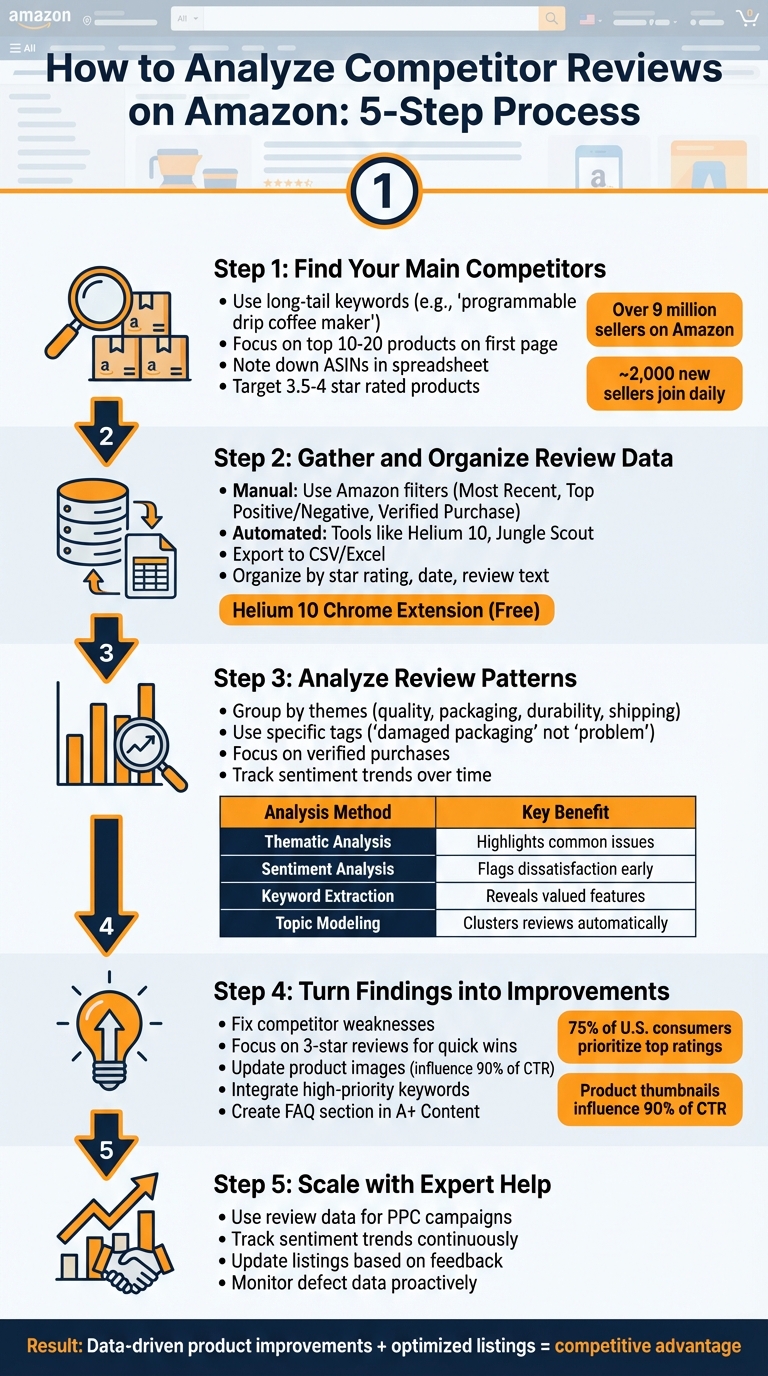
5-Step Process to Analyze Amazon Competitor Reviews
How To Spy On Your Amazon Competitors Using Helium 10!
sbb-itb-e2944f4
Step 1: Find Your Main Competitors and Their Products
Start by identifying your direct competitors. With over 9 million sellers on Amazon and around 2,000 new sellers joining daily, the marketplace is undeniably crowded. The key is to focus on products that directly compete for your target customers.
Use Core Keywords to Find Competitors
Search Amazon using the keywords your customers would type in when looking for your product. Skip broad terms like "coffee maker" and go for more specific, long-tail keywords such as "single-serve coffee machine" or "programmable drip coffee maker with thermal carafe." The top 10 to 20 products that show up on the first page for these searches are your main competitors.
"The top products for a niche keyword are your primary competitors." – Geoffrey Martlin, Senior Digital Marketing Manager, Trellis
While reviewing search results, note down the ASINs (Amazon Standard Identification Numbers) of these products in a spreadsheet. You can find the ASIN on the product detail page, typically in the product information section. Use Amazon’s filters for price and star ratings to refine your search to products that align with your market positioning.
Choose Similar Products to Compare
Focus on products that are direct competitors – those that share your price range, features, and appeal to the same audience. Check the "Customers Also Viewed" and "Frequently Bought Together" sections on both your listing and competitor listings to identify products Amazon already considers related.
Pay close attention to competitors with 3.5 to 4-star ratings. These products have enough reviews to provide valuable insights, but their imperfections often highlight areas where you can improve. Look for competitors ranking for your main keywords, matching your product’s specifications (like size, material, or color options), and targeting the same customer demographics. This ensures you’re comparing products that truly compete in your niche, avoiding irrelevant comparisons.
Once you’ve identified your competitors, you’re ready to dive into analyzing and organizing their review data.
Step 2: Gather and Organize Review Data
After identifying your competitors, the next step is to collect their review data. Depending on the scale of your analysis, you can either gather this data manually or use automated tools.
Collect Data Manually
For smaller datasets or when focusing on specific feedback, manually copying review text from Amazon into a spreadsheet works well. Start by visiting the competitor’s product page and selecting standout reviews.
To streamline this process, leverage Amazon’s built-in filters. Use the "Most Recent" filter to stay updated on current trends, or switch to "Top Positive" and "Top Negative" to quickly pinpoint what customers appreciate or dislike. Filtering by "Verified Purchase" ensures you’re only reviewing feedback from actual buyers.
Don’t overlook customer-uploaded images and videos – they can reveal gaps between the product’s listing and its actual performance. Additionally, the "Customer questions & answers" section can provide insights into what potential buyers find unclear or concerning before purchasing.
For those familiar with HTML, using your browser’s "Inspect" tool can help you copy the review section’s HTML for a more structured view of the data.
While manual collection is effective for smaller tasks, it can become overwhelming when dealing with large volumes of data. In such cases, automation can save time and effort.
Use Tools to Collect Data in Bulk
When analyzing multiple products or thousands of reviews, automated tools are a practical solution. Tools like Helium 10’s Review Downloader and Jungle Scout‘s AI Review Analysis allow you to export and categorize reviews efficiently. These tools filter data by date, star rating, verified purchases, and even keywords, making it easier to extract meaningful insights.
Most of these tools function as Chrome extensions. Once you’re on an Amazon product page, simply activate the extension, select the ASIN, and export the review data into a CSV or Excel file. For example, the Helium 10 Chrome Extension, which is free to download, includes both the Review Downloader and Review Insights features.
Advanced tools take it a step further by using AI to identify recurring themes and sentiment within reviews. Helium 10’s Review Insights, for instance, highlights frequently mentioned phrases like "leaks" or "broke", helping you spot common issues without reading every review. Some tools even let you schedule regular data scrapes, so you can track changes in customer sentiment over time.
Once you’ve gathered the data, organize it in a spreadsheet. Use separate columns for details like review date, star rating, review text, and whether the review is from a verified purchase. For clarity, create distinct sheets for positive (4-5 stars) and negative (1-2 stars) reviews. This structured format makes it easier to identify patterns and trends, setting you up for deeper analysis in Step 3.
Step 3: Analyze Review Patterns for Customer Insights
Turn raw review data into meaningful insights by spotting trends that highlight what customers care about most. This step sheds light on your competitors’ strengths and weaknesses. Building on the organized data from Steps 1 and 2, this analysis helps you understand what customers love – or can’t stand.
Group Reviews by Common Themes
Start by sorting reviews into categories like product quality, packaging, durability, customer service, and shipping experience. This thematic approach allows you to identify frequent issues without having to sift through every single review.
Use a consistent tagging system to label feedback. For example, instead of vague tags like "problem", use specific labels like "damaged packaging" or "slow shipping". This precision makes it easier to track recurring problems across various competitor ASINs.
Clean up your data by removing spam, duplicate entries, bot-generated reviews, unnecessary symbols, and filler words (like "and" or "the"). Focus on verified purchase reviews to ensure you’re analyzing reliable feedback.
For deeper insights, try aspect-based sentiment analysis. This method evaluates individual product features – like battery life or ease of setup – rather than the product as a whole. For instance, even if a product has a 4-star average rating, repeated complaints about "leaks when tilted" could point to a critical design flaw that the overall rating doesn’t reveal.
Once you’ve categorized the feedback, summarize your findings to visualize patterns across competitors.
Map Out Competitor Strengths and Weaknesses
Create a comparison table to summarize key attributes and sentiment scores. List your top 10–15 competitors in the left column, and include columns for attributes like price, average rating, total review count, and sentiment scores for specific features.
| Analysis Method | Purpose | Key Benefit |
|---|---|---|
| Thematic Analysis | Groups feedback by category (e.g., Packaging) | Highlights common issues across products |
| Sentiment Analysis | Detects emotional tone (Positive/Negative) | Flags dissatisfaction before ratings drop |
| Keyword Extraction | Identifies frequently used terms | Reveals features customers value most for SEO |
| Topic Modeling | Finds themes in large datasets | Clusters similar reviews without manual effort |
Pay close attention to recurring phrases in negative reviews. For example, if multiple customers report "leaks when tilted", you’ve identified a potential design flaw that could be an opportunity to improve your product. Similarly, note areas where competitors excel – like fast shipping or exceptional customer service – which could set the benchmark for your category.
Look for unexpected use cases in reviews. Sometimes, customers describe creative ways of using a product that you hadn’t considered. These insights could help you target new audiences or inspire feature updates. Finally, track sentiment trends over time. Comparing recent reviews to older ones can reveal whether a competitor is fixing issues or if their quality is slipping.
"Ratings and review analysis helps quickly understand the pulse of the market and then figure out whether some of the benefits aren’t perceived in the right way by the consumers."
- Kaushik Boruah, Business Head, CPG and Hospitality, LatentView Analytics
Step 4: Turn Findings into Product and Listing Improvements
Use competitor insights to refine your product and its listing. The patterns you’ve identified can guide you in standing out and meeting customer expectations. By implementing these targeted changes, you can position your product more effectively.
Fix Competitor Weaknesses in Your Product
Take a closer look at the review patterns you’ve analyzed, especially recurring issues that many buyers mention. These common pain points are opportunities to address systematic problems that competitors haven’t solved. Focus on frequent complaints rather than isolated ones, as these reflect broader customer dissatisfaction.
Pay special attention to 3-star reviews – they often reveal areas where small tweaks or upgrades could make a big difference. For example, if customers consistently mention issues like hard-to-remove stickers or underwhelming packaging, improving these details can elevate your product without requiring major changes.
Also, dig into the Q&A sections for repeated questions. Topics like battery life, skin sensitivity, or compatibility often indicate gaps in competitors’ product details. By addressing these concerns in your product design and description, you can fill those gaps and set your offering apart.
"When it comes to e-commerce and selling on Amazon, there are many different data streams, but nothing is as important as customer reviews."
- Helium 10 Team
Once your product has been refined, update your listing to reflect these improvements and attract more attention from potential buyers.
Update Listings Based on Customer Preferences
The insights you’ve gathered should directly inform your listing updates. Since product thumbnails influence up to 90% of a listing’s click-through rate, ensure your images showcase key features like "compact size" or "vibrant colors" that competitors might be neglecting. Clear, compelling visuals can make a huge impact.
Revamp your bullet points to highlight benefits that matter to customers. For instance, instead of listing technical specs, frame the feature as a solution: "Blue light calms acne-prone skin." This approach speaks directly to what shoppers care about, using their own language from reviews.
Integrate high-priority keywords – terms like "waterproof", "lightweight", or "BPA-free" – into your product title to signal that your product meets specific needs. Additionally, create a FAQ section within your A+ Content to proactively address common concerns found in competitor Q&As, such as durability or compatibility. With 75% of U.S. consumers prioritizing products with top ratings and reviews, preemptively resolving objections can help you avoid negative feedback and gain an edge.
"The main goal of studying what your competitors are doing is not to be a copycat… but to discover how your product or offer is different from theirs, so you can clearly communicate to your customers why they should choose yours over theirs."
Step 5: Work with Emplicit to Scale Review-Driven Improvements
Turning customer reviews into actionable growth strategies takes a consistent, all-encompassing approach to your Amazon presence. Emplicit’s team of specialists can help transform the insights from your reviews into meaningful updates across your listings, PPC campaigns, and account management. This structured method ensures that review data directly contributes to more effective advertising and improved listings.
Emplicit focuses on uncovering high-intent, customer-driven keywords from reviews – often the kind of keywords that standard tools overlook. These insights shape both ad copy and listing updates. For instance, if reviews reveal recurring confusion about how to use a product or concerns about its presentation, Emplicit uses that feedback to refine PPC strategies and make listing adjustments.
"Emplicit’s job is to drive profitable campaigns so we can help you increase traffic to your Amazon listings, reduce your ACOS, and boost your conversions." – Emplicit
Emplicit goes beyond just paid ads. They track sentiment trends and defect data to identify potential issues before they harm your ratings. Their comprehensive approach turns repeated customer feedback into actionable changes – like adding instructional videos to clarify product use or updating images to better reflect size or color accuracy.
Conclusion
Digging into competitor reviews isn’t just about seeing what others are doing – it’s about understanding what customers genuinely want and where current products fall short. By identifying competitors, gathering review data, and spotting recurring themes, you can turn customer feedback into actionable steps to improve your product and listings. This approach ensures you’re building strategies rooted in real customer needs, not assumptions.
"Customer reviews are far more than a reflection of overall product satisfaction. They offer valuable insights sellers can use to improve their products, earn customer trust, and enhance their business strategy." – Brian Connolly, Ecommerce Expert, Jungle Scout
But the real magic lies in what you do with this information. Use it to fix design flaws, sharpen your product descriptions, update visuals, and weave in high-performing keywords. Considering that at least 75% of U.S. consumers prioritize products with the best ratings and reviews on Amazon, understanding what drives those ratings gives you a clear advantage.
This process doesn’t stop at one product – it scales. Regular monitoring and expert execution are key to applying these insights across your portfolio. Companies like Emplicit streamline this by automating sentiment analysis, pinpointing impactful listing updates, and channeling customer feedback into advertising and product development strategies.
With nearly 2,000 new sellers entering Amazon’s marketplace every day, leveraging review-driven strategies isn’t optional – it’s essential. The right tools and expertise can transform competitor reviews into a powerful asset for staying ahead of the curve.
FAQs
How many competitor products should I analyze?
When analyzing competitor products, there’s no magic number to aim for, but narrowing your focus to the top 5–10 competitors is a smart move. These products typically have a strong presence in the market, with plenty of reviews and visibility, making them highly relevant to your research. By concentrating on this group, you can pinpoint their strengths, weaknesses, and potential gaps in the market – all without drowning in an overload of data.
Which reviews should I prioritize first?
Pay close attention to reviews that consistently mention customer complaints or negative feedback. These reviews often uncover recurring problems with your products – or even your competitors’ offerings. By prioritizing low-rated reviews, you can pinpoint weaknesses, address them, and improve your product or listing to better align with customer expectations.
This strategy isn’t just about damage control. Tackling these issues head-on can lead to higher customer satisfaction and even position you ahead of the competition. Negative feedback, when acted upon, becomes an opportunity for growth.
How do I turn review insights into better keywords?
Customer reviews are a goldmine for uncovering the language your audience actually uses. By analyzing these reviews, you can spot common themes, pain points, and frequently mentioned features that resonate with buyers.
Look for recurring words and phrases in the reviews – these are often the exact terms potential customers search for. Use these insights to refine your product titles, bullet points, and descriptions, making them more relevant and easier to find.
To stay ahead, make it a habit to update your keywords regularly. This ensures your content stays aligned with how customers describe your products and keeps pace with market trends.