

Automated PPC bidding uses machine learning to adjust ad bids in real-time, helping businesses achieve goals like higher conversions or improved revenue. Unlike manual bidding, which relies on static adjustments, automated strategies analyze billions of data points – such as device type, location, and time of day – to make smarter decisions for each auction.
Key benefits include:
- Increased efficiency: Save time by automating bid adjustments across platforms like Google, Amazon, and TikTok.
- Better performance: Strategies like Target ROAS and Target CPA optimize for revenue or cost efficiency.
- Data-driven decisions: Algorithms use signals beyond human reach to improve results, such as identifying high-converting user patterns.
To succeed, ensure accurate conversion tracking, sufficient historical data (15–50 conversions in 30 days), and clear goals. Automated bidding is ideal for scaling campaigns, improving ROI, and focusing on broader strategies instead of micromanaging bids. However, it requires regular monitoring and adjustments to maintain performance.
If you’re running PPC campaigns, consider switching to automated bidding to save time and achieve better results.
What Automated PPC Bidding Is and How It Affects ROI
Automated PPC Bidding Defined
Automated bidding is a strategy that leverages artificial intelligence and machine learning to adjust bids automatically, aiming to increase the chances of an ad leading to a click or conversion. Unlike manual bidding, which relies on static cost-per-click (CPC) settings at the keyword or ad group level, automated systems analyze billions of signals in real time. These signals include factors like device type, location, time of day, browser, operating system, and even whether a user is part of a remarketing list.
A more advanced form of this is Smart Bidding, which uses auction-time bidding to optimize for conversions or conversion value during each individual auction. It evaluates how various signals interact to uncover patterns that influence conversion rates. For example, while mobile users might generally convert less often, the algorithm might identify that a mobile user browsing at 7:00 AM in a specific city has a higher likelihood of converting.
How Automation Increases ROI
Automated bidding helps boost ROI by aligning bid strategies with specific financial goals. For instance:
- Target CPA (tCPA): Automatically adjusts bids to achieve the highest possible number of conversions while staying at or below a defined cost-per-action.
- Target ROAS (tROAS): Optimizes bids to maximize the value of conversions, ensuring a specific return on ad spend. For example, setting a Target ROAS of 400% means the system will aim to generate $4 in revenue for every $1 spent.
By shifting from volume-driven strategies to value-based ones, automated bidding prioritizes high-value conversions instead of just increasing the total number of conversions. Strategies like Maximize Conversions and Maximize Conversion Value are designed to utilize your entire daily budget to achieve either the highest number of conversions or the greatest total revenue, respectively. Auction-time bidding further enhances performance by adjusting bids in real time for each auction, ensuring optimal results.
However, automation works best when the groundwork is properly set.
What You Need Before Automating
Automated bidding isn’t something you can just switch on and expect instant success. It requires three critical components: accurate conversion tracking, enough historical data, and a well-structured account.
Conversion tracking is non-negotiable. Without it, the algorithm has no way to determine which clicks lead to meaningful actions. Michelle Morgan, Co-Founder of Paid Media Pros, emphasizes this point:
Enable conversion tracking before launching automated bidding. Google’s goal is to maximize the number of conversions being tracked, so if no tracking is enabled, the algorithm is more likely to make bad decisions.
You’ll also need a solid data foundation. Ideally, aim for 15–50 conversions over the past 30 days to ensure the algorithm has enough information to work with. If you’re using value-based strategies like Target ROAS, assign monetary values to your conversion actions. This allows the system to focus on leads that bring the most value to your business.
Finally, allow for a learning period of two weeks to a month when implementing a new strategy. During this time, it’s normal to see some fluctuations in performance metrics. Avoid making major changes during this phase, as doing so can reset the algorithm’s progress. To give the system room to optimize, set initial targets slightly above your recent CPA or just below your recent ROAS.
4 Proven Automation Plays That Consistently Grow Ecommerce Profits | ALM 10
How to Choose the Right Automated Bidding Strategy
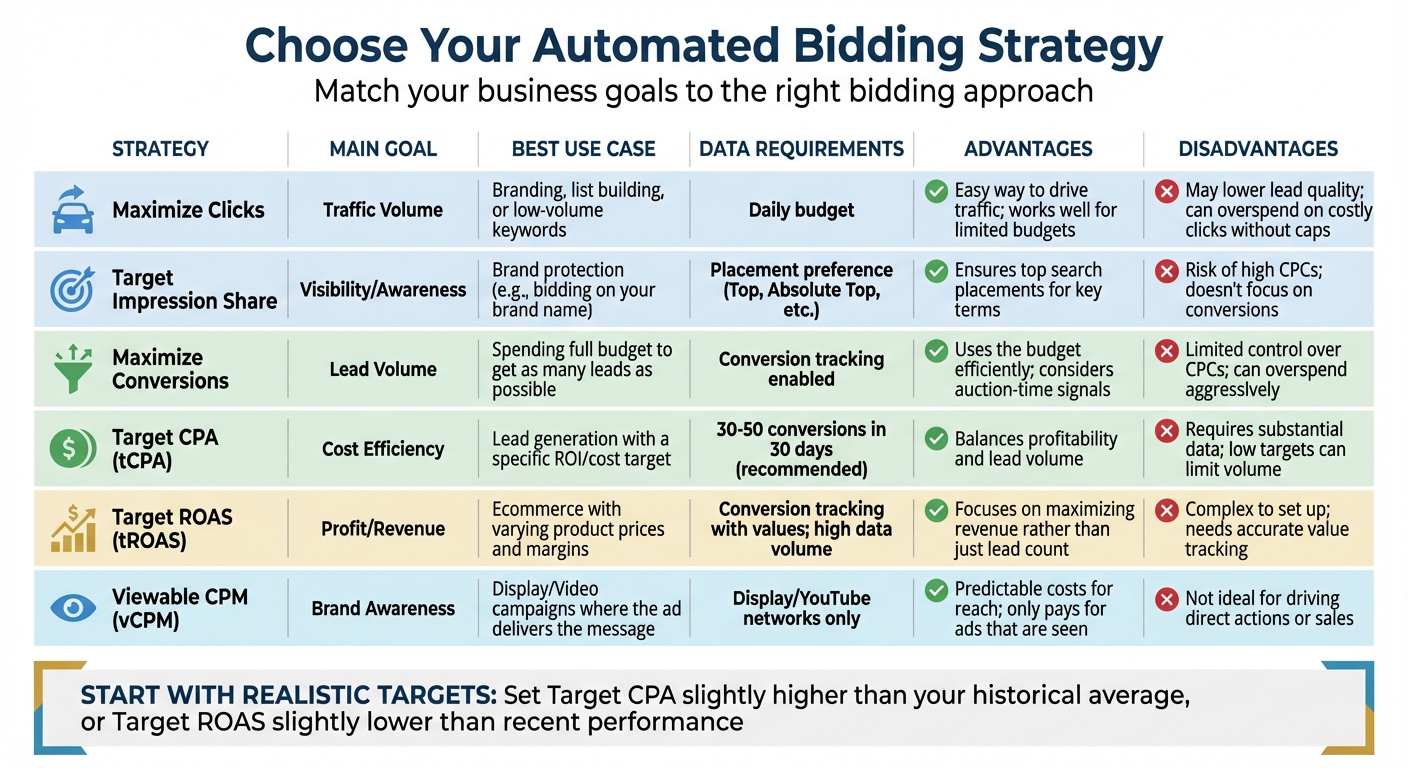
Automated PPC Bidding Strategies Comparison: Goals, Requirements, and Use Cases
Matching Your Goals to Bidding Strategies
The best automated bidding strategy depends on what you want to achieve. If your focus is visibility and brand awareness, consider using Target Impression Share or vCPM. These strategies help your ads show up for high-value searches, such as when bidding on your brand name.
If you’re aiming to increase traffic, go with Maximize Clicks and set a Maximum CPC bid limit to control your spending. This approach is particularly useful when building an email list, launching a new brand, or when conversion data is limited.
For leads and sales generation, you’ll want to use conversion-focused strategies. Maximize Conversions is great if you’re ready to allocate your full daily budget to gather as many leads as possible. On the other hand, Target CPA (tCPA) is a better option if you need to keep your cost per lead predictable while still scaling your results.
If you’re in ecommerce, focus on Maximize Conversion Value or Target ROAS. These strategies work best when you’ve assigned proper conversion values, like differentiating between a $1,000 sale and a $5 lead.
To make it easier, the table below compares these strategies to help you decide which one aligns with your business goals.
Automated Bidding Strategies Compared
Here’s a breakdown of the main automated bidding strategies:
| Strategy | Main Goal | Best Use Case | Data Requirements | Advantages | Disadvantages |
|---|---|---|---|---|---|
| Maximize Clicks | Traffic Volume | Branding, list building, or low-volume keywords | Daily budget | Easy way to drive traffic; works well for limited budgets | May lower lead quality; can overspend on costly clicks without caps |
| Target Impression Share | Visibility/Awareness | Brand protection (e.g., bidding on your brand name) | Placement preference (Top, Absolute Top, etc.) | Ensures top search placements for key terms | Risk of high CPCs; doesn’t focus on conversions |
| Maximize Conversions | Lead Volume | Spending full budget to get as many leads as possible | Conversion tracking enabled | Uses the budget efficiently; considers auction-time signals | Limited control over CPCs; can overspend aggressively |
| Target CPA (tCPA) | Cost Efficiency | Lead generation with a specific ROI/cost target | 30-50 conversions in 30 days (recommended) | Balances profitability and lead volume | Requires substantial data; low targets can limit volume |
| Target ROAS (tROAS) | Profit/Revenue | Ecommerce with varying product prices and margins | Conversion tracking with values; high data volume | Focuses on maximizing revenue rather than just lead count | Complex to set up; needs accurate value tracking |
| Viewable CPM (vCPM) | Brand Awareness | Display/Video campaigns where the ad delivers the message | Display/YouTube networks only | Predictable costs for reach; only pays for ads that are seen | Not ideal for driving direct actions or sales |
When you’re setting up Target CPA or Target ROAS, start with realistic goals. For example, set your CPA slightly higher than your recent average or your ROAS a bit lower. This gives the algorithm room to adjust and learn without being overly restricted. If your campaigns don’t meet the recommended 30–50 conversions per month, group them into a Portfolio Bid Strategy to combine data across multiple campaigns.
How to Set Up Automated Bidding on Major Platforms
This guide walks you through the steps to activate automated bidding on popular platforms, helping you maximize your return on investment (ROI).
Google Ads
Google Ads uses Smart Bidding, a machine learning system that adjusts bids in real time based on factors like device type, location, time of day, and browser . Over 80% of Google advertisers now rely on automated bidding .
Before you start, make sure conversion tracking is enabled. Without it, Smart Bidding won’t have the data it needs to optimize your campaigns.
If your focus is on revenue, especially for ecommerce, consider the Target ROAS strategy. To set this up as a portfolio strategy across multiple campaigns, go to Tools > Budgets and bidding > Bid strategies in Google Ads. Click the plus button, select Target ROAS, name your strategy, pick the campaigns to include, and set your target return (e.g., 500% ROAS for $5 revenue per $1 spent). Finally, click Save .
For individual campaigns, during the setup process, go to the Bidding section. Choose Conversion value for ROAS goals or Conversions for CPA goals, enter your target, and click Save and continue. Advertisers who switch from Target CPA to Target ROAS have reported an average 14% increase in conversion value while maintaining a similar ROAS .
To get the best results, pair Smart Bidding with broad match keywords and responsive search ads. Keep track of performance using the Bid Strategy report. These tools simplify bid management and align with your ROI objectives.
Amazon Ads
Amazon’s platform offers three bidding options for Sponsored Products: Dynamic bids – down only, Dynamic bids – up and down, and Fixed bids .
"When you select dynamic bids – up and down, we will raise or lower your bid based on performance. That means we will increase your bids in real time to help win impressions that may be more likely to convert to a sale."
The Dynamic bids – down only option, which is the default for new campaigns, lowers bids in real time for auctions that are less likely to convert. This is a good choice if you’re working with a strict budget. On the other hand, Dynamic bids – up and down adjusts bids upward – up to 100% – for impressions that are more likely to convert and lowers them for less promising ones. For example, a $1.00 bid could go as high as $2.00. This option works best when you have strong historical performance data .
To enable dynamic bidding, go to the Campaign Bidding Strategy section during campaign setup. For existing campaigns, update your Campaign Settings, choose your preferred bidding strategy, and click Save. If you’re just starting out, consider using Amazon’s Suggested Bid, which is based on recent winning bids for similar products.
To give the algorithm time to adjust, review your bids every two weeks . For automatic campaigns, fine-tune your strategy by adjusting bids for targeting groups like Close match, Loose match, Substitutes, and Complements. You can also set placement adjustments – up to 900% – for specific placements such as "Top of Search" or "Product Pages". These features help you balance performance and cost.
Walmart, Target, and TikTok Shops
Other platforms like Walmart, Target, and TikTok Shops also offer automated bidding systems tailored to their specific needs. These systems use AI to optimize bids and allocate budgets efficiently, helping brands tackle challenges such as scaling, profitability, and complex reporting.
For businesses managing campaigns across multiple platforms, working with agencies like Emplicit can simplify the process. Emplicit provides full-service PPC management for Walmart, Target, and TikTok Shops, focusing on growth and profitability with custom strategies for each marketplace.
When starting on these platforms, set clear ROI goals. Define your target ROAS or CPA before launching campaigns, and allow two to three weeks for the system to optimize. This gives the platform enough time to gather data and fine-tune performance.
sbb-itb-e2944f4
How to Optimize Automated Bidding for Better Long-Term ROI
The Learning Period Explained
Once you’ve set up automated bidding, the system enters a learning phase where it refines its performance. During this time, you might notice some fluctuations as the algorithm experiments with different bid levels and identifies the most effective auctions.
To avoid disrupting this process, hold off on making major changes like adjusting budgets, altering CPA (Cost Per Acquisition) or ROAS (Return on Ad Spend) targets, or pausing campaigns. Let the system complete at least one or two full conversion cycles before evaluating its performance. This ensures the data is stable and provides a clearer picture of how the strategy is working.
"Even though automated bidding strategies require less maintenance than manual bidding, there’s no such thing as ‘set it and forget it.’ Once these strategies are leveraged in your account, set reminders to check in on them to ensure they’re still accomplishing the goals they set out to hit." – Michelle Morgan, Co-Founder, Paid Media Pros
For the best results, start with realistic initial targets. If you’re using Target CPA, set a target slightly higher than your historical average. For Target ROAS, aim for a target that’s a bit lower than recent performance. This gives the algorithm some flexibility to adjust before you fine-tune your goals. While Google suggests having at least 15 conversions in the past 30 days, many experts recommend aiming for 30 to 50 conversions per month to provide the algorithm with enough data for effective decision-making.
Data-Driven Ways to Improve Performance
Once the learning phase is complete, use bid strategy reports to track how well your campaigns align with your goals. These reports indicate whether your strategy status is "Learning", "Limited", or "Active", helping you spot issues like budget constraints or low conversion volumes that might be affecting performance.
Dive into search term reports regularly to identify and exclude irrelevant queries that might be wasting your budget. Adding negative keywords can help refine your targeting. Similarly, check placement reports to ensure your ads aren’t showing up on websites that don’t align with your objectives.
When tweaking your CPA or ROAS targets, make small, incremental adjustments rather than dramatic changes. While modifying a target won’t reset the learning phase, large shifts can cause performance to fluctuate for a cycle or two as the system recalibrates for new auctions. If individual campaigns aren’t generating enough conversion data, consider consolidating them into a portfolio bid strategy to pool data and enhance the algorithm’s effectiveness.
For events like flash sales or product launches, use seasonality adjustments to inform the algorithm about expected changes in conversion rates. For example, if you anticipate a 50% boost in conversions during a promotion, the system can adjust bids accordingly.
These steps provide a solid foundation for comparing automated bidding with manual management.
Automation vs. Manual Management Compared
The adjustments above highlight the strengths of automated bidding when compared to manual management.
| Feature | Manual Management | Automated Bidding |
|---|---|---|
| Control | Full control over every keyword bid | Focus on high-level goals and targets |
| Time Investment | High; requires constant updates and analysis | Low; automates bid adjustments, saving time |
| Data Usage | Limited to visible metrics | Leverages millions of auction-time signals (e.g., device, location, browser) |
| Optimization Speed | Reactive; relies on past performance | Real-time optimization for individual auctions |
| Best For | New accounts with minimal data or low traffic | Scaling performance and maximizing ROI with existing data |
Take 1STOPlighting, for example. This retail lighting store switched all their shopping campaigns to Target ROAS bidding, focusing on profit goals instead of just volume. The result? A 214% increase in profit. Similarly, loveholidays replaced their in-house solution with Smart Bidding. By tapping into auction-time signals that their internal tools couldn’t access, they saw a 57% boost in profit.
Advanced Automation Tactics for Ecommerce Brands
Value-Based Bidding
Value-based bidding (VBB) is all about focusing on the customers who bring in the most revenue or profit. By leveraging real-time optimization, this approach targets users who are likely to spend more or become loyal, repeat buyers.
The backbone of VBB is first-party data. Integrate your CRM, cloud storage, or customer data platform directly with Google Ads. This allows the algorithm to identify patterns within your most profitable customer segments. If your budget or conversion numbers are on the smaller side, you can assign values to "micro-conversions", like video views or downloads of product information. These smaller actions provide the algorithm with enough data to eventually optimize for high-value purchases.
A great example of VBB in action is Citibanamex. After implementing VBB, they saw a 27% increase in credit card bookings and a 7% drop in cost per booked card. Karla Guerrero, their Online Acquisition Manager, noted:
"Google AI helped us detect patterns quickly, catch users with potential to convert, and increase our sales by optimizing towards value".
In 2025, many brands are expected to shift from ROAS (Return on Ad Spend) to POAS (Profit on Ad Spend). Unlike ROAS, which focuses on revenue, POAS uses profit margins to guide bids, ensuring the system prioritizes products that contribute most to your bottom line. To get started with VBB, you’ll need to track at least two unique, non-zero conversion values and hit a minimum of 15 conversions per month. Additionally, enabling "enhanced conversions for web" will provide more precise data, and avoiding CPC limits ensures the system can aggressively bid for high-value users.
Once you’ve refined your bidding strategy through customer data, fine-tuning bids based on inventory levels can take your optimization efforts even further.
Inventory-Aware Bidding
After optimizing for value, it’s essential to align your ad spend with your inventory levels. Promoting products that are nearly out of stock not only wastes your budget but can also hurt your organic rankings on platforms like Amazon and Walmart. Inventory-aware bidding adjusts your pay-per-click (PPC) strategy in real time based on stock availability.
The key metric here is Days of Cover (DoC), which you calculate by dividing your total on-hand and inbound units by your average daily sales. Here’s how to adjust based on DoC:
- Critical Low Stock (≤ Lead Time or < 7 days): Pause all non-brand ads to avoid stockouts.
- Low Stock (7–14 days): Lower bids and budgets; remove coupons or promotions.
- Healthy Stock (21+ days): Increase bids for high-performing keywords.
- Overstock (60+ days): Aggressively bid or use "Clearance" labels to move inventory.
| Inventory Status | Days of Cover (DoC) | Recommended Action |
|---|---|---|
| Critical Low | ≤ Lead Time (or < 7 days) | Pause: Stop all non-brand ads to prevent stockout |
| Low Stock | 7–14 Days | Throttle: Lower bids and budgets; remove coupons/promotions |
| Healthy Stock | 21+ Days | Scale: Aggressively bid on high-performing keywords |
| Overstock | 60+ Days | Liquidate: Increase bids or use aggressive "Clearance" labels |
Ignoring inventory can be costly. For example, a drop in in-stock rates from 90% to under 30% can cause up to a 42% loss in sales, and it typically takes four days to recover full sales volumes after just one day out of stock. On Amazon, stockouts also lead to a sharp decline in search rankings, which can take weeks to recover. Additionally, Amazon now imposes "low inventory fees" for FBA sellers with less than 28 days of stock.
To automate inventory-aware bidding, connect your ecommerce platform (like Shopify or WooCommerce) or feed manager to your ad platform. Set up automated rules to pause ads for products with inventory below a set threshold, such as 50 units. Use custom labels like "High-stock", "Low-stock", or "Clearance" to apply tailored bidding strategies to each group. During peak shopping seasons, such as Black Friday, increase how often your inventory feed updates – ideally several times a day – to avoid advertising sold-out products.
Adjusting Bids for Seasonal Events and Promotions
Major U.S. shopping events like Black Friday and Cyber Monday create massive spikes in shopping activity and conversion rates. Seasonality adjustments help your bidding algorithm anticipate these temporary changes, ensuring it bids more aggressively ahead of time.
For example, applying a +50% conversion rate adjustment just before a sale can help the algorithm capture valuable traffic during peak periods. However, avoid making significant changes within 7–14 days of the event.
"Seasonality adjustments inform Google that you expect a temporary increase in conversion rates. This way, the algorithm can bid more aggressively during that window, so you don’t miss out on valuable traffic during peak times." – PPC Hero
Use historical data from previous years to set realistic seasonal CPA or ROAS targets. Setting these targets too low – like aiming for a $10 CPA when your average is $50 – can cause the strategy to fail. Pairing broad match keywords with automated bidding during these periods can also help capture seasonal search terms that might not be in your exact keyword list. Lastly, make sure your conversion tracking is flawless across all devices. Without accurate data, automated bidding won’t perform at its best.
Conclusion
Automated PPC bidding isn’t a plug-and-play solution, but when applied thoughtfully, it can be a game-changer. By analyzing real-time signals, these algorithms help fine-tune bids, allowing for more precise campaign management.
To make the most of these tools, it’s crucial to align your bidding strategy with your specific business goals. For instance, Target CPA is ideal for maintaining a steady cost per lead, while Target ROAS focuses on maximizing revenue. In fact, advertisers who switch to these strategies often see a 14% boost in conversion value. However, success hinges on having accurate conversion tracking and enough historical data – check earlier sections for details on setting these up.
As Michelle Morgan aptly puts it:
Automated bid strategies in Google Ads are a fantastic way to save time while leveraging algorithms to optimize your account, but only when evaluated and chosen wisely. And even though automated bidding strategies require less maintenance than manual bidding, there’s no such thing as ‘set it and forget it’.
Consistent monitoring and making small, incremental adjustments to your targets are key to keeping your campaigns aligned with your evolving business objectives.
For those looking to go beyond the basics, advanced techniques like value-based bidding, inventory-aware adjustments, and seasonal optimizations can help you capture high-value customers during critical shopping periods. Start simple, respect the learning phase, and refine your approach over time. With proper optimization, automated bidding can become a powerful growth tool for your business.
If you’re ready to take your PPC strategy to the next level, Emplicit offers expert guidance to help you unlock the full potential of automated bidding. Let us help you turn your campaigns into a true driver of growth.
FAQs
What are the benefits of using automated PPC bidding for better ROI?
Automated PPC bidding uses AI to adjust your bids in real-time during ad auctions, aligning them with your specific objectives like Cost Per Acquisition (CPA) or Return on Ad Spend (ROAS). By constantly analyzing data, it ensures your budget is used effectively to drive more conversions and boost ROI, outperforming manual bidding methods.
In contrast, manual bidding often struggles to keep up with rapidly changing conditions, leading to missed opportunities or overspending. Automated bidding not only saves you time but also takes the guesswork out of the process, delivering consistent results and making the most of every dollar in your ad campaigns.
What data do I need to set up automated PPC bidding effectively?
To make automated PPC bidding work effectively, you must feed the system with accurate and sufficient data. Start by providing historical performance data – this includes clicks, impressions, costs, and conversions. This information helps the algorithm understand how different bids have influenced results in the past. Equally important is setting up conversion tracking correctly and ensuring you have enough conversions – ideally, at least 15–30 per month – so the system can make informed predictions.
Next, establish clear budget limits and outline the KPIs you want to optimize. These could be metrics like target cost-per-acquisition (CPA), return-on-ad-spend (ROAS), or a specific goal for clicks or conversions. With these parameters, the platform can dynamically adjust bids in real time to align with your business objectives.
However, managing this process and maintaining accurate data can be time-consuming. That’s why many brands turn to specialists like Emplicit. Their expertise in PPC management ensures your data remains accurate, conversion tracking is fine-tuned, and performance goals are clearly defined – allowing you to get the most out of automated bidding strategies.
How can I fine-tune automated PPC bidding for seasonal sales to boost ROI?
To get the most out of automated PPC bidding during seasonal sales, start by diving into past performance data. Look for patterns like the best-performing devices, locations that drive the most conversions, and the times when activity peaks. Set up an automated bidding strategy, such as Target ROAS or Maximize Conversion Value, and activate it at least 7–14 days before the sale. This gives the system enough time to complete its learning phase.
Once the sale is live, keep a close eye on key metrics like ROAS and CPA every day. Use real-time data to fine-tune your bids – for example, you might increase bids for regions or times that are performing exceptionally well. If you notice your campaigns are under budget, you could slightly raise your target ROAS to attract more traffic. Need help fine-tuning these strategies? Emplicit offers expert support to help you get the best return on your investment.