

One-click checkout makes shopping faster and easier by letting customers complete purchases with a single action. By securely storing payment and shipping details, it removes repetitive steps, addresses cart abandonment issues, and improves mobile shopping experiences. This feature helps businesses:
- Boost conversion rates by up to 35%.
- Reduce cart abandonment caused by long forms or forced account creation.
- Increase spending, with returning users spending 28.5% more on average.
- Simplify mobile checkouts, crucial as mobile accounts for 60%-73% of e-commerce sales.
To implement one-click checkout effectively:
- Simplify checkout by reducing unnecessary fields and offering guest checkout.
- Optimize for mobile with easy-to-use layouts, larger buttons, and digital wallet options like Apple Pay or Google Pay.
- Prioritize security using encryption, tokenization, and trusted payment processors.
A faster, easier checkout process not only helps close sales but also builds long-term customer loyalty.
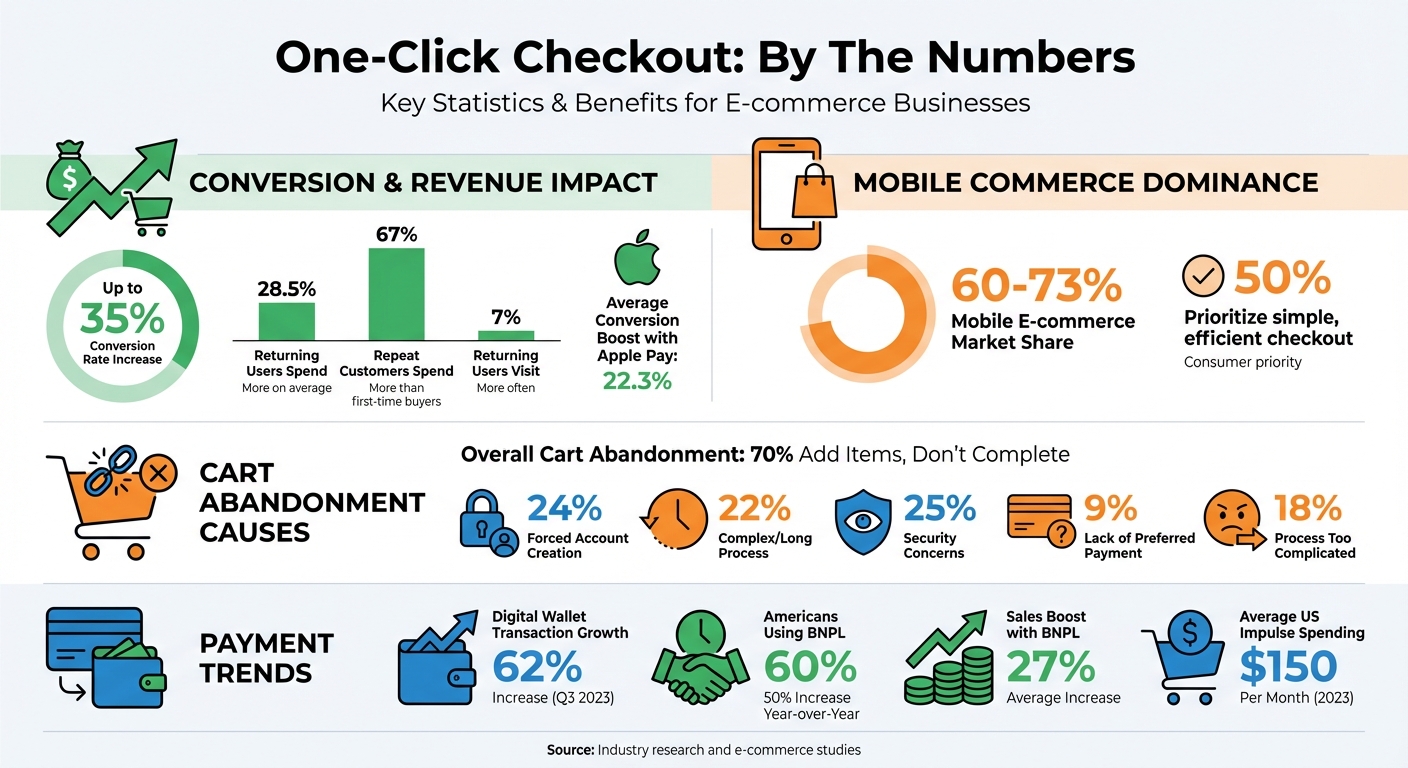
One-Click Checkout Impact: Key Statistics and Benefits
Why One-Click Checkout Matters
Easier Shopping for Customers
One-click checkout simplifies the shopping process by removing the need for repetitive data entry. Instead of typing in names, email addresses, payment details, and shipping information for every purchase, customers can complete transactions with a single tap. Payment processors like Stripe Link or PayPal recognize returning shoppers, eliminating the hassle of registration barriers entirely.
For mobile users, this streamlined experience is a game-changer. Features like autocomplete and minimal required fields make it easier to shop on any device, even without remembering retailer-specific passwords.
The convenience of one-click checkout also encourages impulse purchases and quick reorders. Customers can complete transactions in seconds, avoiding the frustration of drawn-out checkout processes. In fact, research shows that 50% of consumers prioritize a simple, efficient checkout when deciding where to shop. This ease of use not only improves the shopping experience but also drives sales.
Higher Conversion Rates
A smooth checkout process can significantly impact a business’s success. Companies that refine their checkout experience often see conversion rates increase by as much as 35%. One-click checkout addresses common mobile shopping challenges by cutting down on unnecessary form fields and using clear, touch-friendly call-to-action buttons.
But it’s not just about convenience – streamlined checkout translates to higher spending. Shoppers using one-click options spend an average of 28.5% more. They also visit retailer websites 7% more often compared to those using traditional checkout methods. This combination of increased spending and engagement can lead to noticeable revenue growth.
Lower Cart Abandonment
Cart abandonment remains a major hurdle in e-commerce, with forced account creation (24%) and lengthy checkout processes (22%) being top reasons for shoppers leaving their carts behind. One-click checkout addresses these issues by using trusted payment processors like PayPal or Stripe, which are familiar and boost customer confidence when entering sensitive information. This is critical, as about 25% of shoppers cite security concerns as a reason for abandoning their carts.
Speed is another key factor. The quicker the checkout process, the more likely retailers are to capture impulse purchases. By reducing the time between a customer’s decision to buy and completing the transaction, one-click checkout helps retailers tap into the average U.S. impulse spend of $150 per month in 2023. Faster, simpler transactions reduce hesitation and the temptation to shop elsewhere.
By combining speed and trusted payment solutions, one-click checkout not only accelerates purchases but also reinforces shopper confidence.
| Checkout Barrier | Impact on Abandonment | One-Click Solution |
|---|---|---|
| Forced Account Creation | 24% of shoppers | Recognizes existing processor accounts |
| Complex/Long Process | 22% of shoppers | Reduces process to a single click |
| Mobile Usability Issues | High abandonment on mobile | Minimizes form fields for small screens |
| Security Concerns | 25% of shoppers | Uses trusted, PCI-compliant processors |
sbb-itb-e2944f4
How to Implement One-Click Checkout
Remove Unnecessary Steps
Start by getting customer consent to store payment, billing, and shipping details. Not only is this a legal requirement, but it also helps establish trust right from the beginning. Once you have consent, simplify the checkout process by reducing form fields – combine "First Name" and "Last Name" into one "Full Name" field, for example – and skip any nonessential questions.
Leverage smart autofill features by using standard input types that allow browsers and mobile devices to automatically populate names, addresses, and card details. This saves time and minimizes errors, especially on mobile. Another critical feature is guest checkout. Nearly a quarter of shoppers (24%) abandon their carts because they don’t want to create an account. Allowing purchases without registration removes this barrier and makes the process smoother.
For secure transactions, rely on a PCI DSS-compliant payment processor to handle and store cardholder data safely. If customers have stored profiles, retrieve them automatically to make the checkout experience even faster.
Make It Work on Mobile
With mobile commerce making up about 73% of the total ecommerce market share, optimizing your one-click checkout for smartphones is non-negotiable. Use a single-column vertical layout to eliminate horizontal scrolling and zooming on small screens. Design buttons and input fields to be large, easy to tap, and spaced out to prevent accidental clicks.
Set form fields to automatically trigger the appropriate mobile keyboards – for instance, a numeric keypad for ZIP codes or an "@" symbol for email addresses. Integrate digital wallets like Apple Pay and Google Pay, allowing users to authenticate with Face ID or Touch ID instead of manually entering their information. Businesses that adopt Apple Pay, for example, have seen conversion rates rise by an average of 22.3%.
Lastly, test your checkout flow on actual mobile devices – not just desktop browsers resized to mobile view. This helps identify issues like misaligned buttons or non-responsive keyboards that could frustrate users.
Protect Customer Data
Once you’ve streamlined the process and optimized for mobile, focus on securing customer data. Use an SSL certificate and encrypted payment gateways to protect sensitive information. Tokenization is another must-have – it replaces actual card numbers with encrypted tokens, adding an extra layer of security. Luhn validation can also be implemented to immediately catch errors in card numbers.
Enhance account security by enabling two-factor authentication (2FA) for customers and multi-factor authentication (MFA) for admin access. Regular security audits and external penetration tests, conducted at least twice a year, can help uncover vulnerabilities before they become problems.
To reassure customers, display badges from well-known payment providers like Visa and PayPal. This is especially important given that 75% of fraud and data breaches involve ecommerce merchants, and only 52% of consumers trust businesses with their data. Strong security isn’t just about compliance – it’s about building the confidence that drives customers to complete their purchases in a one-click checkout environment.
Mistakes to Avoid
Weak Security Measures
Cutting corners on security can quickly damage customer trust. Did you know that 75% of fraud and data breaches involve ecommerce merchants? Despite this, only 52% of consumers feel confident that companies can protect their personal information. When you store payment details to enable one-click purchases, you essentially create a prime target for hackers. Weak security measures make it easier for unauthorized purchases to occur, further eroding trust.
The impact of a security breach goes beyond immediate financial losses. Around 88% of customers say they are unlikely to return after just one bad experience, which includes incidents like security failures. To keep your customers’ trust intact, ensure your checkout process uses HTTPS and maintains consistent branding to avoid raising red flags.
"It’s important to strike a balance between convenience and security to prevent one-click checkouts from becoming a gateway for fraudulent transactions." – Salesforce
Basic SSL certificates are a good start, but they’re not enough. Consider implementing machine learning fraud detection systems that assign risk scores to transactions and flag suspicious activity in real time. Regular security audits are also a must to stay ahead of new fraud tactics.
Just as weak security can hurt your business, offering too few payment options can also be a dealbreaker for customers.
Limited Payment Options
A limited range of payment methods can slow down one-click checkout and frustrate customers. In fact, about 9% of shoppers abandon their carts simply because their preferred payment option isn’t available. This issue is even more pronounced on mobile devices, where digital wallets like Apple Pay and Google Pay can process transactions up to three times faster than manual payment entry.
Payment preferences are evolving rapidly. For example, digital wallet transactions surged by 62% in Q3 2023 compared to the previous year. Meanwhile, nearly 60% of Americans have used a Buy Now, Pay Later (BNPL) service – a 50% increase from the previous year. Businesses that offer BNPL options like Affirm, Klarna, and Afterpay have reported an average 27% boost in total sales. Ignoring these trends could mean missing out on significant revenue opportunities.
"The faster you can integrate new methods with your platform as they crop up, the faster you can earn sales – and customer loyalty." – Salesforce
Take the time to audit your platform and ensure it can easily integrate emerging payment methods. Avoid systems that lock you into rigid options. If your business operates globally, it’s also essential to offer region-specific payment methods instead of relying solely on credit cards.
Once you’ve diversified your payment options, the next step is to regularly test and fine-tune your checkout process.
Skipping Testing and Improvements
One-click checkout isn’t a “set it and forget it” feature – it requires constant refinement. Friction in the checkout process can drive customers away, with 70% of users abandoning their carts after adding items and 18% leaving because the process is too long or complicated. Shockingly, 64% of desktop sites and 63% of mobile sites still deliver subpar checkout experiences, underscoring the need for ongoing testing.
The potential rewards of optimization are huge. Large ecommerce sites have seen up to a 35% increase in conversion rates just by improving design elements in their checkout flows. Yet many businesses neglect crucial steps like tracking validation errors, analyzing user behavior, and testing across different devices and payment methods. Every improvement you make can have a direct impact on your revenue.
Focus on identifying which validation errors cause the highest cart abandonment rates and fix them quickly. Don’t rely solely on resized desktop browsers – test your checkout flow on actual mobile devices in different regions to ensure a smooth experience for all users.
One-Click Checkout: How Simplified Payments Supercharge Shopping
Key Takeaways
One-click checkout isn’t just a nice-to-have – it’s a proven way to increase revenue. Businesses that fine-tune their checkout process can see conversion rates soar by 35%, and repeat customers typically spend 67% more than first-time buyers. By cutting out unnecessary steps and making the payment process smooth, businesses can reduce friction right at the crucial moment – the purchase.
The success of one-click checkout hinges on two factors: security and simplicity. Security measures like PCI DSS-compliant processors, tokenization, and frictionless 3D Secure 2 authentication ensure customer trust. Simplicity comes from eliminating extra steps, offering guest checkout options, and perfecting the mobile experience.
"Your ecommerce checkout experience is a reflection of your business, so it’s best to make it as simple and convenient as possible." – Salesforce
But the work doesn’t stop once the system is in place. Regular testing and tweaking are essential to keep things running smoothly. Pay attention to where customers abandon their carts, track validation errors, and stay updated on new payment trends like digital wallets and Buy Now, Pay Later (BNPL). For instance, businesses that offer BNPL through platforms like Stripe have seen sales jump by 27%.
The trick is balancing speed with trust. Be upfront about shipping costs, highlight security badges, and ensure the checkout process feels as dependable as it is quick. A smooth, hassle-free checkout isn’t just about closing the sale – it’s about building customer loyalty for the long haul.
FAQs
How does one-click checkout enhance the mobile shopping experience?
One-click checkout makes mobile shopping a breeze by condensing the entire purchasing process into just one tap. Instead of repeatedly filling out shipping and payment details, everything is handled instantly, cutting down on typing and extra steps.
This streamlined approach reduces obstacles, decreases cart abandonment, and boosts conversion rates on smartphones, allowing customers to wrap up their purchases quickly and effortlessly.
What are the key security practices for implementing one-click checkout?
To create a secure and seamless one-click checkout experience, focus on protecting customer data through encryption and strict compliance with privacy laws. Use fraud detection tools to actively monitor transactions and block any suspicious activity. To reassure customers, include trust signals such as security badges, SSL certificates, and easy-to-find privacy policies, which help establish confidence in the safety of their purchase.
What are the best ways to optimize one-click checkout for better conversions?
To get better results with one-click checkout, focus on making the process fast, simple, and secure. Keep customers’ payment and shipping details safely stored, so they can complete purchases with just one tap. Cut out any unnecessary steps, speed up page load times, and ensure everything works smoothly on mobile devices.
Be upfront about pricing details, including taxes and shipping costs, to avoid surprises and build trust. Add trust signals like secure payment icons or money-back guarantees, and make sure the checkout flow feels straightforward and hassle-free. When speed, transparency, and ease come together, businesses can see a noticeable improvement in checkout conversions.