
If you’re selling online, knowing your costs is non-negotiable. Amazon fee calculators are great for breaking down the platform’s complex fees like referral rates (8–45%), FBA charges, and seasonal storage costs. They’re ideal for Amazon-only sellers who need precise profit tracking, SKU-level insights, and tools to optimize packaging or reduce fees.
On the other hand, multi-platform tools let you compare profits across marketplaces like Amazon, Shopify, Walmart, and TikTok Shop. They give you an overview of fees like subscription costs, payment processing, and fulfillment expenses, helping you decide where to sell for better margins. These tools are best for sellers managing multiple platforms and looking to allocate inventory efficiently.
Quick Takeaway:
- Use Amazon-specific tools if you’re focused solely on Amazon and need detailed cost breakdowns.
- Use multi-platform tools if you sell across multiple platforms and want to compare profitability side by side.
Quick Comparison
| Feature | Amazon Fee Calculators | Multi-Platform Tools |
|---|---|---|
| Fee Coverage | Detailed for Amazon (40+ fee types) | Covers multiple marketplaces broadly |
| Platforms Supported | Amazon only | Amazon, Shopify, Walmart, TikTok, etc. |
| Accuracy | High (99.8% for Amazon fees) | Moderate (standardized for comparisons) |
| Primary Use | Amazon profit tracking | Cross-platform margin analysis |
| Cost | $15–$29/month | Free to $39.99/month |
For Amazon sellers, tools like Helium 10 or FBACalc provide precise insights into Amazon’s fees. Multi-platform tools like Feescal or Seller Toolkit are better for sellers juggling multiple channels. Choose based on your business needs.
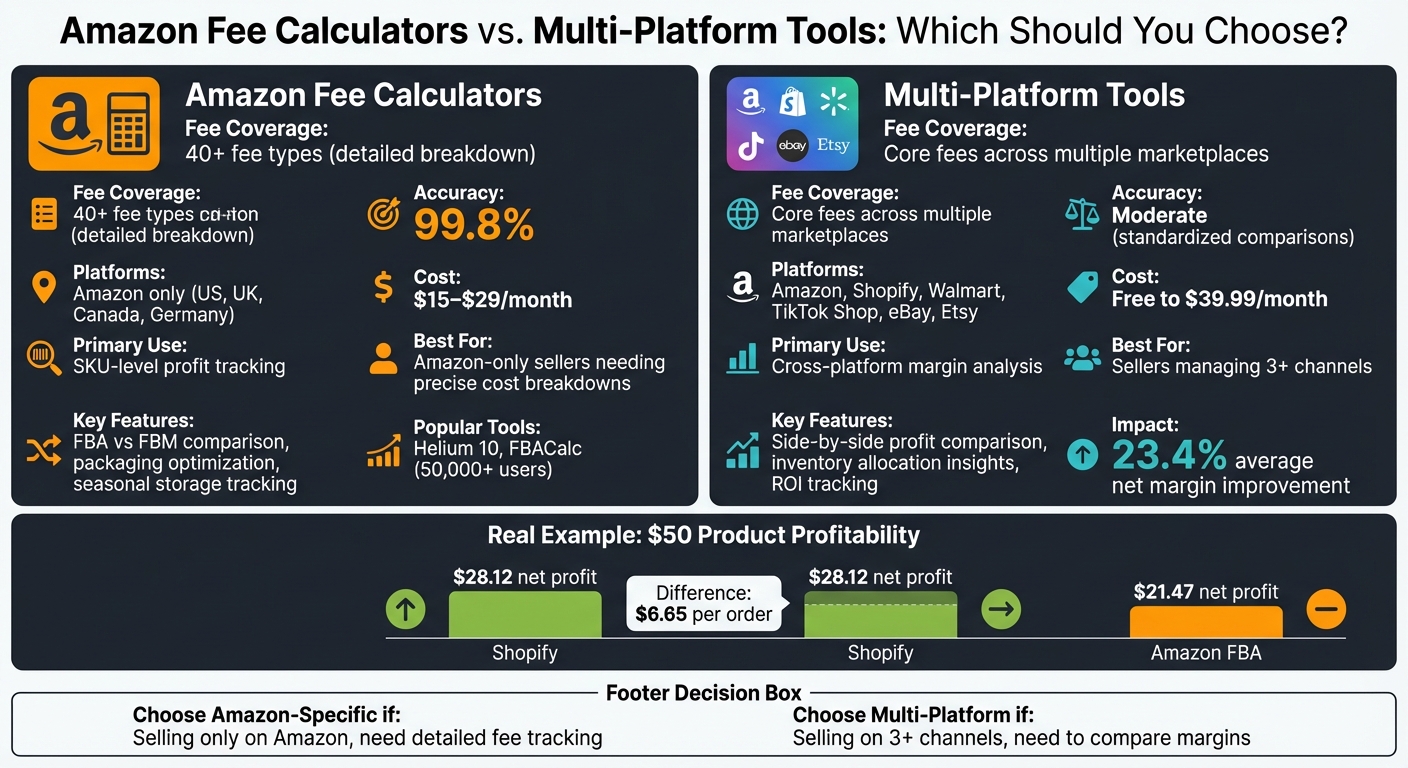
Amazon Fee Calculators vs Multi-Platform Tools Comparison Chart
Amazon Fee Calculators
What Amazon Fee Calculators Do
Amazon fee calculators simplify the platform’s often-confusing cost structure by providing a detailed breakdown of expenses. These include referral fees (usually 15% of the item’s price), FBA fulfillment fees, monthly storage fees, Inbound Placement Fees, Low-Inventory Fees, and seasonal storage rate changes.
One of their standout features is the ability to compare FBA (Fulfillment by Amazon) with FBM (Fulfilled by Merchant) logistics. Sellers can input product details and instantly determine which option is more cost-effective. Tools like Helium 10 go further, allowing users to include factors like manufacturing costs, shipping to warehouses, and PPC ad spending to calculate net profit with precision. Some browser extensions even pull product dimensions and weights directly from Amazon listings, making it easier to estimate potential profitability for new products.
Benefits of Amazon Fee Calculators
These tools excel at tracking fees with remarkable accuracy. As FBACalc notes:
"Generic calculators miss the details. FBA Calc accounts for the new Inbound Placement Fees, seasonal storage hikes, and category-specific referral rates".
This level of precision is vital, especially since Amazon’s fee structure changes frequently and referral fees vary widely – ranging from 8% to 45%, depending on the product category.
For Amazon sellers, these calculators are indispensable for assessing profit margins. They help determine whether margins fall within a sustainable range of 15–20% or drop below the critical 5% threshold. Additionally, these tools can assist in optimizing product packaging, potentially shifting items into a lower size tier and reducing fulfillment costs. The popularity of these calculators is evident, with over 50,000 sellers using FBACalc across six global Amazon markets.
Drawbacks of Amazon Fee Calculators
The main drawback is their narrow focus on Amazon. While these tools support multiple Amazon marketplaces (like the US, Canada, UK, and Germany), they don’t integrate with other platforms such as Walmart, eBay, Shopify, or TikTok Shop. Sellers operating across multiple channels must manually consolidate data, which can lead to inefficiencies and siloed information.
Another limitation is the Amazon Revenue Calculator’s dependency on existing ASINs or specific category data, which reduces its flexibility for general planning. Additionally, these calculators focus primarily on Amazon-related fees and require users to manually input broader business expenses – like insurance, payroll, or taxes – for a complete financial picture. This gap in understanding overall costs contributes to the fact that around 37.6% of first-time Amazon sellers end up losing money.
While these tools are highly detailed for Amazon-specific needs, they fall short when it comes to cross-platform integration – a gap that multi-platform solutions aim to address.
sbb-itb-e2944f4
Multi-Platform Fee Calculation Tools
What Multi-Platform Tools Do
Expanding beyond Amazon-focused solutions, multi-platform fee calculators handle the complexities of multiple marketplaces. These tools streamline fee calculations across platforms like Amazon, Walmart, TikTok Shop, and Shopify. Instead of managing separate calculators for each, they provide a comprehensive breakdown of fees – covering monthly subscriptions, referral commissions by category, payment processing, fulfillment costs, and storage fees.
For example, they can compare profits side by side, showing how a $50 product might yield $28.12 on Shopify but only $21.47 on Amazon FBA. This instant comparison helps sellers pinpoint the most profitable marketplace based on up-to-date 2026 fee structures. Beyond fees, these tools also track key metrics like TACOS (Total Advertising Cost of Sale), return rates, and aged inventory surcharges, giving sellers a complete picture across all their sales channels.
Features of Multi-Platform Tools
Platforms like Feescal, trusted by over 10,000 top-rated sellers, offer tools for cross-channel margin analysis. They account for every cost – listing fees, transaction charges, payment processing, and even offsite advertising expenses.
These tools provide advanced metrics like real-time net margins, ROI, and total costs, factoring in often-overlooked variables like VAT and sales tax. For instance, Seller Toolkit users have reported an average net margin improvement of 23.4%, with over 50,000 sellers actively leveraging its analytics. One seller shared:
I sell across eBay and TikTok Shop and the ROI calculator helps me figure out which platform gives me the better margin for each product.
- Jenny L., Multi-Platform Seller
Many tools go beyond fee calculation, offering features like marketing ROI trackers, inventory reorder calculators, and demand forecasting. They automatically sync with the latest 2026 fee structures and platform policies, cutting calculation time from 5–10 minutes of manual work to just 0.1 seconds. This speed allows sellers to make quick, data-driven decisions across platforms. However, these tools are not without their limitations.
Drawbacks of Multi-Platform Tools
While multi-platform calculators are versatile, they may lack the detailed insights provided by Amazon-specific tools. Sellers focused solely on Amazon might find the broader dashboards overwhelming or unnecessary. Additionally, costs can add up – tools like Seller Toolkit and Ecomcalc offer free versions, but premium options such as Feescal PRO ($12/month) or Profit Cyclops Plus ($39.99/month billed annually) can increase expenses.
Another challenge is accuracy. Although manual calculations typically have a +/- 5% error rate, multi-platform tools can still struggle with hidden or variable costs like category-specific surcharges, aged inventory penalties, and refund administration fees. Even minor errors in product dimensions can lead to large discrepancies in profit estimates, as fulfillment fees vary significantly depending on size and weight.
Feature and Cost Comparison
Comparison Table: Amazon vs. Multi-Platform Tools
This comparison highlights the differences between Amazon-specific calculators and multi-platform tools, focusing on specialization versus integration. Amazon-specific calculators dive deep into over 40 fee types, including detailed costs like storage, disposal, and inbound fees. On the other hand, multi-platform tools provide a standardized breakdown of core fees – such as referral, payment processing, and fulfillment costs – allowing sellers to compare Amazon with platforms like eBay, Walmart, Shopify, TikTok Shop, and Etsy side by side.
| Feature | Amazon-Specific Calculators | Multi-Platform Tools |
|---|---|---|
| Fee Coverage | Extensive (40+ fees: storage, disposal, inbound, etc.) | Broad (Referral, Payment Processing, Basic Fulfillment) |
| Platforms Supported | Amazon only (often includes EU/US marketplaces) | Amazon, eBay, Walmart, Shopify, TikTok Shop, Etsy |
| Accuracy | Very high (up to 99.8% for specialized tools) | Moderate (Standardized for comparisons) |
| Primary Use Case | SKU-level profit tracking | Channel comparison & margin analysis |
| Monthly Cost | $15–$29 (e.g., Sellerboard, Nova Analytics) | Free to $39.99 (varies by platform) |
| Limitations | No off-Amazon performance data | May lack granular Amazon-specific fee details |
Amazon-specific calculators are priced moderately, while multi-platform tools range from free to premium options. For sellers already paying $39.99/month for Amazon’s Professional Seller Plan, adding an Amazon-specific tool is worthwhile only if revenue exceeds $10,000/month.
These distinctions help sellers choose tools based on their business needs.
When to Use Each Tool Type
The choice between these tools depends on your selling strategy and operational requirements. If you’re focused on FBA logistics and profitability, Amazon-specific calculators are the way to go. These tools excel at SKU-level profit and loss analysis, offering accuracy rates as high as 99.8%. They’re especially useful for identifying fee leakage, optimizing packaging dimensions, and managing costs like aged inventory surcharges or return administration fees.
On the other hand, multi-platform tools shine when you’re selling across three or more channels and need to make strategic decisions about inventory allocation. For example, these tools can highlight margin differences – a $50 item might yield $35 on Shopify but only $28 on Amazon. This kind of insight helps you decide whether to focus on higher volume (Amazon) or better margins (Shopify). Multi-platform tools are also valuable during the sourcing phase, helping you evaluate which marketplace offers the best return on investment before committing inventory.
Conclusion
Main Takeaways
Amazon’s fee structure can be tricky to navigate, with referral fees ranging from 8% to 45%, seasonal storage costs spiking to $2.40 per cubic foot in Q4, aged inventory surcharges, and refund fees of $5.00 per item. Multi-platform tools simplify this complexity by comparing fees across marketplaces. For instance, selling a $50 item might net $28.12 on Shopify but only $21.47 on Amazon FBA, showing a $6.65 difference per order.
For high-volume sellers, specialized calculators can track SKU-level profitability and even optimize packaging dimensions, potentially reducing fulfillment fees by $1 to $3 per unit. Sellers managing multiple channels often use these tools to create profit and loss statements by channel, helping them decide which SKUs to remove from high-fee platforms. On average, users of these tools report a 23.4% boost in net margins.
How Emplicit Can Help

Emplicit specializes in optimizing operations across platforms like Amazon, TikTok Shops, Walmart, and Target, ensuring your fee structures are handled efficiently. Their team creates tailored strategies for inventory allocation, pricing adjustments, and platform-specific fulfillment, all aimed at protecting your margins – exactly the type of support needed for the fee challenges discussed here.
From reducing Amazon FBA costs to prioritizing SKUs for better margins, Emplicit offers a range of ecommerce services, including marketplace management, PPC optimization, and account health monitoring. With USA-based account managers conducting quarterly fee reviews and developing channel-specific pricing strategies, Emplicit can help save thousands in platform fees every month. Their comprehensive approach ensures your business makes smart, data-driven decisions for sustained growth.
KNOW your Profit Margins! Amazon FBA Calculator Explained
FAQs
Which fees are most often missed in Amazon profit estimates?
When estimating profits on Amazon, sellers often miss hidden or micro-fees that quietly chip away at their margins. These include charges like FBA fee adjustments, referral fees, storage fees, and support fees. While a single fee increase – say, $0.08 per unit – might seem minor, the impact can be substantial when dealing with large inventory volumes. Overlooking these small, recurring costs during profit calculations can lead to an unpleasant surprise as margins shrink more than expected.
How do I compare margins fairly across Amazon, Shopify, and Walmart?
When comparing margins across platforms, it’s crucial to include all fees and costs involved. This means factoring in referral fees, payment processing charges, fulfillment costs, storage fees, and any surcharges. To get a clear picture, use a detailed fee calculator that takes into account variables like product price, category-specific fees, and storage costs. This approach allows you to calculate the actual per-order costs, rather than relying on headline percentages, ensuring a fair and accurate margin comparison between platforms.
When should I switch from an Amazon-only calculator to a multi-platform tool?
When selling on multiple marketplaces or planning to expand beyond Amazon, it’s smart to switch to a multi-platform tool. These tools make it easier to compare fees, adjust pricing, and boost profits across platforms like eBay, Walmart, and Shopify. They also give you a clear breakdown of different fee structures, helping you make smarter decisions to improve your overall profitability.