

Running Amazon PPC campaigns without analyzing your reports is like throwing money away. PPC reports are critical for identifying which search terms drive sales and which waste your budget. By leveraging these insights, you can lower your ACoS (Advertising Cost of Sales) and improve your ad performance. Here’s how:
- Find High-Performing Keywords: Use Search Term Reports to spot terms with a conversion rate over 20% and ACoS under 30%. Move them into Exact Match campaigns for better control.
- Eliminate Non-Converting Terms: Identify search terms with high clicks but no sales. Add these as negative keywords to stop wasting money.
- Adjust Bids by Placement: Focus on high-converting ad placements (e.g., Top of Search) and lower bids for underperforming ones.
- Optimize Campaign Bids: Segment campaigns by match type and adjust bids based on profitability metrics like Revenue Per Click (RPC).
- Refine Keywords Weekly: Regularly review reports to promote winners, block poor performers, and keep your campaigns efficient.
Amazon PPC reports provide the data you need to cut costs and boost returns. By acting on these insights, you can reduce wasted spend, improve conversions, and maximize profitability.
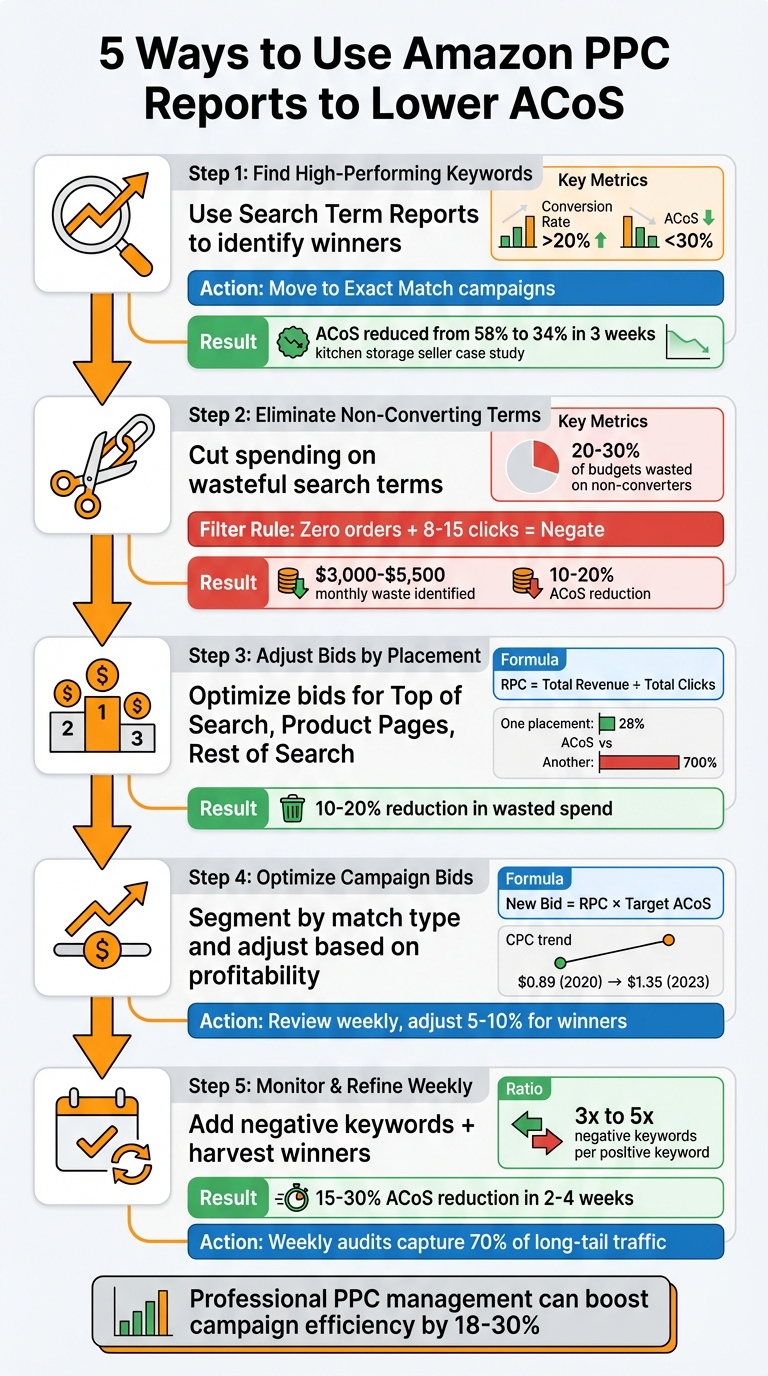
5 Amazon PPC Strategies to Lower ACoS: Data-Driven Optimization Process
1. Use Search Term Reports to Find and Promote High-Performing Keywords
Actionable Insights from Amazon PPC Reports
The Search Term Report is a game-changer for advertisers. Unlike simply relying on bid keywords, this report gives you a clear view of the specific shopper queries that lead to conversions. As Tanveer Abbas, Founder of Ecombrainly, explains:
"Your keyword is the net you cast, and the search terms are the actual fish you catch. You pay for the search terms, but you control the budget through the keywords".
To make the most of this data, focus on terms that perform well – those with a conversion rate over 20% and an ACoS under 30%. These are your high-value search terms. Move them from Broad or Auto campaigns into Exact Match campaigns to take full control of your bids and budgets. This approach ensures you’re directing your ad spend where it counts.
How Advertisers Can Implement This Easily
Sometimes, the same search term can show up across multiple campaigns. To handle this, use a Pivot Table in Excel or Google Sheets. This will help you consolidate performance data for each search term. To get accurate results, exclude data from the last three days, as Amazon may take up to seven days to fully attribute sales. This simple adjustment can uncover profitable queries and help lower your ACoS.
Real-World Impact on Campaign Performance
The results of this strategy can be impressive. For example, a mid-sized kitchen storage seller in India reduced their ACoS from 58% to 34% in just three weeks. They also saw a 15% boost in click-through rate and cut their total ad spend by 22%. Another advertiser, working with PPC Hero, used a 90-day report to identify $3,000 to $5,500 in wasted ad spend per month. By eliminating inefficiencies, they achieved an ACoS reduction of 2% to 10%.
Once you’ve identified your top-performing search terms, don’t stop there. Incorporate these phrases into your product titles, bullet points, and backend search terms. This will improve your product’s relevance and help boost its organic ranking .
sbb-itb-e2944f4
How to Grow Sales While Lowering ACoS: Amazon PPC Tips
2. Identify and Cut Spending on Non-Converting Search Terms
Once you’ve honed in on high-performing keywords, it’s time to deal with the flipside: cutting out the dead weight – those non-converting search terms that quietly drain your ad budget. While promoting the right keywords is crucial, identifying and eliminating wasteful clicks is just as important for keeping costs in check.
Effectiveness in Reducing ACoS
Non-converting search terms are like tiny leaks in your budget – they add up fast. In fact, around 20–30% of most Amazon ad budgets go to these ineffective clicks. By cleaning them out, you could see your Advertising Cost of Sales (ACoS) drop by 10–20%.
Here’s a real-world example: In 2024, an Amazon FBA seller in the kitchen gadgets niche slashed their ACoS from 45% to 18% and boosted sales by 34%. How? They reviewed a 3-month search term report and found that generic terms like "kitchen tools" had wasted over $1,200. After adding 47 negative keywords and shifting focus to high-performing terms like "silicone baking mats" (which had a 22% ACoS), their campaigns became much more profitable.
Actionability of Insights from Amazon PPC Reports
Amazon’s Search Term Report is your best friend here – it tells you exactly which customer queries are burning through your budget. To spot these "bleeding" keywords, try the "Rule of Thumb" filter: look for terms with zero orders but 8–15 clicks . Another handy trick is the AOV Rule: if a search term has spent an amount equal to your product’s Average Order Value without a single sale, it’s time to negate it.
Need help organizing all that data? Use Pivot Tables in Excel or Google Sheets to consolidate performance metrics and weed out duplicates across campaigns. Pay special attention to ASINs starting with "b0" – these represent competitor product pages where your ads might be showing up but not converting.
Impact on Campaign Profitability
When you optimize your keywords and use negative targeting effectively, you can cut ad costs by as much as 30% without hurting your ACoS. Shaival Choksi, Founder of Your Seller Agency, sums it up perfectly:
"Negative keyword targeting isn’t just an optimization trick – it’s a profit-driving lever for any serious Amazon seller".
Once you’ve trimmed the fat, reallocate that saved budget to your top-performing keywords. To measure how much you’re improving, calculate your ACoS Power Ratio: subtract non-converting spend from your total ad spend. This will show you how efficient your campaigns could be if every dollar worked toward conversions.
Ease of Implementation for Advertisers
Adding negative keywords is simple and incredibly effective. Use Negative Exact match to block specific phrases that don’t convert, or Negative Phrase match to filter out broader themes (e.g., blocking "plastic" if your products are exclusively leather) . Perform this cleanup at least weekly – ideally on Wednesdays – to capture data from the previous Sunday-to-Saturday period, allowing for the 72-hour attribution window to settle.
For more advanced optimization, try N-gram analysis. This technique helps you pinpoint recurring patterns in non-converting terms, such as "free", "cheap", or "DIY." By identifying these trends, you can block entire categories of wasteful clicks . Keep in mind, not all non-converting clicks are bad – some are part of the buyer’s journey. The goal is to eliminate the ones that truly provide no value. Up next: refining your bid strategies to maximize profitability across campaigns.
3. Adjust Bids Based on Ad Placement Performance
Effectiveness in Reducing ACoS
Amazon places your ads in three primary spots: Top of Search (First Page), Product Pages, and Rest of Search. Each placement performs differently, sometimes drastically. For instance, one placement might run at a manageable 28% ACoS, while another in the same campaign could skyrocket past 700%. Just like tweaking bids for specific keywords, adjusting bids based on placement can have a big impact on lowering your ACoS. By analyzing placement-level performance and redistributing your budget, you can focus on high-converting locations and cut back on wasteful spending, potentially reducing wasted ad spend by 10–20%.
Actionability of Insights from Amazon PPC Reports
Amazon’s placement reports provide clarity on which ad spots deliver the best results. To start, calculate the Revenue Per Click (RPC) for each placement using this formula:
RPC = Total Revenue ÷ Total Clicks.
If the Top of Search placement shows a much higher RPC than Product Pages, it’s a clear signal to increase its placement modifier. Brett from FBAExcel explains this approach:
"The main concept is we set a lower base bid to start working to suppress poor placements and use positive placement modifiers to bring high-performing placements back up to their deserved level." – Brett, FBAExcel
To determine the right placement modifier, use this formula:
Modifier = (((RPC × Target ACoS) ÷ Base Bid) - 1) × 100.
Since Amazon doesn’t allow negative modifiers, you’ll need to set a conservative base bid – roughly 10% below the CPC of your best-performing placement. This strategy helps suppress underperforming placements while boosting visibility in high-performing ones. These adjustments can directly improve your campaign’s efficiency.
Impact on Campaign Profitability
With Amazon’s average CPC rising from $0.89 in 2020 to $1.35 in 2023, fine-tuning placement bids has become even more critical. As Admin from Swanseaairport puts it:
"Most sellers lose money not because of bad keywords, but because of bad bid logic." – Admin, Swanseaairport
By focusing your ad spend on placements with higher RPC and better conversion rates, you can lower your overall ACoS while maintaining – or even increasing – sales volume. This tactic works particularly well for single-keyword campaigns, where the placement data directly ties back to one target.
Ease of Implementation for Advertisers
Adjusting placement modifiers is straightforward. Amazon allows you to increase bids by up to 900% for specific placements. Start by running all placement modifiers at 0% for 14–30 days to gather baseline data. Once you’ve identified high-performing placements, apply your calculated modifiers at the campaign level. Pair this strategy with "Dynamic Bids – Down Only" to keep your CPC in check while testing, avoiding overspending. Only increase modifiers for placements already performing below your target ACoS. Monitor performance weekly and adjust as needed – this is a hands-on approach, not a one-time fix.
4. Optimize Bids at the Campaign and Ad Group Level
Effectiveness in Reducing ACoS
Fine-tuning bids at the campaign level builds on strategies like placement adjustments and targeted keywords. To get the most out of your campaigns, segment them by match type and intent. Why? Because mixing match types in a single campaign makes it harder to see which strategies are actually working. A practical way to organize campaigns is by splitting them into two categories: Discovery (Auto and Broad match types) and Profit (Exact match). This setup provides clearer insights and simplifies bid adjustments.
One method that stands out is the Revenue Per Click (RPC) approach. Here’s how it works: calculate your bid by multiplying the keyword’s RPC by your Target ACoS (New Bid = RPC × Target ACoS). This formula ensures your bids are directly tied to profitability.
Actionability of Insights from Amazon PPC Reports
Amazon’s PPC reports are a goldmine for actionable data. They help you group keywords into four categories:
- High ACoS: These need a bid reduction.
- High Spend/Non-Converting: These also signal the need for a bid cut.
- Low ACoS: These might benefit from a bid increase.
- Low Visibility: Consider raising bids here to improve performance.
For keywords performing well below your target ACoS (by at least 20%), increasing bids by 5–10% can help scale volume without dramatically increasing costs. On the flip side, for underperforming keywords, calculate your Target CPA by multiplying your Target ACoS with your Average Order Value (AOV). If a keyword’s spend exceeds your Target CPA without a sale, it’s time to lower the bid.
As Sequence Commerce points out:
"Amazon’s suggested bid calculation doesn’t consider your product’s profit margins, conversion rate compared to competitors, or your cost of goods sold." – Sequence Commerce
This highlights why relying on your own data is so important. Tailoring bid adjustments to your specific metrics can make all the difference in achieving profitability.
Impact on Campaign Profitability
Once you’ve identified opportunities for profitability, applying these bid adjustments can deliver tangible results. With Amazon’s average Cost-Per-Click (CPC) climbing from $0.89 in 2020 to $1.35 in 2023 – and projected to reach $1.21 on average by Q1 2026 – optimizing bids has become a core strategy for staying competitive. Yet, despite these rising costs, nearly 88% of advertisers still focus more on keyword selection than refining their bids.
SwanseaAirport puts it perfectly:
"Bid optimization today isn’t about ‘winning’ auctions – it’s about winning the right auctions at the right price." – SwanseaAirport
By grouping keywords into Profit, Neutral, or Loss zones based on your Break-Even ACoS, you can scale up successful keywords while minimizing spend on those that underperform. This approach also prevents high-ACoS keywords from being paused too early, helping maintain overall campaign efficiency.
Ease of Implementation for Advertisers
Start by calculating your Break-Even ACoS – divide your unit profit by the selling price to find the maximum bid threshold. For new campaigns, a good rule of thumb is the 2.5% rule: set your initial maximum CPC at around 2.5% of your product’s retail price. To avoid overspending while gathering data, use Amazon’s "Dynamic Bids – Down Only" feature.
Once you’ve collected 14–30 days of performance data, apply the RPC method to refine your bids at the campaign level. Make it a habit to review your reports weekly. This allows you to transfer winning search terms into Exact Match campaigns while trimming bids on less effective Broad Match terms. A consistent, weekly optimization routine keeps your campaigns efficient and profitable.
5. Monitor Keyword Reports to Add Negative Keywords and Harvest Winners
Effectiveness in Reducing ACoS
Keeping a close eye on keyword reports can help cut wasted spend and boost the results of winning keywords. Here’s how it works: while you bid on keywords, you’re actually paying for the specific search terms shoppers use on Amazon. High-performing accounts often maintain a negative keyword ratio of 3x to 5x – that’s three to five negative keywords for every positive one. This level of filtering can significantly lower your Advertising Cost of Sales (ACoS). In fact, implementing a well-planned negative keyword strategy can reduce ACoS by 15% to 30% within two to four weeks.
Here’s a real-world example: In July 2024, a mid-sized kitchen storage seller in India was dealing with a 58% ACoS. By reviewing their Search Term Report and identifying terms with over 10,000 impressions and $4 in spend but no orders, they added these as negative keywords. The result? ACoS dropped to 34% in just three weeks – a 24-point improvement. This change also brought a 15% boost in click-through rate (CTR) and cut total ad spend by 22%. The takeaway? Use these reports to identify both underperforming and winning search terms.
Actionability of Insights from Amazon PPC Reports
Amazon’s Search Term Reports are a goldmine for finding "bleeders" – terms that rack up clicks or spend without converting. A CTR below 0.3% is often a red flag that your product isn’t a good match for the search term, making it a candidate for negative targeting.
When analyzing these reports, exclude the last three days of data to account for Amazon’s sales attribution window, which can extend up to 7 days for Sponsored Products and 14 days for Sponsored Brands. Use tools like Pivot Tables in Excel or Google Sheets to consolidate data for unique search terms that may appear in multiple campaigns. This gives you a clearer picture of overall performance.
On the flip side, identify search terms with high conversion rates (above 20%) and an ACoS below your break-even point. Move these winners from Automatic or Broad campaigns into dedicated Exact Match campaigns with higher bids to capture more impressions. Additionally, look for ASINs (those starting with "b0") where your product is successfully converting sales. You can target these ASINs directly in Product Attribute Targeting (PAT) campaigns.
Impact on Campaign Profitability
This dual strategy – eliminating wasteful terms and promoting high performers – can have a big impact on profitability. A case study from PPC Hero highlighted how an advertiser used a 4-step Excel-based tool to identify keywords with an ACoS above 40%. By calculating the daily wasted spend on these poor performers and cutting campaign budgets accordingly, they uncovered $3,000 per month in wasted spend in one account and $5,500 per month in another. Redirecting this saved budget to top-performing terms resulted in a 2–10% drop in ACoS.
"Negative keywords aren’t just an advanced strategy – they’re essential for reducing wasted ad spend and improving profitability." – Marketplace Valet
Ease of Implementation for Advertisers
Getting started is straightforward. Download your Search Term Report weekly – daily updates often don’t provide enough data for meaningful decisions. Filter for terms with high clicks or spend but zero orders. Then, use Negative Exact or Phrase matches to block these terms. Be cautious with Negative Broad matches, as they can unintentionally block too many relevant terms.
For identifying winners, calculate your average conversion rate (CVR). If your CVR is 10%, any term with more than 10 clicks and no sales should be considered for a negative match. At the same time, move terms performing well below your target ACoS into Exact Match campaigns with higher bids. By routinely identifying and acting on both bleeders and winners, you’ll keep your campaigns efficient and profitable.
Conclusion
Lowering ACoS takes a systematic, data-focused approach. The five strategies discussed in this article work together in a continuous cycle: analyzing search term and keyword reports helps you spotlight high-potential performers to promote, while also identifying non-converting terms to exclude and cut wasted spend. Fine-tuning bids ensures your budget is allocated to the most effective traffic sources.
By pairing keyword harvesting with negative targeting, you can refine your funnel, increase conversion rates, and bring down CPC. This integrated method not only optimizes pricing but also enhances overall campaign performance. Regular weekly audits of search term reports reveal long-tail keyword opportunities – responsible for about 70% of search traffic – and flag irrelevant queries to exclude. When done right, professional PPC management can boost campaign efficiency by 18% to 30%.
Amazon advertising requires a consistent and well-organized strategy. With markets constantly shifting – rising CPCs during peak seasons and new competitors entering the space – staying on top of report analysis is more important than ever.
For brands struggling to manage these intricate strategies, Emplicit offers expert support. They specialize in optimizing PPC campaigns across platforms like Amazon, TikTok Shops, Walmart, and Target. Their comprehensive services include PPC management, listing optimization, inventory management, and tailored strategies to reduce ACoS while safeguarding your market share. Many brands see noticeable improvements in under 100 days.
FAQs
What date range should I use for Amazon PPC reports?
To get the most out of Amazon PPC reports, work with data covering a period of 3 to 6 months. This timeframe allows you to spot patterns and set reliable benchmarks. At the same time, pay close attention to recent sales data – it provides actionable insights and helps you make better, more informed decisions.
When should I add a search term as a negative keyword?
When a search term proves to be unprofitable or irrelevant, it’s time to add it as a negative keyword. These are the terms that drain your ad budget without generating sales. To identify them, you can use search term reports or look for keywords with a high ACoS (Advertising Cost of Sales). By excluding these terms, you can cut down on wasted ad spend and make your campaigns run more efficiently.
How do I set placement bid modifiers without overspending?
To manage placement bid modifiers effectively and avoid overspending, start by reviewing placement-level performance metrics like Revenue Per Click (RPC). Use this data to guide your adjustments:
- Increase bids for placements that perform well, such as Top of Search, to maximize returns.
- Lower or maintain bids for placements that show weaker results.
Keep your changes gradual – avoid making drastic adjustments all at once. Instead, tweak bids incrementally and closely monitor the impact over time. This measured, data-driven strategy helps you allocate your budget toward placements that deliver results while cutting down on wasted spend.