

You can start Amazon keyword research for $0. The main takeaway is simple: use Amazon Autocomplete for raw keyword ideas, Brand Analytics to check demand if you have Brand Registry, and free third-party tools like Helium 10, Keyword Tool Dominator, SellerApp, and Sonar to add long-tail terms, volume clues, and some competitor data.
Here’s the short version:
- Best starting point: Amazon Autocomplete
- Best first-party data: Amazon Brand Analytics
- Best for long-tail ideas: Helium 10 Magnet and Search Expander
- Best for light reverse ASIN checks: Keyword Tool Dominator and SellerApp
- Best fully free discovery option: Sonar
- Big limit with free tools: they mostly help with keyword discovery, not deep validation
- What to do with the keywords: use them in titles, bullets, and Amazon’s 249-byte backend search term field
- What tends to work best: long-tail keywords, because they often show stronger buying intent
A few points matter right away:
- Amazon autocomplete suggestions come from actual shopper searches
- Many free tools show relative demand or estimated volume, not exact numbers
- Reverse ASIN data is often limited, capped, or missing
- Some tools only work well if you have Brand Registry
- Free plans often stop at a few searches per day or limited exports
Step-by-Step Amazon SEO & Keyword Research | Full Course
sbb-itb-e2944f4
Quick Comparison
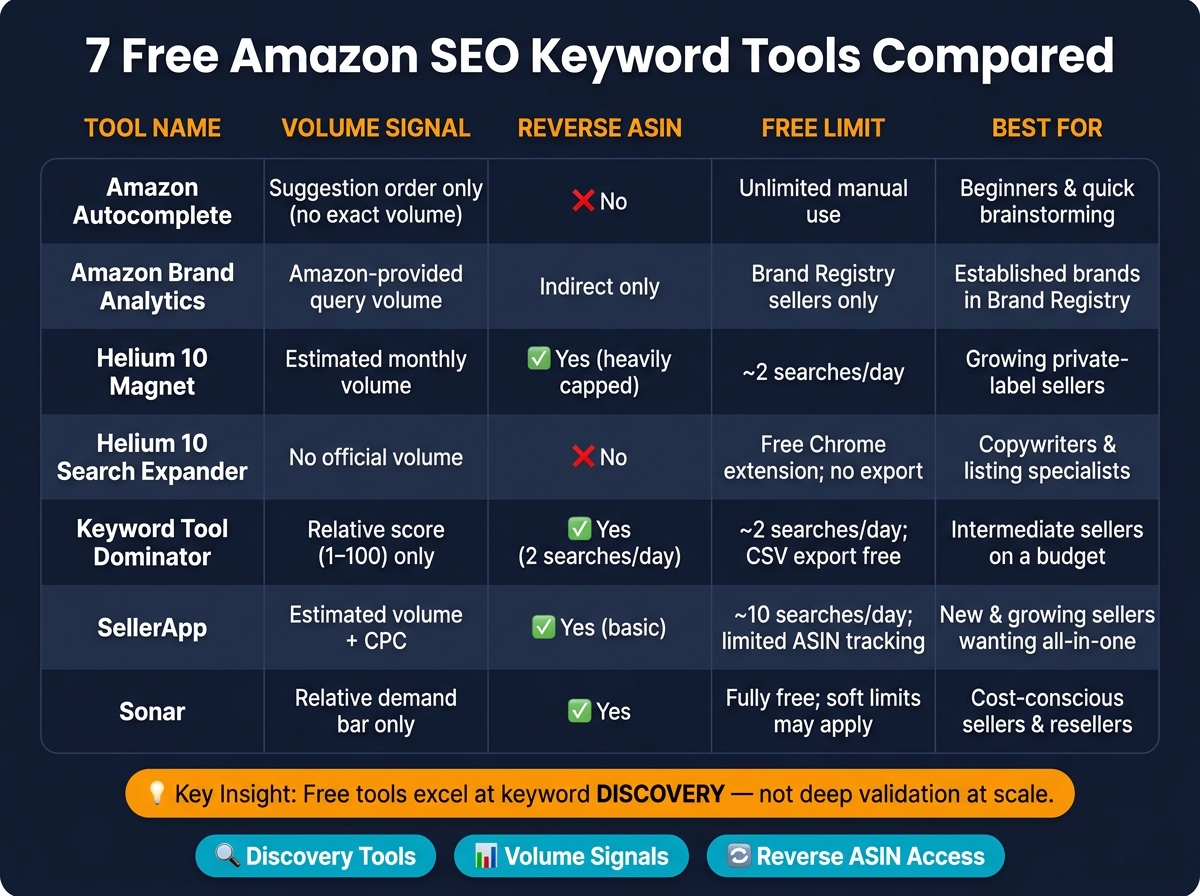
7 Free Amazon SEO Keyword Tools Compared
| Tool | Main use | Volume signal | Reverse ASIN | Main free limit |
|---|---|---|---|---|
| Amazon Autocomplete | Raw keyword ideas | Suggestion order only | No | Manual use only |
| Amazon Brand Analytics | Check demand | Amazon query data | Limited/indirect | Brand Registry only |
| Helium 10 Magnet | Long-tail expansion | Estimated volume | Limited on free tier | Small daily cap |
| Helium 10 Search Expander | More long-tail terms | No exact volume | No | Limited free use |
| Keyword Tool Dominator | Autocomplete expansion | Score only | Yes | About 2 searches/day |
| SellerApp | Volume + PPC checks | Estimated volume/CPC | Yes | Limited results/lookups |
| Sonar | Free keyword discovery | Relative demand | Yes | No exact volume/export limits |
Bottom line: if I were starting today, I’d use Autocomplete first, check demand with Brand Analytics if available, then use one or two free tools to fill gaps. That gives me enough to build listing copy and early PPC targets without paying on day one.
What to Expect From Free Amazon Keyword Tools
Free Amazon keyword tools don’t all do the same job. And if you treat them like they do, it’s easy to waste time.
Some pull straight from Amazon’s search bar and related suggestions. That means you see the words shoppers are using right now, plus high-intent phrases that can point to buying interest. The catch? These tools usually don’t give you exact search volume.
Others give you a small amount of search volume data, but there’s almost always a limit. You get a set number of daily lookups, then hit a wall unless you pay for more. And for some tools, a few deeper features sit behind Brand Registry.
Most free tools leave out a few big things:
- Exact search volume
- Multi-marketplace coverage
- Reverse ASIN-level competitor data
That makes them best for keyword discovery, not market sizing.
Use free tools to build out titles, bullets, and the 249-byte backend search term field with synonyms and alternate spellings. Keep titles under 200 characters, and put the main keyword early.
Amazon now puts more weight on natural language, semantic relevance, and conversion quality. So wording matters more than it used to. Slight phrase changes can make a difference.
Where free tools tend to shine is long-tail keywords. These phrases often show clearer purchase intent, which is what most sellers want in the first place.
Next, the list breaks down seven free tools by keyword ideas, search volume clues, reverse ASIN use, export limits, and seller fit.
1. Amazon Autocomplete
Start here if you want the fastest free way to find Amazon search phrases. Amazon Autocomplete is the dropdown that shows up as you type in Amazon’s search bar. It’s part of Amazon search, it costs nothing, and every suggestion comes from actual shopper searches. It is the fastest free source of raw Amazon search phrases.
Type a seed keyword like "stainless steel water bottle" and Amazon will show completions ranked by popularity and relevance. That order matters. Phrases near the top usually point to stronger relative demand, so even without exact search volume, you still get a useful directional signal. If a phrase shows up in autocomplete, it has at least some search activity on Amazon. If it never shows up, it’s probably a weak term.
Want more long-tail ideas? Use the A-to-Z expansion method. Type your main keyword, add a space, then go through the letters A–Z one by one. Each letter can trigger a new batch of completions, and that often brings up terms competitors overlook. You can push this further by adding modifiers like "for kids", "with straw," or "32 oz." That gets you closer to clear buyer intent.
There are limits, though. Amazon Autocomplete does not offer reverse ASIN lookup, and it has no built-in export feature.
Use Autocomplete to gather raw keyword ideas first. Then check the strongest terms in Brand Analytics before placing them in your title, bullets, or backend search terms.
2. Amazon Brand Analytics
After you pull rough keyword ideas from Autocomplete, the next step is validation. That’s where Amazon Brand Analytics comes in.
Amazon Brand Analytics is available ONLY to brand-registered sellers, and that limitation matters. It’s built for this exact job: checking which terms matter most, comparing search terms, and finding high-intent phrases based on Amazon’s own data.
In plain English, Autocomplete gives you ideas. Brand Analytics helps you see which of those ideas already have demand.
That makes it a stronger signal than raw autocomplete suggestions when you’re deciding where to focus. Before you change your listing copy or put money into ad targeting, use this tool to confirm which search terms show meaningful demand.
This is a good fit for brand-registered sellers who want proof, not just more keyword ideas.
If you need broader keyword expansion after that, move to a tool made to generate more variations.
3. Helium 10 Magnet
After you confirm demand, Helium 10 Magnet helps you turn broad terms into more specific keyword ideas. Its free tier is useful for finding long-tail Amazon keywords with lower competition and clear buyer intent, like "non-slip cork yoga mat for hot yoga".
It also shows estimated search volume next to its keyword suggestions, which makes it easier to decide which phrases deserve your attention first. That said, the free tier does not include reverse ASIN data or bulk exports.
This tool makes sense for newer sellers and small brands that are building a keyword list from scratch. Next up: a tool that pushes those keyword ideas even further.
4. Helium 10 Search Expander
If Magnet gave you broad ideas, Search Expander takes things a step further and drills down into long-tail phrases that are easy to miss. Helium 10 Search Expander surfaces narrow keywords like lumbar support seat cushion for truck drivers, which larger sellers often skip.
The free tier is useful if you’re working with a tight budget and want to spot neglected phrases that still have enough demand to go after. It helps you build out your list of options, but it doesn’t replace search-volume validation.
This lines up with Amazon’s relevance-first search model, where specific intent matters more than broad reach. Use Search Expander to find overlooked phrases, then switch to a tool that helps you widen the list.
5. Keyword Tool Dominator
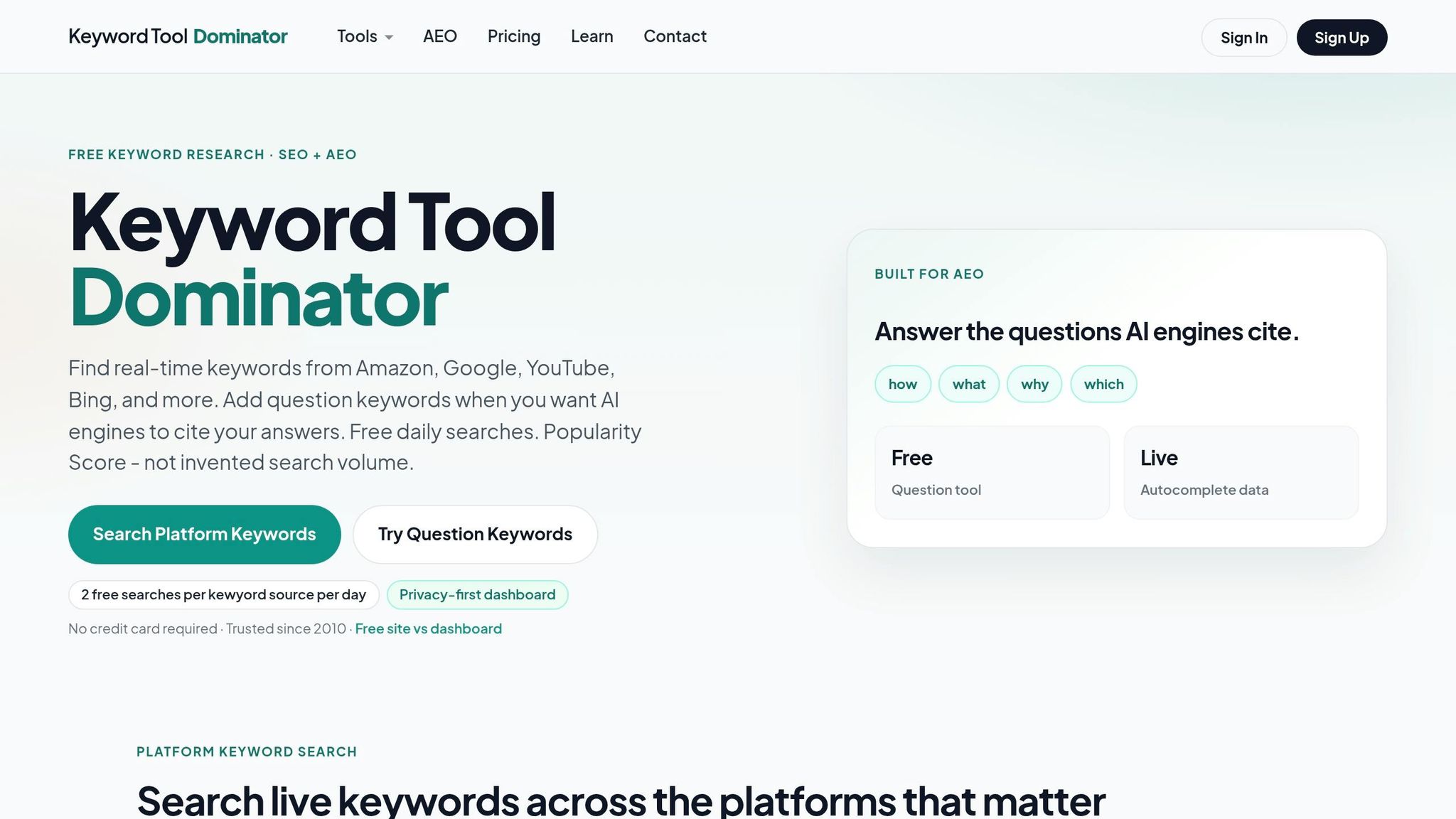
If Search Expander helped you spot phrases that slip under the radar, Keyword Tool Dominator takes that same autocomplete process and does the legwork for you. It automates Amazon autocomplete expansion by running A–Z and 0–9 variations on a seed keyword, so you can pull up long-tail phrases fast.
Instead of giving exact search volume, KTD uses a 1–100 Keyword Score. A higher score means the phrase shows up more often in Amazon autocomplete. That makes it handy when you want to sort terms fast, then check them in another tool later.
KTD also comes with a dedicated Amazon Reverse ASIN Tool. Drop in a specific ASIN, and the tool pulls search-suggestion keywords tied to that ASIN. On the free tier, you get 2 searches per day, and that cap applies separately to the standard keyword tool and the Reverse ASIN tool. Free users can also export results as a CSV.
Best for sellers who want fast autocomplete-based keyword ideas and a small number of reverse ASIN lookups without paying upfront.
6. SellerApp Free Amazon Keyword Tool
Once you’ve found keyword ideas, SellerApp gives you a fast way to sanity-check them. It shows estimated monthly search volume, CPC, and a Keyword Power score, so you can screen terms without wasting time.
It also comes with a free reverse ASIN tool for competitor research. Just paste in a competitor’s ASIN and you’ll see the keywords that product ranks for. That can help you spot gaps in your own listing or find terms your PPC campaigns may be missing.
There’s a catch: free lookups only show a limited set of keywords. So it works best for quick checks, not deep research.
It’s a good fit for sellers who want search volume, CPC, and fast competitor keyword checks for PPC planning.
7. Sonar
Sonar gives you another free way to dig up Amazon keyword ideas based on what shoppers are actually typing into Amazon.
It pulls from a database with millions of Amazon search queries and splits the results into Keywords and Relevant Keywords. That setup makes it easier to spot related long-tail terms without much digging.
The search-volume bar shows relative demand, not exact monthly search volume. So if you just need a quick sense of which terms look bigger or smaller, it does the job. But if you need exact numbers, this isn’t that kind of tool. Free access also leaves out reverse ASIN lookup and exports.
Best for sellers who want fast keyword discovery from Amazon-native data.
Which Free Tool Fits Your Seller Stage
Not every free tool works the same way for every seller. Your stage on Amazon matters more than a giant feature list. Fit beats feature count.
If you’re just starting out, Amazon Autocomplete is the best place to begin. You don’t need an account or signup. Just type and gather your first batch of buyer-intent phrases. That matters a lot when you have no sales history and every click needs to pull its weight.
If you’re a growing private-label seller with a small set of products starting to move, Helium 10 Magnet and Search Expander can help you go deeper. They build on raw autocomplete ideas and surface more high-intent phrases.
If you’re an established brand in Brand Registry, Amazon Brand Analytics is a strong match. It gives you Amazon search frequency data, which helps when you’re tuning a bigger catalog around the terms that drive traffic and conversions.
| Seller Stage | Best Free Tool(s) | Primary Use |
|---|---|---|
| Brand-new seller | Amazon Autocomplete | Long-tail keyword discovery |
| Growing private-label | Helium 10 Magnet / Search Expander | Niche depth, keyword expansion |
| Established brand | Amazon Brand Analytics | Search frequency data, catalog optimization |
Use the table below to compare them at a glance.
Quick Comparison Table
This table gives you a fast side-by-side look at data source, volume signal, reverse ASIN access, free limits, and best-fit seller stage.
| Tool | Data Source | Volume Signal | Reverse ASIN | Free Limits | Best For |
|---|---|---|---|---|---|
| Amazon Autocomplete | Live Amazon search suggestions | No exact volume; order signals demand | No | Unlimited manual use; no native export | Beginners; any seller doing quick keyword brainstorming |
| Amazon Brand Analytics | First-party Amazon query reports | Amazon-provided query volume and query score | Indirect ASIN-level insights only | Free for Brand Registry sellers in Seller Central | Brand Registry private-label brands |
| Helium 10 Magnet | Keyword database with estimated volume | Estimated monthly search volume, limited on the free tier | Yes, but heavily capped on the free tier | About 2 searches/day; exports require paid access | Growing private-label sellers; PPC-focused sellers |
| Helium 10 Search Expander | Expanded Amazon autocomplete suggestions | No official volume numbers | No | Free Chrome extension; no export | All seller stages; especially copywriters and listing optimization specialists |
| Keyword Tool Dominator | Autocomplete-based keyword lists | Relative popularity only; no official Amazon volume | No | Limited daily searches; export requires upgrade | Intermediate sellers building keyword lists on a budget |
| SellerApp | Estimated keyword data with reverse ASIN | Estimated search volume and popularity indicators | Yes, basic reverse ASIN on the free plan | About 10 searches/day; limited ASIN tracking; CSV export on paid plans | New and growing sellers wanting an all-in-one starter hub |
| Sonar | Amazon keyword data with related terms and reverse ASIN | Relative demand signals; basic export | Yes | Fully free keyword lookups; soft limits may apply | Cost-conscious sellers and resellers needing free competitor keyword data |
The pattern is pretty simple: free tools help you find ideas, but they usually fall short when you need deep validation at scale.
One thing stands out right away. Amazon Brand Analytics is the only first-party option in this group. Everything else works from estimated or inferred data.
When Free Tools Are No Longer Enough
Free tools are great for getting started with keyword research. They give you ideas, surface search terms, and help you get a feel for the market.
But there comes a point where ideas alone aren’t enough.
The gap shows up when research needs to turn into actual decisions. Maybe your catalog starts growing. Maybe your PPC campaigns get harder to manage. Either way, you need more than a simple list of keywords.
At that stage, brands usually need broader marketplace support, such as:
- ASIN analysis
- Listing optimization
- Inventory management
- Account health monitoring
That’s when the job shifts. It’s no longer just about finding keywords. It’s about using those keywords across your listings, ads, and catalog planning in a way that makes sense.
If free tools are giving you plenty of ideas but not enough clarity to act, that’s usually the moment keyword research needs to start guiding listing and PPC decisions.
Conclusion
These seven free tools give sellers a practical way to find, check, and fine-tune Amazon keywords without paying for software on day one. You don’t need a paid subscription to begin Amazon keyword research.
A smart low-cost workflow is to pair Amazon Autocomplete with free third-party tools to find high-intent long-tail phrases. For new product launches, that’s often enough to shape your first round of listing updates. But once your catalog starts to grow, free-plan limits and export caps can get in the way.
Long-tail keywords tend to give you the most from free tools because they show clearer buying intent. That’s the sweet spot: less guesswork, more relevance.
The point is simple. Match each tool to the data you need right now, and treat free research as a starting point instead of your whole system. Start with discovery, check what matters, and move to paid tools only when the free options stop giving you the next answer.
FAQs
Which free tool should I start with?
Start with Amazon’s own seller tools, especially Brand Analytics and the Search Query Performance report. A lot of sellers skip past them, but that’s a mistake. They can give you useful insight into what’s happening inside the marketplace.
If you want to look beyond Amazon’s built-in reports, Helium 10’s free tier is a good place to begin, mainly for Black Box and Cerebro. And if you need competitor data without using Seller Central, the SellerSprite free browser extension is another good pick.
How reliable are free Amazon keyword volume estimates?
Free Amazon keyword volume estimates can be hit or miss. Some stronger tools claim accuracy above 90%, which is solid, but you still shouldn’t treat any single number like gospel.
They can give you a helpful read on search volume and competition. That makes them useful for product research, listing work, and content planning. But they work best when you use them as one piece of the puzzle, not the whole picture.
If you want a better read, compare those estimates against Amazon’s own data sources. In practice, that means checking tools against native reports like Brand Analytics and Search Query Performance. That extra step can help you spot gaps, sanity-check the numbers, and make better calls.
When should I move beyond free keyword tools?
Move past free keyword tools when simple features stop being enough for your team. A good starting point is free tools or all-in-one platforms. Then step up when you need precise monthly search volume, deeper reverse ASIN analysis, or side-by-side checks across multiple ASINs.
That shift usually makes sense when your revenue and team can support the extra cost and learning curve. It tends to matter more if you manage several products, deal with heavy competition, or need trend tracking as you scale.