

Struggling to rank on Amazon in the pet category? Here’s the bottom line: Over 70% of sales happen on Page 1, and the top three listings grab 60% of clicks. If your product isn’t visible, you’re losing sales – plain and simple. This guide explains how to move your product from Page 3 to Page 1, focusing on strategies that boost organic rankings and drive conversions without wasting money on ads.
Key Takeaways:
- Keyword Research: Use long-tail keywords like "grain-free dog treats for small breeds" to target buyers with clear purchase intent.
- Listing Optimization: Craft titles, bullet points, and A+ Content that appeal to both Amazon’s algorithm and shoppers.
- Sponsored Ads: Drive sales momentum through targeted PPC campaigns, focusing on high-intent keywords and competitor ASINs.
- Competitor Analysis: Study top-ranking listings and reviews to spot gaps and refine your product’s appeal.
- Operational Excellence: Use FBA for Prime eligibility, manage inventory carefully, and maintain strong account health.
Even small changes – like tweaking keywords or improving images – can increase revenue by 15-30%. Ready to climb the rankings? Let’s break it down step by step.
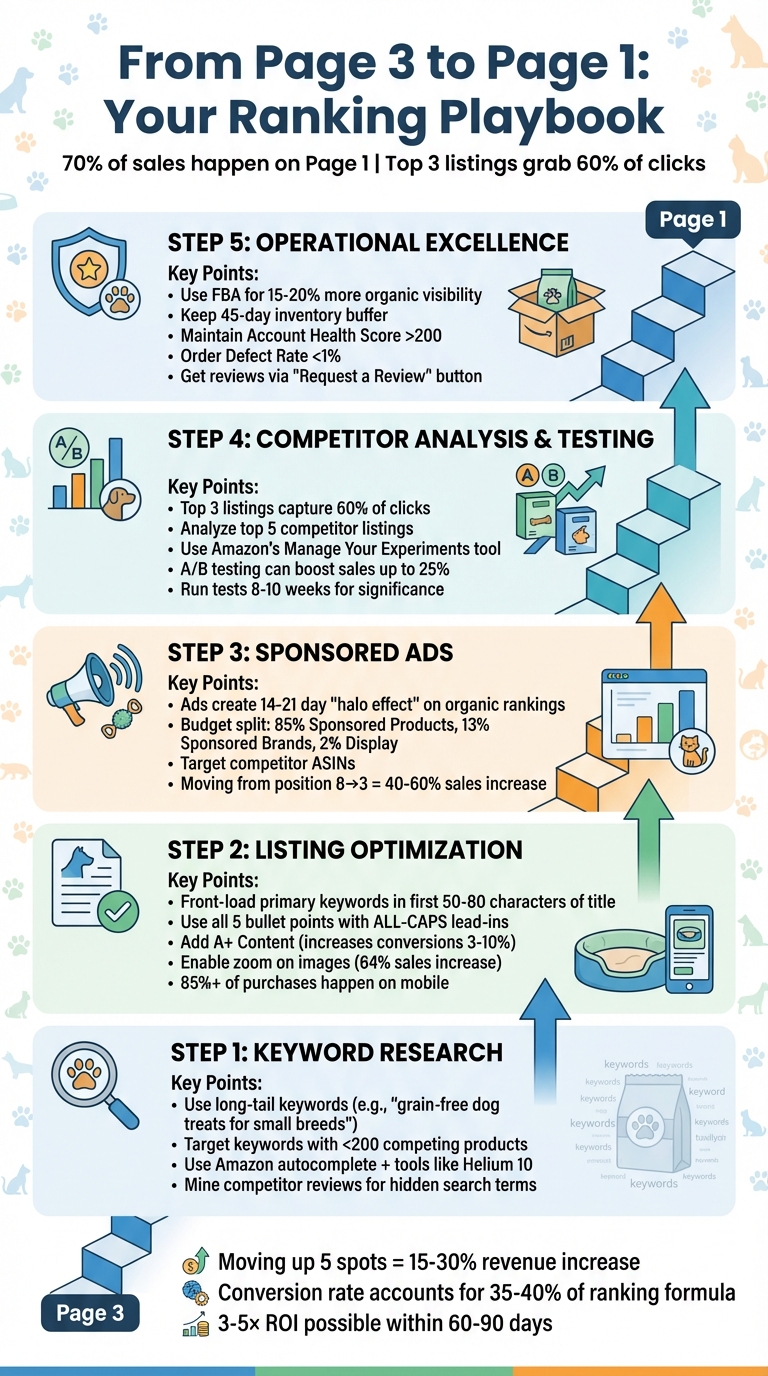
5-Step Amazon Ranking Strategy for Pet Products: From Page 3 to Page 1
Step 1: Finding the Right Keywords for Pet Products
Keywords are the backbone of Amazon rankings. With pet owners projected to spend over $136 billion in 2025, standing out in this competitive space requires a strategic approach. Your mission? Pinpoint the exact terms shoppers type into the search bar – especially those your competitors haven’t fully optimized yet.
Using Amazon‘s Search Bar and Research Tools
A great starting point is Amazon’s own autocomplete feature. For example, type "dog treats" into the search bar, and you’ll see suggestions like "dog treats for small dogs" or "dog treats for anxiety." These phrases come directly from real customer searches.
For more detailed insights, tools like Helium 10‘s Cerebro can be a game-changer. Use a reverse ASIN lookup to analyze top competitors in your niche, such as calming supplements for dogs. Enter their ASINs, and you’ll uncover every keyword they rank for – both organically and through sponsored ads. Focus on keywords with fewer than 200 competing products. These offer a quicker route to landing on Page 1.
If you’re enrolled in Amazon Brand Registry, take advantage of the Search Query Performance dashboard. This tool lets you compare the keywords driving clicks for your brand versus the broader marketplace. Additionally, comb through competitor reviews for hidden gems. Phrases like "perfect for my anxious rescue dog" or "I mix this supplement with my dog’s kibble" can reveal how customers search for products like yours.
Once you’ve gathered a list of potential keywords, shift your focus to long-tail keywords that capture specific buyer intent.
Targeting Long-Tail Keywords
Long-tail keywords – phrases with three or more words – are a goldmine for targeting in competitive pet categories. Instead of broad terms like "dog treats", aim for specific phrases like "grain-free dog treats for small breeds." These keywords often attract shoppers with a clear intent to buy, which can lead to better conversion rates and lower advertising costs.
"Long-tail keywords should likely be at the forefront of your strategy." – Mickey Toogood, Sr. Content Marketing Manager, Amazon
Why do long-tail keywords matter so much? They help you target high-intent shoppers while keeping your costs down. For instance, while a keyword like "dog bed" might attract casual browsers, something like "orthopedic dog bed for large dogs with arthritis" appeals directly to buyers ready to make a purchase. This type of intent signals Amazon’s algorithm to rank your product higher. Plus, long-tail keywords often result in lower CPCs for PPC campaigns, making them a cost-effective way to build sales momentum.
To discover even more long-tail keywords, try the "alphabet method." Type your main keyword followed by each letter of the alphabet – like "dog treats a", "dog treats b", and so on. This technique can uncover suggestions you might otherwise miss. Be sure to filter these keywords by competitor review counts; keywords where competing products have fewer than 500 reviews offer a better chance for quick traction.
Step 2: Optimizing Product Listings for Better Rankings
Now that you’ve nailed your keyword research in Step 1, it’s time to put those keywords to work by optimizing your product listing for better search performance.
Once you’ve chosen the right keywords, the goal is to seamlessly incorporate them into your listing in a way that appeals to Amazon’s algorithm and potential pet buyers. Amazon prioritizes certain areas of your listing for search rankings: titles carry the most weight, followed by bullet points and backend keywords. While product descriptions have less influence on rankings, they’re critical for converting browsers into buyers. And with over 85% of Amazon purchases happening on mobile devices, every character counts – especially the ones visible before users scroll.
Writing SEO-Friendly Titles and Bullet Points
Your product title is your most powerful tool for ranking higher in search results. Since Amazon’s algorithm heavily favors titles, make sure to include your primary keyword within the first 50 to 80 characters. This ensures that both the algorithm and mobile shoppers immediately see the most important terms. A strong title follows this structure: Brand + Core Keyword + Key Attribute + Size/Model + Unique Selling Point (USP). For example, instead of a generic title like "Premium Dog Bed", try something more specific, like: "PetComfort Orthopedic Dog Bed for Large Dogs, Waterproof Memory Foam, 40×30 inches."
As of January 2025, Amazon has banned special characters like !, $, and ? in titles. Also, avoid repeating the same word more than twice (excluding prepositions).
"Amazon wants your product listing titles to be clear and concise, not littered with random keywords."
- Brian Connolly, Ecommerce Expert, Jungle Scout
When it comes to bullet points, focus on benefits rather than just listing features. Shoppers want to know how your product will make their lives easier. Use all five bullet points, starting each with an ALL-CAPS lead-in (e.g., "WATERPROOF PROTECTION" or "EASY TO CLEAN") to make them scannable. A simple formula works well here: state the benefit, mention the feature, and back it up with proof. For instance, instead of saying "10mm thick foam", try:
"SUPERIOR JOINT SUPPORT: Extra-thick 10mm foam cushions your pet’s joints on hard floors, helping senior dogs rest comfortably."
Here’s a real-world example: In May 2021, Jungle Creations launched "Washable Pee Pads for Dogs" on Amazon. By front-loading keywords like "waterproof potty training mats" in the title and crafting benefit-driven bullet points, the product earned over 400 reviews within a year. By January 2024, it boasted a conversion rate of 8.72%.
Improving Product Descriptions and A+ Content
While product descriptions don’t carry as much weight for SEO as titles and bullet points, they’re often the final piece that convinces shoppers to hit “Buy Now”. If you’re a brand-registered seller, you can replace the standard description with A+ Content, which uses rich media modules to build trust and address potential buyer concerns.
A+ Content has been shown to increase conversion rates by 3% to 10%, with some highly optimized listings seeing boosts as high as 20%. For pet products, this can make a big difference. Use comparison tables to help buyers decide between sizes (e.g., Small vs. XL) or product tiers (e.g., Basic vs. Premium). Lifestyle images showing pets using your product in a home setting can create an emotional connection, helping buyers imagine the product in their own lives. Infographics are also a smart addition, especially for highlighting features like waterproof layers for pee pads or non-toxic materials for toys.
Don’t forget the technical details. Write descriptive alt text for every A+ image, incorporating target keywords to improve accessibility and boost SEO indexing. Another tip: make sure your images are at least 1,600 pixels wide to enable Amazon’s zoom feature. Sellers who made 25% or more of their product images zoomable saw an average sales increase of 64%.
Lastly, take advantage of the 250-byte backend search term field. Use it for synonyms, abbreviations, and common misspellings that don’t naturally fit into your public-facing copy.
| Listing Element | Character/Byte Limit | Primary Purpose |
|---|---|---|
| Product Title | < 200 Characters | Search indexing & click-through rate |
| Bullet Points | 5 Bullets (< 200 chars each) | Conversion & benefit selling |
| A+ Content | Multiple Modules | Brand trust & reducing returns |
| Backend Keywords | 249-250 Bytes | Hidden indexing for synonyms |
| Product Images | 7 Slots (incl. Video) | Visual proof & engagement |
Once you’ve optimized your listing, you’re ready to amplify its visibility with sponsored ads.
Step 3: Using Sponsored Ads to Boost Visibility and Sales
Once your product listing is optimized, the next logical step is to drive sales through sponsored ads. Even with a perfectly optimized listing, hitting Page 1 on Amazon requires strong sales momentum. Sponsored ads not only generate quick sales but also signal Amazon’s algorithm by increasing sales velocity – an important ranking factor that accounts for about 25–30% of the equation. For example, in competitive pet categories, moving from position 8 to position 3 in organic search can increase sales by 40–60%. Additionally, well-executed ad campaigns often create a 14–21-day "halo effect", improving organic rankings by 2–4 spots.
Here’s a real-world example: Between August 2022 and August 2023, one Amazon seller expanded their active PPC targets from 291 to 6,494 by leveraging keywords discovered through automatic campaigns. As a result, their monthly clicks skyrocketed from 840 to 24,499 – a 30× increase in visibility. This strategy helped them achieve over $53,000 in monthly sales within just one year. These tactics not only boost immediate sales but also prompt Amazon to rank your listing higher organically.
Creating Manual and Automatic PPC Campaigns
Start with automatic campaigns to let Amazon’s algorithm identify high-converting pet-related keywords. Think of these campaigns as a research tool – they uncover search terms you might not have considered. Once you’ve identified keywords that perform well, transfer them to manual campaigns with exact match targeting. This gives you greater control over your bids and budget. To calculate your ideal cost-per-click (CPC), multiply your target ACoS by your revenue per click (RPC). For example, with a 30% ACoS and $5.00 RPC, your ideal CPC would be $1.50.
Prioritize long-tail keywords that reflect high buyer intent. Keywords like "indestructible chew toys for aggressive chewers" or "hypoallergenic cat food for sensitive stomachs" usually have lower CPCs and higher conversion rates compared to broader terms like "dog treats". Don’t forget to include negative keywords to filter out irrelevant searches. For instance, exclude terms like "free", "DIY", or "cheap" to avoid wasting your ad budget on unqualified clicks.
A smart budget allocation might look like this: dedicate about 85% of your ad spend to Sponsored Products (the primary driver of direct sales), 13% to Sponsored Brands (to enhance awareness), and 2% to Sponsored Display for retargeting.
Targeting Competitor Products and Leveraging Sponsored Brands
Use Sponsored Product campaigns to target competitor ASINs and position your product on the detail pages of top-selling pet items. This strategy puts your product in front of shoppers who are already ready to buy. Focus on competitors with higher prices or fewer reviews than your product. To protect your brand, run manual campaigns targeting your own brand name and ASINs – up to 30% of customers searching for a specific brand name may end up purchasing from a competitor.
Sponsored Brands can significantly increase visibility by placing banner-style ads at the top of search results. These ads often achieve click-through rates that are up to 25% higher than standard Sponsored Product campaigns. They’re particularly effective for broad category terms like "dog treats" or "cat litter." Sponsored Brands offer three formats: Product Collection (to highlight up to 50 items), Store Spotlight (to drive traffic to your Brand Store), and Video Ads (to showcase product features). In the pet category, video ads stand out – playful unboxings or grooming transformations tend to resonate with pet owners.
"Amazon is in this game for the money… The most powerful signal you can send to Amazon [for ranking] is selling on that specific keyword."
- Marcel Marculescu, CEO of Intellirank
Once your ads are live, keep a close eye on your conversion rate. Amazon’s algorithm places significant weight on conversion rates, accounting for 35–40% of the ranking formula. High-performing ads do more than just drive sales – they also improve your listing’s organic visibility.
"Organic ranking means that you’re there and you’re not paying to be displayed there. So this is the cheapest way to get traffic to your listing."
- Marcel Marculescu, CEO of Intellirank
With your ads delivering results, the next step is to dig into competitor strategies and refine your approach even further.
Step 4: Analyzing Competitors and Testing Listing Variations
Competition in the pet category is fierce, with the top three listings on page one capturing at least 60% of all clicks. To break into this elite group, you’ll need to analyze what works for your competitors and experiment with listing variations to find what resonates with your audience. By identifying gaps and opportunities, you can refine your product’s appeal and build on the optimizations you’ve already made.
Studying Competitor Listings for Opportunities
Start by closely examining the top five listings for your target keywords. Pay attention to critical elements like titles, bullet points, and images. For instance, check if their titles prioritize essential keywords within the first 50–80 characters. Take note of their use of A+ Content, such as brand stories or comparison charts, which can help establish trust with potential buyers.
Dive into customer reviews to uncover unmet needs. If buyers frequently complain that a competitor’s dog harness causes chafing during long walks, you can emphasize your product’s padded, ergonomic design in your listing. Additionally, use reverse ASIN lookup tools to identify keywords your competitors rank for organically. Track their pricing strategies, including discounts and coupons, to understand how they maintain sales momentum.
A great example comes from Jungle Creations, who optimized their "Washable Pee Pads for Dogs" by spotting gaps in competitor listings. They noticed top-ranking products lacked detailed use-case descriptions. In response, they crafted a 186-character title that addressed specific scenarios like playpens and crates and highlighted benefits such as washability and reusability. These adjustments aligned perfectly with their earlier keyword and listing strategies.
Testing Titles and Images with A/B Tests
Armed with insights from competitor analysis, the next step is testing your listing variations to ensure they resonate with buyers. Amazon’s Manage Your Experiments tool is a game-changer for this process. Available to sellers with a Professional account and Brand Registry enrollment, this tool allows you to systematically test variations on high-traffic ASINs for meaningful results. You can experiment with different titles, images, bullet points, or even multiple elements at once. For example, compare a concise, punchy title with a longer, feature-packed one, or test a simple product image against a lifestyle shot that shows the product in action.
Ben Huge, Brand Manager at Onkata Hardware Sales, Inc., used this tool to test a single-word change in a product listing. That minor tweak led to an 8% increase in sales. To ensure your tests provide valuable insights, make sure the variations are distinct. Run them for at least 8–10 weeks or until you reach statistical significance. You can even enable auto-publish to automatically update your listing once the best-performing variation is identified.
"With Manage Your Experiments, we can explain what’s going on in a customer’s marketplace. We justify the changes or recommendations we want to make thanks to the data Manage Your Experiments produces."
- Ben Huge, Brand Manager, Onkata Hardware Sales, Inc.
Keep a close eye on Unit Session Percentage, which measures the number of units sold per visitor. A/B testing can boost sales by up to 25%, and higher conversion rates not only drive more sales but also signal Amazon’s algorithm to improve your product’s organic ranking.
sbb-itb-e2944f4
Step 5: Building Trust Through Fulfillment, Reviews, and Account Management
Once you’ve fine-tuned your listings through testing and competitor analysis, it’s time to shift focus to the operational side of things. These are the nuts and bolts of your pet product business – fulfillment, reviews, and account health – that directly influence your ability to maintain those hard-earned rankings. Amazon rewards sellers who consistently deliver a dependable and smooth customer experience. Skipping these essentials could undo all your hard work on listing optimization.
Using Fulfillment by Amazon for Prime Eligibility
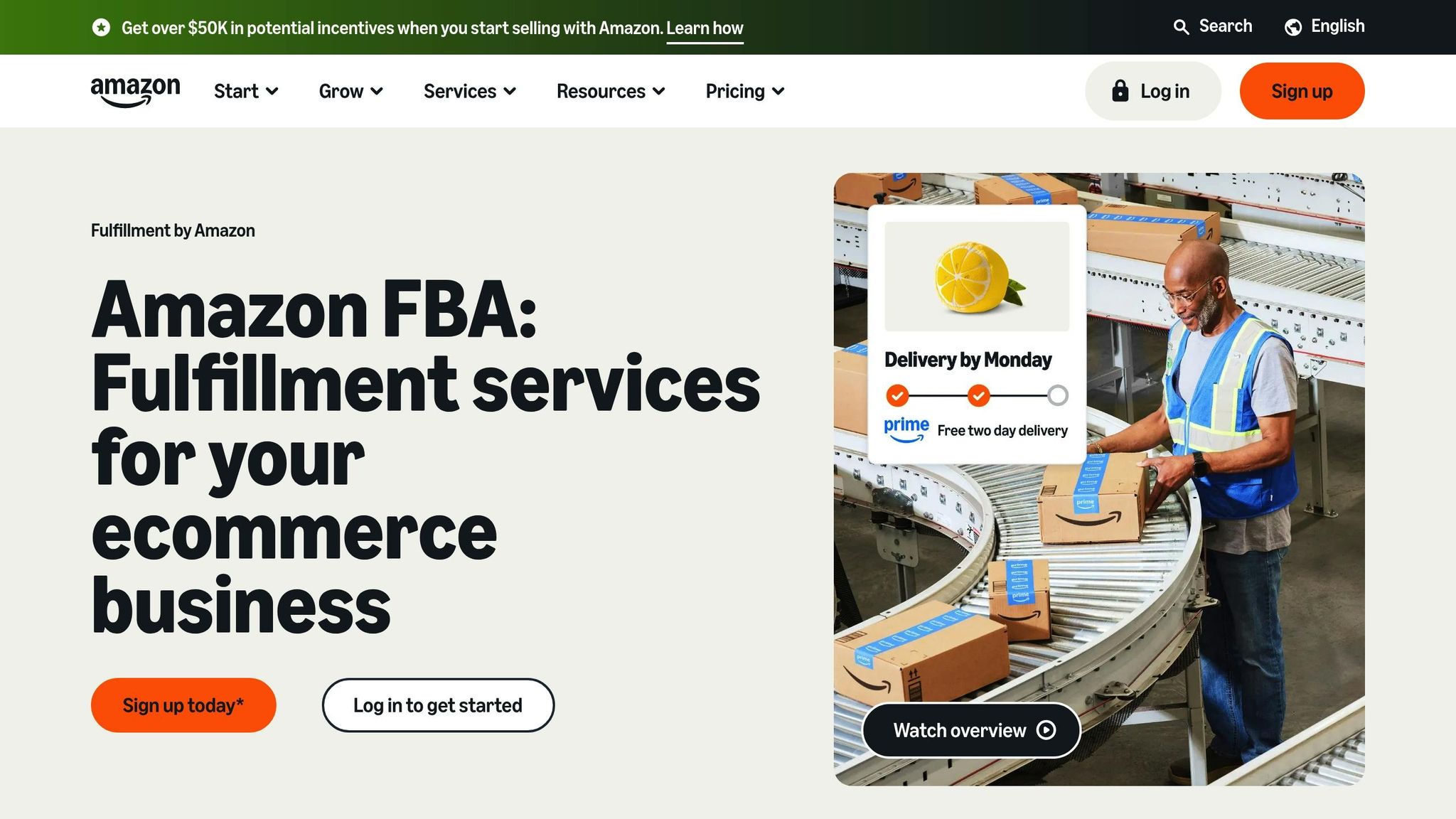
Signing up for Fulfillment by Amazon (FBA) is a game-changer. Amazon’s A10 algorithm favors FBA listings over merchant-fulfilled ones. Even better, FBA products automatically qualify for the Buy Box. That Prime badge? It’s a powerful trust signal to customers, promising quick and reliable shipping, which boosts conversion rates. This creates a ripple effect: higher conversions lead to better organic visibility, which drives even more sales.
"Amazon is constantly trying to push sellers onto FBA, so you’ll instantly get a competitive advantage if you fulfill by Amazon versus someone who fulfills on their own."
- Brian Connolly, Ecommerce Expert, Jungle Scout
FBA products enjoy 15–20% more organic visibility compared to merchant-fulfilled options, but there’s a catch: you need to manage your inventory carefully. If your products are out of stock for more than three days, you could lose 15–25% of your ranking power, and recovery might take weeks. To avoid this, aim to keep a 45-day inventory buffer. Reliable fulfillment not only helps you secure the Buy Box but also lays the groundwork for building trust through customer reviews.
Getting More Reviews Through Amazon-Approved Methods
Positive reviews are like gold on Amazon – they build trust with shoppers and improve your organic search rankings. The easiest way to encourage reviews? Use Amazon’s "Request a Review" tool in Seller Central. This feature sends a standardized, compliant request to customers within 30 days of their purchase. Just steer clear of offering incentives or asking specifically for positive reviews – those tactics violate Amazon’s terms of service.
If you’re a brand-registered seller, the Amazon Vine Program can help you gather early reviews. This program allows you to provide free products to trusted "Vine Voices" in exchange for unbiased feedback. You can also include neutral product inserts in your packaging, politely thanking customers and encouraging honest feedback.
It’s equally important to address negative reviews promptly in your Customer Reviews section. By doing so, you show potential buyers that you care about their experience, which can boost their confidence in your brand. Keep an eye on your return rate as well – keeping it below 10% is key. Higher return rates can signal poor product quality and hurt your rankings.
Monitoring and Maintaining Account Health
Your account health is the backbone of your long-term success on Amazon. Amazon evaluates your account on a scale of 0 to 1,000: Healthy (200–1,000), At Risk (100–199), and Unhealthy (0–99). If your score drops below 200, you’ll get warnings, and falling under 100 could result in account deactivation.
| Metric | Target Threshold | Consequences |
|---|---|---|
| Order Defect Rate (ODR) | < 1% | Account deactivation, loss of Buy Box |
| Late Shipment Rate (LSR) | < 4% | Negative reviews, account suspension |
| Pre-Fulfillment Cancellation Rate | < 2.5% | Hurts seller performance |
| Valid Tracking Rate (VTR) | > 95% | Reduced customer trust, potential penalties |
| On-Time Delivery Rate (OTDR) | > 97% | Lower search ranking, poor customer experience |
Regularly check the Account Health dashboard in the "Performance" tab of Seller Central to catch potential issues early. Respond to customer inquiries within 24 hours to maintain high service standards and avoid negative feedback. Since FBA helps improve metrics like LSR, VTR, and OTDR, it’s a valuable tool for keeping your account in good standing.
For sellers managing multiple products and campaigns, services like Emplicit can assist with account health management and inventory optimization. Conduct quarterly audits of your product catalog to remove stranded inventory or outdated items that might cause compliance issues. Poor account health can jeopardize your Buy Box eligibility, which could slash your sales by up to 80%.
A healthy account doesn’t just protect your current rankings – it helps you climb the ladder from Page 3 to Page 1.
Tracking Progress and Expanding to Other Marketplaces
Monitoring Key Metrics for Ranking Improvements
Keeping a close eye on key metrics is crucial for climbing Amazon’s rankings and staying competitive in pet product categories. One of the most important metrics is your organic search rank. This tells you where your pet products show up for high-intent keywords like "grain-free dog food" or "automatic cat litter box." Why does this matter? Products in the top three positions snag 64% of all clicks. Even small ranking improvements can make a big difference – moving up just five spots can boost revenue by 15-30%, all without increasing ad spend.
Another key metric is your conversion rate, also known as Unit Session Percentage. This measures the percentage of visitors who actually purchase your product. If your conversion rate isn’t where it should be, it might be time to revisit your images, pricing, or bullet points. Then there’s sales velocity, which reflects the consistency of your sales. Maintaining steady sales momentum is essential for holding onto high rankings.
Don’t forget to track your Total Advertising Cost of Sales (TACoS) – this compares your ad spend to your total revenue. A decreasing TACoS shows that your organic growth is outpacing your ad spending. Check this metric weekly to ensure your organic sales are growing faster than your advertising costs. If you’re a brand-registered seller, use Amazon’s Search Query Performance Dashboard to monitor impressions, clicks, and purchases for specific keywords. This tool can help pinpoint areas where performance can improve. Once you’ve optimized these metrics on Amazon, you can apply the same strategies to other marketplaces.
Growing Your Business Across Multiple Platforms
Once you’ve nailed your Amazon strategy, it’s time to take your success to other platforms. Walmart Marketplace, for example, draws over 120 million unique visitors every month. It’s also less competitive than Amazon, and Walmart’s algorithm favors external traffic sources like social media or Google Ads. Just like Amazon, products on Walmart’s first page capture the lion’s share of attention – 80% of clicks.
For reaching younger audiences, TikTok Shop is an excellent option. It’s a hotspot for viral product discovery, especially among Gen Z and Millennials who are increasingly turning to social media instead of search engines to find products. TikTok’s algorithm is particularly good at organically matching products with the right audience. Meanwhile, platforms like Target provide a more curated shopping experience, attracting high-intent, brand-loyal customers.
To scale your business across these platforms, consider working with marketplace management experts like Emplicit. They specialize in helping pet brands grow on platforms like Amazon, Walmart, TikTok Shop, and Target. From crafting platform-specific strategies to optimizing PPC campaigns and managing inventory, Emplicit’s USA-based account managers can help you tailor your listings to each platform’s unique requirements. For instance, Walmart has a 200-character limit for product titles, and Emplicit ensures your listings meet these guidelines while maintaining consistent brand messaging across all channels.
Conclusion: Moving from Page 3 to Page 1 in Pet Categories
Climbing to Page 1 in highly competitive pet categories on Amazon requires a systematic, well-executed strategy. The key elements? Focus on long-tail keywords, fine-tune your listings, use Sponsored Products to drive sales momentum, and ensure your products qualify for Prime. These steps pave the way to higher visibility and better rankings.
The numbers speak for themselves. Over 70% of Amazon sales happen on Page 1, and even a modest organic boost – say, moving up five spots – can increase revenue by 15–30%. Jumping from position 8 to position 3? That could mean a 40–60% jump in sales. With conversion rates influencing 35–40% of your ranking score, every tweak to your strategy counts.
To achieve both immediate and lasting results, combining paid advertising with organic optimization is essential. PPC campaigns not only drive instant sales but also send conversion signals that help your organic rankings climb. As Marcel Marculescu, CEO of Intellirank, explains:
"Amazon is in this game for the money… The most powerful signal you can send to Amazon [for ranking] is selling on that specific keyword".
For brands looking to accelerate their progress, expert guidance can make all the difference. Companies like Emplicit offer end-to-end solutions tailored to pet brands, managing everything from keyword research and listing optimization to PPC campaigns and inventory planning. Their hands-on approach is especially valuable when products plateau below Page 1, ad costs rise, or rankings dip despite steady sales. With proven frameworks and rigorous tracking of key metrics, agencies like Emplicit often deliver a 3–5× ROI within just 60 to 90 days.
As highlighted earlier, the foundation of success lies in consistency and ongoing testing. While competition remains intense, this playbook provides a roadmap to rise above. By staying consistent with optimizations, maintaining healthy inventory levels, and continuously testing strategies, you can unlock the compounding benefits of organic rankings. Over time, these gains lead to higher profit margins and a competitive edge that paid ads alone simply can’t match. Keep refining, and watch your rankings – and revenue – grow.
FAQs
How do long-tail keywords help improve my product’s ranking on Amazon?
Long-tail keywords are highly specific search phrases that usually face less competition but often attract shoppers with a stronger intent to buy. Including these keywords in your product listing can boost its relevance to Amazon’s A9 algorithm, making it simpler for potential customers to discover your product.
Another advantage of long-tail keywords is their ability to lower advertising expenses. Since they’re less competitive in sponsored ads, you can target them at a lower cost. Plus, these keywords often result in better conversion rates because they match exactly what buyers are searching for. Combined, these factors can give your product a better chance of reaching Page 1 in Amazon search results.
What are the advantages of using Fulfillment by Amazon (FBA) for selling pet products?
Using Fulfillment by Amazon (FBA) can give pet-product sellers a noticeable advantage on the platform. When you store your inventory in Amazon’s fulfillment centers, your products automatically earn the Prime badge, signaling fast and free shipping. This is a big deal – nearly 90% of shoppers filter their searches for Prime-eligible items, making it easier for your products to gain visibility and even land on Page 1 of search results.
FBA takes care of the heavy lifting, managing tasks like picking, packing, shipping, and handling returns. This frees up your time to focus on expanding your business. Plus, Amazon’s algorithm often prioritizes FBA-fulfilled listings, which can improve your organic rankings. The result? Faster sales, increased customer trust, and a smoother path to standing out in the competitive pet product market.
How do sponsored ads help improve organic rankings on Amazon?
Sponsored ads are a powerful tool for boosting your product’s organic rankings. By driving more traffic and sales, these ads create a ripple effect: increased sales velocity and conversion rates signal to Amazon’s algorithm that your product is both relevant and in demand. This can lead to better organic placement in search results.
Beyond rankings, ads also enhance visibility, helping to build brand awareness and encourage customer interaction. Over time, this creates a positive cycle that strengthens your product’s overall performance. With a well-planned approach, sponsored ads can fast-track your product’s path to Page 1.
Related Blog Posts
- Why 73% of Pet Brands Fail on Amazon Before Year Two (And How to Be the Exception)
- The Humanization of Pet Care Is Changing Amazon. Is Your Brand Keeping Up?
- The Real Reason Your Amazon Pet Product Has 4.8 Stars and Still Isn’t Selling
- Most Pet Brands Optimize for Amazon Keywords. The Best Ones Optimize for This Instead.