

When launching a product on Amazon, having a strong keyword strategy is non-negotiable. Keywords bridge the gap between what customers search for and your product listing, directly influencing your visibility and sales. Without them, your product risks being invisible to potential buyers. Here’s how to create an effective keyword list:
- Start with Seed Keywords: Identify 10–20 broad terms that describe your product, its features, and the problems it solves. Use categories like core terms (e.g., "yoga mat"), benefit phrases (e.g., "reduce neck pain"), and attribute clusters (e.g., "non-slip yoga mat").
- Expand Using Tools: Use Amazon’s autocomplete feature and third-party tools like Helium 10 to find long-tail, high-intent keywords. Analyze competitor ASINs to uncover hidden opportunities.
- Organize by Placement: Prioritize keywords for the title, bullet points, descriptions, and backend search terms. Focus on relevance and avoid duplication across fields.
- Track and Adjust: Monitor performance metrics like search volume, competition, and conversion rates. Refine your list post-launch to boost rankings and sales.
Key Tip: Long-tail keywords (e.g., "yoga mat for hot yoga beginners") often yield better results for new launches than high-volume, generic terms. Focus on search intent and buyer readiness to maximize conversions.
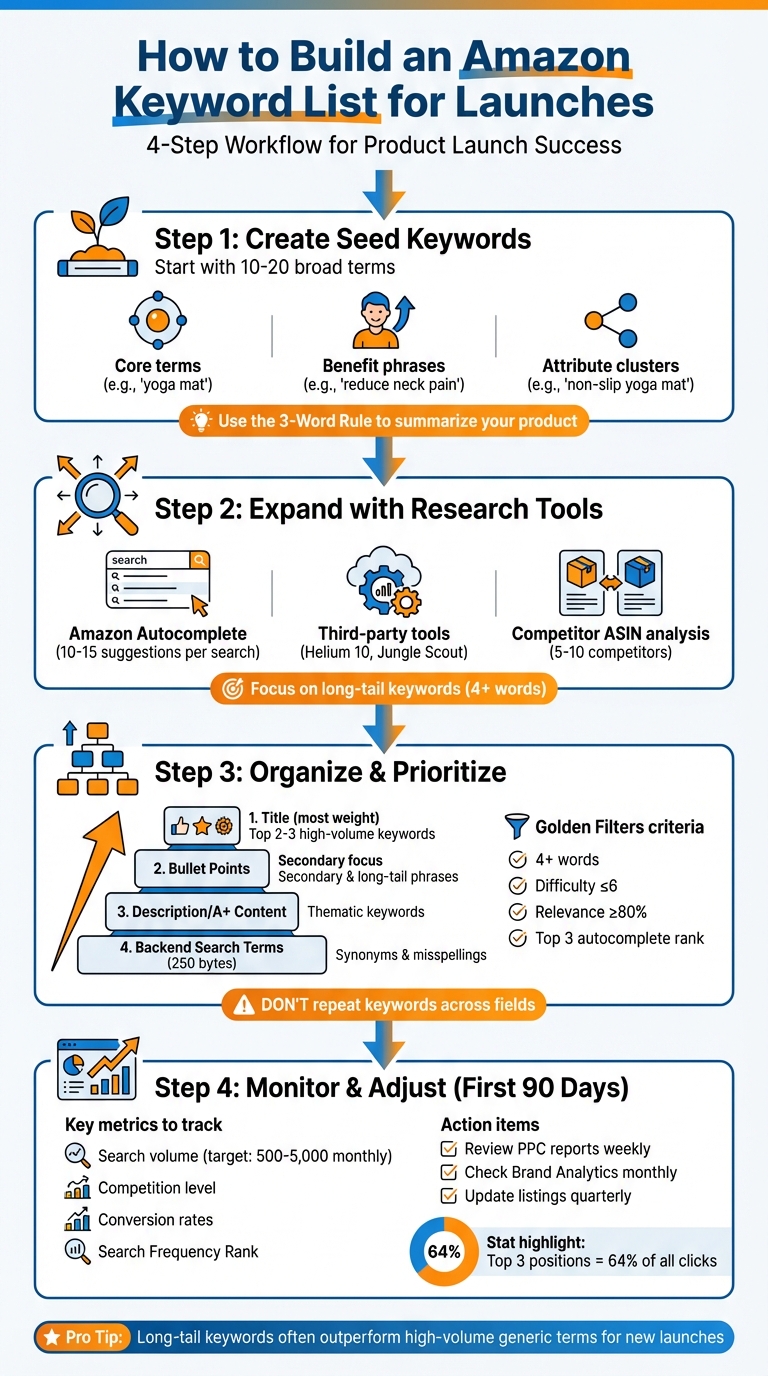
4-Step Amazon Keyword Research Process for Product Launches
Keyword Research to Win on Amazon | Helium 10 | Scale Stories Ep 1
Step 1: Create Your Initial Seed Keywords
Seed keywords are the backbone of your research, opening the door to hundreds of profitable variations. Start with broad, one- to four-word phrases that capture the essence of your product, and then build from there.
"Seed keywords are the foundation of any Amazon keyword research process. These broad terms closely relate to your product’s main category or function and serve as starting points for finding more specific, profitable keywords." – CANOPY Management
For most sellers, 10 to 20 seed keywords per product are ideal. These terms should go beyond simply describing your product – they need to highlight what it does and the problems it solves. This groundwork will prepare you for the next step: diving deeper into keyword expansion with research tools.
Start with Product Features and Benefits
To generate effective seed keywords, focus on your product’s standout features and benefits. Break your keywords into three categories:
- Core product terms (e.g., "laptop stand")
- Problem/benefit phrases (e.g., "reduce neck pain")
- Attribute clusters (e.g., "aluminum laptop stand")
For instance, if you’re marketing an ergonomic laptop stand, your core terms might include "laptop stand" or "laptop riser." Problem/benefit phrases could be "reduce neck pain" or "improve posture", while attribute clusters might include "aluminum laptop stand" or "laptop stand for MacBook."
A helpful trick is the "3-Word Rule" to quickly summarize your product. For example, a joint supplement might focus on "maintain mobility aging." Add descriptive adjectives like "ergonomic", "waterproof", or "BPA-free" to refine your keyword list further.
Another great resource? Amazon’s "Frequently bought together" section. This feature can reveal complementary product keywords that attract customers with related interests.
Include Customer Pain Points
Align your keywords with the language your customers actually use. Browse competitor reviews and Q&A sections to uncover common phrases and recurring problems. For example, if you’re selling a yoga mat, you might see phrases like "slippery hands during hot yoga" or "mat slides on hardwood floors." These phrases make excellent seed keywords because they reflect real search behavior.
For every problem your product addresses, think about creating keywords for different types of searches:
- Question-style searches (e.g., "what helps with…")
- Comparison searches (e.g., "X vs Y")
- Transactional searches (e.g., "buy…")
If you’re promoting charcoal toothpaste, you could use question-style phrases like "what whitens teeth naturally" or transactional phrases such as "buy charcoal toothpaste for kids". Don’t forget to identify what your product doesn’t solve. These can be turned into negative keywords, ensuring your ad spend isn’t wasted on irrelevant searches.
Once you’ve nailed down your seed keywords, the next step is to expand your list using keyword research tools.
Step 2: Expand Your List with Research Tools
After laying the groundwork with your seed keywords, the next step is to broaden your list using research tools. The aim here is to identify high-intent phrases that shoppers are actively typing into Amazon’s search bar – keywords that could already be driving sales.
Use Amazon Autocomplete Suggestions
Amazon’s search bar is a treasure trove of customer behavior insights. Start typing a keyword, and you’ll see 10–15 autocomplete suggestions based on current search trends. These suggestions are a simple yet effective way to uncover high-intent phrases.
"This can be a low-tech way of doing basic keyword research." – Jungle Scout
To maximize your results, try entering partial phrases (e.g., "iPhone ca") to reveal popular variations. The top three suggestions typically indicate the highest search volumes. You can also refine your results by selecting a specific product category, which can cut irrelevant suggestions by up to 50%. Long-tail phrases – those with three or more words, like "backpack with laptop compartment" – are especially valuable because they often attract shoppers who are closer to making a purchase. While manual research can get you started, tools like Helium 10’s Magnet or Keyword Tool Dominator can automate the process, generating hundreds of keyword ideas in seconds.
Apply Keyword Research Tools
Third-party tools can take your seed keywords and turn them into comprehensive lists, complete with data on search volume, competition, and estimated PPC costs. Tools like Helium 10 and Jungle Scout offer features such as "Golden Filters", which help you zero in on keywords of four or more words, with a difficulty score under six and top-three autocomplete rankings.
Another strategy is "snowballing", where you use your best-performing keywords as new seeds to uncover even more niche, hyper-targeted variations. If you’re part of Amazon Brand Registry, don’t overlook the Search Query Performance and Top Search Terms dashboards. These offer valuable first-party data on conversions and popular search terms, giving you an edge.
Analyze Competitor ASINs
Reverse ASIN lookup is a game-changing method for finding keywords that are already driving conversions. Tools like Helium 10 Cerebro or Jungle Scout Keyword Scout allow you to input a competitor’s ASIN and see the keywords they rank for in both organic and sponsored results.
"The #1 method to find your competitor’s highest converting keywords." – Helium 10
Start by selecting 5–10 competitors with similar products. Use filters to narrow down the most relevant opportunities, such as keywords where at least four competitors rank, the average rank is between 1 and 30, and monthly search volume exceeds 500 searches. Also, look for overlooked keywords where only one or two competitors rank in the top 10 – these can be easier wins.
Beyond keyword data, dive into competitor reviews and Q&A sections to find hidden gems. For instance, a collagen peptide seller might notice phrases like "in my coffee" appearing frequently in user reviews. Additionally, check the "Frequently bought together" section on competitor listings to discover complementary product keywords. Once you’ve gathered your data, organize the keywords by priority and relevance to streamline your strategy.
sbb-itb-e2944f4
Step 3: Organize and Prioritize Your Keywords
After gathering a long list of potential keywords, the next challenge is to organize them in a way that aligns with Amazon’s search algorithm. A messy keyword list can waste precious character space and weaken your ranking potential. The goal is to assign each keyword to its best placement and prioritize them based on their impact. Here’s how to sort your keywords and refine them using key metrics.
Sort Keywords by Placement Type
Not all keywords belong in the same part of your Amazon listing. Amazon treats different fields with varying levels of importance. For example, the product title carries the most weight, followed by bullet points, then descriptions/A+ content, and finally backend search terms. To make the most of this structure, divide your keywords into four groups based on these placement types.
- Title: This is where you should feature your brand name and the top 2–3 high-volume keywords. Focus on the first 80 characters to optimize for mobile users. For instance, if you’re selling a yoga mat, a title like "Brand Name Eco-Friendly Yoga Mat Non-Slip" ensures your main keywords are front and center.
- Bullet Points: Use this section for secondary keywords and long-tail phrases that emphasize product features. Phrases like "extra thick padding" or "machine washable" work well here.
- Description and A+ Content: These sections are perfect for thematic keywords. Use storytelling to address customer concerns and highlight benefits.
- Backend Search Terms: This is the place for synonyms, common misspellings, and regional variations (e.g., "color" vs. "colour"). Keep these terms lowercase, use single spaces, and avoid punctuation.
One crucial rule: don’t repeat keywords across fields. If a keyword is already in your title, there’s no need to include it in your backend search terms – it’s indexed automatically. Duplication wastes space, especially since backend search terms are limited to 250 bytes. Once your keywords are sorted, the next step is to evaluate their potential using key metrics.
Evaluate Keywords Using Key Metrics
Not every keyword deserves equal attention. To prioritize effectively, evaluate each term based on four key metrics: search volume, competition level, relevance, and search intent. For new product launches, targeting keywords with 500–5,000 monthly searches often works better than chasing high-volume terms, which are usually more competitive.
Use what’s known as the "Golden Filters" to narrow your focus. Look for long-tail keywords (phrases with four or more words) that meet these criteria:
- Difficulty score: ≤6
- Relevance: ≥80%
- Autocomplete rank: Top three
These filters help you identify buyer-ready phrases that are easier to rank for within a few months. For example, "yoga mat for hot yoga beginners" (difficulty: 4, volume: 1,200) is often a smarter target than the generic "yoga mat" (difficulty: 9, volume: 50,000).
"The best keywords aren’t always the biggest – they’re the most relevant, buyer-intent driven, and winnable." – Marketplace Valet
After analyzing these metrics, group your keywords into tiers for better organization and focus:
- Tier 1: 5–10 primary, high-converting keywords. These should go in your title and be used for exact match ads.
- Tier 2: 20–40 secondary, long-tail keywords. Place these in bullet points and use them for broad match ads.
- Tier 3: Synonyms and misspellings. Reserve these for backend search terms.
This tiered system ensures that your most impactful keywords take priority, while supporting terms enhance your listing without overcrowding the visible sections.
Step 4: Monitor and Adjust Keywords After Launch
In the first 30 to 90 days after launching your product, it’s essential to keep an eye on keyword performance. Look at metrics like sales data, relevance, and conversion rates to fine-tune your rankings. Amazon’s A10 algorithm heavily factors in these elements, so staying on top of performance is crucial if you want to maintain and improve your position. This ongoing process lays the groundwork for smarter adjustments and scaling your efforts.
Group Keywords by Search Intent
Organize your keywords based on their search intent: transactional, investigational, navigational, or informational. For new product launches, focus your PPC budget and listing optimization on transactional keywords, such as “non-slip yoga mat.” These terms target shoppers who are ready to buy, making them more likely to convert. On the other hand, save informational keywords for blog posts or off-site marketing campaigns, where they can help build awareness and drive traffic.
Track Performance with Amazon Brand Analytics

Amazon Brand Analytics is a powerful tool for refining your keyword strategy. The Search Query Performance dashboard, for instance, reveals the terms customers used to find your product over the past 90 days, along with data on clicks, add-to-carts, and purchases. Meanwhile, the Search Catalog Performance dashboard provides a complete view of the customer journey, from impressions to conversions.
Pay attention to metrics like Search Frequency Rank (a lower rank means higher popularity). If your product gets plenty of impressions but isn’t converting, consider tweaking your listing – this could mean updating your images, adjusting prices, or improving descriptions. Keep in mind that the top three organic search positions account for about 64% of all clicks for any given keyword. Even small improvements in your rankings can lead to significant boosts in daily sales.
"A strong keyword strategy is always evolving and adjusting to the marketplace. For that to work, you have to monitor performance and make constant adjustments." – Reilly McDonnell, Amazon & Marketplaces Specialist, JumpFly
Use your Search Term Report to identify high-performing (“winning”) keywords – those that drive multiple sales at a profitable ACoS – and underperforming (“losing”) ones that attract clicks but don’t convert. Move your winning keywords into exact match campaigns to maximize their visibility, and add the non-converting terms to your negative keyword list to prevent wasted ad spend. Sellers who carefully refine their keyword strategies can see sales increases of over 40%.
Once you’ve optimized your listings and campaigns using these insights, you’ll be ready to take your growth to the next level.
Scale Your Results with Emplicit
When your keyword strategy is dialed in, it’s time to scale. Emplicit offers PPC management and listing optimization services that include daily performance monitoring, real-time bid adjustments, and the identification of new opportunities through competitor ASIN analysis and seasonal trends. Their USA-based account managers develop custom strategies tailored to your product category, helping you optimize not just on Amazon, but also on platforms like Walmart, Target, and TikTok Shops. With Emplicit, you can focus on growing your business while they handle the fine-tuning.
Conclusion
Your Amazon keyword list isn’t just a one-time setup – it’s a living, breathing part of your strategy that needs regular attention. By following the steps outlined above, you can transform your keyword list into a powerful tool for driving sales and visibility. Start with 10–20 carefully chosen seed keywords that highlight your product’s features and address customer pain points. From there, expand your list using competitor insights and research tools. Evaluate each keyword based on four key factors: relevance, search volume (aim for 300+ monthly searches), competition (can you rank for it within six months?), and buyer intent.
Make sure your top keywords are front and center in critical listing elements like your title and bullet points. These foundational steps will set you up for continued success as you refine your keyword strategy post-launch.
The first 90 days after launch are especially important. During this time, Amazon’s algorithm is actively assessing your product’s performance to determine its long-term placement in search results. Stay proactive by monitoring PPC reports weekly, reviewing Brand Analytics monthly, and updating your listing quarterly to account for seasonal trends and competitor changes. Keep in mind that the top three organic positions capture about 64% of all clicks, so moving from position ten to position three could significantly boost your daily sales – without requiring changes to your price or product.
Key Points for Your Keyword Strategy
As you transition out of the launch phase, focus on quality over quantity. Ten highly targeted keywords will always outperform a scattered list of fifty because Amazon’s algorithm places increasing importance on conversion rates. Avoid repeating keywords across your title, bullet points, and backend terms – Amazon automatically indexes them, so duplication only wastes valuable space.
Leverage the "snowball technique" by taking your best-performing keywords and using them to discover highly specific long-tail variations that your competitors might overlook. Also, keep an eye on your Total Advertising Cost of Sale (TACoS). A declining TACoS indicates that your ad spend is effectively driving organic growth, which is a strong sign of a healthy launch trajectory.
FAQs
What are seed keywords, and why do they matter for Amazon product launches?
Seed keywords are the backbone of your keyword research. These are the primary terms or phrases tied directly to your product or niche. They serve as a starting point to uncover broader, high-traffic keywords that your potential customers are actively searching for.
When it comes to Amazon launches, seed keywords play a key role in making your product listings more discoverable. By building your strategy around well-chosen seed keywords, you can align your product with the right audience, boosting visibility and driving more sales.
How can competitor analysis help improve my Amazon keyword strategy?
Competitor analysis is an excellent tool for sharpening your Amazon keyword strategy. By examining how your competitors achieve visibility, you can uncover effective keywords they’re leveraging. This insight helps you focus on proven search terms, boosting your product’s chances of being discovered.
It doesn’t stop there – digging into competitor data can also highlight keyword gaps, or opportunities they’ve missed. These gaps give you a chance to stand out by targeting terms they’ve overlooked, potentially improving your search rankings. Keeping a close eye on competitors ensures your approach stays sharp and ready to adapt to market changes.
Why are long-tail keywords important for launching a new product on Amazon?
Long-tail keywords play a key role in launching a product successfully on Amazon. These are highly specific search terms that shoppers often use when they’re ready to make a purchase. Because they’re more targeted, they usually face less competition, giving your product a better chance to rank higher in search results and reach the right audience.
By prioritizing long-tail keywords, you’re setting yourself up for better visibility and improved conversion rates – especially during the early, make-or-break phase of your product launch. This approach ensures you’re connecting with customers actively searching for exactly what you’re selling.