
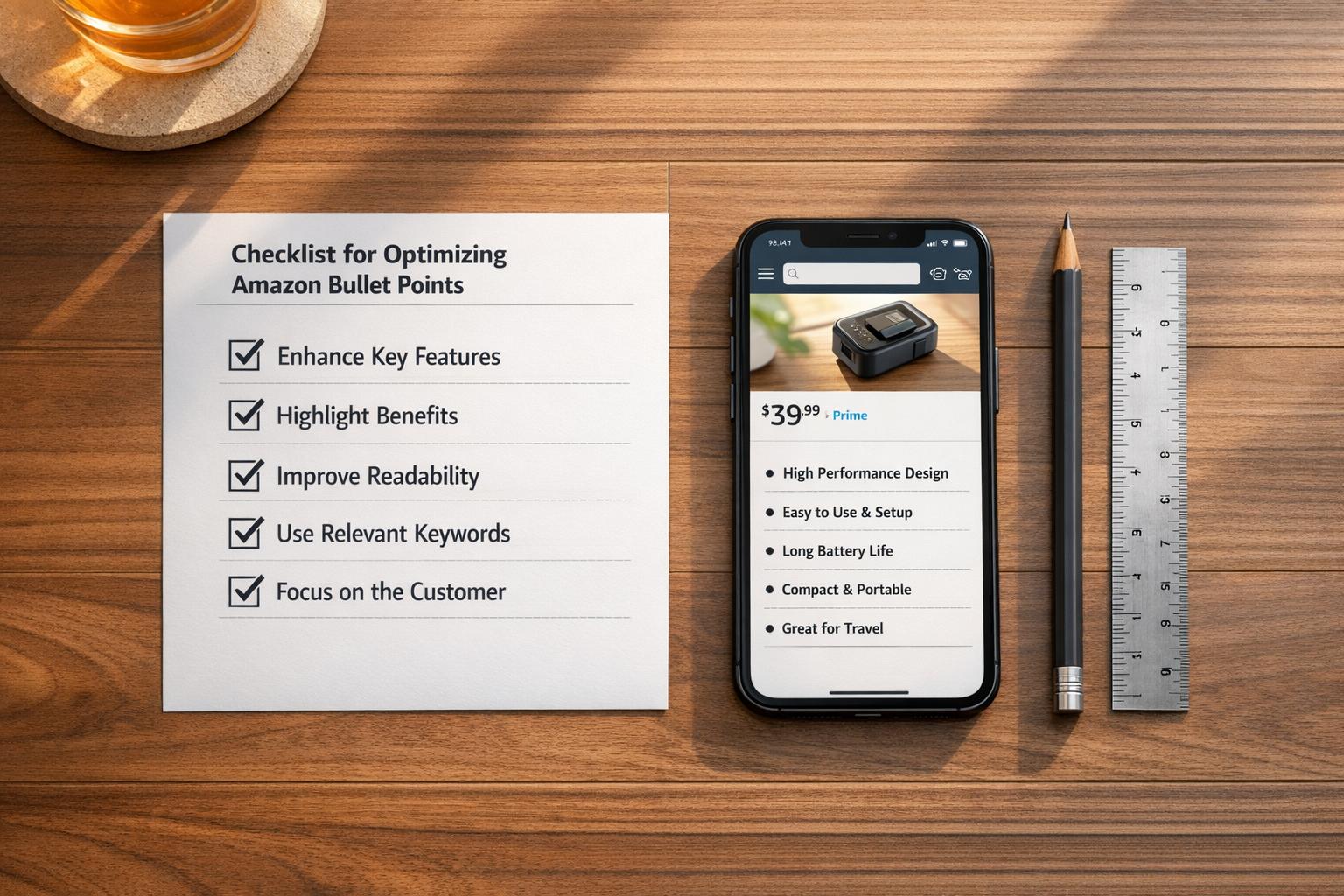
Bullet points on Amazon product listings can make or break a sale. They need to grab attention, highlight benefits, and stay compliant with Amazon’s strict guidelines. Here’s what you need to know:
- Keep it mobile-friendly: Focus on the first 70–80 characters, as that’s all most mobile users see.
- Follow Amazon’s rules: Avoid emojis, ALL CAPS, promotional claims, and subjective language. Use clear, factual details only.
- Structure matters: Start with a capitalized header (e.g., "DURABLE MATERIAL:") and avoid punctuation at the end.
- Use keywords wisely: Place high-priority keywords naturally in the first 10 words, and avoid keyword stuffing.
- Be specific: Highlight benefits first, then follow with technical details or use cases.
Amazon’s automated scanners enforce these rules, and non-compliance can lead to suppressed or rewritten listings. By focusing on clarity, benefits, and keyword integration, you can create bullet points that drive conversions while staying within Amazon’s policies.
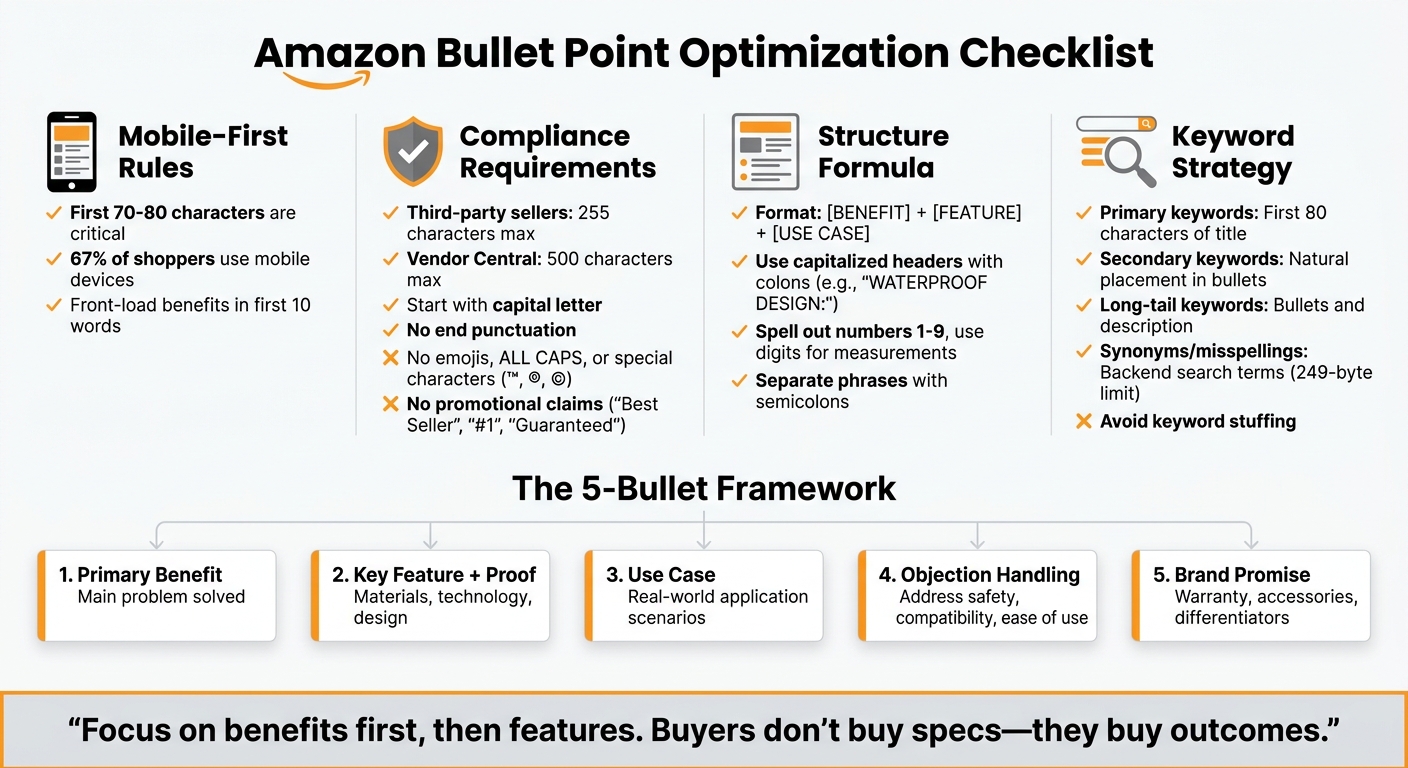
Amazon Bullet Point Optimization Checklist: Step-by-Step Guide
Compliance and Formatting Rules
Required Compliance Guidelines
Amazon enforces strict, automated rules for product listings. Each bullet point must begin with a capital letter and omit punctuation at the end. Sellers using third-party accounts are limited to 255 characters per bullet point, while Vendor Central accounts can extend up to 500 characters. Standard sellers are restricted to five bullet points, whereas Vendor Central accounts may have up to 10 in certain categories.
Avoid using emojis, special characters like ™, ®, ©, or €, and ASIN numbers, as these will be flagged by Amazon’s automated systems. Claims such as "eco-friendly", "anti-bacterial", or "Made from Bamboo" require proper certifications to be included. Additionally, promotional phrases like "Best Seller", "Hot Item", or "Guaranteed" are prohibited, as are references to shipping details, pricing, and refund policies like "Money-back guarantee."
When formatting, start with a short header followed by a colon to clearly separate the main feature from its details. Spell out numbers one through nine, but use numerals for measurements and model numbers (e.g., "60 ml"). Separate phrases within a single bullet point using semicolons, and always include a space between numbers and units (e.g., "60 ml", not "60ml").
By adhering to these rules, you can avoid common errors that could jeopardize your product listings.
Common Mistakes to Avoid
Even after meeting compliance standards, several mistakes can derail your listing:
- Keyword stuffing: Overloading bullet points with irrelevant or excessive keywords can confuse Amazon’s algorithms and lead to suppression. Keywords should flow naturally within the text.
- Using ALL CAPS: Entire bullet points in uppercase violate Amazon’s formatting rules and may result in rejection.
- Subjective or prohibited claims: Avoid phrases like "#1", "best", or "top-rated", as well as banned content such as company contact details, external links, or calls to action like "Buy now!"
- HTML tags: Tags for bold text or line breaks are not allowed and can trigger rejection.
Since August 2024, Amazon has ramped up AI-driven enforcement of these rules. Non-compliant bullet points may be rewritten into generic text or removed entirely without warning.
"Listings with special characters, emoji, prohibited phrases, or obvious keyword stuffing are getting their bullets auto-rewritten by Amazon’s AI – or worse, suppressed entirely." – SellScope
sbb-itb-e2944f4
Keyword Optimization
How to Integrate Keywords Naturally
To make your keywords work effectively, focus on placing your most important keywords within the first 10 words of each bullet point. This is especially important for mobile shoppers, who account for about 67% of Amazon’s customer base. Mobile screens often truncate text around 70–80 characters, so putting key details upfront ensures they don’t get cut off.
A Benefit-First Formula can help you incorporate keywords smoothly into persuasive copy. Start with the benefit, follow with proof or specifications, and then explain why it matters. For example, instead of writing a clunky phrase like "stainless steel water bottle insulated travel gym sports", you could say: "KEEPS DRINKS COLD 24 HOURS with double-wall stainless steel insulation, perfect for travel, gym workouts, and outdoor adventures." This approach naturally integrates keywords like "stainless steel", "insulated", "travel", and "gym" while keeping the text engaging.
"Keywords are important; ensure high-priority keywords appear within the first 10 words while maintaining natural, engaging copy." – Ash Metry, Founder & CEO, Keywords.am
To broaden your reach, vary the keywords across different bullet points instead of repeating the same ones. For example, if "wireless earbuds" is in the title, use alternatives like "Bluetooth headphones" or "cordless earphones" in the bullets. Save awkward or less natural keyword variations for backend search terms to keep your visible copy polished and professional.
Next, let’s dive into how backend search terms can help you capture additional search traffic while keeping your visible content clean.
Using Backend Search Terms
Backend search terms are a hidden tool for indexing additional search phrases. Amazon provides a 249-byte field (not character-based) where you can include synonyms, common misspellings, regional spellings like "color" versus "colour", and abbreviations that might clutter your visible copy.
Avoid repeating keywords that already appear in your title or bullet points – redundancy wastes valuable space. Instead, use backend terms to cover alternate searches, such as "wirless" for "wireless" or "flask" for "bottle." Separate terms with single spaces only – punctuation like commas takes up unnecessary bytes.
| Keyword Type | Placement | Purpose |
|---|---|---|
| Primary Keywords | First 80 characters of Title | Maximize ranking weight and mobile visibility |
| Secondary Keywords | Naturally within Bullet Points | Boost ranking while driving conversions |
| Long-Tail Keywords | Bullet Points and Description | Target specific, high-intent searches |
| Synonyms/Misspellings | Backend Search Terms | Index hidden terms without cluttering copy |
Keep a close eye on the 249-byte limit. Exceeding it – even by one byte – can cause Amazon to de-index your entire backend search term field. Use lowercase letters (Amazon’s search is case-insensitive), remove stop words like "a", "an", "and", and "the", and steer clear of competitor brand names to stay compliant with Amazon’s policies.
Writing Benefit-Focused Bullet Points
Highlighting Benefits and Use Cases
The first bullet point is your chance to hook buyers by addressing the main benefit or solving a key problem. Remember, shoppers care more about what a product does for them than its technical specs. For example, instead of saying, "Made of stainless steel", say, "Durable stainless steel resists rust and lasts for years of daily use." This approach connects the feature to a clear benefit.
"Buyers don’t buy specs – they buy outcomes." – Jason Vu, Ecommerce Expert, SwanseaAirport
To craft compelling bullet points, use the formula: [BENEFIT] + [FEATURE] + [USE CASE]. For instance: "Stays warm for 12 hours – double-wall vacuum insulation keeps coffee hot from your morning commute to your afternoon meeting." This format effectively ties features to real-world applications.
Start each bullet with an ALL CAPS summary of the feature or benefit to make it easy for mobile users to scan. Since many shoppers skim rather than read, ensure the first 80 characters highlight the most critical information. Address common objections upfront – if customers often question compatibility, safety, or ease of use, dedicate a bullet to resolving those concerns before they turn into doubts.
Once benefits and use cases are clear, follow up with concise technical details that reinforce the product’s value.
Adding Product Features and Specifications
Technical details like dimensions, materials, and certifications should be presented in a way that emphasizes their benefit to the customer. Save the final bullet for key technical specifications or your brand promise, ensuring each detail adds value. For example, instead of simply stating "IPX5 waterproof rating", write, "SWEAT & RAIN PROOF – Run in the rain without risk of moisture damage."
Use numerals for clarity (e.g., "5-Pack" instead of "Five Pack") and provide exact measurements to minimize returns. Replace vague claims like "Works with all phones" with specifics such as "Compatible with iPhone 12-15 series and Samsung Galaxy S21-S24." Each bullet should offer distinct, benefit-driven information.
| Bullet Slot | Focus Area | Content Goal |
|---|---|---|
| Bullet 1 | Primary Benefit | Tackle the main problem the product solves (Conversion Anchor) |
| Bullet 2 | Key Feature + Proof | Highlight the materials, technology, or design that delivers the benefit |
| Bullet 3 | Use Case | Help shoppers picture the product in their daily life or specific scenarios |
| Bullet 4 | Objection Handling | Address safety, compatibility, or ease of use to reduce hesitation |
| Bullet 5 | Brand Promise | Include warranty, accessories, or unique brand differentiators |
Avoid subjective terms like "amazing" or "perfect", and only use performance claims like "the best" if they are explicitly stated on your product packaging. Keep each bullet between 10 and 255 characters to ensure mobile-friendliness, especially for third-party platforms. Benefit-led bullet points consistently outperform those that simply list technical features, so always focus on what matters most to your customers.
Step-by-Step Checklist for High-Converting Bullet Points
Optimization Process
Start your first bullet point with the main benefit, making sure it appears within the first 70–80 characters. This ensures it’s visible on mobile devices, where space is limited. For better readability, use a capitalized header followed by a colon (e.g., WATERPROOF DESIGN:). This formatting helps readers quickly scan your content.
Sprinkle secondary keywords naturally across all bullet points, avoiding repetition. Spread these keywords across the title, bullet points, and backend terms to sidestep keyword stuffing, which could lead to listing suppression. To make your bullets more relevant, review customer questions and feedback. Common concerns like size, compatibility, or included accessories can be addressed in your fourth or fifth bullet to reassure potential buyers.
Use numerals (e.g., 5) and maintain proper spacing for measurements (e.g., 60 ml). Regularly check your listings – ideally every quarter – to adapt to algorithm changes and competitor strategies. When managing a large inventory, focus first on your top 20% of ASINs by revenue to safeguard your best-performing products, especially before peak sales periods. If you’re experimenting with different bullet versions, leverage Amazon’s "Manage Your Experiments" tool. Run these tests for at least 8–10 weeks to collect enough data for meaningful results.
Emplicit applies these strategies to refine ecommerce listings, optimizing bullet points for better visibility and conversions. Below are examples that illustrate how these practices transform underperforming bullet points into effective, high-converting ones.
Before-and-After Examples
| Element | Non-Optimized (Before) | High-Converting & Compliant (After) |
|---|---|---|
| Headers | No headers or lowercase text | Bold, capitalized headers (e.g., WATERPROOF:) |
| Punctuation | Ends with periods or exclamation marks | No end punctuation |
| Visuals | Uses emojis (✅, ❌) to stand out | No emojis; uses clear, professional text |
| Content | Focuses on brand history or guarantees | Focuses on specific benefits and use cases |
| Keywords | Keyword stuffing that hinders readability | Natural integration of high-volume keywords |
| Symbols | Uses ™ or ® symbols | No special characters or symbols |
"Amazon is cracking down and standardizing product bullets more, hoping to increase customer information, level the playing field, and create a better and more consistent customer experience." – Katy Luxem, eComEngine
Live Walkthrough: Turn Average Amazon Bullets Into High-Converting Ones
How Emplicit Can Help with Listing Optimization

When it comes to optimizing Amazon bullet points, success lies in striking the perfect balance between keyword relevance and persuasive language. Emplicit’s listing optimization services use a proven "Benefit + Feature + Use Case" formula. This method ensures each bullet point not only addresses common customer concerns but also emphasizes what makes your product stand out. By doing so, Emplicit targets both Amazon’s A9 algorithm – designed to rank products by relevance and sales velocity – and the human shoppers scanning listings to make quick purchasing decisions.
Staying compliant with Amazon’s 2024 standards is non-negotiable, and Emplicit takes the guesswork out of it. Their team ensures bullet points meet Amazon’s compliance guidelines while maximizing the 255-character limit for third-party sellers (or 500 characters for Vendor Central accounts). They also optimize for mobile shoppers by front-loading the most crucial information within the first 80 characters, ensuring it displays effectively on mobile devices, where the majority of Amazon shopping happens.
Emplicit goes beyond visible bullet points, tackling backend search term optimization with precision. They incorporate synonyms, common misspellings, and complementary use cases to enhance discoverability – without cluttering the visible copy. By filling all five bullet point slots, they maximize opportunities to answer customer questions and improve your listing’s completeness score.
Emplicit’s expertise doesn’t stop at bullet points. Their services extend to PPC, inventory, and account health management across Amazon and other platforms. Pairing well-optimized bullet points with A+ Content can lead to a significant boost in conversion rates – up to 10%. With USA-based account managers, they deliver tailored strategies to grow your business, focusing on your top-performing ASINs to safeguard revenue during critical sales periods.
Whether you’re working within a single marketplace or expanding across multiple platforms, Emplicit turns lackluster listings into high-performing assets that drive measurable sales growth.
Final Checklist Summary
When wrapping up your bullet points, make sure they align with these key principles of compliance, structure, keyword usage, and mobile readability:
- Compliance: Double-check that your bullets follow Amazon’s guidelines. For third-party sellers, keep each bullet under 255 characters (or 500 for Vendor Central accounts). Start with a capital letter and steer clear of emojis, trademark symbols, or promotional language.
- Structure: Stick to a clear and effective formula: [Benefit] + [Feature] + [Use Case]. Highlight major benefits in the first 80 characters to grab mobile shoppers’ attention. Using a "Header: Description" format (e.g., "Material: 100% Cotton") can make your bullets easier to scan. Avoid repeating the same information across multiple points.
- Keyword Integration: Use keywords naturally, steering away from repetitive or awkward phrasing. For measurements, use digits (like "10 inches") but spell out numbers from one to nine. Skip unverifiable claims such as "eco-friendly" or "anti-bacterial" unless they’re clearly supported by your product packaging.
- Mobile Readability: Make sure your bullets are straightforward and easy to follow. Keep an eye on your Seller Central account for any listing updates, as Amazon may adjust non-compliant bullets without notifying you. If managing a large catalog, focus your efforts on the top 20% of ASINs by revenue to protect your most successful products.
This checklist ensures your bullet points are clear, compliant, and optimized for performance.
FAQs
Why did Amazon rewrite or remove my bullet points?
Amazon has tightened its rules for bullet points, especially since 2024. If your bullet points include things like promotional phrases, special characters, emojis, or go over the character limit, they might be rewritten or removed. To avoid this, make sure your bullet points follow Amazon’s content guidelines.
How do I choose which keywords go in bullet points vs backend terms?
Keywords serve a dual purpose in product listings: they highlight product features and benefits while also boosting relevance and search rankings. To make the most of them, ensure they are concise, focused on benefits, and address common customer questions. This approach not only persuades shoppers but also aligns with search algorithms.
On the other hand, backend terms are hidden keywords that don’t appear in the visible content but play a critical role in improving search visibility. These can include relevant terms that don’t fit naturally into the main copy. By using backend terms strategically, you can enhance discoverability without cluttering your product listing.
What certifications are needed to claim a product is ‘eco-friendly’?
To describe a product as "eco-friendly" on Amazon, you need to back up that claim with proper certifications or evidence. Although Amazon doesn’t outline specific certifications, it’s crucial to ensure the information you provide is accurate and verifiable to align with their updated bullet point guidelines.