

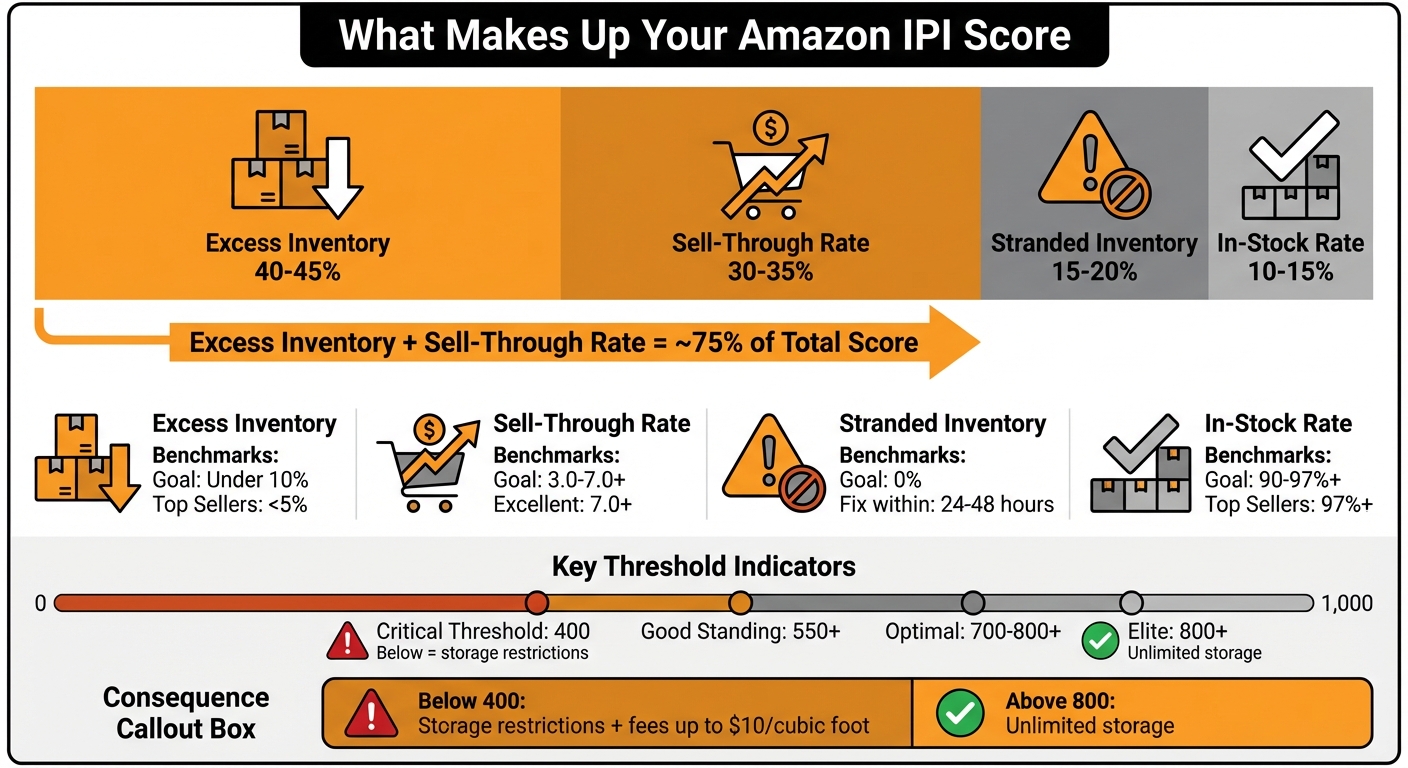
Amazon’s Inventory Performance Index (IPI) measures how well you manage your FBA inventory. Scores range from 0–1,000, with a threshold of 400. Falling below this limit leads to storage restrictions and fees up to $10 per cubic foot, while scores above 800 often result in unlimited storage.
Key metrics that impact your IPI score include:
- Excess Inventory (40–45%): Keep below 10%. Overstocking leads to fees and wasted space.
- Sell-Through Rate (30–35%): Aim for 3.0–7.0+. Low rates indicate slow sales and overstock.
- Stranded Inventory (15–20%): Fix listing issues promptly to avoid wasted storage.
- In-Stock Rate (10–15%): Maintain 90–97% to ensure best-sellers are always available.
Actionable Tips:
- Ship inventory every 3–4 weeks to maintain a 30–60 day supply.
- Use promotions, discounts, or removal orders to clear excess stock.
- Monitor stranded inventory weekly and resolve issues within 24–48 hours.
- Mark seasonal items as "non-replenishable" to avoid penalties.
Improving these metrics ensures better inventory health, fewer fees, and uninterrupted sales growth.
Amazon IPI Score Components and Benchmarks Guide
Amazon Inventory: 5 Steps to Boost Your IPI Score FAST!
sbb-itb-e2944f4
What Makes Up Your IPI Score
Amazon doesn’t share the exact formula for calculating your Inventory Performance Index (IPI) score – it’s proprietary. However, sellers and experts have pieced together the approximate weight of each factor through observation and testing. Understanding these elements is crucial for improving your inventory management and boosting your IPI score. Broadly, four key components influence your score:
- Excess Inventory: Accounts for about 40–45% of your score.
- Sell-Through Rate: Makes up approximately 30–35%.
- Stranded Inventory: Represents around 15–20%.
- In-Stock Rate: Covers about 10–15%.
Here’s a quick look at these metrics and their benchmarks:
| IPI Metric | Estimated Weight | Goal/Benchmark |
|---|---|---|
| Excess Inventory | 40–45% | Under 10% (Top sellers <5%) |
| Sell-Through Rate | 30–35% | 3.0 – 7.0+ |
| Stranded Inventory | 15–20% | 0% |
| In-Stock Rate | 10–15% | 90% – 97%+ |
Since Excess Inventory and Sell-Through Rate together make up around 75% of your score, these metrics should be your top priorities. However, ignoring the smaller factors can still negatively impact your performance. Stranded inventory wastes valuable space, while frequent stockouts on bestsellers indicate poor planning.
Excess Inventory Percentage
This metric evaluates how much of your inventory exceeds a 90-day supply based on Amazon’s demand forecasts. As the largest component of your IPI score, managing excess inventory effectively is critical.
Overstocking ties up warehouse space that could be used for faster-moving items. To discourage this, Amazon imposes surcharges on excess inventory, with fees increasing the longer items remain stored.
Top-performing sellers aim to keep their excess inventory percentage below 5%, while Amazon generally expects it to stay under 10%. If you have stock exceeding a 90-day supply, consider strategies like running promotions, bundling products, or submitting removal orders. Amazon’s shift toward a faster fulfillment network, reflected in its fee structure, makes it even more important to manage overstock effectively.
Sell-Through Rate
Sell-Through Rate measures how efficiently you’re converting inventory into sales. It’s calculated by dividing the number of units sold over the last 90 days by the average number of units you had in stock during that period. This metric accounts for about 30–35% of your IPI score.
A Sell-Through Rate between 3.0 and 7.0 is considered solid, with anything above 7.0 being excellent. For example, selling 300 units over 90 days while maintaining an average stock of 50 units gives you a rate of 6.0 – a strong performance. A rate below 3.0 indicates overstocking or slow-moving products, which can tie up both capital and warehouse space.
Low sell-through rates not only hurt your IPI score but can also lead to storage surcharges after 22 weeks, ranging from $0.23 to $0.94+ per cubic foot. Since the IPI score relies on a 90-day rolling average, improvements take time to show, making consistent monitoring essential. Maintaining a strong sell-through rate ensures your inventory remains productive.
In-Stock Rate
This metric tracks how often your popular products – those with sales on at least 30 of the past 60 days – are available for purchase. While it contributes only 10–15% to your IPI score, a high In-Stock Rate is essential for maintaining sales momentum and strong search rankings.
Amazon expects at least a 90% in-stock rate, though top sellers often exceed 97%. Stockouts not only hurt your IPI score but also impact your search rankings by reducing product availability. To avoid this, mark seasonal or discontinued items as "non-replenishable" in Seller Central. For replenishable items, aim to maintain 30–60 days of inventory coverage. This helps you avoid low-inventory fees (triggered under 28 days) and excess inventory flags (triggered over 90 days).
Stranded Inventory Percentage
Stranded Inventory includes items in Amazon’s warehouses that can’t be sold due to listing errors, policy violations, or other technical issues. This metric accounts for about 15–20% of your IPI score and is often one of the easiest to address.
From Amazon’s perspective, stranded inventory is wasted space – you’re paying storage fees for products that aren’t generating revenue. Common causes include expired listings, suppressed ASINs, closed listings, or compliance issues. Prolonged stranded inventory not only lowers your score but also racks up unnecessary fees.
"Low IPI means Amazon interprets you are not managing your inventory efficiently."
- Arishekar N, VP of Marketing, AMZ Prep
Top sellers resolve stranded inventory issues within 24–48 hours. Amazon’s Inventory Performance Dashboard highlights these problems with error codes and recommended actions, making them relatively simple to fix. Whether it’s updating product details, appealing policy violations, or reactivating listings, acting quickly can lead to noticeable improvements in your IPI score. The goal is to maintain 0% stranded inventory at all times.
Addressing stranded inventory is a key part of the broader checklist for maintaining a high IPI score, which will be explored in the next section. These metrics lay the groundwork for actionable strategies to optimize your inventory performance.
Checklist for Maintaining a High IPI Score
To improve your Inventory Performance Index (IPI) score, focus on the areas where you struggle the most, while also keeping an eye on other contributing factors. Every component matters when it comes to your overall performance.
Monitor and Improve Sell-Through Rate
The sell-through rate, contributing 30–35% to your IPI score, is a key metric to prioritize. It takes time for improvements to show up, so consistency is crucial.
- Smaller, Frequent Shipments: Instead of large quarterly orders, send shipments every 3–4 weeks. Keeping 30–60 days of supply on hand boosts turnover rates without risking stockouts. This approach also avoids fees for low inventory (under 28 days) and flags for excess inventory (over 90 days).
- Proactive Inventory Management: Don’t wait for Amazon alerts. At 60–75 days of supply, launch coupons or increase PPC spending. Use the table below as a guide:
| Inventory Age (Days of Supply) | Recommended Action | Discount Range |
|---|---|---|
| 60–75 days | Launch coupons, increase PPC | 10%–15% |
| 75–85 days | Run promotions, Lightning Deals | 20%–25% |
| 85+ days | Aggressive liquidation/removal | 30%+ |
- Improve Product Listings: High-quality images, clear bullet points, and optimized keywords can directly improve conversion rates and sales velocity.
- Manage Slow-Moving Items: Products with a sell-through rate below 2.0 can be moved to Merchant Fulfilled (FBM) to remove them from IPI calculations while keeping them available for sale. However, keep in mind that FBM may lower conversion rates by 20–40% due to the loss of the Prime badge.
- Leverage Amazon Warehousing & Distribution (AWD): Inventory stored in AWD doesn’t count against FBA capacity limits or IPI scores. It can also automatically replenish FBA stock. AWD storage costs start at $0.43 per cubic foot per month, which is much cheaper than standard FBA rates of $0.87–$2.40.
Once your sell-through rate is under control, tackle excess inventory to further optimize your IPI.
Reduce Excess Inventory
Excess inventory is the largest factor in your IPI score, accounting for 40–45%. Aim to keep excess inventory below 5%.
- Weekly Monitoring: Check the "Manage Inventory Health" report every Monday or Tuesday when IPI updates. Use filters like "Excess inventory" to spot slow-moving SKUs before they impact your 90-day rolling average. The "FBA Inventory Age" page is another useful tool for tracking aging products.
- Take Action:
- Increase PPC ad spend to improve sell-through for excess items without devaluing your brand.
- Use Amazon Outlet to offer 30–50% discounts to deal-seeking customers for overstocked items.
- For products that simply won’t sell, create a removal order. Be prepared to pay fees starting at $1.04 per unit.
- Avoid Penalties: Aged inventory surcharges can quickly add up, starting at $0.50 per cubic foot at 181 days and climbing to $6.90 per cubic foot after 365 days.
As Dillon Carter, Co-Founder of Aura, explains:
"FBA is no longer cheap long-term storage. It’s a high-speed fulfillment network that punishes slow inventory."
With excess inventory addressed, shift your focus to stranded inventory.
Minimize Stranded Inventory
Stranded inventory, which makes up 15–20% of your IPI score, is one of the simplest issues to fix. This refers to stock sitting in Amazon warehouses that isn’t actively listed for sale due to errors or missing information. Your goal should be 0% stranded inventory.
- Regular Reviews: Check the Stranded Inventory Report every Monday to catch issues early and avoid extra storage fees. Successful sellers resolve stranded inventory problems within 24–48 hours.
- Common Causes: Issues like missing product info, pricing errors, expired products, or lost brand approval often lead to stranded inventory. Fix these quickly to prevent further problems.
- Enable Automatic Relisting: Use the "Edit Automatic Action Settings" on the "Fix Stranded Inventory" page to let Amazon relist items automatically within a 1–30 day window for standard listing errors.
- Set Price Boundaries: Avoid pricing suspensions by setting minimum and maximum price limits in the "Manage Inventory" section.
- Unfixable Items: For restricted ASINs or expired products, create a removal order immediately to minimize the negative impact on your IPI score.
Amazon typically gives sellers 30 days to resolve stranded inventory before returning or disposing of the items automatically.
Finally, ensure you maintain a strong in-stock rate to complete your IPI strategy.
Improve In-Stock Rate
The in-stock rate, while contributing only 10–15% to your IPI score, is vital for maintaining sales momentum and search rankings. Amazon expects at least a 90% in-stock rate, though top sellers often exceed 97%.
- Monitor Low Stock: Use restock inventory reports in Seller Central to keep an eye on products running low. Maintain 30–60 days of inventory for replenishable items.
- Mark Seasonal Items: For seasonal or discontinued products, mark them as "non-replenishable" in Seller Central so they don’t hurt your in-stock rate.
- Balance FBA and FBM: Use FBA for best-sellers that need the Prime badge and FBM for slower-moving or unpredictable items.
- Avoid Low Inventory Fees: Keep stock levels above 28 days to avoid penalties.
Balancing your in-stock rate with the other IPI metrics requires thoughtful planning, but it’s essential for long-term success. By addressing these key areas, you can steadily improve your IPI score and overall inventory performance.
Inventory Replenishment Best Practices
Keeping your inventory levels in check is crucial for maintaining a healthy IPI score while avoiding excess stock or cash flow issues. The way you manage replenishment impacts key metrics like sell-through rate, excess inventory percentage, and in-stock rate – all major factors in your IPI score.
Order in Smaller Batches
Shipping large quantities of inventory at once might seem efficient, but it can actually hurt your IPI score. For example, selling 300 units a month with only 50 units in stock gives you a sell-through rate of 6.0. Compare that to having 100 units in stock, where the sell-through rate drops to 3.0. The sales numbers stay the same, but the smaller inventory level significantly boosts your performance metric.
Aiming for a 30–60 day supply window is ideal. This approach helps you avoid low-inventory fees (triggered when stock falls below 28 days) and flags for excess inventory (which start at 90 days).
"Stop sending huge shipments every 2-3 months. Send smaller, more frequent shipments every 3-4 weeks to stay in the 30-60 day supply window." – Dillon Carter, COO at Aura
To make this work, you’ll need accurate supplier lead times and well-calculated safety stock to prevent stockouts. If you’re a wholesale seller, consider negotiating with suppliers for more frequent deliveries or use a 3PL (third-party logistics provider) to send inventory to Amazon FBA in smaller batches.
For products with unpredictable demand, reduce Amazon’s Restock Inventory recommendations by 25–40%. The tool often overestimates, and cutting back on these suggestions can help you avoid overstocking.
Use ABC Analysis
ABC analysis is a powerful way to categorize your inventory and fine-tune your replenishment strategy. Here’s how it breaks down:
- Class A products (top 20% of your catalog): These generate 70–80% of your revenue.
- Class B products (middle 30%): These account for about 15–20% of revenue.
- Class C products (bottom 50%): These contribute only about 5% of revenue.
| Product Tier | Target Stock Level | Reorder Frequency | In-Stock Priority |
|---|---|---|---|
| A Products (Top 20%) | 45–60 days | Weekly/Bi-weekly | 99%+ |
| B Products (Middle 30%) | 30–45 days | Bi-weekly/Monthly | 95%+ |
| C Products (Bottom 50%) | 15–30 days | Monthly/As-needed | 85% acceptable |
Focus on keeping Class A items fully stocked with a 99%+ availability rate, using tight reorder points and extra safety stock. For Class B products, aim for balanced safety stock with monthly reviews. Class C items can operate with minimal safety stock and quarterly checks.
Adjust review cycles based on product importance: daily or weekly for Class A, monthly for Class B, and quarterly or semi-annually for Class C. This prioritization frees up working capital while ensuring your best-sellers are always available. For seasonal or discontinued items, mark them as "non-replenishable" in Seller Central to avoid dragging down your in-stock rate.
Plan for Seasonal Demand
Once you’ve nailed your order sizing and inventory segmentation, it’s time to prepare for seasonal fluctuations. Review 12–24 months of sales data to identify peak demand periods and adjust stock levels accordingly.
During peak seasons, apply your ABC analysis. For Class A products, maintain 45–60 days of supply and reorder weekly or bi-weekly. For Class B and C products, keep inventory tighter – 30–45 days for Class B and 15–30 days for Class C – to avoid excess inventory after the season ends.
Share your forecasts with suppliers early to secure production slots and negotiate better pricing for larger orders. Keep in mind that lead times often stretch during busy periods, so add extra buffer time. If storage space becomes an issue, consider using Amazon Warehousing & Distribution (AWD). AWD inventory doesn’t count against your FBA capacity or IPI score and can automatically replenish your FBA stock at rates between $0.43–$0.78 per cubic foot.
After the season, act quickly to clear out leftover stock. Use Amazon Outlet or offer steep discounts (30% or more) before items hit the 90-day "excess" threshold. The goal is to clear seasonal inventory before it impacts your IPI score for the next quarter.
Conclusion and Next Steps
Your IPI score holds the key to your FBA storage limits and your ability to scale. Falling below 400 can result in storage restrictions, making it harder to restock your best sellers. On top of that, low scores come with hefty fees for aged inventory, sometimes surpassing the wholesale value of your products.
To keep your score healthy, prioritize the two biggest factors: excess inventory and sell-through rate. Make it a habit to check your IPI dashboard and stranded inventory weekly when scores update. Address stranded inventory issues within 24–48 hours to prevent long-term damage.
Since the IPI score is based on a 90-day rolling average, consistent performance over 8–12 weeks is essential for noticeable improvements. Stick to the ideal inventory coverage of 30–60 days, run monthly audits to identify items nearing excess status, and shift to smaller, more frequent shipments every 3–4 weeks for better control.
At its core, success comes down to a disciplined routine of monitoring and quick action. But juggling these tasks alongside running your business can feel overwhelming. That’s where Emplicit can step in. Their inventory and account health management services simplify the process with automated monitoring, strategic replenishment planning, and hybrid fulfillment approaches. These tools not only safeguard your IPI score but also help boost sales velocity.
If you aim for a score of 550+ (good standing) or even 700–800+ (optimal), the path is clear. Start implementing these steps today to lay the groundwork for steady, long-term growth on Amazon.
FAQs
How fast can my IPI score improve?
Improving your IPI score doesn’t have to take ages – focused inventory management can make a difference sooner than you might think. The key? Tackle important factors like inventory levels and turnover rate head-on. While you might see some positive changes in just a few months, keeping up with consistent efforts is what really pays off. Make it a habit to regularly monitor and fine-tune your inventory health for lasting results.
Which metric should I fix first to raise IPI?
To boost your IPI score, the first step is tackling your excess inventory percentage. By cutting down on excess stock, you’ll improve your inventory health and key performance metrics, which play a big role in determining your score. Prioritize moving overstocked items to create a more balanced and efficient inventory.
Does moving slow SKUs to FBM help my IPI?
Reducing slow-moving SKUs by switching them to FBM (Fulfilled by Merchant) can indirectly help boost your Inventory Performance Index (IPI) score. How? It helps tackle two major issues: stranded inventory and excess stock. Both of these are critical for maintaining better inventory health. That said, while this strategy improves overall inventory management, it doesn’t directly change your IPI score.