

When your SEO rankings drop, your revenue takes a hit. Whether it’s losing visibility on Amazon or falling off Google’s first page, the consequences are immediate and costly. Here’s how to tackle the issue:
- Diagnose the Problem: Check analytics tools like Google Analytics 4 and Search Console to confirm the drop. Look for traffic changes, indexing issues, or algorithm updates.
- Identify Causes: Common reasons include algorithm updates, technical issues (like broken links or slow site speed), listing changes, or negative reviews.
- Fix Technical Issues: Repair broken links, optimize site speed (LCP under 2.5 seconds), and address duplicate content with canonical tags.
- Improve Content: Update product metadata, rewrite descriptions with keywords, and use structured data like schema markup to enhance visibility.
- Monitor Recovery: Regularly audit your site, track rankings, and analyze traffic trends to prevent future drops.
SEO problems often stem from technical errors or content misalignment. By addressing these areas systematically, you can regain visibility and protect your revenue.
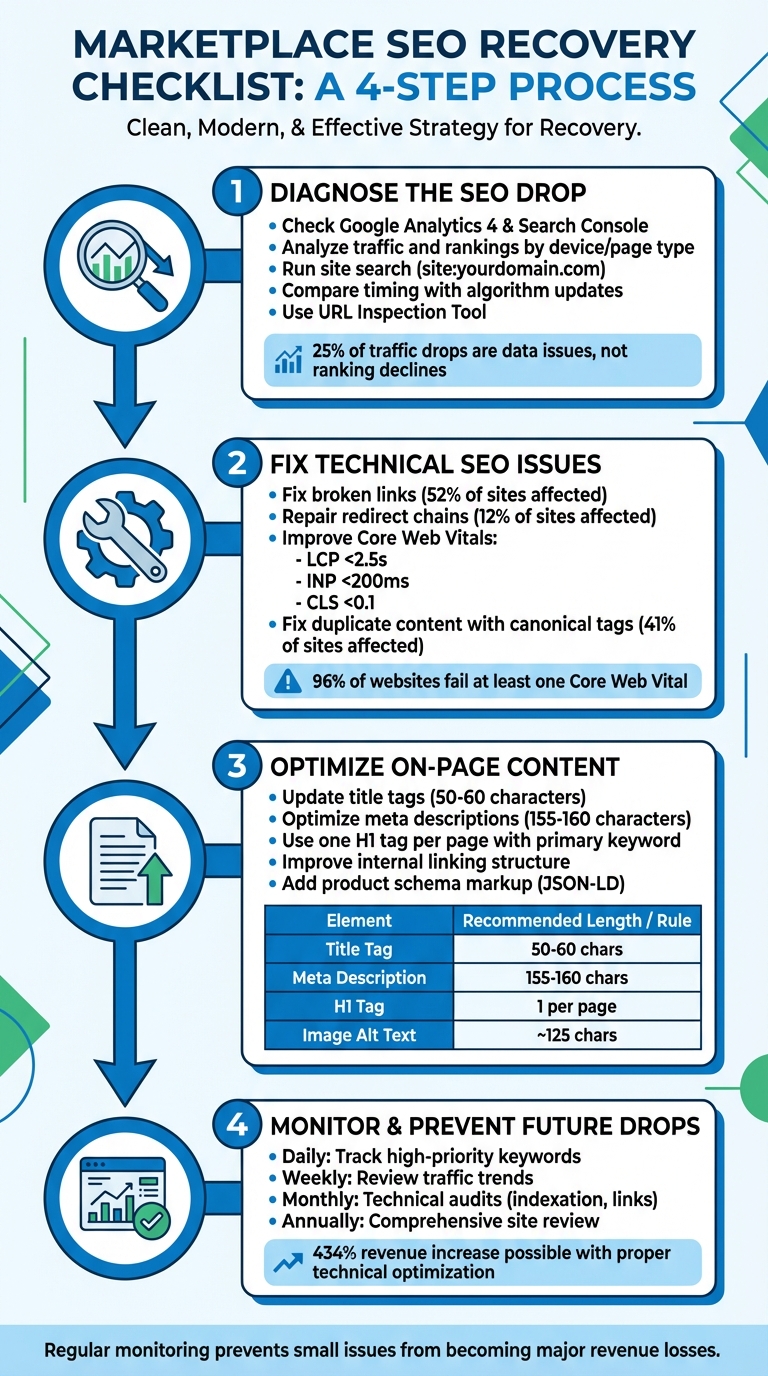
4-Step SEO Recovery Process for Marketplace Rankings
Step 1: Diagnose the SEO Drop
Before jumping to solutions, it’s crucial to figure out why your SEO performance has taken a hit. Daniel Marks from SeatGeek points out that about 25% of organic traffic drops are caused by data issues, not actual ranking declines. Start by verifying the drop across both Google Analytics 4 and Google Search Console. If one platform shows a decline while the other doesn’t, you might be dealing with a tracking code error or a reporting glitch.
Analyze Traffic and Rankings
Dive into Google Search Console’s Performance Report to identify which pages have lost clicks and impressions. Break the data down by device and page type to zero in on the specific areas affected. Then, check the Page Indexing Report for potential issues like 404 errors, noindex tags, or pages blocked by robots.txt that could be stopping search engines from accessing your content.
Run a site search on Google (e.g., site:yourdomain.com) to see if key pages are missing. If they are, you’re likely dealing with an indexing problem. Use rank tracking tools like Ahrefs or GetSTAT to monitor daily local rankings and determine whether the drop is a sustained issue or just temporary volatility. Keep in mind that about 16% of weekly traffic fluctuations fall within normal variance and don’t indicate actual SEO problems.
This analysis helps you connect the dots between your traffic drop and potential algorithmic or technical causes.
Check for Algorithm Updates
If the drop is real, compare the timing with known algorithm updates. Resources like the Google Ranking Status page, MozCast, or Search Engine Land can help you identify if a Core, Spam, or Helpful Content update coincided with your traffic decline. If other sites in your niche experienced similar drops, an algorithm update might be the cause. However, if the decline happened right after a site change – like updating product templates or migrating to a new platform – the issue is more likely technical.
Also, check if your rankings remained stable but traffic still dropped. This often happens when search engines display rich snippets that directly answer user queries, reducing the need for clicks to your site.
"At least a quarter of the traffic drops I’ve seen were simply due to data problems." – Daniel Marks, SeatGeek
If there’s no evidence of an algorithm update, shift your focus to technical troubleshooting.
Identify Technical Issues
Once you’ve ruled out algorithm updates and confirmed the drop isn’t data-related, it’s time to dig into technical issues. Use the URL Inspection Tool in Google Search Console to test live URLs and see how Googlebot renders your pages.
Your first stop should be the Manual Actions Report in Google Search Console. This will quickly reveal if your site has been penalized for spammy practices or unnatural links. Next, ensure that the affected pages are returning a 200 OK status code instead of 404 (Not Found) or 5xx (Server Error). Slow server response times can waste your crawl budget, prioritizing low-value pages over important ones.
Finally, double-check your robots.txt file to ensure critical directories like /assets/ or /js/ aren’t accidentally blocked. Blocking these can prevent proper page rendering and hurt your rankings.
Step 2: Fix Technical SEO Issues
Addressing technical SEO issues is crucial for improving your marketplace’s search performance. Studies reveal that 52% of websites have broken internal or external links, and 12% deal with redirect chains or loops that waste valuable crawl budget. These problems can negatively affect how search engines navigate and rank your pages.
Fix Broken Links and Redirects
Once you’ve identified technical issues, start by repairing broken links and optimizing redirects. Use tools like Screaming Frog, Ahrefs, or Semrush to run a full site crawl and pinpoint 404 errors. In marketplaces, broken links often occur when products are discontinued or out of stock. Instead of leaving these pages to return 404 errors, set up 301 redirects to the most relevant category page or a similar product. This way, you transfer the ranking power from the outdated page to its new destination.
Redirect chains – where one URL redirects to another, which then redirects again – can slow down your site and waste your crawl budget. Fix these by ensuring the original link points directly to the final destination. This keeps server response times low and improves efficiency.
For pages showing "Product Not Found", ensure they return a proper 404 or 410 status. Google may treat these as errors and remove them from its index, which helps keep your site clean and organized.
Improve Site Speed and Core Web Vitals
Site speed plays a critical role in rankings, and 96% of websites fail at least one Core Web Vital. Focus on achieving the following benchmarks: LCP (Largest Contentful Paint) under 2.5 seconds, INP (Interaction to Next Paint) under 200 milliseconds, and CLS (Cumulative Layout Shift) below 0.1.
To improve site performance:
- Compress images to under 100KB, use descriptive file names, and add alt text.
- Minify CSS and JavaScript files.
- Use a CDN to deliver content faster.
These optimizations can dramatically impact business outcomes. For example, Wild West Pool Supplies saw a 434% boost in revenue and a 216% increase in website sessions after refining their technical performance.
Use tools like Google PageSpeed Insights and the Core Web Vitals report in Search Console to identify bottlenecks. Since Google prioritizes mobile-first indexing, make mobile performance your top priority. Once you’ve optimized speed and performance, shift your focus to content-related issues for a more stable SEO foundation.
Fix Duplicate Content
Duplicate content is a common issue for marketplaces, often caused by product variants, filters, and sorting options. In fact, 41% of websites struggle with internal duplicate content problems.
A practical solution is to implement canonical tags to signal which version of a page is the primary one. For instance, if a product has multiple variants (like different colors or sizes), use canonical tags to point all variant pages to a single main product URL. Alo Yoga successfully tackled this in 2024 by applying canonical tags to color variants of their "Airlift Intrigue Bra" (e.g., Steel Grey, Anthracite), ensuring search engines treated them as one unified page.
Other steps to manage duplicate content include:
- Ensuring only one version of your domain is accessible by redirecting HTTP to HTTPS and choosing either www or non-www.
- Adding "noindex" meta tags to internal search results or filter combinations that users find helpful but don’t need to appear in search results.
- Double-checking your robots.txt file to ensure it doesn’t block Google from crawling pages with canonical tags. If blocked, the tags won’t function as intended.
Step 3: Optimize On-Page Content
Once you’ve tackled any technical issues, the next step to improving SEO performance on marketplaces is refining your on-page content. This includes updating product listings, improving internal linking, and adding structured data to enhance visibility.
Update Product Listings and Metadata
Fine-tuning your on-page content can significantly impact search rankings. Start with title tags, keeping them between 50–60 characters and placing the primary keyword at the beginning. Ensure each page has a unique title that accurately reflects the product. For meta descriptions, aim for 155–160 characters (or under 120 for mobile) to prevent truncation. Include a clear call-to-action like "Shop now" or "Buy today", and incorporate secondary keywords naturally.
Each page should also feature a single H1 tag that includes the primary keyword. Unlike title tags, H1s can be more descriptive to engage readers. Replace generic manufacturer-provided text in product descriptions with concise, benefit-focused content, ideally presented in bullet points.
"A well-written product description is more than just a list of features; it’s an opportunity to address your customers’ pain points, highlight unique selling propositions, and guide them toward purchasing."
- Wasim Kagzi, SEO Specialist at Digital Commerce Partners
An example of how impactful this can be: In September 2022, Inflow helped retailer Vitrazza optimize their blog and product pages. By aligning metadata and on-page content with search intent, Vitrazza saw a 965% increase in strategic content revenue and a 940% boost in non-branded keyword traffic.
Don’t forget about image SEO. Use descriptive file names like "red-leather-jacket.jpg" and keep alt text under 125 characters, including target keywords.
| Element | Recommended Length | Key SEO Requirement |
|---|---|---|
| Title Tag | 50–60 characters | Place the primary keyword at the start |
| Meta Description | 155–160 characters | Include CTA and secondary keywords |
| H1 Tag | No strict limit | One per page; must include primary keyword |
| Image Alt Text | ~125 characters | Descriptive and keyword-rich |
| URL Slug | Short & Simple | Use hyphens; avoid special characters |
Once your listings are optimized, it’s time to enhance your site’s structure with internal links.
Improve Internal Linking
Internal linking is essential for both search engines and users to navigate your site effectively. It helps distribute authority across pages and clarifies relationships between them. Aim for a flat architecture where key product pages are no more than three clicks from the homepage. Use descriptive, keyword-rich anchor text to signal the destination page’s content to both users and search engines.
On product pages, link to related items, like pairing a hiking backpack with accessories such as water bottles or trekking poles. Blog posts and buying guides can also direct visitors to relevant product or category pages. Adding breadcrumb navigation gives users a clear sense of where they are on your site and provides simple paths back to higher-level categories.
Focus on your most important pages – like bestsellers and top categories – by linking to them frequently from the homepage and navigation menus. Conduct audits to find "orphan pages" (pages with no incoming links) and "dead-end pages" (pages that don’t link out to other content). Ensure all internal links are written in HTML and set to "dofollow" to effectively pass authority.
Add Product Schema Markup
Structured data helps search engines understand your product details, enabling rich results like star ratings and prices to appear in search results. Use the JSON-LD format for easier implementation and compatibility. Include key fields such as product name, current price, stock availability, and aggregate review ratings.
Leverage tools like Google’s Structured Data Markup Helper to create accurate tags for your product pages. Adding Offer schema can highlight promotions or discounts, making your site more appealing to shoppers.
"By implementing the Product rich snippet, you can have your product’s price and ratings displayed directly in the search results, helping to attract potential customers to your site."
- Scott Stouffer, CEO of MarketBrew
Regularly monitor the "Enhancements" or "Product" reports in Google Search Console to identify and resolve any markup errors. Use the URL Inspection tool to verify how Google is indexing your structured data for specific pages.
sbb-itb-e2944f4
Step 4: Monitor and Prevent Future Drops
Fixing an SEO drop is just the beginning; keeping a close eye on your site ensures small issues don’t snowball into major setbacks.
Schedule Regular SEO Audits
Running regular audits is key to catching problems early. Aim for monthly technical audits to spot indexation errors, broken links, or duplicate content. Keep a daily pulse on high-priority keyword rankings and review weekly traffic to separate normal fluctuations from real problems.
"I recommend tracking rankings daily for your important keywords, so you’ll know if the rankings drop is sustained within a few days."
- Kristina Kledzik, SEO Expert
Tools like Ahrefs Site Audit can automate these technical checks, flagging new errors before they affect your revenue. Once a year, conduct a comprehensive site review to clean up outdated content and optimize your site structure. For instance, Wild West Pool Supplies saw a 434% jump in year-over-year revenue and a 216% boost in website sessions after implementing fixes identified during an audit in 2022.
| Audit Frequency | Focus Area | Primary Tools |
|---|---|---|
| Daily | High-priority keyword rankings | Rank Tracker, Marketplace Dashboards |
| Weekly | Traffic trends and segment performance | Google Analytics, Ahrefs Web Analytics |
| Monthly | Technical health, internal links, backlinks | Ahrefs Site Audit, Google Search Console |
| Annually | Full site structure and content cleanup | Screaming Frog, Sitebulb |
Don’t overlook Google Search Console – check the "Security & Manual Actions" section daily for penalties that could instantly tank traffic. Use the URL Inspection Tool to confirm your key product pages remain indexed and haven’t been mistakenly "noindexed" due to CMS updates.
Track Recovery Progress
Once you’ve resolved technical and on-page issues, focus on tracking your recovery. Keep a close eye on organic traffic and conversion rates through Google Analytics and marketplace dashboards. Break down the data by device (mobile vs. desktop) and page type (product vs. category) to figure out what’s working.
Monitor Core Web Vitals and Time to First Byte (TTFB) with PageSpeed Insights to ensure performance improvements stick. Engagement metrics like bounce rate and dwell time can also offer clues – pages with longer "time on site" often perform better in Google rankings. To see how you stack up against competitors, use "Share of Voice" reports to measure whether your recovery efforts are gaining traction.
Maintain Performance with Emplicit

To keep your SEO gains intact, combine regular maintenance with expert support. Beyond technical fixes and content updates, ongoing strategy is crucial.
Emplicit offers a range of ecommerce services, including listing optimization and account health management, all handled by USA-based account managers. Their tailored strategies help maintain a strong marketplace presence and prevent minor issues from turning into revenue drains. Whether you’re on Amazon, Walmart, or Target, staying proactive ensures your products remain visible and competitive.
Conclusion
SEO performance dips often signal underlying issues with site functionality or search dynamics. Tackling these effectively requires a structured approach to diagnose and resolve problems. Without this, you might end up addressing the wrong area – like focusing on content updates when the real culprit is a robots.txt block or a server error that’s stopping Google from crawling your pages.
Even small missteps, such as an incorrectly configured canonical tag or a rendering issue, can lead to significant visibility losses across numerous product pages. For example, technical SEO audits and fixes have been known to deliver impressive results, including a 118% boost in organic site revenue.
Once these fixes are in place, maintaining performance is key. This is where expert assistance comes into play. Partnering with specialists like Emplicit provides access to tools and strategies designed to handle the complexities of marketplace SEO. Their services include listing optimization, account health monitoring, and tailored strategies for platforms like Amazon, Walmart, and Target. With USA-based account managers who are well-versed in the nuances of each marketplace, you’ll have proactive support to tackle issues before they can affect your bottom line.
FAQs
How can I quickly find out if an SEO drop is caused by technical problems or a Google algorithm update?
To figure out why your SEO performance has taken a hit, the first step is to dive into your website analytics. This helps confirm whether the decline is genuine or just a glitch in reporting. Pay close attention to which pages or keywords are seeing the biggest drops – this will help you figure out if the problem is across your entire site or limited to specific areas.
If there’s a chance the issue is technical, check for things like crawl errors, indexing problems, or broken links. Running a technical SEO audit can often uncover these types of problems. On the other hand, if the timing of the drop lines up with a recent Google algorithm update, it’s worth reviewing industry news or official announcements from Google to see if the changes align with what’s been reported.
By carefully examining your analytics and the timing of events, you can zero in on whether the cause is technical or tied to an algorithm update. This insight will guide you in taking the right steps to get your SEO performance back on track.
How can I fix duplicate content issues on marketplace websites?
Managing duplicate content on marketplace websites starts with pinpointing its origins. Common culprits include product variations, URL parameters, or identical descriptions across multiple pages. To tackle this, use canonical tags to tell search engines which version of a page is the main one. This helps consolidate SEO value and prevents your pages from competing with each other.
Next, block unnecessary URL parameters – like those created by filters or tracking codes – using robots.txt or meta tags. This stops search engines from indexing duplicate versions of your pages. It’s also smart to regularly audit your site with tools like Screaming Frog or Siteliner. These tools help you track and reduce duplicate content effectively.
Aim to keep duplicate content under 5%. Doing so not only boosts your site’s SEO performance but also ensures a better experience for your users.
How often should I perform SEO audits to avoid ranking drops?
Performing SEO audits at least once every quarter is a smart way to avoid sudden dips in your search rankings. These regular checkups allow you to spot and fix problems early – whether it’s outdated keywords, broken links, or technical glitches – helping your site stay optimized and competitive in search results.
For websites that see frequent updates or seasonal traffic surges, conducting audits more often can be even more beneficial. This proactive approach ensures you’re prepared for changes and can keep your performance steady.