
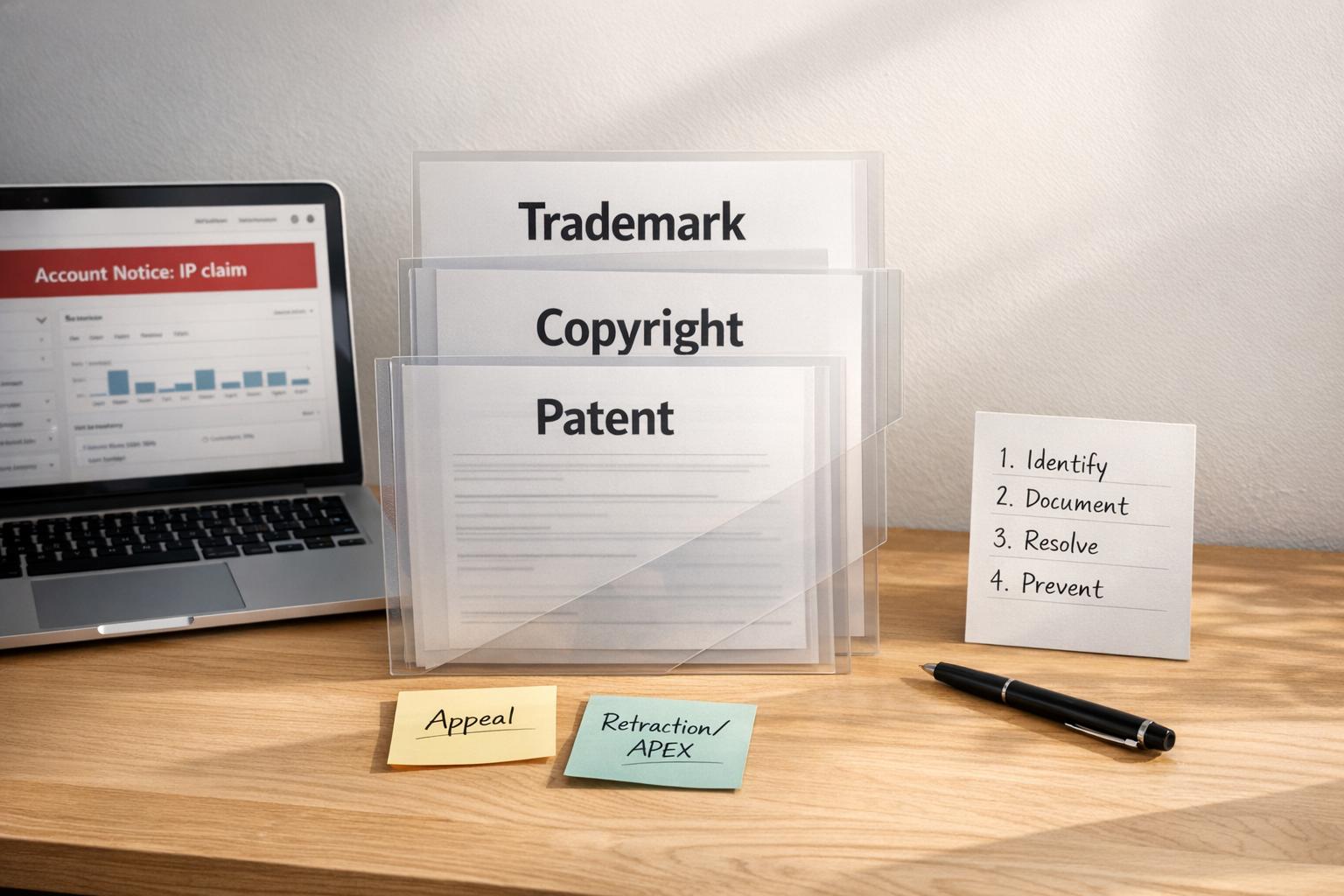
Dealing with third-party IP claims on Amazon can feel overwhelming, but understanding the process can help you resolve them quickly and protect your account. These claims typically involve trademarks, copyrights, or patents and can result in immediate listing removal, revenue loss, and account health risks. Acting within 24–48 hours is critical to minimizing damage.
Key Steps to Handle IP Claims:
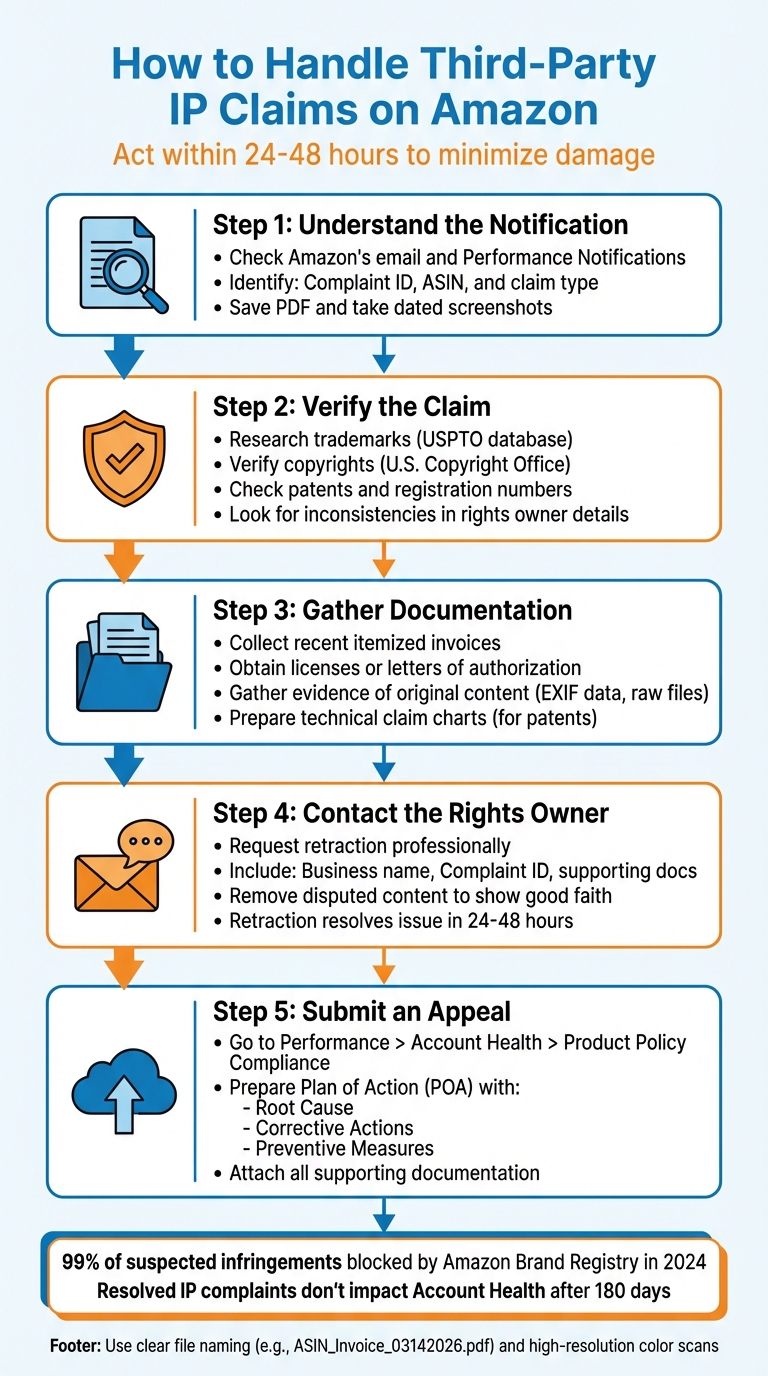
- Understand the Notification: Check Amazon’s email and Performance Notifications for details like Complaint ID, ASIN, and claim type.
- Verify the Claim: Research trademarks, copyrights, or patents to confirm validity. Look for inconsistencies in the rights owner’s details.
- Gather Documentation: Provide invoices, licenses, or evidence of original content to support your case.
- Contact the Rights Owner: Request a retraction by addressing their concerns professionally.
- Submit an Appeal: If retraction fails, prepare a detailed Plan of Action (POA) with root cause, corrective actions, and preventive measures.
Preventive Measures:
- Enroll in Amazon Brand Registry for better control over your listings.
- Regularly audit your product details to avoid IP risks.
- Maintain clear and organized supplier documentation.
Quick action and a clear plan are essential to resolving IP claims effectively and safeguarding your Amazon account.
5-Step Process to Resolve Amazon IP Claims
How to Handle Intellectual Property Complaints on Amazon: Guide | Learn from 417k+ Seller Reviews
sbb-itb-e2944f4
How to Read Amazon’s IP Claim Notifications
When Amazon flags an intellectual property (IP) issue, they notify you in two ways: an email sent to the address linked to your seller account and a notice in the Performance Notifications section of Seller Central. These violations will also appear in your Account Health Dashboard under Product Policy Compliance. Of these, the Seller Central notice serves as your official record, which is crucial for maintaining consistency in your response.
Each notification contains key details you’ll need to address the issue. The Complaint ID (or Case ID) is a unique number that tracks your case with Amazon and the rights owner. You’ll also find the affected ASIN, which identifies the specific product listing in question. The notification further specifies the claim type – Trademark, Copyright, Patent, or Counterfeit – along with the rights owner’s name, contact email, and, in many cases, a trademark registration or patent number. Additionally, it will identify the marketplace where the issue occurred, such as Amazon.com.
"Amazon typically favors the rights holder initially, so prompt, accurate action is essential." – Dillon Carter, Co-Founder and COO, Aura
To protect yourself, immediately save a PDF and take a dated screenshot of both the email and your Account Health page. This documentation can be invaluable if details change or if you need to escalate the issue later. Also, double-check that the ASIN listed corresponds to a product you’ve sold. If the ASIN is unfamiliar, alert Amazon right away.
It’s important to note that legitimate IP claims come directly from Amazon’s official systems. If someone contacts you via Buyer-Seller Messaging claiming to be a rights owner, understand that this is not an official enforcement action. Only respond to notifications found in your Performance Notifications section and Account Health Dashboard.
Once you’ve reviewed the notification, focus on understanding the exact nature of the IP claim.
3 Types of IP Claims on Amazon
Trademark Claims
Trademark claims involve unauthorized use of brand names, logos, or slogans. These notifications often include phrases like "Trademark Infringement" or "Unauthorized Use" and may reference a specific trademark registration number. Common triggers include using a brand name in titles, bullet points, or search terms without authorization. Even if you’re selling genuine products, using trademarked terms improperly can lead to a claim.
Copyright Claims
These claims address creative content, such as images or text. If you’ve copied product photos from a manufacturer’s website, reused a competitor’s descriptions, or duplicated A+ Content without permission, you could face a copyright notice. These claims often reference the Digital Millennium Copyright Act (DMCA) and may include a copyright registration number, though registration isn’t always required to enforce rights.
Patent Claims
Patent claims are more technical and relate to allegations that your product’s design or functionality infringes on a protected invention. Notifications will include a patent number and may involve either a utility patent (covering how a product works) or a design patent (covering how it looks). In recent years, patent claims have increasingly been used to enforce distribution controls, such as Minimum Advertised Price (MAP) policies, rather than addressing actual infringement.
What to Look for in an IP Claim Notification
Start by verifying the registration number. For trademark or patent claims, search the USPTO database. For copyright claims, check the U.S. Copyright Office. This step confirms whether the reported intellectual property is valid and owned by the party filing the claim.
Next, examine the rights owner’s contact information. Verify that the email domain matches the brand or a recognized law firm. If the domain looks suspicious or mismatched, the claim may be abusive or competitor-driven. As Christopher Keleher, Founder of Keleher Appellate Law Group, points out, "Amazon regularly removes listings or suspends seller accounts in response to infringement claims, often without investigating whether the complaint has merit."
Compare your listing with the allegedly infringed material. For the ASIN mentioned in the notice, review your product title, bullet points, images, and backend keywords for any exact matches or close similarities to the protected content. For patent claims, analyze your product details alongside the claim’s language and patent drawings to determine whether your product infringes on the patent.
Finally, confirm the authenticity of your product by cross-referencing supplier invoices with the ASIN and brand details. A legitimate invoice should include the supplier’s full contact information and itemized product identifiers. If you’re selling authentic goods from an authorized distributor, this documentation will strengthen your case.
How to Resolve Third-Party IP Claims
Dealing with third-party IP claims on Amazon can feel overwhelming, but breaking the process into manageable steps can make it more straightforward. Resolving these claims involves three key actions: gathering the right documentation, negotiating with the rights owner, and submitting a detailed appeal through Seller Central. Each step requires careful attention, as Amazon’s system is often automated and intolerant of incomplete or incorrect submissions.
Collecting the Required Documentation
The type of documentation you’ll need depends on the claim. For trademark claims, you’ll need to provide recent itemized invoices showing an unbroken chain of authorization from the brand. These invoices must include essential details like your supplier’s full business name, your business name, the purchase date, and specific product identifiers (e.g., UPCs or ASINs). While you can redact pricing information, altering other details could lead to rejection for "forged or manipulated" documents.
When handling copyright claims, you must prove you either created the content yourself or have permission to use it. Strong evidence includes original files with metadata (e.g., raw photos with EXIF data), licensing agreements, contractor agreements, or a formal DMCA counter-notice. For patent claims, you’ll need to provide technical claim charts that compare the patent’s elements to your product, highlighting at least one key difference. For design patents, side-by-side comparisons can also be effective.
"Pull the notice, identify the claim type, and respond with facts you can document." – Enrico Schaefer, Founding Partner, Traverse Legal
Always use high-resolution, full-page color scans for your documents, and name your files clearly (e.g., "ASIN_Invoice_03142026.pdf"). This makes it easier for Amazon’s reviewers to process your submission.
Contacting the Rights Owner to Negotiate
Before submitting an appeal to Amazon, try reaching out to the rights owner directly. According to Sarah Mitchell from aSellingSecrets:
"The fastest way to clear an IP complaint isn’t through Amazon. It’s getting the rights owner to withdraw it." – Sarah Mitchell, aSellingSecrets
A retraction from the rights owner can resolve the issue within 24 to 48 hours, much faster than Amazon’s appeal process. Start by finding the contact information in your Performance Notification or Account Health dashboard. If it’s not available, check the brand’s website or LinkedIn for a contact, such as a brand protection manager.
Before reaching out, make sure you’ve addressed the issue on your end. For example, remove or modify disputed images, keywords, or text to show you’re taking the claim seriously. Then, send a concise, professional email titled "Retraction Request" that includes your business name, the complaint ID, and any relevant documents like an invoice or a letter of authorization. Offer to remove disputed assets permanently if needed and request a formal retraction.
Keep your tone calm and solution-focused. Avoid legal threats or accusations, as these can lead to uncooperative responses. If you don’t hear back, follow up politely after three to seven business days. Importantly, ensure the rights owner includes the specific ASIN and Amazon complaint or case ID in their retraction. As Traverse Legal emphasizes:
"A withdrawal works only when Amazon can match it to your case." – Traverse Legal
Ask the rights owner to submit the retraction through the same Brand Registry or "Report Infringement" tool they used to file the claim. If a retraction isn’t possible, you’ll need to move forward with an appeal through Seller Central.
Submitting Your Response Through Seller Central
If resolving the issue directly with the rights owner doesn’t work, your next step is to submit an appeal through Amazon. Go to Performance > Account Health > Product Policy Compliance in Seller Central and click "Submit Appeal" next to the violation. Amazon requires a Plan of Action (POA), which includes three parts:
- Root Cause: Explain why the violation occurred.
- Immediate Corrective Actions: Detail what you’ve done to fix the issue.
- Preventive Measures: Describe steps you’ve implemented to avoid future problems.
For instance, if you received a trademark claim for using a brand name without authorization, your root cause might be "lack of awareness of trademark restrictions in product titles." Your corrective action could be "removed all trademarked terms from the ASIN’s title, bullet points, and backend keywords on 03/14/2026." As a preventive measure, you might implement a review process to check new listings against the USPTO database.
Attach all supporting documents – such as invoices, letters of authorization, or DMCA counter-notices – and ensure they align with the claim type. According to DAM Law Firm:
"Amazon reviewers look for evidence mapped to policy… this flow shows not only that you fixed the problem but also that the rights owner agrees." – DAM Law Firm
If you’re filing a DMCA counter-notice, be aware that the complainant has 10 to 14 business days to file a lawsuit, or Amazon will typically restore the content.
Timing is critical. Dillon Carter, Co-Founder and COO at Aura, explains:
"A single IP complaint won’t tank your account overnight… That said, time matters. The longer a complaint sits unresolved, the worse it looks." – Dillon Carter, Co-Founder and COO, Aura
Submit your appeal as soon as you have all the necessary documentation. If you receive an automated rejection, escalate the issue to a human reviewer through phone support or an executive email escalation.
Handling Patent Claims Through Amazon APEX
Dealing with a U.S. utility patent claim on Amazon can feel overwhelming, but the Patent Evaluation Express (APEX) program offers a faster and more affordable way to resolve disputes. APEX simplifies the process by having an independent, neutral patent attorney evaluate whether your product is likely infringing on a U.S. utility patent. As Greg Geiser, an attorney at Gutwein Law, explains:
"The APEX program utilizes a neutral party (‘evaluator’) to evaluate a single patent claim of an asserted U.S. patent to determine if an accused infringing product is more likely than not to infringe the asserted patent."
Once a patent owner files a claim through Amazon’s Brand Registry, you’ll receive a notification and have three weeks to decide whether to participate. If you don’t respond in time, Amazon automatically removes your listings. If you choose to proceed, both parties are required to pay a $4,000 deposit to the evaluator. The winning party gets their deposit refunded, while the losing party’s deposit covers the evaluator’s fees.
Here’s how the process works: the patent owner submits an opening brief within 14 days, you have 14 days to respond, and there’s an optional 7-day reply period. After reviewing all submissions, the evaluator issues a decision within 14 days of the final filing. The entire process typically takes about seven weeks, a dramatic contrast to the two years or more that traditional patent litigation can take. In some cases, disputes have even been resolved in under 30 days.
It’s important to note that APEX only applies to U.S. utility patents. To defend yourself, you can argue non-infringement, present a court ruling declaring the patent invalid, or prove your product was on sale more than a year before the patent’s filing date. If the evaluator rules against you, Amazon will remove your product listings within 10 business days.
Take the case of Houndsy, a pet-product company, as an example. In 2024, they used the APEX program to protect their patented pet-feeder designs after counterfeit versions flooded Amazon. CEO Pavan Bapu shared:
"We submitted our U.S. utility patents to the APEX program, and after careful review, they determined that those counterfeit listings were infringing on our patents and swiftly removed them. This set a precedent for future listings as well."
Because APEX decisions are binding, Houndsy was able to use the same case ID to quickly address and remove future infringing listings without starting the process over. This efficient resolution underscores how understanding the APEX process can be a key part of your broader strategy to manage and prevent intellectual property disputes on Amazon.
How to Prevent Future IP Claims
CJ Rosenbaum, Founder of AmazonSellersLawyer.com, emphasizes:
"The best way to win against an IP complaint is to never receive one in the first place."
Taking proactive steps helps safeguard your account, keep your listings live, and avoid unnecessary disputes.
Using Amazon Brand Registry

One of the most effective ways to prevent IP claims is by securing your intellectual property. If you own a registered trademark, enrolling in Amazon Brand Registry can provide robust tools to protect your brand. This program uses advanced technology to block suspicious listings before they appear. In 2024, Amazon’s automated protections intercepted 99% of suspected infringements before brands even needed to report them. That’s a powerful way to guard against counterfeiters and unauthorized sellers.
Brand Registry also gives you control over your product detail pages, ensuring third parties can’t make unauthorized changes that may lead to confusion or claims. You’ll also gain access to the "Report a Violation" tool, which allows you to search the Amazon catalog by image, ASIN, or URL to identify potential trademark, copyright, or patent violations. With Project Zero, you can even remove infringing listings instantly.
If you don’t yet have a trademark, Amazon IP Accelerator can connect you with trusted law firms to fast-track your application. Even while your trademark is pending, you can access Brand Registry benefits. To qualify, ensure your brand name or logo is permanently attached to your products or packaging – stickers and removable labels won’t meet the requirements.
Tracking Your Account Health Metrics
Your Account Health Dashboard in Seller Central is a key tool for staying ahead of potential issues. Regularly check the "Product Policy Compliance" section to address any concerns before they escalate. Many suspected violations can be resolved with simple updates, like removing a competitor’s brand name from backend keywords or replacing copied product descriptions with original text.
It’s also worth noting that resolved IP complaints no longer impact your Account Health Rating after 180 days. Keeping your metrics clean is essential for maintaining Buy Box eligibility. Responding to notifications within 48 hours demonstrates your commitment to compliance and helps protect your account standing.
Getting Expert Help for Compliance
If you’re managing multiple marketplaces or handling a large inventory, expert assistance can make a big difference in staying compliant. Navigating Amazon’s intellectual property policies requires consistent oversight, and professional guidance can help reduce risks significantly.
For example, Emplicit offers account health management as part of their ecommerce services. Their team helps sellers monitor compliance, audit listings, and address policy violations before they become major issues. They can conduct regular reviews of your product listings, backend keywords, and sourcing documentation to spot potential gaps that might trigger IP claims. With USA-based account managers who understand Amazon’s enforcement practices, you’ll have knowledgeable support to handle compliance challenges while expanding your business on platforms like Amazon, TikTok Shops, Walmart, and Target.
Conclusion
Addressing IP claims effectively requires prompt action, thorough documentation, and a clear plan. Aim to respond within 24–48 hours to protect your account’s reputation. Start by determining whether the claim involves a trademark, copyright, or patent issue. Then gather essential documents like invoices from the past year, letters of authorization, and metadata for any original content. Often, the quickest way to resolve the issue is by reaching out directly to the complainant – a retraction can restore your listing in as little as 24 to 48 hours.
When communicating, stay factual and focused on solutions. As Traverse Legal advises:
"The goal is not to argue. The goal is to resolve risk".
Avoid letting emotions cloud your response. Instead, submit a concise Plan of Action that addresses the root cause, outlines corrective measures, and explains how you’ll prevent future issues. This approach aligns with Amazon’s review process requirements.
Preventative steps are just as crucial for long-term account health. Regularly audit your listings before they go live, maintain a well-organized supplier documentation kit, and leverage Amazon Brand Registry tools to minimize risks. Keep in mind that resolved IP complaints no longer impact your Account Health Rating after 180 days.
For sellers managing complex inventories, expert assistance can make all the difference. Professional services like Emplicit offer account health management and compliance support, helping you monitor listings, audit documentation, and anticipate potential issues. With experienced, USA-based account managers familiar with Amazon’s enforcement policies, you’ll have the strategic guidance needed to stay compliant while expanding your business across platforms like Amazon, TikTok Shops, Walmart, and Target.
FAQs
What happens if I miss Amazon’s 24–48 hour response window?
Missing Amazon’s 24–48 hour response window for an IP complaint can lead to serious repercussions, like having your listing removed or even facing a suspension of your seller account. Acting quickly is crucial – delays not only lower your chances of resolving the issue but may also result in penalties or restrictions on your account.
How can I tell if an IP complaint is legitimate or abusive?
To figure out whether an IP complaint is valid or just unfair, start by pinpointing the type of claim being made – whether it’s about a trademark, copyright, or patent. A legitimate complaint will typically include solid proof, like ownership documents or registration details. On the other hand, abusive claims often lack clear evidence, seem vague, or feel like they’re targeting you unfairly. Take the time to carefully examine both the complaint and the evidence provided before responding. This way, you can protect your position and avoid making unnecessary concessions.
When should I use a DMCA counter-notice or Amazon APEX?
If your content was taken down because of a mistaken intellectual property claim, you can file a DMCA counter-notice – but only if you have solid evidence to back up your case. For brand owners aiming to safeguard their products and eliminate counterfeit listings, Amazon APEX is a powerful tool to address these issues directly. Just make sure you have legitimate reasons and strong supporting evidence before moving forward with either option.