

Want to improve your Amazon sales? Start by analyzing competitor keywords. This method helps you identify high-converting search terms, refine your product listings, and optimize ad campaigns. Here’s a quick breakdown:
- Step 1: Identify Competitor ASINs
Search for top competitors manually or use Amazon’s Best Seller Lists to find relevant products. - Step 2: Analyze Listings
Study product titles, bullet points, and A+ content for primary and secondary keywords. Customer reviews and Q&A sections reveal long-tail keywords. - Step 3: Use Reverse ASIN Tools
Tools like Helium 10, SellerApp, and Sellerise provide detailed keyword data, including search volume and competition levels. - Step 4: Leverage Amazon’s Search Bar and Reports
Use predictive search suggestions and Brand Analytics’ Search Term Reports to find keywords based on real customer behavior. - Step 5: Prioritize and Optimize
Focus on high-volume, low-competition keywords. Use primary keywords in titles and secondary ones in bullet points and backend fields.
Pro Tip: Combine manual research with tools for the best results. Competitor keywords aren’t just data – they’re a roadmap to better visibility and sales.
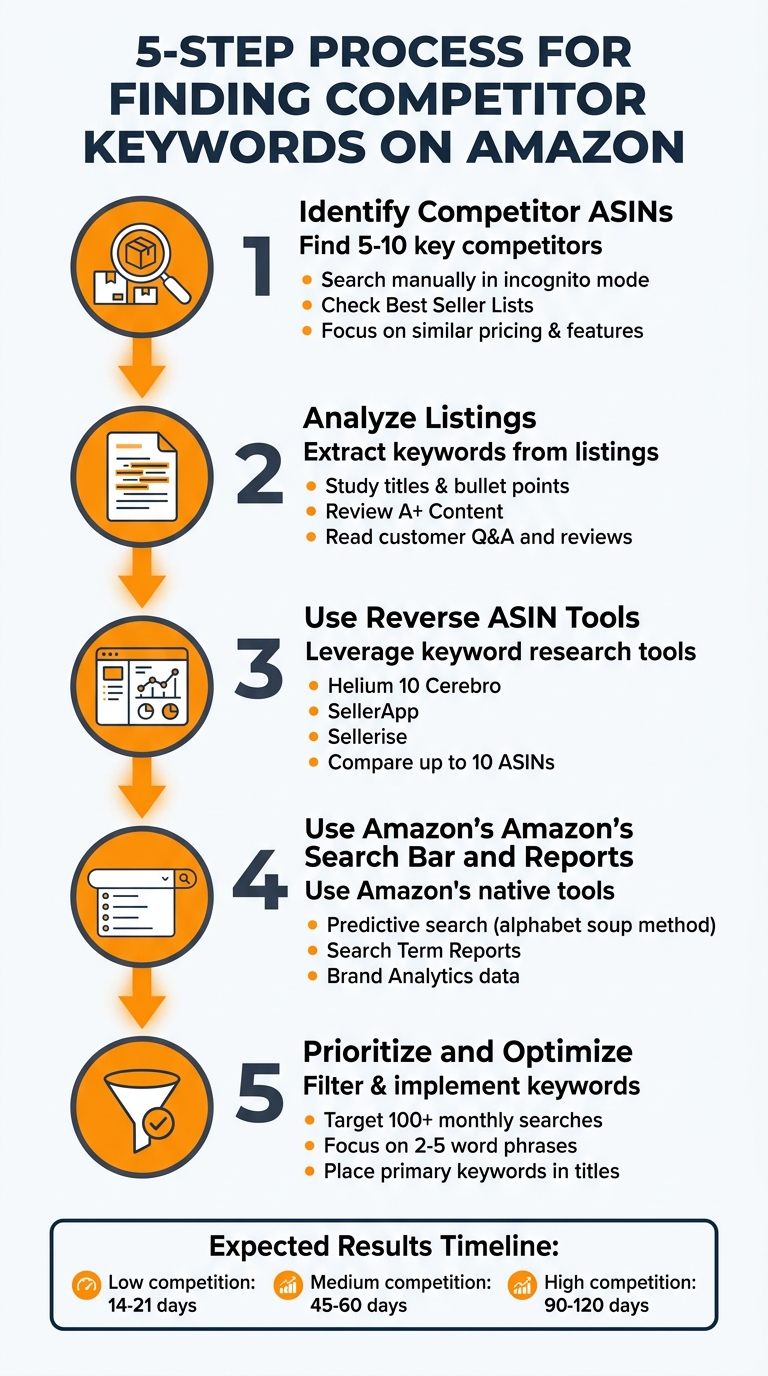
5-Step Process to Find and Use Amazon Competitor Keywords
Amazon Keyword Research with Helium 10 Cerebro (Step-By-Step)
sbb-itb-e2944f4
Step 1: Find Your Top Competitor ASINs
To get started, identify the products that compete directly with yours. On Amazon, every product has an ASIN (Amazon Standard Identification Number), a 10-character alphanumeric code that serves as its unique identifier. You can find this code either in the product URL or in the product details section.
Begin by gathering ASINs from 5–10 key competitors. This will give you a solid base for understanding their keyword strategies. Focus on products similar to yours in terms of features, pricing, and target audience.
Search for Competitor Products Manually
Start by typing your primary keywords into Amazon’s search bar. Look at the top 5–10 organic listings that appear. These products rank high because they typically have strong sales and conversion rates – factors Amazon’s algorithm values. To avoid skewed results influenced by your browsing history, make sure to search in incognito mode.
Once you’ve identified potential competitors, check their relevance by reviewing product titles and bullet points. This will help confirm if their features and target audience align with your own. Don’t overlook customer reviews – they’re a treasure trove for discovering long-tail keywords. As Alex Stoykov, CEO and Founder of Olifant Digital, explains:
Reviews are goldmines for long-tail keywords because customers naturally describe use cases and benefits in their own words.
If you want to expand your search further, Amazon’s Best Seller Lists are another great resource.
Check Amazon’s Best Seller Lists
Go to your product category and drill down to the most specific sub-category available. For instance, instead of stopping at "Sports & Outdoors", keep narrowing down to "Sports & Outdoors > Exercise & Fitness > Yoga > Mats." This granular approach helps you focus on direct competitors rather than unrelated products.
Use the "Best Sellers" filter to identify competitors with high sales velocity. Sorting by "Most Reviewed" can also help you spot well-established products with a proven track record. Since rankings on these lists can change daily, it’s a good idea to check them regularly. Additionally, exploring adjacent or related categories might reveal competitors you hadn’t initially considered.
Step 2: Extract Keywords from Competitor Listings
Now that you’ve gathered competitor ASINs, it’s time to analyze their listings for impactful keywords. Competitor listings are carefully crafted to rank for specific search terms, so by studying them, you can uncover their primary and secondary keyword strategies. This step helps you identify the terms driving their visibility and conversions.
Examine Titles and Bullet Points
The product title is prime real estate for high-priority keywords. Typically, the first 3–5 words of a title feature the most valuable, high-volume keyword. Pay attention to the structure, which often includes the brand name, product type (primary keyword), a key benefit, and supporting features. For instance, a title like "YogaMax Premium Yoga Mat Non-Slip Extra Thick for Hot Yoga" clearly highlights "yoga mat" as the primary keyword, with supporting terms like "non-slip", "extra thick", and "hot yoga."
Bullet points are just as revealing. Keywords that appear repeatedly across all five bullet points are often secondary keywords critical for both ranking and conversions. For example, if "non-slip surface" shows up multiple times in the title, bullets, and description, it’s likely a term worth targeting. By systematically highlighting repeated phrases, you can identify clusters of related keywords that competitors rely on.
Don’t ignore A+ Content if it’s available. Review text modules and comparison charts to extract long-tail and comparative keywords. You can also use the "View Page Source" method: right-click on the listing page, search for "description", and uncover backend keywords embedded in the HTML that aren’t immediately visible on the page.
Read Customer Questions and Reviews
While titles and bullet points provide structured keyword insights, customer interactions offer a goldmine of natural language terms. The Q&A section and customer reviews reveal how buyers talk about and search for products in their own words. These sections often highlight specific use cases and nuanced keywords that might not appear in the listing.
Start with the top 20–30 questions in the Q&A section. These often uncover compatibility keywords or feature-related terms. For example, a question like "Is this suitable for hot yoga?" points to "hot yoga mat" as a potential keyword you might have missed. Questions like these reveal search intent and can inform your listing strategy.
For customer reviews, analyze both positive and negative feedback. Look at 4–5 star reviews to identify benefit-driven phrases that customers naturally use. Meanwhile, 1–3 star reviews expose unmet needs or frustrations that can be turned into "pain-point" keywords. For example, if several reviews mention "slippery surface" as a drawback, consider addressing this in your product description with keywords like "non-slip surface." To streamline this process, export review text and use a word cloud generator to visualize frequent 2–4 word phrases.
Step 3: Use Reverse ASIN Lookup Tools
Reverse ASIN lookup tools can uncover the keywords fueling your competitor’s traffic and sales. By entering a competitor’s ASIN (Amazon Standard Identification Number), these tools reveal every keyword the product ranks for. This helps you separate keywords driving organic rankings from those relying on paid ads. You can also compare multiple ASINs to identify overlapping keywords, unique strengths, and untapped opportunities. Advanced filters allow sorting by organic rank, search volume, and title density, making it easier to pinpoint ranking opportunities quickly. This complements the manual methods discussed earlier, adding a data-driven edge.
Helium 10 Cerebro
Helium 10’s Cerebro tool dives deep into data and supports multi-ASIN comparisons. With it, you can analyze up to 10 competitor ASINs side by side, identifying keyword gaps across the competition. Cerebro distinguishes between organic rankings and sponsored positions, showing which keywords competitors rank for naturally versus those requiring ad spend. It also tracks search volume trends over the past 30 days, helping you account for seasonal patterns and shifts in demand. The Cerebro IQ Score highlights keywords with high search volume, low competition, and reasonable ranking difficulty. Additionally, it identifies keywords tied to the Amazon Choice Badge, offering insights into terms that already have Amazon’s trust.
SellerApp Reverse ASIN Tool
SellerApp’s Reverse ASIN tool emphasizes search volume estimates for both exact and broad match phrases, helping you prioritize high-traffic keywords. It provides insights into the number of competing products and unique ASINs advertising for each keyword, giving you a clear view of competitive intensity. The tool also calculates how many units you’d need to sell to rank on page one. Its word count filters help target long-tail keywords, which often convert better and face less competition. You can further refine your list by including or excluding specific terms, or by removing common words for a streamlined approach.
Sellerise Reverse ASIN Keyword Finder
Sellerise simplifies reverse ASIN lookups by focusing on actionable insights. The tool identifies both organic and sponsored keywords while providing essential metrics like search volume, competition level, and ranking difficulty. Using proven competitor keyword strategies, Sellerise helps refine your titles and descriptions. Its filtering options let you focus on specific phrase lengths, making it easier to find long-tail keywords that are more likely to convert. By highlighting keywords already working for similar products, Sellerise reduces the guesswork and allows you to create listings based on tested market data.
Step 4: Use Amazon’s Search Bar and Search Term Reports
Amazon offers built-in tools that let you tap directly into customer search behavior. The predictive search bar and Search Term Reports are invaluable for uncovering keywords based on real customer activity. When paired with reverse ASIN tools, these methods provide a powerful combination of broad keyword discovery and precise validation.
Amazon Predictive Search Bar
The autocomplete suggestions in Amazon’s search bar are a goldmine for understanding what customers are actively searching for. As Alex Stoykov, CEO/Founder of Olifant Digital, explains:
Amazon’s autocomplete shows you real search terms customers actually type, tapping directly into Amazon’s internal data for free.
These suggestions are based on high-volume searches happening in real time, making them incredibly relevant.
One effective way to use this tool is the "alphabet soup" method. Simply type your main keyword followed by each letter of the alphabet (e.g., "yoga mat a", "yoga mat b", etc.). This approach can generate 200 to 500 long-tail keywords that reflect actual customer behavior. These long-tail phrases often face less competition and attract highly motivated shoppers ready to buy.
You can also try adding modifiers like "best", "for", or "with" to your search terms. For instance, "yoga mat for hot yoga" reveals a niche audience that "yoga mat" alone might miss. These live suggestions provide a great starting point for finding keywords, which you can then verify using Amazon’s Search Term Reports.
Amazon Search Term Reports
If you’re part of Amazon’s Brand Registry, you’ll have access to Search Term Reports through Brand Analytics. These reports offer deeper insights into how competitors are performing. The Top Search Terms dashboard allows you to reverse-search a competitor’s ASIN and discover the keywords driving traffic to their listings. This gives you a clear view of where they’re succeeding.
You can also search specific high-volume keywords to identify the top three products customers click on most frequently. If a competitor dominates a particular term, look closely at how they’ve optimized their title, bullet points, and backend fields. Additionally, the Search Query Performance dashboard provides detailed metrics like impressions, clicks, add-to-cart actions, and conversions. Keywords with high clicks but low conversions can signal opportunities where your product might perform better.
Step 5: Filter and Prioritize Keywords
Once you’ve pulled keywords using reverse ASIN tools and Amazon’s search features, it’s time to refine and prioritize your list to focus on terms that can drive conversions. Start by removing irrelevant keywords and zero in on those that describe your product accurately, indicate purchase intent, and are realistically rankable.
Use these three key questions to evaluate each keyword:
- Does it clearly describe your product?
- Does it reflect buyer intent?
- Can you realistically outrank the current top results?
If a keyword fails to meet any of these criteria, it’s best to discard it. By applying this filter, you’ll narrow your list to the terms most likely to deliver results.
Target High Search Volume with Low Competition
To maximize your efforts, aim for keywords with enough search volume to generate traffic but with competition you can realistically handle. Tools like Helium 10 Cerebro can help you filter for keywords with at least 100+ searches per month and a relevance score of 7 out of 10. This ensures you’re not wasting time chasing terms with either minimal traffic or impossibly high competition.
Check the review counts of top-ranking products to assess competition. For example, if the leading listings have 5,000+ reviews and yours only has 47, it’s better to target keywords where competitors have similar review numbers. Medium-competition keywords often show ranking improvements within 45–60 days of optimization, whereas highly competitive terms may take 90–120 days and require a significant boost in reviews.
Focus on long-tail keywords – phrases with two to five words that capture specific buyer intent. For example, "stainless steel water bottle with straw" appeals to shoppers who know exactly what they want, leading to better conversion rates than broader terms like "water bottle." Keywords with commercial intent modifiers, such as "best" or "buy", or those featuring specific details, are more likely to attract ready-to-buy customers compared to informational phrases that might only draw casual browsers.
Organize Keywords by Relevance
To stay organized, use a master spreadsheet to group keywords based on their purpose:
- Primary keywords: Best suited for titles.
- Secondary keywords: Ideal for bullet points and feature descriptions.
- Long-tail variations: Perfect for backend search terms.
Include columns for keyword phrase, estimated search volume, keyword difficulty, relevance score (1–10 scale), and priority level. This structure helps you clearly see which terms to use and where to place them within your listing.
When optimizing your product listing, prioritize high-volume, highly relevant primary keywords in your title. Use secondary keywords for bullet points that highlight benefits, and reserve backend search terms for synonyms, misspellings, and long-tail variations that don’t fit naturally into the visible copy. Be cautious – irrelevant keywords don’t just take up space; they can actively harm your performance. As Olifant Digital explains:
Irrelevant keywords tank your conversion rate, which signals Amazon’s algorithm that your product isn’t a good match.
| Keyword Metric | Target Threshold |
|---|---|
| Search Volume | Minimum 100+ (varies by niche) |
| Word Count | 2–5 words (long-tail) |
| Relevance Score | 7/10 or higher |
| Competition | Review count comparable to your own |
| Intent | Purchase-ready (e.g., "best [product]", "[product] for [use case]") |
How Emplicit Can Help with Competitor Keywords

Emplicit takes the competitor keyword research process and turns it into actionable strategies for growth. By identifying the right keywords, Emplicit focuses on both PPC campaigns and listing optimization, creating a feedback loop where insights from paid ads enhance organic performance – and vice versa.
Use Emplicit for Amazon PPC Optimization
Emplicit’s PPC management transforms competitor keywords into ad campaigns designed to perform. Here’s how the process unfolds:
- First 30 days: Test keywords with high relevance.
- Next 30 days: Integrate terms that perform well in PPC campaigns.
- By day 90: Focus on keywords that consistently drive organic growth.
One standout feature is reconnaissance-driven targeting. Emplicit studies competitor Sponsored Product Ads and PPC Search Term Reports to pinpoint keywords that are actively converting for similar products. These high-performing terms are then incorporated into your organic listing’s backend search fields. This approach reduces long-term reliance on ads while maintaining strong visibility.
Emplicit also adapts to Amazon’s Rufus AI assistant, which impacts product discovery for over 250 million users. By optimizing for intent-rich phrases and conversational language patterns, Emplicit ensures your keywords align with how customers search today – not just with high-volume terms.
This PPC strategy naturally sets the stage for improving your Amazon listings.
Improve Listings with Emplicit’s Optimization Services
Emplicit’s listing optimization services use competitor keywords to maximize your product’s visibility. The process starts by breaking down competitor listings to uncover primary keywords and high-converting phrases. These insights are then applied with precision:
- Titles and backend fields: High-volume, relevant keywords are placed at the very start of your title and backend search fields, ensuring they carry the most algorithmic weight.
Backend optimization is a critical focus. Emplicit ensures the 249-byte limit in the "Generic Keywords" field is fully utilized without exceeding it – since going over the limit causes Amazon to ignore all terms in that field. Backend terms are formatted correctly (lowercase, single spaces, no punctuation) and avoid repeating keywords already present in titles or bullets, as repetition doesn’t improve indexing.
Once changes are made, Emplicit manually verifies indexing by searching for your ASIN with the updated keywords after 24 hours. For low-competition keywords, you can expect to see organic ranking improvements within 14-21 days.
Emplicit’s holistic approach ensures that every keyword works harder for your brand, whether through ads or organic rankings.
Conclusion
Finding competitor keywords on Amazon isn’t about copying – it’s about using proven insights to make smarter decisions. The process – identifying competitors, extracting keywords, analyzing data with tools, and applying strategic filters – replaces guesswork with a clear path to high-conversion keywords.
How long it takes to see results depends on the competition for each keyword. Low-competition keywords might show ranking improvements in 14 to 21 days. Medium-competition keywords typically need 45 to 60 days, while high-competition terms can take 90 to 120 days, especially if paired with a strong review strategy.
"The real advantage isn’t just finding keywords, it’s turning competitive data into a repeatable growth system." – Alex Stoykov, CEO/Founder, Olifant Digital
Emplicit takes these insights further by optimizing PPC campaigns and organic listings. By turning competitor keyword data into actionable strategies, Emplicit follows the same systematic approach. Their ecommerce services include marketplace management, listing optimization, inventory management, and account health support to help businesses grow on platforms like Amazon, Walmart, Target, and TikTok Shops.
Competitor keywords provide the foundation, but success depends on execution. With the right strategy and expert guidance, you can transform competitive intelligence into measurable growth – faster rankings, better conversions, and long-term success on major platforms. Strategic keyword research isn’t just a tactic; it’s the starting point for scalable growth.
FAQs
How do I choose the right competitor ASINs?
To find competitor ASINs that align with your product, look for those targeting a similar audience, falling within a comparable price range, and operating in the same niche. Competitors in these areas are likely using keywords that resonate with your market.
Start by examining top sellers and products ranking high for the keywords you’re aiming to target. This approach can reveal not only relevant competitors but also effective strategies they’re using to succeed in your shared space.
Which competitor keywords should I use in my title vs backend?
For your title, focus on using high-impact, customer-friendly keywords that align with what your audience is searching for. These keywords not only make your listing more appealing but also boost its visibility in search results, driving organic traffic directly to your product.
In the backend, take advantage of supporting terms such as synonyms, common misspellings, or related keywords. These additions improve your product’s discoverability without cluttering the title or repeating keywords unnecessarily. This approach keeps your listing optimized while maintaining a clean and professional appearance.
How can I tell if a competitor keyword is worth targeting?
To figure out if a competitor’s keyword is worth pursuing, start by assessing its relevance to your niche and its potential impact. Focus on keywords that are helping competitors achieve strong organic rankings, attract high search volumes, and generate sales.
You can use tools like reverse ASIN lookups to uncover these keywords. Additionally, keep an eye on metrics like the Best Sellers Rank (BSR) and the number of reviews to gauge performance. By combining manual research with these tools, you can pinpoint profitable keywords that fit your niche and align with your business goals.