

Your Amazon Account Health Score is a critical measure of your success as a seller. It ranges from 0 to 1,000 and directly impacts your ability to maintain operations, win the Buy Box, and avoid suspensions. A score below 100 can lead to frozen funds, unfulfillable inventory, and account deactivation. Key metrics like Order Defect Rate (ODR), Late Shipment Rate (LSR), and Pre-Fulfillment Cancellation Rate determine your score, and violations can result in immediate penalties.
Here’s how to protect your score:
- Monitor Key Metrics: Keep ODR under 1%, LSR below 4%, and cancellations under 2.5%.
- Resolve Violations Quickly: Address issues within 24 hours to regain points and avoid deactivation.
- Use Tools and Reports: Regularly check the Account Health Dashboard and utilize Amazon’s reports to track performance.
- Improve Shipping Standards: Use Amazon’s “Buy Shipping” and maintain accurate tracking rates (95%+).
- Prevent Cancellations: Audit inventory and use automated tools to manage stock levels.
Daily monitoring and quick responses are essential to maintaining a healthy account. Sellers with a score above 250 for six months may qualify for protection programs like Account Health Assurance. If managing this feels overwhelming, consider professional services to handle compliance and performance monitoring.
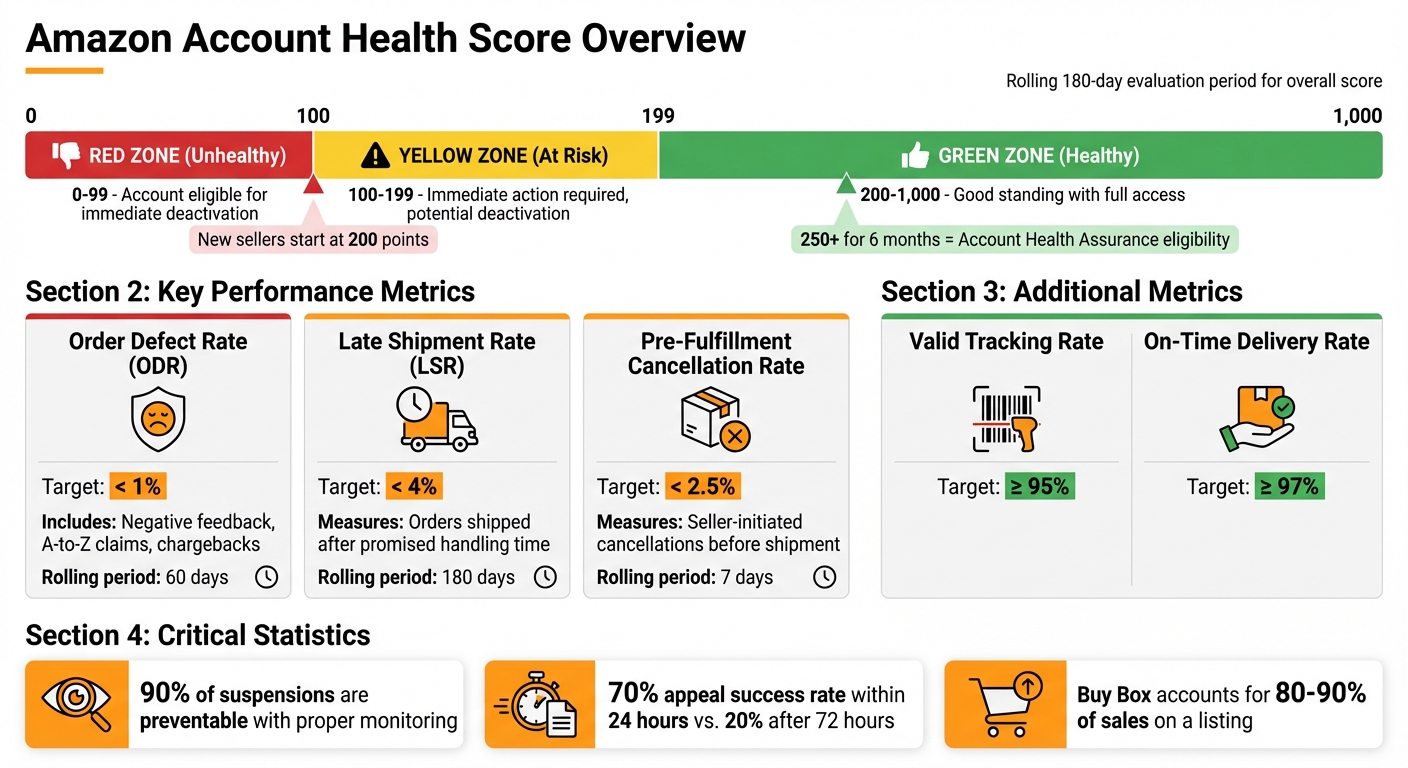
Amazon Account Health Score Status Levels and Performance Metrics
How to Improve Your Account Health Rating (AHR) on Amazon
What is the Amazon Account Health Score?
The Amazon Account Health Rating (AHR) is a 0-to-1,000 scale used to assess your account’s risk of deactivation due to policy violations or performance issues. It evaluates how well you’re meeting Amazon’s standards for customer service, shipping reliability, and policy compliance.
New sellers begin with a default score of 200 points. Over time, your score is adjusted based on your actions within a rolling 180-day period. Points are deducted for policy violations like intellectual property complaints, selling restricted products, or poor customer service. However, resolving these issues can help you regain points.
Violations are classified by severity – critical, high, medium, or low. Critical violations can result in immediate account enforcement, regardless of your overall score. Additionally, repeated violations within 180 days lead to heavier penalties and could trigger instant deactivation.
The score is primarily driven by operational metrics, which are explained below.
Key Components of the Account Health Score
Your AHR is influenced by several core performance metrics:
- Order Defect Rate (ODR): Must stay below 1%. This includes orders with negative feedback, A-to-Z Guarantee claims, or chargebacks.
- Late Shipment Rate (LSR): Should remain under 4%. This tracks orders shipped after the promised handling time.
- Pre-Fulfillment Cancellation Rate: Needs to be below 2.5%. This measures cancellations initiated by the seller before shipment.
Amazon also monitors other important metrics, such as:
- Valid Tracking Rate: Requires at least 95% accuracy.
- On-Time Delivery Rate: Targeted at 97% or higher.
These metrics collectively reflect how reliable and customer-focused your operations are.
Health Status Categories
Your score is translated into one of three status levels, each color-coded to indicate the health of your account:
| Status | Color | Score Range | Impact on Operations |
|---|---|---|---|
| Healthy | Green | 200–1,000 | Account is in good standing with full access to features and no risk of deactivation. |
| At Risk | Yellow | 100–199 | Immediate action required; account faces potential deactivation and may lose Buy Box eligibility. |
| Unhealthy | Red | 0–99 | Account is eligible for immediate deactivation or may already be suspended. |
A low score doesn’t just risk suspension – it can also lead to suppressed listings, restricted access to Amazon Advertising (like Sponsored Products), and frozen funds for up to 90 days during appeals. If you use Fulfillment by Amazon (FBA), inventory could be marked as unfulfillable while you continue to incur storage fees.
On the positive side, sellers maintaining an AHR of 250 or higher for six months may qualify for Account Health Assurance (AHA). This program helps protect against immediate deactivation while you work with Amazon to resolve issues.
How to Access and Read the Account Health Dashboard
Steps to Access the Dashboard
To get started, log in to Amazon Seller Central. From there, you can find the Account Health section either under the Performance tab in the main menu or through the home page tile or widget.
Once you’re in, you’ll notice your Account Health Rating (AHR) prominently displayed at the top. This score ranges from 0 to 1,000 and updates in real time. If there are specific violations requiring attention, head to the Performance Notifications section under the Performance tab for detailed guidance on how to resolve them.
Now, let’s break down the key sections of the dashboard and how they can guide your performance improvements.
Dashboard Sections Explained
The dashboard is divided into three main sections, each focusing on a critical area of your account’s performance.
| Dashboard Section | Metrics Monitored | Target Standard |
|---|---|---|
| Customer Service Performance | Order Defect Rate (ODR), including negative feedback, A-to-z claims, and chargebacks | Less than 1% |
| Policy Compliance | Violations like intellectual property issues, product authenticity, and listing compliance | Zero violations |
| Shipping Performance | Late Shipment Rate (LSR), Pre-fulfillment Cancellation Rate, and Valid Tracking Rate (VTR) | LSR < 4%; Cancellations < 2.5%; VTR > 95% |
It’s a good idea to check the dashboard daily, especially during busy sales periods, to catch and fix any issues quickly. Make sure your emergency contact information is always up to date in the Notification Preferences. If you’re struggling to meet shipping metrics, you might want to consider using Fulfillment by Amazon (FBA) to help maintain these standards.
sbb-itb-e2944f4
How to Improve Key Metrics
Using insights from your Account Health Dashboard, you can take focused actions to improve key metrics and maintain a healthy seller account.
Reducing Order Defect Rate (ODR)
The Order Defect Rate (ODR) tracks the percentage of orders with one or more defects over a rolling 60-day period. Amazon requires sellers to keep their ODR below 1%. Going above this threshold can result in losing the Buy Box, suppressed listings, or even account suspension. Keeping a close eye on feedback channels is critical.
To reduce your ODR, start by refining your product listings. Make sure titles, descriptions, and images match the product customers will receive – misleading details often lead to "item not as described" complaints. Upgrading your packaging, or using Amazon’s Frustration-Free Packaging standards, can also help prevent damage during shipping.
Quick responses are key. Aim to address customer issues within 24 hours to prevent them from escalating. Check customer feedback daily, and if you spot inaccurate product reviews, request their removal via Seller Central. If shipping-related complaints are a recurring issue, switching to Fulfillment by Amazon (FBA) might be the solution, as Amazon takes over most shipping responsibilities. Regularly review your Account Health Dashboard to catch and resolve ODR spikes before they become a problem.
Improving Shipping Performance
Amazon’s shipping standards are strict, but meeting them is achievable with the right tools. Using Amazon’s “Buy Shipping” service or APIs helps ensure tracking information is entered correctly. Partnering with Amazon-integrated carriers guarantees that tracking numbers are validated automatically, and every shipment gets scanned during transit and upon delivery.
Set realistic handling times to avoid late shipments. If you sell on multiple platforms, syncing your inventory across channels can prevent stock-outs and reduce the risk of cancellations.
"The brands and resellers selling products on Amazon who recover fastest are those who treated account health as a daily priority, not a problem to fix after it breaks." – SellerCandy
Remember, if you don’t confirm dispatch within 7 days of the ship-by date, Amazon will cancel the order automatically. This impacts both your Late Shipment Rate (LSR) and overall metrics. Conduct weekly audits of your shipping performance to catch and correct issues before they hurt your account health. Once your shipping processes are running smoothly, work on minimizing pre-fulfillment cancellations.
Lowering Pre-Fulfillment Cancellation Rate
The Pre-Fulfillment Cancellation Rate (CR) measures the percentage of seller-fulfilled orders you cancel before shipping over a rolling 7-day period. Amazon expects sellers to keep their CR below 2.5%, but if you’re aiming for Premium Shipping features, your CR needs to be under 0.5%.
Inventory mismatches are a common cause of cancellations. Regular audits of your stock levels and the use of automated inventory management systems can help avoid stock-outs. These systems can also send replenishment alerts, reducing the risk of cancellations due to unavailable items.
If you need to stop fulfilling orders temporarily – say, for a vacation – use Seller Central’s Vacation Mode to deactivate your listings and prevent new orders. Regularly review your pricing to catch errors that could lead to cancellations. Additionally, use tools like the “Orders with Defects” report and the “Voice of the Customer” tab to identify problem SKUs and address performance issues.
Using Reports and Tools for Regular Monitoring
To keep your Amazon account in good standing, regular monitoring is just as important as proactive measures. A great place to start is the Account Health Dashboard in Seller Central (found under Performance > Account Health). Here, your Account Health Rating (AHR) is displayed on a 1-to-1,000 scale with color-coded statuses: Green (200–1,000), Yellow (100–199), and Red (0–99). Checking this dashboard daily ensures you’re on top of any potential issues.
You’ll also want to pay attention to Performance Notifications in your Settings. These alert you to any violations that need to be resolved within 24 hours. Quick action here can significantly improve your chances of successfully addressing appeals. If you’re an FBA seller, make it a habit to review the FBA Fulfillment and Stranded Inventory Reports for real-time updates. These tools help you spot problems early and dig deeper using Amazon’s Seller Reports.
Using Amazon Seller Reports
Amazon provides several reports to help you track performance trends and identify issues before they escalate. For example, the "Voice of the Customer" dashboard highlights product quality complaints and "item not as described" issues. Addressing these early can prevent returns or Order Defect Rate violations. Similarly, the "Orders with Defects" report pinpoints problem SKUs, allowing you to address performance concerns at the product level.
It’s also essential to maintain your catalog on a weekly basis. Removing inactive listings and resolving potential compliance issues can save you from headaches down the road. Additionally, hold onto supplier invoices for at least a year. Amazon may request proof of authenticity during disputes, and you’ll need to provide it within 24 hours.
Weekly reviews of your inventory and performance metrics are a must. This keeps your listings clean and helps you stay ahead of any emerging problems.
Working with Expert Services
For growing businesses, manually managing account health can become overwhelming, especially when dealing with multiple ASINs and complex Amazon policies. This is where professional services, like Emplicit, can step in. Their team specializes in monitoring "shadow metrics" – hidden indicators like product quality complaints, pricing issues, and buyer-seller message response times – that might not seem urgent until they lead to bigger problems.
Emplicit offers real-time monitoring and can craft expert-written Plans of Action if violations occur. Their inventory management tools synchronize stock across sales channels, reducing the risk of cancellations and stock-outs that can hurt your Pre-Fulfillment Cancellation Rate. With USA-based account managers who understand Amazon’s enforcement patterns, they help safeguard your Buy Box eligibility, which accounts for 80% to 90% of sales on a listing.
Conclusion
Keeping your Amazon Account Health Score in good shape isn’t just a nice-to-have – it’s a daily task that directly affects your revenue and the visibility of your listings. Successful sellers understand that proactive management beats reactive fixes every time. By maintaining key metrics within Amazon’s thresholds, you safeguard your Buy Box eligibility and reduce the risk of listing suppressions that can hurt your sales.
The stats speak for themselves: 90% of Amazon account suspensions are preventable with proper monitoring. Plus, sellers who respond to issues within 24 hours have a 70% chance of a successful appeal, compared to just 20% after 72 hours. This makes checking your Account Health Dashboard every morning a non-negotiable habit for catching problems early.
But there’s more to it than just the visible metrics. Amazon also monitors "shadow metrics" – things like product quality complaints and how quickly you respond to buyer messages. These hidden factors can quietly harm your account standing. To stay ahead, weekly audits of your listings and addressing root causes in your Plans of Action are essential, especially if you’re managing multiple ASINs or dealing with tricky compliance issues. This proactive strategy is the key to avoiding enforcement headaches.
As Notifcentral puts it:
"The best time to improve your account health monitoring is before you need it."
If managing this process feels overwhelming, specialized services can help. Tools like Emplicit take the guesswork out of account health management with features like real-time monitoring, automated alerts, and expertly crafted appeals. With U.S.-based managers experienced in Amazon enforcement and inventory synchronization, these services let you focus on growing your business while keeping your account in the green zone.
FAQs
How fast can my Account Health Rating recover after I fix a violation?
Your Amazon Account Health Rating can bounce back in just a few days or take a few weeks, depending on how quickly you resolve the violation. Acting fast and submitting a detailed Plan of Action can help speed things up. Generally, Amazon gives you about 3 days to address most issues, but for more urgent violations, you might only have 48 hours to fix them.
Which violations can suspend my account even with a high score?
Even if your account boasts a high health score, some violations can still lead to suspension. These include policy violations like intellectual property disputes or complaints about product authenticity, shipping delays, and subpar customer service. Staying ahead of these risks is essential to keep your account in good standing and steer clear of suspension.
What ‘shadow metrics’ should I monitor besides ODR and late shipments?
While tracking Order Defect Rate (ODR) and late shipments is essential, there are other important metrics that often fly under the radar but can significantly impact your account health:
- Pre-Fulfillment Cancel Rate (PFCR): Aim to keep cancellations below 2.5%. Exceeding this threshold can negatively affect your account’s standing.
- Valid Tracking Rate (VTR): Make sure at least 95% of your shipments have valid tracking uploaded. This is crucial for maintaining trust and transparency.
- Policy Violations: Stay vigilant about issues like intellectual property or authenticity violations. Ignoring these can lead to account restrictions.
Make it a habit to regularly check your account health dashboard. Staying on top of these metrics can help you address potential problems before they escalate.