

Want to make your PPC campaigns more effective year-round? Adjusting for seasonal trends is key.
Without adapting your budgets, bids, and ad messaging to match seasonal demand, you risk overspending during slow periods or missing out on high-intent shoppers during peak times. For example, a health product company saw an 82% drop in cost per acquisition (CPA) and a 544% boost in conversion rates simply by aligning their PPC strategy with seasonal shifts.
Here’s what you need to know:
- Budget Timing Matters: Increase budgets early (4–6 weeks before peak) to let algorithms optimize. Ramp up during peak periods to avoid budget throttling and scale down after the rush.
- Seasonal Ad Copy Works: Generic ads fail during peak times. Use specific messaging (e.g., “Holiday Deals”) and time-sensitive offers like countdown timers to drive urgency.
- Smart Bidding Adjustments: Use automated bidding during high-demand periods and tighten targets post-peak to capture remaining traffic efficiently.
- Analyze Trends: Use tools like Google Trends and historical campaign data to spot demand spikes and plan campaigns accordingly.
- Landing Page Consistency: Ensure your landing pages match ad promises (e.g., discounts, seasonal themes) to avoid losing conversions.
When and How to Set Up Seasonality Bid Adjustments in Google Ads
sbb-itb-e2944f4
PPC ROI Problems During Seasonal Campaigns
Seasonal campaigns often amplify existing inefficiencies in PPC strategies. Keeping daily budgets static during peak times can severely limit your ability to reach high-intent shoppers who are ready to purchase. This rigid budget approach means missed revenue opportunities during surges or overspending on low-intent traffic during slower periods just to use up your monthly allocation. Making timely adjustments to match seasonal demand is essential for improving PPC ROI. Let’s break down some common pitfalls in budget allocation during these periods.
Budget Mismanagement and Overspending
One frequent misstep is waiting too long to adjust budgets. Many advertisers only increase spending when major shopping events like Black Friday or Cyber Monday are already underway. This delay prevents automated bidding systems from collecting enough data to optimize campaigns effectively. As a result, ad spend often gets wasted. Compounding this issue, some businesses fall into the "use it or lose it" mindset during slower months, spending budgets on low-converting clicks just to exhaust their allocation.
Competition also intensifies during peak seasons, driving up costs. When multiple advertisers target the same keywords, CPCs can skyrocket. For example, the average Google Ads CPC across industries is now $2.53, with 86% of industries experiencing a 10% increase in costs. Without a well-thought-out plan, you could end up paying premium prices for clicks that don’t generate meaningful returns. In fact, sticking to outdated calendar-based strategies can leave as much as 67% of seasonal revenue potential untapped.
Generic Ad Copy and Messaging
Using generic ad copy during seasonal peaks is another costly mistake. Shoppers during these times are often looking for specific solutions, whether it’s holiday gifts, back-to-school supplies, or summer must-haves. Ads that fail to address these seasonal needs tend to have lower click-through rates, wasting valuable ad spend. This is especially critical during Q4, where some industries see revenue jump by 300% to 400% compared to other quarters. Every click matters when CPCs are at their highest.
The problem gets worse when there’s a mismatch between the ad’s promise and the landing page. For instance, if an ad promotes a "Christmas Sale" but the landing page looks like any other day, it creates a disjointed experience that can drive potential customers away. This disconnect is particularly damaging during peak seasons when each visitor comes at a higher cost. Poor audience targeting can further erode campaign performance.
Poor Audience Targeting
Seasonal keywords naturally attract a wide range of searchers, many of whom aren’t ready to buy. Without proper audience segmentation, you risk wasting budget on low-intent users. This issue becomes even more expensive during peak seasons when CPCs are already inflated.
Geographic targeting is another area where advertisers often stumble. Promoting winter coats to shoppers in warm climates or marketing summer gear to regions experiencing cold weather is a surefire way to waste ad spend. Seasonal demand often aligns with weather patterns and regional events, so failing to refine geographic targeting can drain resources on audiences with no immediate interest in your product. During the summer vacation season alone, ad costs can rise by as much as 30%, making precise targeting crucial to avoid unnecessary spending.
How to Analyze Seasonal Trends for PPC Planning
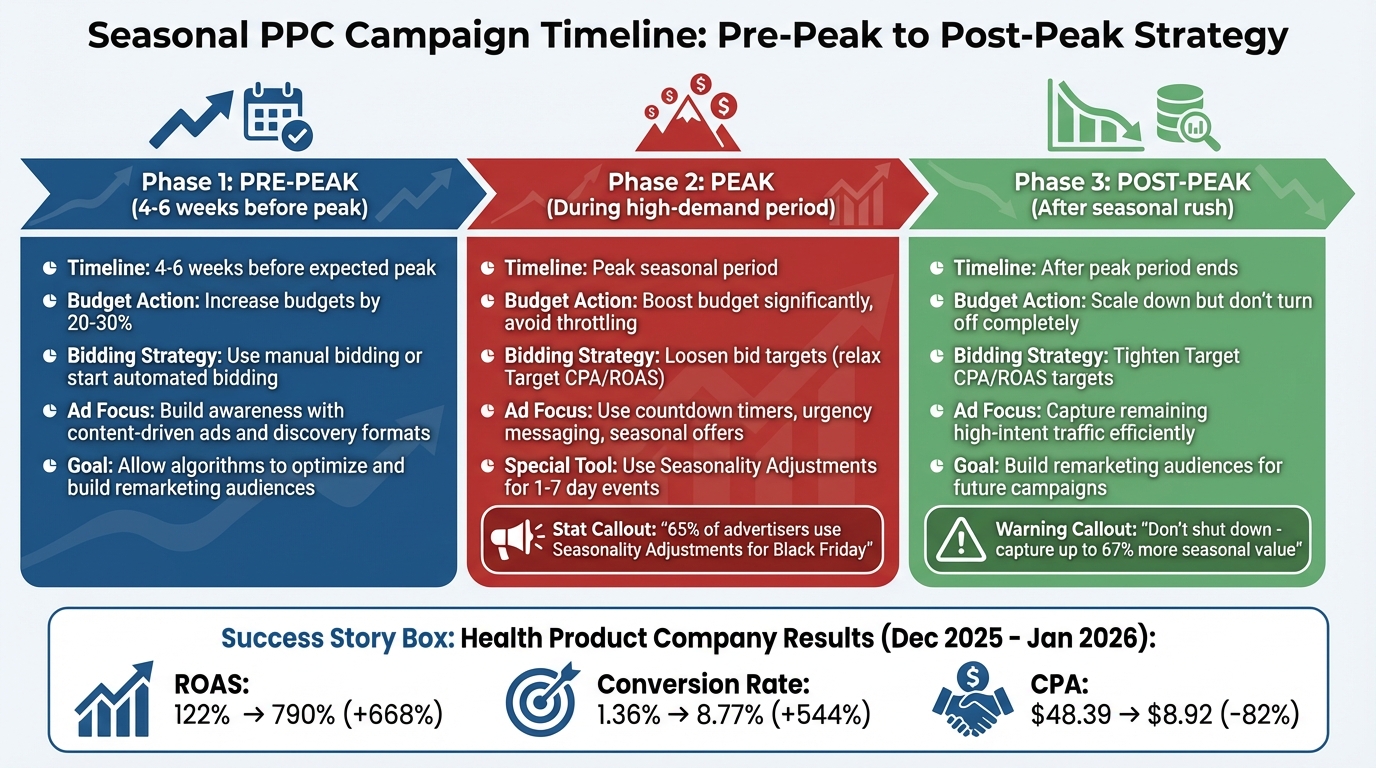
3-Phase Seasonal PPC Campaign Strategy: Pre-Peak, Peak, and Post-Peak Optimization
Understanding seasonal trends is key to addressing challenges like budget mismanagement and poorly timed campaigns in PPC. By identifying patterns in consumer behavior, you can adjust your campaigns for better performance. The good news? You don’t need expensive tools – most of the insights you need are already available in your ad accounts or through free resources like Google Trends.
Review Historical Campaign Data
Your past campaign data is a goldmine for understanding future trends. Start by diving into your ad platform’s reporting tools. Extend the timeframe to 12–24 months and analyze metrics like CPC, impressions, and click-through rates on a monthly or quarterly basis. This will help you spot patterns and fluctuations over time.
For a broader view, check Google Analytics 4 for year-over-year traffic trends, even from organic or direct sources. Collaborate with your sales team to uncover industry-specific cycles, such as seasonal B2B lead generation trends.
"History might repeat itself, or it might rhyme, but either way, regular trends are something you should be aware of and ready for."
– Michelle Morgan, Co-Founder, Paid Media Pros
Don’t forget to review your Auction Insights report. This can reveal how competitor behavior – like aggressive bidding – has shifted during key periods in the past. Use this information to anticipate competitive spikes and adjust your budget. Lastly, identify which keywords and ad sets performed best or struggled during peak times. This allows you to prioritize high-performing assets and pause underperforming ones when planning future campaigns.
Track Search Volume with Google Trends
While your historical data shows what’s happened in your account, Google Trends offers a market-wide perspective. This free tool scores search popularity on a 0–100 scale, making it easy to spot spikes in interest. You can even drill down to hourly data in specific cities for event-driven trends.
Start by entering your main product or service keywords into Google Trends and set the timeframe to "Past 5 years." Look for recurring peaks that align with your campaign goals. A score of 100 indicates peak popularity, while 0 means there wasn’t enough data. It’s important to note that this tool measures relative interest, not absolute search volume.
For more detailed data, use Google Keyword Planner’s "Get search volumes and forecasts" feature. Export the data into a spreadsheet and use conditional formatting to highlight high- and low-demand months. This visual approach helps you decide when to scale your budgets up or down.
"By understanding seasonality trends, you can effectively allocate your budgets to gain the best possible results throughout the year, every year."
– Sophie Fell, Two Trees PPC
Social listening can also give you an edge. Platforms like TikTok and X (formerly Twitter) often reveal emerging seasonal interests before they show up in Google search trends. This early insight can help you prepare campaigns ahead of your competitors.
Combine insights from your historical data and current trends to map out your strategy across pre-peak, peak, and post-peak phases.
Plan for Pre-Peak, Peak, and Post-Peak Periods
One common mistake advertisers make is treating seasonal campaigns as a single event. Instead, breaking them into pre-peak, peak, and post-peak phases allows for better budget management and more effective messaging.
Pre-Peak Phase:
Start this phase 4–6 weeks before your expected peak. This gives automated bidding algorithms time to optimize. Focus on building awareness with content-driven ads or discovery formats. Gradually increase your budget and ensure creative assets are ready in advance.
Peak Phase:
During the peak, boost your budget significantly and loosen bid targets (e.g., relax Target CPA or Target ROAS) to stay competitive as auction prices rise. For short-term events lasting just a few days, use Google Ads’ "Seasonality Adjustments" feature to help Smart Bidding account for expected spikes in conversion rates. Incorporate ad customizers and countdown timers to create urgency in your messaging.
Post-Peak Phase:
Instead of turning off campaigns after the peak, tighten your bid targets to efficiently capture high-intent traffic at lower volumes. This strategy keeps your account healthy and builds remarketing audiences for future campaigns. Relying solely on dates rather than data could cause you to miss up to 67% of the seasonal opportunity value.
Once you’ve identified peak dates using historical data and Google Trends, create a seasonal calendar. Include specific timelines for ramping budgets and preparing creative assets. This structured approach ensures you’re always ready to adapt when seasonal demand shifts.
How to Adjust Budgets and Bids for Seasonal Campaigns
Once you’ve mapped out your seasonal timeline, it’s time to fine-tune your budgets and bids. The goal? Prevent your budget from running dry mid-morning or overspending during slower periods. Here’s how to do it.
Scale Budgets Based on Demand
Your budget shouldn’t stay static throughout the year – it should flex with actual demand. Dive into your historical data to identify spending tiers – high, medium, and low – based on search volume and conversion trends instead of arbitrary calendar dates. This approach ensures you’re ready to capture the full potential of seasonal spikes.
During the pre-peak phase (4–6 weeks before the surge), consider increasing budgets by 20–30%. This gives automated bidding systems time to optimize and build remarketing audiences. As you enter the peak phase, ramp up budgets significantly to avoid throttling. John Stanko, Account Manager at JumpFly, warns:
"Google and Microsoft Ads might start throttling your impressions by mid-morning" – John Stanko, Account Manager, JumpFly
A real-world example highlights the impact of this strategy. In January 2026, a nutrition and health product company managed by Samuel Edwards at PPC.co saw a dramatic improvement in their campaign performance. By adjusting bids and introducing contextually relevant keywords during the New Year rush, their ROAS skyrocketed from 122% in December 2025 to 790% in January 2026. They also slashed their Cost Per Acquisition by 82% (from $48.39 to $8.92) while boosting their conversion rate by 6.5× (from 1.36% to 8.77%).
After the peak, don’t just shut everything down. Shift into the post-peak phase by tightening your Target CPA (tCPA) or Target ROAS (tROAS) goals. This helps you capture the remaining high-intent traffic at lower costs while gathering valuable data for future campaigns.
For short-term events lasting 1–7 days, take advantage of Google Ads’ Seasonality Adjustments feature. This tool alerts Smart Bidding to anticipate temporary spikes or dips in conversion rates, allowing it to adapt accordingly. As one expert explains:
"Seasonality adjustments are perfect for short-term events – we’re talking 1 to 7 days – where you expect noticeable changes in conversion rates"
In fact, around 65% of advertisers use this feature for Black Friday campaigns.
Once your budgets align with demand, the next step is selecting the right bidding strategy to make the most of these adjustments.
Manual vs. Automated Bidding
Adjusting your budget is only half the battle – choosing the right bidding model is just as important. Whether you go with manual or automated bidding depends on your campaign goals, the data you have, and the duration of your seasonal event.
Manual bidding gives you full control over maximum CPCs for specific keywords. It’s particularly useful in the early pre-peak phase when you’re focused on building awareness and may not have much conversion data yet. Manual bidding is also effective for very short campaigns lasting less than two days, where automated systems don’t have enough time to adjust. However, it requires constant monitoring and may not respond quickly to auction changes.
Automated (Smart) bidding, on the other hand, excels during high-volume periods when there’s plenty of conversion data – ideally at least 30 conversions in 30 days. It uses real-time signals to optimize for conversions or ROAS. During intense auction periods, where CPCs can spike by as much as 26%, you may need to relax your tCPA or tROAS targets to let the algorithm bid more aggressively. Andrew Lolk, Founder of SavvyRevenue, explains:
"Lowering your tROAS gives Smart Bidding permission to go after those suppressed auctions. It tells the algorithm, ‘I’m willing to accept a lower return to capture more volume’" – Andrew Lolk, Founder, SavvyRevenue
For the best results, consider blending the two approaches. Use manual bidding during the early pre-peak phase when data is limited, and switch to automated bidding once you’ve gathered enough data during the peak. Here’s a quick comparison:
| Feature | Manual Bidding | Automated (Smart) Bidding |
|---|---|---|
| Primary Goal | Awareness and precise keyword control | Conversions and ROAS optimization |
| Best Seasonal Use | Early pre-peak phases and short bursts | High-volume peak periods |
| Adjustment Method | Increase max CPCs manually on top-performing keywords | Relax tCPA/tROAS targets or use Seasonality Adjustments |
| Reaction Speed | Slower; requires human intervention | Real-time adjustments based on live signals |
| Data Requirement | Effective with limited conversion history | Requires at least 30 conversions per 30 days |
Automated rules can also simplify adjustments. For instance, you could set a rule to increase your daily budget by 25% if the previous day’s ROAS exceeds your target. Andrew Teigman from AdVenture PPC highlights the benefit:
"Smart Bidding instantly reverts to pre-event behavior after the adjustment period ends, eliminating the need for a ramp-down phase" – Andrew Teigman, AdVenture PPC
Creating Seasonal Ad Copy and Promotions
Once your budgets and bids are ready, the next step is crafting ad messages that align with seasonal consumer intent. Generic ads won’t cut it when shoppers are looking for season-specific solutions. Here’s how to create seasonal ads that grab attention and drive results.
Match Ad Copy to Seasonal Customer Needs
To create effective seasonal ads, you need to understand what your customers are looking for. For instance, someone searching for "last-minute Christmas gifts" on December 23rd has a completely different mindset than someone searching for "holiday gift ideas" in early November. The first shopper values speed and clarity, while the second is likely looking for inspiration and options.
Instead of tweaking your existing Responsive Search Ads, consider building separate seasonal ad units. This keeps your historical data intact and allows you to test seasonal messaging without affecting your evergreen campaigns. Use fresh, specific titles like “Christmas Tech Deals” or “Back to School Laptops” instead of generic ones like “Tech Deals”.
You can also use ad assets like Promotions, Callouts, Sitelinks, and Price extensions to spotlight seasonal offers without changing your main ad copy. These assets can be scheduled to activate during promotions and pause automatically when the sale ends, saving you from late-night manual updates.
Language matters too. Words like “limited-time offer,” “holiday deal ends soon,” or “exclusive seasonal special” create urgency. Pair these phrases with festive visuals to evoke emotions like joy and excitement. Adding time-sensitive elements to your messaging can further push customers to act quickly.
Use Time-Sensitive Offers
Countdown timers and flash sales are great tools to create urgency. For example, using countdown customizers in your ad copy – like {=COUNTDOWN("2026/12/25 00:00:00")} – displays a live ticking clock, which can be highly effective. As Benjamin Wenner, Growth Hacker, explains:
"Nothing creates urgency like watching the seconds tick away on a great deal."
Promotion assets are versatile for events like Black Friday or Back-to-School sales. You can highlight specific details like discount percentages or “buy-one-get-one” deals. For short-term promotions lasting 1–7 days, where conversion rates might jump by 25% or more, use Seasonality Adjustments to optimize bid strategies in real time.
Start preparing 4–6 weeks before peak shopping days by refining your creative assets and scheduling ad activations. During peak periods, allocate 20–50% more budget to maintain visibility. Automated rules can help you enable and pause promotional ads at midnight, but it’s a good idea to manually check them during the first few hours to ensure everything runs smoothly.
Once your time-sensitive offers are live, it’s essential to back them up with landing pages that deliver a seamless experience.
Keep Landing Pages Consistent with Ads
Your landing pages need to match the precision and urgency of your seasonal ads. If your ad promotes a “Black Friday 50% Off Tech Sale,” the landing page must showcase this deal prominently. Any discounts or offers mentioned in your ad should appear above the fold on the landing page to create a smooth user experience and maintain your Quality Score.
Consistency is key. If your ad headline says “Ransomware Protection,” your landing page should mirror that exact phrase instead of using a generic alternative. Make sure all advertised offers, like “Free Gift Wrapping,” are clearly visible.
Seasonal landing pages should also address customer concerns. Include FAQs about shipping deadlines, return policies, and product availability to reduce friction. With mobile shopping spiking during the holidays, ensure your landing pages load quickly and are easy to navigate on smaller screens. As PPC.co puts it:
"Match intent first; optimize design second."
Failing to optimize your seasonal pages could mean missing out on up to 67% of potential seasonal value. And with the average Google Ads CPC now at $2.53, driving traffic to poorly optimized pages can be an expensive mistake.
If you’re looking to fine-tune your seasonal PPC strategy, Emplicit offers expert PPC management services tailored to help you align your ads, bids, and landing pages for maximum ROI.
Testing and Real-Time Adjustments for Better ROI
Seasonal ads are a great starting point, but their real power lies in how you manage and refine them once they’re live. Real-time testing and adjustments ensure your campaigns hit their stride, delivering the best possible ROI. Seasonal campaigns naturally create high-intent search traffic, making them ideal for quick optimizations. The faster you adapt, the better your results.
Run A/B Tests on Ad Elements
Seasonal campaigns are the perfect opportunity to test what resonates with your audience. For instance, should your Halloween campaign say "Spook-tacular Deals" or "Savings You’ll Die For"? The only way to know is to test both. High search volumes during these periods mean you’ll get quicker insights into what works.
Focus your tests on seasonal hooks, such as urgency versus emotional appeals. For example, compare "Last Chance for Holiday Savings" with "Give Joy This Season" to see which drives more engagement. You can also test countdown timers to create urgency or experiment with bidding strategies. For instance, loosening your Target ROAS during peak periods might bring in more conversions – just make sure the higher costs are worth it.
Start testing around 4–6 weeks before your peak season. This gives Google’s algorithm time to optimize and improve your Quality Score before the rush begins. Once your campaigns are live, track which variations perform best and adjust accordingly.
Track Performance Metrics
Keeping an eye on the right metrics is crucial for understanding how your seasonal campaigns are performing. Here are some key ones to monitor:
- Return on Ad Spend (ROAS): This tells you how much revenue you’re generating for every dollar spent.
- Conversion Rate: Helps you measure whether your seasonal messaging and landing pages are driving action.
- Click-Through Rate (CTR): Indicates if your creative elements are connecting with your audience.
- Impression Share: During peak times, this metric shows how visible your ads are compared to competitors.
Seasonal campaigns often bring higher competition, which can drive up your Cost Per Click (CPC). For example, the average CPC across industries is $2.53, but seasonal spikes can push this much higher. Evaluate whether the increased traffic is worth the added cost.
Take the example of a nutrition and health product company that optimized its New Year campaign between December 2025 and January 2026. By making real-time bid adjustments and adding new keywords, they achieved dramatic results:
| Metric | December 2025 (Baseline) | January 2026 (Optimized) | Change |
|---|---|---|---|
| ROAS | 122% | 790% | +668% |
| Conversion Rate | 1.36% | 8.77% | +544% |
| CPA | $63.65 | $11.73 | -82% |
| Total Conversions | 21.5 | 54.5 | +153% |
To avoid missing critical changes, set up automated alerts for sudden drops in conversion rates or spikes in CPC. For short-term events like flash sales, Google’s Seasonality Adjustments tool can help fine-tune your bidding strategy. As Samuel Edwards, Chief Marketing Officer at PPC.co, puts it:
"Seasonality adjustments are perfect for short-term events – we’re talking 1 to 7 days – where you expect noticeable changes in conversion rates."
Retarget Previous Website Visitors
Your past visitors are often your best prospects during seasonal campaigns. They’re already familiar with your brand, making them more likely to convert. Create audience segments based on behaviors like cart abandonment, last year’s seasonal shoppers, or users who signed up for sale notifications. Tailor your messages to address each group’s specific needs.
Dynamic remarketing can take this a step further by showing users the exact products they viewed on your site. Add urgency with time-sensitive offers like "Free Shipping Ends Tonight" or "Last Chance for Holiday Discounts". To avoid overwhelming your audience, use frequency caps to limit how often they see your ads. Nicholas Barclay, Search Manager at Equator, emphasizes:
"Remarketing campaigns are great for keeping your brand top-of-mind. You can target past visitors to your site with ads that remind them to come back when the peak season hits again."
Finally, ensure consistency between your ads and landing pages. If your ad promotes a specific seasonal discount, that offer should be front and center when visitors click through. This seamless experience can make all the difference in converting seasonal shoppers.
Conclusion
Seasonal PPC adjustments are more than just a nice-to-have – they’re what separate wasted ad spend from optimized performance. Research shows that sticking to traditional calendar-based strategies leaves 67% of seasonal opportunities untapped. On the other hand, AI-driven seasonal optimization can deliver a 94% boost during peak periods and improve efficiency by 67% during quieter times.
To make the most of seasonality, treat it as a controllable factor. Start planning 4–6 weeks in advance, use historical data to guide budget and bid adjustments, and refine your approach in real time by monitoring key metrics like ROAS and conversion rates. As John Stanko, Account Manager at JumpFly, explains:
"If you’re running Google Ads or Microsoft Ads without factoring in seasonality, you’re either overspending during quiet periods or missing out when demand is high."
Executing these strategies effectively requires expertise and constant oversight. With their data-driven approach, Emplicit’s PPC management services help brands navigate the challenges of seasonal campaigns. From scaling budgets and crafting seasonal ad copy to making real-time platform-specific adjustments, their strategies ensure your campaigns capture demand at just the right moment while safeguarding your budget when business slows.
FAQs
How do I find my real peak season dates?
To make the most of your marketing efforts, dive into your historical data to uncover patterns in demand and sales throughout the year. Pay close attention to trends like sudden spikes, seasonal dips, competition levels, and shifts in conversion rates. These insights can help you identify your busiest periods and fine-tune your strategy accordingly.
Make it a habit to revisit this data regularly, as market conditions and customer behavior can change over time. By staying on top of these trends, you can adjust your targeting to match your true high-demand seasons, ensuring your campaigns hit when it matters most.
When should I switch to Smart Bidding for seasonal spikes?
Switching to Smart Bidding can be a game-changer during seasonal spikes, like holidays or big sales events, when you anticipate sharp, short-term changes in conversion rates. To make the most of these shifts, use seasonality bid adjustments to alert the system ahead of time. Ideally, set these adjustments within a 7-day window to give your campaigns the best chance to adapt and perform effectively during these temporary surges.
What’s the fastest way to avoid wasting spend after a peak?
The fastest way to avoid wasting money after a peak period is by using seasonal bidding adjustments in Google Ads. These adjustments allow you to fine-tune bids during critical moments, ensuring you maximize performance when activity is high and cut back on spending when things slow down. This approach helps you allocate your budget wisely across seasonal campaigns.