

Pet brands are losing over $50,000 every quarter due to three avoidable mistakes in their product listings. These errors harm visibility, reduce click-through rates, and hurt conversions. Here’s the breakdown:
- Poor Keyword Optimization: Listings often miss relevant search terms or misuse keywords, making products hard to find on platforms like Amazon.
- Low-Quality Images: Blurry or incomplete visuals fail to grab attention, especially on mobile, where 35% of shoppers browse.
- Weak Product Descriptions: Generic, feature-focused text doesn’t connect with buyers or address their needs, leading to missed sales opportunities.
Fixes include: Using precise keywords, uploading high-resolution images, and writing benefit-driven descriptions. These steps can boost conversions by 25–40%, recover lost revenue, and improve your product’s visibility in search results.
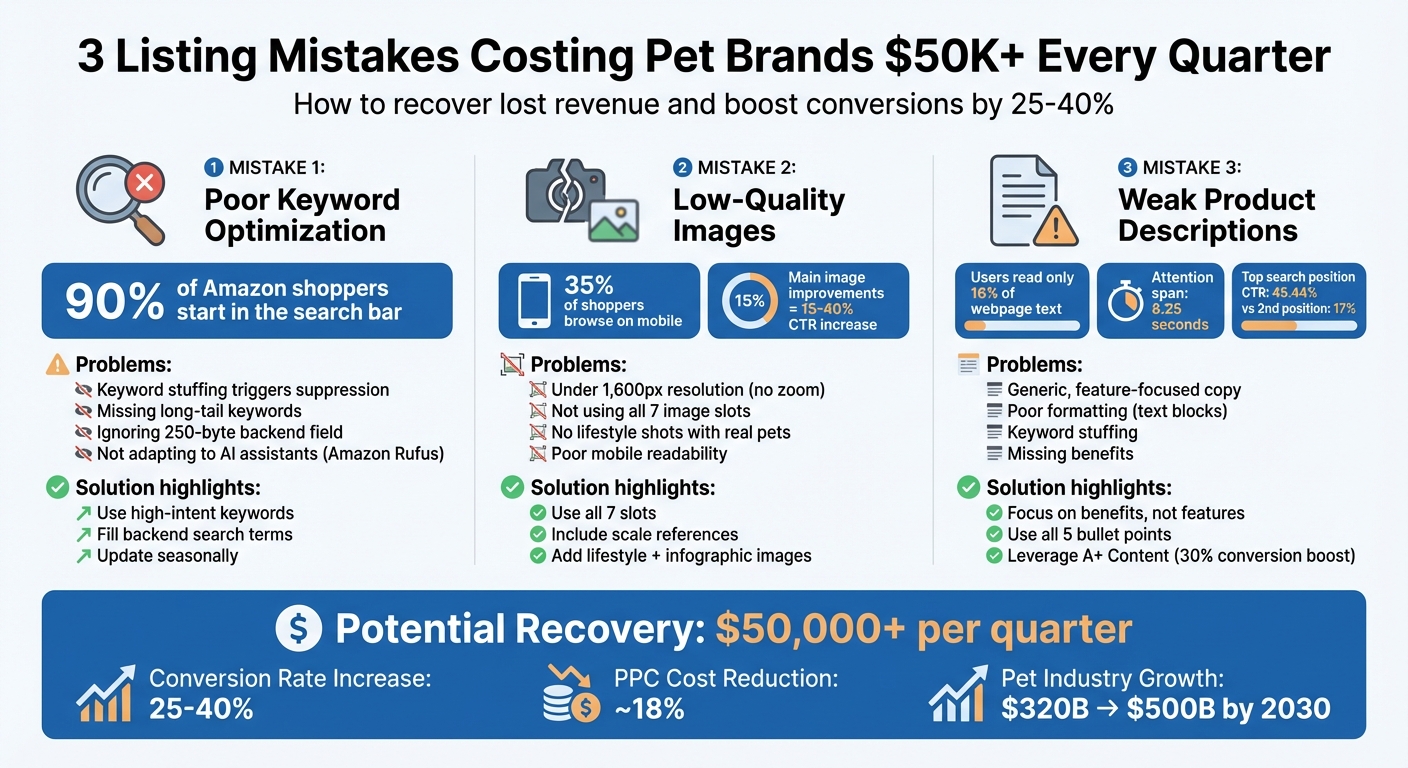
3 Listing Mistakes Costing Pet Brands $50K+ Quarterly: Impact and Solutions
ASIN Review: Squeeze Pouch for Dogs | Drive More Sales with Amazon Listing Optimization
Mistake 1: Poor Keyword Optimization
Getting your products noticed on major marketplaces starts with the right keywords. Without them, even high-quality items can go unseen, costing pet brands a fortune in lost sales. If your listings don’t include the terms shoppers are actually searching for, algorithms won’t show your products – no matter how great they are.
The problem isn’t just skipping a few keywords; it’s often about focusing too much on broad, generic terms. For instance, many brands prioritize high-traffic phrases like "dog treats" but miss out on long-tail keywords that actually drive purchases. A customer searching for "grain-free dental chews for small dogs" is likely ready to buy, while someone typing "dog treats" might just be browsing. Relying on vague terms wastes valuable title space and attracts less serious buyers.
Common Keyword Mistakes
One big mistake is keyword stuffing – repeating terms like "dog food dog treats dog snacks" to the point where your listing becomes unreadable. Not only does this confuse shoppers, but it also risks triggering suppression filters. As of 2025, Amazon limits repeating the same word in titles to no more than twice (excluding prepositions).
Another misstep is using the same keyword strategy across platforms. For example, Amazon favors keyword-packed titles up to 200 characters, while Walmart prefers shorter, simpler titles. Walmart may also flag unverified claims like "all-natural" unless properly certified. What works on one marketplace could lead to penalties on another.
Sellers often overlook the hidden 250-byte backend field where you can add synonyms, common misspellings, and related terms without cluttering your visible listing. This field is a goldmine for boosting discoverability.
Adding to the complexity, AI shopping assistants like Amazon Rufus are changing how people search. Instead of typing traditional keyword strings, shoppers now ask conversational questions like, "What’s a good snack for long car rides?" Listings that don’t adapt to this shift risk missing out on these emerging trends.
Revenue Impact of Poor Keyword Usage
The financial consequences of weak keyword strategies are hard to ignore. Listings that lack relevant keywords won’t rank well in search results, meaning your PPC campaigns end up wasting money on broad terms that don’t convert. Meanwhile, competitors with optimized keywords capture the high-intent traffic.
"Amazon’s search algorithm… has one primary purpose: surface the products most likely to be purchased. While Google serves the most relevant information, Amazon’s algorithm maximizes revenue per customer."
- Chuck Kessler, Content and SEO Manager, Canopy Management
Take KCHEX as an example. This pet brand, selling housebreaking pads, had a Listing Quality Score of just 3 out of 10 in January 2025. Their product title was only 80 characters long and didn’t include crucial terms like "potty training mats" or "disposable underpads", making the listing nearly invisible in search results. This shows how poor keyword choices can lead to low visibility, fewer sales, and a downward spiral where the algorithm deems the product irrelevant. With 90% of Amazon shoppers starting their journey in the search bar, missing key terms means losing sales.
How to Fix Your Keyword Strategy
To improve, use tools tailored to each marketplace. Platforms like Helium 10 and Jungle Scout can help identify high-conversion keywords. For broader trends, Google Keyword Planner and SEMrush offer valuable search volume insights.
Don’t overlook free tools available within marketplaces. For instance, Amazon’s autocomplete feature provides real-time suggestions based on what customers are searching for – type "grain-free dog" and see what pops up. If you have access, Amazon Brand Analytics’ Search Query Performance dashboard can reveal which terms are driving clicks and sales for your brand.
Focus on intent, not just volume. A term like "organic raw dog food for seniors" might have fewer searches than "dog food", but it attracts buyers who are ready to purchase. High-intent keywords should always take priority.
Strategic placement is just as important as keyword selection. Use primary, high-volume keywords in your product title, and save long-tail, intent-driven phrases for bullet points to address specific needs. The backend search terms are perfect for synonyms, abbreviations, and common misspellings. Don’t forget the image ALT text field – this allows up to 100 characters for additional keywords, misspellings, or even translations.
Here’s an example of success: Jungle Creations optimized their "Washable Pee Pads for Dogs" listing by using 186 out of 200 title characters to include specific use cases (like "puppy playpen" and "whelping box") and benefits (like "waterproof" and "reusable"). Combined with automated review requests, they earned over 400 positive reviews in under a year, dramatically improving their Best Seller Rank.
Lastly, update your keywords regularly to align with seasonal trends. Highlight terms like "calming treats" during fireworks season, "travel crates" in summer, or "winter coats" in the holiday months to capture demand spikes that competitors might miss. Fine-tuning your keyword strategy can help recover the $50K+ quarterly losses many brands experience.
| Keyword Type | Purpose | Pet Industry Example |
|---|---|---|
| Primary | High-volume, product-defining | "Dog treats", "Cat litter" |
| Long-Tail | Niche, high-conversion intent | "Grain-free treats for small breeds" |
| Competitor | Target adjacent demand | "Alternative to [Competitor Brand]" |
| Backend | Hidden discoverability | Misspellings, "puppy snacks" |
Next, we’ll dive into how product images can further boost shopper engagement.
Mistake 2: Low-Quality Product Images
Your product images are the first thing shoppers notice. If they’re blurry, generic, or fail to highlight key details, you could lose potential customers before they even glance at your product description. In the pet industry, where emotional appeal is critical, poor-quality images not only impact click-through rates but can also make your brand seem unreliable.
Common Image Problems
One of the most common mistakes is failing to utilize all seven image slots that Amazon provides. If you only upload three or four photos, shoppers might suspect you’re hiding something, which can diminish trust in your product and brand credibility.
Low-resolution images – anything under 1,600 pixels – don’t support Amazon’s zoom feature and can make your product appear low-quality. Additionally, Amazon requires that the main image fill at least 85% of the frame. Too much white space can weaken the visual impact of your listing.
Another frequent issue is the lack of lifestyle photos featuring real pets. Many brands rely on generic product renders or images with shadows and logos rather than showing actual pets interacting with the product. For instance, if you’re selling a dog bed, a photo of a happy dog lounging on it in a cozy home setting not only creates an emotional connection but also helps shoppers visualize the product’s size and use.
Infographics can also present challenges. Overloading them with text might work on desktops, but they often become unreadable on mobile devices. With over 150 million Amazon users browsing on mobile apps, critical selling points could get lost if the text is too small or dense.
Lastly, many listings fail to provide a sense of scale. A dog crate might look roomy in a photo, but without a size reference – like a pet or a person – shoppers can’t accurately judge its dimensions, leading to abandoned carts or increased returns.
Impact on Mobile and Desktop Shoppers
Low-quality images hit mobile shoppers especially hard. Since 35% of Amazon users prefer browsing on their smartphones, unclear visuals or unreadable text can drive them away instantly. Meanwhile, desktop users often rely on the zoom feature to inspect product details. If your images fall below the minimum resolution of 1,000 pixels, they won’t support zoom functionality, which can alienate detail-oriented buyers.
"High quality photos = High quality product. Low quality photos = Low quality product."
- Manoli Epitropoulos, Granitsa E-commerce Solutions
Improving your main image alone can increase click-through rates by 15% to 40%. As Manoli Epitropoulos puts it, "The less sure the customer is of what they’re buying, the less likely they are to buy".
These image-related issues can seriously hurt your conversions. Let’s dive into some actionable ways to elevate your visuals.
How to Improve Your Product Images
First, make sure to use all seven available image slots. Fill them with a mix of visuals, including:
- Lifestyle shots: Show the product in use, such as a dog enjoying a bed in a home setting.
- Infographics: Highlight key features like "waterproof" or "machine washable" with large, clear text.
- Scale references: Include objects or pets to provide a sense of size.
- Packaging shots: Showcase how the product arrives.
- Instructional images: Demonstrate assembly or usage steps.
Optimize your images for mobile by using bold, high-contrast fonts on infographics to ensure readability on smaller screens. Avoid cramming too much information into one image; instead, focus on one key benefit per visual.
For inspiration, take a page from Jungle Creations, which revamped their "Washable Pee Pads for Dogs" listing in 2025. By adding six high-quality images and a video, they received over 400 positive reviews in under a year and significantly improved their Best Seller Rank. You can also experiment with A/B testing different pet breeds in your main image, as some brands have found that featuring a specific breed can boost engagement.
Consider using A+ Content to add comparison charts, brand stories, and extra lifestyle imagery without cluttering your main image gallery. For example, in August 2025, Sony Electronics rolled out Premium A+ Content across their Amazon range. Jennifer Conley, their Channel Marketing Manager, reported that this approach increased sales and reduced returns by visually addressing customer concerns.
Keep your images fresh by updating them seasonally. For example, feature winter coats in December or travel crates in summer to keep your listings relevant and engaging. Don’t forget to utilize the ALT text field to include keywords, common misspellings, or even Spanish translations to improve discoverability.
| Image Type | Purpose | Key Requirement |
|---|---|---|
| Main Image | Drive Click-Through Rate (CTR) | Pure white background, 85% frame fill, no text |
| Lifestyle | Show usage/create emotional appeal | Real pets in natural settings with scale reference |
| Infographic | Highlight features and benefits | Large, readable text; focus on key points |
| Scale/Size | Reduce uncertainty and returns | Product shown with a common object or pet |
| Instructional | Demonstrate assembly or usage | Clear steps to ease customer hesitation |
Next, we’ll explore how even perfect images can’t save you if your product descriptions fall short.
sbb-itb-e2944f4
Mistake 3: Weak Product Descriptions
Even top-notch images can’t compensate for a weak product description. Like poor keyword usage or low-quality visuals, lackluster descriptions can derail your ability to convert casual browsers into paying customers. Unfortunately, many pet brands treat descriptions as an afterthought, relying on generic, one-size-fits-all text. The result? Missed opportunities and lost revenue. In fact, optimizing your product listings can boost conversion rates by 25% to 40%.
Problems with Generic Descriptions
The biggest issue with generic descriptions is their reliance on vague, feature-focused language that fails to connect with the customer. For example, simply stating that a dog bed is made of "memory foam" doesn’t resonate unless you explain how it benefits the pet, like easing joint pain. Similarly, calling out a "canvas upper" on pet boots falls flat without mentioning the warmth and comfort it provides.
Another common pitfall is poor formatting. Studies show that users read only about 16% of the words on a webpage, and with an average attention span of just 8.25 seconds, large blocks of text are often ignored. If your product listing lacks bullet points or structured sections, you’re making it harder for shoppers to find the information they need.
Keyword stuffing is another trap to avoid. Overloading your description with repetitive keywords creates a spammy feel, frustrating potential buyers and possibly triggering search penalties. Research indicates that 80% of online text isn’t read in full, so your description has to grab attention quickly or risk losing the customer entirely.
Lastly, many pet brands use the same generic copy for products aimed at both dogs and cats. This approach is ineffective because dog owners and cat owners often have different priorities. Tailored descriptions for each type of pet perform much better.
Missing Benefits and Features
Weak descriptions often fail not because of what they say, but because of what they leave out. They neglect to connect product features with the specific needs of pet owners, such as calming anxious pets or making potty training easier. As Henneke Duistermaat, a contributor to Entrepreneur, explains:
"Potential clients don’t want to know what your product is or does. They want to know what’s in it for them. How does it make their lives better? Which problems does it take away?"
A case study highlights that improving product descriptions can significantly boost rankings and reviews. Listings with low-quality descriptions – such as short, unclear titles or repetitive bullet points – often score poorly, which can hurt visibility. For instance, the click-through rate for the top search position on Amazon is 45.44%, but it drops sharply to 17% for the second position. Missing benefits or unclear features can push your listing further down the rankings.
How to Write Better Descriptions
To create descriptions that convert, focus on making them easy to read and benefit-driven. Use all five bullet point slots on Amazon to highlight your product’s key benefits and address potential buyer concerns. Keep each bullet point under 100 characters and prioritize essential information for mobile users. Start each bullet with a bolded benefit, followed by a brief explanation.
Shift the focus from features to benefits. For example, instead of saying "100% organic cotton", explain that the material is "soft and breathable for all-day comfort". Address specific customer pain points – if you’re selling a calming pet bed, mention how it helps reduce anxiety during thunderstorms or fireworks.
| Element | Common Mistake | Recommended Fix |
|---|---|---|
| Tone | Writing for search bots | Write naturally to engage buyers |
| Focus | Listing only features | Highlight benefits and explain their value |
| Formatting | Large text blocks | Use bullet points, headers, and A+ content |
| Keywords | Keyword stuffing | Strategically place keywords in key areas |
Leverage A+ Content to include comparison charts, brand stories, and additional visuals without cluttering your main description. Enhanced Brand Content can increase conversions by up to 30%.
Craft descriptions that tell a story about how your product improves the buyer’s life. For items like crates or furniture, include precise dimensions and weight limits to minimize returns. Use straightforward language and avoid overused buzzwords like "market-leading" or "world-class", which can undermine trust.
Lastly, don’t overlook backend search terms. Include synonyms and common misspellings that may not fit naturally into the visible description. This hidden optimization can help capture additional search traffic.
With clear, benefit-focused descriptions, your listings will be far more effective in converting shoppers into customers.
How to Fix Your Listings: Step-by-Step Plan
Revamping your listings can feel like a daunting task, but a structured approach can help you recover lost revenue. By auditing, updating, and refining your listings, you can ensure they’re optimized for both search engines and shoppers.
Audit Your Current Listings
Start by comparing your listings with your top three organic competitors. This will help you identify gaps in keywords, titles, bullet points, and even image quality. Tools like Helium 10’s Cerebro or Jungle Scout’s Keyword Scout are excellent for conducting a keyword gap analysis. These tools can reveal whether you’re targeting high-intent keywords or wasting space on less effective ones.
Keep in mind that over 80% of Amazon shoppers browse on mobile devices. Your product titles should work within the first 80 characters, as that’s what appears on mobile screens – and it also influences your canonical URL.
Also, ensure your titles meet Amazon’s updated standards for 2025. Titles should avoid repeating the same word more than twice (excluding prepositions and articles) and limit the use of special characters like "Also, ensure your titles meet Amazon’s updated standards for 2025. Titles should avoid repeating the same word more than twice (excluding prepositions and articles) and limit the use of special characters like "$", "?", and "!" [4]. Keep them under 150–200 characters to avoid truncation [37][4].quot;, "?", and "!". Keep them under 150–200 characters to avoid truncation.
Don’t overlook your images. They should meet the technical standards mentioned earlier, with a resolution of at least 1,600px to enable zoom functionality. Use all available image slots to address potential customer concerns.
Finally, dive into your Q&A section and customer reviews. Look for recurring complaints or points of confusion. These insights can highlight areas where your listing might be unclear or incomplete. Addressing these issues can significantly boost your conversion rates.
| Audit Element | Checkpoint | Goal |
|---|---|---|
| Title | First 80 characters | Include main keyword and ensure mobile compatibility |
| Images | 1,600px+ resolution | Enable zoom to increase buyer confidence |
| Bullets | 5 points used | Tackle top customer concerns from reviews |
| A+ Content | Comparison charts | Keep shoppers within your product catalog |
| Inventory | Stock levels | Avoid stockouts to maintain organic ranking |
Once your listings meet these baseline requirements, it’s time to make them seasonally relevant.
Update for Seasonal Trends
Product demand can shift dramatically throughout the year, especially in categories like pet products. Use tools like Amazon’s Search Bar auto-complete, Product Opportunity Explorer, and the Search Query Performance dashboard to uncover seasonal keywords with high search volume.
Seasonal updates aren’t just about keywords. Refresh your images to reflect the time of year – think cozy, festive visuals for winter or bright, outdoor shots for summer. These tweaks help your listings feel more relevant to shoppers searching for seasonal solutions.
Incorporate seasonal long-tail keywords into your titles, bullet points, and backend search terms. For example, phrases like "summer cooling mats for dogs" or "Christmas cat treats" often convert better than generic keywords due to their specificity. Update your backend "Generic Keyword" field every quarter with seasonal terms that don’t fit into your public-facing copy.
Take it a step further by creating seasonal bundles. Pair high-margin items with accessories tailored to the season to boost your average order value. Amazon’s "Manage Your Experiments" tool can help you A/B test the effectiveness of seasonal images versus standard ones during peak shopping periods.
You can also capitalize on events like National Pet Day or adoption-themed campaigns to drive urgency and engagement. With global pet spending expected to grow from $320 billion today to $500 billion by 2030, aligning your listings with seasonal trends can have a big impact on your sales.
If tackling all these steps feels overwhelming, there’s professional help available.
Use Emplicit‘s Services for Better Results

If managing listing optimization feels like too much, Emplicit offers tailored solutions through their Growth and Enterprise plans. These plans cover everything from listing updates to inventory management and omnichannel strategies.
The Growth plan is ideal for managing up to three marketplaces and includes services like inventory monitoring and account health checks to prevent stockouts that can hurt your rankings. For a more comprehensive approach, the Enterprise plan adds omnichannel marketing and gives you access to a full-service team with U.S.-based account managers who specialize in the pet industry.
Optimized listings often see a 25% to 40% increase in conversion rates. By combining better keyword targeting, high-quality images, and benefit-driven descriptions, you could recover $50,000 or more in lost quarterly sales.
These improvements don’t just stop at better conversions. Higher click-through rates (CTR) improve your organic rankings, bringing in more traffic. And as conversion rates climb, Amazon’s A10 algorithm takes notice, further boosting your visibility. This creates a positive cycle that continues to pay off well beyond the initial optimization.
Conclusion
Pet brands are losing over $50,000 each quarter due to poor keyword usage, subpar images, and weak product descriptions. These issues lead to low Listing Quality Scores, pushing products off the first search page and into obscurity. As Jake Schwarzbaum, Co-Founder and CEO of Velocity Sellers, aptly states:
"If ‘good enough’ listings still worked, you wouldn’t be here".
The financial upside of addressing these issues is hard to ignore. Brands that invest in thorough listing optimization often see conversion rates climb by 25–40%. Plus, better listings cut PPC costs by around 18%, as they convert clicks into actual sales more efficiently. In short, optimized listings improve conversions, boost organic rankings, and save money.
However, staying ahead requires more than a one-time fix. Marketplace rules are always changing. For example, updated title guidelines now restrict repeating the same word more than twice and limit the use of special characters. Navigating these updates while maximizing performance demands constant attention and expertise.
Emplicit offers tailored services to help brands secure and grow their revenue. Their Growth plan supports up to three marketplaces, providing inventory monitoring and account health checks to prevent stockouts that hurt rankings. For larger needs, the Enterprise plan includes omnichannel marketing and access to U.S.-based account managers with expertise in the pet industry. With professional guidance, you can maintain optimizations, adapt to algorithm changes, and safeguard your revenue.
The pet industry is on track to grow from $320 billion today to $500 billion by 2030. By optimizing your listings now, you position your brand to claim a share of this expanding market.
FAQs
What are the best ways to optimize keywords for my pet brand’s product listings?
To make your pet brand’s product listings more visible, focus on building a strong list of relevant keywords. Start by using tools like Amazon’s search bar, Product Opportunity Explorer, and keyword research software to find high-traffic terms. Include a mix of short-tail and long-tail keywords, branded and non-branded terms, as well as common misspellings and Spanish translations to expand your audience.
Integrate your main keywords naturally into product titles, bullet points, and descriptions. This ensures your listings remain easy to read while being optimized for search. For backend fields and image ALT text, use short, keyword-rich phrases without commas to maximize discoverability. Keep an eye on Amazon’s performance dashboards to see which keywords are driving traffic and sales, and fine-tune your approach based on the data.
Don’t skip testing – try A/B testing different titles and keyword placements to see what resonates most with your audience. By sharpening your keyword strategy, you could boost visibility and recover substantial lost sales, potentially adding over $50,000 in revenue each quarter.
How can I use product images to increase sales for my pet brand?
High-quality product images play a crucial role in increasing sales by giving shoppers the confidence they need to make a purchase. To make the most of your product listings, use all available image slots – ideally 7 or more – and include a mix of shots. Show different angles, close-ups of key features, and lifestyle images that demonstrate how pets interact with the product. For your main image, stick to Amazon’s guidelines: use a pure white background, ensure the product fills at least 85% of the frame, and aim for a resolution of 1,600 pixels or higher so shoppers can use the zoom feature. Avoid cluttering this image with text, logos, or unrelated items.
To enhance your images’ effectiveness, incorporate descriptive ALT text. Include high-volume keywords, common misspellings, and even translations (like Spanish) to attract more search traffic. Combine your visuals with A+ content that highlights key product details in plain text, which helps Amazon’s algorithm better understand and rank your listing. Finally, use A/B testing to experiment with different image variations, such as angles or props, to determine which visuals generate the most clicks and conversions.
How can I write product descriptions that boost sales for pet products?
To craft product descriptions that truly speak to pet owners and help drive sales, focus on highlighting clear benefits and incorporating targeted keywords. Start by using high-intent pet-related keywords such as “natural dog chew” or “odor-free cat litter.” Place your primary keyword early in the description to grab attention. Emphasize how each product feature directly benefits the pet or owner, like “Made with 100% USDA-grade beef to promote healthy gums.” Keep the format easy to skim by using short paragraphs or bullet points for the most important details.
Make your descriptions more relatable by sharing a snippet of your brand’s story or even a quick pet-owner anecdote. A conversational tone can create a stronger connection with your audience. Build trust by mentioning certifications or guarantees, such as “Veterinarian-approved” or “30-day satisfaction guarantee.” Don’t forget to test different versions of your descriptions to find what resonates most with your audience. Use performance metrics like sales or add-to-cart rates to refine your approach. Following these steps will help you connect with U.S. pet owners and increase conversions.
Related Blog Posts
- Why 73% of Pet Brands Fail on Amazon Before Year Two (And How to Be the Exception)
- The Humanization of Pet Care Is Changing Amazon. Is Your Brand Keeping Up?
- The Amazon Listing That Sold $1.2M in Dog Supplements Last Year Had One Thing Yours Doesn’t
- Why the Fastest-Growing Pet Brands on Amazon Are Spending Less on Ads, Not More