
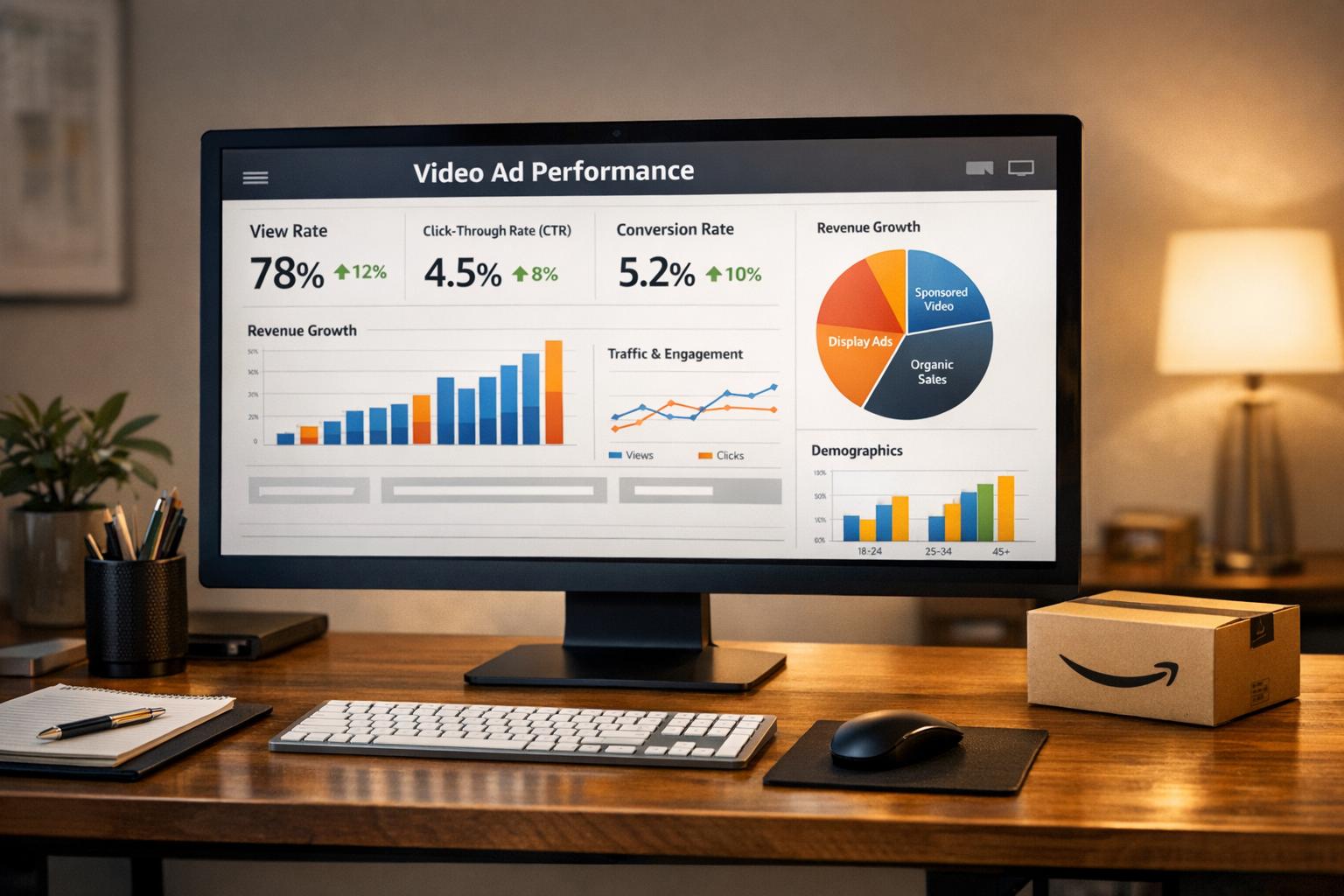
Want to make your Amazon video ads work harder? Tracking the right metrics is key. Instead of just focusing on clicks and conversions, dive deeper into engagement, efficiency, and visibility metrics to understand how viewers interact with your ads. Here’s what you need to know:
- Engagement Metrics: Monitor view rates, completion rates, and unmutes to see how well your video holds attention.
- Efficiency Metrics: Use ACoS (Advertising Cost of Sales) and CPC (Cost Per Click) to evaluate your ad spend.
- Visibility Metrics: Track impressions and CTR (Click-Through Rate) to measure reach and effectiveness.
Quick Steps to Start:
- Access video ad reports in Amazon’s Advertising Console via the Campaign Manager.
- Customize reports to include video-specific data like quartile views and unmutes.
- Use tools like Amazon Marketing Cloud (AMC) for advanced insights, like customer journeys and conversion paths.
Pro Tip: Focus your message in the first 5 seconds of your video to grab attention. Use captions to ensure your message lands, even on mute.
How to Access Video Ad Metrics in Amazon Advertising Console
Finding Your Video Ad Reports
To access video ad performance data, start at the Campaign Manager dashboard, which is the first page you see when you log into the Amazon Ads console. This dashboard displays a list of your campaigns along with key metrics, which you can filter by date range for a quick overview. For more detailed video metrics, navigate to the sidebar, click Measurement & Reporting, and select Sponsored ads reports.
From there, click Create report to build a custom report. Choose the relevant ad product – Sponsored Brands or Sponsored Display – to access video-specific data such as video starts, quartile views (25%, 50%, 75%), completions (100%), unmutes, and viewable impressions.
If you’re looking for deeper insights, use the Products page and Targeting page in the sidebar. These tools help you analyze the performance of individual products or targeting strategies within your video campaigns. For the most accurate insights, wait at least two weeks after launching a campaign before generating reports, ensuring you have enough data to make well-informed decisions.
Once your report is ready, refine it to focus specifically on video metrics for a clearer understanding of your campaign’s performance.
Customizing Reports for Video Campaigns
When customizing your report, you can choose from several report types, including Campaign, Targeting, Search Term, Advertised Product, Purchased Product, or Placement. Placement reports, for example, let you see whether your video ads perform better at the top of search results or on product detail pages.
To measure how your audience engages with your videos, add columns like Video complete and Unmutes. You can also filter results by custom date ranges to compare performance before and after making creative updates. Organize multiple campaigns into Portfolios by brand, category, or season to streamline reporting and budgeting.
For larger campaigns, save time by using Bulk operations. This feature allows you to download, edit, and re-upload campaign data for quick adjustments. You can also automate your reporting process by scheduling reports through Reporting settings, sending them directly to your email at your preferred intervals.
Why Your Amazon Sponsored Video Ads Suck (Real Data Analysis)
Key Video Ad Metrics to Track
Key Amazon Video Ad Metrics: What to Track and Why
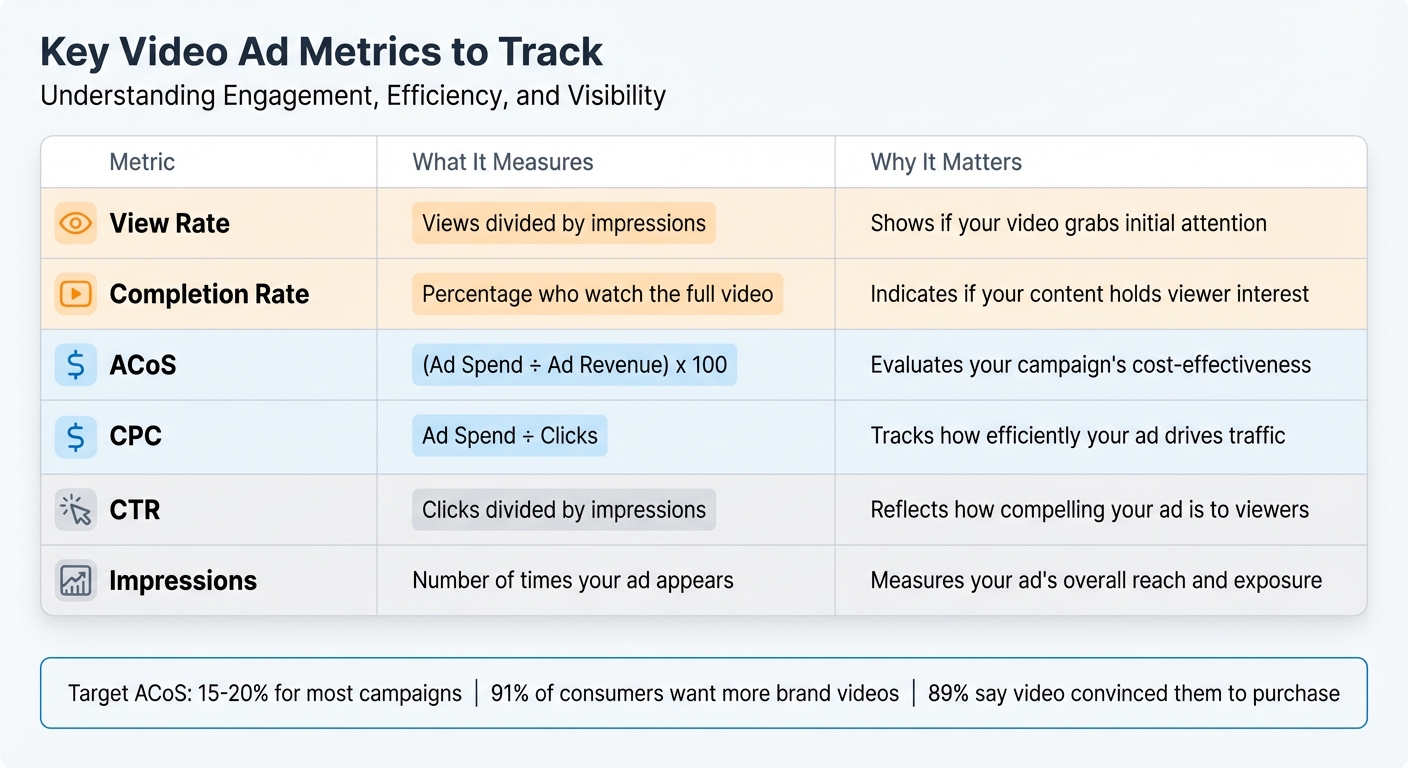
When analyzing your video ad performance, it’s essential to focus on three main categories: engagement (how viewers interact with your ad), efficiency (how cost-effective your campaign is), and visibility (how often your ad is being seen). By zeroing in on these areas, you can gain a clearer picture of what’s working and where adjustments might be needed.
View Rate and Completion Rate
View rate gauges how many people actually watched your video after it appeared on their screen. A "view" is counted when at least 50% of your ad is visible for two seconds. This metric helps determine if your ad placement and opening visuals are grabbing attention.
Completion rate, on the other hand, tracks the percentage of viewers who watch your video all the way through. Amazon provides a breakdown of video performance by quartiles – 25%, 50%, 75%, and 100% – so you can see exactly where viewers are dropping off. For instance, if many viewers stop watching around the halfway mark, it could mean your video is either too long or loses momentum. Considering that 91% of consumers want to see more videos from brands, a high completion rate is a strong sign that your content resonates with your audience.
Another engagement signal to monitor is unmute events. Since video ads often autoplay without sound, an unmute event shows that viewers are actively engaging with your ad. To ensure your message still lands even when muted, use captions and bold text overlays.
The 5-second view rate is another critical metric – it measures how many viewers stick around for at least the first five seconds of your ad. This is where you need to hook your audience. Place your key message or value proposition upfront to make an immediate impact before viewers scroll away.
ACoS and CPC
Beyond engagement, efficiency metrics like ACoS and CPC offer insights into how well your ad spend translates into results.
Advertising Cost of Sales (ACoS) is calculated by dividing your total ad spend by your ad revenue, then multiplying by 100. For example, if you spend $500 on ads and generate $2,500 in sales, your ACoS would be 20%. Many brands aim for an ACoS between 15% and 20%, though this target can vary depending on profit margins. For campaigns focused on building awareness rather than driving immediate sales, a higher ACoS might be acceptable, especially during the launch phase. Keep in mind that Amazon’s 7-day attribution window may temporarily inflate your ACoS until all sales are accounted for.
Cost Per Click (CPC) measures how much you pay each time someone clicks on your video ad. You can calculate it by dividing your total ad spend by the number of clicks. Video ads often use either a CPC or cost-per-thousand viewable impressions (vCPM) bidding model. Even with a small budget – say $10 – you can test campaigns effectively. However, if your CPC rises without a boost in conversions, it might mean your ad generates interest but fails to drive action.
CTR and Impressions
Impressions reflect how many times your ad is shown. If your impressions are lower than anticipated, it could mean your bid isn’t competitive enough to secure placements. In that case, consider increasing your bid or budget.
Click-Through Rate (CTR) measures the ratio of clicks to impressions. If your ad has high impressions but a low CTR, it might indicate that your messaging or visuals aren’t connecting with viewers. Since 89% of consumers say watching a video has convinced them to purchase a product or service, a strong CTR shows that your video is effectively moving viewers from awareness to consideration.
| Metric | Measures | Importance |
|---|---|---|
| View Rate | Views divided by impressions | Shows if your video grabs initial attention |
| Completion Rate | Percentage who watch the full video | Indicates if your content holds viewer interest |
| ACoS | (Ad Spend ÷ Ad Revenue) x 100 | Evaluates your campaign’s cost-effectiveness |
| CPC | Ad Spend ÷ Clicks | Tracks how efficiently your ad drives traffic |
| CTR | Clicks divided by impressions | Reflects how compelling your ad is to viewers |
| Impressions | Number of times your ad appears | Measures your ad’s overall reach and exposure |
sbb-itb-e2944f4
Using Advanced Tools for Deeper Analysis
Basic metrics can give you an overview of your ad performance, but advanced tools like Amazon Marketing Cloud (AMC) take things to the next level. AMC offers a more detailed look at how your video ads influence customer behavior, going beyond surface-level data to map out complete customer journeys.
AMC is a "clean room" solution designed for custom analytics. It works with pseudonymized data, combining Amazon Ads event-level data with your own first-party inputs. One of its standout features is a 25-month lookback window, which allows you to analyze long-term trends and patterns. For eligible advertisers, AMC is available at no cost, whether you’re using Amazon DSP or sponsored ads. This extended window means you can track how a video campaign from last holiday season might still be driving repeat purchases months later.
Amazon Marketing Cloud for Attribution Analysis
One of AMC’s key features is its path-to-conversion reporting, which lays out the sequence of ad exposures that lead to a purchase. For example, it can help you determine whether a Streaming TV ad introduced a customer to your brand or acted as the final push for conversion. By offering insights into 30-day conversion paths, AMC gives you a clearer picture of how video ads fit into your broader marketing strategy. These insights build on standard metrics, providing a more complete understanding of audience behavior and campaign performance.
A real-world example? A study with Netgear and Amazon Ads partner Flywheel revealed that Streaming TV ads boosted incremental reach by 67% and doubled purchase rates among exposed consumers.
AMC also lets you segment your audience based on video engagement. For instance, you could identify viewers who watched at least 75% of your video ad but didn’t make a purchase, then retarget them with display or sponsored ads. If you’re running Amazon Live shoppable streams, AMC can track engagement and shopping events, helping you pinpoint which live videos generate the most conversions. And for teams without SQL expertise, the Ads Agent (beta) feature uses AI-powered natural language to create analytics queries, making it easier for everyone to access advanced insights.
How to Optimize Video Campaigns Using Performance Data
Once you’ve analyzed your video metrics, it’s time to put that data to work. Use these insights to amplify the success of your best campaigns and cut back on those that aren’t delivering. This means fine-tuning bids, sharpening your targeting, and tweaking creative elements based on performance trends.
Identifying Your Best-Performing Campaigns
To spot your top campaigns, focus on metrics like low ACoS (Advertising Cost of Sales), high ROAS (Return on Ad Spend), strong conversion rates, and solid Video Completion Rates across quartiles (25%, 50%, 75%). For instance, if Campaign A has a 15% ACoS while Campaign B is at 40%, it’s clear where your budget should go. However, don’t just stop there. A campaign with high completion rates but weak conversions might signal that your product detail page needs some work.
Dive into Placement Reports to see where your ads thrive – are they performing better at the top of search results or on product detail pages? Also, keep an eye on New-to-Brand metrics to gauge which campaigns are pulling in first-time customers. If you’re running campaigns outside of Amazon, use Amazon Attribution to track traffic and sales from external sources.
Once you’ve identified your strongest campaigns, adjust bids and creative elements to push their performance even further.
Adjusting Bids and Creative Elements
If your campaign has a high CTR (Click-Through Rate) but low impressions, it’s time to increase your bids and daily budget. On the flip side, if you’re seeing low CTR (below 0.03%) despite high impressions, your creative likely needs a refresh. Experiment with new headlines, modify the opening seconds of your video, or update product images to better resonate with your audience.
Focus on keywords that convert well, and lower bids on those driving up your ACoS. If CTR remains low, revisit your creative strategy. Dynamic bidding can also help by automatically adjusting bids based on real-time conversions.
Since video ads autoplay on mute, make sure to include captions and on-screen text to communicate your message effectively. Tailor your video content to match the viewer’s mindset – use educational hooks to engage new audiences and urgency-driven messaging for returning customers. As Destaney Wishon, Co-founder and CEO of BTR Media, wisely puts it:
"Video should not be treated as a separate tactic. It belongs across the whole shopper journey".
Finally, deliver your core message within the first five seconds of your video. That’s your window to grab attention before viewers scroll away.
Conclusion
Tracking video ad performance is a continuous effort that distinguishes effective campaigns from wasted budgets. By keeping an eye on metrics like ACoS, ROAS, CTR, and video completion rates, you gain the clarity needed to assess what’s working and what needs improvement. These numbers are the backbone of a smart, data-driven video strategy.
Tie your metrics directly to your campaign objectives to ensure your efforts drive meaningful results. For example, if your goal is brand awareness, focus on impressions and CPM. If you’re aiming for consideration, keep an eye on your CTR and 5-second view rate. When the goal is conversions, hone in on metrics like conversion rates and ACoS. Additionally, track new-to-brand metrics to see how well your campaigns are attracting first-time customers versus repeat buyers.
Give your campaigns at least two weeks to gather data before making changes. Use this time to identify trends – are some placements performing better than others? Is your creative engaging enough in the first five seconds? Are high impressions leading to clicks and, ultimately, sales? These insights can help you fine-tune your strategy and allocate your budget more effectively.
Amazon’s video ad platform makes it easy to start testing, with budgets as low as $10. Whether you’re using the Amazon Advertising Console for straightforward reporting or diving deeper into Amazon Marketing Cloud for detailed attribution analysis, the tools are there to support your decision-making. The most successful brands are those that consistently test, analyze, and refine their approach based on real-world data. Regular evaluation and quick adjustments are the foundation for thriving in today’s competitive marketplace.
FAQs
What metrics should I track to evaluate the performance of Amazon video ads?
To gauge how well your Amazon video ads are performing, keep an eye on key engagement metrics. These include viewable impressions, view-through rate (VTR), and viewable click-through rate (vCTR). It’s also important to monitor 5-second views along with their view rate, as well as video completion rates – broken down into first quartile, midpoint, third quartile, and full video views. Don’t overlook unmutes, as they can reveal how compelling your video content is.
By diving into these metrics, you can gain valuable insights into viewer behavior and fine-tune your campaigns for stronger results.
How does Amazon Marketing Cloud improve video ad performance analysis?
Amazon Marketing Cloud offers advertisers a secure, privacy-conscious way to dive deeper into analyzing video ad performance. The platform enables you to generate custom SQL-based reports, making it easier to track important metrics, conduct path-to-conversion analyses, and segment audiences with precision.
What sets it apart are features like cross-channel measurement and detailed insights into Amazon Live video engagement. These tools provide more than just basic post-campaign metrics – they deliver a broader perspective on how your ads perform and influence shopping behavior.
What are the best ways to improve video ad completion rates on Amazon?
To improve video ad completion rates on Amazon, focus on crafting content that resonates with your audience while optimizing it for the platform. Start by ensuring your message aligns with your target audience’s interests – this includes matching your tone, storytelling, and product benefits to what matters most to them. Keep your video concise, ideally between 15–30 seconds, and make those first 3–5 seconds count by featuring your logo or an attention-grabbing hook right away.
Since Amazon video ads autoplay without sound, it’s crucial to include captions or striking visuals that effectively communicate your message. Highlight your product in action within relatable, everyday scenarios to create a stronger connection with viewers. Leverage Amazon’s video metrics, such as view-through rates and completions, to assess how your ads are performing and make necessary adjustments. For extra support, you can collaborate with experts like Emplicit, who specialize in optimizing Amazon video campaigns to drive better engagement and returns.