

Monitoring Amazon PPC campaigns in real time is crucial to avoid wasted ad spend and to capitalize on opportunities as they arise. With tools like Amazon Marketing Stream, Advertising Console, and custom dashboards, you can track key metrics such as impressions, clicks, ACoS, and conversion rates hourly, enabling swift adjustments to improve performance. Real-time insights help prevent budget drain on underperforming keywords or out-of-stock products, while strategies like dayparting can maximize ROI during peak hours.
Here’s what you can do to stay ahead:
- Track Key Metrics: Monitor impressions, CTR, CPC, ACoS, and conversion rates to identify performance trends.
- Use Amazon Tools: Leverage the Campaign Manager Dashboard, Budgets Page, and Products Page for instant data.
- Automate with Marketing Stream: Get hourly updates and alerts for faster decision-making.
- Build Custom Dashboards: Centralize data with tools like Looker Studio or Amazon QuickSight for deeper analysis.
- Set Alerts: Use automated notifications for budget or performance changes to act immediately.
Real-time monitoring ensures campaigns remain efficient and profitable, helping advertisers optimize their spend and boost returns.
Streamline Amazon PPC with Data Integration and Automated Analytics
Key Metrics to Track in Real-Time
Amazon PPC Real-Time Monitoring Key Metrics and Benchmarks
Keeping an eye on metrics that directly influence ad spend and revenue allows you to address issues before they become costly. Below, we’ll break down the key metrics and how they can shape your Amazon PPC strategy.
Impressions, Clicks, and Click-Through Rate (CTR)
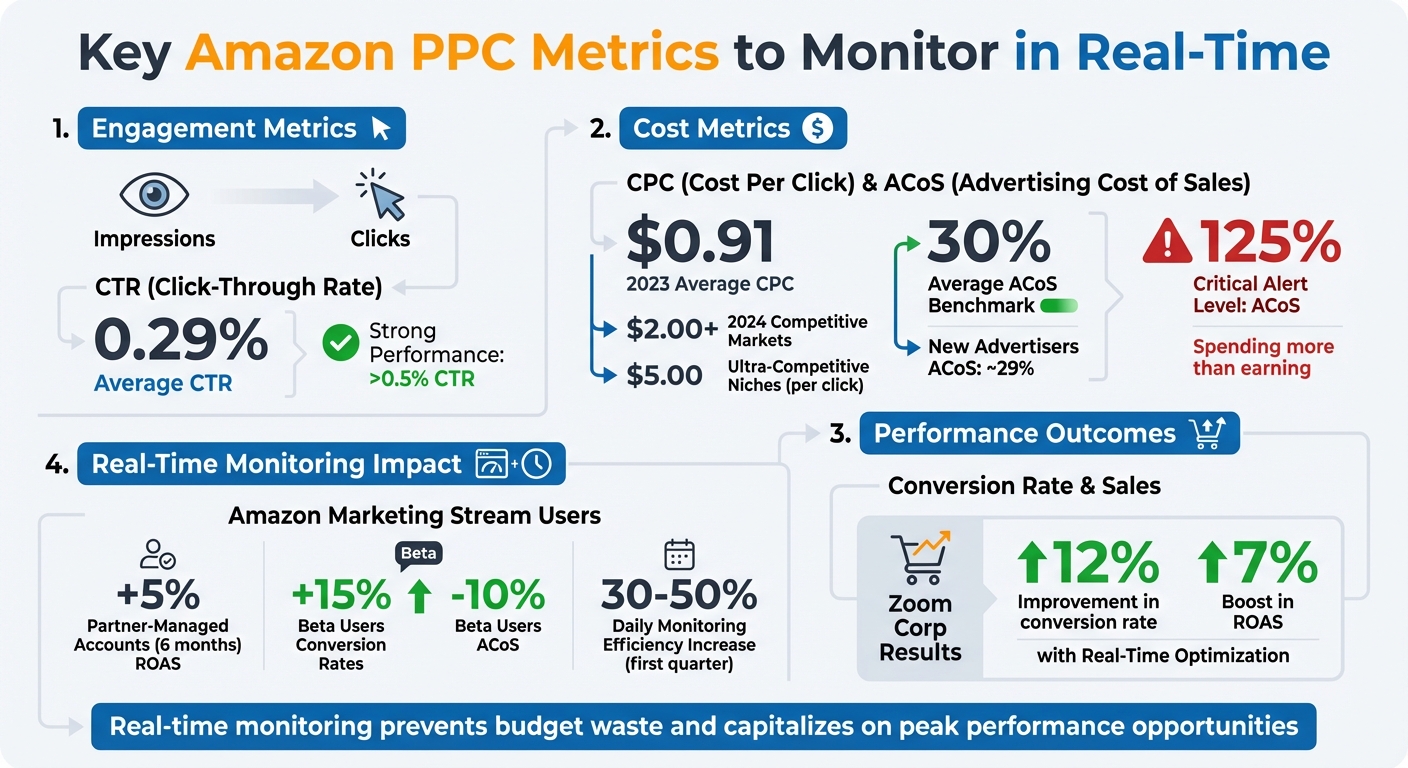
These metrics measure how visible and engaging your ads are. Impressions show how many shoppers saw your ad, clicks indicate how many interacted with it, and CTR calculates the percentage of impressions that resulted in clicks. On average, Amazon Sponsored Products have a CTR of 0.29%, but anything above 0.5% stands out as strong performance.
If you notice high impressions but low clicks, it’s a sign your targeting or ad creatives might need immediate adjustments. For instance, in 2023, JELLYSUB, a household goods brand, used Amazon Marketing Stream’s hourly data via SellerSpace to track keyword performance by ad placement. By reallocating their budget to placements with better CTR during Prime Day, they significantly boosted daily impressions and sales revenue. Similarly, SellerKO, an auto-parts seller in China, optimized bids based on impression data during specific time slots, achieving better results.
Cost-Per-Click (CPC) and Advertising Cost of Sales (ACoS)
CPC tells you how much you’re spending each time someone clicks on your ad, while ACoS measures the percentage of your sales revenue spent on advertising. In 2023, the average CPC for Amazon Ads in the U.S. was $0.91. However, by 2024, competitive markets frequently saw CPCs exceed $2.00, and in ultra-competitive niches, it reached $5.00 per click. ACoS benchmarks are usually around 30%, though new advertisers often experience rates closer to 29%.
Tracking these metrics in real time helps you avoid letting small inefficiencies grow into major losses. For example, if ACoS suddenly spikes, you can quickly pause underperforming campaigns and redirect funds to better-performing ones. When ACoS hits 125%, it means you’re spending more on ads than you’re earning in revenue – a loss that real-time tracking can help you catch and correct before it worsens.
Conversion Rate and Total Sales
Conversion rate measures the percentage of clicks that lead to purchases, while total sales reflects the revenue generated by your ads. A high number of clicks but low conversions often points to issues with your product listing, such as pricing, descriptions, or lack of reviews, and requires immediate attention.
One example of success comes from Zoom Corp, which partnered with DemandHelm to analyze hourly retail and ad trends. Their intraday optimization strategy helped them achieve a 12% improvement in conversion rate and a 7% boost in ROAS. By identifying and addressing conversion dips during specific hours, they adjusted bids to maximize results before exhausting their daily budget.
Setting Up Amazon’s Native Tools for Real-Time Monitoring
Getting started with real-time monitoring on Amazon involves using their built-in tools, which provide instant performance data to help you make quick adjustments. The Campaign Manager Dashboard is your go-to for tracking campaigns and key metrics by date. From there, you can dive into individual campaigns to tweak bids or set budget rules right from the sidebar. The Budgets Page offers a snapshot of how your budget is being spent and suggests adjustments to keep campaigns running during high-traffic periods. Meanwhile, the Targeting Page breaks down metrics for automatic, keyword, product, and audience targets. For a closer look at product-level performance, the Products Page delivers data on impressions, clicks, sales, and ROAS, along with actionable recommendations to improve your listings. Once you’re familiar with these tools, it’s time to configure the Advertising Console for deeper insights.
Configuring the Amazon Advertising Console
The Amazon Advertising Console takes things up a notch by letting you create custom, recurring reports for your Sponsored Ads campaigns. For example, reports like search term or placement reports can help pinpoint high-performing targets so you can fine-tune your bids. Placement reports, in particular, are useful for deciding whether to increase bids for Top of Search placements to enhance performance. Don’t forget to check the "Recommendations" tab regularly – Amazon provides tailored suggestions there to help optimize your campaigns. For even more detailed, real-time data, you can activate Amazon Marketing Stream.
Activating Amazon Marketing Stream
Amazon Marketing Stream is a game-changer for real-time data. Unlike the Advertising Console, which requires manual checking, this system pushes hourly campaign metrics and change notifications directly to your AWS environment. Within minutes of an event, you’ll receive JSON messages detailing performance changes. To get started, you’ll need an active Amazon Ads API integration, an AWS account, and development resources. Set up a data destination in AWS using SQS or Data Firehose, configure security with IAM roles, and subscribe to datasets like Sponsored Products, Sponsored Brands, or Sponsored Display. While Amazon doesn’t charge extra for Marketing Stream, standard AWS usage fees apply.
Here’s a real-world example: Sunnydaze Decor, a home and garden product importer, used the Xmars AI platform integrated with Amazon Marketing Stream. Their "Smart Creation" tool automated budget and bid adjustments based on real-time data, resulting in a 408% increase in ad-attributable sales.
"Amazon Marketing Stream now gives us the ability to adapt quickly, shifting investments to ad placements in near real-time, to optimize for incremental growth for the brands we manage and fine-tune the digital shelf." – Patrick Miller, Co-President, Ascential Digital Commerce
Using Amazon Ads API for Automated Alerts
The Amazon Ads API, especially when paired with Marketing Stream, can automate alerts and actions based on campaign activity. For instance, it can send notifications when a campaign’s budget changes by 5% or more. You can use AWS Lambda to trigger API calls that adjust budgets in real time, ensuring your campaigns don’t go offline. By subscribing to messaging data, you’ll also receive alerts for changes in campaign states, ad groups, and ads, allowing you to monitor campaign health without delay. Choose SQS for quick processing or Firehose for continuous data streaming.
Advertisers using Amazon Marketing Stream have reported impressive results. Partner-managed accounts saw a 5% boost in ROAS over six months, while beta users experienced a 15% increase in conversion rates and a 10% drop in ACoS. These tools and integrations make real-time monitoring not just achievable but highly effective for advertisers.
Building Custom Dashboards for Real-Time Insights
Once you’ve set up Amazon’s native tools, the next step is creating custom dashboards to bring all your PPC data together in one place. These dashboards give you a clear view across different channels, let you compare performance across platforms, analyze individual ASINs, and even integrate inventory data to avoid advertising products that are out of stock. Unlike Amazon’s standard console – which offers only basic charts and Amazon-only data – custom dashboards provide advanced features like filtering by category, geography, or SKU. They also use automated data pipelines to keep your information up-to-date, eliminating the hassle of manual CSV exports.
Integrating Data with Google Data Studio
Looker Studio, previously known as Google Data Studio, is a popular tool for visualizing Amazon PPC data. However, since it doesn’t have a native Amazon Ads connector, you’ll need to rely on third-party connectors like Supermetrics, Power My Analytics, Windsor.ai, or Porter Metrics to pull in your data. If you prefer, you can manually export data using Google Sheets, though this approach lacks automation. For a more seamless option, use Amazon Marketing Stream to receive hourly data updates in AWS, which you can then visualize in Amazon QuickSight using natural language queries.
Once your data is connected, you can include scorecards at the top of your dashboard to display key metrics like Total Spend, Sales, ACoS, and ROAS. Adding annotations for major events – like launching a new campaign or adjusting budgets – helps you see how these changes impact performance over time. For more detailed analysis, set up views that track ROAS and spend by SKU. This makes it easy to spot underperforming products and pause them quickly. These visualizations go beyond what native tools offer, providing instant insights across multiple channels.
Setting Up Budget Alerts and Conditional Formatting
After visualizing your data, the next step is setting up alerts to catch critical issues before they escalate. Conditional formatting is a must-have feature for identifying problems at a glance. For example, you can use color-coded rules to highlight when ACoS goes above your target or when your budget is nearly maxed out. A simple setup might include marking cells red if ACoS exceeds 30% or if daily spend reaches 90% of the budget, making it easy to pinpoint areas that need attention.
To stay on top of changes, you can also set up automated notifications with tools like Optmyzr. These alerts can be configured to notify you via email, Slack, or Microsoft Teams when key metrics shift – for instance, if ACoS spikes, sales drop below a certain level, or inventory runs dangerously low. This ensures you’re aware of potential problems, even when you’re not actively monitoring your campaigns. These systems help you respond quickly and effectively, keeping your campaigns on track.
sbb-itb-e2944f4
Using Emplicit for Advanced PPC Campaign Monitoring
Setting up custom dashboards for PPC campaigns can be a daunting task. That’s where Emplicit steps in, simplifying the process and improving how you monitor campaign performance. With over a decade of experience in Amazon advertising, a team of more than 70 experts, and a track record of helping over 5,000 brands generate $250 million in sales, Emplicit brings a wealth of expertise. They specialize in spotting KPI anomalies – like unexpected jumps in ACoS or sudden dips in sales – and use advanced metric models to trace these issues back to their root causes. This means you’re not just alerted when something goes wrong, but you also gain insight into why it happened and how to fix it. Their monitoring system seamlessly complements the strategies discussed earlier.
Emplicit’s Custom PPC Management Services
Emplicit enhances your Amazon Marketing Stream setup by offering comprehensive PPC management that turns raw data into actionable strategies. Their dashboards track key performance metrics like ACoS, ROAS, and CTR in real time, pulling data from Amazon Marketing Cloud, Seller Central, Google Analytics, and external data warehouses. This gives you an all-encompassing view of your business. What makes their solution stand out is the ability to consolidate metrics from multiple Amazon accounts into a single, unified interface. Plus, they integrate ad data with inventory and sales trends, giving you a complete picture of your business performance – not just isolated campaign stats.
Benefits of Emplicit’s Custom Dashboards and Alerts
Emplicit’s system takes optimization to the next level with automated alerts and smart bidding tools. Their dashboards are highly customizable, featuring drag-and-drop widgets, adjustable date ranges for comparing performance, and the ability to focus on the KPIs that matter most to your business. Automated alerts notify you of critical changes – like when budgets are nearing their limits or significant metric shifts occur – while scheduled reports keep you updated without requiring constant manual checks. On top of that, the system provides smart bidding recommendations based on historical data, making it easier to adjust bids proactively. Detailed reports break down campaign performance, highlighting top-performing and underperforming keywords, while tracking budget usage in real time. This allows you to adapt your strategy quickly as market conditions evolve.
Best Practices for Daily Real-Time Monitoring
Setting Daily Checkpoints for Key Metrics
Start your day by reviewing essential metrics like ACoS, ad spend, budget pacing, and CTR. This routine helps you catch small issues before they snowball into costly problems. Don’t forget to check your inventory and Buy Box status – advertising out-of-stock items or losing the Buy Box can drain your budget and hurt your rankings. Additionally, keep an eye out for negative reviews or competitor price changes that might suddenly impact your conversion rates. Consistent daily monitoring has been shown to increase campaign efficiency by as much as 30–50% within the first quarter.
Identifying Trends and Reacting Quickly
Leverage real-time data to fine-tune your campaigns. Use hourly metrics to adjust bids strategically – raise them during high-traffic hours and lower them during slower periods. A great example is Lean With Lilly, a health and wellness brand that used Amazon Marketing Stream in 2023 to optimize bids hourly. By increasing bids during peak traffic and scaling back during quieter times, they maximized their ad performance.
Set up automated alerts, like email or Slack notifications, to flag critical KPI changes – such as unexpected drops in sales or spikes in ACoS. This way, you can respond immediately without constantly monitoring the dashboard. Additionally, review search term reports daily to identify and exclude inefficient queries using negative keywords. Combining these daily actions with automated tools ensures your campaigns stay on track while still allowing for strategic oversight.
Balancing Automation and Manual Oversight
While automation is a powerful tool, it’s not a substitute for strategic decision-making. Use automation for tasks like data collection, hourly bid adjustments, and budget alerts. However, reserve manual oversight for decisions that require context and judgment. A common pitfall is over-optimization – making major bid changes based on just one day’s data. Instead, let data stabilize over 7–10 days before making significant adjustments unless performance is clearly declining.
"Automation doesn’t replace strategic thinking but frees you to focus on optimization rather than data collection".
For tasks like dayparting and setting threshold alerts, automation is invaluable. However, always manually verify inventory levels in Seller Central before scaling up ad spend. To maintain clarity, document any manual changes so they don’t get confused with automated adjustments. This balance between automation and human oversight ensures your real-time metrics lead to long-term campaign success.
Conclusion
Keeping a close eye on your Amazon PPC campaigns in real time has become a must in today’s competitive marketplace, where ad revenue surged to $38 billion between 2020 and 2022. Monitoring hourly ensures you’re not wasting budget on out-of-stock products and helps you capitalize on peak sales moments.
Tools like Amazon Marketing Stream, custom dashboards, and automated alerts make this process easier. These tools have delivered impressive results, like enabling JELLYSUB to increase their Prime Day revenue nearly 12x by instantly adjusting bids.
"Being able to know in real time how your campaign is performing is imperative for optimizing advertising spend." – Amazon Web Services
To get started, activate Amazon Marketing Stream, set up daily checkpoints for tracking key metrics, and configure automated alerts for critical indicators like ACoS and budget usage. Once the basics are covered, you can explore advanced tactics like dayparting and syncing your inventory with your campaigns. The payoff is clear: advertisers using real-time tools saw an average 5% boost in ROAS over six months.
Whether you’re managing campaigns solo or with expert assistance, the goal is always the same – turn real-time insights into immediate actions. Acting quickly on trends not only stretches your budget further but also sharpens your campaign performance.
FAQs
How can I monitor Amazon PPC campaigns in real time using Amazon Marketing Stream?
Amazon Marketing Stream (AMS) gives you the power to monitor your PPC campaigns in real time by delivering hourly updates on crucial metrics like impressions, clicks, spend, ACOS, and conversions. To get started, you’ll need access to the Amazon Ads API and a subscription to the AMS data feed. Once subscribed, this data can be directed to an AWS destination, such as an S3 bucket or Kinesis Data Firehose, for processing.
After the data is ingested, you can use tools like Amazon QuickSight or other business intelligence platforms to visualize your campaign metrics. These insights make it easier to track performance and spot trends. You can even set up alerts to flag issues like budget overspending, sudden ACOS spikes, or dips in conversions. This allows you to act quickly – whether that means tweaking bids or pausing ads that aren’t delivering results.
For a hassle-free setup, you might consider partnering with a specialist like Emplicit, who can manage the technical heavy lifting while you concentrate on refining your campaign strategy.
What are the most important metrics to track for optimizing Amazon PPC campaigns?
To get the most out of your Amazon PPC campaigns, it’s essential to keep an eye on the right metrics. These numbers give you a clear picture of how your ads are performing and where you can make adjustments to improve results. Here are the key metrics to monitor:
- Advertising Cost of Sale (ACoS): This tells you what percentage of your ad spend is going toward generating sales. It’s a quick way to assess whether your campaigns are profitable.
- Return on Ad Spend (ROAS): This metric shows how much revenue you’re earning for every dollar spent on ads. It’s a direct indicator of your campaign’s efficiency.
- Click-Through Rate (CTR): A higher CTR means your ad is resonating with shoppers. It measures how often people click on your ad after seeing it.
- Cost-Per-Click (CPC): Keeping track of your average CPC helps you manage your budget effectively by showing how much each click is costing you.
- Impressions and Clicks: These metrics reveal how visible your ads are and how much engagement they’re generating.
- Conversion Rate and Sales: This is where the rubber meets the road – how many clicks are actually leading to purchases.
By analyzing these metrics regularly, you can pinpoint what’s working, make smarter bidding decisions, and fine-tune your targeting to boost both performance and profitability.
How can I set up automated alerts for changes in my Amazon PPC campaign performance?
Setting up automated alerts for your Amazon PPC campaigns is a smart way to keep tabs on your budget and performance shifts as they happen. Here’s how to get started:
- Pinpoint key metrics: Determine which performance indicators matter most to you. This could include daily spend surpassing a specific percentage of your budget, your ACoS (Advertising Cost of Sales) exceeding its target, or a noticeable dip in impressions or sales.
- Define alert rules: Use your monitoring tool to establish rules for these metrics. For instance, you might set up an alert to notify you when your daily spend hits 80% of your budget or if your ACoS climbs above 25%.
- Select notification methods: Decide how you’d like to be alerted – whether that’s through email, messaging apps like Slack or Microsoft Teams, or directly within your internal systems.
By setting up these alerts, you’ll get real-time updates on critical changes, allowing you to respond quickly and prevent small issues from turning into major problems. If you’re looking for expert help, Emplicit’s ecommerce services include setting up and managing these alerts as part of their Amazon PPC management offerings.