

Monitoring your PPC ROI in real time is critical to maximizing your ad spend and avoiding wasted resources. By tracking key metrics like ROAS, CPC, and conversion rates as they happen, you can make faster adjustments to optimize performance. Here’s what you need to know:
- Why It Matters: Real-time monitoring helps identify underperforming campaigns, adjust budgets, and respond to sudden changes like rising CPCs or falling CTRs before they impact profitability.
- Key Metrics:
- ROAS (Return on Ad Spend): Measures revenue efficiency. A 4:1 ratio is a common benchmark.
- CPC (Cost Per Click): Tracks ad spend per click; influenced by Quality Score.
- Conversion Rates: Indicates how well clicks turn into sales or leads.
- CLV (Customer Lifetime Value): Focuses on long-term profitability over short-term gains.
- Tools to Use:
- Google Analytics 4: For detailed attribution and event tracking.
- TapClicks: Creates unified dashboards for easy campaign oversight.
- Optmyzr: Sends real-time alerts and automates bid adjustments.
- How to Start:
- Connect ad platforms (Google Ads, Meta, etc.) with revenue tracking tools.
- Set up dashboards for live data updates and ROAS calculations.
- Use insights to optimize bids, ad copy, and targeting.
Real-time data lets you act quickly, ensuring your PPC campaigns stay profitable and aligned with your goals. Ready to get started? Dive into the tools and strategies that can make it happen.
How to Track REAL Marketing ROI (Not Just Attribution) | The Ad Lab Live! EP046
Key Metrics for PPC ROI Tracking
Getting the most out of your PPC campaigns means focusing on the metrics that truly matter. These are the numbers that separate campaigns that waste money from those that generate profit. By understanding these key data points, you can make smarter decisions and protect your ROI.
Revenue and Return on Ad Spend (ROAS)
Revenue shows how much income your PPC traffic brings in, while ROAS measures how efficiently you’re turning ad spend into revenue. The formula is simple: divide your total revenue by your ad spend. For example, if you spend $1,000 on ads and bring in $4,000 in sales, your ROAS is 4:1 – meaning you earn $4 for every $1 spent.
ROAS is a great tool for evaluating specific campaigns or platforms. It helps you figure out which campaigns are worth more investment and which ones need adjustments. On average, businesses make $2 in revenue for every $1 spent on Google Ads. A 4:1 ROAS is often seen as a solid benchmark, though this can vary widely by industry, ranging from 2:1 to 10:1.
But keep in mind, a high ROAS doesn’t always mean you’re making money. ROAS usually doesn’t include other expenses like agency fees, software costs, or management overhead. For example, a campaign with a 5:1 ROAS could still lose money once these additional costs are factored in. To make better budget decisions, you need to calculate total ROI, which considers all expenses beyond just ad spend.
Another thing to consider is the difference between branded and generic traffic. Branded searches – where people are already looking for your company – often convert regardless of your ads. As Arik Berzak, Co-Founder of ROI Escalator, puts it:
"To get the most accurate ROAS calculation, it’s best to rely exclusively on generic traffic attribution."
This approach focuses on how well your ads bring in new customers, rather than just capturing people who were already planning to buy. Once you’ve nailed down ROAS, it’s time to dive into the costs and conversions.
Cost Per Click (CPC) and Conversion Rate
Cost Per Click (CPC) tells you how much you’re paying for each click, while Conversion Rate measures how many of those clicks turn into actual sales or leads. Together, these numbers determine your Cost Per Acquisition (CPA) – the cost of acquiring a customer.
What matters most is how these two metrics work together. For instance, you might pay $5 per click (higher than the B2B average of $3.33), but if your conversion rate is strong, your CPA can still be profitable. On the other hand, a low CPC won’t help if visitors aren’t converting once they land on your site.
Your Quality Score – Google’s measure of your ad and landing page relevance – directly impacts your CPC. Improving your Quality Score by just one point can cut costs by 7% to 9%. A higher score means better ad relevance, which not only improves performance but also lowers your cost per click.
Instead of comparing your conversion rates to broad industry averages, focus on your own month-over-month trends. A sudden drop in conversion rate could point to issues like broken tracking, seasonal changes, or outdated ad copy. Remarketing campaigns, for example, often achieve conversion rates 2 to 3 times higher than those targeting new visitors. Breaking down your data by audience type can provide clearer insights. Beyond these immediate numbers, it’s equally important to think about long-term customer value.
Customer Lifetime Value (CLV)
Customer Lifetime Value (CLV) measures how much revenue a customer generates over the course of their relationship with your business. This metric shifts your focus from short-term gains to long-term profitability, helping you adjust your bids based on customer quality rather than just immediate returns.
The formula multiplies the average purchase value by purchase frequency and customer lifespan. For example, if customers typically spend $50 per order, buy 4 times a year, and stay with you for 3 years, their CLV is $600. This number sets your maximum sustainable acquisition cost.
CLV is especially important for subscription-based businesses or those with high repeat-purchase rates. Spending $100 to acquire a customer with a $600 CLV is far more profitable than spending $20 on a one-time $30 purchase.
Understanding CLV also helps refine your bidding strategy. When you know a customer’s long-term value, you can justify paying more per click for keywords that attract high-quality, loyal buyers. CLV gives you the bigger picture, helping you balance campaigns that deliver quick wins with those that drive sustainable growth.
Tools for Real-Time Monitoring
Keeping a close eye on your PPC ROI in real time requires tools that can combine data from multiple channels and send instant alerts to catch performance issues before they drain your budget. Let’s take a closer look at three tools that simplify the process of real-time monitoring.
Google Analytics 4 for PPC Attribution
Google Analytics 4 (GA4) is a go-to tool for tracking what happens after someone clicks on your ad. Unlike older versions that focused mainly on pageviews, GA4 uses event-based tracking to capture actions like form submissions, downloads, or purchases. This approach provides more detailed insights and even includes predictive metrics. Its data-driven attribution model spreads conversion credit across various touchpoints, though it works best if you’re generating at least 300 monthly conversions. To make the most of GA4, link it to your PPC platforms and enable auto-tagging, ensuring conversion data flows seamlessly into your dashboards. From there, consider adding a dashboard tool to consolidate data from all your platforms.
TapClicks for Automated Dashboards
TapClicks is a powerful tool for creating unified dashboards by pulling data from over 250 sources, including Google Ads, Meta, and Microsoft Ads. With pre-built templates and color-coded visuals, it makes it easy to spot underperforming campaigns (highlighted in red) and successful ones (highlighted in green). As TapClicks explains:
"A strong PPC report gives clients a clear view of their budget, results, and next steps. The main goal is to present performance metrics in a format that’s easy to understand."
For ecommerce managers handling multiple campaigns, this consolidated view is a game-changer, enabling quick and informed decision-making.
Optmyzr for Performance Alerts
Optmyzr is designed for automation and real-time alerts. It continuously monitors your campaigns and sends notifications via Slack or email when key metrics – like spend, CTR, or conversions – fall below set thresholds. Linda Grönlund, Performance and Growth Marketing Manager at Supermetrics, highlights the importance of this:
"The issue with reviewing performance so infrequently is that by the time you spot a drop in conversions or an overspend on clicks, the window for turning things around has already passed."
What sets Optmyzr apart is its frequent data refreshes, ensuring you’re always working with up-to-date information – unlike competitors that might lag by 12 hours. Additionally, Optmyzr’s AI-powered automation and Rule Engine can adjust bids, optimize keywords, and reallocate budgets based on live data. With user ratings of 4.6/5 on G2 and 4.7/5 on Capterra, it’s a trusted choice. Plans start at $208/month, covering up to $25,000 in ad spend and 25 accounts.
How to Set Up Real-Time Dashboards
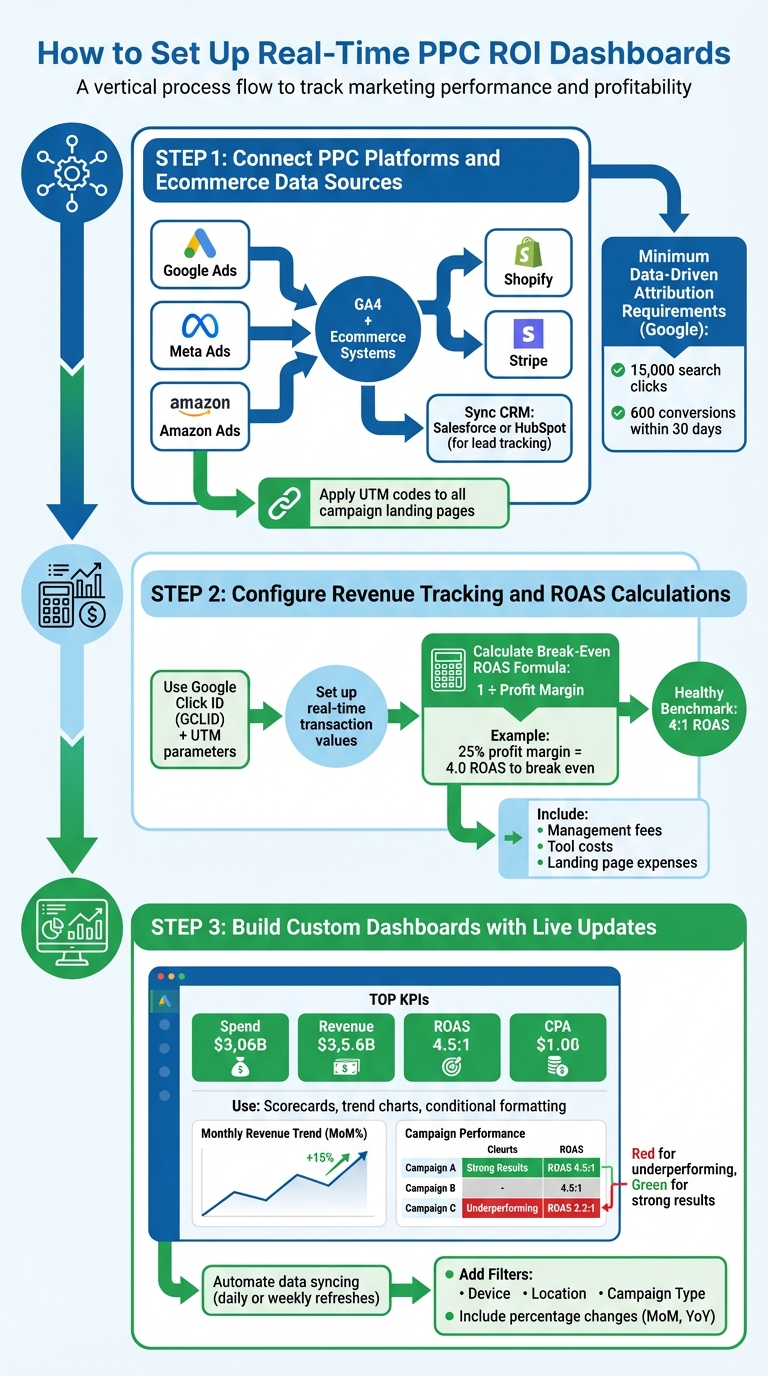
3-Step Guide to Setting Up Real-Time PPC ROI Dashboards
Creating a real-time dashboard involves linking your advertising platforms with revenue sources, setting up tracking systems, and designing visuals that update automatically. The purpose? To give you a single source of truth that shows whether your campaigns are profitable – without needing to juggle multiple tools. This setup builds on previously discussed tools, providing instant insights to help you fine-tune your PPC ROI.
Step 1: Connect PPC Platforms and Ecommerce Data Sources
Start by linking your PPC platforms – like Google Ads, Meta Ads, or Amazon Ads – with GA4 and your ecommerce systems. This connection lets you track key metrics, such as spend, clicks, conversions, and revenue. For example, if you’re using Shopify or Stripe, integrate these platforms to capture transactional revenue. If lead tracking is part of your strategy, sync your CRM (like Salesforce or HubSpot) to measure offline conversions and assess lead quality for specific campaigns.
As Kayla Johansen from WebFX emphasizes:
"As advertisers adopt increasingly cross-channel strategies to reach their target audience wherever they spend time online, implementing a single source of truth for your PPC reporting is becoming even more critical."
To ensure accuracy, apply UTM codes to all campaign landing pages, tying revenue streams back to their sources. If offline conversions are part of your data, configure tracking for those as well. For those using Google’s data-driven attribution model, remember the minimum requirements: 15,000 search clicks and 600 conversions within 30 days. These integrations lay the groundwork for efficient PPC management.
Step 2: Configure Revenue Tracking and ROAS Calculations
To track ROAS (Return on Ad Spend) accurately, you’ll need to combine ad spend with revenue data from GA4 or your CRM. Use tools like Google Click ID (GCLID) and UTM parameters to link ad clicks with specific conversion events and revenue. Set up real-time transaction values to capture the exact revenue from each sale, rather than relying on a static average.
Calculating your break-even ROAS is straightforward: use the formula 1 ÷ Profit Margin. For instance, if your profit margin is 25%, a ROAS of 4.0 is needed just to break even. A healthy benchmark for ROAS is often 4:1. But keep in mind, true ROI goes beyond ad spend – it also includes management fees, tool costs, and landing page expenses. Use calculated fields in your dashboard to automate formulas, ensuring your metrics update instantly as new data comes in. This accurate view of ROAS enables you to make quick, informed adjustments to your campaigns.
Step 3: Build Custom Dashboards with Live Updates
Design a dashboard that focuses on your top KPIs, like spend, revenue, ROAS, and CPA. Use scorecards, trend charts, and conditionally formatted tables to highlight any potential issues.
Datis Mohsenipour from Outback Team Building & Training advises:
"Don’t go into the minutia of things. Your dashboard should contain high-level KPIs and data that will ‘alert’ you should something be trending in the wrong direction."
Automate data syncing to ensure your dashboard always reflects the latest numbers. Tools like the Google Analytics add-on for Google Sheets can be set to refresh daily or weekly. Include percentage changes – month-over-month or year-over-year – to quickly spot shifts in performance. Filters for device, location, and campaign type can help you zero in on where your funnel might be underperforming. Finally, use conditional formatting with color-coding (e.g., red for underperforming ROI, green for strong results) to turn your dashboard into an active monitoring tool rather than just a static report.
sbb-itb-e2944f4
How to Optimize Campaigns Using Real-Time Data
Once your real-time dashboard is up and running, the next step is to put those insights to work. Real-time data can help you cut unnecessary spending and boost the performance of your best campaigns. By monitoring your campaigns live, you can quickly spot problems and make adjustments – like tweaking bids, pausing low performers, or reallocating budgets – before your ad spend runs dry. This approach fits seamlessly into any well-rounded PPC management strategy.
Start by keeping an eye on mismatches between Click-Through Rate (CTR) and Conversion Rate (CVR). For instance, if your ad has a high CTR but a low conversion rate, it’s a sign that your landing page isn’t delivering. Fix this by improving your landing page design, refining your ad copy, or narrowing your audience targeting. On the other hand, a low CTR could mean your ad creative or targeting isn’t resonating – try testing new headlines or adjusting audience segments.
Pay close attention to your Quality Score, too. A score below 5 can drive up costs by 25% to 400%, but boosting it by just one point can lower your Cost Per Click (CPC) by 7% to 9%. If your Quality Score starts to slip, revisit key factors like ad relevance, landing page speed, and keyword match types. Helena Rothwell from Right Hand Consulting emphasizes the importance of filtering out irrelevant traffic:
"Smart targeting starts with negative keywords! Filtering out irrelevant search terms keeps your ads sharp, ensuring every penny of your budget works efficiently".
When it comes to bidding, real-time performance data is your best guide. For example, if your Return on Ad Spend (ROAS) is more than 50% above your target, consider increasing bids by 30%. If it’s 50% below target, decrease bids by 30%. Once a campaign hits 30 conversions per month, you can switch to automated bidding strategies like Target ROAS or Target CPA. Stefan Valentin, Ads Specialist at Irresistible Me, shares his approach:
"I look at which campaigns or ad groups are giving the best return, meaning they’re making more money than they’re costing. Those are the ones I’ll give more budget to".
Don’t forget to review your search term reports weekly. Adding negative keywords like "free", "DIY", or "cheap" (if you’re selling premium products) can help you filter out unqualified traffic. For example, in 2024, HawkSEM partnered with Grayson Living to identify high-value customer segments and optimize bids using real-time ROI data. The result? A 279% increase in sales. This example highlights the power of real-time adjustments compared to waiting for monthly reports.
How Emplicit PPC Management Helps Ecommerce Businesses Scale
Managing PPC campaigns today goes beyond just collecting data – it’s about actively using that data to make real-time decisions. While many in-house teams stick to passively tracking metrics, professional PPC management focuses on continuously fine-tuning campaigns. This includes adjusting bids, testing ad copy, and refining targeting as needed, all in real time. The result? Less wasted ad spend and a better return on every dollar invested. This hands-on approach ensures campaigns stay efficient and aligned with growth goals.
One key difference in Emplicit’s strategy is its emphasis on generic traffic attribution rather than relying solely on branded traffic. This approach highlights new customer acquisition more accurately, avoiding inflated metrics that can stem from existing brand awareness.
Scaling PPC campaigns effectively requires a careful, step-by-step approach. Instead of making large budget increases that could disrupt performance, incremental adjustments – typically in the range of 10% to 20% – are more sustainable. Arik Berzak, Co-Founder of ROI Escalator, underscores this point:
"Scaling should be done carefully while closely monitoring the total revenue generated"
This method allows businesses to gauge the impact of increased spending on revenue without jeopardizing campaign stability.
Emplicit also leverages advanced tools to simplify cross-channel performance tracking. Unified dashboards, which integrate data from platforms like Google, Amazon, Meta, and Microsoft Ads, provide a comprehensive view of campaign performance. These dashboards eliminate the hassle of switching between different systems, making it easier to spot issues like rising CPCs or dips in conversions across multiple accounts. For businesses juggling campaigns on platforms such as Amazon, TikTok Shops, Walmart, and Target, having this centralized view is critical for maintaining a steady ROI.
Another advantage of professional PPC management is its comprehensive approach to ROI calculations. It accounts for all costs, including software subscriptions, management fees, and additional marketing expenses, ensuring a clearer picture of profitability. This level of precision is vital, especially when you consider that nearly 76% of marketing budgets are wasted due to poor analysis and inadequate tracking. With expert oversight, businesses can avoid overspending and focus on scaling their campaigns effectively.
Conclusion
Keeping a close eye on your PPC ROI in real time is key to staying ahead in ecommerce. With CPC costs climbing 40–50% over the last five years and CPL rising 25% between 2023 and 2024, businesses simply can’t afford to wait until the end of the month to realize their campaigns are losing money. The ability to act quickly – pausing underperforming ads, reallocating budgets to high-performing keywords, or adding negative keywords – can be the difference between driving profitable growth or wasting precious resources.
To make this happen, focus on critical metrics like ROAS, conversion rate, and customer lifetime value. Use unified dashboards to integrate your data sources, and set up automated alerts to catch problems before they escalate. This proactive approach is the foundation of effective campaign management. Remember, PPC campaigns, when optimized properly, can deliver conversion rates up to 50% higher than organic traffic. But this only holds true if you’re monitoring performance in real time, not after the damage has already been done.
Accurate tracking is the backbone of real-time insights. Whether you’re running campaigns on Amazon, TikTok Shops, Walmart, or Target, having a centralized view saves you from the inefficiency of jumping between platforms. This streamlined setup enables faster, smarter decisions, ensuring your campaigns stay on track.
For businesses looking to take their efforts further, expert PPC management can fill the gaps and drive consistent ROI growth. By leveraging the tools and metrics we’ve discussed, professional management ensures your campaigns remain efficient, even as budgets scale. Emplicit’s approach focuses on continuous optimization powered by real-time data, helping businesses avoid common mistakes that lead to wasted ad spend.
The strategies and tools covered in this guide equip you to monitor PPC ROI effectively and in real time. Start implementing them now to avoid unnecessary losses and maximize every dollar spent.
FAQs
How can I track my PPC ROI accurately in real time?
To keep tabs on your PPC ROI in real time, start by setting clear, measurable goals. For example, define your target return on ad spend (ROAS) or cost per acquisition (CPA). These benchmarks will serve as your guiding metrics. Then, ensure you’re using consistent UTM parameters across all campaigns. This step is crucial for collecting clean, organized data.
Next, make use of tools like Google Analytics (GA4). By linking your ad platforms and enabling e-commerce tracking, you can track real-time revenue for each transaction and instantly calculate ROI. To simplify things further, consider using a centralized reporting dashboard. This can pull together key metrics like click-through rates (CTR), cost per click (CPC), and conversion rates into one place, giving you a live overview of your campaign’s performance.
Accuracy is key, so regularly validate your data by cross-checking it with your actual sales reports. If you spot any discrepancies, make the necessary adjustments to keep your tracking reliable. For those who want an extra layer of expertise, teaming up with specialists like Emplicit can help fine-tune your tracking setup. This ensures your PPC campaigns provide actionable insights you can trust.
Why is real-time data important for optimizing PPC campaigns?
Real-time data plays a crucial role in fine-tuning your PPC campaigns on the fly. With immediate access to performance insights, you can spot ads that aren’t delivering results, shift your budget toward the ones that are, and adjust your targeting parameters right away. This not only minimizes wasted ad spend but also helps you get the most out of your investment.
Tracking key metrics like click-through rates (CTR), conversion rates, and cost-per-click (CPC) as they happen allows you to stay ahead of trends and seize opportunities. The ability to act quickly ensures your campaigns remain both efficient and effective.
How can I calculate the break-even ROAS for my PPC campaigns?
To figure out your break-even ROAS (Return on Ad Spend), you’ll need to start by calculating your gross profit margin. Here’s how: take your total cost per sale – which includes product cost, handling, and shipping – and divide it by the revenue you earn per sale (the product price plus any shipping fees).
Once you’ve got your gross profit margin, use this simple formula to find your break-even ROAS: 1 ÷ gross profit margin.
This number represents the minimum ROAS your campaign needs to hit in order to cover all costs and avoid losing money. For instance, let’s say your gross profit margin is 40% (or 0.4). In that case, your break-even ROAS would be 1 ÷ 0.4 = 2.5. That means for every $1 you spend on ads, you’ll need to generate at least $2.50 in revenue just to break even.