

Did you know that 49% of shoppers abandon their purchase if they can’t pay in their local currency? If your online store displays prices in one currency but charges in another at checkout, you’re losing sales and trust. Offering a true multi-currency checkout is no longer optional – it directly impacts conversions, customer satisfaction, and global growth.
Here’s what often goes wrong:
- Outdated exchange rates: Prices don’t match real-time currency values, leading to unexpected charges.
- Currency mismatches: Shoppers see one currency during browsing but are charged in another at checkout.
- No automatic location detection: Customers are forced to manually select their currency, adding friction.
- Platform limitations: Many e-commerce platforms and payment gateways don’t fully support multi-currency transactions.
- Missing local payment and tax options: Customers expect familiar payment methods and upfront tax calculations.
To fix these issues:
- Use real-time exchange rate APIs to display accurate prices.
- Ensure the display currency matches the payment currency by integrating native multi-currency gateways like Shopify Payments or Stripe.
- Add automatic location detection with a manual currency selector as backup.
- Offer local payment methods and tools for accurate tax calculations to improve the checkout experience.
These steps help reduce cart abandonment, build trust, and increase global sales. Businesses supporting 25+ currencies grow 25% faster than single-currency stores. Ready to optimize your checkout? Let’s dive into the details.
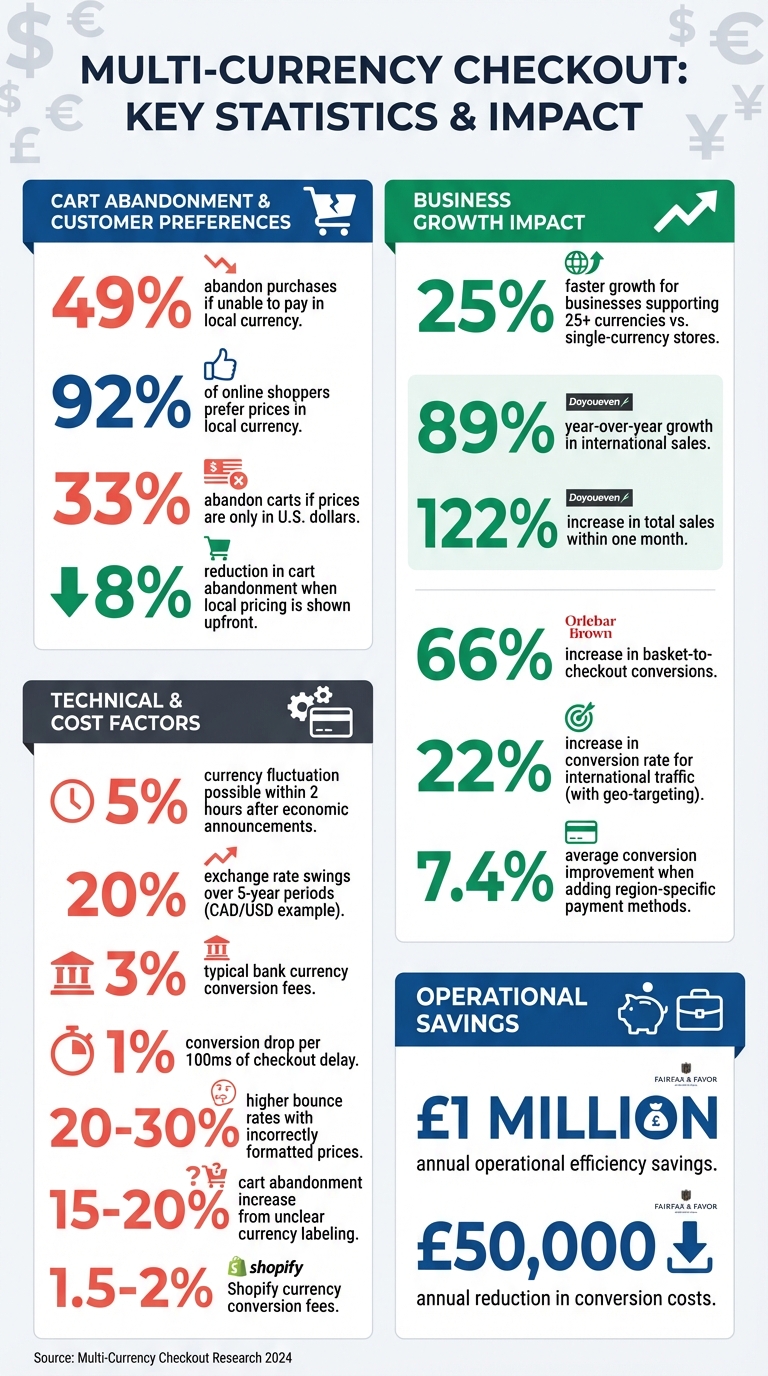
Multi-Currency Checkout Statistics: Impact on Global E-commerce Sales
How to Change Currency Based on the Location of the User in Shopify

sbb-itb-e2944f4
Common Multi-Currency Checkout Problems
Even the best multi-currency systems can fall short, often due to technical glitches that aren’t immediately visible. These hidden issues can lead to lost sales and frustrated customers. Let’s break down some of the most common problems, starting with exchange rate discrepancies.
Outdated Exchange Rates
Currency markets are incredibly volatile. Major currency pairs can shift by as much as 5% within just two hours after significant economic announcements. Yet, many ecommerce platforms rely on exchange rates that update only once every 24 hours. This lag creates a gap between the price displayed to customers and the rate applied at checkout.
When transactions settle days later, outdated rates can cause either the customer or the merchant to absorb the difference. Over time, these discrepancies – often called "FX margin leaks" – can add up to substantial losses.
"Currency markets react to news within seconds. If your rates are hours or days old, they’ll eventually be significantly wrong at exactly the wrong time." – APIVerve
Consider this: the CAD/USD exchange rate has seen swings exceeding 20% over a five-year period. Even small daily fluctuations can pile up across hundreds of transactions. When customers notice a mismatch between the price they expected and the amount charged, trust erodes, often leading to abandoned carts.
Currency Mismatches at Payment
Few things frustrate online shoppers more than seeing one currency during browsing and being charged in another at checkout. Serge John, SEO Content Writer at Geo Targetly, explains it this way: "If a shopper sees ¥12,000 during browsing but is billed $82.47 at checkout, trust is broken – and the cart is likely abandoned." This issue is significant, as 92% of online shoppers prefer to see prices in their local currency.
This problem often arises because currency switcher plugins only update the storefront display, while the payment gateway processes transactions in the store’s default currency. For example, Australian fitness brand Doyoueven displayed multiple currencies but processed payments exclusively in AUD. After switching to true multi-currency functionality through Shopify Payments, they reported an 89% year-over-year growth in international sales and a 122% increase in total sales within just one month.
Payment gateway limitations can make things worse. If a customer selects a currency unsupported by the payment processor, the system may revert to the store’s base currency or block the transaction entirely. The consequences are clear: 33% of shoppers will abandon their cart if prices are displayed only in U.S. dollars. One retailer even saw a 15–20% increase in cart abandonment after failing to clarify "AUD" versus "USD" pricing for Australian customers.
No Automatic Location Detection
Manual currency selection creates unnecessary friction, especially for mobile users who already face limited screen space. Without automatic location detection, shoppers are forced to calculate conversions themselves, which often leads to hesitation. On top of that, banks typically charge around 3% in currency conversion fees when local currencies aren’t supported. Showing local pricing upfront can reduce cart abandonment by up to 8%.
While automated detection tools identify the correct locale about 85% of the time, they aren’t perfect. Around 15% of international visitors may still see incorrect formats unless a manual override is available. Combining auto-detection with an easy-to-use currency selector offers a good balance of convenience and control.
Platform Compatibility Issues
Different ecommerce platforms handle multi-currency functionality in their own ways. Shopify, WooCommerce, and Magento often require specific plugins or custom configurations to enable true multi-currency features. What works seamlessly on one platform might demand significant development on another.
Payment gateways add another layer of complexity. For instance, you might enable 20 currencies in your store settings, but if your payment processor only supports 10, you could run into errors like CANNOT_MIX_CURRENCIES or UNPROCESSABLE_ENTITY. Additionally, Shopify charges a currency conversion fee – 1.5% for U.S. stores and 2% for stores elsewhere – which can cut into profits.
Caching systems can also cause issues. While full-page caching improves site speed, it may serve outdated currency data if cart and checkout pages aren’t excluded from the cache.
Missing Local Payment Options and Tax Calculations
Even if currency displays and exchange rates are accurate, the checkout process can still fail without localized payment methods and proper tax handling. Shoppers expect to use payment options familiar to them – like SEPA in Germany or iDEAL in the Netherlands. When these aren’t available, conversion rates drop. Adding region-specific payment methods has been shown to improve conversions by an average of 7.4%.
Tax calculations are another critical factor. Customers need to see the full cost – including duties, VAT, and import fees – before completing a purchase. In the EU, failing to display prices inclusive of VAT isn’t just a poor user experience; it can also result in legal penalties.
Proper localization also includes respecting regional pricing conventions. For example, Japanese yen uses no decimals, while Bahraini dinar uses three. Incorrectly formatted prices are linked to bounce rates that are 20–30% higher.
How to Fix Multi-Currency Checkout Issues
The challenges with multi-currency checkouts can be solved with the right technical adjustments. By using effective tools and configurations, you can create a smooth international checkout experience that builds trust and boosts conversions. Here’s a breakdown of how to tackle each issue.
Use Real-Time Exchange Rate APIs
To avoid outdated currency conversions, integrate a REST API like Fixer.io, Open Exchange Rates, or CurrencyLayer. These APIs provide live exchange rates for over 170 currencies. Fetch rates server-side to enhance security and reduce load. Update rates every 10–15 minutes to keep them accurate while managing API costs. Lock the exchange rate at the start of a session and add a small buffer (1–2%) to account for fluctuations and payment processing fees.
When converting prices, multiply your base price by the current exchange rate. If the API uses a fixed base currency (like EUR), convert the source currency to the base first, then to the target currency. Use locale-specific rounding – such as two decimals for USD or no decimals for JPY – via libraries like JavaScript’s Intl.NumberFormat. Implement caching with a one-hour Time-To-Live (TTL) to improve response times and provide a fallback if the API is temporarily unavailable. Limit responses to only the required currencies to optimize performance.
"Currency markets react to news within seconds. If your rates are hours or days old, they’ll eventually be significantly wrong at exactly the wrong time." – APIVerve
For example, Fairfax & Favor automated currency conversions with Shopify Payments, saving over £1 million annually in operational efficiencies and reducing conversion costs by £50,000 per year.
While accurate rates are essential, ensuring the payment process matches the displayed currency is just as important.
Match Display Currency with Payment Currency
To prevent mismatches, use native payment gateways like Shopify Payments or Stripe Adaptive Pricing, which ensure that both the displayed and charged currencies are the same. These solutions align the browsing and checkout experiences seamlessly.
If you use WooCommerce, enable the "Checkout in User’s Currency" option within your multi-currency plugin settings to stop the checkout from defaulting to your store’s base currency. Avoid using incompatible third-party gateways – standard PayPal or non-Shopify Stripe integrations often revert to the base currency at checkout. Disable caching on dynamic pages like cart and checkout to maintain currency consistency. Ensure that your plugin and gateway settings align by verifying that all currencies offered by your switcher are supported by your payment gateway. This prevents "invalid currency code" errors.
It’s crucial to differentiate between a simple "currency conversion" (a visual filter) and "true multi-currency" (integration with checkout and payment). Only the latter ensures customers are charged exactly what they see. Regularly test your setup using VPNs or browser location emulators to confirm currency consistency from product pages through to payment confirmation.
For instance, Orlebar Brown switched to Shopify Payments to manage global currencies and taxes, leading to a 66% increase in basket-to-checkout conversions.
Once your rates and payment processes are aligned, fine-tuning localization becomes the next step.
Add Automatic Location Detection
Use geolocation tools like MaxMind or Geo Targetly to identify customer IP addresses and automatically display the correct local currency and payment options. Always include a manual currency selector as a backup.
When mapping countries to currencies, be thoughtful. For example, assign EUR to all 27 Eurozone countries to maintain consistency.
"We implemented Geo Targetly on our Shopify Plus store and saw a 22% increase in conversion rate for international traffic within the first 30 days."
– Ecommerce Director, Apparel Brand
Add Local Payment Gateways and Tax Tools
Shoppers expect to see familiar payment methods. Stripe Adaptive Pricing can calculate localized prices and enable region-specific payment options like iDEAL in the Netherlands, Pix in Brazil, or BLIK in Poland. For example, in the Netherlands, 70% of e-commerce transactions rely on iDEAL, which requires EUR as the currency.
For tax compliance, tools like Avalara, TaxJar, or Zonos can calculate duties and import taxes in real time, including the necessary Harmonized System (HS) codes for customs. Adopting a Delivered Duty Paid (DDP) strategy – where duties and taxes are calculated and collected at checkout – eliminates surprise fees, a leading cause of cart abandonment, and reduces returns. For a hands-free approach, consider Shopify Markets Pro (powered by Global-e), which handles international transactions, duties, and tax compliance. To streamline the checkout experience, filter out irrelevant payment methods in your backend.
Platform-Specific Solutions
Each e-commerce platform has unique multi-currency capabilities. Shopify offers Shopify Markets and Shopify Payments, which provide native support for multi-currency transactions with conversion fees of 1.5% for U.S. stores and 2% elsewhere. WooCommerce requires plugins like Aelia Currency Switcher ($79/year) or FOX Currency Switcher Professional ($36) to enable full multi-currency functionality. BigCommerce and Magento often need custom setups or third-party integrations. Always verify that your currency switcher, payment gateway, and tax tools are compatible and correctly configured.
Platform Comparison Table
| Platform | Main Issue | Fix Method | Conversion Impact |
|---|---|---|---|
| Shopify | Currency conversion fees (1.5–2%) | Use Shopify Markets or Shopify Payments for multi-currency | Up to 122% sales increase |
| WooCommerce | Checkout reverts to base currency | Enable "Checkout in User’s Currency" in plugins like Aelia | 10% conversion rate increase |
| BigCommerce | Limited native multi-currency | Integrate Stripe Adaptive Pricing or third-party apps | Unlocks region-specific payment methods |
| Magento | Complex configuration required | Use extensions like Magento Multi-Currency or custom APIs | – |
Monitoring and Improving Multi-Currency Performance
After addressing multi-currency checkout issues, the next step is to stay vigilant. Continuous monitoring ensures your system remains accurate, reliable, and user-friendly as markets evolve. This consistency is key to maintaining trust and driving conversions.
Track Checkout Failures and Conversion Rates
Analytics tools like Google Analytics 4 or Shopify Analytics can help you keep tabs on conversion rates by currency. If certain currencies show lower conversion rates, it might point to issues like pricing discrepancies, limited payment options, or insufficient localization for that market.
Dive deeper by tracking payment authorization and success rates for each currency and region. Transactions processed through local acquirers often see higher approval rates since issuing banks tend to favor domestic-looking transactions. Additionally, keep an eye on cart abandonment during the final checkout steps. High drop-off rates here may indicate problems like currency mismatches, unexpected fees, or unclear payment labels. Monitoring Strong Customer Authentication (SCA) completion rates is also essential to ensure security measures aren’t inadvertently hurting conversions.
Test Different Currency Options
Experimentation is a powerful tool for optimizing performance. Run A/B tests to find out what pricing strategies resonate in different markets. For instance, while prices ending in ".99" are popular in the U.S., other regions may respond better to different price endings based on local preferences.
Placement of your currency selector can also impact user experience. Test its visibility by trying it in the header, footer, or as a pop-up. Use tools like VPNs or browser location emulators to simulate the checkout experience from various countries. This helps verify that prices, symbols, and rounding rules are displayed accurately. A soft launch strategy – introducing multi-currency features to a small percentage (5–10%) of traffic in a new region – can help identify potential issues before a full rollout.
Review Backend Reports Regularly
Set aside time each week to review backend reports for trends across currencies and regions. Look out for indicators like “unapplied cash” or “refund deltas” – these occur when exchange rate fluctuations lead to customers receiving less during a refund than they originally paid.
Pay close attention to your realized FX margin versus your target margin. This helps you maintain profitability by ensuring your exchange rate buffer is sufficient. And don’t overlook performance: delays in real-time currency conversion can hurt sales, as even a 100ms lag can reduce conversions by 1%. Using tools like edge computing (e.g., Cloudflare Workers) can speed up currency formatting and improve site performance.
| Metric | Impact on Conversion | Recommended Action |
|---|---|---|
| Checkout Latency | 1% drop per 100ms delay | Use edge computing for faster formatting. |
| Auth Success Rate | Prevents hard payment declines | Route transactions to local acquirers. |
| Formatting Accuracy | 20–30% bounce rate increase if incorrect | Use Intl.NumberFormat API; avoid hardcoding symbols. |
| Currency Consistency | High cart abandonment if mismatched | Ensure display currency matches settlement currency. |
Proactively addressing these issues can save sales and improve user satisfaction. Consider allocating 20–30% of your internationalization budget for post-launch fixes, as many localization challenges only appear after scaling to production.
Conclusion
Tackling multi-currency checkout challenges is a must for thriving in global ecommerce. It’s not just about convenience – it directly influences conversions and revenue. With 92% of shoppers favoring purchases in their local currency and 33% abandoning their carts when only U.S. dollars are shown, the message is clear: getting multi-currency checkout right can turn potential losses into gains.
The issues we’ve discussed – like outdated exchange rates, mismatched currencies, missing location detection, platform limitations, and incomplete tax calculations – can all chip away at shopper trust. Decisions happen in a split second, and something as small as an incorrect currency symbol or date format can lead to abandoned carts. A great example is a brand that boosted its international sales simply by aligning display and checkout currencies.
To address these challenges, focus on solutions like real-time exchange rate APIs, consistent currency displays, automated location detection, and local payment and tax integrations. Each ecommerce platform offers unique tools, so knowing their capabilities is key to finding the right fit for your business. Beyond setup, continuous monitoring is essential. Keep an eye on authorization rates by currency, experiment with pricing strategies in different regions, and review backend reports for issues like refund discrepancies or formatting errors. Even minor problems can snowball – every 100ms of checkout delay can decrease conversions by about 1%. And here’s a compelling stat: businesses supporting 25 or more currencies grow 25% faster than single-currency stores. Multi-currency support isn’t just a feature; it’s a growth driver.
FAQs
How do I know if my store has true multi-currency checkout?
To determine if your store offers genuine multi-currency checkout, look for these key features: prices displayed in local currencies, the ability to process payments in various supported currencies, and a smooth, consistent checkout process for customers worldwide. These elements ensure a hassle-free shopping experience for users across different regions.
What’s the best way to handle exchange rate changes during checkout?
To handle exchange rate changes effectively during checkout, rely on real-time or frequently updated currency conversion data. This approach ensures pricing stays accurate, which is key to maintaining customer trust. It’s also smart to put systems in place that account for market fluctuations. This helps avoid pricing discrepancies that could disrupt the checkout process or lead to customer dissatisfaction.
How can I show local taxes and duties before customers pay?
To make the checkout process more transparent, consider displaying local taxes and duties upfront. Start by implementing a localized checkout system that calculates duties and import taxes based on the customer’s location. Double-check that your tax settings are properly configured and work seamlessly with any checkout customizations you’ve made.
If you’re using a multi-currency setup, show prices in the customer’s local currency, including any applicable taxes and duties. This way, customers can see the total cost of their purchase before completing the transaction. This approach not only builds trust but can also help reduce cart abandonment.