
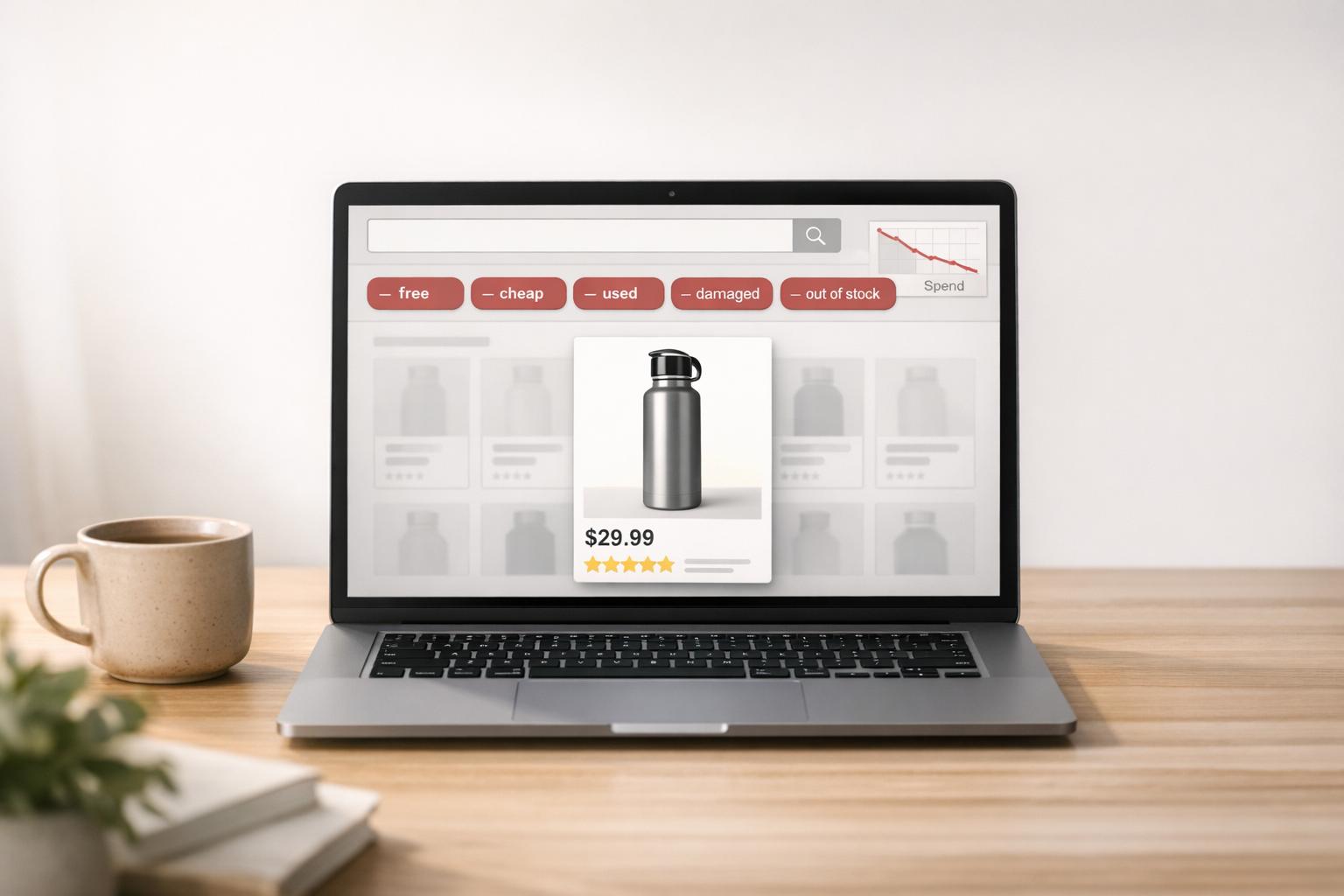
Amazon PPC campaigns often waste 20%–40% of their budget on irrelevant traffic. Negative keywords can help you stop this waste, improve ad performance, and focus your budget on shoppers ready to buy. Here’s how:
- Review Search Term Reports: Identify high-spend terms with no conversions and add them as negative keywords to reduce wasted spend and improve ACoS (Advertising Cost of Sale).
- Use Cross-Negatives: Prevent campaigns from competing with each other by adding high-performing keywords as negatives in Auto and Broad campaigns.
- Block Low-Intent Keywords: Exclude terms like "free", "cheap", or "how to" that attract non-buyers.
- Add Aggressive Negatives to Auto Campaigns: Quickly block irrelevant terms to control costs and guide traffic to high-performing keywords.
- Conduct Regular Audits: Regularly review and refine your negative keyword lists to maintain efficiency and profitability.
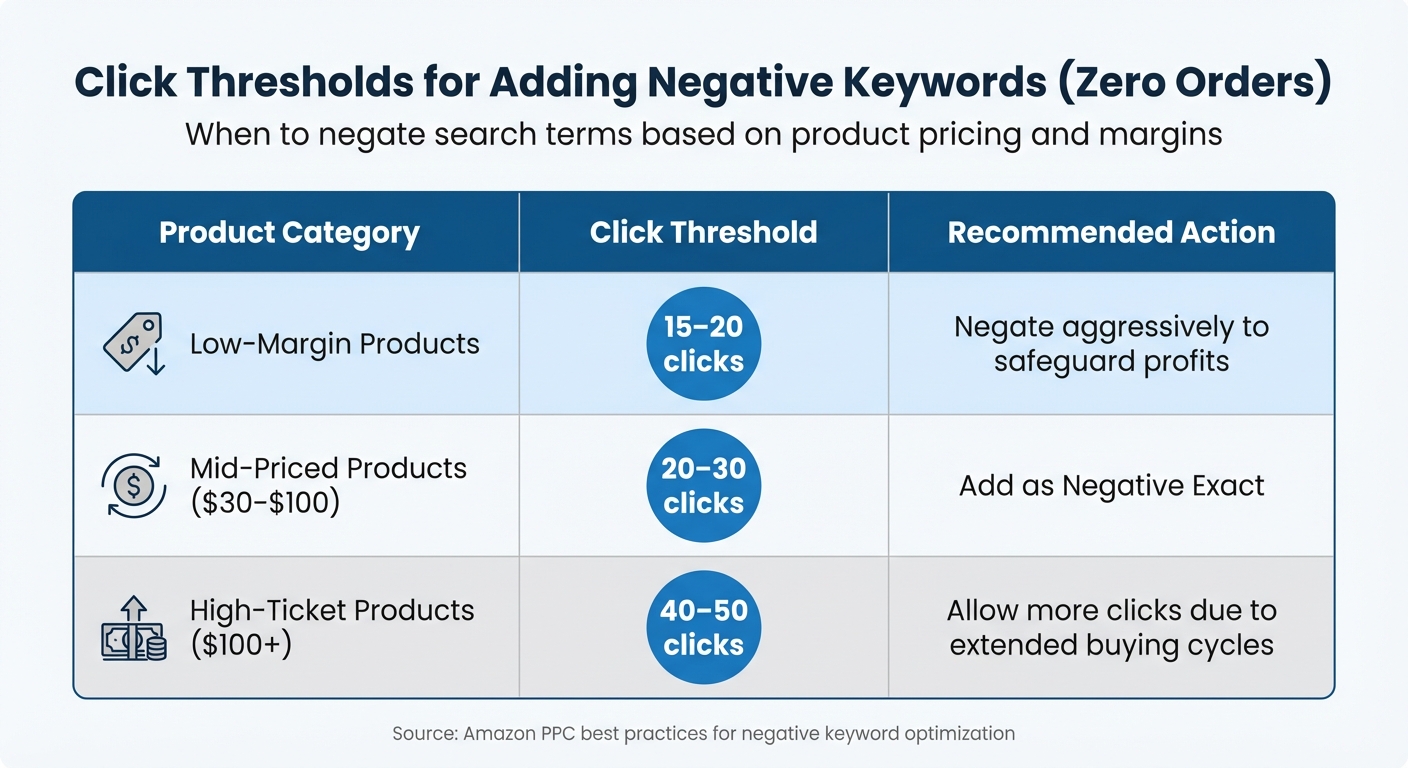
Click Thresholds for Negating Amazon PPC Keywords by Product Category
Everything You Need to Know About Amazon’s Negative Keywords In 2023
sbb-itb-e2944f4
1. Review Search Term Reports to Eliminate High-Spend Irrelevant Terms
Your Search Term Report is a goldmine for spotting queries that eat up your ad budget without delivering results. To get started, pull the report and filter for "Orders = 0", then sort by spend in descending order. This will highlight terms that are racking up clicks but failing to convert. By addressing these terms, you can cut unnecessary spending and refocus your campaigns on what works.
Effectiveness in Reducing Wasted Ad Spend
The number of clicks a term gets without converting should guide your strategy. For mid-priced products (around $30–$100), you should negate terms after 20–30 clicks with no orders. High-ticket items (over $100) often require more patience, as their longer buying cycles justify a higher click threshold. On the other hand, low-margin products demand quicker action – terms should be cut after just 15–20 clicks to protect your slim margins.
| Product Category | Click Threshold (Zero Orders) | Recommended Action |
|---|---|---|
| Low-Margin | 15–20 clicks | Negate aggressively to safeguard profits |
| Mid-Priced ($30–$100) | 20–30 clicks | Add as Negative Exact |
| High-Ticket ($100+) | 40–50 clicks | Allow more clicks due to extended buying cycles |
Impact on Improving ACoS
Once you’ve eliminated non-converting terms, the next step is to address keywords that convert but drive up your Advertising Cost of Sales (ACoS). These are the chronic high-ACoS keywords – terms that bring in sales but at a cost 2–3 times higher than your target ACoS. Start by lowering the bids on these keywords and give it 2–3 weeks to see if performance improves. If there’s no improvement, it’s time to add them as negatives. This two-part strategy – cutting out non-converters and reining in poor performers – can significantly improve your ACoS.
Ease of Implementation
Once you’ve identified the problematic keywords, the next step is straightforward. Use Negative Exact for specific terms and Negative Phrase for broader ones. Keep in mind that it takes about 72 hours for keyword changes and up to 96 hours for product target adjustments to take full effect. By systematically applying these changes, you can streamline your campaign performance and better allocate your budget where it matters most.
2. Use Cross-Negatives to Stop Campaign Cannibalization
To prevent your campaigns from competing with each other, consider using cross-negatives. This strategy ensures your campaigns work together, not against each other, by directing traffic to the right campaign.
Campaign cannibalization happens when two or more campaigns target the same keyword. This can drive up bids and increase costs unnecessarily. For example, your Auto or Broad campaigns might pick up high-performing keywords that are already being targeted by your Exact match campaigns. By adding these high-performing Exact match keywords as Negative Exact matches in your Auto and Broad campaigns, you can funnel traffic to your Exact campaigns, where you have greater control over bidding and performance.
Effectiveness in Reducing Wasted Ad Spend
When your campaigns compete for the same keywords, you’re essentially bidding against yourself. Studies show that without a solid negative keyword strategy, as much as 20%–40% of your ad spend could go to waste. Cross-negatives help eliminate this overlap, ensuring your budget is spent efficiently on the campaign best equipped to deliver results.
Stephen Noch from Ad Badger explains it well:
"If you haven’t added all your ‘exact match’ keywords from your manual campaign as ‘negative exact’ keywords to your auto campaign, you are undoubtedly experiencing keyword cannibalization".
By eliminating internal competition, you can focus your budget on clicks that are more likely to convert, cutting down on wasted spend.
Impact on Improving ACoS
Cross-negatives also help you better manage your Advertising Cost of Sales (ACoS). By directing high-intent traffic to your Exact match campaigns, you can bid more confidently for those top-performing keywords. This approach often leads to higher conversion rates and a lower ACoS, as Auto and Broad campaigns are no longer siphoning off budget for the same terms. Plus, better conversions signal stronger product relevance to Amazon’s algorithm, which can further enhance your campaign performance over time.
Ease of Implementation
Setting up cross-negatives is simpler than it sounds. Here’s how to do it:
- Identify your top-converting keywords from Search Term Reports – these are keywords that have generated at least three orders with an ACoS below your target.
- Add these keywords as Negative Exact matches in your Auto and Broad campaigns.
- Make sure these keywords remain actively targeted in your Exact match campaign.
To stay ahead of potential cannibalization, review your Search Term Reports regularly – weekly during product launches and at least every two weeks for established accounts. This ongoing review ensures your campaigns remain optimized and aligned with your goals.
3. Block Keywords with Low Purchase Intent
Not everyone clicking on your ad is ready to buy – some are just browsing, researching, or hunting for free options. These low-intent clicks can eat into your budget without delivering actual sales. For instance, keywords like "free", "cheap", "DIY", "how to", "refill", or "replacement" often signal that someone is gathering information rather than planning to make a purchase. By filtering out these terms, you can not only save money but also focus on reaching an audience that’s more likely to convert.
Unnecessary clicks don’t just drain your budget – they also confuse Amazon’s algorithm. When your ads show up for irrelevant searches, it can lead to higher costs and worse ad placements. In fact, audits reveal that 20%–40% of ad budgets may be wasted on irrelevant traffic.
Effectiveness in Reducing Wasted Ad Spend
Blocking low-intent keywords is like putting a guardrail on your budget. By excluding terms that attract non-buyers, you can allocate your ad spend toward clicks that are more likely to result in sales. To do this effectively, rely on data to determine which clicks are worth keeping before adding negative keywords – similar to the process explained in Section 1, but focused specifically on low-intent terms.
Ability to Target High-Intent Traffic
When you remove low-intent keywords, your campaigns can focus on attracting high-quality traffic. This not only improves your click-through rates but also sends better conversion signals to Amazon’s algorithm. As a result, your product appears more relevant for the right searches, which can enhance both your organic rankings and ad placements.
For broad themes, use Negative Phrase Match to block irrelevant categories – like excluding "kids" if you only sell professional adult gear. For more precise filtering, Negative Exact Match is ideal for eliminating specific, unprofitable queries while still allowing for potentially valuable long-tail searches. By cutting out low-intent clicks, your budget shifts toward keywords that are more likely to generate sales, which can lead to better ACoS.
Impact on Improving ACoS
Eliminating low-intent keywords is a straightforward way to lower your ACoS. But don’t stop there – keep an eye on keywords that occasionally convert but consistently run at 2–3 times your target ACoS. These "margin killers" can erode profitability and should be negated after bid adjustments fail to bring them in line. By systematically removing both low-intent and high-ACoS terms, you can redirect your budget to keywords that drive profitable sales, further improving your overall ACoS.
4. Add Aggressive Negatives to Auto Campaigns
Auto campaigns are great for discovering new opportunities, but they often lead to irrelevant search queries due to Amazon’s broad algorithm. To keep costs in check, you need to take a more assertive approach with negative keywords compared to manual campaigns.
"Auto campaigns should run lean. Harvest winners quickly… and negative out losers just as quickly." – CANOPY Management
By actively managing negatives, you can reduce wasteful spending while zeroing in on the high-performing areas of your auto campaigns.
Effectiveness in Reducing Wasted Ad Spend
Set clear click thresholds before diving into your Search Term Reports. This prevents snap decisions that might cause you to cut promising keywords too soon or hold on to unprofitable ones for too long. For example:
- Low-margin products: Negate terms after 15–20 clicks without orders.
- Mid-priced items ($30–$100): Wait for 20–30 clicks.
- High-ticket products (over $100): Allow 40–50 clicks due to their longer buying cycles.
Applying these thresholds consistently can significantly reduce wasted ad spend across your auto campaigns.
Impact on Improving ACoS
Keep an eye on keywords that exceed your target ACoS by 2–3 times, even after adjusting bids. Auto campaigns require constant monitoring, and quickly negating these underperformers will prevent them from draining your budget. This proactive approach helps protect your margins and ensures your campaigns remain profitable.
Ability to Target High-Intent Traffic
Once you’ve trimmed the fat, focus on identifying high-performing keywords within your auto campaigns. These keywords can be migrated to manual exact match campaigns, where you have more control over bids. After adding these high-performers to your manual campaigns, include them as negatives in your auto campaigns. This forces Amazon to push quality traffic toward your manual campaigns, giving you a better shot at conversions and tighter bid management.
5. Conduct Regular Negative Keyword Audits
Regular negative keyword audits are a crucial step in keeping your Amazon PPC campaigns efficient and profitable. Without these audits, you risk wasting a significant portion of your ad budget. In fact, studies show that 20%–40% of ad budgets are often lost to irrelevant traffic. For example, one agency discovered $10,625 in wasted ad spend over just 60 days, which accounted for 40% of the total budget. Even a single poorly performing search term can add up – 25 clicks at a $1.50 CPC with no conversions costs $37.50. Multiply that by dozens of terms, and the losses can quickly spiral.
Effectiveness in Reducing Wasted Ad Spend
To start, pull your Search Term Report from Seller Central and sort it by spend, focusing on the highest-cost terms first. Break these terms into categories like "Zero-Conversion Culprits", "High ACoS Terms", and "Unrelated Terms". Here’s how to handle them:
| Search Term Category | Performance Indicators | Recommended Action |
|---|---|---|
| Clear Loser | High clicks (15–20+) with no orders | Add as Negative Exact immediately |
| Money Pit | High spend with ACoS 2–3x above break-even | Lower the bid first; if no improvement in 2–3 weeks, add as Negative Exact |
| Unrelated Terms | Terms completely unrelated to your product (e.g., "glass" for a metal product) | Use Negative Phrase to block similar searches |
| Research/Watchlist | Low clicks, no orders, moderate ACoS | Monitor for 1–2 weeks before deciding |
By eliminating these wasteful terms, you can reallocate your budget to more productive keywords, ensuring your campaigns are working smarter, not harder.
Impact on Improving ACoS
Removing irrelevant clicks not only saves money but also boosts your overall conversion rate. A higher conversion rate signals relevance to Amazon’s algorithm, which can improve your organic search rankings over time. This creates a ripple effect: cleaner data helps Amazon better understand your product’s relevance, enhancing both paid and organic performance.
"The most profitable Amazon PPC campaigns often have 3 to 5 times more negative keywords than positive, targeted keywords. This high ratio is not an accident. It is the hallmark of a mature, hyper-targeted strategy." – Abhishek Moorjani, COO, Headline Amazon Agency
Ease of Implementation
The frequency of your audits should match the maturity of your campaigns. For new product launches, review weekly to keep spending under control. For established campaigns, shift to biweekly or monthly reviews, and perform a deep quarterly audit to catch any terms that may now be relevant due to market changes. While the initial setup takes effort, regular reviews become a simple habit that protects your profit margins.
Ability to Target High-Intent Traffic
After identifying your top-performing keywords, promote them to Exact Match campaigns for tighter bid control. Simultaneously, add those same keywords as negative exact matches in your Auto or Broad campaigns. This strategy, often called "traffic sculpting", ensures that high-intent shoppers are funneled into your most optimized campaigns. The result? Higher click-through rates, better conversion rates, and more efficient ad spend. Regular audits keep this process running smoothly, ensuring your campaigns consistently attract the right audience.
Conclusion
These approaches not only safeguard your ad budget but also enhance campaign performance. By filtering out irrelevant traffic, you can conserve your spend, while focusing on high-intent searches allows for better bid control and increased conversions. This leads to cleaner data, signaling relevance to Amazon’s algorithm, which can improve both your paid and organic rankings.
Audits frequently reveal considerable budget loss due to irrelevant traffic. Applying these strategies helps redirect wasted ad spend toward keywords that actually generate results.
"Negative keywords aren’t a one-time cleanup. They’re an ongoing margin-protection system that compounds over time." – CANOPY Management
This quote highlights the importance of continuously refining your strategies. As markets evolve with new competitors and changing shopper behavior, past methods may no longer be effective. Regular audits, as outlined earlier, are essential to maintaining campaign success amidst these shifts. For instance, review your search term reports weekly during product launches and at least monthly for established campaigns. Set clear benchmarks – such as 20 to 30 clicks without orders for mid-priced products – to ensure your strategy stays on track.
Feeling overwhelmed by managing these processes? Emplicit’s PPC management services can help. Their team leverages proven frameworks and proprietary tools to cut down wasted spend and adjust to changing market dynamics. With expertise across platforms like Amazon, TikTok Shops, Walmart, and Target, Emplicit offers comprehensive support to optimize your campaigns and protect your bottom line.
FAQs
Should I use negative phrase or negative exact?
When deciding between negative exact and negative phrase keywords in Amazon PPC, it all comes down to your campaign’s objectives.
- Negative exact stops your ad from showing when a search matches the exact keyword. This gives you tight control and helps cut down on irrelevant clicks.
- Negative phrase prevents your ad from appearing in searches containing the phrase, regardless of the order of the words. This method casts a wider net to filter out irrelevant traffic.
Choose negative exact for pinpoint exclusions or negative phrase when you need to block a broader range of irrelevant searches. It all depends on how specific you need your filtering to be.
How do I set click limits before negating a term?
To manage your Amazon PPC campaigns effectively, make it a habit to review your Search Term Reports. Look for keywords that are racking up high spend but aren’t delivering any conversions. These are the terms draining your budget without contributing to sales.
Once identified, add these keywords to your negative keyword list. Use exact match to block specific terms or phrase match to exclude a broader range of related searches. There’s no hard-and-fast rule for the number of clicks to tolerate before acting, but focus on patterns. If a term consistently eats up your budget without any return, it’s time to act. This approach helps fine-tune your campaigns and ensures your ad spend is directed toward profitable opportunities.
How can I avoid blocking keywords that might convert later?
To avoid unintentionally blocking keywords that might drive conversions in the future, make it a habit to review and update your negative keyword list. Use search term reports and performance data to identify keywords that could turn profitable over time.
When adding negative keywords, stick to exact match and phrase match to prevent overly broad exclusions. Keep an eye on performance trends, and if certain keywords start showing promise, consider re-allowing them. This approach helps you manage costs while staying open to new opportunities.