
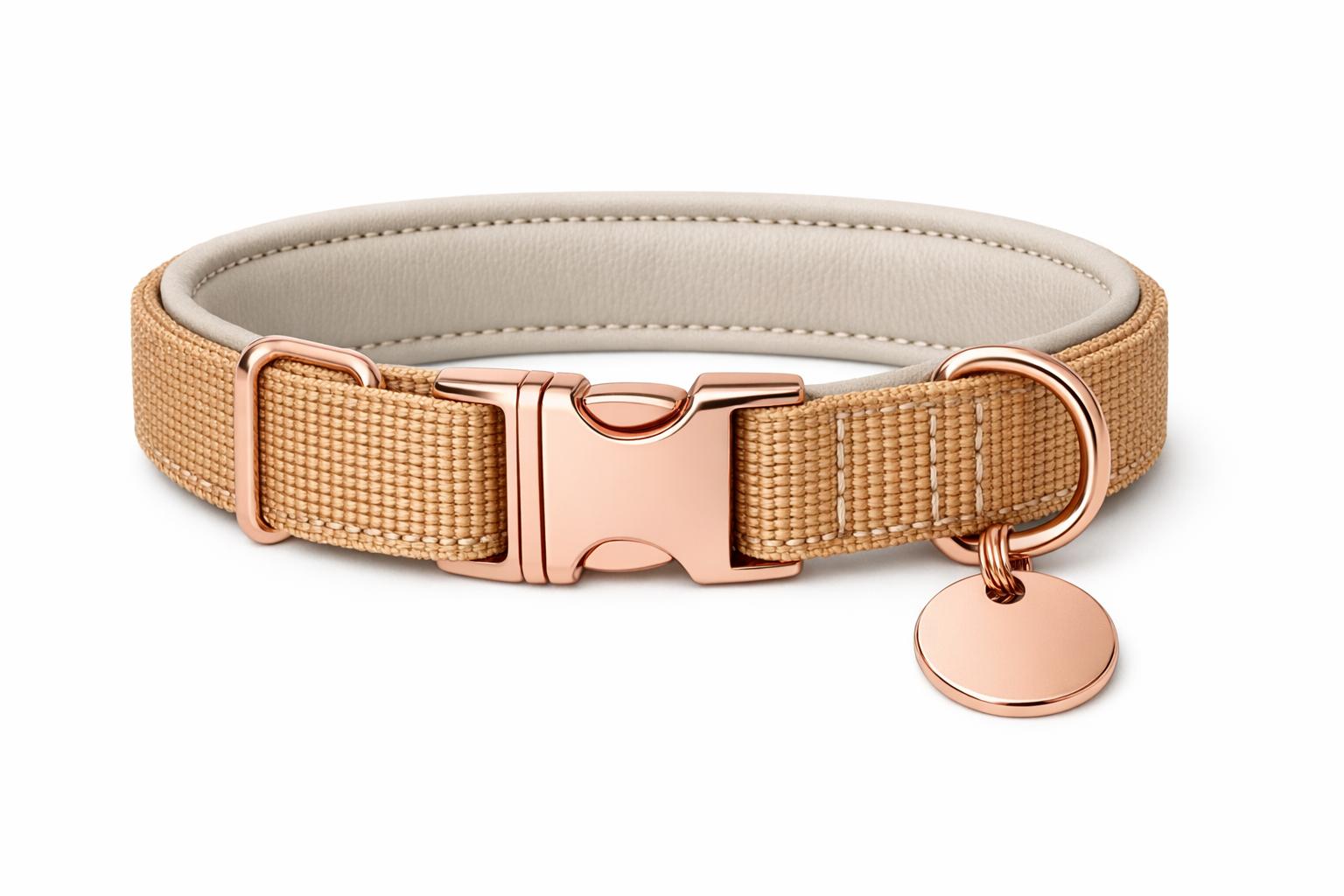
Your Amazon pet product photos might be costing you sales and visibility without you realizing it. Amazon‘s strict image guidelines are designed to ensure a consistent shopping experience, and failing to meet them can lead to listing suppression – making your products disappear from search results. Here’s what you need to know:
- Main Image Must-Haves:
- Pure white background (RGB 255, 255, 255).
- Product occupies at least 85% of the image frame.
- No text, logos, watermarks, or props that aren’t part of the product.
- High resolution: Minimum 1,000 pixels on the longest side (1,600+ recommended).
- Common Mistakes:
- Backgrounds that aren’t pure white (e.g., off-white or textured).
- Adding promotional text like "Sale" or including unrelated props.
- Poor framing or low-resolution images that fail to meet technical standards.
- Fix It:
- Use tools like a lightbox for clean backgrounds.
- Ensure images are at least 2,000 x 2,000 pixels for better zoom functionality.
- Check compliance via Amazon’s Image Manager in Seller Central.
Non-compliance risks more than just suppression – it can hurt your account health and lead to lost sales. Fixing these issues now ensures your listings remain visible and competitive.
Common Image Mistakes Pet Product Sellers Make
Amazon’s image guidelines are strict, and even small mistakes can lead to your product being flagged or suppressed. Below are the most frequent errors pet product sellers make – and how to avoid them.
Using Backgrounds Other Than Pure White
One of the most common issues is failing to use a pure white background. Amazon requires the background of your main image to be pure white (RGB 255, 255, 255). Even slightly off-white shades, like cream or light gray, can result in automated suppression. For instance, a background coded as #FEFEFE instead of #FFFFFF might seem white to the naked eye but could still trigger a flag.
Scenic or textured backgrounds, such as grass, wood floors, or patterned blankets, are also prohibited. These types of backgrounds disrupt the seamless appearance Amazon aims for in its search results and product pages.
"Your main image needs a pure white background – and I mean RGB 255, 255, 255. Not off-white. Not ‘close enough.’ Pure white."
– Ailee.ai
Once you’ve nailed the background, it’s equally important to avoid adding unnecessary elements to the image.
Adding Text, Logos, or Props in Main Images
Some sellers attempt to enhance their main images by including promotional text like "Sale", "Free Shipping", or "100% Original." However, Amazon strictly forbids any text, logos, watermarks, or graphic overlays unless they are physically part of the product.
Props can also lead to compliance issues. For example, if you’re selling a dog collar, the main image should not include a leash, toy, or treat unless those items are part of the purchase. Similarly, a pet bed should be displayed outside of its packaging unless the packaging itself is a selling point, such as in a gift set.
"Many sellers mistakenly add ‘100% original’ or ‘fast shipping’ text to their main images. Amazon suppresses these listings."
– AmzMonitor
Beyond what’s in the image, how the product is framed and presented is just as critical.
Poor Product Framing and Presentation
Your product should occupy at least 85% of the image frame. Images with too much empty space or overly tight cropping can reduce visibility and may even violate Amazon’s guidelines. Additionally, avoid partial views of the product – showing only half of a pet carrier or cropping out part of a dog bed, for instance, does not meet Amazon’s requirement for a full product presentation.
Amazon‘s Specific Image Requirements Explained
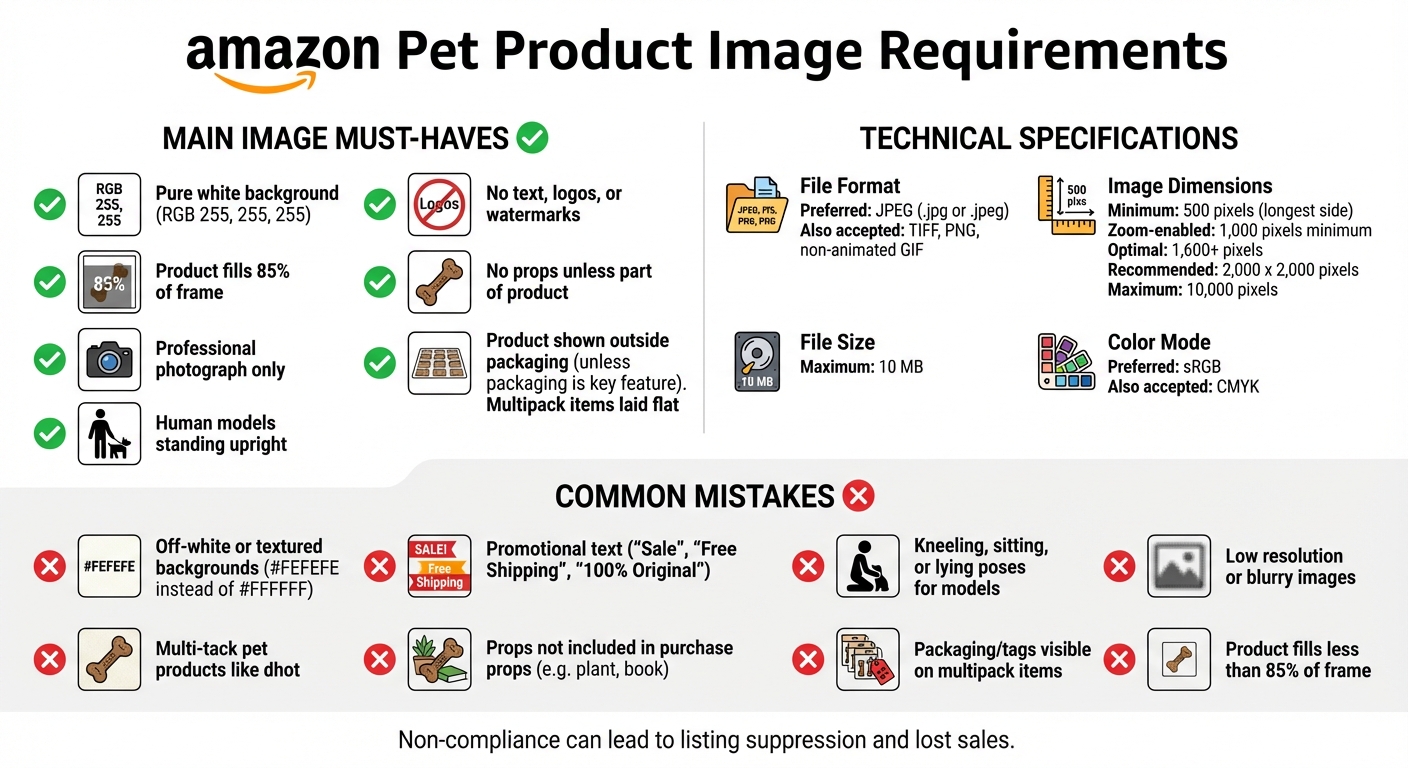
Amazon Pet Product Image Requirements Checklist
Meeting Amazon’s image guidelines is crucial to avoid listing suppression. These rules apply across all pet products, whether you’re selling collars, toys, beds, or grooming supplies.
Main Image Rules You Must Follow
Your main image needs to be a professional photograph – illustrations, graphics, or any non-photographic images are not allowed. If your product involves a human model, such as pet apparel or accessories, the model must be standing upright. Poses like sitting, kneeling, or lying down are not permitted.
For multi-pack items, such as squeaky toy sets, the main image should display the products laid flat on a neutral surface. If the packaging is a key selling point, like in a gift set, it can be included in the main image; otherwise, show the product outside its packaging.
"The main image has to be a no-frills – but high-quality – mugshot of your product."
– Brian Connolly, Jungle Scout
Once you’ve nailed the main image, it’s time to address the technical specifications to ensure your images meet Amazon’s standards.
Technical Image Specifications
Amazon recommends using JPEG files (.jpg or .jpeg) as the preferred format, though TIFF, PNG, and non-animated GIF files are also accepted. Follow these technical guidelines to enhance zoom functionality and improve customer interaction:
| Specification | Requirement |
|---|---|
| Preferred File Format | JPEG (.jpg or .jpeg) |
| Minimum Size | 500 pixels on the longest side |
| Zoom-Enabled Size | 1,000 pixels minimum; 1,600+ pixels optimal |
| Maximum Size | 10,000 pixels on the longest side |
| Maximum File Size | 10 MB |
| Color Mode | sRGB (preferred) or CMYK |
For zoom functionality, images must be at least 1,000 pixels on the longest side, but 1,600 pixels or more is ideal for a better customer experience. The maximum allowed size is 10,000 pixels, and the file size should not exceed 10 MB. To ensure accurate color representation, use sRGB color mode, though CMYK is also acceptable. Keeping these specifications in mind will help you create images that are both compliant and visually appealing to potential buyers.
Examples of Non-Compliant Pet Product Photos
Understanding what makes an image non-compliant becomes much easier when we look at specific examples. These scenarios help bring Amazon’s guidelines into focus and show how certain mistakes can lead to violations.
Example 1: Pet Collars on Models in Incorrect Poses
Imagine a main image featuring a person kneeling to adjust a dog collar. This violates Amazon’s rule that human models in product photos must stand upright. Any pose other than standing shifts the attention away from the product itself, disrupting the shopping experience and breaking compliance rules.
This is just one example of how improper poses can lead to non-compliance issues.
Example 2: Multipack Toys with Packaging or Tags Visible
Packaging errors are another common compliance issue. Amazon requires that products be displayed outside their packaging unless the packaging is a key feature of the product. For example, multipack pet toys need to be shown unpackaged, with no tags or stickers visible. Instead of being bundled in their original packaging, these items should be neatly laid out on a clean, white background.
Ignoring this guideline can result in cluttered images that fail to meet Amazon’s standards.
Example 3: Low-Resolution and Blurry Images
Quality matters. A pet bed image with a resolution of just 400 pixels falls short of Amazon’s minimum requirement of 500 pixels on the longest side. Blurry or pixelated images are also disallowed. Low-resolution photos make it hard for customers to see key details like fabric texture, stitching, or material quality. Without the ability to zoom in, customers may lose confidence in the product, potentially lowering conversion rates. Worse, Amazon might suppress your listing altogether.
These examples underline common mistakes that can lead to non-compliance. Up next, we’ll explore ways to address and prevent these issues effectively.
sbb-itb-e2944f4
How to Fix and Prevent Image Compliance Problems
Making sure your product images meet Amazon’s requirements doesn’t have to be complicated. Start by photographing your product against a pure white background (RGB 255, 255, 255). To achieve this, use tools like a lightbox or a sweep, which help create a clean, uninterrupted white background with even lighting. Your product should fill 85%-90% of the frame – anything less might lead to suppression, while exceeding that range could distort the image.
For the best results, use images that are 2,000 x 2,000 pixels. While Amazon’s minimum requirement is 500 pixels (and 1,000 pixels for zoom functionality), images at 2,000 pixels can improve conversion rates by up to 30%. As Ailee.ai points out, "Amazon technically accepts 1000 x 1000 pixels. But here’s the thing – you really want to go with 2000 x 2000". Save your files using the product identifier (e.g., ASIN.MAIN.jpg) and ensure they are in sRGB color mode for the best on-screen display.
Whether you choose professional services or DIY tools, maintaining compliance is key to keeping your listings visible and effective.
Using Emplicit‘s Services for Image Compliance

If you’re managing a large product catalog or prefer expert help, Emplicit offers tailored services for Amazon compliance. Their team handles listing optimization and professional image editing, ensuring your main images meet Amazon’s standards, including the 85% frame fill and pure white background requirements. They also recommend using 2,000 x 2,000 pixel images to enhance the shopping experience and keep your listings future-ready. Additionally, Emplicit provides account health management services to help prevent listing suppression. You can request a free quote to see how their expertise can improve your image compliance and overall performance.
DIY Tools for Checking Compliance
If you prefer a hands-on approach, there are plenty of budget-friendly tools to help you stay compliant. Use Photoroom for background removal and resizing, Ailee.ai for product cropping, and Canva or Adobe Firefly for creating secondary images. To monitor compliance, check Amazon’s Image Manager in Seller Central. It highlights non-compliant images with a red alert icon and provides details about the issues when you hover over it.
Conclusion
Key Points for Pet Product Sellers
Getting your pet product images right isn’t just about aesthetics – it’s about protecting your business. To stay compliant, your main image must have a pure white background (RGB 255, 255, 255), with the product taking up at least 85% of the frame. Avoid including any text, logos, or props that aren’t part of the actual product. As Brendan McConnell from Photoroom explains, "In this marketplace, image requirements are far from just technicalities. They’re make-or-break rules that decide whether your listings appear highly in product searches, or if it disappears entirely due to suppression".
Failing to meet these standards can lead to listing suppression, which happens without warning. This not only results in immediate revenue loss but can also harm your account health metrics. Even after fixing the issue, regaining your product’s previous search ranking can be a steep climb. On top of that, using compliant images helps set clear customer expectations, which can reduce returns and negative reviews.
The takeaway? Don’t wait until it’s too late – take steps now to ensure your images meet the guidelines.
Next Steps to Ensure Compliance
Start by checking your Image Manager in Seller Central for any red alert icons. These alerts indicate issues with your images, such as improper backgrounds or framing that doesn’t meet the requirements.
For sellers managing multiple listings or those who prefer expert help, Emplicit provides professional image editing and account health management services. Their team can ensure your listings stay compliant and visible. You can even request a free quote to see how they can help safeguard your listings and improve performance.
FAQs
What are the consequences if my pet product images don’t follow Amazon’s guidelines?
If your pet product images don’t align with Amazon’s guidelines, your listing might get suppressed, effectively disappearing from shoppers’ view. This could result in missed sales opportunities, decreased visibility, and potential penalties that could harm your account’s standing.
To prevent these setbacks, make sure your images meet Amazon’s standards for size, background, and content. Following these rules not only safeguards your account but also enhances your product’s appeal, helping it catch the eye of more potential buyers.
How can I make sure my pet product photos meet Amazon’s white background requirements?
Amazon has specific requirements for main product photos: they must feature a pure white background (RGB 255, 255, 255), and the product should dominate most of the image frame. To meet these standards, start by using a seamless white backdrop and ensure the lighting is even to remove any shadows. When setting up the shot, position the product so it fills at least 85% of the frame, and capture the image in high resolution – ideally, with the longest side measuring at least 2,000 pixels.
After taking the photo, use an editing tool to verify that the background is truly pure white. If any areas fall short, a background remover can help fix them. Once the image is ready, export it as a JPEG or PNG in sRGB color mode. Make sure the file size stays under 10 MB and that the dimensions are either square or close to square. Following these steps will ensure your images look polished and meet Amazon’s strict guidelines.
Why does my product need to fill at least 85% of the image frame on Amazon?
Amazon has a clear rule: the main product image must take up at least 85% of the frame. This ensures that the product stands out, making it easier for shoppers to see and evaluate. Plus, it activates the zoom feature, allowing potential buyers to examine details closely – something that can often lead to more sales.
Sticking to this guideline not only makes your listing look polished but also keeps it compliant with Amazon’s standards. This reduces the chance of penalties and boosts your chances of catching a shopper’s eye.
Related Blog Posts
- Fixing Amazon Listing Suppression Issues: A Step-by-Step Guide
- Why 73% of Pet Brands Fail on Amazon Before Year Two (And How to Be the Exception)
- What Happens to Pet Brands That Ignore Amazon’s New Ingredient Transparency Rules
- The Amazon Listing That Sold $1.2M in Dog Supplements Last Year Had One Thing Yours Doesn’t