
When a customer clicks "buy", the journey isn’t over – it’s just starting. Post-purchase support can turn one-time buyers into loyal customers, driving revenue growth and increasing retention. Here’s what you need to know:
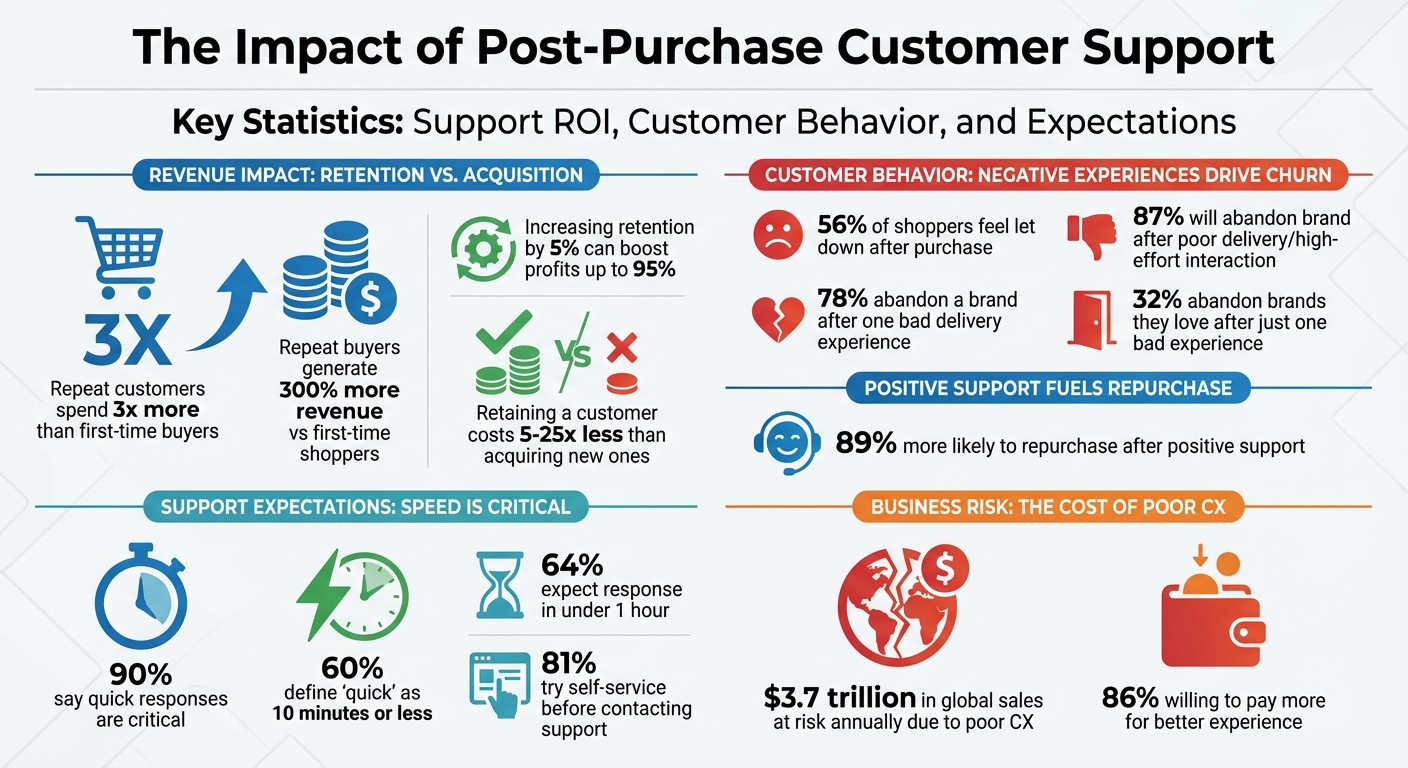
- Why It Matters: Repeat customers spend 3x more than first-time buyers, but 56% of shoppers feel let down after purchase.
- Key Stats: Poor support leads 78% of customers to abandon a brand after one bad delivery experience.
- Core Strategies:
- Use a centralized support system for faster response times.
- Implement self-service options like knowledge bases to reduce ticket volume.
- Leverage automation for updates and repetitive tasks like "Where Is My Order?" inquiries.
- Personalize support using customer data and AI tools.
- Collect and act on feedback to improve processes.
- Tools to Consider: Platforms like Gorgias, Zendesk, and eDesk can streamline support across channels.
- Metrics to Track: Focus on Customer Satisfaction (CSAT), First Response Time (FRT), and First Contact Resolution (FCR) to measure success.
The bottom line: Great post-purchase support builds trust, reduces churn, and boosts customer lifetime value. Investing in these strategies ensures every sale is the start of a lasting relationship.
Post-Purchase Customer Support Statistics and ROI Impact
How To Fix Order Tracking And Delivery Issues To Improve Post Purchase Experience
sbb-itb-e2944f4
Setting Up a Centralized Support System
Effective post-purchase support starts with a single, unified system that simplifies customer interactions. Picture this: messages coming in from Amazon, your Shopify store, Instagram DMs, and email. Managing them separately? That’s a recipe for delays. Agents waste time flipping through tabs, customers get frustrated repeating themselves, and some inquiries inevitably slip through the cracks. Centralizing all support channels into one inbox can cut response times by up to 69%. Plus, 56% of consumers say they’ve had to repeat their information when dealing with fragmented systems. That’s a lot of unnecessary frustration.
A centralized system brings all inquiries into one place – a "Smart Inbox" that gives agents instant access to order history, tracking info, and past conversations without switching platforms. Retailers using a unified platform resolve issues 50% faster, yet only 19% of ecommerce businesses currently offer unified support across four or more channels. There’s a big opportunity here.
This kind of system doesn’t just make things easier – it helps protect your seller ratings too. Marketplaces like Amazon require responses within 24 hours, and a unified inbox with SLA countdown timers ensures no message gets missed. With 64% of shoppers expecting a response in under an hour, every second spent hunting for context is a second too long. Once you’ve got this foundation in place, you’re ready to choose the right tools to fine-tune your support system.
Choosing the Right Support Tools
Not all helpdesks are created equal. Generic ones often lack the integrations ecommerce businesses need. Specialized tools, on the other hand, pull in live data like tracking numbers, carrier details, and delivery estimates directly into each ticket. Imagine resolving an issue in 30 seconds instead of spending five minutes searching for details. That’s the power of having the right tools.
Your tools should match where you sell. If you’re on marketplaces like Amazon, eBay, Walmart, or TikTok Shop, look for platforms with built-in integrations for each. For example, Sauder Woodworking saw a 98% CSAT score and a 66% boost in support efficiency by using eDesk in 2025. Similarly, Hey Pharma cut average handling time by 54% with automated order-linking features.
Key features to look for include omnichannel ticketing, automated routing based on keywords or order value, and direct integrations with ecommerce platforms and shipping providers. AI-powered tools can take this a step further, assigning tickets based on intent or SLA requirements, while auto-responders manage customer expectations during busy periods. Teams using AI resolve issues 47% faster and achieve 25% higher first-contact resolution rates compared to those without automation.
But tools alone aren’t enough. Giving customers the power to solve their own problems can make your support system even more efficient.
Building a Self-Service Knowledge Base
Most customers would rather fix issues themselves. In fact, 81% try self-service options before contacting live support. A well-designed knowledge base can cut support ticket volumes by 25–35% – or even up to 40% – allowing your team to focus on more complex issues.
Here’s how to set it up: create two knowledge bases – one for customers and one for your support team. The external one should answer common questions like "How do I track my order?" or "What’s your return policy?" Organize it by stages of the customer journey, such as "Before You Order", "After Your Order", and "Returns & Exchanges", and use the exact phrases your customers search for.
The internal knowledge base is your team’s playbook. It should include escalation paths, troubleshooting guides, and step-by-step procedures for handling tricky situations. For example, if an agent needs help with a complicated refund or a marketplace-specific policy, they can find the answer without asking for managerial input. Plus, self-service options are far more cost-effective – each interaction costs about $1.84 compared to $13.50 for phone support. That’s a huge saving as your business scales.
Using Automation to Improve Efficiency
Automation takes the efficiency of a centralized support system to the next level by speeding up interactions and reducing repetitive tasks. For example, 30% to 50% of ecommerce support tickets are "Where Is My Order?" (WISMO) inquiries. These inquiries consume a significant amount of support time. The solution? Automated notifications that keep customers updated at every stage – order confirmed, packed, shipped, out for delivery, and delivered. When customers are informed, they don’t need to ask.
The benefits are clear. 90% of customers say quick responses are critical when they have a support question, and 60% define "quick" as 10 minutes or less. Meeting this expectation manually is tough, but AI can handle it with ease. In August 2025, the online Asian supermarket Weee! implemented Sobot‘s AI-powered contact center to manage high inquiry volumes and language barriers. The results? A 48% boost in reception efficiency, a 41% cut in average handle time, and a 54% improvement in first-contact resolution.
"Generative AI increases customer service productivity at a value of 30% to 45% of current function costs." – McKinsey
Modern AI agents do much more than follow scripts. They understand natural language, access real-time order data, and resolve tickets from start to finish without needing human intervention. For example, OPPO leveraged Sobot’s AI chatbot solutions to handle routine queries, achieving an 83% chatbot resolution rate. This contributed to a 57% increase in customer repurchase rates. Automation, in this case, turned customer support into a revenue-driving tool.
Implementing AI-Powered Chatbots
AI chatbots are a step above traditional bots. While older bots follow rigid decision trees and fail when faced with unexpected questions, AI-powered chatbots use natural language processing (NLP) to understand context and intent. They pull real-time data from sources like order management systems, product catalogs, and shipping providers to deliver accurate, personalized answers in seconds.
Key features to look for include:
- Sentiment analysis to detect frustration and escalate to a human agent before the situation worsens.
- Omnichannel deployment to manage conversations across email, live chat, SMS, and marketplaces like Amazon or TikTok Shop.
- Self-learning capabilities to improve responses based on past interactions.
Most importantly, ensure a smooth handoff to human agents when necessary. The AI should transfer the full conversation history so customers don’t have to repeat themselves.
The numbers are compelling. AI can reduce human-serviced contacts by up to 50%, and businesses that adopt automation see average cost savings of 60%. Resolving tickets manually costs between $5 and $12 each, while automated solutions cost just pennies. Plus, if customers don’t get a reply within 30 minutes, there’s a 38% chance they’ll abandon their purchase. AI eliminates this risk entirely.
Start small. Review your ticket data to identify the top five repetitive queries – like WISMO, returns, or sizing questions – and automate those first. Build a customer-friendly, AI-optimized knowledge base to support your chatbot’s responses. And always include a fallback option: if the AI can’t resolve an issue after a few attempts, it should seamlessly hand off to a human agent with all the necessary context.
While AI chatbots handle common questions, automated notifications keep customers informed proactively.
Setting Up Automated Customer Notifications
Proactive communication stops problems before they arise. Instead of waiting for customers to ask "Where’s my order?", automated notifications keep them in the loop at every stage. Set up event-driven triggers to notify customers when their order is confirmed, packed, shipped, out for delivery, and delivered. If there are delays or exceptions, notify them immediately.
The value of this is clear. 97% of customers consider delivery tracking essential to their experience, and 67% are open to letting AI handle order tracking entirely. Automated notifications not only reduce ticket volume but also build trust. When customers feel informed, they’re more likely to stay loyal.
Take it further by creating branded tracking portals. These portals can show order status, suggest complementary products, and provide contextual FAQs – all in one place. Dynamic personalization can tailor content based on customer behavior, turning a simple tracking page into a chance to boost sales.
For multichannel sellers, automation must adapt to marketplace-specific rules. For example, Amazon requires responses within 24 hours. Your system should flag at-risk tickets automatically to ensure compliance. Integrate all your channels – Amazon, eBay, Shopify, social media – into one unified inbox to maintain consistent service levels without switching tabs. With 75% of CX leaders predicting that 80% of customer interactions will soon be resolved without human intervention, brands that adopt these strategies early will gain a clear edge.
How to Deliver Personalized Support
Automation can handle the heavy lifting, but it’s personalization that wins customer loyalty. Research shows that 80% of customers prefer tailored experiences, and 52% would consider switching brands if interactions feel generic. By combining automation with a unified platform and skilled teams, personalized support turns customer data into lasting loyalty.
The rewards are hard to ignore. Returning customers are a major driver of revenue. In fact, increasing customer retention by just 5% can lead to a profit boost of up to 95%. Personalization isn’t just an extra touch – it’s a strategy for growing revenue.
Collecting and Using Customer Data
To provide personalized support, you need a solid foundation of customer insights. Start by centralizing your data. Integrate all customer touchpoints – like social media, SMS, email, and ecommerce – into a single helpdesk. This ensures a complete view of each customer and eliminates the frustration of repeated explanations across channels.
Zero-party data, or information customers willingly share, is a goldmine. Ask questions during the post-purchase process, such as their product preferences or intended uses, to refine future recommendations. This approach not only improves accuracy but also builds trust, unlike relying on third-party data.
Dynamic segmentation is another game-changer. Group customers based on behavior and purchase history to send targeted messages. For instance, remind customers to restock limited-edition items or offer care tips for maintenance-heavy products. Real-time actions also open the door to behavior-triggered campaigns. If a package hasn’t moved, you can proactively send a "suspected lost package" notification before the customer even reaches out.
Take Fresh Clean Threads as an example. They introduced branded tracking pages with personalized product recommendations and loyalty invites, leading to a 10% increase in second-purchase revenue. Similarly, LSKD, an Australian sportswear company, adopted an "exchange-first" return policy. By offering personalized alternatives – like different sizes or colors – they managed to retain 53% of their return revenue.
Personalized emails are another effective tool, boasting a 78% open rate after a purchase. Automate replenishment reminders by calculating how long a product, like vitamins or soap, typically lasts. Then, send a reminder just before the customer runs out. Tools like Maverick even use AI to add customer names to video templates, creating thank-you notes or setup guides that feel personal. Brands like Magic Mind and Dr. Squatch have used such strategies to significantly increase repeat purchases.
Samsung offers another example of effective personalization. In 2026, they used Sobot’s unified contact center to consolidate customer interactions across multiple channels. This streamlined approach boosted agent efficiency by 30%, as agents had access to the full customer history in one place. Whether through email, chat, or social media, omnichannel integration ensures that customers always receive informed and seamless support.
"My biggest piece of advice is to really understand the customer journey for your business. Which touchpoints are going to drive the most revenue?" – Bri Christiano, Director of Customer Support, Gorgias
With the right data and tools in place, your support team can deliver a truly personalized experience.
Training Support Teams for Better Customer Interactions
Even the best data is useless if agents don’t know how to use it effectively. Training your support team is key to delivering exceptional, empathetic service. 93% of customers are likely to make repeat purchases after a great customer service experience, and 68% say the post-purchase experience shapes their view of a brand.
Start with empathy training. Teach agents how to handle emotionally charged situations – like a missing wedding dress or a delayed birthday gift – with genuine care rather than sticking to rigid scripts. Role-playing exercises and annotated examples from past interactions can help them understand what great support looks like in practice.
Improvisation exercises are another way to sharpen adaptability. These activities encourage agents to respond naturally to unexpected questions, moving beyond scripted responses. The goal? Equip them to take full ownership of customer issues from start to finish.
A unified agent view is also essential. This tool consolidates all past interactions, purchase history, and customer preferences into one interface, so customers don’t have to repeat their story every time they reach out. AI-powered tools can further enhance agent performance by analyzing tone, suggesting grammar improvements, and summarizing lengthy conversations for quicker responses.
Here’s how these strategies impact support metrics:
| Metric | Support Impact Metrics |
|---|---|
| Customer Satisfaction | 10-14% increase |
| Ticket Volume | Up to 70% reduction in routine inquiries |
| Support Costs | 35% lower through automation/self-service |
| Agent Efficiency | 30-40% improvement via unified tools |
| Conversion Rates | 15-20% increase for ecommerce |
Multi-Channel Support Best Practices
People communicate in different ways – some prefer the instant response of live chat, while others lean toward texts or social media messaging. In fact, 58% of customers say having support on their favorite channel influences their buying choices. Meeting customers where they feel most comfortable isn’t just convenient – it gives you a competitive edge.
Omnichannel customers are a brand’s best friend – they spend 1.5 times more than single-channel buyers and are three times more loyal. Plus, improving how these channels work together can increase sales revenue by 2%–7% and boost profitability by 1%–2%. But here’s the catch: simply having multiple channels isn’t enough. The magic happens when these channels are integrated, so customers don’t need to repeat themselves, and your team always has the full context.
A well-thought-out multi-channel strategy, built on a centralized support system, reduces frustration and builds loyalty throughout the post-purchase experience.
Selecting the Right Channels for Your Business
Start by understanding your audience and their communication preferences. Gen Z and Millennials often lean toward social media and SMS, while older customers may stick with phone support. 73% of shoppers use multiple channels during their buying journey. Match each channel to the stage of the customer journey – social media and live chat are great for quick answers during browsing, while email and phone are better for complex issues like returns or troubleshooting.
Cost matters too. For example, phone and video support can cost $15–$25 per interaction, while AI and self-service options are much more affordable, at $0.50–$2.00. Use automated channels for simple questions like “Where’s my order?” and save high-touch options for more complicated or emotional situations.
It’s smart to start small – focus on two or three key channels, like email, live chat, and one social platform, to avoid overwhelming your team. Test each channel with a pilot program before fully committing. For example, in January 2026, Rothy’s, a footwear brand, used the Gladly platform and an AI chatbot named "Sandi" to unify customer data into a single timeline. Under Lauren Inman-Semerau’s leadership, they cut Average Handling Time by 34% and resolved 31% of conversations through AI, proving the value of a multi-channel approach.
Integration is key. Bringing all your channels into a unified system ensures seamless customer interactions. For instance, OLIPOP, a beverage brand, integrated SMS support through the Gorgias platform and saw an 88% decrease in response time.
"I’ve called angry customers, and if you let them speak and hear them out, and repeat back to them their frustrations, that alone will save that customer in the end." – Bri Christiano, Senior Director of Customer Success, Gorgias
Consistency is non-negotiable. 85% of customers expect the same experience no matter the channel. A CX playbook can help – document your brand tone, refund policies, and escalation procedures so every agent is on the same page. Shared templates and macros ensure consistent tone and information whether the customer reaches out via email, chat, or social media.
This approach not only simplifies customer interactions but also makes it easier to choose the right tools and maintain high-quality support.
Support Tools Comparison
The right tools make a multi-channel strategy work smoothly, ensuring each platform fits your operational needs. For example:
- Marketplace sellers managing platforms like Amazon, eBay, and Walmart need tools with native integrations that follow each platform’s rules.
- Shopify-based DTC brands benefit from tools that integrate deeply with store data.
- Enterprise teams require solutions with advanced routing and global scalability.
Here’s a quick comparison of popular tools:
| Platform | Best For | Key Features | AI/Automation |
|---|---|---|---|
| HappyFox | Omnichannel Ticketing | Centralized hub, Smart Rules for routing, Knowledge Base builder | Strong (Smart Response) |
| Gladly | Customer-Centric Brands | Unified conversation timeline, "Sandi" AI chatbot, people-focused | Advanced (AI Copilots) |
| eDesk | Marketplace Sellers | Native Amazon/eBay/Walmart integration, marketplace compliance | Strong (Smart Automations) |
| Gorgias | Shopify/DTC Brands | Deep Shopify integration, SMS/Social focus, revenue tracking | Strong (AI Agent) |
| Zendesk | Enterprise/Global Teams | Robust ticketing, advanced analytics, highly scalable | Advanced (Enterprise AI) |
Helpdesk tools typically cost $50 to $200 per agent per month, with setup and training for enterprise systems ranging from $10,000 to $50,000. For example, in 2026, a high-volume ecommerce seller switched to eDesk for Amazon and eBay support. This change reduced first-response time by 35% in just two weeks, improving from 8 hours to 5 hours by eliminating the need for agents to switch between platforms.
For brands expanding to multiple platforms, companies like Emplicit offer comprehensive ecommerce services. Their expertise spans marketplace management on Amazon, TikTok Shops, Walmart, and Target, helping brands maintain consistent support while managing inventory, PPC, and listings across channels.
Using Customer Feedback to Improve Support
Customer feedback is like a roadmap – it highlights what’s working and what needs fixing. Here’s a striking stat: 86% of consumers are willing to pay more for a better customer experience. But on the flip side, 32% will abandon a brand they love after just one bad experience. That’s a slim margin for error. Globally, businesses risk losing $3.7 trillion in sales every year due to poor customer experiences. Yet, only 15% of business leaders actively use customer insights in their decisions. Bridging the gap between gathering feedback and actually using it requires clear processes that connect customer opinions to meaningful actions.
Creating Feedback Loops
Feedback loops work best when they’re structured and backed by the right metrics. Tools like the Net Promoter Score (NPS) help measure overall loyalty by asking customers how likely they are to recommend your brand on a 0–10 scale. Meanwhile, the Customer Satisfaction Score (CSAT) focuses on specific interactions, like resolving a support ticket or completing a purchase. The Customer Effort Score (CES) gauges how easy it was for customers to resolve an issue, and here’s a key insight: 96% of customers who describe an interaction as "high effort" are likely to stop being loyal.
Timing plays a big role in collecting feedback. In-app surveys tend to get response rates between 20% and 30%, while email surveys typically land around 15% to 25%. To maximize responses, trigger these surveys right after key moments – like resolving a chat, processing a return, or even spotting a "rage click". Keeping surveys short, with just one or two questions, can further improve engagement.
The CLEAR Framework is a five-step method for managing feedback effectively:
- Collect: Centralize feedback from all channels.
- Label: Use AI tools to categorize feedback.
- Escalate: Prioritize issues based on urgency and customer value.
- Act: Respond with full context in mind.
- Review: Analyze trends to identify areas for improvement.
"Feedback is fuel. The difference between teams that simply collect feedback and those that use feedback well comes down to three things: asking the right questions at the right time, distinguishing signal from noise, and building systems that turn insights into action."
- Tim Jordan, Sr. Manager of Customer Support, Cars.com
Combining customer comments with behavioral data can uncover the root causes of frustration. For example, vague complaints like "this is broken" might actually stem from issues like rage clicks or confusing checkout processes. Diving deeper into CSAT scores alongside data like agent performance, issue types, and resolution times can reveal specific areas where training or processes need improvement. And don’t forget your internal teams – support agents often notice recurring problems before they show up in formal surveys, offering valuable context beyond the numbers.
Turning Feedback into Improvements
Feedback only matters if it leads to action. Using insights from customer feedback, brands can make targeted changes that directly address customer pain points. For example, in 2026, Australian sportswear brand LSKD revamped their returns process after analyzing customer feedback. Instead of defaulting to refunds, they introduced an "exchange-first" policy, offering options like different sizes or store credit. This approach helped them retain 53% of their return revenue.
"Taking concrete actions based on the feedback is what brings value to both the brand and the customers. By continuously improving based on feedback, ecommerce brands can create a customer-centric culture that sets them apart."
- John Webber, Founder, Carved
When deciding what to tackle first, focus on problems that occur frequently, are costly to fix (like damaged shipments), or directly impact repeat purchases. Feedback can also be used to coach support teams. Incorporating specific customer comments into agent training sessions can improve soft skills like empathy and communication. Similarly, auditing support documentation using prompts like "Was this article helpful?" can identify outdated or unclear content.
Closing the loop is just as important as gathering feedback. Always let customers know how their input led to changes – it builds trust and can even turn dissatisfied customers into loyal advocates. Automating alerts for negative feedback, such as tagging a supervisor when a neutral or poor rating is received, ensures timely follow-ups.
Collaboration across teams is crucial too. Sharing feedback with product, sales, and marketing teams can address broader issues like confusing onboarding processes or unclear product descriptions. Businesses that excel in NPS see 20% lower customer churn and grow revenue at twice the industry rate. Additionally, companies that focus on reducing customer effort can boost repurchase intent by up to 94%. The takeaway? It’s not about how much feedback you collect – it’s about acting on it quickly and effectively.
At Emplicit, we use customer feedback to fine-tune post-purchase support, ensuring every interaction strengthens loyalty and aligns with the efficient service strategies outlined here.
Measuring Post-Purchase Support Performance
If you want to improve your post-purchase support, you need to measure it. Metrics are your guide to understanding where your team shines and where improvements are needed. It’s about striking the right balance between efficiency, quality, and overall business impact. For example, focusing solely on fast response times might look impressive, but it won’t mean much if customers still walk away dissatisfied.
Here’s a breakdown of the key metrics that can help maintain top-notch support.
Key Metrics to Track
Start with the Customer Satisfaction Score (CSAT), which gauges how happy customers are with a specific interaction. This is typically collected via a quick survey (on a 1–5 or 1–10 scale) immediately after resolving an issue. Aiming for a score between 80–90% indicates excellent service, with 70–80% being acceptable. For a broader perspective, use the Net Promoter Score (NPS), which asks customers how likely they are to recommend your brand on a 0–10 scale. Scores of 50–70 are considered excellent, while 30–50 is average.
Another critical metric is the Customer Effort Score (CES), which measures how easy it was for a customer to resolve their issue. This often-overlooked metric is incredibly telling: 96% of customers who face high-effort interactions become disloyal, while 94% with low-effort experiences stay loyal. CES is also 1.8x better than CSAT at predicting customer loyalty.
Speed is another crucial factor. First Response Time (FRT) measures how quickly customers receive their first personalized reply, while Average Resolution Time (ART) tracks the time from ticket creation to closure. The best ecommerce teams resolve tickets in an average of 1.67 hours, with 90% of issues resolved within 17 hours. Simpler issues, like "Where is my order?" should be resolved in under 2 hours, while more complex problems, such as technical bugs, may take up to 72 hours.
First Contact Resolution (FCR), which measures the percentage of issues resolved in a single interaction, is another game-changer. A 1% improvement in FCR can lower operating costs and boost customer satisfaction by the same amount. It can also reduce churn by up to 67%. To ensure agents aren’t closing tickets prematurely, track Ticket Reopens as well.
Other useful metrics include the Customer Churn Rate, which shows the percentage of customers lost over time (often due to poor support), and Tickets Per Order (TPO), which highlights systemic issues if support requests are unusually high per order.
| Metric | Channel | Good Benchmark | Excellent Benchmark |
|---|---|---|---|
| First Response Time (FRT) | Live Chat | < 2 Minutes | < 60 Seconds |
| First Response Time (FRT) | 4–12 Hours | < 4 Hours | |
| First Response Time (FRT) | Phone | 1–3 Minutes | < 1 Minute |
| First Contact Resolution (FCR) | All | 60–70% | 70–80%+ |
| Customer Satisfaction (CSAT) | All | 70–80% | 80–90%+ |
| Net Promoter Score (NPS) | All | 30–50 | 50–70+ |
These benchmarks give you a starting point for identifying areas to improve and optimizing your support operations.
Using Data to Improve Support Quality
Once you’ve identified the key metrics, use them to make meaningful changes that enhance customer satisfaction. Start by establishing a 30-day performance baseline. Then, analyze segmented data by channel (like chat, email, or phone), issue complexity (billing vs. technical), and customer tier to avoid misleading averages. For instance, FRT expectations differ: under 5 minutes for live chat vs. under 24 hours for email.
Root cause analysis can help you dig deeper into problem areas. If resolution times are high, is it due to understaffing, inefficient workflows, or agents lacking decision-making authority?. Segment metrics by issue type – like "Where Is My Order" (WISMO) – to uncover product or shipping problems driving ticket volume. For example, in 2025, Orthofeet, a US orthopedic footwear company, implemented AI tools and achieved a 56% ticket automation rate within two months. This slashed their email response times from 24 hours to just 35 seconds and fueled double-digit revenue growth without needing to hire more staff.
Set up automated alerts to flag when CSAT drops below a certain level (like 70%) or when tickets breach service level agreements (SLAs). Track Interactions Per Ticket to identify where processes are falling short – this often signals a need for better training or updated documentation. Don’t forget to evaluate your self-service options by monitoring the "Self-Service Resolution Rate." This helps you identify which FAQ topics or automated workflows are working and which need improvement.
Advanced analytics can even predict churn risks up to 60 days in advance by analyzing patterns like unresolved tickets or slow response times. AI-driven sentiment analysis can detect customer frustration across 40+ languages with up to 85% accuracy, enabling automatic escalation for negative interactions. Businesses leveraging AI-powered support see a $3.50 return for every $1 invested.
Lastly, keep your team’s workload balanced. Aim for an agent utilization rate of 70–85% – anything above 90% risks burnout and declining support quality. Remember, retaining a customer costs five times less than acquiring a new one, and 89% of customers are more likely to make repeat purchases after a positive support experience. Use this data to build a support system that keeps customers coming back.
At Emplicit, we rely on these metrics to drive loyalty and boost revenue growth.
Conclusion
Post-purchase support shows your customers that their success matters long after the sale. In fact, 89% of customers are more likely to buy again after a positive post-purchase experience. And here’s why that matters: repeat buyers generate 300% more revenue compared to first-time shoppers. Plus, focusing on retention is far more cost-effective – keeping a customer costs 5 to 25 times less than acquiring a new one.
When you combine smart automation, tailored interactions, and actionable feedback loops, support becomes a revenue-driving powerhouse. Brands like Fresh Clean Threads and LSKD are proof that thoughtful post-purchase strategies can directly boost revenue and customer loyalty.
"Trust is the currency of modern business. You earn it in drops and lose it in buckets. The post-purchase journey is where you make your most significant deposits." – Ami Heitner
The numbers speak for themselves: 87% of customers will abandon a brand after a poor delivery or high-effort interaction, and 96% will lose loyalty. On the flip side, customers who rate their post-purchase experience as 5-star are 2.9 times more likely to trust your brand and 3 times more likely to recommend it.
At Emplicit, we specialize in creating post-purchase experiences that cultivate loyalty and advocacy. Whether you’re managing marketplaces like Amazon and Walmart or growing your own ecommerce platform, having the right strategy can transform your support into a competitive edge. Let us help you turn one-time buyers into lifelong advocates.
FAQs
What should I automate first in post-purchase support?
The first step in post-purchase automation should focus on order confirmation and shipping updates. These updates play a key role in building trust, as they reassure customers that their order has been processed and keep them informed about delivery progress.
By automating these notifications, you can ease customer concerns, reduce the number of support inquiries, and create a smoother overall experience. Once these basics are in place, you can explore adding automated personalized offers or follow-up messages to further enhance customer engagement.
How do I choose the right support channels for my customers?
Understanding your customers’ preferences and the types of inquiries they make is key to selecting the best support channels. Offering a mix of options – like phone, email, live chat, social media, and self-service tools – ensures you’re meeting a variety of needs.
For example, younger customers often lean toward messaging platforms and self-service options. Catering to these preferences can make a big difference in their experience.
Speed is another critical factor. Aim for response times between 30 to 60 minutes, but if you want to stand out, strive for under 30 minutes like top-performing companies do. When your support channels align with how your customers behave, you’re not just solving problems – you’re building satisfaction and loyalty.
Which support metrics matter most for retention?
When it comes to retaining customers, focusing on quality and efficiency is essential. Some of the most important metrics to track include:
- Customer Satisfaction (CSAT): A direct measure of how happy your customers are with your service.
- Customer Lifetime Value (CLV): This shows the total revenue a customer is expected to bring during their relationship with your business.
- Ticket Volume and Resolution Rate: These metrics reveal how efficiently your team handles customer inquiries and resolves issues.
Additionally, tracking the Repeat Purchase Rate (RPR) and evaluating the effectiveness of personalized strategies, such as sending order updates or offering loyalty rewards, can go a long way in fostering customer loyalty. By keeping an eye on these metrics, businesses can reduce churn, improve retention, and set the stage for sustainable growth.