
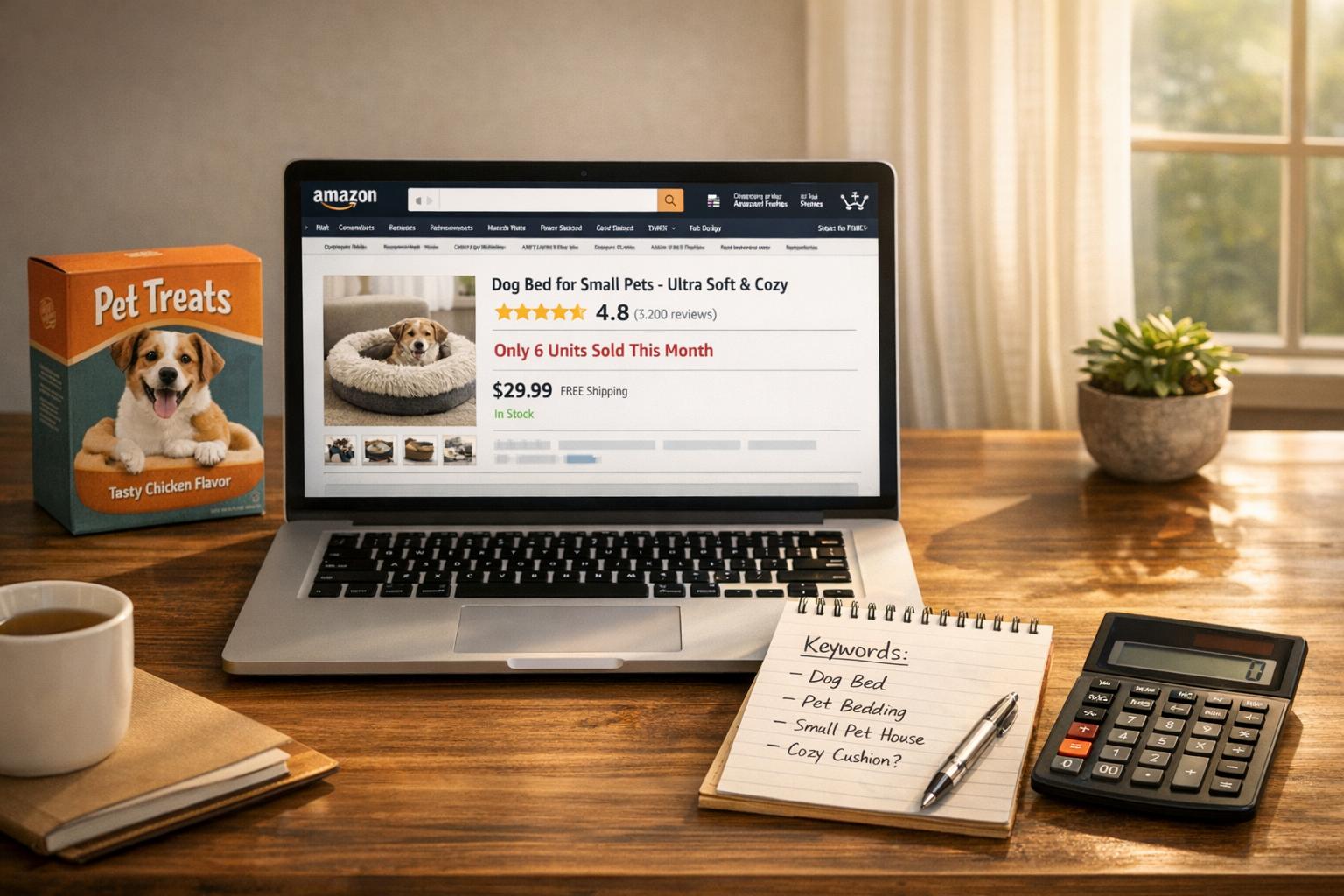
Your pet product has a 4.8-star rating on Amazon, yet sales are stagnant. Why? High ratings alone don’t drive sales. Success on Amazon depends on visibility, optimized listings, competitive pricing, and effective advertising. Here’s the breakdown:
- Visibility is key: If your product isn’t on the first page of search results, most shoppers won’t find it. Amazon prioritizes sales velocity and keyword relevance over star ratings.
- Listings matter: Poor titles, low-quality images, and uninspired bullet points can turn potential buyers away, even if reviews are glowing.
- Pricing impacts decisions: Shoppers compare prices within seconds. If you’re priced too high without clear added value, they’ll choose cheaper options.
- Advertising drives traffic: Amazon PPC campaigns can increase visibility and sales, creating momentum for better organic rankings.
To fix this, focus on keyword optimization, improve your product presentation, monitor competitor pricing, and invest in targeted ads. High ratings only help if shoppers can find – and are convinced to buy – your product.
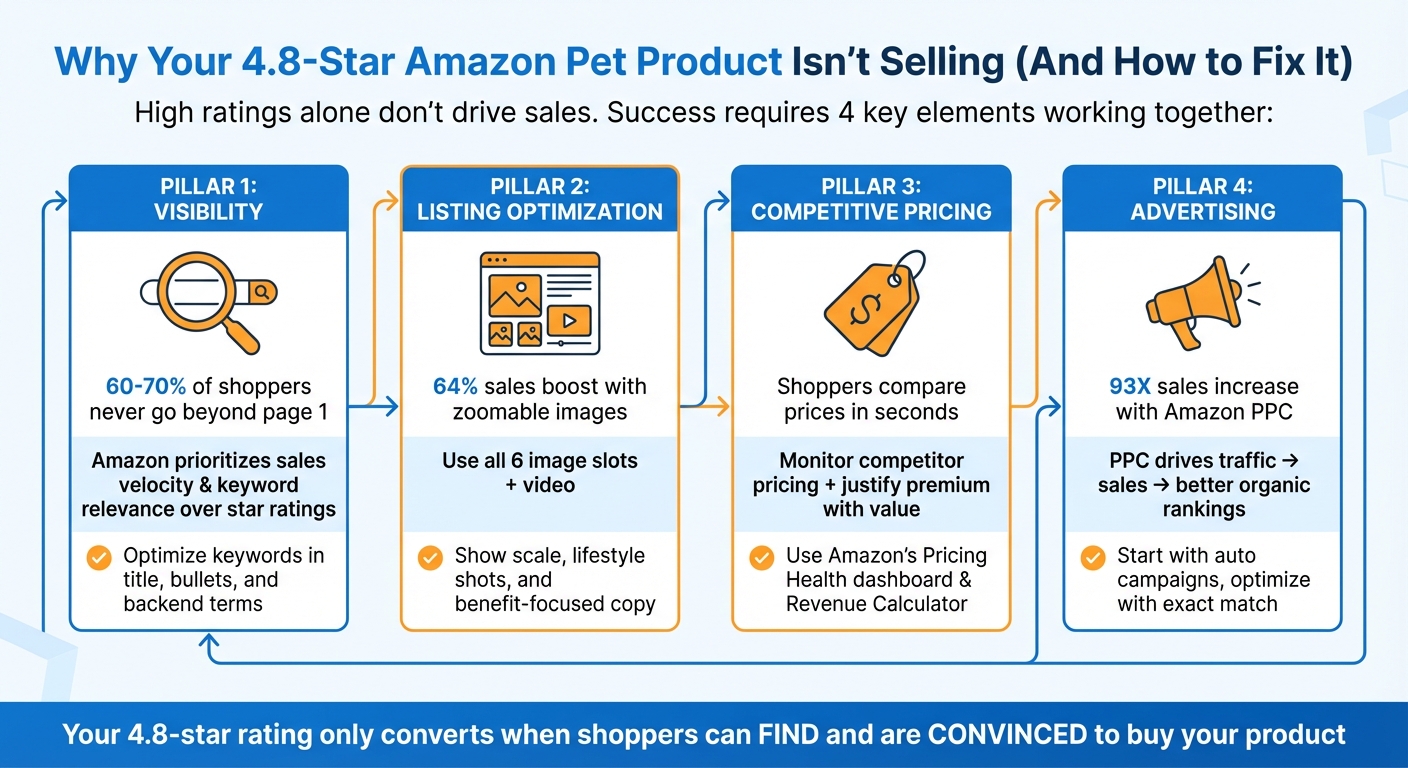
4-Step Strategy to Turn Amazon Product Ratings Into Sales
Why Your Amazon Listing Isn’t Selling (And How to Fix It in Minutes

Visibility and Search Problems
High ratings won’t help if shoppers can’t even find your product. Here’s a critical stat: 60% to 70% of Amazon visitors never go beyond the first page of search results. So, if your pet product is buried on page three, those glowing reviews might as well not exist.
Amazon’s algorithm doesn’t prioritize star ratings. Instead, it focuses on sales velocity and keyword relevance. Nancy-lee McLaughlin, Director of Marketplace Search at Tinuiti, breaks it down:
"At the end of the day, Amazon is a platform for getting people products that they want, really fast… how does Amazon know what the consumer wants? It’s conversion relative to keyword."
This creates a frustrating loop: poor keyword optimization leads to fewer views, which translates to fewer sales, ultimately dragging your search ranking even lower. With nearly 80% of Amazon sellers prioritizing keyword optimization, failing to get it right means falling behind.
The key to breaking this cycle? Nail your keyword strategy.
Keyword Optimization for Product Discovery
Many sellers sabotage their visibility with keyword missteps. Take the KCHEX Pet Housebreaking Pad listing as an example – it missed essential terms like "potty training mats", "puppy", and "waterproof." As a result, it was practically invisible to shoppers searching for those products.
Here are some common keyword mistakes that could be hurting your visibility:
- Repeating keywords throughout your listing. Amazon’s algorithm only needs to see a keyword once to index it. Using "dog bed" repeatedly in your title, bullets, and backend search terms is a waste of space.
- Using technical jargon instead of shopper-friendly terms. If you describe a leather dog collar’s color as "espresso", but shoppers are searching for "dark brown", you won’t show up in their results.
- Ignoring backend search terms. Amazon gives you 250 bytes in the "Generic Keyword" field in Seller Central. Use this space for synonyms, common misspellings, and abbreviations that don’t fit naturally in your visible listing.
- Overloading titles with subjective language. Words like "cute", "best", or "cheapest" not only fail to improve ranking but can also violate Amazon’s updated title guidelines (effective January 21, 2025). These rules ban special characters (!, $, ?) and prohibit repeating the same word more than twice.
- Focusing on broad keywords instead of long-tail terms. Competing for "dog toys" is tough, but targeting something like "waterproof potty training mats for puppies" attracts more specific, high-intent shoppers with less competition.
McLaughlin suggests using your PPC campaigns to refine your keyword strategy:
"The number one thing that I would recommend for keyword research is harvesting your advertising… looking at keywords that you have historically converted on and incorporating that into your product description and titles."
A great example? Jungle Creations revamped their Washable Pee Pads listing in 2025 by using 186 out of 200 title characters to include specific phrases like "waterproof potty training mats" and "for puppy playpen" without repeating keywords. The result? Over 400 reviews in less than a year, thanks to better search visibility and automated review requests.
| Listing Component | Amazon Best Practice | Common Mistake |
|---|---|---|
| Title Length | 80-100 characters (mobile visibility); max 200 | Using only 60-80 characters or cramming all 200 with keywords |
| Bullet Points | 5 slots; emphasize benefits over features | Repeating title content or leaving slots blank |
| Backend Keywords | Max 250 bytes; avoid repeating frontend terms | Copying title/bullet keywords or exceeding the byte limit |
| Description | Up to 2,000 characters; include related keywords | Generic copy with no search-relevant terms |
Now let’s see how these keyword strategies impact Amazon’s search rankings.
How Amazon’s Search Algorithm Works
Keywords get your listing noticed, but conversions determine your ranking. Amazon’s algorithm (A9/A10) is laser-focused on one thing: maximizing sales and profit for Amazon. Unlike Google, which aims to answer questions, Amazon’s priority is turning browsers into buyers.
The algorithm evaluates two main types of factors:
- Relevance factors: These decide whether your product matches what the shopper searched for. Keywords in your title, bullets, description, and backend terms all play a role.
- Performance factors: These measure how well your product sells. Metrics like conversion rate (percentage of visitors who buy), sales velocity (speed of sales), and customer engagement (clicks, add-to-cart rates) are critical.
Here’s the catch: a 4.8-star rating doesn’t directly influence these factors. While high ratings can boost conversion rates, they only matter after shoppers find your listing. Weak keywords mean your product won’t even show up.
Amazon’s algorithm also penalizes certain behaviors. Stockouts, for example, can reset your Best Sellers Rank (BSR) and hide your product in search results. Products fulfilled by Amazon (FBA) often get a boost, as the Prime badge is a major filter for shoppers.
Consider the Mattel Magic 8 Ball. As of September 2025, it held a 4.5-star average across 15,000+ ratings and consistently ranked as the top result for "magic 8 ball" – despite not being the cheapest option. Why? Strong brand trust and consistent sales velocity outweighed price. The algorithm rewarded its steady performance over discount pricing.
The bottom line: your listing needs to convert clicks into sales quickly. Amazon tracks how many people view your product versus how many buy. If your conversion rate is low, the algorithm assumes your product isn’t relevant and lowers its ranking – even with stellar reviews.
| Ranking Factor | What It Measures | Why It Matters |
|---|---|---|
| Sales Velocity | Speed of sales | The most influential ranking factor; slow sales = lower rank |
| Conversion Rate | Percentage of visitors who buy | Signals product-market fit to the algorithm |
| Keyword Match | Search terms in title, bullets, backend | Determines if your product appears in search results |
| Fulfillment Method | FBA/Prime eligibility | Prime badge builds trust and improves ranking |
| Inventory Status | Availability of stock | Stockouts can suppress or hide your product |
Amazon’s algorithm is always evolving. Recent updates prioritize customer intent over keyword stuffing. Advanced AI tools like COSMO and RUFUS now analyze context and conversational queries, not just exact keyword matches. This means your listing needs to address what shoppers are really looking for – not just cram in keywords.
Product Listing Presentation Issues
Even a product with glowing reviews and a 4.8-star rating can fail if its presentation doesn’t grab attention. Getting shoppers to your listing is just the start. Once they’re there, your images and copy need to seal the deal. Unfortunately, many pet products fall short in this department. A strong presentation is what turns browsers into buyers.
Did you know that about 80% of online text doesn’t get read in full? Shoppers skim for the highlights. If your main image doesn’t stand out or your bullet points are packed with confusing jargon, potential buyers will move on in seconds.
Common issues like low-quality images, uninspiring copy, and failure to address pet owners’ specific needs often hurt conversions. Let’s break down how to fix these problems.
Better Product Images
Your main image is the first thing shoppers notice in search results. As Brian Connolly from Jungle Scout puts it:
"Your main image is what customers will first see when scrolling through the search results page on Amazon. If your main image is bland or simply blends in with all the other results, your click-through rate may not be where it could be."
Images smaller than 1,600 pixels disable Amazon’s zoom feature, which is a major missed opportunity. Sellers who made at least 25% of their product images zoomable saw an average sales boost of 64%. Similarly, listings with four or more images experienced a 59% sales increase within a week.
Take the Jungle Creations Washable Pee Pads, for example. Their listing uses all six image slots and includes a product video. They feature colorful infographics, lifestyle shots, and clear sizing charts to build trust and engage shoppers.
Here are some common image mistakes to avoid:
- Main Image Violations: Including text, logos, watermarks, or props in your main image violates Amazon’s rules. Stick to a pure white background (RGB 255, 255, 255) with the product filling at least 85% of the frame.
- Lack of Scale: Not showing the product next to a pet or a familiar object can lead to size-related returns.
- No Lifestyle Shots: A plain white background doesn’t help buyers picture the product in their lives. Show the product in use with a pet to create an emotional connection.
- Tiny Infographic Text: Infographics should use large, easy-to-read text.
- Redundant Angles: Every image should serve a unique purpose, such as showing scale, lifestyle use, or close-ups of materials, rather than repeating similar views.
Here’s a practical guide for structuring your image stack:
| Image Type | Purpose | Example |
|---|---|---|
| Main Image | Grab attention in search results | High-resolution shot on a white background, with the product filling 85% of the frame |
| Scale Image | Set accurate expectations, prevent returns | Show a dog bed next to a pet or include overlaid dimensions |
| Lifestyle Image | Help buyers imagine the product in their home | Display the product in a realistic setting with a pet |
| Infographic | Highlight key benefits | Feature diagrams with clear text, like "5-layer leak-proof technology" |
| Instructional | Build confidence, reduce hesitation | Step-by-step photos for assembly or cleaning |
| Packaging/Unboxing | Set expectations, reduce return rates | Show the product packaging and included items |
Videos are just as important. A 30–60 second clip showing the product in action can build trust and increase conversions. In fact, user-generated content has been shown to boost conversion rates by up to 18%. Additionally, using Amazon’s "Manage Your Experiments" tool to A/B test main images – like comparing a product-only shot with one featuring packaging – can help you find what resonates best.
Once your visuals are optimized, it’s time to focus on crafting bullet points that turn interest into sales.
Writing Better Product Copy
While high-quality images draw shoppers in, it’s the product copy that convinces them to buy. One common mistake? Listing features instead of benefits. Pet owners care less about technical specs like "600D polyester" and more about what it does for them, like "rip-resistant fabric that survives puppy claws".
Your bullet points should grab attention, tackle common objections, and make the purchase an easy choice. Many sellers underuse these five slots, but each one is an opportunity to highlight a different aspect: the key benefit, the problem it solves, material and sizing details, quantity or warranty info, and a risk-free guarantee.
Focus on benefits rather than technical jargon. For example, instead of "12-hour battery life", say, "Your dog’s GPS collar lasts all weekend." Address potential concerns directly – if reviews mention a bed is "too small for a Golden Retriever", include "Sized specifically for large breeds like Labs and Goldens".
Format your bullet points for skimmers by using capitalized headers that stand out:
- LEAK-PROOF PROTECTION: Five-layer design with waterproof backing keeps floors dry.
- MACHINE WASHABLE: Toss it in the washer and dryer – no hand-washing needed.
- PERFECT FOR TRAINING: Non-slip backing stays in place for hassle-free puppy training.
Avoid keyword stuffing. Repeating the same keyword multiple times won’t improve your ranking – it just makes your copy sound robotic. Also, don’t waste space by copying your title into the bullet points. Instead, use this space to provide fresh, relevant details that help shoppers make a decision.
sbb-itb-e2944f4
Pricing and Competitive Positioning Problems
Getting clicks on your Amazon listing is just the first step. To turn those clicks into sales, your pricing strategy has to hit the mark. A glowing 4.8-star rating won’t matter if your price doesn’t align with what pet owners expect. Amazon shoppers are all about value – they’ll compare prices across listings in seconds. If your product is priced higher than similar options, even stellar reviews might not stop buyers from choosing a cheaper alternative.
As Mickey Toogood, Sr. Content Marketing Manager at Amazon, puts it:
"Overprice and you lose buyers; underprice and you sacrifice profit."
The key is finding that pricing sweet spot. Amazon considers a "competitive price" to be the lowest price offered by major external retailers, which you can track using the Pricing Health page in Seller Central. On top of that, you need to monitor the lowest prices within Amazon’s marketplace – shoppers will compare your listing to others available on the platform. A competitive pricing strategy includes keeping an eye on your competitors to ensure your product remains attractive to budget-conscious pet owners.
If a competitor undercuts your price, buyers are likely to choose their product instead. If your price is higher, you’ll need to justify it with added value – like A+ Content, high-quality images, detailed warranties, or unique features that make your product stand out.
Before setting your price, use Amazon’s Revenue Calculator to understand your actual profits after fees. Regularly check your Pricing Health dashboard to maintain your Buy Box eligibility. For a more automated approach, Amazon’s free Automate Pricing tool can adjust your prices in real time based on the rules you set.
Tracking Competitor Pricing
To stay competitive, you need a clear picture of what your competitors are charging and how often their prices change. Free tools like camelcamelcamel can provide Amazon price history charts, helping you spot trends in competitor pricing. For more detailed insights, tools like Jungle Scout’s Product Tracker and Competitive Intelligence dashboard let you monitor Buy Box prices and compare your pricing to top competitors.
Context matters when analyzing competitor pricing. For instance, a competitor with thousands of reviews can often charge more than a listing with only a few hundred reviews. If your product is new or has fewer reviews, temporarily lowering your price can help you build social proof. Once your review count grows, you can gradually increase your price.
Amazon’s internal tools provide additional insights. The "Manage All Inventory" page displays the "competitive external price", which is the lowest price from major retailers outside of Amazon. If your price is higher than both internal and external competitors, you’ll face an uphill battle. Running A/B price tests for 7–14 days can help you see which price point drives better sales and profits.
How Pet Owners Make Purchase Decisions
Understanding competitor pricing is only part of the equation – you also need to know what drives pet owners’ buying decisions. While price is a big factor, shoppers don’t always go for the cheapest option. They need a reason to pay more. Amazon is a value-driven marketplace where buyers look for quick, confident purchases at the best available price. Reviews and star ratings play a huge role in this process. For example, a product with 3,000 reviews can often justify a higher price than one with only 150 reviews, even if both have a 4.8-star rating. In fact, 91% of shoppers check reviews before making a purchase.
If you’re new to the market and have fewer reviews, you might need to start with a lower price to encourage sales. High-quality images and videos can signal premium value and help justify a higher price. Additionally, factors like fast shipping and Prime eligibility can make a big difference – shoppers are often willing to pay a little more for quicker delivery and reliable service.
Coupons are another great way to stand out. Amazon Coupons display a green badge in search results, making your product look like a deal without requiring you to lower your base price permanently. Just keep in mind the $0.60 redemption fee per coupon. To further justify a higher price, use A+ Content and infographics to clearly highlight your product’s superior features and benefits.
Advertising and Promotion Strategies
Even with a stellar 4.8-star rating, your product won’t sell itself. Without a smart advertising strategy, it risks staying invisible. This is where Amazon PPC (Pay-Per-Click) steps in, bridging the gap between great reviews and actual sales. PPC campaigns can drive traffic to well-rated products that might otherwise struggle with low organic visibility due to slower sales momentum. In fact, sellers using Amazon Advertising have reported a 93X increase in sales compared to those who don’t. Simply put, paid ads can breathe life into dormant listings.
PPC doesn’t just generate sales – it creates a feedback loop. Ads lead to initial sales, which then improve your organic search rankings. And here’s the kicker: products with ratings above 3.5 stars and at least five reviews tend to convert clicks into purchases more effectively. With your 4.8-star pet product, you’re already in a great position. Now, it’s all about getting it in front of the right audience.
Let’s dive into how you can optimize your PPC campaigns to maximize sales and improve organic rankings.
PPC Campaign Optimization
Start by running automatic campaigns for the first 1–2 weeks. These campaigns help you discover how shoppers are searching for pet products and identify high-performing long-tail keywords. Once you’ve pinpointed the best keywords, transition to exact match manual campaigns to bid more aggressively on terms that are proven to work.
For new products, expect a higher ACoS (Advertising Cost of Sales) – typically around 40% or more. Over time, as your sales grow, work to bring that down to a range of 15–30%. The real metric to track, though, is TACoS (Total Advertising Cost of Sales), which measures ad spend as a percentage of total revenue (both organic and paid). A declining TACoS signals that your PPC efforts are boosting organic growth.
To make your campaigns more efficient, use negative keywords to eliminate wasted ad spend. For example, if you’re selling premium pet products, exclude terms like "cheap" or "discount" to avoid targeting bargain shoppers. Additionally, apply placement multipliers to prioritize "Top of Search" positions, which tend to drive higher conversions. A +50% or +100% bid increase can ensure your high-rated product stays in the spotlight.
| Product Stage | Target ACoS | Target TACoS | Objective |
|---|---|---|---|
| Launch (Month 1) | 40–60% | 40–50% | Build visibility & rank |
| Growth (Month 3–6) | 25–30% | 15–20% | Boost organic sales |
| Mature | 15–20% | 8–12% | Sustain profitability |
Source: atom11
Seasonal Advertising for Pet Products
Standard PPC strategies are essential, but seasonal advertising can take your results to the next level, especially for pet products. Demand for these items fluctuates throughout the year, so your advertising should adapt accordingly. For instance, products advertised during high-demand weeks saw an average 32% increase in sales. Amazon even offers tools like "Forecasted demand" and "Trending" labels to help identify products expected to see a surge in engagement over the next month.
To manage seasonal campaigns effectively, create separate campaigns for seasonal items versus year-round products. During peak times like the holidays, use broad match keywords to capture discovery searches such as "holiday pet gifts." Once the season ends, switch to exact match campaigns for your core products. Products promoted with deals or coupons through Sponsored Products saw an average 65% increase in sales and a 75% boost in units sold compared to non-advertised deals.
Plan your budget to cover the entire seasonal cycle – from early November prep to Black Friday and Cyber Monday, mid-December last-minute shopping, and post-holiday re-engagement in January. Use dynamic bidding to capitalize on high-conversion periods, allowing bid increases of up to 100%. Just ensure your inventory is ready for the demand – if your product runs out of stock, Amazon will automatically pause your Sponsored Products campaign.
Conclusion: Turning High Ratings Into Sales
A 4.8-star rating signals strong customer satisfaction, but without visibility, even the best-rated products can struggle to sell. To thrive on Amazon, you need a well-rounded strategy where SEO, listing optimization, pricing, and advertising work in harmony to turn high ratings into revenue.
"Success on Amazon in 2025 requires treating the marketplace as an integrated ecosystem, not a collection of separate tactics."
– Chuck Kessler, Content and SEO Manager, Canopy Management
The first step is making sure your product can be easily found. Optimized listings are key here – use all seven image slots, write bullet points that highlight benefits, and take advantage of A+ Content to persuade shoppers to buy. Remember, products on the first page of search results capture over 80% of clicks, with the top three listings alone taking 60%.
Advertising plays a vital role in kickstarting momentum. PPC campaigns can drive early sales, which in turn helps improve your organic ranking. Keeping an eye on your TACoS (Total Advertising Cost of Sales) ensures your ad spend is working effectively to support your overall performance.
When your visibility, product presentation, pricing, and advertising strategy align, your 4.8-star rating becomes more than just a number – it becomes the engine for long-term growth and consistent sales.
FAQs
Why isn’t my Amazon pet product selling even with a 4.8-star rating?
A 4.8-star rating is impressive and suggests quality, but Amazon’s algorithm cares more about visibility factors like keywords, pricing, and advertising. Without the right keywords in your listing, your product might not even show up for shoppers. To fix this, make sure your title, bullet points, backend search terms, and description include the exact terms your audience is searching for. Also, craft titles that highlight benefits, use high-quality images, and write bullet points that are concise yet engaging.
Pricing and inventory are equally important. If your product consistently costs more than competitors or often goes out of stock, it risks losing the Buy Box and dropping in visibility. Advertising is another key player – without targeted campaigns like Amazon PPC, even the most optimized product might fail to reach enough buyers. Tackle these areas, and you can transform a well-rated product into a top seller.
Why isn’t my highly-rated Amazon pet product selling, and how can I improve its performance?
A top-notch rating on Amazon doesn’t automatically translate to booming sales. If you want to boost your product’s performance, the key lies in optimizing your listing.
Start with your product title. Make it concise, easy to read, and packed with relevant search terms that customers are likely to use. Next, take a close look at your product images. High-quality visuals are essential – ensure they clearly showcase your product and include lifestyle or usage shots to help customers imagine it in their daily lives.
Your bullet points are another opportunity to shine. Use these to highlight your product’s main benefits, address customer pain points, and naturally incorporate important keywords. Then, expand on these details in a well-written, SEO-friendly product description. This is your chance to convince potential buyers by providing more in-depth information while keeping it engaging.
Finally, evaluate your pricing strategy. Make sure your price is competitive, but don’t be afraid to experiment with small adjustments to find the sweet spot that maximizes conversions. By fine-tuning these elements, you can transform a high-rated product into a top seller.
Why isn’t my high-rated Amazon pet product selling despite having 4.8 stars?
Pricing plays a crucial role in transforming a highly-rated Amazon product into a sales winner. Sure, a 4.8-star rating builds credibility, but if your price isn’t competitive, shoppers might skip over your listing. Plus, Amazon’s algorithm weighs pricing heavily when deciding which products get top search rankings or snag the Buy Box. If your price is higher than similar items, you risk losing both visibility and sales. On the flip side, pricing too low can eat into your profits and hurt your bottom line.
To get your pricing right, start by researching your competitors and calculating a break-even point that accounts for costs and Amazon fees. Tactics like “charm pricing” (e.g., $19.99 instead of $20.00) or pricing just above free-shipping thresholds can make a big difference in driving conversions. Keep an eye on market trends and experiment with small price tweaks to find that sweet spot between staying competitive and maintaining profitability. Think of pricing as a dynamic process – regular adjustments can keep your product both visible and appealing to shoppers.
Related Blog Posts
- Why 73% of Pet Brands Fail on Amazon Before Year Two (And How to Be the Exception)
- We Analyzed 200 Pet Product Listings. Here’s What the Top 10% Do Differently.
- The Humanization of Pet Care Is Changing Amazon. Is Your Brand Keeping Up?
- Why the Fastest-Growing Pet Brands on Amazon Are Spending Less on Ads, Not More