

Scaling multilingual support with AI can save costs, improve customer experience, and help businesses reach global markets. Here’s how:
- Cost Efficiency: AI-powered interactions cost about $0.50 compared to $5.00 for human-led ones, reducing costs by 90%.
- Customer Retention: 75% of consumers prefer support in their native language, boosting loyalty and repeat purchases.
- Faster Responses: AI delivers replies in under 90 seconds, compared to 2.5 hours for human agents.
- Global Reach: AI tools enable businesses to support up to 133 languages, expanding market access.
Key Steps:
- Identify Language Needs: Use customer data to prioritize languages based on demand and market potential.
- Choose the Right AI Tools: Select platforms with real-time translation, neural machine translation (NMT), and retrieval-augmented generation (RAG) to ensure accuracy.
- Build a Multilingual Knowledge Base: Start with a strong English base, then use AI for translation and localization, ensuring consistency with glossaries and terminology tools.
- Integrate AI with Systems: Connect AI to CRM and order management software for seamless automation of tasks like order tracking and returns.
- Track and Improve: Monitor metrics like resolution rates, CSAT scores, and escalation rates to refine and scale support.
AI-driven multilingual support isn’t just about cutting costs – it’s a way to improve customer satisfaction, reduce churn, and grow your business globally.
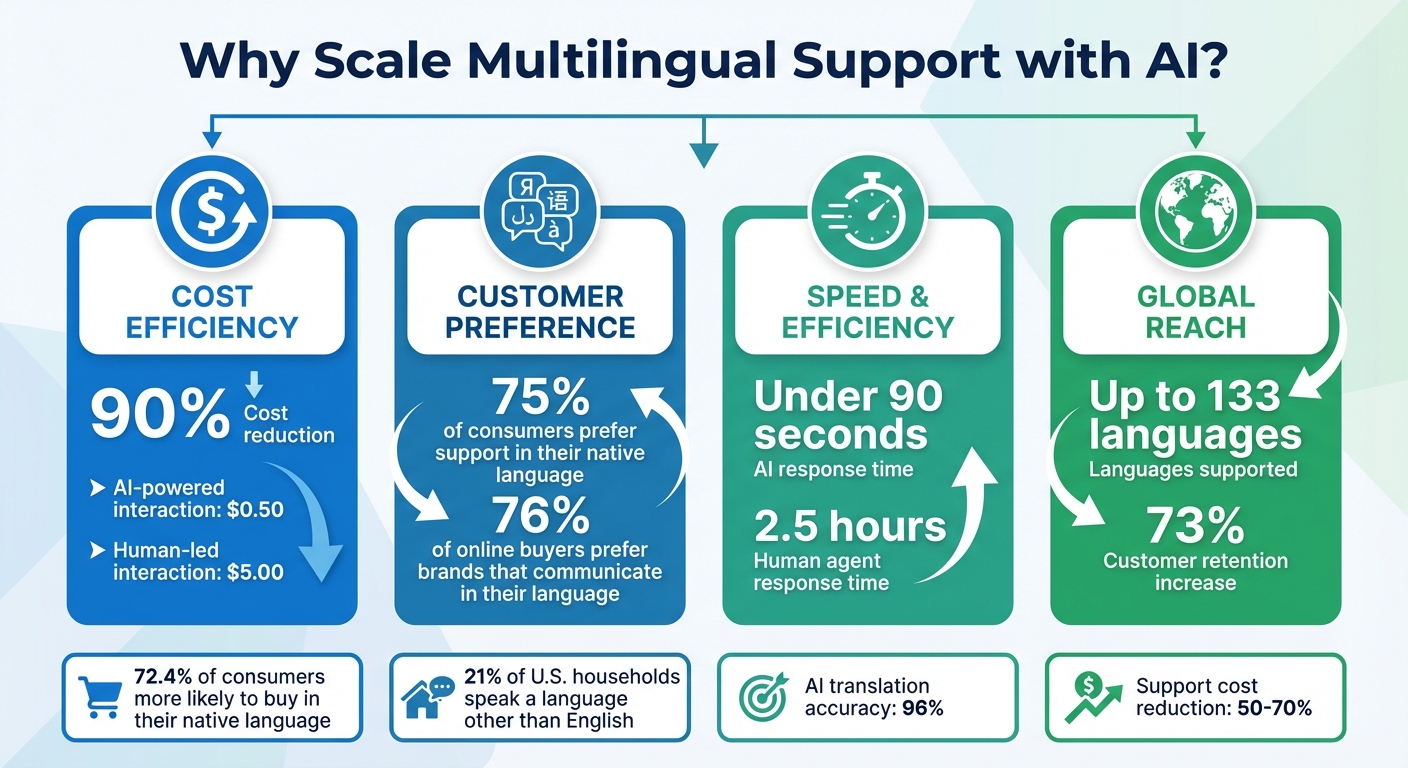
AI Multilingual Support Benefits: Cost Savings and Customer Satisfaction Statistics
Multilingual Chatbots: How to Build One for Global Support
sbb-itb-e2944f4
Step 1: Identify Language Requirements and Target Markets
Before rolling out multilingual AI support, it’s crucial to pinpoint the key languages your business needs. Start by digging into your customer data using tools like Google Analytics, and cross-check these insights with CRM sales data. If a significant portion of your revenue comes from regions where English isn’t the primary language, you’ve identified a clear opportunity.
Analyze Data to Determine Priority Languages
Take a closer look at your support ticket trends. Use your help desk system to tag tickets by language and review call recordings or IVR (Interactive Voice Response) selections to see which languages customers prefer. For instance, Aspire, a fintech company, implemented IVR routing to offer support in English, Mandarin, and Cantonese. This move reduced missed calls by 23% and saved agents an average of five minutes per ticket.
Keep in mind that over 21% of U.S. households speak a language other than English at home. Additionally, 72.4% of consumers are more likely to buy when information is in their native language, and 56.2% prioritize language access over price.
Once you’ve identified the key languages, align them with your eCommerce markets to make the biggest impact.
Match Languages to eCommerce Markets
Use your data to prioritize languages based on market potential. For example, Spanish is essential for Latin American markets, while Mandarin is key for East Asia. A tiered strategy works well here:
- Tier 1: High-impact global languages like English, Mandarin, and Spanish.
- Tier 2: Regional powerhouses such as Arabic, Hindi, and Portuguese.
- Tier 3: Specialized markets with premium buyers, including German, French, and Japanese.
Start small by focusing on one or two high-impact languages, then expand as your return on investment (ROI) grows. For example, an international home goods retailer launched in five European markets simultaneously using translation tools. Their English-speaking team managed over 2,000 tickets per month in German, French, Italian, Spanish, and Dutch – while maintaining customer satisfaction scores above 90% in every market. This phased approach ensures you can measure ROI before committing more resources to additional languages.
Step 2: Choose and Configure AI Tools for Multilingual Support
If you’re aiming for global expansion, your AI platform needs to meet the multilingual requirements you’ve identified. The right tools should offer real-time translation, precise language detection, and seamless integration with your eCommerce systems. These capabilities ensure your platform works smoothly with your existing setup.
Select an AI Platform
When choosing an AI platform, prioritize those with instant language detection – ideally within 2–3 seconds – and the ability to handle scenarios where customers switch languages mid-conversation. Leverage Neural Machine Translation (NMT) and Large Language Models (LLMs) for responses that are contextually accurate and align with your brand’s tone.
Another key feature to look for is Retrieval-Augmented Generation (RAG). This approach ensures AI responses are based on your verified knowledge base, which significantly reduces errors (or "hallucinations") from 14.6% to as low as 2–3%, improving multilingual customer satisfaction. Additionally, safeguard sensitive data – like SKUs, order IDs, and tracking numbers – from translation errors. Platforms with risk-based routing are also essential. They can handle routine tasks, such as order tracking, automatically, while escalating complex issues like refunds or legal concerns to human agents.
Set Up AI Tools for eCommerce Tasks
Once you’ve chosen the right AI platform, configuring it for your eCommerce needs is the next step. Use API integration to connect the AI with your Order Management System (OMS) and shipment software. This enables the system to automate tasks like generating return labels, updating order statuses, or processing PIN changes in over 30 languages. A great example is Weee!, a leading online Asian supermarket in the U.S., which implemented Sobot‘s multilingual AI in 2025. This integration cut resolution times by 50%, improved agent productivity by 20%, and achieved a 96% customer satisfaction score.
To maintain efficiency and accuracy, implement risk-based workflows. Automate low-risk tasks like password resets or order tracking, while directing high-priority inquiries to human agents. Use confidence thresholds to ensure quality – if the AI’s translation confidence drops below 0.70, route the query for human review. Additionally, set up terminology management tools, such as glossaries, to protect brand names and technical terms, ensuring consistency across all languages. This setup not only keeps your AI accurate but also meets customer expectations – 76% of online shoppers prefer businesses that communicate in their native language.
Step 3: Create and Train a Multilingual Knowledge Base
After setting up your AI tools, the next step is building a well-structured knowledge base to enable accurate multilingual support. AI tools depend heavily on this foundation to provide precise responses, so starting strong is key before branching into additional languages.
Build a Strong English Knowledge Base First
Begin with a clean, deduplicated English knowledge base as your central reference point. Focus on high-traffic and high-priority articles, and format them using a consistent "Problem-Solution-Outcome" structure. This structure ensures AI delivers clear and consistent translations across different languages. For instance, OLX, a classifieds platform operating in over 40 countries, adopted localized self-service articles in their knowledge base. This approach led to a 40% drop in global ticket volume.
Use AI for Translation and Localization
Once your English knowledge base is solid, leverage AI to produce accurate translations while adapting content for regional contexts. Localization goes beyond translating words – it tailors the content to reflect local nuances. Current AI translation tools boast 96% accuracy across 133 languages and can slash support costs by 50% to 70%.
To maintain consistency, create a centralized glossary for product names, technical jargon, and legal terms. This prevents AI from misinterpreting brand-specific language. You can also upload Translation Memory (TMX) files and glossaries to train the AI in your brand’s tone and style. Consider a tiered workflow: fully automated AI for low-risk content like FAQs, AI with human spot checks for support articles, and AI with full human review for sensitive materials like legal or compliance documents.
"The quality of even the first pass [of machine-translated content] is already high enough, unless you’re dealing with very specialized content or content that requires transcreation." – Olga Beregovaya, VP of AI, Smartling
Automate syncing so that whenever the primary English article is updated, the AI flags related articles in other languages for review. This ensures consistency without the hassle of manually tracking updates across multiple language versions.
Comparison: Single-Language vs. Multilingual Knowledge Base
Here’s how single-language and multilingual knowledge bases stack up:
| Feature | Single-Language KB | Multilingual KB |
|---|---|---|
| Maintenance | Low; updates made in one place. | High; updates need syncing across all versions. |
| Accuracy | High for native speakers only. | Variable; requires glossaries to avoid errors. |
| Cost | Low initial investment. | Higher upfront cost; offset by 50-70% savings with AI. |
| Reach | Limited to ~20% of global speakers. | Expands to 80% of non-English speakers. |
| Complexity | Simple data architecture. | Complex; needs TMX files, glossaries, and style guides. |
The effort pays off: companies offering multilingual support enjoy a 73% higher customer retention rate, while 76% of online buyers prefer brands that communicate in their native language. While the initial investment may seem steep, the benefits – greater market reach and happier customers – make it worthwhile.
Step 4: Connect AI Tools with eCommerce Systems and Test
Once your multilingual knowledge base is ready and your AI tools are configured, the next step is to integrate them into your eCommerce systems. This ensures smooth, efficient support across all touchpoints.
Link AI with CRM and Order Management Systems
After setting up your multilingual knowledge base, the next move is integrating AI tools with your CRM and order management systems. This can be done through REST APIs, webhooks, or database connections. Many AI platforms are compatible with CRMs like Salesforce, Zendesk, and Microsoft Dynamics, as well as order management systems such as Shopify, JTL, and Xentral. This integration enables AI agents to access real-time data – like order statuses, DHL tracking numbers, or purchase histories – allowing them to resolve customer inquiries in any language without involving human agents.
Workflow triggers are key here. For example, if a Spanish-speaking customer requests a return, the AI should automatically generate a return label, update the order status, and send a confirmation email in Spanish. A real-world example? In 2024, Klarna, a Swedish fintech company, launched a custom AI assistant that managed around 2.3 million conversations in 35 languages. This reduced their average resolution time from 11 minutes to under 2 minutes while maintaining customer satisfaction scores on par with human agents.
To maintain quality, set up a confidence threshold. Low-confidence responses should be routed to human agents – an approach that has helped 75% of CRM leaders significantly cut response times.
Validate Accuracy and Cultural Appropriateness
Testing is crucial to ensure your AI performs well across languages and customer scenarios. A three-tier testing approach works best:
- Fully automate responses for FAQs.
- Use human reviews for moderate-complexity queries.
- Assign full human responses for high-risk or sensitive content.
To validate accuracy, test the AI using 10–30 actual customer transcripts for high-volume intents in each target language. Additionally, have native speakers review how the AI handles tone and regional differences, such as Mexican Spanish versus European Spanish. This step ensures the AI resonates with diverse audiences.
Don’t forget to test edge cases like code-switching (where customers mix languages in a single message) and confirm that right-to-left languages, like Arabic, display properly in your interface.
"AI behaves much more like a smart teammate than a scripted tool. It can interpret natural language, understand the intent behind a message, pull the right information from documentation, and generate accurate responses." – Valentyna Dimova, VP of Customer Support, Evly AI
Step 5: Track Performance, Improve, and Scale with Emplicit

With your integrations and testing in place, the next step is all about refining, tracking, and scaling. By focusing on performance metrics and strategic growth, you can ensure your multilingual support system keeps delivering results.
Monitor Key Metrics for Improvement
Once your system is live, keeping a close eye on key metrics is essential. Start by tracking operational efficiency metrics like resolution rates (how often AI resolves issues without agent involvement), escalation rates (how frequently issues are transferred to human agents), and first response times. For assessing the quality of translations and conversational flow, use tools like METEOR and perplexity scores.
Customer satisfaction is the ultimate benchmark. Keep an eye on Customer Satisfaction (CSAT) scores, retention rates, and conversion rates to measure the real-world impact. For example, companies offering multilingual support report a 73% boost in customer retention. A striking case is Weee!, an online supermarket. In November 2025, they introduced multilingual voice support for their Asian-American customer base, leading to a 50% reduction in resolution time, a 20% increase in agent efficiency, and a stellar 96% customer satisfaction score.
To maintain high quality, set confidence thresholds that route uncertain AI responses to human agents. This ensures routine queries are handled efficiently while preventing errors in complex cases. If escalation rates begin to rise, it might signal that your AI needs retraining or your knowledge base requires updates.
Add New Languages Based on Demand
Once your metrics are optimized, it’s time to expand. Start by conducting a language audit of your CRM and website traffic. This helps identify the top three non-English languages where demand is high but unmet. Look for patterns like customer drop-offs, growth opportunities in specific markets, or areas where your current team struggles to keep up.
Begin with simple, high-volume queries in new languages – tasks like password resets, order tracking, or shipping updates. These are low-risk and allow you to demonstrate value quickly. As you gain confidence, you can gradually tackle more complex interactions. Supporting customers in their preferred language not only improves their experience but also increases repurchase rates and reduces drop-offs.
Use Emplicit Services for Scaling
As you refine your system and prepare to scale, Emplicit offers expert support to manage the complexities of multilingual growth. Their Growth and Enterprise plans go beyond translation, providing tools like inventory management, account health monitoring, and custom AI strategies tailored to specific markets.
Data shows that adopting Emplicit’s multilingual strategies can drive a 70% increase in conversion rates. Their full-service teams handle the operational challenges of scaling – everything from PPC management in multiple languages to optimizing listings for regional preferences. This allows you to focus on growth while they manage the details.
Conclusion
Expanding multilingual support with AI is within reach. By tackling five essential steps – pinpointing priority languages, setting up the right AI tools, developing a robust knowledge base, integrating with your eCommerce systems, and consistently tracking performance – you can deliver native-language support that yields tangible business outcomes. For instance, offering multilingual support can boost customer retention by 73% and appeal to 76% of buyers who prefer communication in their native language.
The real challenge lies in sustainability. Success isn’t just about launching the system; it’s about maintaining and refining it over time. Regular monitoring ensures your AI stays accurate, culturally sensitive, and aligned with your brand’s tone. Incorporating human-in-the-loop feedback helps correct errors, improve translations, and set confidence thresholds to route complex issues to human agents when needed. This proactive approach minimizes costly mistakes and enhances customer satisfaction.
As Valeria Sagnotti from Lara Translate explains:
"Customer support is one of the fastest ways to lose trust in a new market. A strong AI translation workflow helps you reply quickly… while keeping tone, terminology, and escalation rules consistent."
Routine audits of automated conversations are essential. They uncover knowledge gaps and ensure your system evolves alongside your business. Tracking metrics like CSAT scores, resolution times, and first response rates for each language provides clear insights into areas needing improvement. This kind of continuous refinement turns basic support into a growth engine.
Emplicit offers the tools and expertise to streamline this process. Their Growth and Enterprise plans provide the necessary infrastructure, strategic guidance, and hands-on support to manage multilingual operations across platforms like Amazon, Walmart, and TikTok Shops. With proven results, such as a 70% increase in conversion rates, Emplicit helps simplify operational challenges, allowing your brand to focus on scaling globally. By combining AI-driven multilingual support with ongoing human oversight, your brand can confidently expand into international markets.
FAQs
How do I pick the first 1–2 languages to support?
Start by pinpointing the languages that matter most to your audience and align with market demand. For example, in the U.S., where more than 22% of residents speak a language other than English, focusing on widely spoken languages like Spanish or Chinese can make a big difference. By prioritizing languages with high demand, you can make the best use of your resources and gradually expand your offerings as your capabilities grow.
How can I avoid translation errors with SKUs and brand terms?
When dealing with SKUs and brand terms, avoiding translation errors is crucial. To ensure accuracy and consistency, rely on localization assets like translation memories, glossaries, and style guides. These tools help standardize brand language and reduce the chance of mistakes.
It’s also smart to integrate quality assurance workflows that include human reviews, especially for critical terms. This extra layer of oversight minimizes misinterpretation and ensures your brand’s messaging stays clear and aligned across all markets.
When should AI hand off to a human agent?
AI systems should step aside and transfer tasks to a human agent when dealing with complex, sensitive, or high-stakes issues. This is especially important if the AI’s confidence in its response drops below an acceptable threshold. Similarly, when tasks require an understanding of nuances or precision beyond the AI’s capabilities, escalation becomes essential to uphold customer trust and deliver quality service.
A properly designed escalation process ensures AI can identify these situations and seamlessly hand off tasks to human agents, maintaining efficiency and avoiding interruptions in service.