

SEO A/B testing on Amazon helps you optimize product listings by comparing two versions (A and B) to see which one performs better in terms of sales and traffic. Using Amazon‘s Manage Your Experiments tool, sellers can test elements like product titles, images, bullet points, and A+ Content to make data-driven improvements. Here’s a quick overview:
- Why It Matters: Small changes can boost sales by up to 25%.
- How It Works: Test one variable at a time (e.g., title or image) using eligible ASINs with high traffic.
- Eligibility: Requires a Professional selling plan, Brand Registry enrollment, and minimum traffic levels.
- Key Steps: Select ASINs, create variations, set test duration, monitor metrics, and implement the winning version.
- Best Practices: Focus on high-traffic products, isolate variables, and consistently test for ongoing improvements.
This process ensures your listings are optimized based on real customer behavior, not guesswork.
Prerequisites for Amazon SEO A/B Testing
Eligibility Requirements for Manage Your Experiments
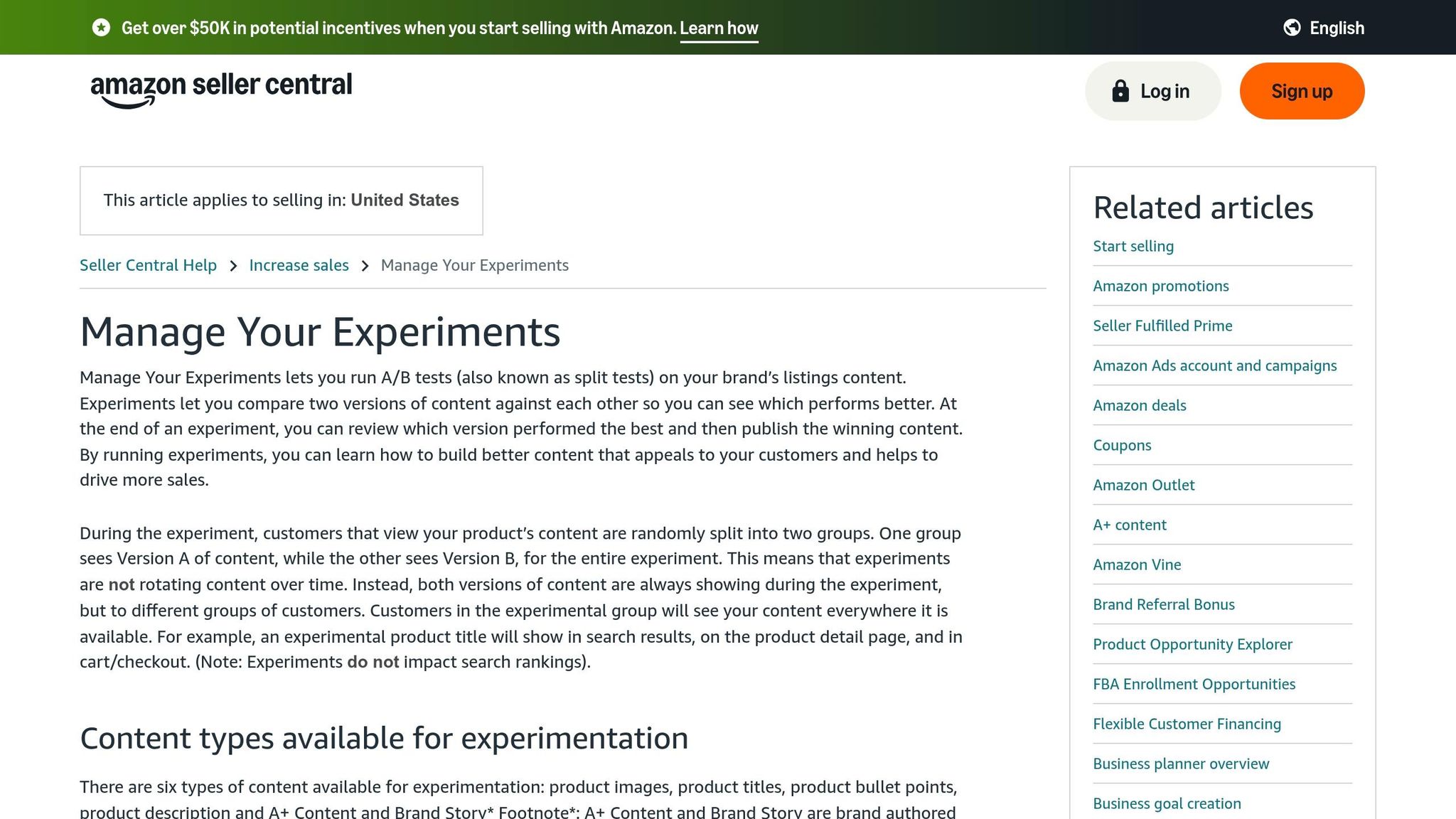
To use the Manage Your Experiments tool on Amazon, there are a few requirements you need to meet. First, you must have a Professional selling plan, which costs $39.99 per month plus applicable selling fees. Unfortunately, sellers with Individual accounts won’t have access to this tool.
You also need to be enrolled in the Amazon Brand Registry as either a Brand Representative or Rights Owner. Simply being part of a registered brand isn’t enough – you need the right role. To confirm your status, check the Brand Registry section in Seller Central. If you’re not properly designated, the Manage Your Experiments option won’t appear, even if your brand is registered.
Additionally, your ASINs must meet a minimum traffic requirement to qualify for testing. While Amazon doesn’t disclose the exact numbers, eligible products typically generate at least several dozen orders per week. To check which ASINs are eligible, go to the "Create a New Experiment" section in Seller Central. Amazon will automatically display a list of products that meet the criteria. As of early 2026, this tool is primarily available for the U.S. marketplace. If you’re planning to test A+ Content or Brand Stories, make sure those elements are already live on the ASIN before starting.
Once your eligibility is confirmed, you can start exploring which listing elements are available for testing.
Elements You Can Test on Amazon
The Manage Your Experiments tool allows you to test six key aspects of your product listings. For starters, you can experiment with product titles to see if different keyword placements or title lengths impact click-through rates. Testing main images is also an option – compare a standard white background image to lifestyle photos or try out different angles of your product.
Bullet points can be adjusted to test variations in order, length, or whether focusing on features versus benefits drives more conversions. Product descriptions are another area worth testing, especially if emphasizing details like dimensions or technical specs could influence purchasing decisions.
You can also test A+ Content and Brand Story modules, experimenting with different layouts, messaging, and visuals. Recent updates to the tool even allow for multi-attribute testing, meaning you can test multiple elements – like titles, images, and bullet points – within one experiment.
However, some aspects of your listing can’t be tested yet. These include pricing, backend keywords, and PPC ad copy. When creating your "Version B", make sure it’s noticeably different from the original. Amazon may flag your test if the two versions are too similar to yield actionable insights.
Once you’ve decided what to test, it’s time to prepare your tools and resources.
Setting Up Tools and Resources
To get started, access the Manage Your Experiments tool through the "Brands" menu in your Amazon Seller Central account. If you’re testing A+ Content, you’ll need to use the A+ Content Manager to create and duplicate content versions. The tool includes a handy "Start by duplicating Version A" feature, which simplifies the process of creating a test variation.
Before launching your experiment, make sure to prepare and upload your alternative titles, images, or bullet points. If you’re unsure where to start, the tool provides machine-learning-based recommendations for titles and A+ Content. These suggestions are based on insights from thousands of successful experiments and can help spark ideas for your tests.
For added convenience, enable the auto-publish setting. If your test reveals a version that outperforms the original, Amazon will automatically update your listing with the better-performing version. This eliminates the need for manual updates after the test concludes.
With everything set up, you’re ready to move on to the step-by-step testing process.
sbb-itb-e2944f4
How To A/B Split Test Your Product Listing Images & Titles on Amazon | Manage Your Experiments
Step-by-Step Process for Amazon SEO A/B Testing
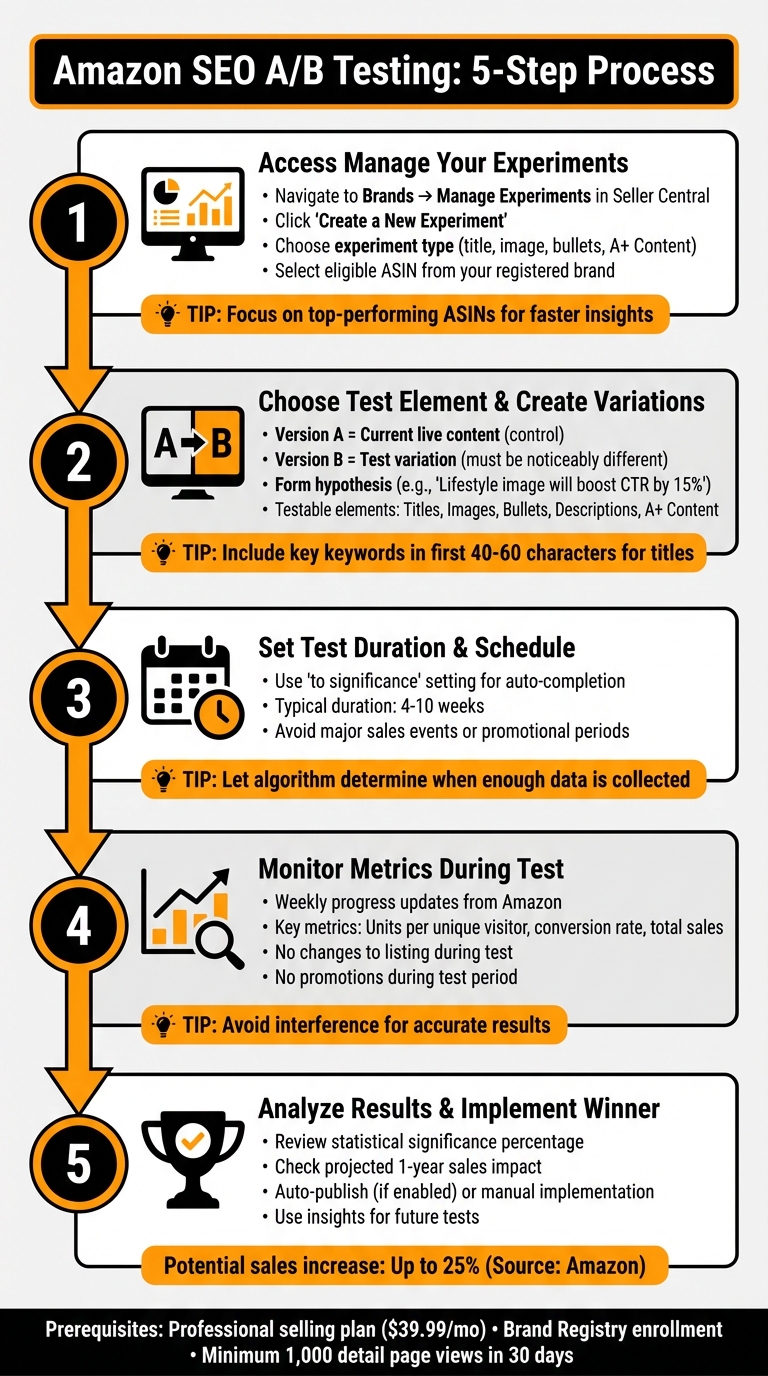
Amazon SEO A/B Testing 5-Step Process Guide
Step 1: Access Manage Your Experiments and Select ASIN
Start by logging into your Amazon Seller Central account. Head to the Brands tab in the main menu and select Manage Experiments from the dropdown. Once there, click Create a New Experiment to kick off the process. You’ll then be asked to choose an experiment type – this could be a product title, main image, bullet points, or A+ Content.
Amazon will show you a list of eligible ASINs next. These are products from your registered brand that have gathered enough traffic to provide statistically meaningful results. Focus on your top-performing ASINs to get quicker, more reliable insights.
After picking an eligible ASIN, you can move on to defining the elements you want to test.
Step 2: Choose a Test Element and Create Variations
Decide which part of your listing you want to test. Options include product titles, main images, bullet points, product descriptions, or A+ Content. Once you’ve made your choice, the tool will automatically use your current live content as Version A – this serves as your control group.
Next, create Version B, which is your test version. Make sure there’s a noticeable difference between the two versions to generate clear, actionable data. Before launching, form a hypothesis. For instance, you might predict, “Switching the main image to a lifestyle shot will boost click-through rates by 15%.”
If you’re testing titles, include your most important keywords in the first 40–60 characters to ensure they’re visible on mobile. For images, double-check that Version B meets Amazon’s content guidelines.
Once your variations are ready, set the duration of your test to ensure you gather enough data for reliable results.
Step 3: Set Test Duration and Schedule
Use Amazon’s "to significance" setting to let the algorithm automatically conclude the test once enough data is collected to determine a winner. This usually takes between four and ten weeks. Be mindful of Amazon’s review period when scheduling your test. Avoid running tests during major sales events or promotional periods, as these can distort your results.
Step 4: Monitor Metrics During the Test
Amazon provides weekly updates on your experiment’s progress. Keep an eye on key metrics like units per unique visitor, conversion rate, and total sales. During the test, avoid making changes to your listing or running promotions, as these could interfere with the results.
Step 5: Analyze Results and Implement the Winning Variation
After the test concludes, analyze the data to see which version aligns better with customer behavior. Amazon will present a statistical significance percentage, showing how likely it is that one version outperformed the other. You’ll also get a projected one-year sales impact for the winning variation, helping you gauge the long-term value of the change.
If you opted for the auto-publish feature, Amazon will automatically update your listing with the winning variation if it shows a clear advantage. Otherwise, you can manually implement the winning version by clicking View Details and publishing the change. Take time to review both pre-test and post-test data to understand what drove the improvement. This insight will shape your future testing efforts.
"By optimizing content with Manage Your Experiments you can potentially boost traffic, increase conversation rates, and help drive up to a 25% increase in sales."
– Avi Ravi, Director, Seller Recruitment and Success at Amazon
Best Practices for Amazon SEO A/B Testing
To get the most out of your A/B testing efforts on Amazon, it’s crucial to follow these practices. They’ll help ensure your experiments deliver clear, actionable insights.
Focus on High-Traffic ASINs
For an ASIN to qualify for Amazon’s Manage Your Experiments tool, it must have at least 1,000 detail page views in the past 30 days. This threshold ensures your test results are based on meaningful customer behavior rather than random fluctuations.
Amazon recalculates eligibility weekly. To stay ahead, regularly check the "Create a New Experiment" section in Seller Central to see which products meet the traffic criteria. If one of your ASINs is just shy of the requirement, consider running a Sponsored Products campaign to boost its visibility and traffic.
Test One Variable at a Time
Avoid the temptation to change multiple elements during a single test. For example, if you adjust both your product title and main image and notice an increase in conversions, you won’t know which change drove the improvement. Amazon advises sellers to "ensure variables are isolated to maintain test validity".
Stick to testing one element at a time – whether it’s your title, main image, or bullet points. This approach gives you clear, reliable data that you can apply to other listings. While it may take longer, the insights you gain will be far more actionable and trustworthy.
Run Multiple Tests for Continuous Improvement
A/B testing is not a one-time task. Instead, think of it as an ongoing process. Once you’ve identified a winning variation, make it your new baseline and test another element. Mickey Toogood, Sr. Content Marketing Manager at Amazon, emphasizes that consistent testing leads to lasting gains.
Optimized content has been shown to drive an average sales increase of 20%. Over time, the cumulative effect of multiple successful tests can significantly boost your overall revenue.
Conclusion and Key Takeaways
Recap of the A/B Testing Process
Amazon’s Manage Your Experiments tool simplifies the process of optimizing your product listings. The steps are straightforward: verify your eligibility, focus on high-traffic ASINs, and choose one element to test. Create a variation that’s noticeably different, and let the tool run its course until it achieves statistical significance. Metrics like conversion rates and units sold per unique visitor are key indicators to guide your decisions.
Avi Ravi emphasizes the importance of patience in this process. Waiting for statistical significance and isolating variables are critical to identifying what truly impacts your success.
Next Steps for Amazon Sellers
To make the most of A/B testing, start with practical steps that can deliver quick results. Begin by selecting high-traffic ASINs, as they provide faster and more meaningful insights. Test one specific element at a time – whether it’s your main image, title, or bullet points – and ensure the variation is distinct enough to measure its impact. Allow the test to run for at least four weeks, though extending it to eight or ten weeks often provides more reliable outcomes.
Once you’ve identified a winning variation, use it as a foundation for further improvements. For instance, in 2025, Onkata Hardware Sales, Inc. increased sales by 8% by simply changing a single word in their content. Ben Huge, their Brand Manager, explained how the data from their experiment justified actionable recommendations, leading to measurable success for their clients.
How Emplicit Can Support Your Amazon Growth
Effective A/B testing requires more than just running experiments – it demands careful planning and a deep understanding of metrics. That’s where Emplicit comes in. They provide full Amazon marketplace management, from listing optimization to PPC campaigns, all tailored to your business objectives. Their team handles everything from setting up experiments to interpreting key metrics like "units sold per unique visitor" and turning those insights into actionable strategies.
With USA-based managers, Emplicit ensures your testing efforts translate into sustainable revenue growth. Beyond A/B testing, they offer services like inventory management, account health monitoring, and omnichannel marketing. By partnering with Emplicit, you can focus on growing your brand while they handle the complexities of managing and optimizing your Amazon presence.
FAQs
What should I test first on an Amazon listing?
Testing your product detail page can make a big difference in how customers engage with your listings. Focus on elements like titles, images, bullet points, and descriptions. Tools such as Amazon’s Manage Your Experiments allow you to compare different versions of these elements to see which ones lead to better sales and conversions. By experimenting, you can uncover what appeals most to your audience, boosting both engagement and overall sales.
How can I tell if my results are statistically significant?
To figure out if your A/B test results hold weight statistically, you’ll need to dig into the data and assess whether the variation differences are probably not just random. A key tool for this is the p-value or the statistical tests built into your A/B testing platform. When the p-value is under 0.05, it’s a strong sign that the results are statistically significant. Many A/B testing tools even flag significant results automatically, making it easier to interpret your findings.
What can I do if my ASIN isn’t eligible for Manage Your Experiments?
If your ASIN isn’t eligible for Manage Your Experiments, there are other ways to test your content. Amazon allows testing for titles, images, bullet points, descriptions, and A+ Content, but it doesn’t permit testing for pricing, backend keywords, or PPC ads.
You can explore manual split testing or use third-party tools to gather performance insights. Just keep in mind that some of these tools might not offer genuine A/B testing. If you go the manual route, tracking results carefully will help you get accurate data on what’s working.