

Accurate PPC ROI tracking is critical for ensuring your ad spend delivers results. Without it, you’re relying on flawed data that can mislead bidding algorithms and drain budgets. Common issues like duplicate tags, misconfigured conversion actions, and attribution errors can skew your performance metrics by up to 30%. This leads to poor optimization decisions and wasted ad spend.
To fix these problems:
- Audit your conversion tracking monthly to identify errors.
- Use tools like Google Tag Manager (GTM) and GA4 DebugView to check tag accuracy.
- Switch to Data-Driven Attribution (DDA) for better credit assignment across touchpoints.
- Align tracking settings with your sales cycle and exclude test data or internal traffic.
- Regularly review discrepancies between ad platforms and internal systems.
Identifying and Fixing Broken Conversion Tracking
Common Conversion Tracking Errors
One of the most troublesome issues in conversion tracking is duplicate tag firing. This occurs when a thank-you page reloads or when both a hard-coded tag and a Google Tag Manager (GTM) tag are active at the same time. The result? Conversion counts get inflated, giving the illusion that your campaigns are performing much better than they really are.
Another frequent problem is misconfigured conversion actions. For instance, if micro-conversions – like scrolling through a page, clicking a button, or watching a video – are mistakenly set as "Primary" actions, Smart Bidding starts prioritizing these low-value events instead of focusing on actual purchases or qualified leads. Other common tracking issues include:
- Cross-domain tracking failures, especially in Shopify stores with separate checkout domains.
- Broken UTM parameters, often caused by redirects.
- Challenges with Single Page Applications (SPAs) built on frameworks like React or Vue, which don’t trigger standard pageview events.
Being aware of these errors is the first step in understanding how they can distort your ROI data.
How Broken Tracking Skews ROI Data
A duplicate-firing tag alone can inflate conversion counts by as much as 30%. This leads Target CPA strategies to bid more aggressively than they should, based on inaccurate data. Over time, this mismatch between perceived and actual performance can significantly impact your ad spend.
"If your conversion data is wrong, your campaigns are optimizing toward the wrong outcomes, and you are paying for it every single day." – Alexander Perleman, Head of Product, groas
Here’s a helpful benchmark: a 5–15% discrepancy between Google Ads and GA4 is generally acceptable due to differences in attribution models. However, if the gap exceeds 20–25%, it’s a clear sign that something is broken and needs immediate attention.
Now that we’ve outlined the risks, let’s dive into how to identify and fix these tracking errors.
How to Audit and Fix Conversion Tracking
Accurate conversion tracking is essential for optimizing your PPC campaigns. Here’s how you can ensure everything is functioning correctly:
Start with a systematic audit. Document every conversion event, noting where it fires (client-side or server-side) and its key parameters, such as transaction_id, value, and currency. Use tools like GTM Preview Mode and GA4 DebugView to confirm that tags fire only on confirmation pages.
For cross-domain setups, make sure the _gl parameter carries through the checkout process to avoid attribution errors. Additionally, review your Google Ads conversion action settings. Only high-value actions, like purchases or qualified leads, should be marked as "Primary." Lower-priority actions should be designated as "Secondary" to avoid skewing bidding strategies.
To prevent future issues, walk through your funnel manually once a month. Complete a test conversion in a separate browser profile and verify that it’s recorded in both Google Ads and GA4. This simple practice can catch 90% of tracking and reporting issues before they escalate.
Here’s a quick troubleshooting guide for common issues:
- Zero conversions recorded: Check for missing or unverified tags using Google Tag Assistant or the Ads Summary tool.
- Sudden drop in conversions: Review recent site updates or broken triggers using GTM Preview Mode or the site release log.
- Conversion rate above 30%: Investigate duplicate tags or ensure micro-conversions aren’t set as "Primary" actions in Google Ads.
- "Unassigned" traffic in GA4: Use sGTM Preview Mode to check for stripped parameters.
- Missing mobile conversions: Test the mobile funnel manually, as different page templates may cause tracking issues.
sbb-itb-e2944f4
Fixing Attribution Errors for Accurate ROI Measurement
Attribution Models and Their Limitations
Even with precise conversion tracking, your ROI calculations can falter if the wrong attribution model is in play. Attribution assigns credit for conversions to specific ads, directly influencing how your budget is spent.
A common offender here is last-click attribution. This model gives all the credit to the final touchpoint, often inflating the importance of branded search or retargeting while ignoring the contributions of upper-funnel channels like YouTube, display ads, and non-brand search.
"Last-click attribution is not just imperfect — it actively misdirects budget." – Editorial Staff, Search Performance Marketing
This method can lead to what’s often called a "death spiral": reducing investment in top-of-funnel channels because they appear inefficient under last-click metrics. Over time, this shrinks the audience discovering your brand, which ultimately hurts bottom-funnel conversions.
Another challenge is cross-channel blindness. Attribution models native to platforms like Google’s Data-Driven Attribution (DDA) only account for touchpoints within their ecosystem. For example, if a customer interacts with a Meta ad, a LinkedIn post, and then a Google search ad before converting, only the Google interaction gets credit. This incomplete view can lead to poor decisions when allocating budgets across multiple platforms.
Recognizing these limitations is the first step toward aligning your attribution model with your business’s sales cycle.
Matching Attribution Models to Your Sales Cycle
The path to purchase varies widely depending on the product or service. A $30 impulse buy is a world apart from a $50,000 B2B software contract.
For short sales cycles – like retail or food delivery – last-click attribution or short lookback windows (7 days) might suffice. But longer sales cycles in industries such as B2B SaaS or real estate require extended lookback windows (60 to 90 days) and multi-touch attribution models to capture the full customer journey. Using a 30-day window for a product with a 90-day sales cycle could mean missing early-stage conversions that deserve credit.
For most advertisers, Data-Driven Attribution (DDA) is now the go-to model. Google retired its rule-based models (First-click, Linear, Time-decay, Position-based) in September 2023, as they accounted for less than 3% of web conversions. DDA uses machine learning to assign fractional credit to each touchpoint, offering a more nuanced view than fixed-weight rules.
However, DDA works best with sufficient data. Here’s a quick guide to choosing an attribution model based on your monthly conversions:
| Monthly Conversions | Recommended Model |
|---|---|
| Fewer than 500 | First-Touch |
| 500–2,000 | Linear or Position-Based |
| 2,000+ | Data-Driven Attribution (DDA) |
How to Fix Attribution Errors
Once you’ve chosen the right model, follow these steps to address common attribution errors:
- Switch to DDA immediately, but adjust your Smart Bidding targets. Before making the switch, compare your cost per conversion over the past two weeks. Use this data to tweak your target CPA (tCPA) or target ROAS (tROAS) accordingly.
"If your Smart Bidding targets remain static while the underlying conversion data shifts, you will either over-bid or under-bid across your campaigns until the algorithm recalibrates." – ALM Corp
- Audit your lookback windows. Make sure your Google Ads conversion settings align with your CRM’s average lead-to-close time. For example, if your sales team typically closes deals in 75 days but your lookback window is set to 30 days, many conversions will go untracked.
- Implement Enhanced Conversions to combat the impact of ad blockers and cookie restrictions. This feature uses hashed first-party data, like customer emails or phone numbers, to match conversions that might otherwise be missed. Enhanced Conversions can boost attribution accuracy by 15–30%.
- Use the Model Comparison Report in Google Ads to identify campaigns that appear underwhelming with last-click attribution but gain more credit under DDA. These campaigns might be quietly driving conversions and could be worth additional investment.
Fixing Revenue and Value Mismatches in ROI Tracking
Common Causes of Revenue Mismatches
Even with accurate attribution, your ROI data can still be off if the revenue values you’re tracking don’t align with actual business outcomes. This disconnect can lead to misleading metrics and poor decision-making.
One common issue is duplicate tag firing, which happens when a thank-you page is refreshed or when a tag is hard-coded on a page and also deployed through Google Tag Manager. This results in double counting, inflating conversion data and distorting bidding strategies.
Other frequent problems include:
- Currency and format mismatches: For example, sending revenue values as text instead of numbers or using the wrong currency. This can throw off Smart Bidding by optimizing for incorrect figures.
- Test transaction pollution: QA orders or internal demos firing live conversion tags can blend test data with actual revenue.
- Tagging gaps in mobile flows or SPAs: Mobile-specific pages or single-page applications (built with frameworks like React or Vue) may lack the necessary tags or fail to trigger pageview-based conversion events.
Here’s a quick breakdown of common tracking issues and their impacts:
| Tracking Issue | Impact on ROI | How to Spot It |
|---|---|---|
| Duplicate Tag Firing | Inflated ROAS, over-bidding | Look for multiple conversions with the same Transaction ID |
| Currency/Format Mismatch | Nonsensical ROI calculations | Check GTM data layer currency codes vs. Google Ads settings |
| Missing Mobile Tags | Under-reported ROI, under-bidding | Audit mobile-specific page templates for conversion firing |
| String Instead of Number | Smart Bidding failure | Inspect tag payload in GTM Preview Mode |
Next, let’s explore how to ensure your conversion values reflect actual revenue.
How to Calibrate Conversion Values Correctly
Once your conversion tracking and attribution are in good shape, the next step is ensuring transaction data is accurate. Start by passing a unique order ID with each conversion. This prevents duplicate counting, even if the page is refreshed. Tools like GTM Preview Mode and Google Tag Assistant can help confirm that tags trigger only when intended and capture the right values.
For e-commerce businesses, set conversion counting to "Every" to capture all revenue from individual purchases. For lead generation, use "One" to avoid inflated lead counts. Additionally, filter out internal IP addresses and test transaction IDs from GA4 and Google Ads to keep test data from skewing your results.
A good practice is to manually complete a real conversion in your production environment monthly. Compare the results across Google Ads, GA4, and your internal order system. While exact alignment is rare, significant discrepancies (ad platforms often over-report by 15% to 30% compared to internal data) indicate a tracking issue that needs fixing.
"Treat conversion tracking like financial reporting. Set it up carefully, audit it regularly, document it thoroughly, and assume it will break unless someone is responsible for keeping it healthy." – Sentinel
For lead-generation or B2B businesses, Offline Conversion Import (OCI) is a game changer. Instead of tracking form submissions, you can import actual signed contracts or qualified lead values from your CRM into Google Ads via API. This gives Smart Bidding a more accurate revenue signal rather than relying on proxy metrics.
Using Customer Lifetime Value in ROI Tracking
Once you’ve calibrated transaction values, you can take things further by factoring in long-term customer value. Standard PPC tracking focuses on immediate transaction revenue, but for many businesses, that’s just a small part of the picture. Optimizing solely for first-purchase revenue can cause Smart Bidding to undervalue customers who make repeat purchases or sign long-term contracts.
For lead-generation models, assigning the same value to every lead can skew performance metrics. A better approach is to calculate lead value using this formula: Average Deal Size × Close Rate. Regularly update this figure in your conversion tags to reflect changes in deal sizes or close rates, ensuring your bidding strategies stay relevant.
For SaaS or subscription-based businesses, incorporating Customer Lifetime Value (CLV) can refine your ROI tracking. Extend your measurement window to account for long-term revenue. For high-LTV SaaS models, a healthy 12-month ROI target typically ranges between 200% and 500%. Segmenting new versus returning customer revenue in your dashboard also helps you see whether your PPC spend is driving new customer acquisition or supporting repeat business.
Better Data Segmentation for More Accurate Reporting
The Problem with Blended Reporting
Accurate tracking and attribution are only part of the equation for understanding ROI. To get a clear picture, precise data segmentation is essential. When data from different campaigns, platforms, or audience types is lumped into a single report, it can create a false sense of success. For instance, a branded search campaign with strong conversions might overshadow the poor performance of a display campaign. This can make overall ROI seem acceptable, even when certain segments are underperforming. These misleading metrics – sometimes called superficial metrics – highlight high-level results like clicks or conversions, but they fail to show that a specific segment may be contributing nothing to your qualified pipeline in the CRM. The result? Blended reporting distorts the signals you need to identify inefficiencies, leading to wasted budget in areas that aren’t delivering results.
Let’s explore how proper segmentation can fix this issue and uncover true performance.
How to Segment Data for Cleaner Analysis
To avoid the pitfalls of blended reporting, start by distinguishing conversion events based on their importance. Actions that directly impact your business – like purchases, signed contracts, or completed forms – should be marked as Primary. These events should feed directly into Smart Bidding systems. Meanwhile, softer engagement actions, such as video plays or pricing page visits, can be marked as Secondary. This way, they remain visible in reports without skewing bidding strategies.
Device-level segmentation is another critical step. Mobile devices often present unique tracking challenges due to differences in page templates or checkout flows. For single-page applications (SPAs) built on frameworks like React or Vue, standard pageview triggers might miss key conversions. In such cases, tracking history changes or button clicks ensures these events are captured properly.
For the clearest insights, use Google Ads tags to manage primary bidding signals while relying on GA4 for more comprehensive reporting. Keeping these systems distinct helps avoid double-counting and provides a more accurate view of performance across channels.
Using Segmentation to Improve PPC Performance
When done right, segmentation turns reporting into a powerful decision-making tool. By breaking down data by campaign, device, and conversion action, you can identify hidden inefficiencies. For example, you might discover that mobile users are struggling with a checkout process or that duplicate submissions are inflating your numbers. Segmentation can also uncover patterns like a non-branded campaign with a significantly higher cost-per-acquisition – insights that blended reports often obscure.
Make it a habit to reconcile conversion data from Google Ads, GA4, and your CRM on a weekly basis. While these numbers won’t align perfectly – ad platforms tend to over-report compared to internal systems – tracking the expected gaps can help you quickly spot anomalies. This proactive approach allows you to address issues early, preventing them from snowballing into bigger problems with your bidding or budgeting strategies.
🔧 How To Fix Conversion Tracking Instantly Once It Stops Working ⚡💰
A Framework for Auditing and Validating PPC ROI Tracking
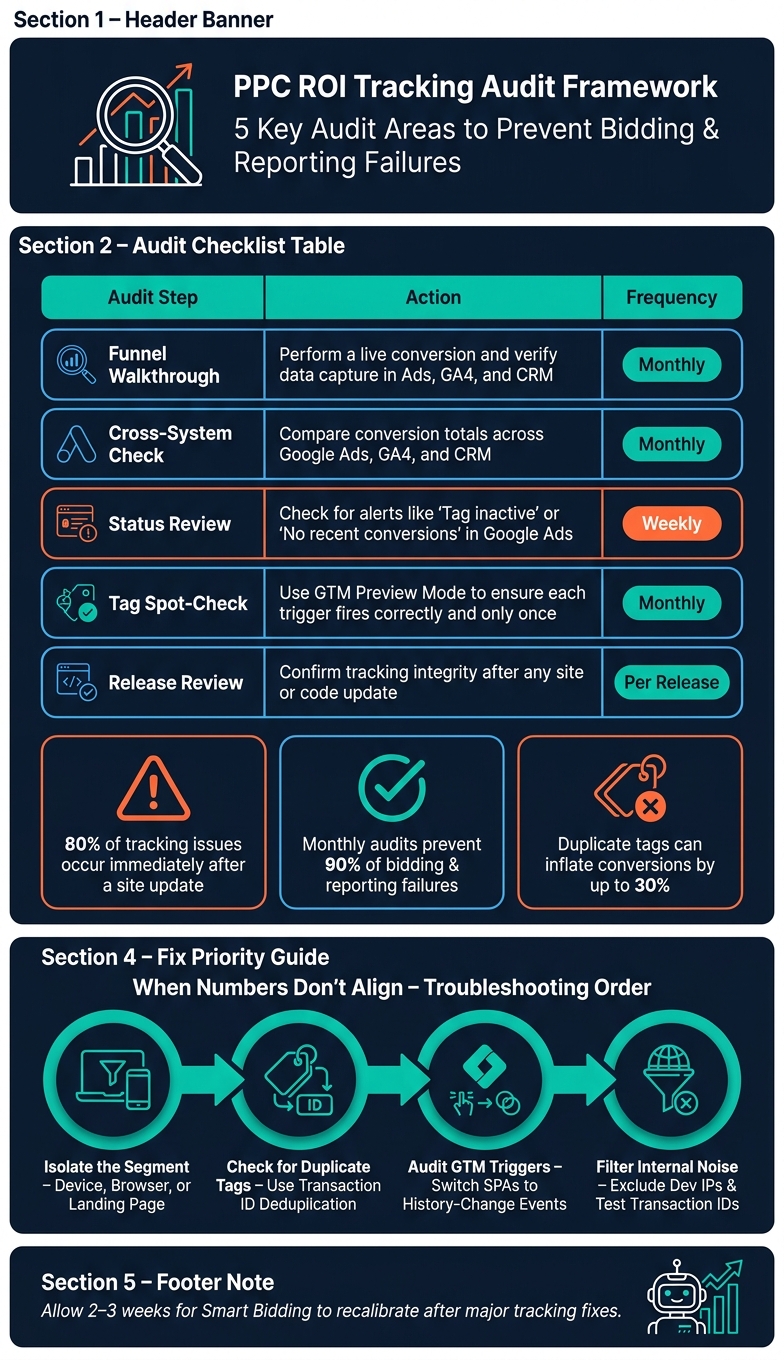
PPC ROI Tracking Audit Framework: Fix Errors & Maximize Ad Spend
A PPC Tracking Audit Checklist
Tracking PPC ROI effectively requires a disciplined approach, much like financial reporting. Regular audits, clear documentation, and ongoing oversight are the cornerstones of this process. To help you stay on track, here’s a framework that focuses on five key areas: tag status, funnel validation, cross-system comparison, GTM trigger logic, and engineering release reviews.
Below is a table outlining the steps, actions, and recommended audit frequency:
| Audit Step | Action | Frequency |
|---|---|---|
| Funnel Walkthrough | Perform a live conversion and verify data capture in Ads, GA4, and CRM. | Monthly |
| Cross-System Check | Compare conversion totals across Google Ads, GA4, and CRM. | Monthly |
| Status Review | Check for alerts like "Tag inactive" or "No recent conversions" in the Google Ads tab. | Weekly |
| Tag Spot-Check | Use GTM Preview Mode to ensure each trigger fires correctly and only once. | Monthly |
| Release Review | Confirm tracking integrity after any site or code update. | Per release |
Another critical element is maintaining a conversion taxonomy document. This record should detail every conversion action, trigger, value, and owner. It’s especially useful when team members transition or when an unnoticed update disrupts tracking, like a thank-you page URL change.
With this checklist in place, let’s move on to diagnosing and fixing common tracking issues.
How to Diagnose and Fix Common Tracking Issues
After completing your audit, the next challenge is identifying and addressing specific tracking problems. When numbers don’t align, avoid diving into every possible cause at once. Instead, focus on isolating the issue. Most discrepancies – about 80% – stem from a single segment, such as a particular device, browser, or landing page. Narrowing the scope makes troubleshooting far more manageable.
Two of the most frequent problems are duplicate-firing tags and broken triggers caused by site updates. Duplicate tags can severely distort data, leading Smart Bidding to over-bid based on inflated signals. To resolve this, consider:
- Using thank-you page redirects.
- Implementing single-firing triggers in GTM.
- Applying transaction-ID-based deduplication.
For Single-Page Applications (SPAs) built with frameworks like React or Vue, traditional pageview-based triggers often miss conversions. Instead, switch to history-change or button-click events for better accuracy.
"Smart Bidding can only learn from what you feed it. If conversions are duplicated, missing, or defined too early in the funnel, the algorithm will optimize the wrong outcome." – Clixtell
Don’t forget to filter out internal noise. Exclude developer IPs and test transaction IDs from GA4 and Google Ads to ensure QA activity doesn’t skew your ROI data. While this may seem minor, it can significantly improve reporting accuracy.
Keeping PPC Tracking Accurate Over Time
The most dangerous tracking issues are the ones that degrade quietly over time. A monthly audit routine is your best defense. Research suggests that consistent monthly checks can prevent 90% of bidding and reporting failures caused by broken data.
After making major fixes or structural changes, allow 2–3 weeks for Smart Bidding to recalibrate. During this period, avoid additional bid or budget adjustments, as this can confuse your analysis of what’s working.
"The cost of bad tracking is invisible until it is severe." – Sentinel
Finally, implement a change-control process for any engineering updates that affect checkout flows, signup paths, or thank-you pages. Require formal tracking sign-offs before deployment. Around 80% of tracking issues occur immediately after a site update, and many are entirely avoidable with this step in place.
Conclusion: Getting PPC ROI Tracking Right
PPC ROI tracking isn’t something you set up once and forget – it’s an ongoing process that demands attention to detail. By addressing issues like conversion tags, choosing the right attribution models, and carefully segmenting data, you create a solid framework for PPC success. These steps ensure your bidding algorithms get the accurate data they need to make smart budget decisions.
And the stakes? They’re high. For instance, duplicate-firing tags can inflate conversion counts by as much as 30%, leading Target CPA strategies to overbid for extended periods. Laurent Malka, Co-Founder of AnyTrack, offers a blunt but accurate take:
"Most teams have tracking that works, in the sense that pixels show ‘active’… But the data flowing through that tracking is wrong, duplicated, or missing entirely. And every budget decision made on top of it is a guess dressed up as a number."
This highlights why modern tracking methods are no longer optional. By 2026, server-side tagging and Enhanced Conversions will be essential tools for ensuring data accuracy as browser-based tracking becomes less reliable. Pairing these tools with regular funnel reviews and strict change-control practices can keep tracking issues from snowballing into wasted ad spend.
"The advertisers who do these eight things consistently have data they can trust, Smart Bidding that performs as advertised, and reports that match the bank account." – Sentinel
When PPC results seem erratic, it’s rarely just about bids or budgets. The real culprit is often flawed measurement. Reliable data is the foundation for every successful optimization, so if your PPC performance feels unpredictable, start by fixing the way you measure. Clean data is where every smart decision begins.
FAQs
How can I check if my conversions are being double-counted?
To identify double-counted conversions, start by reviewing your tracking setup for duplicate events. In Google Tag Manager (GTM), enable Preview/Debug mode to check if purchase events are firing multiple times on the confirmation page. Make sure each event includes a unique transaction ID to prevent duplication.
You can also compare your platform’s order count (like Shopify) with the conversions recorded in Google Ads. Any mismatch could signal an issue. Lastly, avoid installing tags both through GTM and directly in your site’s code, as this can lead to duplicate tracking.
What conversion actions should be “Primary” vs “Secondary”?
Primary conversion actions represent the key outcomes that directly drive revenue or align with your core business goals. These include actions like purchases, signups, or qualified leads. They’re critical because they’re used for bidding optimization and are displayed in the "Conversions" column in your reports.
On the other hand, secondary actions – like viewing a pricing page or watching a video – serve a different purpose. These actions are tracked for observation only and aren’t included in bidding strategies. By marking these as secondary, Smart Bidding can focus solely on the most valuable actions, making it easier to track and improve your PPC ROI.
When should I use offline conversion imports instead of form fills?
Offline conversion imports let you track actions like phone calls or in-person sales that happen outside the digital space. They’re especially useful for businesses with longer sales cycles or those leveraging data from CRM systems or call centers. While form fills focus solely on tracking online lead submissions, offline imports provide a clearer picture of offline sales, giving you a more comprehensive view of your campaign’s performance.