
If your TikTok data is incomplete, your ad decisions will be off too. In this article, I break down how ecommerce teams use TikTok APIs to fix missing conversion data, automate reporting, and keep product, order, and inventory data in sync.
Here’s the short version:
- I show how the TikTok Events API helps recover missed purchases and gives TikTok better conversion signals.
- I cover how the TikTok Marketing API pulls ad and video data into one reporting setup, so teams can compare platform numbers with Shopify revenue.
- I explain how TikTok Shop APIs keep catalog data, orders, fulfillment, and stock counts aligned across systems.
- I also show how teams connect ad data, order data, and SKU margin data to make better decisions on ROAS, CAC, AOV, conversion rate, and revenue.
A few numbers stand out fast:
- Obvi pushed event match rate from 44% to 81%, cut CAC by 31%, and improved blended ROAS by 2.4x.
- Hexclad increased server-side purchase coverage from 61% to 94%, surfaced an estimated $12 million in revenue, and hit 3.9x blended ROAS.
- Segmented product sets can lower CPA by 52% on average.
- Value-Based Optimization can improve ROAS by 30% to 50%.
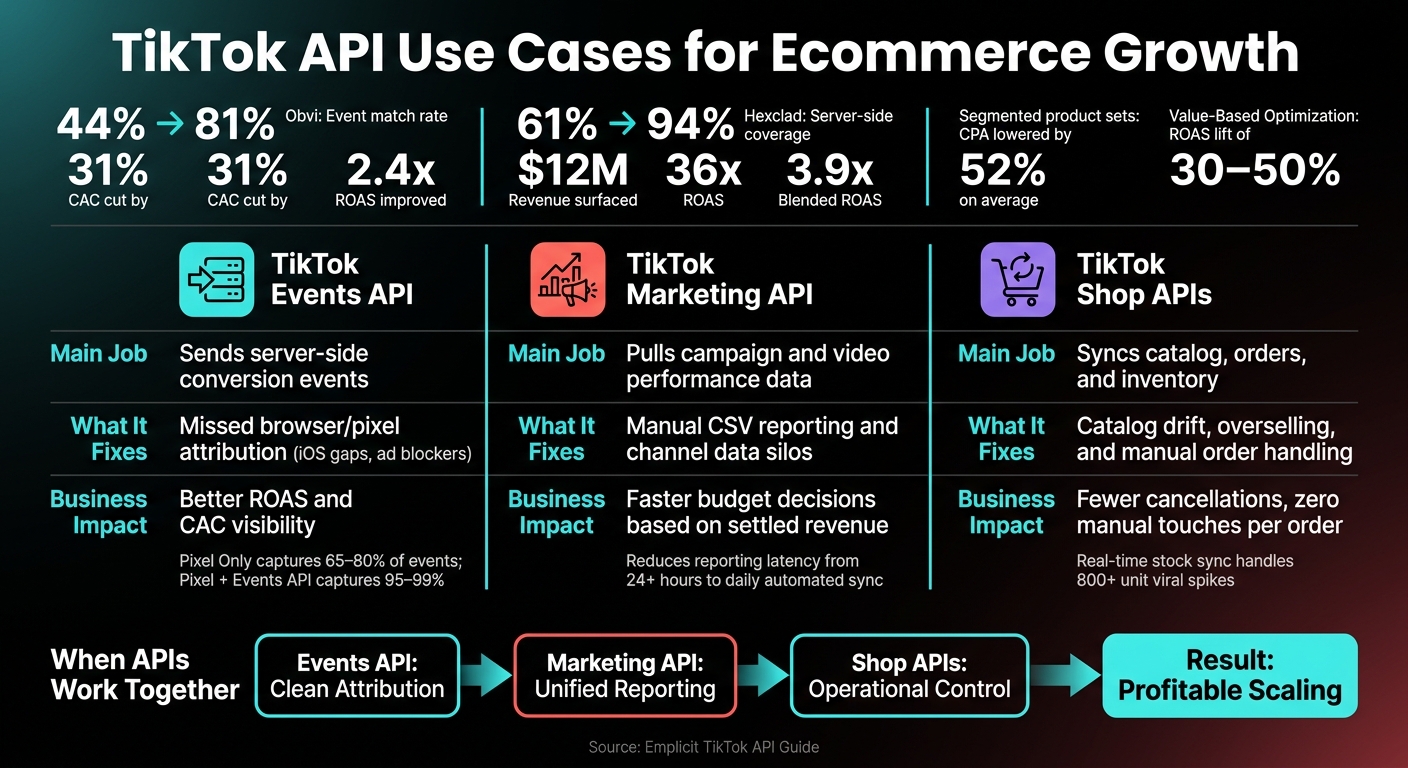
TikTok API Comparison: Events, Marketing & Shop APIs for Ecommerce
TikTok API: How to Seamlessly Integrate It with Your eCommerce Software

sbb-itb-e2944f4
Quick Comparison
| API | Main job | What it helps fix | Main business impact |
|---|---|---|---|
| Events API | Sends server-side conversion events | Missed browser/pixel attribution | Better ROAS and CAC visibility |
| Marketing API | Pulls campaign and video data | Manual reporting and channel silos | Better budget decisions |
| TikTok Shop APIs | Syncs products, orders, and inventory | Catalog drift and overselling | Fewer cancellations and less manual work |
If you run TikTok for ecommerce, this article shows where each API fits and how the pieces work together.
Case study: Recovering conversion data with the TikTok Events API
The clearest payoff shows up when server-side tracking brings purchase data back into view.
Business problem: Lost attribution from browser-only tracking
Browser-only tracking often undercounts TikTok conversions. That leaves a gap between what the platform reports and what finance confirms as actual revenue.
Integration approach: Send AddToCart, InitiateCheckout, and Purchase events server-side
A practical setup is to keep browser events for upper-funnel activity, then send AddToCart, InitiateCheckout, and Purchase through the Events API on the server side. Include hashed first-party identifiers and a shared event_id for deduplication. That way, TikTok counts each conversion once and gets a better signal for ROAS and CAC reporting.
Growth impact: Better ROAS visibility and smarter budget scaling
Obvi switched to TikTok’s Events API and pushed its event match rate from 44% to 81%. After that, the brand cut CAC by 31% and improved blended ROAS by 2.4x.
"The pixel was telling TikTok that maybe 40% of our actual purchases were happening. The algorithm was learning from incomplete data, and the campaigns reflected that. You can’t expect good optimization outputs when you’re feeding the model garbage inputs." – Ronak Shah, Co-Founder and CEO, Obvi
Hexclad saw a similar result after rebuilding its signal stack. By increasing TikTok server-side coverage from 61% to 94% of total purchase events, the brand surfaced an estimated $12 million in revenue that had been invisible before and reached a 3.9x blended ROAS. In plain English: TikTok was learning from confirmed purchase signals instead of patchy browser data.
| Tracking Method | Average Event Capture Rate | iOS Event Capture | Ad Blocker Resistance |
|---|---|---|---|
| Pixel Only | 65–80% | 40–55% | None |
| Events API Only | 85–95% | 85–95% | Complete |
| Pixel + Events API | 95–99% | 90–97% | Complete |
(Source: Benly, 2026)
That fixes measurement. The next step is reporting, where the Marketing API pulls campaign and creative data into one place.
Case study: Centralizing campaign reporting with the TikTok Marketing API
Business problem: Manual reports and fragmented channel data
A lot of ecommerce teams running TikTok ads still work from CSV exports pulled out of TikTok Ads Manager and Shopify. Then comes the messy part: matching campaign names by hand before the numbers are even usable.
That slows everything down. It also hides the gap between platform-reported ROAS and settled revenue. So teams end up optimizing toward numbers they don’t fully trust. When reporting lives in different places, budget calls trail behind revenue.
Integration approach: Pull campaign and creative data into a central warehouse
A cleaner setup is to use a scheduled ELT pipeline that pulls TikTok Marketing API data into BigQuery or Snowflake, then joins it with Shopify revenue, CRM cohorts, and SKU-level sales. That gives teams one view across reach, intent, and revenue instead of piecing the story together from separate dashboards.
The API also makes video-level tracking possible. That means teams can see which specific videos drive the best click-to-purchase rates, rather than judging performance only at the campaign level.
Use settled revenue as the decision metric, not headline GMV. From there, teams can match TikTok-reported conversions against Shopify revenue and independent multi-touch attribution tools. As Joey Glyshaw of ZonFlip put it:
"Most TikTok Shop operators aren’t making data-driven decisions. They’re making dashboard-driven ones – and those aren’t the same thing."
Before vs. after: API reporting workflow comparison
| Reporting Dimension | Before (Manual/Dashboard) | After (Marketing API) |
|---|---|---|
| Reporting latency | 24+ hours via manual CSV exports | Daily automated sync |
| Manual hours per week | High – reconciling files and naming conventions | Low – automated ELT pipeline |
| Video-level visibility | Aggregate product performance only | Granular content-to-click-to-purchase chain |
| Decision confidence | Low – inflated by view-through and GMV Max | High – reconciled with MTA tools and checkout surveys |
| Primary decision metric | Platform-reported ROAS | Blended MER |
That reporting base feeds the next layer of operations: catalog, order, and inventory sync through TikTok Shop APIs.
Case study: Using TikTok Shop APIs for catalog, orders, and inventory control
Once reporting lives in one place, the next chokepoint is operations: keeping TikTok Shop catalog, order, and inventory data aligned.
Business problem: Catalog mismatches and overselling
For brands that sell on TikTok Shop alongside Shopify or an ERP, product data can drift fast. Titles change. Prices stop matching. Variants get messy. And when that happens, shoppers can pick the wrong option, support teams get more tickets, and return volume climbs.
The bigger problem is overselling. TikTok demand can spike HARD. One viral video can move 800+ units in a matter of hours. If stock counts update every 15 minutes, that gap is big enough to take orders you can’t ship. Then come seller-fault cancellations, weaker performance metrics, and possible account restrictions.
The answer is simple: use the same data discipline you’d use in reporting. Keep one source of truth and sync it in real time.
Integration approach: Sync products, orders, and stock levels automatically
Use Shopify or your ERP as the source of truth, and treat TikTok Shop as the sales channel. Product variants, USD prices, and descriptions should move out from the master catalog, not back into it.
Inventory should update through webhooks, not on a timed schedule. The POST /inventory/update endpoint sends stock levels to TikTok Shop in real time. So when one unit sells on any channel, stock updates across all channels within seconds.
Orders should follow that same setup. Pull TikTok Shop orders through the Order API and send them straight into the central OMS. Check tracking numbers before you submit them so you don’t get hit with invalid tracking penalties. After that, fulfillment status and tracking numbers can flow back to TikTok with no manual entry at all.
It also helps to check catalog data before syncing. That way, SKU mismatches get caught early instead of turning into order issues later.
Before vs. after: Operational KPI comparison
| Operational KPI | Before (Manual / Basic App) | After (API Orchestration) |
|---|---|---|
| Order handling time | Hours or days | Minutes |
| Stock-out cancellations | Frequent during viral spikes | Rare – real-time sync |
| Manual touches per order | Multiple – data entry, status updates, tracking | Zero – automated status updates |
| Catalog update speed | Delayed – batch or CSV uploads | Instant – event-triggered sync |
| Order-related disputes | High baseline | Lower through automated validation and routing |
That kind of control means TikTok demand spikes turn into shipped orders instead of cancellations.
Case study: Making better creative and merchandising decisions with TikTok data
Once you centralize reporting, you can use that same data to see which creatives and products lead to profitable orders. In practice, that means pulling creative data from the Marketing API, conversion data from the Events API, and TikTok Shop data for order and margin analysis. When those sources sit in the same data layer, creative reporting stops being just a media report and starts shaping merchandising calls too.
Use case: Find which creative themes drive profitable orders
Teams that do this well look past CTR and spend. They tag creatives by hook, format, and angle – like educational, testimonial, unboxing, or demo content – then join those tags to SKU-level margin data in a warehouse. From there, the same event data can connect each creative theme to SKU margin, AOV, and revenue.
That matters because a creative might look strong on the surface but still push lower-margin products. Another ad might bring in fewer clicks, yet lead to better carts and more profit. Without that product and margin view, it’s easy to back the wrong winner.
Use case: Connect TikTok traffic to SKU-level and AOV performance
The same event data can also connect ad traffic to product performance. Pass content_id with ViewContent, AddToCart, and CompletePayment to tie ads to SKUs, AOV, and margin.
A few setup choices can make a big difference:
- Segmented product sets for bestsellers, high-margin items, or price tiers can lower CPA by 52% on average.
- Value-Based Optimization can lift ROAS by prioritizing higher-value buyers, which can lift ROAS by 30% to 50%.
Emplicit can connect server-side event tracking, Marketing API reporting, TikTok Shop orders, and margin data into one workflow.
Conclusion: TikTok API use cases that create measurable ecommerce gains
These APIs tighten attribution, automate reporting, and keep product data in sync. Put together, they shift TikTok from a channel with patchy signal into one backed by data you can actually use.
The gap between brands that see small lifts and those that post bigger gains often comes down to one thing: do these integrations work as a single system? Obvi rebuilt its tracking setup and saw a 31% drop in CAC plus a 2.4x blended ROAS lift. Hexclad hit 94% server-side event coverage and a 3.9x blended ROAS, while surfacing an estimated $12 million in revenue that had been invisible before.
When attribution, reporting, and operations run together, teams make creative calls based on actual performance, scale budget with cleaner numbers, and keep inventory accurate even when demand spikes after a viral moment. For teams ready to put that stack to work, implementation support can make a big difference. Emplicit can help with server-side tracking, reporting, and TikTok Shop operations.
FAQs
Which TikTok API should my ecommerce team start with?
If your ecommerce team is just getting started, start with the TikTok Sales Channel app on platforms like Shopify, BigCommerce, or WooCommerce. It’s a simple way to sync your product catalog, keep inventory up to date, and turn on native checkout without custom engineering.
As your business grows, you can add the TikTok Business API or Marketing API. That gives you more control over ad automation, inventory management across multiple warehouses, and deeper performance analytics. Emplicit can help guide those integrations.
How hard is it to connect TikTok API data with Shopify or an ERP?
It depends on your business needs.
For many merchants, connecting TikTok Shop with Shopify takes about 2 to 4 hours when you use apps from the official app stores. That’s often the fastest path if you want to get up and running without much setup.
Things get more involved when you connect to an ERP or manage multiple stores at once. In those cases, you may need tighter orchestration to avoid data conflicts between orders, inventory, and product details.
Direct API development gives you real-time control, which can be a big plus. But it also adds engineering work, including OAuth 2.0 authentication and request signing.
What metrics should I track after implementing TikTok APIs?
Focus on metrics across sales, conversion, and ad performance.
- Sales: GMV, completed orders, average order value
- Conversion: click-through attribution, view-through attribution, conversion rate, add-to-cart rate, checkout completion rate
- Ads and engagement: ROAS, CPA, CTR, Product Show Rate, Enter Room Rate, and Click-to-Order Rate