
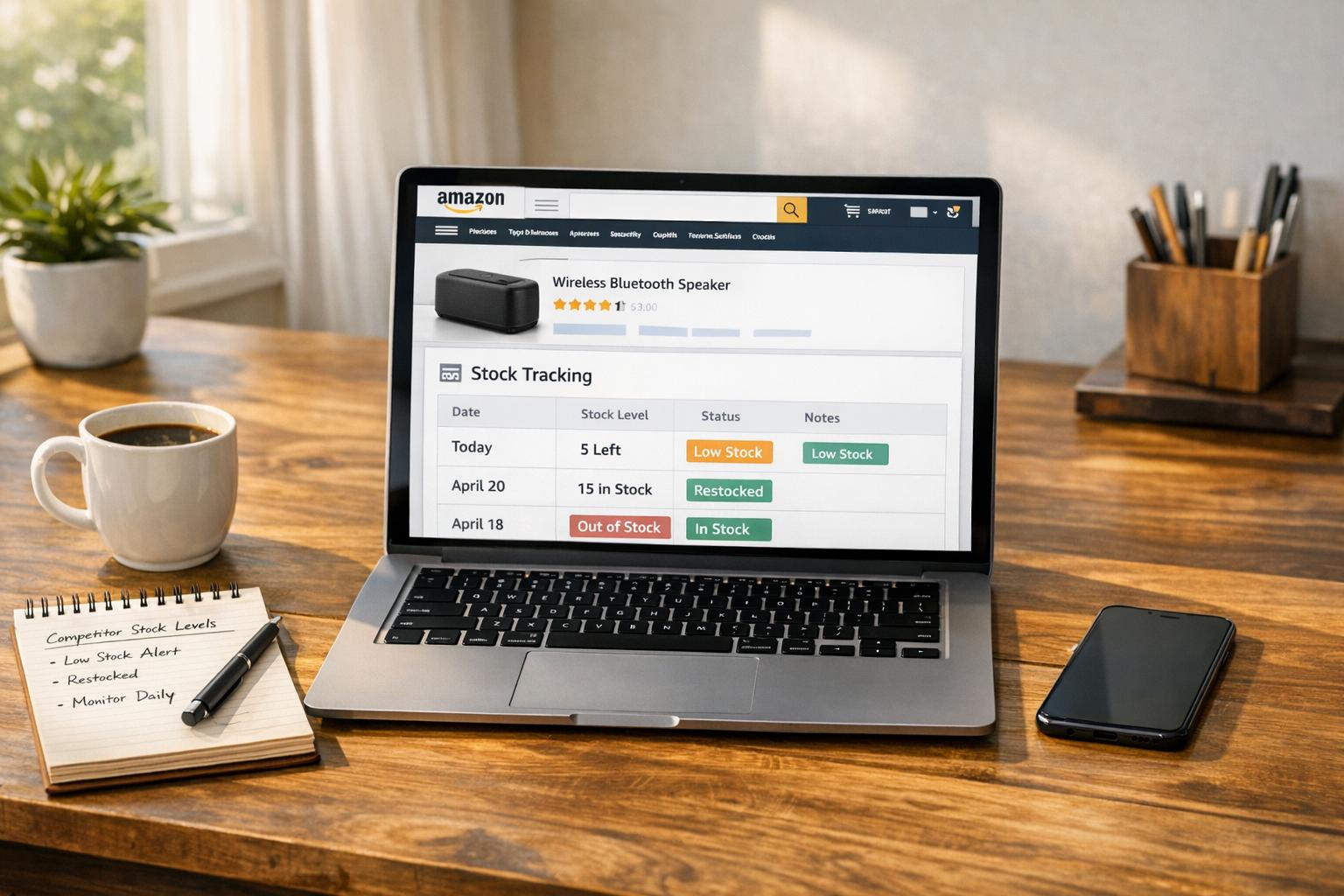
Monitoring competitor stock levels on Amazon can help you make smarter pricing and inventory decisions. If your competitors are running low on stock, you can adjust your strategy to boost sales or increase margins. This article explains how to track competitor inventory manually using the 999 Cart Method or automate the process with tools like Helium 10 or Seller Assistant Stock Checker. Key takeaways include:
- Manual Tracking: Use the 999 Cart Method to check stock levels for products with fewer than 999 units. Limitations include order caps and incomplete data for large inventories.
- Automated Tools: Tools like Helium 10 provide real-time stock data, historical trends, and predictive analytics to simplify tracking across multiple competitors.
- Actionable Insights: Use stock data to refine pricing, plan restocking, and identify market opportunities when competitors sell out.
Protecting your own stock data is also crucial. Setting a "Max Order Quantity" in Seller Central can limit how much information competitors can access. Combining manual checks with automated tools ensures you stay ahead in a highly competitive marketplace.
How to know your Amazon competitors’ stock | Stock Checker Review
Manual Methods for Checking Competitor Stock
If you’re not ready to invest in tracking software, you can manually check competitor stock levels. These methods work well for analyzing a small number of products or exploring a niche market.
All you need is your Amazon account and a few minutes to gather accurate data. While this approach isn’t practical for monitoring dozens of competitors, it’s effective for products with fewer than 999 units in stock.
The 999 Cart Method
The 999 Cart Method is a straightforward way to uncover a competitor’s exact stock levels using Amazon’s cart quantity limits. Here’s how it works:
- Go to a product listing and add the item to your cart.
- In your cart, click the quantity dropdown, select "10+", then type "999" into the field.
- Click "Update." If the seller has fewer than 999 units, Amazon will display a message like: "This seller only has [X] available".
"Knowing how many items your competitors have in stock is not only good for when you are out sourcing, but also when you are pricing your items." – Stephen Smotherman, Full-Time FBA
This method works on both desktop and mobile for third-party sellers and Amazon retail stock. By checking inventory at the same time daily for a week, you can estimate daily sales velocity by observing how stock levels change. Just remember to clear your cart immediately after performing the check – Stephen Smotherman once ended up with nearly $30,000 worth of inventory sitting in his cart during his research.
However, the 999 Cart Method comes with significant limitations. If a competitor stocks more than 999 units, the method won’t work. Sellers can also block it by setting a "Max Order Quantity" in Seller Central. For instance, if a seller limits orders to 49 units, the method will never reveal stock levels beyond that, no matter how much inventory they actually have. Amazon may also enforce its own purchase limits on certain items, sometimes as low as 3 units per customer, further obscuring stock levels. Additionally, this method only shows inventory currently available in fulfillment centers – it won’t account for items in transit or awaiting processing at warehouses.
While this approach is precise for low-volume products, its limitations make it unsuitable for large-scale tracking. For broader inventory monitoring, automated tools are indispensable.
Automated Tools for Tracking Competitor Inventory
When you’re keeping tabs on multiple competitors, manual tracking quickly becomes overwhelming. Automated tools simplify this process by integrating competitor stock data right into your browser. These Chrome extensions provide real-time inventory insights directly on product pages, including whether sellers are using FBA (Fulfillment by Amazon) or FBM (Fulfilled by Merchant). This distinction is crucial – it can influence Buy Box eligibility and delivery times.
Spotting low stock levels in your competitors’ inventory can reveal opportunities to adjust your pricing or ramp up PPC ad spending to capture more market share. With these tools, it’s as simple as downloading the extension, signing up, and letting the data populate as you browse Amazon listings.
Helium 10 Inventory Levels

Helium 10’s Inventory Levels feature, part of their Chrome Extension, allows you to view inventory quantities for specific Amazon listings. It streamlines the process by analyzing multiple competitors at once, saving you from having to check each seller individually. After downloading the extension and creating a free account, click the Helium 10 icon while browsing search results or product pages. This instantly displays inventory data for all sellers, helping you identify competitors running low on stock.
This tool integrates seamlessly with Helium 10’s broader suite of features, like the Xray tool, which estimates sales figures with impressive accuracy – often within 22 units of the actual numbers. Trusted by over 4 million businesses, Helium 10 offers a comprehensive solution for e-commerce operations.
"Helium 10 has everything you need… there is only one tool that matters for serious sellers: Helium 10." – Kevin King, Freedom Ticket & Illuminati Mastermind
Pricing starts at $29/month (billed annually) or $39/month (billed monthly) for the Starter plan. The Platinum plan costs $79/month (annually) or $99/month (monthly), while the Diamond plan – with advanced features like TikTok Shop integration – comes in at $229/month (annually) or $279/month (monthly). Keeping your inventory in check is essential, as running out of stock for extended periods can harm your organic search ranking.
Seller Assistant Stock Checker

Seller Assistant’s Stock Checker provides real-time inventory data, breaking it down by FBA and FBM sellers. This feature appears directly on Amazon product pages and can even be used on supplier websites. Simply right-click on selected text and choose “Search with Seller Assistant.” Its Offers feature presents a detailed table showing competing offers, including stock levels, seller types, and Buy Box share.
"The Offers feature displays real-time stock availability for each seller, giving insight into when competitors might run out." – Seller Assistant
This tool is particularly useful for refining your pricing strategy. If your competitors are running low on inventory, you might consider raising your prices slightly to maximize profitability while they’re unable to meet demand. By automating these insights, you can shift your focus to strategic decision-making instead of tedious manual research.
These tools offer a solid foundation for tracking competitor inventory and responding quickly to market shifts. They also set the stage for more advanced tracking methods, which are discussed in the next section.
Advanced Inventory Tracking Solutions
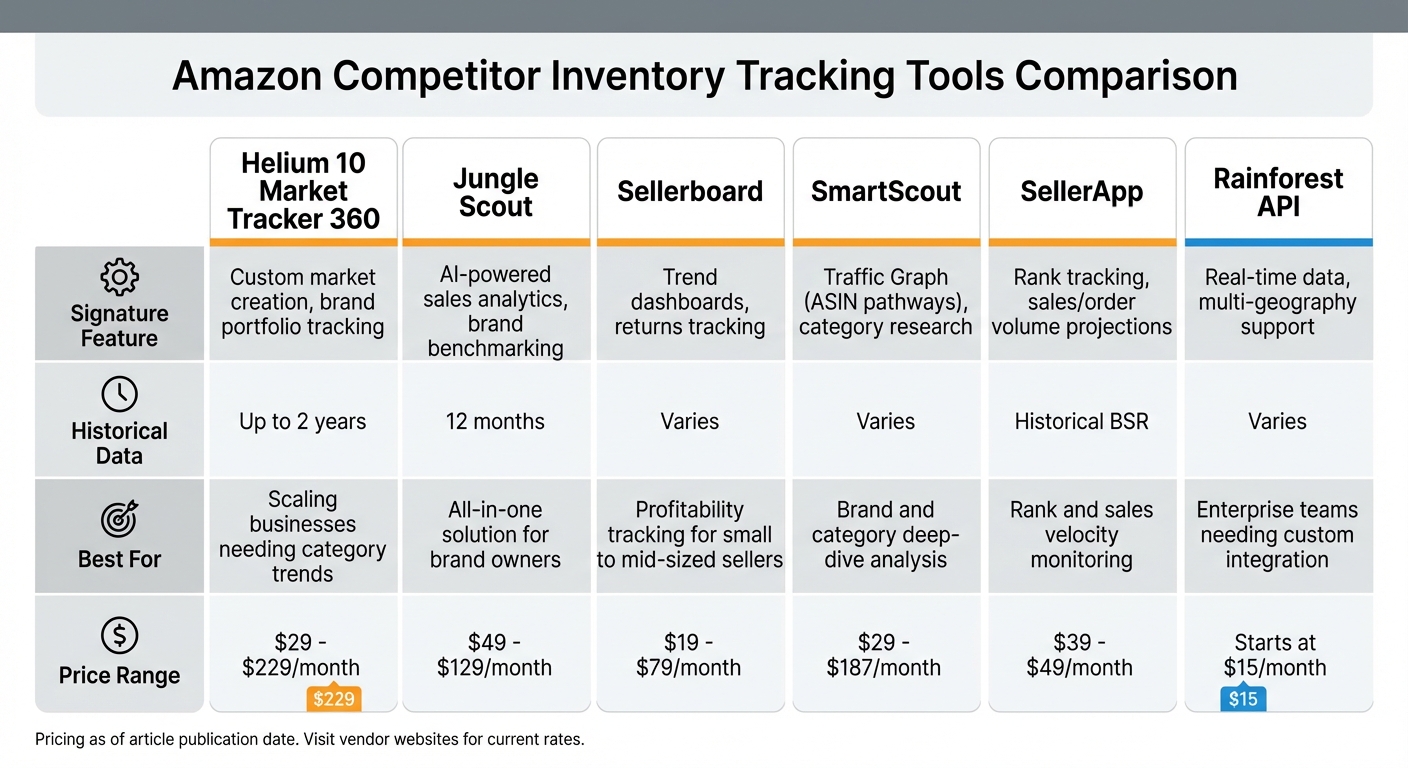
Amazon Competitor Inventory Tracking Tools Comparison Chart
Advanced inventory tracking systems bring powerful tools to the table, offering features like historical data analysis, predictive forecasting, and minute-by-minute monitoring. These platforms keep a close eye on competitor activity, giving you the chance to act quickly when rivals drop prices to clear out stock.
Take historical data tracking, for instance. Tools like Helium 10’s Market Tracker 360 can store up to two years of data, uncovering patterns and potential supply chain hiccups. Imagine spotting a competitor who consistently runs low on inventory at the end of each month. This could hint at cash flow challenges, giving you an opportunity to ramp up your ad spend and snag their missed sales. In one case, a seller used historical data to identify a competitor’s restocking habits, timing price changes perfectly to gain market share. These insights provide a clear view of competitor behavior, helping you fine-tune your strategy.
Automated alerts are another game-changer. They eliminate the need for constant manual checks by sending notifications – via email or Slack – when competitors hit certain inventory levels, launch new products, or adjust prices. For example, an electronics retailer used the Rainforest API to track competitors and tweak pricing within minutes, boosting margins by 8%. Moreover, these tools can achieve a 98% data collection rate for sponsored ads, enabling you to analyze competitor ad strategies and respond effectively.
"On Amazon, the information gap = survival gap." – Loopsthings, E-commerce Operator
These platforms don’t just stop at monitoring. They integrate inventory data across multiple channels – Amazon (FBA and FBM), eBay, Shopify, and more – helping you avoid overselling and streamline operations. Some even use machine learning to predict competitor inventory needs, allowing you to optimize your own stock. With millions of daily price changes and over 100,000 new product launches on Amazon every month, automated tracking isn’t just helpful – it’s critical for staying ahead.
Tool Comparison Table
The right tool depends on your business size, technical needs, and monitoring goals. SaaS platforms like Jungle Scout and Helium 10 offer intuitive dashboards that require no coding, making them great for small to mid-sized sellers. On the other hand, professional APIs like Rainforest provide enterprise-level flexibility, letting teams integrate raw data directly into their ERP or business intelligence systems.
| Tool | Signature Feature | Historical Data | Best For | Price Range |
|---|---|---|---|---|
| Helium 10 Market Tracker 360 | Custom market creation, brand portfolio tracking | Up to 2 years | Scaling businesses needing category trends | $29 – $229/month |
| Jungle Scout | AI-powered sales analytics, brand benchmarking | 12 months | All-in-one solution for brand owners | $49 – $129/month |
| Sellerboard | Trend dashboards, returns tracking | Varies | Profitability tracking for small to mid-sized sellers | $19 – $79/month |
| SmartScout | Traffic Graph (ASIN pathways), category research | Varies | Brand and category deep-dive analysis | $29 – $187/month |
| SellerApp | Rank tracking, sales/order volume projections | Historical BSR | Rank and sales velocity monitoring | $39 – $49/month |
| Rainforest API | Real-time data, multi-geography support | Varies | Enterprise teams needing custom integration | Starts at $15/month |
To get the most out of these tools, focus on three key competitor segments: Direct Rivals (those with over 60% category overlap and similar pricing), Category Leaders (who set the trends), and Rising Stars (new players with rapid growth potential). This targeted approach ensures you’re ready to act when a competitor’s inventory dips below critical levels, whether it’s by adjusting your pricing or increasing your ad spend.
sbb-itb-e2944f4
How to Use Competitor Stock Data in Your Business
Competitor stock data can be a game-changer for fine-tuning your restocking, pricing, and demand forecasting strategies. For instance, if you notice that low-priced competitors are sitting on high inventory levels, it might be wise to focus on products with less competition. Stephen Smotherman offers this practical insight:
"If the three lowest priced sellers all have just one item in stock… you might want to price your item higher than theirs, knowing they might sell out while your item is headed to a FBA warehouse".
By analyzing stock trends, you can determine whether you’re dealing with a reliable, replenishable product or a one-time clearance deal. If a brand owner consistently maintains high inventory, it often signals a steady supply. On the other hand, low stock levels across several third-party sellers might indicate clearance items that won’t be restocked. Use this data to strategically time your market entry and gain a competitive edge.
When competitors run out of stock, it’s the perfect time to raise your prices and increase your margins. By tracking competitors over several months, you can identify patterns, such as sellers who frequently clear their inventory toward the end of the month. These insights allow you to adjust your pricing or ad spend to capture missed sales during these predictable cycles.
To refine your strategy further, combine stock data with other metrics like Best Seller Rank (BSR). For example, if a competitor has a low BSR but limited inventory, they’re likely to sell out quickly. This creates an opportunity for you to step in and capitalize. Automated tracking tools can simplify this process – set alerts to notify you when competitors hit critical inventory levels, so you can react promptly without constant manual monitoring.
One crucial tip: avoid competing with Amazon’s "999+" stock listings. Their purchasing power and fulfillment advantages make them nearly impossible to beat. Instead, focus on tracking direct competitors – those with at least 60% category overlap – and keep an eye on emerging rivals showing unusual growth. These are the competitors most likely to influence your business and provide actionable opportunities.
How to Protect Your Own Inventory Data
While keeping an eye on competitors is important, safeguarding your own inventory data is just as critical. One reliable way to defend against the 999 cart method is by setting a "Max Order Quantity" in Amazon Seller Central. Here’s how you can do it: log in to Seller Central, navigate to "Manage Inventory", locate your listing, click "Edit", and go to the "Offer" tab. In the "Max Order Quantity" field, input a reasonable purchase limit for customers, such as 10 or 50 units. This ensures that if a competitor tries to add 999 items to their cart, they’ll only see your preset limit, not your actual stock. However, keep in mind that if your inventory exceeds 999 units, Amazon will display "999+ available", without revealing the exact number.
That said, even these precautions have their limits. Ryan Hogue, an Amazon FBA expert, points out:
"There’s nothing you can do to prevent Amazon from letting the public know that you’re about to sell out".
Amazon automatically displays low-stock notifications like "Only [x] left in stock" when inventory levels drop significantly. Unfortunately, this feature cannot be turned off.
Setting a Max Order Quantity helps keep your listing active by preventing competitors from attempting to cart your entire stock. Another useful step is using Amazon barcodes (FNSKU) instead of manufacturer barcodes. Starting March 31, 2026, Amazon will require all resellers to use Amazon barcodes, which eliminates the risk of your inventory being commingled with stock from other sellers.
In addition to these measures, you can adjust your marketing and pricing strategies to further protect your inventory. Keeping stock levels above 999 units and applying purchase limits can deter most tracking efforts. If your inventory runs low, Eva Hart from Jungle Scout suggests:
"pausing marketing strategies… and by setting a higher price point".
This approach not only helps you maintain an "In Stock" status but also buys you time to restock before running out.
Conclusion
Keeping an eye on competitor inventory data can lead to smarter decisions in pricing, sourcing, and marketing. By combining manual efforts with automated tools, you can significantly enhance your decision-making process. As Chuck Kessler from Canopy Management puts it:
"The sellers who scale treat competitor monitoring as an operating system, not an occasional research task".
Blending these methods provides both immediate insights and a clearer view of long-term trends. For instance, noticing a competitor restocks on specific days or clears inventory toward the end of the month reveals valuable clues about their cash flow or supply chain strategies. These observations can help shape a proactive approach to fine-tune your own operations.
Low inventory levels among competitors present a chance to adjust your pricing or ramp up ad spend to capture potential traffic. With the Amazon marketplace evolving quickly, weekly monitoring – rather than monthly – ensures you stay ahead of rapid shifts. Use stock data to identify the right moments to act, and pair that knowledge with listing improvements and creative strategies to stand out. This ongoing monitoring is key to staying competitive and maintaining your edge in the market.
FAQs
What is the 999 Cart Method, and how can it help track competitor stock on Amazon?
The 999 Cart Method offers a simple way to figure out how much stock a competitor has for a product on Amazon. Here’s how it works: head to the competitor’s product page and add the item to your cart. Next, go to your cart, click on “Edit quantity,” select the “10+” option, and type in 999 as the quantity. If the stock is under 1,000 units, Amazon will adjust the number to show the actual amount available.
To estimate how many units your competitor has sold, you can repeat this process a week later and compare the updated stock levels. Just note that if the inventory exceeds 1,000 units, Amazon will display “999+,” and you won’t see the exact number. This method provides a quick way to track inventory and get a sense of sales trends for competing products.
What are the advantages of using automated tools like Helium 10 to track inventory on Amazon?
Managing inventory on Amazon becomes much simpler with automated tools like Helium 10. These tools provide real-time stock updates, restock alerts, and even demand forecasting, helping you sidestep the risks of running out of stock or over-ordering.
With a centralized dashboard, you can oversee inventory across multiple Amazon channels, making the process more efficient and less time-consuming. Plus, these tools offer valuable insights to guide better decisions around replenishment and logistics, keeping your operations running smoothly.
How can I prevent competitors from tracking my inventory levels on Amazon?
Protecting your inventory data on Amazon is essential to keep competitors from gaining insights into your stock levels. One way Amazon unintentionally reveals this information is through low-inventory alerts, like “Only X left in stock,” which appear when your stock dips below a certain threshold. To avoid these alerts, it’s smart to maintain a buffer stock that keeps your inventory above this limit.
Another effective strategy is to use Fulfillment by Amazon (FBA). By distributing your inventory across multiple fulfillment centers, you make it more difficult for competitors to estimate your stock quantities. On top of this, take advantage of Amazon’s tools, such as real-time dashboards, to monitor your inventory health and quickly address any unexpected fluctuations.
For even greater control and security, you might explore dedicated ecommerce services like Emplicit. They provide secure inventory management, automated notifications, and personalized replenishment strategies to protect your stock data while keeping your operations running smoothly. By combining these approaches, you can effectively safeguard your inventory information and stay ahead of the competition.