
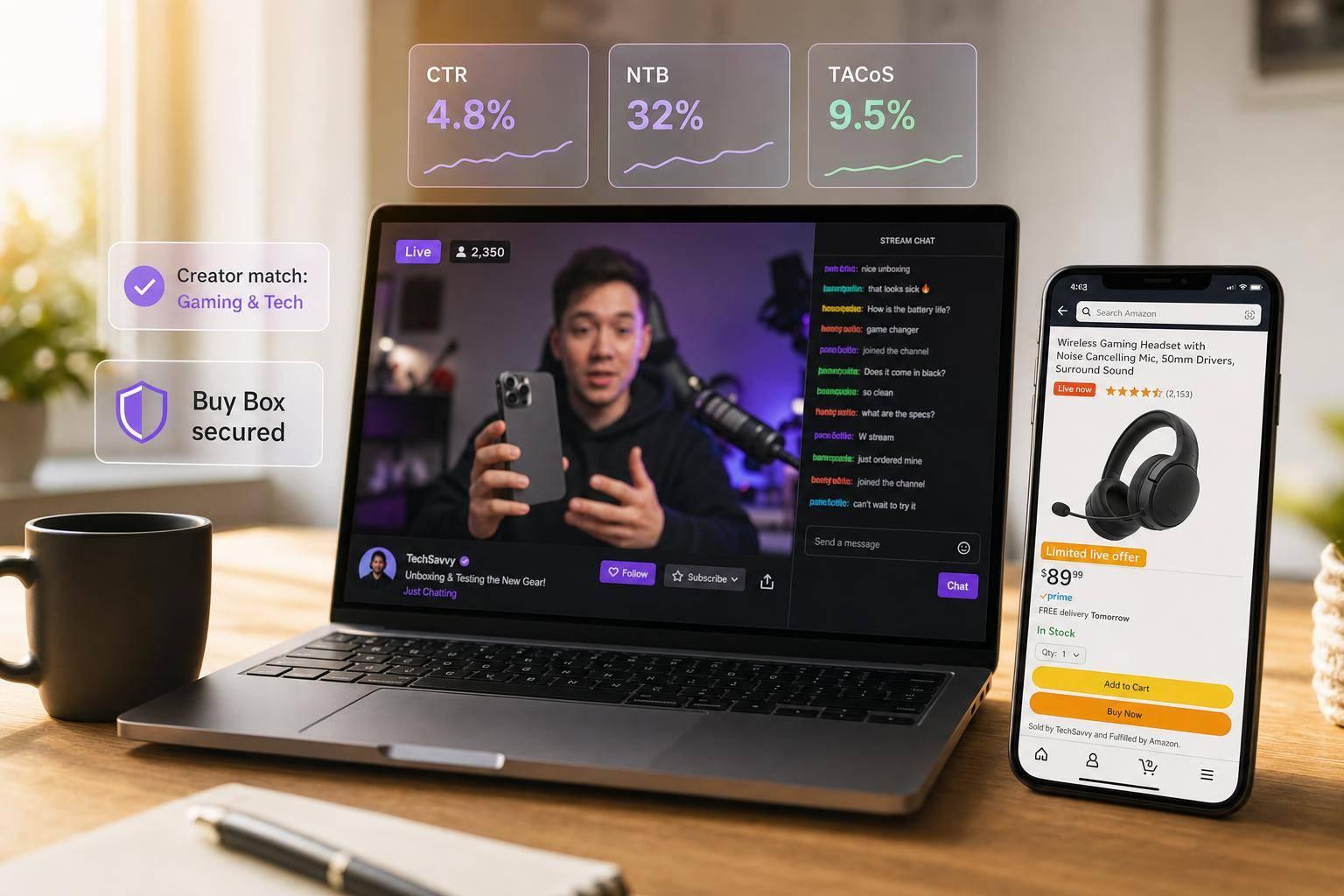
Twitch can help Amazon sellers drive demand before shoppers ever search on Amazon. If I sell products that need a demo, live Q&A, or a bit more trust before purchase, Twitch can work well – but only if I pick the right creators, set offers that protect margin, keep inventory ready, and track what happens after the stream.
Here’s the short version:
- Twitch is a discovery channel, not a replacement for Amazon PPC or listing work.
- Live commerce can convert at 9% to 30%, versus the 2% to 3% that standard ecommerce often sees.
- I should focus on creators with 10,000 to 100,000 followers, strong chat activity, clean sponsor history, and steady growth.
- Offers should be simple: live-only codes, bundles, or limited deals.
- Before traffic hits, I need to check inventory, Buy Box rate, pricing, and listing quality.
- I should track CTR, conversion rate, AOV, New-to-Brand rate, TACoS, organic rank lift, and BSR stability.
- If Buy Box share drops below 80% or stock gets too low, I should stop sending more traffic.
A few numbers matter most up front:
- Buy Box before launch: at least 95%
- Star rating before launch: at least 4.2
- Creator commission: 10% to 15%
- NTB benchmark: 40% to 70%
- TACoS benchmark: 5% to 15%
- Pilot test window: 4 to 6 weeks
If I had to boil the whole article down to one idea, it’s this: Twitch works best when I treat it like a controlled demand channel, not just a branding play. That means the right product, the right creator, the right offer, and tight retail setup on Amazon before I go live.
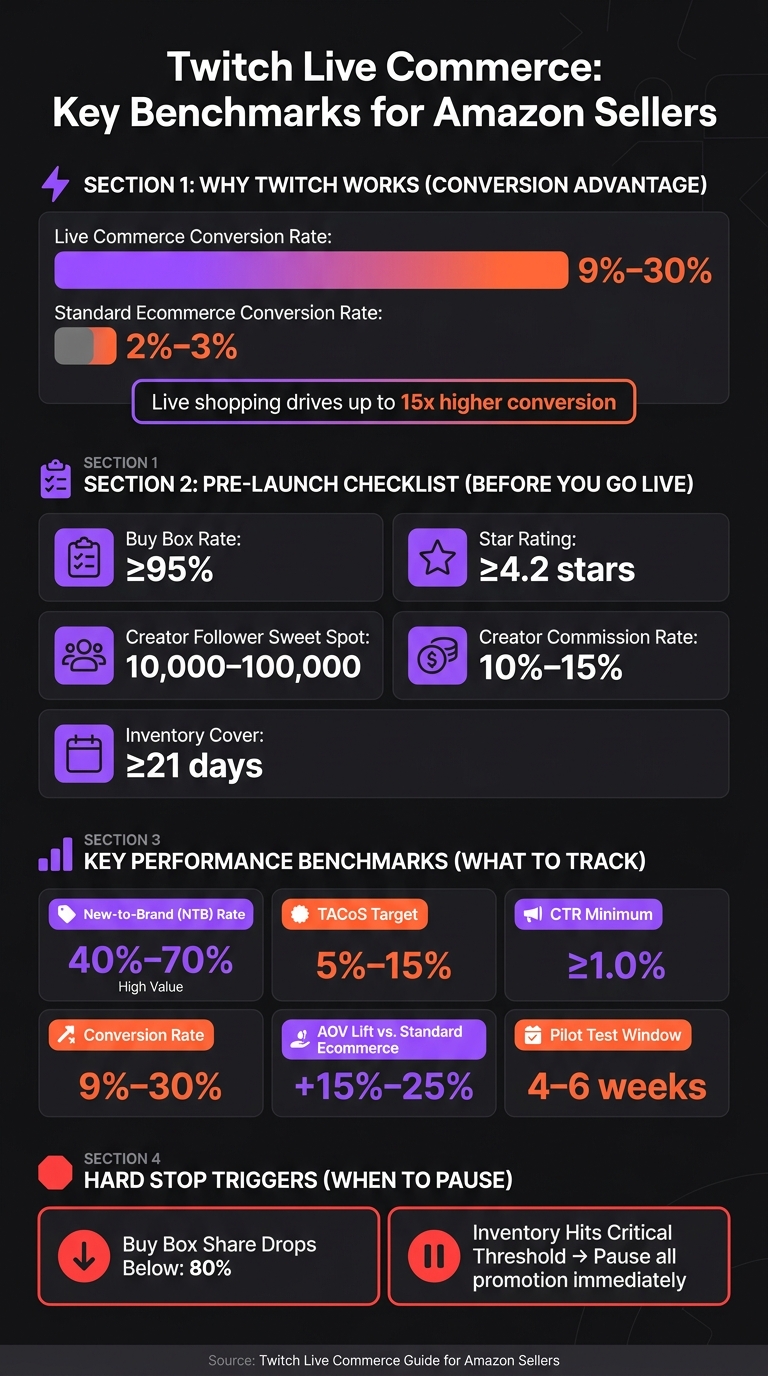
Twitch Live Commerce: Key Benchmarks for Amazon Sellers
Find and Vet Twitch Creators Who Can Drive Qualified Demand
Source creators by category, audience, and stream format
Start by matching your product to Twitch categories and stream formats where demos, live Q&A, and buying intent already make sense. The goal isn’t to force the product into a stream. It’s to find creators who can work it in naturally, without making the whole thing feel awkward or overly scripted.
Focus first on creators who already use demos and live Q&A in their streams. That matters because some products need a little showing, not just telling. You should also lean toward creators who can move viewers toward Amazon search and Brand Store traffic, not just rack up views.
Vet creators using engagement, audience quality, and brand safety
Follower count by itself doesn’t tell you much. A big number can look nice on paper, but it doesn’t mean people are paying attention. What matters more is whether the audience shows up, joins the chat, and reacts in the moment. High real-time comment rates are a strong sign that the audience is genuine and more likely to convert.
Creators with 10,000 to 100,000 followers often beat larger channels on ROI because their audiences tend to be more engaged, and partnership costs are lower. That’s a pretty common sweet spot. You should also check for odd follower growth spikes, since those can point to fake followers who won’t convert during a live event.
Brand safety deserves the same level of scrutiny. Look through past streams and pay attention to moderation quality, the tone of the audience, and any history of sponsor conflicts. A creator might have solid numbers, but if the chat feels chaotic or the sponsor history is messy, that’s trouble you don’t need. Use those signals to narrow your list to creators who are more likely to send qualified Amazon traffic.
| Vetting Criteria | What to Look For | Red Flag |
|---|---|---|
| Engagement | High real-time comment activity | Low engagement relative to follower count |
| Follower Growth | Steady, organic growth | Suspicious spikes that suggest fake followers |
| Prior live-selling experience | A track record of hosting live shopping events | No experience with live shopping or real-time selling |
| Brand Alignment | Content and values that fit your product | History of past sponsor conflicts |
| Moderation Quality | Active moderation and a positive chat environment | Unmoderated chat or a toxic audience tone |
| Stream Consistency | Regular schedules that build repeat viewership | An inconsistent schedule |
| Commission rate | 10%–15% of revenue | 25%–35% can erode margin |
Choose a collaboration model that supports commerce
Once you’ve got a shortlist, pick the format based on how much explanation the product needs. If the product is simple, a shorter mention may do the job. If it needs context, proof, or back-and-forth with viewers, go with a dedicated sponsored stream or a longer product segment.
That extra time gives the creator room to explain the product, answer live questions, and move viewers closer to action instead of just awareness.
sbb-itb-e2944f4
Twitch Is Finally Launching Live Shopping
Design Offers and Stream Plans Without Creating Margin or Stock Problems
Once you’ve picked the right creator, lock in the offer, stream format, and stock plan before you go live.
Build Twitch-friendly offers that create urgency
The offers that tend to work best in live streams are simple, time-bound, and easy to use in a few seconds. Live-only coupons, limited bundles, and creator-only discount codes usually fit that bill. Live scarcity signals, like a visible inventory countdown or an “only X left” message, add urgency in a way static product pages just can’t match.
The goal isn’t only to drive live purchases. It’s also to get more clicks to your Amazon listings and Brand Store. That’s why low-friction offers often work best. They make it easier for viewers to act fast without forcing you into heavy discounts that eat into margin.
Bundles are also worth a close look if you sell complementary SKUs. They can lift Average Order Value (AOV) without a deep price cut, and live shopping often drives a 15% to 25% increase in AOV compared with standard ecommerce channels. In a stream, a creator can frame a bundle as a natural add-on instead of a pushy upsell.
The next move is to match that offer to the stream format.
Match the stream format to the product and buying trigger
Not every product needs the same kind of stream. A higher-consideration item usually needs more time, more demo, and a live Q&A before someone is ready to click. That fit between format and buying trigger is often the difference between a stream that converts and one that just racks up views.
| Stream Format | Best Use Case | Inventory Risk |
|---|---|---|
| Product Demos | High-consideration items | Moderate |
| Q&A Sessions | Addressing purchase barriers | Low |
| Unboxings | New product launches | High |
| Tutorials | Products with a learning curve | Moderate |
| Event-Style Drops | Limited editions / flash sales | Very High |
Event-style drops make the most sense for launches or scarce inventory. Q&A sessions are especially useful when viewers have hesitations and need answers on the spot. That live back-and-forth is often what turns “maybe later” into a purchase.
Once the format is set, check stock depth and fulfillment timing.
Plan inventory and fulfillment before traffic spikes
Even a short stream can move units fast. That means stock and replenishment need to be set before launch. If inventory runs out mid-stream, you risk damage to Best Seller Rank (BSR) and possible account health problems.
Before the stream starts, confirm available units and replenishment lead time. If stock is tight, lean toward creator-only codes or bundles instead of flash deals. You can also push complementary add-ons to lift AOV and cut shipping waste.
| Offer Type | Conversion Potential | Margin Impact | Inventory Risk |
|---|---|---|---|
| Live Flash Deal | Very High | High (Deep discount) | High (Rapid depletion) |
| Bundle/Multi-pack | High | Moderate (Higher AOV) | Moderate |
| Creator-Only Code | Moderate | Moderate (Commission + Discount) | Low |
| Limited Drop | Very High | Low (Full price) | Very High |
If you’re not sure your stock can handle a spike, start with a creator-only code or a bundle instead of a flash deal. Those formats give you more control over volume and are easier to dial back if demand moves faster than inventory.
Protect Amazon Account Health and Measure What Twitch Actually Produces
Once your offer and inventory are locked in, the next job is simple: protect the listing and measure what the stream is actually doing. During a live campaign, those two things matter most. You want the traffic spike without hurting Amazon account health, and you want proof that Twitch is driving demand instead of just sending empty clicks.
Avoid Amazon policy and promotion mistakes
The biggest problems usually come from pricing conflicts, unsupported claims, and stockouts. If the stream promotes one deal but the Amazon listing shows something else, shoppers get confused fast. That hurts conversion and can create issues with your pricing rules.
Before any high-traffic stream, check two numbers first. Your Buy Box percentage should be at or above 95% and your star rating should be at or above 4.2. If you send a burst of traffic to a listing that is already losing the Buy Box to a third-party seller, you’ll lose sales and end up with more volatile BSR.
| Risk | Likely Impact | Warning Signs | Mitigation |
|---|---|---|---|
| Pricing conflict | Reduced conversion | Stream offer conflicts with Amazon pricing | Keep promotions aligned with your Amazon pricing rules |
| Unsupported claims | Listing or compliance issues | Unsupported superlatives or health claims during stream | Provide approved talking points and a restricted claims list |
| Stockout mid-stream | Lost sales and more volatile BSR | Under 21 days of cover before launch | Throttle promotions if stock is insufficient |
| Buy Box loss | Wasted traffic, lower conversion | Buy Box % below 95% | Resolve third-party seller issues before launch |
Set clear disclosure and brand safety rules for creators
Every creator should get a brief before going live. Cover paid-partnership disclosure, approved product claims, restricted language, and how to answer live questions. That sounds basic, but live content can go sideways fast if a creator improvises around claims or pricing.
Your brand team also needs a simple moderation plan. It should spell out how to handle off-topic comments, negative chatter, and surprise product questions. The goal is to keep the stream centered on the buying decision while staying compliant. Done well, these guardrails protect trust without making the stream feel stiff.
Track Amazon traffic, sales, and branded-store lift
Attribution gets messy because Twitch can influence more than one touchpoint. A viewer may watch the stream, click later, see a Sponsored Ad, and then buy after visiting your Store. That’s why Amazon Marketing Cloud matters here. Use it to connect Twitch-driven activity with Sponsored Ads and DSP touchpoints, then track the metrics that show whether the stream brought in qualified demand: average watch time, return viewer rate, conversion rate, revenue per viewer, New-to-Brand rate, TACoS, organic rank lift, and BSR stability.
For benchmarks, use NTB at 40% to 70% and TACoS at 5% to 15%. For conversion rate and average order value, compare performance against your own baseline. There isn’t one magic target that fits every brand, product, or creator. What matters is whether the stream is moving the numbers that tie back to sales.
| Metric | Target Benchmark | What It Tells You |
|---|---|---|
| Average Watch Time | Trend up | Depth of audience engagement |
| Return Viewer Rate | Trend up | Whether the audience is building a habit with the brand |
| CTR | ≥1.0% | Whether the creator’s pitch is driving action |
| Conversion Rate | 9%–30% | Stream effectiveness and real-time trust |
| Average Order Value (AOV) | vs. baseline | Whether bundles or upsells are landing |
| Revenue Per Viewer | vs. baseline | Total revenue efficiency per viewer |
| New-to-Brand (NTB) Rate | 40%–70% | Incremental customer acquisition |
| Organic Rank Lift | Trend upward post-stream | Secondary impact on Amazon visibility |
| BSR Stability | Stable or improving | Whether traffic is helping or hurting retail performance |
| TACoS | 5%–15% | Total business health including organic lift |
One hard stop matters here: pause promotion if Buy Box share drops below 80% or inventory hits a critical threshold. If those two signals flash red, more traffic won’t help. It’ll just send shoppers into a weak retail setup and muddy your read on performance.
Build a Repeatable Twitch Commerce Workflow
Once you can measure Twitch’s impact, the next step is turning it into a workflow your team can run again and again. When the process is written down, one good result stops being a one-off and starts becoming a repeatable channel. That helps cut execution mistakes, protect your Amazon account health, and gives everyone a clear path to follow instead of rebuilding the plan every time.
Use a pre-stream, live, and post-stream checklist
Run every stream with the same basic structure so prep, live execution, and follow-up stay steady.
Before the stream, confirm roles, timing, offer codes, and who owns moderation. Set commission at 10% to 15%.
During the stream, watch inventory and answer purchase-blocking questions in real time. If viewers are stuck on sizing, setup, or how to use the product, handle it right away. Small delays can cost sales fast when the stream is live.
After the stream, review what drove clicks, conversions, and repeat viewers. Look at revenue per viewer, watch time, and return viewers. Use a 4–6 week pilot window before scaling a creator, product, or time slot. Capture email and SMS signups during the event.
Turn early tests into a channel playbook
After two or three streams, patterns usually start to show up fast. You can see which creator drove the highest conversion rate, which offer structure, like a bundle, limited-time discount, or live-only exclusive, led to the best average order value, and which day and time slot brought back the most return viewers. Write those answers down and standardize what worked.
A simple playbook should include:
- Vetted creators
- Commission rates of 10% to 15%
- A steady stream schedule
- Approved offer templates
- A reporting cadence with clear ROI thresholds
It also helps to assign ownership for each phase so no part of the process depends on one person trying to remember everything.
Give one owner responsibility for PPC, listings, inventory, and account health so each stream follows the same operating rhythm.
FAQs
Which products work best on Twitch?
Products tend to do best on Twitch when they look good on a live stream, feel fun to watch, and already sell well on Amazon. That mix matters because interest from a Twitch audience can turn into actual conversions, not just views.
Put your focus on hero SKUs with clear before-and-after results or standout features you can show in real time. If a product has an obvious visual payoff, it’s much easier to make it click live. At the same time, make sure your inventory and listings match what viewers will see during the event, so you don’t run into stock issues or product-page confusion right when attention is highest.
How much inventory should I have before a stream?
Make sure you have enough inventory to cover expected demand before a live stream. Running out of stock during a high-traffic event can throw off sales data and leave money on the table.
It also helps to check that your product tags link to active, in-stock listings. Steady stock levels help keep things running smoothly and can help protect account health and performance metrics.
How do I measure Twitch sales impact on Amazon?
Use Amazon Attribution to track clicks from your Twitch streams to purchases on Amazon. It shows conversions, units sold, and return on ad spend.
Attribution can get messy fast. A click from Twitch doesn’t always tell the whole story, especially when someone watches your stream, leaves, and buys later. That’s why it helps to also watch shifts in branded search volume on Amazon and Best Seller Rank during and after live events.
When you review those trends in Amazon Brand Analytics, you can get a clearer read on Twitch’s halo effect. In plain English: your stream may push sales even when the path to purchase isn’t perfectly visible in attribution data.