

Amazon’s policies are strict, and violations can lead to serious consequences for sellers, including deactivated accounts, removed listings, and withheld funds. To maintain your account’s health and avoid penalties, you need to:
- Keep your Account Health Rating (AHR) above 200 to stay out of the "At Risk" category.
- Meet key performance metrics: Order Defect Rate below 1%, Late Shipment Rate under 4%, and Cancellation Rate below 2.5%.
- Respond quickly (often within 12–24 hours) to severe violations like counterfeit claims or safety hazards.
Common violations include errors in product listings, intellectual property issues, pricing manipulation, prohibited selling practices, and operating multiple accounts without approval. Each violation can harm your AHR and stay visible on your Account Health Dashboard for 180 days.
To resolve issues, sellers must act fast:
- Identify the root cause of the violation.
- Take corrective action (e.g., update listings, provide supplier invoices).
- Submit a detailed Plan of Action (POA) outlining the problem, fixes, and preventive measures.
Daily monitoring of your Account Health Dashboard and maintaining proper documentation can help you stay compliant. Professional account management services may also assist in reducing risks and managing violations effectively.
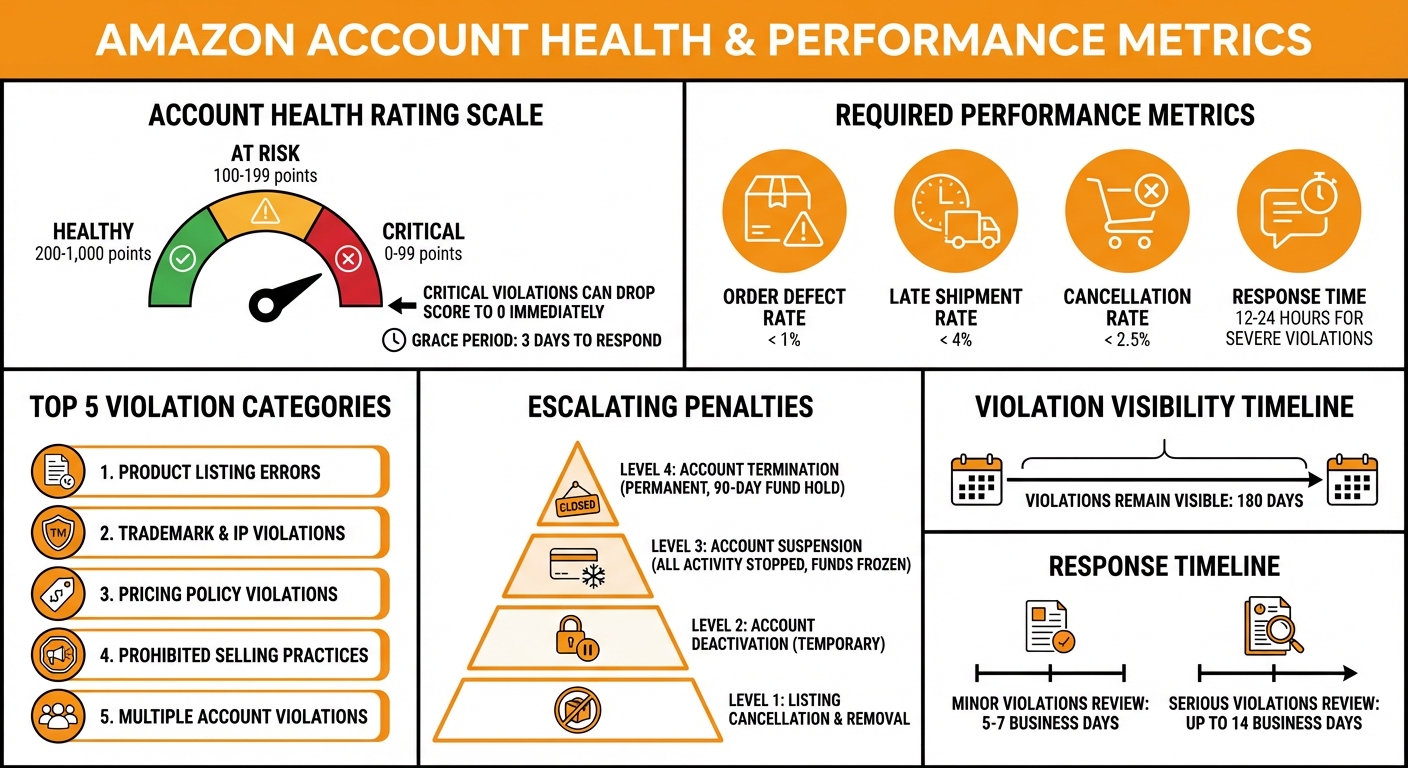
Amazon Seller Account Health Metrics and Performance Standards
Amazon Rules Every Seller Should Know (Avoid Suspensions!)
sbb-itb-e2944f4
Common Amazon Policy Violations
Understanding common policy violations is key to keeping your Account Health Rating in good standing. Amazon sellers often face violations due to specific actions, each with its own consequences. To help sellers, the Account Health Dashboard in Seller Central organizes these violations, making it easier to pinpoint and resolve issues.
As Amazon Community Manager Manny_Amazon explains:
"When you see a policy violation in your Account Health Dashboard, it’s not just a warning – it’s a specific signal about what needs to change".
Here’s a closer look at the five most frequent violation categories and their impact on your account.
Product Listing Errors
Violations in this category occur when product detail pages include incorrect information, unauthorized claims, or formatting mistakes. These issues appear in the Account Health Dashboard as "Listing Policy Violations" or "Product Detail Page Rules Violations".
Examples include making unapproved claims like "Instant Pain Relief", creating duplicate listings for the same product, or incorrectly grouping unrelated items – such as listing different phone models as variations of a single product. Even small formatting errors can lead to ASIN removal. In severe cases, a single mistake can result in losing approval to sell in entire categories like Grocery or Alcohol.
Trademark and Intellectual Property Violations
Intellectual property issues fall into two main types: Suspected IP Violations and Received IP Complaints.
- Suspected IP Violations: These are automated alerts triggered when a seller uses a brand name without proper authorization. Resolving these typically involves correcting the brand name or providing a Letter of Authorization from the rights holder.
- Received IP Complaints: These are formal complaints filed by trademark, copyright, or patent owners. Sellers must provide documentation such as supplier invoices, purchase orders, and authorization letters to prove they are authorized to sell the product.
Pricing Policy Violations
Pricing violations happen when sellers manipulate prices or fail to honor confirmed pricing. One common issue is "price gouging", where sellers dramatically raise prices on high-demand items, particularly during emergencies or shortages. Another violation occurs when sellers increase prices after an order is confirmed but before it ships. Both actions breach Amazon’s Fair Pricing Policy and can result in immediate removal of listings.
Prohibited Selling Practices
This category includes activities that harm buyer trust. Review manipulation is a major focus, with Amazon closely monitoring practices like creating fake orders to boost reviews, offering discounts over 50% in exchange for reviews, or contacting buyers outside the platform to request feedback. Amazon’s AI systems are highly effective at detecting these patterns, so sellers should stick to the official "Request a Review" button in Seller Central.
Other prohibited actions include selling restricted products without proper approval (e.g., supplements or hazardous materials) and misrepresenting product conditions, such as listing used items as "New." Amazon has a strict stance on these violations:
"If you supply a product in violation of the law or any of Amazon’s policies… we will take appropriate corrective actions… including but not limited to immediately suspending or terminating selling privileges, destroying inventory in our fulfillment centers without reimbursement, returning inventory, terminating the business relationship, and permanent withholding of payments".
Multiple Account Violations
Running more than one seller account without Amazon’s explicit approval is a serious breach. Sellers must have a legitimate business reason and formal permission to operate additional accounts. Common triggers for violations include using the same bank account, tax ID, or IP address across multiple accounts. To manage multiple brands properly, sellers need to request approval through Seller Central before creating a second account. Failing to do so can lead to the suspension of all linked accounts and permanent withholding of funds.
Penalties for Policy Violations
Amazon has a structured penalty system for policy violations, with consequences escalating based on the severity and frequency of the infractions. Knowing these penalties is essential to keeping your account in good standing. Here’s a breakdown of what sellers might face:
The first level involves listing cancellation and removal. When this happens, Amazon takes down specific product listings, making them invisible to customers and halting sales. This often occurs due to violations like intellectual property complaints or issues with restricted products.
Next up is account deactivation, which temporarily suspends selling privileges. This is typically for minor infractions and can be resolved by submitting an appeal.
For more serious violations, Amazon imposes account suspension. In this case, all selling activity stops until you provide a successful Plan of Action. During suspension, your listings are taken offline, funds are frozen, and cash flow is disrupted. You may also lose Fulfillment by Amazon (FBA) privileges, preventing you from sending in new inventory while your account is under review. As Emet, an Amazon Forum Representative, explains:
"These notices advise on being under review and that you would be deactivated on 8/30/2023 in accordance with section 3".
The most severe consequence is account termination, which permanently removes you from the platform with no chance of reinstatement. In such cases, Amazon holds your funds for 90 days to cover any remaining claims or refunds. Avenue7Media emphasizes:
"Amazon does not reinstate accounts based on promises; they reinstate based on completed actions".
After facing these penalties, Amazon often conducts a thorough audit of your business practices. This audit may require documents like government-issued IDs, recent bank or credit card statements, supplier invoices, proof of delivery, and Letters of Authorization. If the violation involves more than just procedural errors, Amazon might reject your Plan of Action and demand physical verification of these documents to resolve the issue effectively.
How to Identify and Fix Policy Violations
After getting familiar with Amazon’s policies and the most common violations, the next step is acting quickly to spot and resolve issues. This is crucial for keeping your account in good standing.
Understanding Amazon’s Violation Notices
Amazon’s violation notices are more than just warnings – they’re specific alerts that highlight what needs attention. Each notice provides details about the issue, whether it’s a listing error, an intellectual property (IP) concern, or a safety-related problem.
These notices include a violation category and recommended steps for resolution. To access this information, log in to the Account Health Dashboard (AHD) under the ‘Performance’ tab in Seller Central. Here, you’ll find your Policy Compliance Score, along with active violations and a "Next Steps" column that outlines what actions you need to take. For serious violations, Amazon often requires a response within 12 to 24 hours to avoid account deactivation.
Once you’ve reviewed the notice, the next move is figuring out what caused the violation.
Finding the Root Cause
To address a violation effectively, you need to uncover its root cause. This means determining whether the issue comes from seller-created data (information you uploaded) or catalog-inherited data (errors already present in Amazon’s system for pre-existing ASINs).
Amazon’s automated systems often flag listings due to sudden spikes in sales, specific keywords, or updates to compliance policies. For IP violations, the problem is often an incorrect brand name in the title or brand field – like listing "iPhone accessories" when you’re not Apple. For authenticity complaints, check customer feedback and return reasons, as these issues often stem from packaging inconsistencies or shipping damage. Listing policy violations are frequently tied to "trigger words" in product descriptions or variations that don’t comply with Amazon’s guidelines.
Here’s an example: In early 2024, a Brand Registry owner lost category approval due to an automated IP violation on ASIN B0FMCFWQQV. The issue was traced back to a catalog-level error where Amazon’s system attributed the wrong brand name ("yum****") to the product. Although the seller didn’t create this data, the system flagged it as a violation. Resolving the issue required multiple escalations through Case IDs 19724724531 and 19759382891, as well as involvement from Executive Brand Relations.
Once you’ve pinpointed the cause, it’s time to take corrective action.
Taking Corrective Action
After identifying the root cause, take targeted steps to fix the issue based on the violation type. For IP-related problems, correcting the brand name in your title or brand field often leads to automatic reactivation. For authenticity complaints, gather supplier invoices and purchase records, as Amazon now prioritizes documentation over manual FBA bin checks.
Safety violations require compliance documents, such as lab test reports from certified agencies or regulatory certificates (e.g., UL, CE, FDA). For listing policy violations, remove any "trigger words" causing the flag and correct prohibited variations. If the issue involves product condition, assign unique SKUs for different conditions (e.g., New vs. Used) and inspect inventory thoroughly before shipping.
Amazon typically requires evidence to resolve violations. This can include supplier invoices, Letters of Authorization (LOA), brand licensing documents, or lab test reports. Submit these materials directly through the Account Health Dashboard to ensure they’re linked to the correct case. If your initial appeal is denied, escalate the issue to Seller Performance or the Account Health Support team. While minor violations are usually reviewed within 5 to 7 business days, more serious issues like counterfeits or safety concerns can take up to 14 business days.
Writing a Plan of Action (POA)
When Amazon suspends your account or deactivates a listing, a Plan of Action (POA) is your formal response to show you’ve resolved the issue and put safeguards in place. Essentially, it’s a compliance report that outlines what went wrong, how you fixed it, and how you’ll prevent it from happening again. Enrico Schaefer, Founding Partner at Traverse Legal, puts it simply:
"Amazon reinstates sellers who identify the cause, fix the cause, and then prove the fix will hold."
A strong POA includes three key parts: the root cause of the problem, immediate corrective actions you’ve already taken, and long-term preventive measures to ensure it doesn’t happen again. Use past tense to describe your fixes. For instance, instead of saying, "we will update our supplier verification process", write, "we implemented a three-step supplier verification process on 04/10/2026."
To meet Amazon’s expectations, organize your response into clear sections.
Identifying the Root Cause
Pinpointing the exact cause of the violation is the first step. Start by reviewing the Performance Notifications section in your Seller Central account to understand which policy Amazon flagged. Then, conduct an internal review to identify where your process failed.
Be specific about the breakdown and take full responsibility without shifting blame. For example:
- If the issue involves an inauthentic complaint, you might state: "Our supplier verification process did not require itemized invoices showing the manufacturer’s name for each ASIN."
- For late shipment violations: "Our handling time settings were set to 2 days, but our warehouse capacity only supported 4-day processing during peak periods."
- For intellectual property violations: "We listed products using the brand name ‘Apple’ in the title field without authorization from the trademark holder."
As Schaefer advises:
"A POA fails when it reads like a legal defense. A POA also fails when it reads like a customer complaint."
Outlining Corrective and Preventive Measures
This section should make it clear that you’ve addressed the issue and taken steps to prevent a repeat. Highlight actions you’ve already completed, such as:
- Removing flagged ASINs from inventory
- Issuing refunds to affected customers
- Updating product descriptions to remove prohibited claims
For preventive measures, explain the systemic changes you’ve made. Examples include:
- Conducting weekly audits of active listings with Amazon’s monitoring tools
- Launching a training program for your team on Amazon’s intellectual property policies, with documented completion logs
- Requiring three verification documents from suppliers before adding new inventory
Support your claims with evidence like supplier invoices, screenshots of updated listings, training logs, or customer communications.
POA Submission Tips
Once your POA is ready, follow these tips to improve your chances of approval:
- Use bullet points and clear headers (e.g., Root Cause, Corrective Actions, Preventive Measures) to make your plan easy for Amazon’s reviewers to follow.
- Avoid generic templates; your response must be tailored to your specific situation.
- Submit your POA through the Performance Notifications section in Seller Central using the link provided in your suspension notice.
Amazon typically responds within 48 hours, though it can take longer during busy times. If your POA is denied, carefully review Amazon’s feedback, make necessary adjustments, and resubmit with additional documentation or clarification. Avoid emotional appeals or legal threats, as these can harm your credibility.
Preventing Future Policy Violations
Once you’ve addressed violations through your Plan of Action (POA), the next step is focusing on prevention. Maintaining a healthy account on Amazon means staying vigilant and keeping up with policy updates. For many sellers, this also involves seeking professional guidance to navigate Amazon’s ever-changing rules.
Monitoring Account Health
Your Account Health Rating (AHR) is a crucial indicator of compliance. This score is color-coded to reflect your account’s status:
- 200–1,000: Healthy
- 100–199: At Risk
- 0–99: Critical
Consistent performance helps your AHR grow over time, but critical violations can drop your score to 0, leading to rapid account deactivation. In such cases, Amazon typically provides a 3-day grace period to respond. Repeat violations can result in harsher penalties, such as doubled point deductions. For instance, accruing five infringement violations or two restricted product violations within a 180-day period puts you at immediate risk of deactivation.
To avoid these pitfalls, check your Account Health Dashboard daily. Pay close attention to three main performance areas:
- Customer Service Performance: Monitor your Order Defect Rate to ensure excellent service.
- Policy Compliance: Stay on top of intellectual property, authenticity, and other policy requirements.
- Delivery Performance: Keep late dispatches and tracking issues to a minimum.
To remain compliant, address violations quickly, remove out-of-stock items, respond to customer inquiries within 24 hours, and ensure your product listings are accurate. Additionally, update your emergency contact information under "Notification Preferences" to receive timely alerts. Professional sellers can also use the "Contact us" or "Call me now" options on the Account Health page for direct assistance when needed.
Using Professional Account Management Services
Amazon holds sellers accountable for all actions on their accounts, even errors caused by third-party partners. This is why many sellers turn to professional account management services to help reduce the risk of violations and maintain compliance.
For example, companies like Emplicit specialize in identifying potential operational issues before they escalate. Instead of treating late shipments as isolated incidents, they look for root causes like poor inventory management or unrealistic handling times. They also help sellers vet suppliers to ensure they’re not sourcing from liquidators or closeout vendors that fail Amazon’s invoice verification standards.
These services also assist with managing documentation, including supplier invoices, letters of authorization, and certificates of authenticity, ensuring they meet Amazon’s requirements. Professionals can perform proactive listing reviews to identify and remove items that might have become non-compliant due to regulatory changes. For sellers in highly regulated categories, they can facilitate consultations with legal experts to ensure compliance.
Another benefit of professional services is their ability to stay updated on Amazon’s constantly evolving policies. They can train your team on restricted product guidelines and compliance processes, integrating these practices into a long-term strategy for maintaining account stability and compliance.
Conclusion
Staying compliant with Amazon’s policies isn’t just a recommendation – it’s a necessity for keeping your business running smoothly. As Mickey Toogood, Sr. Content Marketing Manager at Amazon, warns:
"Ignoring or breaking these rules may result in account deactivation, loss of Featured Offer eligibility, withholding of funds, negative reviews from customers, or other actions".
The message is clear: meeting Amazon’s performance standards is non-negotiable for avoiding penalties.
One of the most effective ways to safeguard your account is through daily monitoring of your Account Health Dashboard. Amazon’s automated systems can flag potential violations, sometimes triggered by certain keywords or unexpected sales patterns, even if you’ve never had issues before. If a serious violation occurs, you’ll need to act fast – responses are typically required within 12 to 24 hours. Violations also stay visible on your dashboard for up to 180 days, so keeping your records well-organized is a must.
For added protection, many sellers turn to professional account management services. Companies like Emplicit specialize in identifying and resolving compliance risks before they escalate. These services can help with tasks like supplier vetting, maintaining proper documentation, and staying up to date with changing regulations.
FAQs
How do I know if a violation is catalog vs. my listing?
Catalog violations impact the accuracy of product details shared across multiple listings. These might include incorrect information or content that isn’t allowed. You’ll often find these flagged in the Account Health Dashboard or through alerts like "suspected intellectual property violations."
On the other hand, listing-specific violations are tied to individual product listings. These issues could involve things like misleading descriptions or errors in the stated condition of the product. Such violations are typically flagged directly on the listing page or during the creation process.
What documents does Amazon usually require to clear a violation?
Amazon sometimes asks sellers to provide certain documents to address policy violations. These typically include supplier invoices, certificates of authenticity, and compliance reports to confirm the legitimacy of products. Depending on the situation, Amazon might also request additional paperwork like business licenses, proof of address, or tax records. It’s crucial to submit genuine, unmodified documents – submitting anything falsified can lead to more serious account health problems.
When should I escalate a denied appeal to Account Health Support?
If your appeal has been denied and the issue involves serious concerns like account suspension, unresolved policy violations, or unhelpful responses from support, it’s time to escalate the matter to Account Health Support. Escalating is especially necessary when multiple appeals, even with thorough supporting documents, are dismissed quickly or if the process feels flawed.
Reach out to the account health team directly if these unresolved issues are putting your business at risk or if detailed Plans of Action have failed to resolve the situation.