

With over 9 million sellers on Amazon and 2,000 new ones joining daily, standing out requires more than guesswork. Competitor analysis gives you the data to understand what works – helping you refine your keywords, pricing, and listings to outperform others. It’s not about copying; it’s about identifying gaps in their strategy, like poor images or weak keywords, and using those to improve your approach.
Key Takeaways:
- Identify competitors: Focus on those targeting your audience, price range, and keywords.
- Track metrics: Monitor Best Sellers Rank (BSR), reviews, pricing trends, and advertising presence.
- Use tools: Platforms like Helium 10, Jungle Scout, and AMZScout simplify keyword research and performance tracking.
- Leverage insights: Optimize your listings, set competitive prices, and improve your ads based on competitor data.
Competitor analysis is your roadmap to boosting visibility, conversions, and sales on Amazon. The brands that consistently monitor and act on this data are the ones that thrive.
Competitor Analysis on Amazon For An Extra 300+ Sales / Month – Research & Analyse Competitors
sbb-itb-e2944f4
How to Identify Your Competitors on Amazon
Identifying the right competitors on Amazon is crucial. You need to focus on those targeting your keywords, audience, and price range. This step lays the groundwork for deeper analysis and fine-tuning your SEO strategy.
Finding Relevant Competitors
Start by searching with a broad keyword like "yoga mat" and then refine it to something more specific, such as "extra thick yoga mat for beginners." Pay attention to the top 10–20 products on the first page – these are likely your main competitors.
Next, dive into Amazon’s category lists. Check out sections like "Best Sellers", "Movers & Shakers", and niche subcategories. The "Movers & Shakers" section is particularly handy for spotting up-and-coming competitors. You can also explore the "Customers Who Bought This Also Bought" and "Sponsored Products Related to This Item" sections on competitor listings. These areas often reveal rivals who might not show up in keyword searches.
For even deeper insights, use tools like Helium 10 or Jungle Scout to perform a reverse ASIN lookup. This can uncover hidden keywords and competitors. Visiting a competitor’s Amazon Storefront is another smart move. It lets you see their full product lineup and identify potential gaps in your own offerings.
Once you’ve gathered a list of competitors, organize them into three categories:
- Primary competitors: Sell the same products to the same audience.
- Secondary competitors: Offer similar products but target a different audience (e.g., luxury vs. budget shoppers).
- Tertiary competitors: Sell different products but compete for the same customer spending.
This categorization helps you decide where to focus your efforts. After identifying competitors, the next step is to measure their performance.
Metrics for Evaluating Competitors
To evaluate competitors effectively, focus on key metrics. Start with the Best Sellers Rank (BSR), which indicates sales velocity – a lower BSR means higher sales within a category. Also, check the Listing Quality Score (LQS), typically rated from 1 to 10, to see how well a competitor’s title, images, bullet points, and description align with Amazon’s best practices.
Review metrics are equally important. Look at the number of reviews, average rating, and review velocity (how quickly they’re gaining new reviews). The Q&A section on competitor listings can also be revealing. If customers repeatedly ask about a feature that isn’t addressed, consider emphasizing that feature in your own product listing.
Other metrics to track include:
- Share of shelf: How often a competitor appears on the first page of search results.
- Share of voice: Their presence in paid advertising.
Keep an eye on pricing trends with tools like Keepa and monitor inventory levels. If a top competitor runs out of stock, it’s a golden opportunity to capture market share.
Lastly, dive into competitor reviews. One-star reviews highlight deal-breakers, while three-star reviews point to areas for improvement. Use this feedback to improve your product and refine your messaging, ensuring your listing addresses customer concerns while standing out from the competition.
Best Tools for Amazon Competitor Analysis
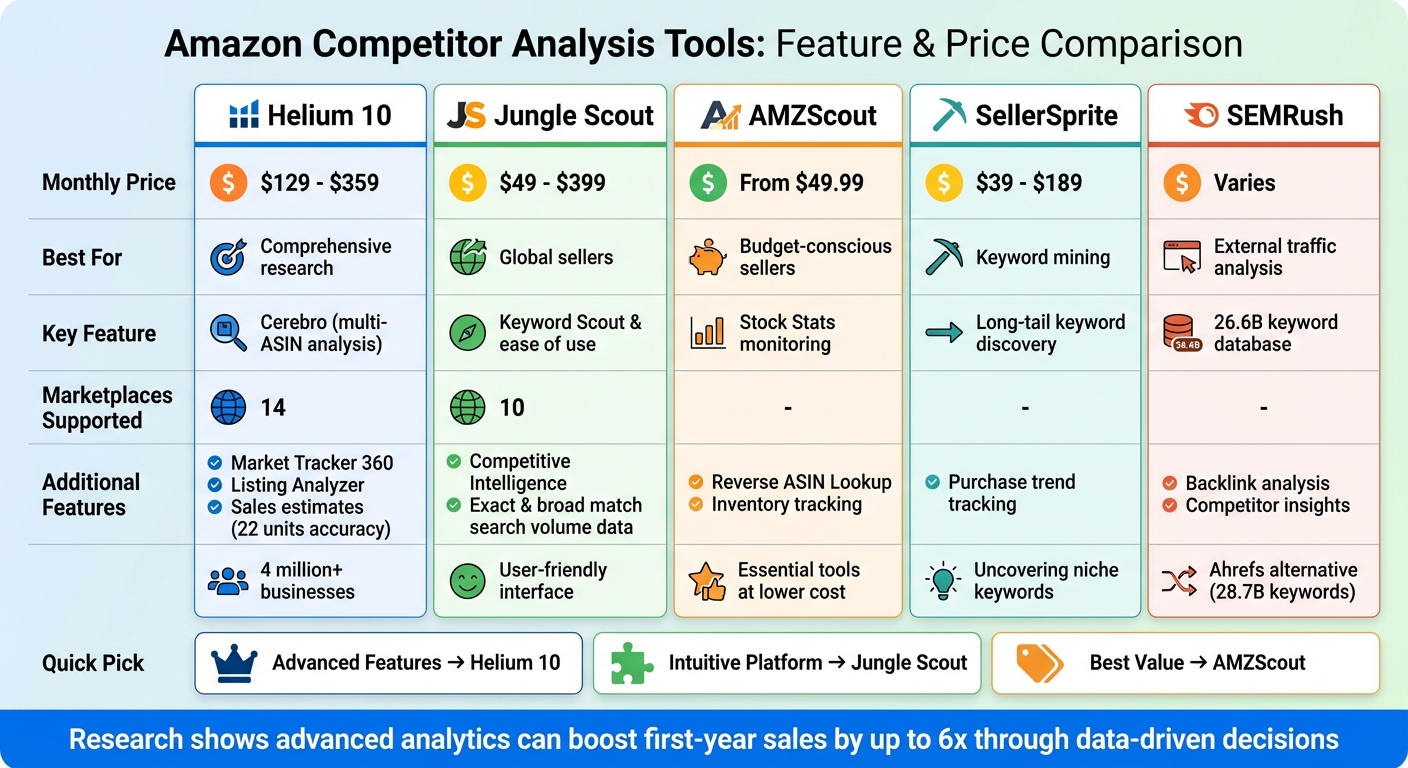
Amazon Competitor Analysis Tools Comparison: Features and Pricing
If you’re looking to gain an edge in the Amazon marketplace, specialized tools can make competitor analysis faster and more effective. These tools simplify the process, offering insights that help sellers refine strategies and stay ahead.
Helium 10 stands out as a robust all-in-one solution, trusted by over 4 million businesses. Its Cerebro tool allows sellers to analyze up to 10 competitor ASINs at once, uncovering shared keywords and market opportunities. The Market Tracker 360 keeps tabs on market share shifts, while its sales estimates are impressively accurate – within 22 units. With pricing between $129 and $359 per month, Helium 10 supports 14 marketplaces and includes a Listing Analyzer to evaluate product listings against Amazon’s best practices. As the Helium 10 Team emphasizes:
"Without effective SEO, your product will likely lack the visibility it needs to rank above the competition and capitalize on the sales that come with it".
Jungle Scout is another popular option, offering a user-friendly interface with pricing from $49 to $399 per month. Its Keyword Scout delivers both exact and broad match search volume data, while the Competitive Intelligence feature tracks competitor sales trends and market share. Covering 10 marketplaces, Jungle Scout is particularly appealing to sellers operating on a global scale.
AMZScout appeals to budget-conscious sellers, starting at $49.99 per month. Tools like Reverse ASIN Lookup and Stock Stats help identify when competitors are running low on inventory – an ideal time to adjust advertising strategies and capture new customers.
For external traffic analysis, SEMRush and Ahrefs are excellent choices. SEMRush boasts a database of 26.6 billion Google keywords, while Ahrefs tracks 28.7 billion keywords for backlink and competitor insights. Meanwhile, SellerSprite, priced from $39 to $189 monthly, specializes in uncovering long-tail keywords and tracking purchase trends. Research shows that using advanced analytics can boost first-year sales by up to six times through smarter, data-driven decisions.
| Tool | Monthly Price | Best For | Key Feature |
|---|---|---|---|
| Helium 10 | $129 – $359 | Comprehensive research | Cerebro (multi-ASIN analysis) |
| Jungle Scout | $49 – $399 | Global sellers | Keyword Scout & ease of use |
| AMZScout | From $49.99 | Budget-conscious sellers | Stock Stats monitoring |
| SellerSprite | $39 – $189 | Keyword mining | Long-tail keyword discovery |
| SEMRush | Varies | External traffic analysis | 26.6B keyword database |
The right tool depends on your specific needs and budget. For advanced features and in-depth analysis, Helium 10 is a top choice. Jungle Scout is ideal for those seeking a more intuitive platform, while AMZScout offers essential tools at a lower cost. By selecting the right tool, you can fine-tune your SEO efforts and gain a competitive edge in the marketplace.
Step-by-Step Competitor Analysis Process
Analyzing Competitor Keywords
Start by identifying your top 10 competitors. You can do this by searching for your primary keywords and checking both organic results and sponsored listings. Stick to the main competitors without overcomplicating the categorization process.
To dig deeper, use a reverse ASIN lookup. This tool lists all the keywords a competitor ranks for, including those visible in their titles, bullet points, and even backend search terms – keywords that are hidden but still used for indexing.
Key metrics to evaluate include:
- Relative Rank: Your position compared to competitors.
- Competitor Rank Average: Where your competitors rank as a group.
- Keyword Competition: Focus on keyword gaps, which are high-volume terms your competitors rank for but you don’t.
Pay attention to keywords competitors bid on in sponsored ads, as these often indicate terms that drive conversions.
For quick insights, try Amazon AutoSuggest. Just type your primary keywords into the search bar to see what shoppers are actively searching for. Another useful trick is to read through competitor Q&A sections to see how customers describe their needs and concerns in their own words. Prioritize long-tail keywords – phrases with three or more words – to target specific audiences while avoiding heavy competition.
Once you’ve nailed down keywords, the next step is to keep an eye on pricing trends.
Tracking Competitor Pricing and Trends
Amazon’s pricing landscape is incredibly dynamic, with prices changing as frequently as every 10 minutes. This makes daily or even real-time tracking a must. Price plays a massive role in winning the Buy Box, which accounts for 80% of all Amazon sales.
Focus on tracking metrics like:
- Monthly Units Sold: Helps estimate demand.
- Revenue Estimates: Gives a snapshot of financial performance.
- Best Seller Rank (BSR): A lower BSR indicates higher sales volume.
"Amazon rewards brands that understand the marketplace as a dynamic auction, not a static channel".
Pay attention to stockouts, sudden price jumps, or shifts from FBA (Fulfilled by Amazon) to FBM (Fulfilled by Merchant). These can signal opportunities to capture market share. Use repricing tools with profit floors to avoid cutting into your margins during price wars. And when competitors run out of stock, consider raising your prices to capitalize on the increased demand.
Once you have pricing and keyword insights, it’s time to refine your product by analyzing reviews.
Using Review Analysis for Product Improvement
Customer reviews are a goldmine for understanding what your competitors are doing well – and where they’re falling short. Focus on 1-star and 2-star reviews to uncover consistent issues like poor material quality, difficult assembly, or missing features. Look for patterns in complaints across multiple competitor listings to identify unmet needs that you can address in your own products.
AI tools can help by automating sentiment analysis and categorizing common themes. Don’t overlook the Questions & Answers section – it’s a great place to find points of confusion or gaps in competitor product descriptions. Another key metric is review velocity, which shows how quickly competitors are gaining new reviews. This can give you a sense of their current market momentum and the impact of any recent updates.
"If you are not doing Amazon competitor research, you are leaving money on the table. Your competitors are already analyzing your listings, so why aren’t you doing the same?" – Francisco Valadez, VP of Brand Operations, My Amazon Guy
Use these insights to improve your own listings. Incorporate the exact language and keywords customers use in their reviews. With about 80% of Amazon purchases coming from the top 10 search results and customer reviews playing a major role in the A10 algorithm, this step has a direct impact on your search rankings.
Applying Competitor Insights to Your Amazon SEO Strategy
Optimizing Listings with Competitor Data
To refine your Amazon listings, start by running a reverse ASIN lookup on competitors. This tool uncovers both the visible keywords and the backend search terms that competitors use for indexing their products.
Once you’ve gathered this data, prioritize it strategically:
- Primary keywords: Place high-intent keywords within the first 80 characters of your product title to ensure better visibility on mobile.
- Secondary keywords: Use these in bullet points to emphasize features like material, size, or unique benefits.
- Long-tail terms and synonyms: Save these for your product description and backend search terms (up to 500 bytes).
Another key step is identifying keyword gaps. Look for high-traffic terms that competitors rank for but are missing from your listing.
"Your best keywords are the ones that strong competitors already rank for and that shoppers actually search for with purchase intent." – SellerSprite Team
Dive into competitor reviews and Q&A sections to extract exact customer language. If buyers frequently mention phrases like "easy to clean" or "fits perfectly in small spaces", weave these directly into your bullet points. And don’t forget to revisit your keyword list every 2 to 4 weeks to stay updated on seasonal trends and emerging competitors.
Once your listings are optimized, you can channel these insights into your advertising strategy for even better results.
Using PPC Campaigns to Outperform Competitors
Take those high-performing competitor keywords and integrate them into Sponsored Products campaigns. This allows you to attract traffic that might otherwise go to more established brands. At the same time, use negative keywords to cut out terms that drain your budget without delivering conversions.
"Amazon’s goal is to make money, and it promotes the products that are proven to convert clicks into purchases." – Ryan Cooper, Panda Boom
Stay alert for opportunities to adjust your PPC strategy. For example, if a competitor faces supply chain issues, you can ramp up your campaigns to capture their lost traffic. Combining PPC efforts with competitive pricing can boost your sales velocity, which, in turn, improves your organic ranking. This aligns with Amazon’s A10 algorithm, which prioritizes products that consistently turn clicks into purchases.
How Emplicit Supports Competitor-Driven Growth

Emplicit takes competitor insights and turns them into strategies that drive growth on Amazon.
Listing Optimization and PPC Management with Emplicit
Emplicit uses competitor data to sharpen your Amazon listings. With its proprietary Amazon analysis framework, the team conducts detailed audits of competitor listings, analyzing key elements to identify areas where your listings can improve. Through reverse ASIN lookups, they reveal the keywords your competitors rank for in the top 10 organic positions, offering a clear path for keyword integration.
But it doesn’t stop at keywords. Emplicit also uses SWOT analyses to compare your brand against competitors, uncovering new ways to position your products. They even dig into competitor Q&A sections and customer reviews to spot product weaknesses or unmet market needs that your brand can address. This blend of data and strategy strengthens your Amazon SEO efforts, turning insights into actionable results.
"At Emplicit we use our team of subject matter experts to conduct high-quality competitor analysis and generate actionable insights. We can then help develop and implement strategies to maximize your Amazon sales and protect your brand."
– Emplicit
For PPC campaigns, Emplicit identifies the keywords driving competitor traffic and conversions, adjusting bids to capture that audience. If a competitor runs out of stock, their system triggers aggressive bidding to attract those displaced customers. This approach aligns with Amazon’s A10 algorithm, which prioritizes sales velocity and conversion rates.
Inventory and Account Management Tools from Emplicit
Emplicit doesn’t just focus on optimization – it ensures your operations run smoothly too. By tracking competitor stock levels in real time, they help you stay ready to meet demand when competitors face stock shortages. This proactive approach ensures your products remain available in a marketplace that adds around 300,000 new sellers every year.
Their account health management services keep an eye on metrics like Buy Box percentage and A10 signals, ensuring long-term visibility. By analyzing competitor usage of Sponsored Ads, A+ content, and Amazon badges, Emplicit helps your brand stay competitive. With these advanced tools, sellers can achieve up to six times more sales in their first year by making informed, data-driven decisions.
Conclusion
Competitor analysis is the backbone of making informed decisions on Amazon. It replaces guesswork with a strategy rooted in data. In a marketplace crowded with millions of sellers, the brands that consistently monitor competitors on a weekly basis are the ones that gain market share and stay ahead.
Amazon’s A10 algorithm rewards sellers who treat the platform like a dynamic auction. Those who drive genuine off-site traffic, maintain strong conversion rates, and adapt swiftly to market changes see better results. By leveraging tools like Helium 10 and Jungle Scout, you can uncover the keywords fueling competitor rankings and identify the creative elements that resonate with customers. High-quality images, smart pricing strategies, and detailed review analysis often deliver the best returns. These insights allow for precise tweaks to listings and pricing that lead to measurable improvements.
"Competitor analysis isn’t an optional tactic; it’s the strategic path that holds every decision, from pricing strategies to catalog optimization and marketing approaches."
– NoDataNoBusiness
This approach separates top-performing brands from the rest. Success on Amazon hinges on understanding competitors’ moves and responding quickly. With nearly 300,000 new sellers joining the platform each year, staying ahead requires constant monitoring, agility, and expert execution.
Adjusting PPC bids or optimizing listings based on competitor insights can give you a critical edge. Companies like Emplicit turn raw data into actionable strategies, helping you boost sales and secure your market position. Ultimately, ongoing competitor analysis transforms data into meaningful actions that refine your Amazon SEO strategy and drive success.
FAQs
How often should I run competitor analysis on Amazon?
To keep up with market trends, new product introductions, and shifts in competitor strategies, it’s a good idea to conduct competitor analysis on Amazon every quarter. However, during critical times – like the holiday season or when launching a new product – checking in more often can be helpful. This allows you to fine-tune your strategy and stay competitive, ensuring your search rankings and sales performance remain strong.
Which competitor metrics matter most for Amazon SEO results?
To succeed in Amazon SEO, keeping an eye on key competitor metrics is crucial. These include keyword rankings, reviews and how quickly they’re accumulating, pricing strategies, and listing optimization (such as titles, bullet points, and descriptions). By analyzing competitors’ use of keywords, stock levels, and the quality of their content (like images and descriptions), sellers can uncover areas where they can outperform. Taking a well-rounded approach to track these aspects ensures sellers can fine-tune their strategies to boost visibility and overall performance.
How can I use competitor keywords to improve rankings without copying?
To get ahead, start by researching the keywords your competitors are using – especially the ones driving their success. Once you’ve identified these high-performing terms, weave them naturally into your titles, product descriptions, and backend search terms. The key here is balance: avoid cramming keywords in ways that feel forced or unnatural.
Take a close look at how competitors organize their content. Notice which terms they emphasize and how they structure their listings. Then, use that insight to fine-tune your own content. By doing this, you can improve your rankings, stay original, and work in harmony with Amazon’s algorithm.