

Automation is no longer optional for Amazon sellers managing customer support. With rising ticket volumes, strict Amazon response policies, and customer expectations for near-instant replies, manual processes are costly and unsustainable.
Here’s why automation matters and what it can do for you:
- Faster Response Times: AI tools reduce response times from 24 hours to under 15 minutes.
- Lower Costs: Automating interactions costs $0.50–$0.70 per ticket compared to $8–$15 for human agents.
- Improved Compliance: Automation ensures adherence to Amazon’s 24-hour SLA and messaging rules, reducing account suspension risks.
- Scalability: Handle up to 400% ticket surges without hiring more staff.
This guide explains how to implement automation tools, optimize workflows, and measure success. Learn how AI can manage repetitive tasks like order tracking, returns, and FAQs while freeing up your team for complex issues. From Amazon’s native tools like Quick Automate and Connect to third-party platforms like Thread and Minimal AI, the right setup can save time, cut costs, and improve customer satisfaction.
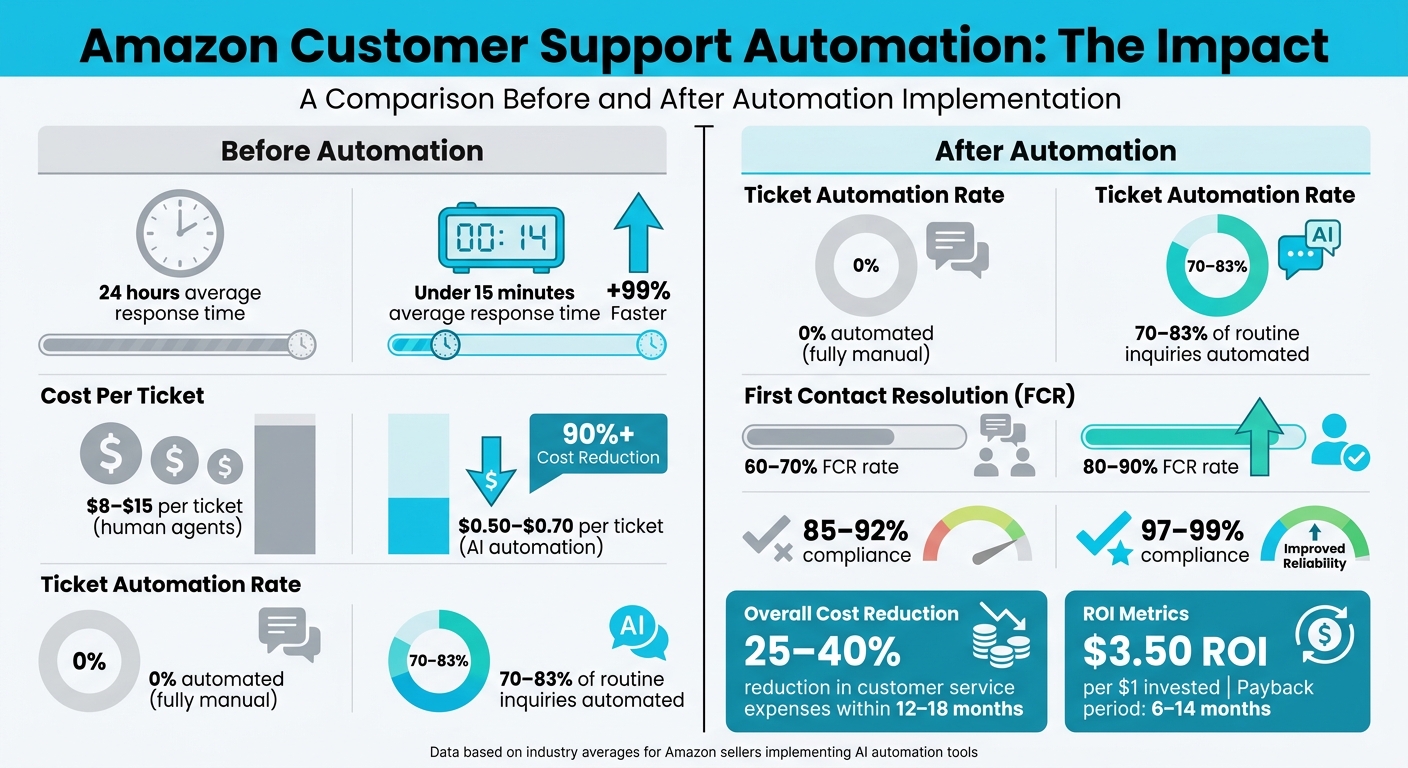
Amazon Customer Support Automation: Before vs After Impact Metrics
Automate Amazon Customer Emails. The Easy Way – Daniel Boross
sbb-itb-e2944f4
Benefits of Automating Amazon Customer Support
In a world where response times are shrinking and ticket volumes are climbing, automation is becoming a game-changer. It brings faster resolutions, reduces costs, and ensures compliance with Amazon’s strict policies.
Better Customer Satisfaction
When it comes to customer support, speed is everything. 73% of customers say fast responses are the key to earning their loyalty. Automation steps in by drastically cutting response times. AI chatbots, for example, can handle 70%–83% of routine inquiries like tracking orders or processing returns. These bots don’t just work fast – they work smart. They pull real-time data from Amazon’s API, delivering accurate answers in seconds without the need for human agents to sift through dashboards.
Automation also ensures a seamless experience. Advanced tools keep track of conversation history, so customers don’t have to repeat themselves when switching between channels or agents. AI systems even use sentiment analysis to detect frustration or urgency, routing critical issues to senior agents immediately. This combination of speed and precision creates a smoother, more satisfying experience for customers.
Take MaryRuth’s Organics, for example. When the health supplement company integrated AI-driven automation in 2024, they saw a 27% revenue boost and faster response times across all their sales platforms. These kinds of improvements don’t just make customers happy – they also streamline operations and save money.
Lower Costs and Easy Scaling
With labor making up 70% of support budgets, cutting costs is a top priority. AI offers a major advantage here, handling interactions for just $0.50–$0.70 compared to the $8–$15 it costs for human agents. On average, integrated AI tools reduce the cost per support interaction by 23.5%, and overall customer service expenses drop by 25%–40% within 12–18 months.
One of the biggest wins is how automation breaks the need for linear scaling. Traditionally, more tickets meant hiring more agents. With AI, you can handle 20% year-over-year ticket growth without increasing headcount. Plus, automation provides 24/7 support without overtime or shift-related costs. For top Amazon sellers, this translates to saving over 60 hours per week on support tasks. The return on investment is impressive too – on average, every dollar spent on automation delivers $3.50 in ROI, with payback periods ranging from 6 to 14 months.
Better Compliance and Fewer Errors
Staying compliant with Amazon’s strict messaging rules is non-negotiable. In Q1 2025, 14% of seller accounts were suspended, up from 11% the previous year. Amazon also flagged 45% more messaging violations in the first half of 2025 compared to 2024. Missing Amazon’s 24-hour response deadline can result in performance notices or even account deactivation.
Automation helps sellers navigate these challenges. Drafting tools automatically filter out prohibited content like promotional offers, external links, emojis, or review requests before messages are sent. This reduces violations to near zero. Real-time order data from Amazon’s API eliminates manual errors, ensuring customers get accurate information. Additionally, intelligent tools flag high-risk keywords like "legal" or "suspension" and route these tickets to senior agents with full context, cutting resolution errors by 60%.
"An integrated AI assistant inside your help desk eliminates manual errors, flags prohibited content before it ships, and reduces Average Handle Time while protecting your Order Defect Rate." – eDesk
Automation also ensures professionalism under pressure. Tone adjustment features keep responses empathetic and polished, even during high-volume periods. This keeps your Order Defect Rate (ODR) below Amazon’s 1% threshold. With AI, First Contact Resolution rates jump from 60%–70% to 80%–90%, and compliance with Amazon’s 24-hour SLA improves from 85%–92% to 97%–99%.
Tools and Technologies for Amazon Customer Support Automation
Building an efficient Amazon customer support automation system relies heavily on choosing the right tools. Amazon provides its own suite of automation solutions, while third-party tools offer specialized features to enhance operations.
Amazon’s Built-In Automation Tools
Amazon equips sellers with several AI-driven tools designed to streamline complex support tasks. One standout is Amazon Quick Automate, a multi-agent system that transforms business processes into automated workflows using natural language commands. It features:
- Planning Agent: Designs workflows.
- UI Agent: Automates actions like clicks and typing.
- Custom Agents: Integrates with Amazon Bedrock for specific task handling.
In one case, this tool processed over 1,600 monthly tickets, cutting average handling time by 80% compared to manual responses.
Another powerful solution is Amazon Connect, an omnichannel contact center platform. It uses AI agents to assist customers via voice and chat. Its Amazon Q tool provides real-time generative responses, surfaces relevant knowledge articles, and drafts replies for human review. Meanwhile, Amazon Lex specializes in conversational AI, automating up to 75% of common queries like "Where’s my order?" within weeks of deployment.
For those building custom solutions, Agents for Amazon Bedrock orchestrates interactions between AI models, APIs, and knowledge bases, enabling seamless automation.
"By leveraging Amazon Quick Automate, we’ve substantially reduced routine manual steps, allowing our compliance experts to focus on the most complex cases while maintaining accuracy and scalability…"
– Mauricio Clausen, Head of Engineering
While Amazon’s tools are robust, third-party platforms can complement them with additional features tailored to specific needs.
Third-Party AI Tools
External platforms cater to sellers who need faster implementation or unique functionalities. One example is Thread, a tool designed for Amazon FBA sellers. It automates buyer messages, review requests, and ticket routing through a Smart Support Inbox. With a 4.8/5 rating from over 610 reviews, Thread has proven its value. For instance, Mini Mic Pro replaced three full-time support staff with Thread, achieving ROI within two weeks.
Minimal AI offers deep integration with the Amazon Seller API, enabling actions like processing refunds, confirming shipments, and managing inventory. Another tool, Fluvi Assistant, operates as a Chrome extension for Seller Central, generating replies in one click and supporting multi-language communication. Sellers can even set custom instructions for specific ASINs, such as offering refunds for opened packages.
For advanced data handling, AgentiveAIQ uses Retrieval-Augmented Generation (RAG) and Knowledge Graph technology to pull real-time data from Amazon’s API. This minimizes AI errors and flags high-risk issues like policy violations for human attention. Plans start at $39/month, with a 14-day free trial available.
With these tools, sellers can take the next step: implementing structured workflows to maximize automation efficiency.
How to Set Up Customer Support Automation
Start by automating high-volume, repetitive tasks before tackling more complex scenarios. A phased approach works best, focusing first on simple inquiries that consume the most time.
Set Your Goals and Pick Your Tools
Pinpoint the most frequent support tasks before choosing your tools. AI-powered chatbots can address around 70–83% of customer inquiries, but their success depends on targeting the right issues. Analyze your ticket data for recurring questions about order status, business hours, product availability, or return policies – these are prime candidates for automation.
If your technical resources are limited, look for no-code platforms with visual workflow builders and pre-trained e-commerce agents. For smaller ticket volumes, tools like Zapier may handle basic automation needs, with polling intervals checking for new messages every 15 minutes. For larger volumes or more advanced requirements, platforms with direct Amazon Seller Central API integration are ideal, as they can cut response times from 24 hours to under 15 minutes. Choose tools that align with your current workload and anticipated growth over the next year.
Once you’ve picked your tool, the next step is integrating it with Amazon Seller Central.
Connect with Amazon Seller Central

There are three main ways to integrate with Amazon Seller Central: no-code platforms, native AWS solutions like Amazon Connect, or custom-built applications using the Amazon Selling Partner API. The easiest option is the "Trigger and Action" model. For instance, when a new order appears in Seller Central (trigger), your system automatically creates a support ticket in your helpdesk tool (action).
"93% of customers using Zapier for automation report that it has made them better at their jobs, and the average user takes less than six minutes to set up their first automated workflow."
If you’re subscribed to Amazon’s Professional Selling Plan (US$39.99/month), you already have access to built-in automation features like "Automate Pricing" and "Shipping Settings Automation." These tools can handle specific support tasks without requiring additional software. For more advanced needs, the Amazon Selling Partner Appstore offers pre-approved third-party tools that integrate directly with Seller Central. These tools provide real-time data on order history, return eligibility, and account health metrics via the API, ensuring automated responses are accurate and up-to-date.
Set Up Automation Workflows and Responses
Once your tools are ready, configure workflows to streamline message handling. A scoring system can help determine whether inquiries should be resolved automatically or escalated. For example, missing knowledge in your database deducts 100 points, unclear customer intent costs 85 points, premium complaints subtract 50 points, and angry or frustrated tones deduct 30 points. Messages scoring 80 or higher are handled automatically, while lower scores are flagged for human review.
"The intelligent confidence scoring framework ensures that straightforward inquiries receive immediate automated responses, while complex, sensitive, or high-value interactions are routed to specialized agents." – Mo Miah, Senior Specialist Solutions Architect at AWS
Partial automation can reduce agent interaction times by up to 33%. For instance, when a customer asks about a delayed order, the bot can gather tracking details and account history before passing the case to an agent.
Create Human Handover Protocols
To handle more complex cases, establish clear protocols for escalating conversations from bots to humans. Set triggers like negative sentiment scores above 80%, keywords such as "legal", "suspended", or "refund", and high-value orders over US$500.
"Start with high-volume, low-complexity tasks like password resets or lost credit cards." – Brad Beumer, CX and Contact Center Lead at UiPath
When transferring cases, ensure the full conversation history, sentiment analysis, and bot actions are preserved. This prevents customers from repeating themselves and speeds up resolution. Automated escalation workflows can reduce resolution errors by 60%.
Create specialized queues for high-priority cases, such as a "Supervisors Queue" for urgent issues, a "Policy Violations Queue" for account health concerns, and a "High-Value Customer Queue" for premium orders. Additionally, use automated rules to monitor case aging and send alerts as deadlines approach, ensuring a smooth transition from automated to manual handling.
Advanced Automation Workflows and Use Cases
Advanced workflows integrate AI models with real-time data to tackle complex scenarios that traditionally required significant human involvement. These systems go beyond basic automation, enabling smarter and more compliant customer interactions.
Automated Ticket Sorting and Order Data Extraction
Using AWS tools, businesses can take automation to the next level. AI models classify incoming tickets based on intent – like billing disputes, delivery issues, or refund requests – and extract essential details such as order numbers and transaction IDs from text or even customer-submitted screenshots. Tools like Amazon Comprehend and Mistral Large 2 analyze ticket content, ensuring inquiries are routed to the right workflow or department without manual effort.
"AI agents are transforming the landscape of customer support by bridging the gap between large language models (LLMs) and real-world applications." – Deepesh Dhapola, Senior Solutions Architect at AWS
This process integrates seamlessly with Amazon Seller Central, ensuring live updates to order data. Companies using Amazon Lex have reported automating 75% of order tracking inquiries within just weeks of implementation. For effective ticket classification, it’s recommended to train custom models with at least 50 labeled examples per category.
Image Analysis for Damage Claims
Vision Language Models (VLMs), such as Pixtral Large, bring a new level of precision to handling damage claims. These models analyze customer-submitted photos of damaged products, comparing them to stock product images to verify claims and detect potential fraud. This multimodal approach ensures that only flagged discrepancies are sent for manual review, saving time and resources.
The system can also extract transaction IDs from screenshots and cross-reference them with order histories, creating a detailed audit trail. This reduces claim processing times while maintaining accuracy, as the AI can catch inconsistencies that might indicate fraud or misunderstandings about the product’s original condition.
In addition to verifying damage claims, these workflows help streamline response creation while adhering to strict compliance standards.
AI-Generated Responses with Safety Guidelines
AI-generated responses offer significant efficiency improvements while ensuring compliance with policies. For example, Amazon’s Buyer-Seller Messaging policies prohibit external links, promotional content, and requests for positive reviews. Amazon Bedrock Guardrails enhance these processes by scanning drafts before they are sent, blocking harmful content like hate speech and redacting personally identifiable information (PII).
| Metric | Without AI Drafting | With AI Drafting |
|---|---|---|
| Average Handle Time (AHT) | 6-10 minutes per ticket | 2-4 minutes per ticket |
| Policy Violation Rate | 2-5% of messages flagged | Near zero (pre-send filtering) |
| First Contact Resolution (FCR) | 60-70% | 80-90% |
Retrieval-Augmented Generation (RAG) ensures that AI responses align with approved help center articles and policies, reducing inaccuracies by up to 40%. This approach guarantees that automated messages are accurate and based on real business data. These safeguards are critical, especially in an environment where 14% of Amazon seller accounts faced suspensions in Q1 2025.
Improving Automation with Emplicit Services

Technical automation can simplify support processes, but keeping workflows compliant and maintaining account health are just as important. Emplicit’s ecommerce services are designed to ensure that automated workflows stay dependable and align with Amazon’s evolving policies. By combining advanced automation with proactive account management, sellers can achieve long-term stability and growth.
Account Health Management for Smooth Automation
Amazon’s Account Health Rating (AHR) plays a pivotal role in determining whether automated customer support systems can even operate. If the AHR score dips to 99 or below, Amazon deactivates the seller’s account, bringing all automated workflows to an abrupt halt. Even seemingly minor policy violations can add up fast – non-critical violations deduct 2–8 points, and repeated offenses may lead to even steeper penalties.
Emplicit’s Account Health Score Analyzer helps sellers stay ahead of potential risks by identifying weak areas before they hit the "At Risk" range of 100–199 points. The tool provides sellers with structured Plans of Action (POA) and clear protocols for gathering evidence to resolve violations. Since new sellers start with a 200-point baseline and can only gain 4 points per 200 successful orders over six months, building a buffer takes time. Proactive monitoring is critical to avoid sudden drops that could disrupt automated systems.
"The AHR indicates your selling account’s risk of deactivation due to non-compliance with certain Amazon selling policies." – Amazon Seller Central
Critical violations, like counterfeit claims or improper review solicitation, can immediately drop the AHR to zero. When this happens, sellers are given a 3-day grace period to address the issue before account deactivation. Emplicit’s policy violation management service helps sellers respond quickly and professionally during this critical window, ensuring their automated workflows remain operational. These safeguards allow sellers to expand their automation confidently while staying aligned with Amazon’s rules.
Custom Strategies for Scaling Customer Support
Maintaining account health is just one piece of the puzzle. Scaling customer support effectively also requires a tailored approach. Emplicit specializes in creating customized automation strategies that fit the unique needs of each business and its customer journey. This includes segmentation and workflow adjustments that unify multi-channel sales efforts, encourage repeat purchases, and recover lost sales through compliant automated messaging.
As ecommerce increasingly relies on AI to manage customer interactions and decision-making, Emplicit helps businesses integrate advanced automation into their growth strategies. Their approach ensures that customer support systems grow alongside the business while maintaining compliance and delivering a seamless customer experience.
Measuring Results and Making Improvements
Tracking the impact of automation and fixing inefficiencies is essential for success. Start with the Automation Rate, which measures the percentage of tickets resolved from start to finish without human involvement. The best systems can handle up to 50% of support tickets on their own. Another key metric is First Response Time (FRT), which shows how quickly customers get their initial reply. With AI, FRT can drop by as much as 87%, reducing wait times from hours to just seconds.
Resolution Time is another critical measure – it tracks how long it takes to fully close a ticket. Meanwhile, Customer Satisfaction Score (CSAT) reveals how satisfied customers are after interacting with your system. Don’t forget to monitor the Intent Completion Rate, which tells you if your AI successfully meets customer goals like tracking packages or processing returns. If you notice customers abandoning conversations mid-way, analyze conversation flow to identify where things are breaking down.
| Metric | Before Automation | After Automation |
|---|---|---|
| First Response Time | Hours or days | Seconds or minutes |
| Automation Rate | 0% (Manual) | Up to 50% (True Automation) |
| Support Staffing | High manual labor | Up to 83% reduction in staff needs |
| Resolution Time | Dependent on agent availability | Instant for FAQs and automated workflows |
Metrics to Track
To fine-tune your system, start by auditing support tickets over a 90-day period to identify the top five inquiry types – common examples include "Where Is My Order?" (WISMO), returns, and product-related questions. Use feedback loops to improve your AI’s knowledge base whenever incorrect responses appear. If your Intent Completion Rate is low, refine how the AI categorizes customer requests and adjust slot resolution settings.
Amazon sets a high bar with a First Contact Resolution (FCR) rate of 80% or more, and your Average Response Time should ideally range from 0 to 2 hours to keep customers happy. Begin with realistic automation goals – target 30% to 40% for routine tickets, then aim for 60% to 70% as your system becomes more capable. Monitor sentiment scores during interactions; if scores dip, review transcripts manually to address customer frustrations before they escalate.
These metrics give you the foundation to identify and fix common automation challenges.
Common Problems and How to Fix Them
When AI delivers incorrect responses, customer trust takes a hit. Use feedback loops to retrain your AI models and update knowledge bases with real-time data from platforms like Amazon Seller Central. High bot drop rates – where customers abandon conversations – indicate a need to simplify interaction points. Analyze where conversations break down and adjust accordingly. If your bot frequently defaults to fallback responses, improve intent classification and make sure responses are supported by live tracking and inventory data.
| Challenge | Impact | Resolution |
|---|---|---|
| Inaccurate AI Responses | Damages customer trust | Retrain AI models and update knowledge bases with feedback |
| High Bot Drop Rates | Leads to unresolved tickets and churn | Simplify interaction points by analyzing conversation flow |
| Intent Failures | Bot defaults to fallback or fails to help | Enhance intent classification and slot resolution |
| Repetitive WISMO Queries | Overwhelms support with low-value tickets | Automate order updates with real-time tracking links |
Additionally, review AI-to-human transfers to uncover system gaps. Use semantic match rules to flag specific failures – like when the AI repeatedly asks customers to clarify or when frustration is evident. Resolving a single ticket manually can cost $5.00 to $12.00, while automated solutions cost just pennies. Every improvement you make directly boosts efficiency and reduces costs.
Conclusion
Automating customer support creates a system that can grow with your business, ensures compliance, and meets the demand for quick responses that customers now expect. With 90% of customers rating immediate responses as "important" or "very important", automation not only speeds up reply times but also allows your team to focus on more complex issues. In fact, generative AI can improve customer service productivity by 30% to 45%, and most businesses see their investment pay off within just 3 to 6 months.
Start by reviewing your last 90 days of tickets to identify the top five types of customer inquiries. Automate these first – typically, WISMO (Where Is My Order) questions and return requests, which often make up 30% to 50% of total support volume. To get the most out of automation, build a strong knowledge base to support AI agents, use smart routing to handle simple versus complex queries effectively, and keep an eye on CSAT scores to ensure automation enhances the customer experience.
As your business grows, maintaining account health becomes even more important. For Amazon sellers, meeting the 24-hour response SLA and avoiding policy violations are critical to staying compliant. This is where Emplicit comes in. Their account health management services help you catch and resolve potential issues before they escalate, while their custom strategies ensure your automation aligns with Amazon’s policies and supports your broader goals across multiple marketplaces.
To safeguard your account health as you scale, consider using Emplicit‘s free Amazon Account Health Score Analyzer to get a clear starting point. From there, their team can help you create proactive strategies that protect your seller metrics while enhancing your automation efforts. The brands that succeed are those that combine smart automation with expert guidance – transforming customer support from a cost burden into a competitive edge.
FAQs
What should I automate first in Amazon customer support?
The first step in automating Amazon customer support is tackling routine, repetitive questions – like the ever-common “Where is my order?” (WISMO) inquiries. These types of questions account for 30-50% of support requests, making them both predictable and perfect for automation. By using tools like AI agents, macros, or self-service options, you can cut costs by as much as 30%. Plus, automation speeds up response times, freeing your team to handle more challenging customer issues.
How do I keep automated messages compliant with Amazon policies?
To make sure your automated messages align with Amazon’s policies, you can use AI tools designed to filter out prohibited content such as promotions, external links, or anything that might redirect customers elsewhere. These tools are great for keeping messages policy-compliant while maintaining a considerate and empathetic tone. Additionally, an AI assistant can identify potential violations before messages are sent, helping you avoid compliance issues and safeguarding your account.
How can I measure if my Amazon support automation is working?
Tracking the success of your Amazon support automation comes down to monitoring a few key metrics. Start with response times – the faster your system replies, the better. Keep an eye on customer satisfaction scores to gauge how well it’s meeting user needs. Another critical measure is the percentage of queries handled automatically – a higher percentage means less manual intervention and more efficiency.
Improvements like quicker responses, fewer manual tickets, and positive customer feedback are clear signs that your automation is on the right track. To stay on top of things, regularly evaluate metrics like resolution rates and overall satisfaction. These insights help ensure your automation continues to meet expectations while boosting operational efficiency.